1
C:\Documents and Settings\QA2\Desktop\4_Target_20091126\01US\01US01COVmaster page=right
CEK.fm
01US01COV.book Page 1 Thursday, May 13, 2010 11:13 AM
4-169-963-22(1)
Portable
CD/DVD Player
Operating Instructions
US
Manual de instrucciones
ES
DVP-FX94
© 2010 Sony Corporation
DVP-FX94
4-169-963-22(1)
C:\Documents and Settings\QA2\Desktop\4_Target_20091126\01US\01US01WARmaster page=left
CEK.fm
01US01COV.book Page 2 Thursday, May 13, 2010 11:13 AM
WARNING
To reduce the risk of fire or
electric shock, do not
expose this apparatus to
rain or moisture.
To avoid electrical shock,
do not open the cabinet.
Refer servicing to qualified
personnel only.
The AC power cord must be
changed only at a qualified
service shop.
Batteries or batteries
installed apparatus shall
not be exposed to
excessive heat such as
sunshine, fire or the like.
CAUTION
The use of optical instruments
with this product will increase
eye hazard. As the laser beam
used in this CD/DVD player is
harmful to eyes, do not attempt to
disassemble the cabinet.
Refer servicing to qualified
personnel only.
This label is located on the
bottom of the unit.
This symbol is
intended to alert the
user to the presence
of important
operating and
maintenance (servicing)
instructions in the literature
accompanying the appliance.
Precautions
• Install this system so that the
AC power cord can be
unplugged from the wall socket
immediately in the event of
trouble.
• The player is not disconnected
from the AC power source as
long as it is connected to the
wall outlet, even if the player
itself has been turned off.
• To prevent fire or shock
hazard, do not place objects
filled with liquids, such as
vases, on the apparatus.
For customers in the U.S.A
Owner’s Record
The model and serial numbers are
located at the bottom of the unit.
Record the serial number in the
space provided below. Refer to
them whenever you call upon your
Sony dealer regarding this product.
Model No. DVP-FX94
Serial No.______________
However, there is no guarantee
that interference will not occur in
a particular installation. If this
equipment does cause harmful
interference to radio or television
reception, which can be
determined by turning the
equipment off and on, the user is
encouraged to try to correct the
interference by one or more of
the following measures:
– Reorient or relocate the
receiving antenna.
– Increase the separation
between the equipment and
receiver.
– Connect the equipment into an
outlet on a circuit different
from that to which the receiver
is connected.
– Consult the dealer or an
experienced radio/TV
technician for help.
IMPORTANT SAFETY
INSTRUCTIONS
1)
2)
3)
4)
5)
CAUTION
6)
7)
You are cautioned that any
changes or modifications not
expressly approved in this
manual could void your authority
to operate this equipment.
8)
b
This symbol is
intended to alert the
user to the presence
of uninsulated
“dangerous
voltage” within the product’s
enclosure that may be of
sufficient magnitude to constitute
a risk of electric shock to
persons.
This equipment has been tested
and found to comply with the
limits for a Class B digital
device, pursuant to Part 15 of the
FCC Rules. These limits are
designed to provide reasonable
protection against harmful
interference in a residential
installation. This equipment
generates, uses, and can radiate
radio frequency energy and, if
not installed and used in
accordance with the instructions,
may cause harmful interference
to radio communications.
9)
Read these instructions.
Keep these instructions.
Heed all warnings.
Follow all instructions.
Do not use this apparatus
near water.
Clean only with dry cloth.
Do not block any
ventilation openings.
Install in accordance with
the manufacturer’s
instructions.
Do not install near any heat
sources such as radiators,
heat registers, stoves, or
other apparatus (including
amplifiers) that produce
heat.
Do not defeat the safety
purpose of the polarized or
grounding-type plug. A
polarized plug has two
blades with one wider than
the other. A grounding type
plug has two blades and a
third grounding prong. The
wide blade or the third
prong are provided for
your safety. If the provided
plug does not fit into your
2
DVP-FX94
4-169-963-22(1)
C:\Documents and Settings\QA2\Desktop\4_Target_20091126\01US\01US01WARmaster page=right
CEK.fm
01US01COV.book Page 3 Thursday, May 13, 2010 11:13 AM
outlet, consult an
electrician for replacement
of the obsolete outlet.
10) Protect the power cord
from being walked on or
pinched particularly at
plugs, convenience
receptacles, and the point
where they exit from the
apparatus.
11) Only use attachments/
accessories specified by
the manufacturer.
12) Use only with the cart,
stand, tripod, bracket, or
table specified by the
manufacturer, or sold with
the apparatus. When a cart
is used, use caution when
moving the cart/apparatus
combination to avoid
injury from tip-over.
13) Unplug this apparatus
during lightning storms or
when unused for long
periods of time.
14) Refer all servicing to
qualified service
personnel. Servicing is
required when the
apparatus has been
damaged in any way, such
as power-supply cord or
plug is damaged, liquid has
been spilled or objects
have fallen into the
apparatus, the apparatus
has been exposed to rain or
moisture, does not operate
normally, or has been
dropped.
RECYCLING LITHIUMION BATTERIES
Lithium-Ion
batteries are
recyclable.
You can help
preserve our
environment by
returning your used rechargeable
batteries to the collection and
recycling location nearest you.
For more information regarding
recycling of rechargeable
batteries, call toll free
1-800-822-8837, or visit
http://www.rbrc.org/
Caution: Do not handle damaged
or leaking Lithium-Ion batteries.
IMPORTANT NOTICE
About this manual
• In this manual, “disc” is used as
a general reference for the
DVDs or CDs unless otherwise
specified by the text or
illustrations.
• Icons, such as
, listed at
the top of each explanation
indicate what kind of media
can be used with the function
being explained.
For details, see “Playable
Media” (page 27).
• NEED-to-know information
(to prevent incorrect operation)
is listed under the b icon.
NICE-to-know information
(tips and other useful
information) is listed under the
z icon.
Caution: This player is capable
of holding a still video image
or on-screen display image on
your television screen
indefinitely. If you leave the
still video image or on-screen
display image displayed on
your TV for an extended period
of time you risk permanent
damage to your television
screen. Plasma display panel
televisions and projection
televisions are susceptible to
this.
If you have any questions or
problems concerning your
player, please consult your
nearest Sony dealer.
Copyrights and
trademarks
• Manufactured under license
from Dolby Laboratories.
Dolby and the double-D
symbol are trademarks of
Dolby Laboratories.
• “DVD+RW,” “DVD-RW,”
“DVD+R,” “DVD-R,” “DVD
VIDEO,” and “CD” logos are
trademarks.
• MPEG Layer-3 audio coding
technology and patents
licensed from Fraunhofer IIS
and Thomson.
3
DVP-FX94
4-169-963-22(1)
master page=left
C:\Documents and Settings\QA2\Desktop\4_Target_20091126\01US\01US01COVCEKTOC.fm
01US01COV.book Page 4 Thursday, May 13, 2010 11:13 AM
Table of Contents
WARNING . . . . . . . . . . . . . . . . . . . . . . . . . . . . . . . . . . . . . . . . . . . . . . 2
Guide to Parts and Controls . . . . . . . . . . . . . . . . . . . . . . . . . . . . . . . . . 5
Rotating and Folding Down the LCD Panel . . . . . . . . . . . . . . . . . . . . . 8
Preparations . . . . . . . . . . . . . . . . . . . . . . . . . . . . . . . . . . . . 9
Checking the Accessories . . . . . . . . . . . . . . . . . . . . . . . . . . . . . . . . . . 9
Charging the Battery Pack . . . . . . . . . . . . . . . . . . . . . . . . . . . . . . . . . . 9
Using the Car Battery Adaptor . . . . . . . . . . . . . . . . . . . . . . . . . . . . . . 11
Connecting to Other Equipment . . . . . . . . . . . . . . . . . . . . . . . . . . . . . 12
Playback . . . . . . . . . . . . . . . . . . . . . . . . . . . . . . . . . . . . . .13
Playing Discs . . . . . . . . . . . . . . . . . . . . . . . . . . . . . . . . . . . . . . . . . . . 13
Playing MP3 and JPEG Files . . . . . . . . . . . . . . . . . . . . . . . . . . . . . . . 16
Adjusting the Picture Size and Quality . . . . . . . . . . . . . . . . . . . . . . . . 18
Settings and Adjustments . . . . . . . . . . . . . . . . . . . . . . . . . . .19
Using the Setup Display . . . . . . . . . . . . . . . . . . . . . . . . . . . . . . . . . . . 19
Additional Information . . . . . . . . . . . . . . . . . . . . . . . . . . . . .22
Troubleshooting . . . . . . . . . . . . . . . . . . . . . . . . . . . . . . . . . . . . . . . . .
Precautions . . . . . . . . . . . . . . . . . . . . . . . . . . . . . . . . . . . . . . . . . . . . .
Playable Media . . . . . . . . . . . . . . . . . . . . . . . . . . . . . . . . . . . . . . . . . .
Specifications . . . . . . . . . . . . . . . . . . . . . . . . . . . . . . . . . . . . . . . . . . .
Index . . . . . . . . . . . . . . . . . . . . . . . . . . . . . . . . . . . . . . . . . . . . . . . . . .
22
24
27
29
30
4
DVP-FX94
4-169-963-22(1)
C:\Documents and Settings\QA2\Desktop\4_Target_20091126\01US\01US02WARmaster page=Right_2
CEK.fm
01US01COV.book Page 5 Thursday, May 13, 2010 11:13 AM
A LCD panel (page 8)
Guide to Parts and
Controls
B VOL (sound volume) +/–
Adjusts the volume.
For more information, see the pages
indicated in parentheses.
Player
Operate with a single touch of + or –
on the player. You can also adjust the
volume by sliding your finger along
the touch slider. Sliding toward + from
center increases volume; sliding
toward – from center decreases
volume. (The same operation in “LCD
Mode” can be used to adjust the
picture quality level. See page 18.)
C N (play) (page 13)
Starts or re-starts playback.
VOL
DISPLAY
MENU
RETURN
OPTIONS
X (pause) (page 13)
Pauses or re-starts playback.
x (stop) (page 13)
Stops playback.
. (previous)
OPEN
PUSH CLOSE
POWER
Skips to the beginning of the current
chapter/track/scene.
To go to the beginning of the previous
chapter/track/scene, press twice.
CHARGE
> (next)
Skips to the next chapter/track/scene.
POWER
OFF ON
HOLD
PHONES
A
B
AUDIO
IN/
OUT
VIDEO
IN/
OUT
DC IN
9.5V
Buttons B C D and E (but not C/X/x/
c/ENTER) can be operated with a single
touch.
The VOL+ and N (play) buttons have a
tactile dot. Use the tactile dot as a reference
when operating the player.
,continued
DVP-FX94
4-169-963-22(1)
5
master page=Left_2
C:\Documents and Settings\QA2\Desktop\4_Target_20091126\01US\01US02WARCEK.fm
01US01COV.book Page 6 Thursday, May 13, 2010 11:13 AM
D DISPLAY
Displays the playback information.
• When playing a DVD: Displays the
playback information and changes
the playback mode. See page 15.
• When playing a CD: Each time you
press the button, the time
information switches.
E MENU
• When playing a DVD VIDEO:
Displays the menu.
• When playing a CD: Each time you
press the button, switches Repeat
Play, Random Play, and Play.
• When playing a JPEG file: Displays
the list of thumbnails and plays a
slideshow. See page 16.
RETURN
Returns to the previous display.
C/X/x/c
H Disc Lid (page 13)
I OPEN button (page 13)
Opens the disc lid.
J PUSH CLOSE (page 13)
Closes the disc lid.
K POWER indicator (page 13)
L CHARGE indicator (page 10)
M POWER switch (page 13)
Turns the player on or off.
N HOLD switch
To avoid accidental button operation
of the player, set the HOLD switch to
the direction of the arrow.
All the buttons on the player are
locked, while the buttons on the
remote remain operable.
Moves the highlight to select a
displayed item.
• When playing a DVD or CD: C/c on
the player works as the same as m/
M on the remote.
O PHONES (headphone) jack A, B
Centre button (ENTER)
P USB jack (type A) (page 17)
Enters the selected item.
• When playing a DVD or CD:
ENTER on the player works as the
same as N.
F
G Speaker
Connect a USB device to this jack.
Q AUDIO IN/OUT jack (page 12)
OPTIONS
R VIDEO IN/OUT jack (page 12)
Displays the menu for adjusting the
LCD screen (page 18) and using the
setup display (page 19).
S DC IN 9.5V jack (page 10, 11)
(remote sensor)
Connect the AC power adaptor or car
battery adaptor.
When operating by the remote, point it
at the remote sensor .
6
DVP-FX94
4-169-963-22(1)
C:\Documents and Settings\QA2\Desktop\4_Target_20091126\01US\01US02WARmaster page=Right_2
CEK.fm
01US01COV.book Page 7 Thursday, May 13, 2010 11:13 AM
T INPUT SELECT button (page 12)
Each time you press the button, the
LCD screen image switches as
follows:
• Disc mode (default): When playing
an inserted disc.
• USB mode: When playing DATA
files on a connected USB device.
Appears “USB” on the LCD screen
when you select this mode.
• Line In mode: When inputting a
playback signal from connected A/V
equipment. Appears “Line In” on the
LCD screen when you select this
mode.
U Number buttons
Enters the title/chapter numbers, etc.
• When playing a DVD VIDEO or
CD: Search directly by entering the
title/chapter/track number using the
number buttons, and press ENTER.
To switch a title or chapter, press C/
c.
CLEAR button
Clears the entry field.
V TOP MENU button
• When playing a DVD VIDEO:
Displays the top menu.
• When playing a DVD VR: Switches
between “Original” and “Play List”
on the disc created Playlist. During
playback, you cannot switch. Press
x twice, and press TOP MENU.
Remote
W
REPLAY/
buttons
ADVANCE
Replays the scene/briefly fast forward
the current scene (DVD only).
X
m/M
(scan/slow)
buttons
Fast reverses/ fast forwards when
pressed during playback. Press
repeatedly to change the speed.
• When playing a DVD: Slow
reverses/ slow forwards when
pressed during pause. Press
repeatedly to change the speed.
Y ANGLE button
The VOL +, number 5, N and AUDIO
buttons have a tactile dot. Use the tactile
dot as a reference when operating the
player.
Changes the angle. When “
”
(Angle Mark) appears, you can change
angles. Depending on the disc, you
may not be able to change the angle.
(DVD VIDEO only)
,continued
DVP-FX94
4-169-963-22(1)
7
master page=Left_2
C:\Documents and Settings\QA2\Desktop\4_Target_20091126\01US\01US02WARCEK.fm
01US01COV.book Page 8 Thursday, May 13, 2010 11:13 AM
AUDIO button
Changes the audio signal.
• When playing a DVD VIDEO: Each
time you press the button, the
language of the sound track
switches. Depending on the disc, the
choice of language varies.
• When playing a DVD VR: Each time
you press the button, the type of
sound tracks recorded on a disc
switches between main, sub and
main/sub sound.
• When playing a CD: Each time you
press the button, the mode switches
between stereo and monaural (left/
right).
Rotating and Folding
Down the LCD Panel
SUBTITLE button
After rotating the LCD panel 180 degrees
clockwise, push the LCD panel down onto
the main body of the player. In this
position the panel is facing up.
Changes the subtitle. Each time you
press the button, the subtitle switches.
Depending on the disc, the choice of
language varies. (DVD only)
Open the LCD panel to the vertical
position, then slowly rotate it 180 degrees
in the direction indicated by the arrow
(clockwise).
To return the LCD panel to its original
position
Open the LCD panel to the vertical
position and rotate the LCD panel counterclockwise slowly.
b
• Do not rotate the LCD panel over 180 degrees.
In addition, do not rotate in the opposite
direction. Doing so will break the LCD panel.
• Return the LCD panel to its original positions
after use, so the LCD panel will not be
damaged by sudden shocks or rough treatment.
• Do not rotate the LCD panel while keeping it
closed or out of vertical. It may scratch the
player.
8
DVP-FX94
4-169-963-22(1)
C:\Documents and Settings\QA2\Desktop\4_Target_20091126\01US\01US04GETmaster page=right
CEK.fm
01US01COV.book Page 9 Thursday, May 13, 2010 11:13 AM
Preparations
Check that you have the following items:
• Battery pack (NP-FX110) (1)
• AC power adaptor (1)
• Car battery adaptor (1)
• Audio/video cord (mini plug × 2 y
phono plug × 3) (1)
• Remote (1)
• Size AA (R6) batteries (2)
Charge the battery pack (supplied) before
using the player for the first time, or when
the battery is depleted.
1 Attach the battery pack to the
Preparations
Checking the
Accessories
Charging the Battery
Pack
player.
Align the battery pack with the lines
on the bottom of the player.
Engage the hooks of the battery pack
into the holes on the bottom of the
player.
Preparing the Remote
Battery pack
Insert two Size AA (R6) batteries by
matching the 3 and # ends on the
batteries to the markings inside the
compartment.
Attachment
reference marks
Bottom of the
player
Slide the battery pack in the direction
of the arrow until it clicks into place.
,continued
DVP-FX94
4-169-963-22(1)
9
master page=left
C:\Documents and Settings\QA2\Desktop\4_Target_20091126\01US\01US04GETCEK.fm
01US01COV.book Page 10 Thursday, May 13, 2010 11:13 AM
2 Connect the AC power adaptor.
When charging begins, the CHARGE
indicator lights up in orange.
INPUT SELECT
POWER
OFF ON
HOLD
PHONES
A
DC IN
9.5V
B
AUDIO
IN/
OUT
VIDEO
IN/
OUT
DC IN
9.5V
To check the battery level
When the player is stopped, the battery
indicator is displayed. When the battery is
empty,
is displayed or the CHARGE
indicator flashes. Set the POWER switch
to “OFF,” connect the AC power adaptor,
and recharge the battery.
To a wall
outlet
Full
Empty
To remove the battery pack
Push the release knob and slide the battery
pack in the direction of the arrow.
AC power Adaptor
(supplied)
When charging ends, the CHARGE
indicator lights off.
Disconnect the AC power adaptor.
Release knob
z
If the POWER indicator lights up instead of the
CHARGE indicator, the POWER switch is set to
“ON.” Set the POWER switch to “OFF,” and
make sure that the CHARGE indicator lights up.
CAUTION
b
Charge the battery in an ambient temperature of
between 5°C (41°F) to 35°C (95°F).
Danger of explosion if battery is incorrectly
replaced.
Replace only with the same or equivalent
type.
Charging time and playing time
Charging time: approx. 6 hours
Playing time: approx. 7.5 hours
Times indicated are under the following
conditions:
– Moderate temperature (20°C (68°F))
– Headphone use
– Backlight set to minimum
Depending on the ambient temperature or
battery pack condition, charging time may be
longer, or playing time may be reduced.
10
DVP-FX94
4-169-963-22(1)
C:\Documents and Settings\QA2\Desktop\4_Target_20091126\01US\01US04GETmaster page=right
CEK.fm
01US01COV.book Page 11 Thursday, May 13, 2010 11:13 AM
After using the player in a car
Using the Car Battery
Adaptor
1 Start the engine.
2 Connect the car battery adaptor.
INPUT SELECT
POWER
OFF ON
HOLD
PHONES
A
B
AUDIO
IN/
OUT
VIDEO
IN/
OUT
Turn off the player.
Disconnect the car battery adaptor.
Turn off the engine.
b
• Do not disconnect the car battery adaptor or
turn off the car engine before you turn off the
player. Doing so may damage the player.
• Disconnect the car battery adaptor after use. If
it is left connected, the car battery may become
depleted.
• Do not leave the player or accessories in the
car.
Preparations
The car battery adaptor (supplied) is for a
12V car battery, negative earth (do not use
it with a 24V car battery, positive earth).
1
2
3
DC IN
9.5V
DC IN
9.5V
To cigarette
lighter socket
Car battery adaptor (supplied)
3 Turn on the player.
b
• The driver should not connect or disconnect
the car battery adaptor while driving.
• Arrange the cord so as not to interfere with the
driver. Also, do not place the LCD panel where
the driver can watch.
• Clean the cigarette lighter socket. If it is dirty,
it may cause contact failure or malfunction.
• Use the car battery adaptor with the car engine
running. If it is used with the car engine off, the
car battery may become depleted.
11
DVP-FX94
4-169-963-22(1)
master page=left
C:\Documents and Settings\QA2\Desktop\4_Target_20091126\01US\01US04GETCEK.fm
01US01COV.book Page 12 Thursday, May 13, 2010 11:13 AM
Connecting to Other
Equipment
By connecting the player to your TV or
other equipment, you can increase your
viewing options.
b
• Refer to the instructions supplied with the
equipment to be connected.
• Before connecting, turn off the player and the
equipment to be connected, then unplug from
their wall sockets.
z
• When you play back a disc after enjoying
images by “Line In” or “USB,” press INPUT
SELECT repeatedly to select the disc mode.
See page 7.
• The player can connect to an AV amplifier in
the same way as a TV. Although connecting is
the same as a TV, the yellow plug of the audio/
video cord is not used.
Enjoying images on other
equipment
1
Connect the player to your video
player or camcorder using the
audio/video cord (supplied).
Enjoying images on a
connected TV
INPUT SELECT
INPUT SELECT
1
POWER
Connect the player to your TV or
monitor using the audio/video cord
(supplied).
AUDIO
IN/
OUT
INPUT SELECT
OFF ON
HOLD
PHONES
A
AUDIO
IN/
OUT
B
AUDIO
IN/
OUT
VIDEO
IN/
OUT
VIDEO
IN/
OUT
HOLD
DC IN
9.5V
To AUDIO/
VIDEO input
jacks of a TV or
monitor
PHONES
A
INPUT SELECT
POWER
OFF ON
B
AUDIO
IN/
OUT
VIDEO
IN/
OUT
VIDEO
IN/
OUT
DC IN
9.5V
To AUDIO/
VIDEO output
jacks of a
video player or
camcorder
Audio/video cord
(supplied)
2
Turn on the player and press INPUT
SELECT repeatedly to select “Line
In.”
Audio/video cord
(supplied)
12
DVP-FX94
4-169-963-22(1)
C:\Documents and Settings\QA2\Desktop\4_Target_20091126\01US\01US05PLY1master page=right
CEK.fm
01US01COV.book Page 13 Thursday, May 13, 2010 11:13 AM
4 Insert the disc to be played.
Place with the playback side down and
push gently until it clicks.
Playback
Playing Discs
Playback
Depending on the disc, some operations
may be different or restricted. Refer to the
operating instructions supplied with the
disc.
Connect the AC power adaptor or attach
the battery pack.
Playback side facing down
5 Push the PUSH CLOSE on the
x
disc lid to shut the disc lid.
X
6 Press N.
N
VOL
DISPLAY
MENU
RETURN
POWER
OPTIONS
CHARGE
H
S
U
P
The player starts playback.
Depending on the disc, a menu may
appear. Press C/X/x/c to select the
item, and press ENTER.
S
LO
C
E
P
O
N
E
PO
WER
CH
AR
GE
OF
WE
PO
PUSH CLOSE
OPEN
F
ON
R
POWER
1 Open the LCD panel.
2 Slide the POWER switch to
“ON.”
The player turns on and the POWER
indicator lights up in green.
3 Press OPEN to open the disc lid.
To stop playback
Press x.
To pause playback
Press X.
z
When you play back a disc after enjoying images
by “Line In” or “USB,” press INPUT SELECT
repeatedly to select the disc mode. See page 7.
b
• Discs created on DVD recorders must be
correctly finalized to play on the player. For
more information about finalizing, refer to the
operating instructions supplied with the DVD
recorder.
• The disc may be still spinning when the disc lid
is opened. Wait until the spinning stops before
removing the disc.
,continued
DVP-FX94
4-169-963-22(1)
13
master page=left
C:\Documents and Settings\QA2\Desktop\4_Target_20091126\01US\01US05PLY1CEK.fm
01US01COV.book Page 14 Thursday, May 13, 2010 11:13 AM
To resume playback from the point
where you stopped the disc (Resume
Play)
When you press N again after you stop
playback, the player starts playback from
the point when you pressed x.
z
• To play from the beginning of the disc, press
x twice, and press N.
• When turning power on again after power off,
resume play starts automatically.
b
• Depending on the stop point, Resume play
may not start from exactly the same point.
• The resume point is cleared when:
– you open the disc lid.
– you press INPUT SELECT.
– you disconnect the adaptor or remove the
battery pack before turning off the player.
Notes on the screen saver
• A screen saver image appears when you
leave the player in pause or stop mode
without operation for more than 15
minutes. The image disappears when you
press N. For the setup of “Screen
Saver,” see page 20.
• The player goes to standby, 15 minutes
after starting the screen saver function.
Press N to come out of standby mode.
About various playback operations
To
Operation
Change the LCD
picture size
Press OPTIONS to
select “LCD Mode”
(page 18).
Display the DVD Press MENU (page 6)
menu
or TOP MENU
(page 7).
Check the DVD
playback
information
Press DISPLAY
(page 15).
Play DVDs*
repeatedly
(Repeat Play)
Press DISPLAY to
select “Repeat”
(page 15).
Play DVDs in
fast reverse or
fast forward
(Scan Play)
Press C/c repeatedly on
the player to select the
speed (page 6).
Switch between
original and
Playlist in DVD
(VR mode)
Press TOP MENU
repeatedly (page 7).
Change the CD
playback
information
Press DISPLAY
repeatedly (page 6).
Play CDs
repeatedly
(Repeat Play)
Press MENU
repeatedly (page 6).
Play CDs
randomly
(Random Play)
Press MENU
repeatedly (page 6).
Play CDs in fast
reverse or fast
forward
(Scan Play)
Press C/c repeatedly on
the player to select the
speed (page 6).
* DVD VIDEO only
14
DVP-FX94
4-169-963-22(1)
C:\Documents and Settings\QA2\Desktop\4_Target_20091126\01US\01US05PLY1master page=right
CEK.fm
01US01COV.book Page 15 Thursday, May 13, 2010 11:13 AM
Using the Playback
Information Display
•
1
•
•
Press DISPLAY while playing a
DVD.
•
The current playback information
appears.
Example: When playing a DVD
VIDEO
Items
Current playback information*
3
Playback
While playing a DVD, you can check the
current playback information. The
playback information display also allows
you to set a title/chapter or change sound/
subtitle, and so on.
When entering the numbers, operate the
number buttons on the remote.
pressing ENTER. Enter the desired
time code by pressing the number
buttons.
C.Time: Time appears while playing
a chapter. “00:00:00” will appear by
pressing ENTER. Enter the desired
time code by pressing the number
buttons.
Repeat: Select “ Chapter,” “
Title,” “ All,” or “Off” by
pressing X/x.
A-B Repeat: Select “Set” by pressing
X/x, and press ENTER. Select point
A and point B by pressing ENTER.
Time Disp.: “Title Elapsed” is
displayed. Select “Title Elapsed,”
“Title Remain,” “Chapter Elapsed,”
or “Chapter Remain” by pressing X/
x.
Press ENTER.
Menu
Title
02/07
Chapter
03/20
Audio
01 5.1CH
Subtitle
To turn off the display
D English
Press DISPLAY or RETURN.
01 English
Title Elapsed 00:12:01
Elapsed or remaining time
b
Depending on the disc, you may not be able to
set some items.
* When a DVD (VR mode) is played, “PL”
(playlist) or “ORG” (original) is displayed
next to the title number.
2
Press X/x to select items and press
ENTER.
• Title: Select the title number by
pressing X/x or number buttons.
• Chapter: Select the chapter number
by pressing X/x or number buttons.
• Audio: Select the sound by pressing
X/x.
• Subtitle: Select the subtitle by
pressing X/x.
• Angle: Select the angle by pressing
X/x.
• T.Time: Time appears while playing
a title. “00:00:00” will appear by
15
DVP-FX94
4-169-963-22(1)
master page=left
C:\Documents and Settings\QA2\Desktop\4_Target_20091126\01US\01US05PLY1CEK.fm
01US01COV.book Page 16 Thursday, May 13, 2010 11:13 AM
Playing MP3 and JPEG
Files
You can play MP3 and JPEG files. For
details on playable files, see “Playable
Media” (page 27).
When you set a DATA media, a list of
albums appears.
DATA CDs recorded in KODAK Picture
CD format automatically start playing
when inserted.
2 Press X/x to select the file, and
press ENTER.
Playback starts from the selected file.
To go to the next or previous file
Press > or ..
To stop playback
Press x.
The display will return to the list of files.
To pause playback (MP3 only)
Press X.
To restart playback, press X again.
x
X
MENU
N
VOL
./>
DISPLAY
MENU
RETURN
POWER
OPTIONS
C/X/x/c
ENTER
CHARGE
1 Press X/x to select the album,
and press ENTER.
The list of files in the album appears.
Example: The list of MP3 files
Dir:001
MY BEST
..
BEST HITS
BEST3
01 Stardust
02 Fire
03 Wing
• To go to the next or previous page,
press > or ..
• To return to the list of albums, press
X/x to select
and press ENTER.
b
Depending on the file, playback may take time to
start or may not be able to start. For details on
playable files, see “Playable Media” (page 27).
Selecting a JPEG file
To rotate a JPEG image
Press C/X/x/c while viewing the image
file. Rotate every file.
c: Rotates the image 90 degrees
clockwise.
C: Rotates the image 90 degrees counter
clockwise.
X: Reverses the image vertically (up and
down).
x: Reverses the image horizontally (left
and right).
To display the list of thumbnails
Press MENU.
The image files in the album appear in 12
sub-screens.
16
DVP-FX94
4-169-963-22(1)
C:\Documents and Settings\QA2\Desktop\4_Target_20091126\01US\01US05PLY1master page=right
CEK.fm
01US01COV.book Page 17 Thursday, May 13, 2010 11:13 AM
Playing data on a USB device
4
5
6
7
8
9
10
11
Slide Show
You can play back DATA files on a USB
device.
12
Prev
Press INPUT SELECT repeatedly to
select “USB.”
2
Connect a USB device to the USB
jack.
• To go to the previous or next list of
thumbnails, select “bPrev” or
“NextB” at the bottom of the screen,
and press ENTER.
• To exit the list of thumbnails, press
MENU.
DIS
NU
RE
TU
LE
CT
RN
TIO
NS
IN
OP
INPUT
SELECT
IN
DC V
9.5
DIO
AU
IN/
T
OU
PH
ON
EO
VID
IN/
T
OU
ES
B
A
N
E
P
O
Press MENU.
HO
F
LD
ON
OF
R
WE
PO
The list of thumbnails appears.
2
AY
ME
Playing a Slide Show
1
PL
Playback
1
Next
SE
3
T
2
PU
1
USB jack
Press C/X/x/c to select “Slide
Show” at the bottom of the screen,
and press ENTER.
A slideshow starts.
To stop slideshow
Press x to return to the list of files.
Press MENU to return to the list of
thumbnails.
To pause slideshow
Press X.
USB device
To disconnect a USB device
1
Press INPUT SELECT to deselect
“USB.”
2
Disconnect the USB device.
About supported Sony USB devices
The following Sony USB Memory Stick
reader/writer and USB flash drive “Micro
Vault” are supported: MSAC-US40,
USM-J series, USM-JX series, USM-J/B
series, USM-L series, and USM-LX series.
b
• Do not disconnect the USB device while its
access indicator is flashing. Doing so may
cause data corruption or loss of data.
• USB devices which can connect to the player
are flash memory and multiple card readers.
Other devices (digital still camera, USB hub,
etc.) cannot be connected. When an
unsupported device is connected, an error
message appears.
17
DVP-FX94
4-169-963-22(1)
master page=left
C:\Documents and Settings\QA2\Desktop\4_Target_20091126\01US\01US05PLY1CEK.fm
01US01COV.book Page 18 Thursday, May 13, 2010 11:13 AM
Adjusting the Picture
Size and Quality
You can adjust the picture displayed on the
LCD screen.
VOL +/–
RETURN
C/X/x/c
ENTER
OPTIONS
VOL
DISPLAY
MENU
RETURN
POWER
OPTIONS
CHARGE
1 Press OPTIONS.
The menu display appears.
2 Press X/x to select “LCD
Mode” and press ENTER.
The “LCD Mode” display appears.
items
LCD Mode
LCD Aspect :
Full
Backlight :
10
Contrast :
10
Hue :
0
Color :
10
Default
• Contrast: Adjust the difference
between light and dark areas by
pressing C/c or VOL +/–*2.
• Hue: Adjust the red and green color
balance by pressing C/c or VOL +/–
*2.
• Color: Adjust the richness of colors
by pressing C/c or VOL +/–*2.
• Default: Return all settings to the
factory defaults.
4 Press ENTER.
*1 In “Normal,” pictures are displayed in their
original configuration, retaining the aspect
ratio. 4:3 pictures are displayed with black
bands on both sides of the screen. 4:3 letter
box pictures are displayed with bands on all
sides of the screen.
In “Full,” pictures are adjusted to fill the
entire screen. 16:9 pictures are displayed in
their original configuration. (Black band
recorded in a 16:9 picture cannot be erased.)
4:3 pictures appear stretched.
In “Zoom,” 4:3 pictures are displayed full
width. The upper and lower areas of the
picture will be slightly cut.
*2 Operate with a single touch of + or – on the
player. You can also adjust the level by
sliding your finger along the touch slider. For
VOL +/–, see page 5.
To turn off the menu display
Press OPTIONS or RETURN twice.
b
Depending on the disc, the screen size you can
select differs.
3 Press X/x to select items and
press ENTER.
• LCD Aspect: Change the picture size.
Select “Normal,” “Full” or “Zoom” by
pressing X/x*1.
• Backlight: Adjust the brightness by
pressing C/c or VOL +/–*2.
18
DVP-FX94
4-169-963-22(1)
C:\Documents and Settings\QA2\Desktop\4_Target_20091126\01US\01US07ADV4master page=right
CEK.fm
01US01COV.book Page 19 Thursday, May 13, 2010 11:13 AM
Settings and Adjustments
Using the Setup Display
RETURN
x
C/X/x/c
ENTER
OPTIONS
VOL
DISPLAY
MENU
RETURN
4 Select and adjust each of the
following items by pressing X/x
and ENTER.
OPTIONS
To turn off the setup display
POWER
CHARGE
Press OPTIONS or RETURN twice.
1 Press OPTIONS when the player
General Setup
is in stop mode.
The default settings are underlined.
The menu display appears.
During Resume Play, you cannot use
the setup display. Press x twice to
clear Resume Play, and press
OPTIONS.
◆ TV Display (DVD only)
2 Press X/x to select “Setup,”
Selects the aspect ratio of the connected
TV.
4:3
Pan Scan
Select this when you connect
a 4:3 screen TV.
Automatically displays a
wide picture on the entire
screen and cuts off the
portions that do not fit.
4:3
Letter Box
Select this when you connect
a 4:3 screen TV. Displays a
wide picture with bands on
the upper and lower portions
of the screen.
16:9
Select this when you connect
a wide-screen TV or a TV
with a wide mode function.
and press ENTER.
The setup display appears.
setup category
items
General Setup
TV Display :
16 : 9
Angle Mark :
Screen Saver :
Default
On
On
Settings and Adjustments
By using the setup display, you can make
various settings to items such as picture
and sound.
Some discs have stored playback settings,
which take priority.
: General Setup (page 19)
Makes the player-related settings.
: Audio Setup (page 20)
Makes the audio settings according to
playback conditions.
: Language Setup (page 20)
Makes the language settings for the
on-screen display or sound track.
: Parental Control (page 21)
Sets the parental control limit.
3 Press X/x to select the setup
category and press ENTER.
,continued
DVP-FX94
4-169-963-22(1)
19
master page=left
C:\Documents and Settings\QA2\Desktop\4_Target_20091126\01US\01US07ADV4CEK.fm
01US01COV.book Page 20 Thursday, May 13, 2010 11:13 AM
4:3 Pan Scan
Audio Setup
The default setting is underlined.
4:3 Letter Box
◆ Audio DRC (Dynamic Range Control)
(DVD only)
Makes the sound clear when the volume is
turned down when playing a DVD that
conforms to “Audio DRC.”
16:9
b
Depending on the disc, “4:3 Letter Box” may be
selected automatically instead of “4:3 Pan Scan”
or vice versa.
◆ Angle Mark (DVD VIDEO only)
Displays the angle mark when you can change
the viewing angles during playback of DVDs
recorded with multi-angles.
On
Display the angle mark.
Off
Hide the angle mark.
◆ Screen Saver
The screen saver image appears when you
leave the player in pause or stop mode for
15 minutes. The screen saver will help
prevent your display equipment from
becoming damaged (ghosting). Press N
to turn off the screen saver.
On
Activates the screen saver
function.
Off
Deactivates the screen saver
function.
◆ Default
Each function returns to its original factory
settings. Note that all of your settings will
be lost.
Standard
Standard sound.
TV Mode
Makes low sounds clear even
if you turn the volume down.
Wide Range Gives you the feeling of
being at a live performance.
Language Setup
◆ OSD (On-Screen Display)
Switches the display language on the
screen.
◆ Disc Menu (DVD VIDEO only)
Switches the language for the disc’s menu.
When you select “Original,” the language
given priority in the disc is selected.
◆ Subtitle (DVD VIDEO only)
Switches the subtitle language.
When you select “Off,” no subtitle is
displayed.
◆ Audio (DVD VIDEO only)
Switches the language of the sound track.
When you select “Original,” the language
given priority in the disc is selected.
b
If you select a language in “Disc Menu,”
“Subtitle,” or “Audio” that is not recorded on the
disc, one of the recorded languages will be
automatically selected.
20
DVP-FX94
4-169-963-22(1)
C:\Documents and Settings\QA2\Desktop\4_Target_20091126\01US\01US07ADV4master page=right
CEK.fm
01US01COV.book Page 21 Thursday, May 13, 2010 11:13 AM
Parental Control
You can limit playback of a DVD that has
the parental control function.
When you operate this setting, use the
remote.
◆ Password (DVD VIDEO only)
Set the limitation level. The lower the
value, the stricter the limitation.
To set the parental control, you need to set
the password first.
To set the parental control (limited
playback)
1
Press X/x to select “Parental Control,”
and press ENTER.
2
Press X/x to select the limitation level,
and press ENTER. The lower the
value, the stricter the limitation.
The display for entering the password
appears.
To change the password
1
Press X/x to select “Password,” and
press ENTER.
2
Check “Change” is selected and press
ENTER.
The display for entering the password
appears.
Parental Control
Password
Settings and Adjustments
Enter or change a password. Set the
password for the parental control function.
Enter your 4-digit password using the
number buttons on the remote.
◆ Parental Control (DVD VIDEO only)
OK
Parental Control
Old Password
New Password
3
Verify Password
Enter your password, and press
ENTER.
OK
3
To play a disc for which Parental
Control is set
Enter your current password in “Old
Password,” your new password in
“New Password” and “Verify
Password,” and press ENTER.
If you make a mistake entering your
password
Press CLEAR, or press C to return one by
one before pressing ENTER in step 3, and
re-enter the password.
If you forget your password
Enter “1369” in “Old Password,” and enter your
new password in “New Password” and “Verify
Password.”
Insert the disc and press N. The display
for entering your password appears. Enter
your password using the number buttons
on the remote, and press ENTER.
b
• When you play discs which do not have the
Parental Control function, playback cannot be
limited on the player.
• Depending on the disc, you may be asked to
change the parental control level while playing
the disc. In this case, enter your password, then
change the level. If the Resume Play mode is
canceled, the level returns to the previous
level.
21
DVP-FX94
4-169-963-22(1)
master page=left
C:\Documents and Settings\QA2\Desktop\4_Target_20091126\01US\01US09ADDCEK.fm
01US01COV.book Page 22 Thursday, May 13, 2010 11:13 AM
Sound
Additional Information
Troubleshooting
If you experience any of the following
difficulties while using the player, use this
troubleshooting guide to help remedy the
problem before requesting repairs. Should
any problem persist, consult your nearest
Sony dealer.
Power
The power is not turned on.
, Check that the AC power adaptor is
connected securely (page 9).
, Check that the battery pack is attached
securely (page 9).
, Check that the battery pack is sufficiently
charged (page 10).
There is no sound.
, The player is in pause mode or in slow
play mode.
, The player is in fast forward or fast
reverse mode.
The sound volume is low.
, The sound volume is low on some
DVDs. The sound volume may improve
if you set “Audio DRC” in “Audio
Setup” to “TV Mode” (page 20).
Operation
Nothing happens when buttons are
pressed.
, The HOLD switch is set in the direction of
the arrow (page 6).
The disc does not play.
, The disc is dirty or flawed (page 26).
, The brightness is set at minimum. Adjust
the brightness of the LCD (page 18).
, When “USB” or “Line In” is displayed,
press INPUT SELECT repeatedly to
select the disc mode (page 7).
, If the disc is turned over, a “No Disc” or
“Cannot play this disc.” message
appears. Insert the disc with the playback
side facing down (page 13).
, The disc is not set until it clicks
(page 13).
, The disc that cannot be played is
inserted. Check the region code matches
the player, and that the disc has been
finalized (page 27).
, When “USB” or “Line In” is displayed,
press INPUT SELECT repeatedly to
select the disc mode (page 7).
, Parental Control has been set. Change
the setting (page 21).
, Moisture has condensed inside the player
(page 25).
The black points appear and the red,
blue, green points remain on the LCD.
The player starts and stops playing the
disc automatically.
, This is a structural property of the LCD
and not malfunction.
, The disc features an auto playback
function.
, While playing discs with an auto pause
signal, the player stops playback at the
auto pause signal.
The battery pack cannot be charged.
, You cannot charge the battery pack when
power is turned on. Set the POWER
switch to “OFF” (page 9).
Picture
There is no picture/picture noise
appears.
22
DVP-FX94
4-169-963-22(1)
C:\Documents and Settings\QA2\Desktop\4_Target_20091126\01US\01US09ADDmaster page=right
CEK.fm
01US01COV.book Page 23 Thursday, May 13, 2010 11:13 AM
The disc does not start playing from the
beginning.
, Repeat Play or Random Play is selected
(page 14).
, Resume play has taken effect (page 14).
, The Playlist of the created disc is
automatically played. To play original
titles, press TOP MENU to set
“Original” (page 7).
C/c does not work on menu display.
, Depending on the disc, you may not be
able to use C/c on the player for the disc
menu. In this case, use C/c on the
remote.
The remote does not function.
“ ” appears and the player does not
function according to the button.
The MP3 or JPEG file cannot be played
(page 28).
, Depending on the disc, you may not be
able to perform certain operations. Refer
to the operating instructions supplied
with the disc.
,
,
,
,
“Copyright Lock” appears and the
screen turns blue when playing a DVD
(VR mode) disc.
The file or album names are not
displayed correctly.
Playback may take time to start.
, Playback may take time to start in DVD
(VR mode).
The subtitles disappear.
, Images taken from digital broadcasts,
etc., may contain copy protection signals,
such as complete copy protection signals,
single copy signals, and restriction-free
signals. When images that contain copy
protection signals are played, a blue
screen may appear instead of the images.
It may take a while when looking for
playable images. (For player that cannot
play images that contain a copy
protection only.)
Additional Information
, When you change playback speed, or
skip scenes during playback, the subtitles
may disappear temporarily.
, Batteries in the remote are weak.
, There are obstacles between the remote
and the player.
, The distance between the remote and the
player is too far.
, The remote is not pointed at the remote
sensor on the player.
, Direct sunlight or strong illumination is
striking the remote sensor.
, When the AUDIO/SUBTITLE/ANGLE
buttons do not work, select and operate it
from the DVD menu.
The file format does not conform.
The extension does not conform.
The file is damaged.
The file size is too large.
, The player can only display numbers and
alphabet. Other characters are displayed
as “*” (page 28).
The player does not operate properly or
the power does not turn off.
, When static electricity, etc., causes the
player to operate abnormally, set the
POWER switch to “OFF” and disconnect
the adaptor and remove the battery pack.
,continued
DVP-FX94
4-169-963-22(1)
23
master page=left
C:\Documents and Settings\QA2\Desktop\4_Target_20091126\01US\01US09ADDCEK.fm
01US01COV.book Page 24 Thursday, May 13, 2010 11:13 AM
Hookup
There is no picture or sound on the
connected equipment.
, Re-connect the connecting cord securely
(page 12).
, The connecting cord is damaged.
, Check the setting of a connected TV or
amplifier.
, When “USB” or “Line In” is displayed,
press INPUT SELECT repeatedly to
select the disc mode (page 7).
There is no picture or sound from a
connected equipment.
, Press INPUT SELECT to select “Line
In” (page 12).
USB
The player does not recognize a USB
device connected to the player.
, Re-connect the USB device securely
(page 17).
, The USB device is damaged.
, Press INPUT SELECT repeatedly to
select “USB” (page 17).
Precautions
Road safety
Do not use the monitor unit and
headphones while driving, cycling, or
operating any motorized vehicle. Doing so
may create a traffic hazard and is illegal in
some areas. It can also be potentially
dangerous to play your headsets at high
volume while walking, especially at
pedestrian crossings. You should exercise
extreme caution or discontinue use in
potentially hazardous situations.
On safety
Should any solid object or liquid fall into
the cabinet, unplug the player and have it
checked by qualified personnel before
operating it any further.
On power sources
• If you are not going to use the player for
a long time, be sure to disconnect the
player from the wall outlet. To
disconnect the AC power adaptor, grasp
the plug itself; never pull the cord.
• Do not touch the AC power adaptor with
wet hands. Doing so may cause shock
hazard.
• Use a commercially available AC plug
adaptor, if necessary, depending on the
design of the wall outlet.
Wall
outlet
AC power adaptor
(supplied)
AC plug adaptor
(not supplied)
• Do not connect the AC power adaptor to
a traveler’s electric transformer, which
may generate heat and cause a
malfunction.
24
DVP-FX94
4-169-963-22(1)
C:\Documents and Settings\QA2\Desktop\4_Target_20091126\01US\01US09ADDmaster page=right
CEK.fm
01US01COV.book Page 25 Thursday, May 13, 2010 11:13 AM
On temperature increases
Heat may build up inside the player during
charging or if it is being used for a long
time. This is not a malfunction.
On placement
On operation
• If the player is brought directly from a
cold to a warm location, or is placed in a
very damp room, moisture may condense
on the lenses inside the player. Should
this occur, the player may not operate
properly. In this case, remove the disc
and leave the player for about half an
hour until the moisture evaporates. Wipe
off moisture attached to the LCD surface
with tissue etc. Turn on the power again
later.
• Keep the lens on the player clean and do
not touch it. Touching the lens may
damage the lens and cause the player to
malfunction. Leave the disc lid closed
except when you insert or remove discs.
• Turn off the power before disconnecting
the AC power adaptor, the car battery
On Liquid Crystal Display
• Although manufactured with high
precision technology, the LCD may
occasionally display dots of various
colors. That is not a malfunction.
• Do not place or drop any object onto the
LCD surface. Also, do not apply pressure
from hands or elbows.
• Do not damage the LCD surface with a
sharp edged tool.
On battery pack
• Certain countries may regulate disposal
of the battery used to power this product.
Please consult with your local authority.
• Because of the battery’s limited life, its
capacity gradually deteriorates over time
and repeated use. Purchase a new one
when the battery holds about only half
the normal period.
• The battery may not be charged to its
fullest capacity when charged for the first
time, or when it has not been used for a
long time. The capacity recovers after
being charged and discharged several
times.
• Do not leave the battery pack in a car or
direct sunlight, where temperature goes
up above 60 ºC (140°F).
• Do not expose to water.
• Avoid short-circuiting the battery
connecting jacks with metal objects such
as a necklace.
• Make sure dust or sand does not enter the
battery connecting jacks and the guide
holes located on the bottom of the player.
Additional Information
• Do not place the player in a confined
space such as a bookshelf or similar unit.
• Do not cover the ventilation of the player
with newspapers, tablecloths, curtains,
etc. And do not place the player on a soft
surface, such as a rug.
• Do not place the player and adaptors in a
location near heat sources, or in a place
subject to direct sunlight, excessive dust,
sand, moisture, rain, or mechanical
shock, or in a car with its windows
closed.
• Do not place the player in an inclined
position. It is designed to be operated in
a horizontal position only.
• Keep the player and discs away from
equipment with strong magnet, such as
microwave ovens, or large loudspeakers.
• Do not drop or apply strong shock.
Do not place heavy objects on the player
and accessories.
adaptor or the battery pack. Failure to do
so may cause a malfunction.
On AC power adaptor and car battery
adaptor
• Use the supplied adaptors for the player,
as other adaptors may cause a
malfunction.
• Do not disassemble or reverse-engineer.
,continued
DVP-FX94
4-169-963-22(1)
25
master page=left
C:\Documents and Settings\QA2\Desktop\4_Target_20091126\01US\01US09ADDCEK.fm
01US01COV.book Page 26 Thursday, May 13, 2010 11:13 AM
• Do not touch the metal parts, as it may
cause a short and damage the adaptors,
especially if touched by other metal
objects.
On adjusting volume
Do not turn up the volume while listening
to a section with very low level inputs or
no audio signals. If you do, the speakers
may be damaged when a peak level section
is played.
On cleaning discs, disc/lens cleaners
Do not use cleaning discs or disc/lens
cleaners (including wet or spray types).
These may cause the apparatus to
malfunction.
Notes About the Discs
• To keep the disc clean, handle the disc by
its edge. Do not touch the surface.
On headphones
• Preventing hearing damage: Avoid using
headphones at high volumes. Hearing
experts advice against continuous, loud,
and extended play. If you experience a
ringing in your ears, reduce the volume
or discontinue use.
• Showing consideration for others: Keep
the volume at a moderate level. This will
allow you to hear outside sounds and still
be considerate to the people around you.
On cleaning
• Clean the cabinet, panel, and controls
with a soft cloth slightly moistened with
a mild detergent solution. Do not use any
type of abrasive pad, scouring powder or
solvent such as alcohol or benzine.
• Wipe the LCD surface with the soft dry
cloth lightly. To prevent dirt buildup,
wipe it frequently.
Do not wipe the LCD surface with a wet
cloth. If water enters, a malfunction may
result.
• If picture/sound is distorted, the lens may
be covered with dust. In this case, use a
commercially-available blower brush for
camera lenses to clean the lens.
Avoid touching the lens directly during
cleaning.
• Do not expose the disc to direct sunlight
or heat sources such as hot air ducts, or
leave it in a car parked in direct sunlight
as the temperature may rise considerably
inside the car.
• After playing, store the disc in its case.
• Clean the disc with a cleaning cloth.
Wipe the disc from the center out.
• Do not use solvents such as benzine,
thinner, disc/lens cleaners, or anti-static
spray intended for vinyl LPs.
• If you have printed the disc’s label, dry
the label before playing.
• Do not use the following discs:
– A disc that has a non-standard shape
(e.g., card, heart).
– A disc with a label or sticker on it.
– A disc that has cellophane tape or
sticker adhesive on it.
26
DVP-FX94
4-169-963-22(1)
C:\Documents and Settings\QA2\Desktop\4_Target_20091126\01US\01US09ADDmaster page=right
CEK.fm
01US01COV.book Page 27 Thursday, May 13, 2010 11:13 AM
Playable Media
Type
Disc Logo
Icon
Characteristics
• Commercial DVD
• DVD+RWs/DVD+Rs in
+VR mode
• DVD-RWs/DVD-Rs in
video mode
DVD
• Music CDs
• CD-Rs/CD-RWs in music
CD format
CD
DATA disc or
USB
—
b
• Notes about recordable media
Some recordable media cannot be played on
the player due to the recording quality or
physical condition of the media, or the
characteristics of the recording device and
authoring software.
The disc will not play if it has not been
correctly finalized. For more information,
refer to the operating instructions for the
recording device. Note that some playback
functions may not work with some
DVD+RWs/+Rs, even if they have been
correctly finalized. In this case, view the disc
by normal playback.
DATA CD/DATA DVD or
USB devices containing
MP3 or JPEG files.
Additional Information
DVD-RWs/DVD-Rs in VR
(Video Recording) mode
• For player that cannot play images that
contain a copy protection only
Images in DVD (VR mode) with CPRM*
protection may not be played if they contain a
copy protection signal. “Copyright Lock”
appears.
* CPRM (Content Protection for Recordable
Media) is a coding technology that protects
the copyright of images.
,continued
DVP-FX94
4-169-963-22(1)
27
master page=left
C:\Documents and Settings\QA2\Desktop\4_Target_20091126\01US\01US09ADDCEK.fm
01US01COV.book Page 28 Thursday, May 13, 2010 11:13 AM
Notes on MP3 and JPEG files
The player can play the following files:
• MP3 files with the extension “.mp3”*1.
• JPEG files with the extension “.jpg”*2.
• JPEG image files that conform to the
DCF (Design rule for Camera File
system) image file format.
• DATA CDs must be recorded according
to ISO 9660 Level 1, or its extended
format, Joliet.
• DATA DVDs must be recorded
according to UDF (Universal Disk
Format).
*1 Files in mp3PRO format cannot be played.
*2 Files with the extension “.jpe” or “.jpeg” can
be played by changing the extension to “.jpg.”
z
• To play a complex hierarchy of folders may
take some time. Create albums as follows:
– The number of hierarchies in the media
should be no more than two.
– The number of albums in the media should
be 50 or less.
– The number of files in one album should be
100 or less.
– The total number of albums and files in the
media should be 600 or less.
• The player plays the files in an album in the
order the media was recorded.
b
• The player will play any file in the above table,
even if the file format differs. Playing such
data may generate noise that can result in
speaker damage.
• Some DATA discs created in Packet Write
format cannot be played.
• Some DATA discs created in multiple sessions
may not be playable.
• Some JPEG files cannot be played.
• The player cannot play the JPEG file that is
larger than 3078 (width) x 2048 (height) in
normal mode, or larger than 2000 (width) x
1200 (height) in progressive JPEG. (Some
progressive JPEG files cannot be displayed
even if the size is within this specified
capacity.)
• The player can display a file or album name up
to 14 characters. Special character appears as
“*.”
• The player can display only the currently
playing album name.
• Playback information of some files may not be
displayed correctly.
Notes on commercial discs
Region code
It is the system that is used to protect
copyrights. The region code is shown on
the DVD VIDEO packages according to
the region of sale. DVD VIDEOs labeled
“ALL” or “1” will play on the player.
ALL
DVD playback operations
Some playback operations of DVDs may
be intentionally set by software producers.
Since the player plays DVDs according to
the disc contents the software producers
designed, some playback features may not
be available. Also, refer to the instructions
supplied with the DVDs.
Notes on discs
This product is designed to playback discs
that conform to the Compact Disc (CD)
standard.
DualDiscs and some music discs encoded
with copyright protection technologies do
not conform to the Compact Disc (CD)
standard. Therefore, these discs may not be
compatible with this product.
28
DVP-FX94
4-169-963-22(1)
C:\Documents and Settings\QA2\Desktop\4_Target_20091126\01US\01US09ADDmaster page=right
CEK.fm
01US01COV.book Page 29 Thursday, May 13, 2010 11:13 AM
Specifications
System
Laser: Semiconductor laser
Signal format system: NTSC
Inputs/Outputs
VIDEO (video input/output):
Minijack
AUDIO (audio input/output):
Stereo minijack
PHONES (headphones) A/B:
Stereo minijack
USB: USB jack Type A (For connecting USB
memory)
Additional Information
Liquid Crystal Display
Panel size: 9 inches wide (diagonal)
Driving system: TFT active matrix
Resolution: 800 × 480 (effective pixel rate:
more than 99.99%)
General
Power requirements:
DC 9.5 V (AC power Adaptor/Car battery
adaptor)
DC 7.4 V (Battery pack)
Power consumption (DVD VIDEO Playback):
6.5 W (when used with a headphone)
Dimensions (approx.):
227 × 34.4 × 170.8 mm (9 × 1 3/8 ×
6 3/4 inches) (width/height/depth) incl.
projecting parts
Mass (approx.): 880 g (1.94 lbs)
Operating temperature: 5 °C to 35 °C (41°F to
95°F)
Operating humidity: 25 % to 80 %
AC Power Adaptor: 110-240 V AC, 50/60 Hz
Car Battery Adaptor: 12 V DC
Supplied accessories
See page 9.
Specifications and design are subject to change
without notice.
29
DVP-FX94
4-169-963-22(1)
C:\Documents and
Settings\QA2\Desktop\4_Target_20091126\01US\01US01COVIX.fm
master page=left
01US01COV.book Page 30 Thursday, May 13, 2010 11:13 AM
Index
Numerics
S
Screen Saver 14, 20
Setup 19
Slide Show 17
Subtitle 8, 20
16:9 19
4:3 Letter Box 19
4:3 Pan Scan 19
T
A
U
Angle Mark 7, 20
Audio 8, 20
Audio DRC 20
Audio Setup 20
Troubleshooting 22
TV Display 19
USB 17
C
CD 13, 27
Charging time and playing time 10
D
DATA 16, 27
Disc Menu 20
DVD 13, 27
G
General Setup 19
J
JPEG 16, 28
L
Language Setup 20
LCD Aspect 18
LCD Mode 18
M
MP3 16, 28
O
OSD (On-Screen Display) 20
P
Parental Control 21
Password 21
Playable Media 27
Playback Information Display 15
R
Random Play 14
Region code 28
Repeat Play 14
Resume Play 14
30
DVP-FX94
4-169-963-22(1)
C:\Documents and Settings\QA2\Desktop\4_Target_20091126\02ES\01ES05PLY1página principal=izquierda
CEK.fm
01ES01COV.book Page 9 Thursday, May 13, 2010 11:17 AM
DVP-FX94
4-169-963-22(1)
master page=left
C:\Documents and Settings\QA2\Desktop\4_Target_20091126\02ES\01ES01COVCEKTOC.fm
01ES01COV.book Page 2 Thursday, May 13, 2010 11:17 AM
Índice
Este manual explica los preparativos y el funcionamiento básico del reproductor portátil
de CD/DVD. Para obtener más información, consulte el Manual de Instrucciones en
inglés.
Preparativos . . . . . . . . . . . . . . . . . . . . . . . . . . . . . . . . . . . . 3
Control de accesorios . . . . . . . . . . . . . . . . . . . . . . . . . . . . . . . . . . . . . . 3
Carga de la batería . . . . . . . . . . . . . . . . . . . . . . . . . . . . . . . . . . . . . . . . 3
Uso del adaptador para batería de automóvil . . . . . . . . . . . . . . . . . . . 5
Reproducción . . . . . . . . . . . . . . . . . . . . . . . . . . . . . . . . . . . 6
Reproducción de discos . . . . . . . . . . . . . . . . . . . . . . . . . . . . . . . . . . . . 6
Rotación y plegado del panel LCD . . . . . . . . . . . . . . . . . . . . . . . . . . . . 8
2ES
DVP-FX94
4-169-963-22(1)
C:\Documents and Settings\QA2\Desktop\4_Target_20091126\02ES\01ES02WARpágina principal=Derecha_2
CEK.fm
01ES01COV.book Page 3 Thursday, May 13, 2010 11:17 AM
Preparativos
Compruebe que dispone de los siguientes
elementos:
• Batería (NP-FX110) (1)
• Adaptador de alimentación de CA (1)
• Adaptador para batería de automóvil (1)
• Cable de audio/video (clavija mini × 2
y clavija fono × 3) (1)
• Control remoto (1)
• Pilas R6 (tamaño AA) (2)
Cargue la batería (suministrada) antes de
utilizar el reproductor por primera vez o
cuando la batería esté agotada.
Preparativos
Control de accesorios
Carga de la batería
1 Sujete la batería al reproductor.
Alinee la batería con las líneas
ubicadas en la parte inferior del
reproductor.
Ubique los ganchos de la batería en los
orificios ubicados en la parte inferior
del reproductor.
Batería
Preparación del control remoto
Inserte dos pilas AA (R6) de manera tal
que los extremos 3 y # con coincidan las
marcas del interior del compartimiento.
ES
Marcas de referencia
para la conexión
Base del
reproductor
Deslice la batería en la dirección que
indica la flecha hasta que se ajuste con
un clic.
,continúa
DVP-FX94
4-169-963-22(1)
3ES
página principal=Izquierda_2
C:\Documents and Settings\QA2\Desktop\4_Target_20091126\02ES\01ES02WARCEK.fm
01ES01COV.book Page 4 Thursday, May 13, 2010 11:17 AM
2 Conecte el adaptador de
alimentación de CA.
Cuando comienza el proceso de carga,
se enciende la luz naranja del
indicador CHARGE.
Tiempo de carga y tiempo de
reproducción
Tiempo de carga: aproximadamente 6
horas
Tiempo de reproducción:
aproximadamente 7.5 horas
INPUT SELECT
POWER
OFF ON
HOLD
PHONES
A
DC IN
9.5V
B
AUDIO
IN/
OUT
VIDEO
IN/
OUT
Los tiempos indicados dependen de las
siguientes condiciones:
DC IN
9.5V
Al tomacorriente
– Temperatura normal (20 °C (68 °F))
– Uso de auriculares
– Configuración del ajuste de luz de fondo al
mínimo
El tiempo de carga puede ser mayor o el tiempo
de reproducción puede reducirse, según el estado
de la batería y la temperatura ambiente.
Para controlar el nivel de batería
Adaptador de alimentación
de CA (suministrado)
Cuando termina el proceso de carga, el
indicador CHARGE se apaga.
Desconecte el adaptador de
alimentación de CA.
z
Si se enciende el indicador POWER en vez del
indicador CHARGE, el interruptor POWER está
ubicado en “ON”. Ubique el interruptor POWER
en “OFF” y asegúrese de que el indicador
CHARGE se encienda.
b
Cargue la batería a una temperatura ambiente de
entre 5 °C (41 °F) y 35 °C (95 °F).
El indicador de batería se muestra cuando
el reproductor está detenido.
Cuando la batería esté vacía, aparecerá el
símbolo
o el indicador CHARGE
parpadeará. Coloque el interruptor
POWER en “OFF”, conecte el adaptador
de alimentación de CA y recargue la
batería.
Completo
Agotado
Para retirar la batería
Empuje la lengüeta de liberación y deslice
la batería en la dirección que indica la
flecha.
Lengüeta de liberación
4ES
DVP-FX94
4-169-963-22(1)
C:\Documents and Settings\QA2\Desktop\4_Target_20091126\02ES\01ES02WARpágina principal=Derecha_2
CEK.fm
01ES01COV.book Page 5 Thursday, May 13, 2010 11:17 AM
Uso del adaptador para
batería de automóvil
• Use el adaptador para batería de automóvil con
el motor del vehículo en funcionamiento. Si se
utiliza con el motor del vehículo apagado, la
batería del automóvil puede agotarse.
Después de usar el reproductor en el
vehículo
1
2
Apague el reproductor.
1 Arranque el motor.
2 Conecte el adaptador para
3
Apague el motor.
batería de automóvil.
INPUT SELECT
POWER
OFF ON
HOLD
PHONES
A
B
AUDIO
IN/
OUT
VIDEO
IN/
OUT
DC IN
9.5V
DC IN
9.5V
Preparativos
El adaptador para batería de automóvil
(suministrado) está diseñado para una
batería de automóvil de 12 V, con
conexión a tierra negativa (no lo utilice con
baterías de automóvil de 24 V y conexión
a tierra positiva).
Desconecte el adaptador para batería
de automóvil.
b
• No desconecte el adaptador para batería de
automóvil ni apague el motor del vehículo
antes de que haya apagado el reproductor. De
lo contrario, puede dañar el reproductor.
• Desconecte el adaptador para batería de
automóvil después de usarlo. Si lo deja
conectado, la batería del automóvil puede
agotarse.
• No deje el reproductor ni los accesorios en el
auto.
Al enchufe del
encendedor de
cigarrillos
Adaptador para batería de
automóvil (suministrado)
3 Encienda el reproductor.
b
• El conductor no debe conectar ni desconectar
el adaptador para batería de automóvil
mientras conduce.
• Arregle el cable de manera que no moleste al
conductor. Además, no coloque el panel LCD
donde el conductor pueda verlo.
• Limpie el enchufe del encendedor de
cigarrillos. Si está sucio, puede causar fallas en
el contacto o el funcionamiento.
5ES
DVP-FX94
4-169-963-22(1)
C:\Documents and Settings\QA2\Desktop\4_Target_20091126\02ES\01ES05PLY1página principal=izquierda
CEK.fm
01ES01COV.book Page 6 Thursday, May 13, 2010 11:17 AM
4 Inserte el disco a reproducir.
Ubíquelo con la cara de reproducción
hacia abajo y empuje suavemente
hasta que se ajuste con un clic.
Reproducción
Reproducción de
discos
De acuerdo con el disco, algunas
operaciones pueden ser diferentes o estar
restringidas. Consulte las instrucciones de
operación proporcionadas con el disco.
Conecte el adaptador de alimentación de
CA o la batería.
La cara de reproducción
debe mirar hacia abajo
5 Presione el PUSH CLOSE en la
x
X
tapa del disco para cerrarla.
N
VOL
DISPLAY
MENU
RETURN
POWER
6 Presione N.
OPTIONS
CHARGE
H
S
U
P
S
LO
C
E
P
O
N
E
PO
WER
CH
AR
GE
OF
WE
PO
PUSH CLOSE
OPEN
F
ON
R
El reproductor comienza la
reproducción.
De acuerdo con el disco, puede
aparecer un menú. Presione C/X/x/c
para seleccionar el elemento y
presione ENTER.
POWER
Para detener la reproducción
1 Abra el panel LCD.
2 Deslice el interruptor POWER a
“ON”.
El reproductor se enciende y el
indicador POWER se muestra verde.
Presione x.
Para poner en pausa la reproducción
Presione X.
z
Al reproducir un disco después de observar las
imágenes mediante “Entrada De Linea” o
“USB”, pulse INPUT SELECT.
3 Presione OPEN para abrir la
tapa del disco.
6ES
DVP-FX94
4-169-963-22(1)
C:\Documents and Settings\QA2\Desktop\4_Target_20091126\02ES\01ES05PLY1página principal=derecha
CEK.fm
01ES01COV.book Page 7 Thursday, May 13, 2010 11:17 AM
Para reanudar la reproducción desde
donde detuvo el disco (Reanudar
reproducción)
Cuando vuelve a presionar N después de
detener la reproducción, el reproductor
comienza con la reproducción desde donde
presionó x.
z
• Para iniciar la reproducción desde el principio
del disco, presione x dos veces y luego N.
• Al encender nuevamente el reproductor
después de apagarlo, la reproducción se
reanuda automáticamente.
b
• Dependiendo del lugar donde se detuvo, la
reproducción puede no comenzar desde
exactamente el mismo punto.
• El punto donde detuvo la reproducción se
borra cuando:
– usted abre la tapa del disco.
– presiona INPUT SELECT.
– desconecte el adaptador o retire la batería
antes de desactivar el reproductor.
Notas sobre el salva pantalla
• Un salva pantalla aparece cuando deja el
reproductor en modo detenido o en pausa
sin funcionar durante más de 15 minutos.
La imagen desaparece cuando usted
presiona N.
• El reproductor queda en modo de espera
durante 15 minutos después de comenzar
la función de salva pantalla. Presione N
para salir del modo de espera.
Información sobre varias operaciones
de reproducción
Para
Operación
Cambiar el
tamaño de la
imagen LCD
Presione OPTIONS
para seleccionar “Modo
LCD”.
Mostrar el menú
del DVD
Presione MENU o TOP
MENU.
Verificar la
información de
reproducción del
DVD
Presione DISPLAY.
Reproducir un
DVD*
repetidamente
(Repetir
reproducción)
Presione DISPLAY
para seleccionar
“Repetir”.
Reproducir el
DVD en
retroceso o
avance rápido
(Reproducción
rápida)
Presione C/c
repetidamente en el
reproductor para
seleccionar la
velocidad.
Alternar entre
original y Lista
de reproducción
en DVD (modo
VR)
Presione TOP MENU
repetidamente.
Cambiar la
información de
reproducción del
CD
Presione DISPLAY
repetidamente.
Reproducir un
CD
repetidamente
(Repetir
reproducción)
Presione MENU
repetidamente.
Reproducir un
CD en forma
aleatoria
(Reproducción
aleatoria)
Presione MENU
repetidamente.
,continúa
DVP-FX94
4-169-963-22(1)
Reproducción
b
• Los discos creados en grabadoras de DVD
deben finalizarse correctamente para
reproducirlos en este reproductor. Para más
información sobre la finalización, consulte las
instrucciones de operación suministradas con
la grabadora de DVD.
• El disco todavía puede estar girando al abrir la
tapa del disco. Espere hasta que el disco se
detenga antes de retirarlo.
7ES
C:\Documents and Settings\QA2\Desktop\4_Target_20091126\02ES\01ES05PLY1página principal=izquierda
CEK.fm
01ES01COV.book Page 8 Thursday, May 13, 2010 11:17 AM
Para
Operación
Reproducir el CD
en retroceso o
avance rápido
(Reproducción
rápida)
Presione C/c
repetidamente en el
reproductor para
seleccionar la
velocidad.
* DVD VIDEO solamente
Rotación y plegado del
panel LCD
Abra el panel LCD en la posición vertical
y luego rótelo lentamente 180 grados
siguiendo la dirección que indica la flecha
(en sentido de las agujas del reloj).
Después de rotar el panel LCD 180 grados
en sentido horario, empuje el panel LCD
hacia abajo sobre la carcasa del
reproductor. En esta posición, el panel
queda mirando hacia arriba.
Para volver a colocar el panel LCD en su
posición original
Abra el panel LCD en la posición vertical
y rótelo lentamente en sentido antihorario.
b
• No rote el panel LCD más de 180 grados.
Además, no lo rote en la dirección contraria. Si
lo hace, el panel LCD se romperá.
• Coloque el panel LCD nuevamente en su
posición original después de usarlo para que
éste no se dañe por sacudidas violentas o un
tratamiento similar.
• No rote el panel LCD cuando esté cerrado o en
otra posición que no sea vertical. Podría rayar
el reproductor.
8ES
DVP-FX94
4-169-963-22(1)
C:\Documents and Settings\QA2\Desktop\4_Target_20091126\02ES\01ES05PLY1página principal=izquierda
CEK.fm
01ES01COV.book Page 9 Thursday, May 13, 2010 11:17 AM
DVP-FX94
4-169-963-22(1)
C:\Documents and Settings\QA2\Desktop\4_Target_20091126\01US\01US10BCOmaster page=left
CEK.fm
01US01COV.book Page 32 Thursday, May 13, 2010 11:13 AM
4-169-963-22(1)
Sony Corporation Printed in China
DVP-FX94
4-169-963-22(1)

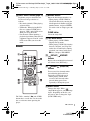
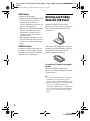

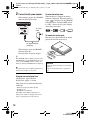
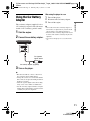
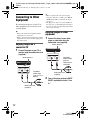
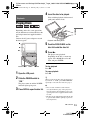
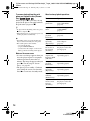
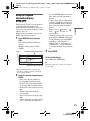


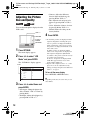
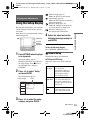


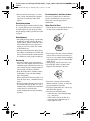
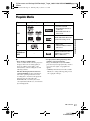


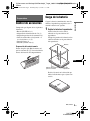
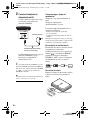
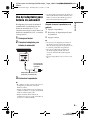
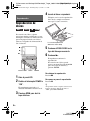

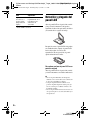

![MC1000 Quick Start Guide [Spanish]](http://vs1.manualzilla.com/store/data/006172196_1-eb8d7c45a657c85a50c3c04048a0df41-150x150.png)