1
How to Use
- When the charger is connected, with the power on or off, the headset will turn off.
-W
hile charging, the LED indicator will show a solid red light and changed to
violet when charged 80% above.
- When charging is completed, the LED indicator will show a solid blue light.
ENG
Charging
Low Battery
- A low battery alert will play once every 2 minutes.
- If the battery is not charged, the headset will turn off.
Battery Status Alert
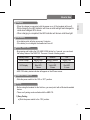
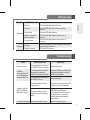
- By pressing and holding the VOLUME DOWN button for 1 second, you can check
the battery status of the HBS-750. There are 3 levels of battery power:
Battery status
Voice Prompt
LED display
High
Battery High
Blinking
Blue LED
3 times
Medium
Battery Medium
Blinking
Violet LED
3 times
Low
Battery Low
Blinking
Red LED
3 times
- HBS-750 battery status indicator will appear on the iPhone screen.
Power On / Power Off
- Slide the power switch to the ‘ON’ or ‘OFF’ position.
Pairing
- Before using the headset for the first time, you must pair it with a Bluetooth-enabled
device.
- There are 2 pairing mode methods with the HBS-750.
1) Easy Pairing
a) Slide the power switch to the “ON” position.
5