1
Product guide | HP LaserJet Pro MFP M426 series
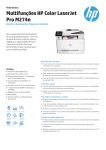
HP LaserJet Pro MFP M426fdn
Printer management
HP LaserJet Pro MFP M426fdw
Windows: Printer Administrator Resource Kit (Driver Configuration Utility, Driver Deployment Utility, Managed Printing
Administrator), HP Web Jetadmin software, HP Proxy Agent software, HP JetAdvantage Security Manager,21 HP Device
Toolbox
Mac: HP Utility
Compatible operating systems
33
Windows OS compatible with In-Box Driver: Windows XP SP3 all 32-bit editions (XP Home, XP Pro, etc.), Windows Vista® all
32-bit editions (Home Basic, Premium, Professional, etc.), Windows 7 all 32- and 64-bit editions, Windows 8/8.1 all 32and 64-bit editions (excluding RT OS for Tablets), Windows 10 all 32- and 64-bit editions (excluding RT OS for Tablets)
Windows OS compatible with Universal Print Driver (from hp.com): Windows XP SP3 32‑ and 64-bit editions (XP Home,
XP Pro, etc.), Windows Vista all 32- and 64-bit editions (Home Basic, Premium, Professional, etc.), Windows 7 all 32- and
64‑bit editions, Windows 8/8.1 all 32- and 64-bit editions (excluding RT OS for Tablets), Windows 10 all 32- and 64-bit
editions (excluding RT OS for Tablets)
Mac: Mac OS (HP Print Drivers available from hp.com and Apple Store), OS X 10.8 Mountain Lion, OS X 10.9 Mavericks,
OS X 10.10 Yosemite
Mobile OS: In-OS drivers, iOS, Android, Windows 8/8.1/10 RT
Other: Linux OS (In-OS HPLIP, Auto install, BOSS 3.0, 5.0), Debian (6.0, 6.0.1, 6.0.2, 6.0.3, 6.0.4, 6.0.5, 6.0.6, 6.0.7, 6.0.8,
6.0.9, 6.0.10, 7.0, 7.1, 7.2, 7.3, 7.4, 7.5, 7.6), Fedora (17, 18, 19, 20), Linux Mint (13, 14, 15, 16, 17), SUSE Linux (12.2, 12.3,
13.1), Ubantu (10.04, 11.10, 12.04, 12.10, 13.04, 13.10, 14.04, 14.10), Manual install, Mandriva Linux (2010.0, 2011.0),
MEPIS (6.0, 6.5, 7.0, 8.0), PCLinuxOS (2006.0, 2006, 2007.0, 2007, 2008.0, 2008, 2009.0, 2009), Red Hat (8.0, 9.0), Red
Hat Enterprise Linux (5.0, 6.0, 7.0), Slackware Linux (9.0, 9.1, 10.0, 10.1, 10.2, 11, 12, 12.1), gOS (8.04.1), IGOS (1.0),
Linpus Linux (9.4, 9.5), Linux from Scratch (6), UNIX
System requirements, PC
Windows 10 (32-bit/64-bit), Windows 8.1 (32-bit/64-bit), Windows 8 (32-bit/64-bit), Windows 7 (32-bit/64-bit): 1 GHz
processor, 1 GB RAM (32-bit) or 2 GB RAM (64-bit), 400 MB available hard disk space, CD/DVD-ROM or Internet, USB or
Network port
Windows Vista (32-bit): 1 GHz 32-bit (x86) processor, 1 GB RAM (32-bit), 400 MB available hard disk space, CD/DVD-ROM
or Internet, USB or Network port
Windows XP (32-bit) (SP2): Pentium 233 MHz processor, 512 MB RAM, 400 MB available hard disk space, CD/DVD-ROM or
Internet, USB or Network port
Windows Server 2003 (32-bit) (SP1 or greater), Windows Server 2003 R2 (32-bit), Windows Server 2008 (32-bit) (SP1 or
greater): 1 GHz 32-bit (x86) processor, 1 GB RAM (32-bit), 400 MB available hard disk space, CD/DVD-ROM or Internet, USB
or Network port
Windows Server 2008 (64-bit) (SP1 or greater), Windows Server 2008 R2 (64-bit), Windows Server 2008 R2 (64-bit) (SP1):
1 GHz 64-bit (x64) processor, 2 GB RAM (64-bit), 400 MB available hard disk space, CD/DVD-ROM or Internet, USB or
Network port
System requirements, Mac
OS X 10.8 Mountain Lion, OS X 10.9 Mavericks, OS X 10.10 Yosemite: Internet, USB, 1 GB HD, OS compatible hardware (for
OS hardware requirements, see apple.com)
Dimensions (width x depth x height)
Minimum: 16.5 x 15.3 x 12.7 in (420 x 390 x 323 mm); Maximum: 16.9 x 25 x 12.8 in (430 x 634 x 325 mm)
Weight (with cartridges)
28.35 lb (12.86 kg)
What’s in the box
HP LaserJet Pro M426 MFP, preinstalled HP 26A Black LaserJet Toner cartridge (~3,100 pages),15 Getting Started guide,
setup poster, support flyer, warranty guide, printer documentation and software on CD‑ROM, power cord, USB cable 34
Software included
Windows: HP Installer/Uninstaller, HP PCL 6 print driver, DXP (Device Experience), User Guide, HP Device Toolbox,
HP Product Improvement Study, HP Scan, HP TWAIN and WIA Scan Drivers, Scan to email Setup Wizard, Scan to Folder
Setup Wizard, HP Send Fax, HP Fax Print Driver, and HP Fax Setup Wizard, HP Update, Product Registration Assist, HP Web
Services Assist (HP Connected), .NET 3.5 SP1 (only installed for older Windows operating systems that lack)
Mac: Welcome Screen (Redirects users to hp.com, or OS App Source for HP LaserJet Software)
Downloadable software
From 123.hp.com: HP Easy Start (Guided Software Install for Windows and Mac)
From HP.com for Windows OS: Full-solution software and drivers (same solution as “Software Included”), HP PCL 6 print
driver only (no installer; for “Add Printer” installs), HP PCL 6 print driver with installer, Product Documentation and Support;
From HP.com for Mac OS: Full-solution software and drivers
For Mobile OS, see “HP Mobile Printing” (www8.hp.com/us/en/ads/mobility/overview.html); From In-OS app stores;
Gotham (HP AiO Remote for Win 8), HP recommended printer drivers and software
From HP.com for printer administrators: Printer Administrator Resource Kit (Driver Configuration Utility, Driver Deployment
Utility, Managed Printing Administrator), HP Universal Print Drivers (PCL 6, PCL 5 and PS for Windows); HP ePrint Software
(ePrint Mobile Driver for Windows); Linux/Unix Print Drivers; SAP (PCL 5 and PS Print Drivers); HP Web Jetadmin Software;
HP Proxy Agent Software; HP JetAdvantage Security Manager;21 HP Driver Configuration Utility; ReadIris Software
13