1
Table of Contents
Getting Started
Upgrading the Phone Software..................... 74
Installing a microSDHC
Card
Troubleshooting.............................................. 75
For Your Safety................................................ 78
General Safety..................................................... 78
Radio Frequency (RF) Energy................................ 79
FCC Compliance.................................................. 79
Hearing Aid Compatibility (HAC) Regulations for
Mobile Phones.................................................... 80
Distraction.......................................................... 81
Product Handling................................................ 81
Electrical Safety................................................... 83
Radio Frequency Interference............................... 84
Explosive Environments....................................... 85
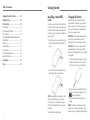
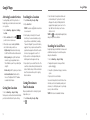
You have the option to install a microSDHC card of up
to 32GB to expand your phone’s storage capacity. The
microSDHC card can be installed and removed while
the phone is turned on. Unmount the microSDHC card
before removing it.
1. Insert the tray eject tool (or end of a paper clip) into
the hole on the microSDHC card tray and pull the
tray out.
Charging the Battery
When you first get your new phone you’ll need to
charge the battery. If the battery is low, there will be
a pop-up message on the screen. As you charge your
phone, the screen will tell you the exact battery level
each time you wake up your phone.
WARNING! Use only ZTE-approved chargers and
cables. The use of unapproved accessories could
damage your phone or cause the battery to explode.
CAUTION: Do not remove or change the built-in
rechargeable battery in your phone by yourself. The
battery can only be changed by ZTE or a ZTE authorized
service provider.
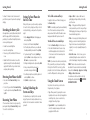
1.Connect the adapter to the charging port. Ensure that
the adapter is inserted with the correct orientation.
Do not force the connector into the charging port.
Specifications.................................................. 86
Notes................................................................ 87
2.Place a microSDHC card (not included) in the tray
with the gold-colored contacts facing down.
NOTE: Some applications may require a microSDHC
card to work normally or may store certain data
on it. Therefore, it is recommended that you keep a
microSDHC card installed and not remove or replace
it randomly.
4
3. Carefully slide the tray back in place.
2.Connect the charger to a standard AC wall outlet. If
the phone is on, you’ll see a charging icon, such as
or , appear in the Status Bar.
3.Disconnect the charger when the battery is fully
charged.
NOTE: If the battery is extremely low, you may be
unable to power on the phone even when it is being
charged. In this case, try again after charging the phone
5