1
Driver Installation for Macintosh
Insert S/W CD into your CD-ROM drive.
�
Double-click“MAC\plawa Installer.HQX”(Driver Installation File) in the CD-ROM.
�
If you run the file, an error message will appear. Ignore this message and click“OK”
.
�
If you click the“New”button, a temporarily folder will be created. Enter folder name and click
the“Create”button.
�
If you select the newly created folder, the installer will appear in Macintosh HD.
�
Double-click“plawa Camera Installer v1.4b3”file in the newly created folder.
�
Use Adobe Photoshop>Plug-Ins> Import> Export to choose the folder location and click the
“Install”button. (When Adobe Photoshop is installed on the Macintosh)
�
To install plawa Camera Import in the same location, click the“Select”button.
�
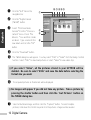
Click the“Quit”button to end the installation.
*** Caution ***
�Install the driver first, and then connect the SPYPEN to the USB port of your
Macintosh.
�Quicktime Player must be installed in your Macintosh. If you have not
installed Quicktime Player, you can download the program from
http://www.apple.com.
Digital Camera 17
English
�