1
INSTALLATION
USAGE
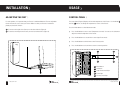
ADJUSTING THE FEET
CONTROL PANEL
For safe operation, it is important that your Freezer is stable and balanced. The two adjustable
feet at the front are used to level your Freezer. Make sure that your Freezer is level before
placing any foodstuffs inside it.
The control panel (Figure 5) displays the internal temperature of the Freezer. Use the Mode ( a )
and Set ( b ) buttons to change the temperature or status of the Freezer.
Press the Mode button to switch between modes:
1 To increase the height of the Freezer, turn the feet clockwise (Figure 4).
2 To decrease the height of the Freezer, turn the feet anti-clockwise (Figure 4).
Press the Mode button once to enter Temperature Set mode. You can use the Set button to
adjust the internal temperature of the Freezer.
Press the Mode button a second time to enter Super Freeze mode.
Press the Mode button a third time to enter Economy mode.
Press the Mode button a fourth time to return to normal operation.
a
c
d
-18
b
e
a Mode button
b Set button
c Super Freeze mode light
d Power light
Figure 4
e Economy mode light
Figure 5
13
T: 0333 577 7232
T: 0333 577 7232
14