1
Using Web Browser Control
Contents of mail sent
• Mail with the contents shown below is sent when the E-mail
settings have been established.
Subject: Panasonic projector report(CONFIGURE)
=== Panasonic projector report(CONFIGURE) ===
Projector Type
: D3500
Subject: Panasonic projector report(ERROR)
=== Panasonic projector report(ERROR) ===
Projector Type
: D3500
––––– E-mail setup data –––––
TEMPERATURE WARNING SETUP
MINIMUM TIME
at [ 60] minutes interval
INPUT AIR TEMPERATURE Over [ 45C / 113F ]
ERROR
LAMP RUNTIME
LAMP RUNTIME
INPUT AIR TEMPERATURE
[ ON ]
[ OFF ] at REMAIN [
[ OFF ] at REMAIN [
[ OFF ]
0] H
0] H
PERIODIC REPORT
Sunday [ OFF ] Monday [ OFF ] Tuesday [ OFF ] Wednesday [ OFF ]
Thursday [ OFF ] Friday [ OFF ] Saturday [ OFF ]
00:00
04:00
08:00
12:00
16:00
20:00
[ OFF ]
[ OFF ]
[ OFF ]
[ OFF ]
[ OFF ]
[ OFF ]
01:00
05:00
09:00
13:00
17:00
21:00
[ OFF ]
[ OFF ]
[ OFF ]
[ OFF ]
[ OFF ]
[ OFF ]
02:00
06:00
10:00
14:00
18:00
22:00
––––– check system –––––
MAIN CPU BUS
FAN
OPTICS MODULE TEMPERATURE
INPUT AIR TEMPERATURE
AROUND LAMP TEMPERATURE
LAMP REMAIN TIME
•
•
•
[ OFF ]
[ OFF ]
[ OFF ]
[ OFF ]
[ OFF ]
[ OFF ]
03:00
07:00
11:00
15:00
19:00
23:00
[
[
[
[
[
[
]
]
]
]
]
]
OK
OK
OK
OK
OK
OK
• Mail with the contents shown below is sent
when an error has occurred.
[ OFF ]
[ OFF ]
[ OFF ]
[ OFF ]
[ OFF ]
[ OFF ]
––––– check system –––––
MAIN CPU BUS
[ OK ]
FAN
[ OK ]
OPTICS MODULE TEMPERATURE [ OK ]
INPUT AIR TEMPERATURE
[ OK ]
AROUND LAMP TEMPERATURE
[ OK ]
LAMP REMAIN TIME
[ OK ]
LAMP STATUS
[ FAILED ]
SHUTTER
[ OK ]
OPTICS MODULE TEMP.SENSOR [ OK ]
INPUT AIR TEMP.SENSOR
[ OK ]
AROUND LAMP TEMP.SENSOR
[ OK ]
BATTERY
[ OK ]
COLOR WHEEL
[ OK ]
(Error code 00 40 00 00 00 00 00 00)
Input air temperature
: 27 degC / 80 degF
Optics module temperature : 65 degC /149 degF
Around lamp temperature : 27 degC / 80 degF
SET RUNTIME
1857 H
POWER ON
248 times
LAMP ON
177 times
LAMP LOW
0H
LAMP HIGH
68 H
LAMP REMAIN
1432 H
––––– Network configuration –––––
IP address 192.168.0.8
MAC address 00:00:00:00:00:00
Wed Jan 26 18:54:31 2005
––––– Memo –––––
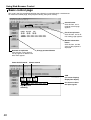
Adjust clock page
Click [Network set up], then [Adjust clock] to display the Adjust clock page.
Time zone selection
Button to update time zone
setting
New date field
Button to update time and
date settings
New time field
Note
54
• If the time becomes incorrect immediately after setting the correct time, then the battery needs to
be changed. Contact the dealer where you bought the projector to have the battery changed.