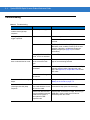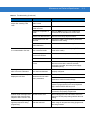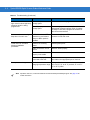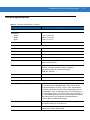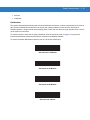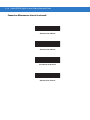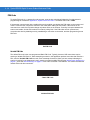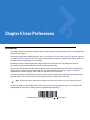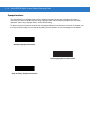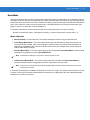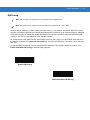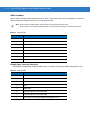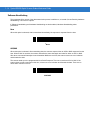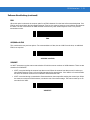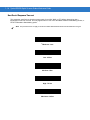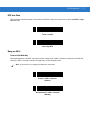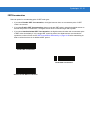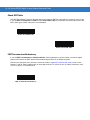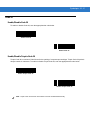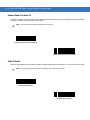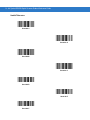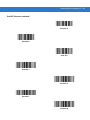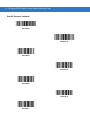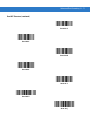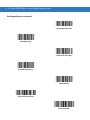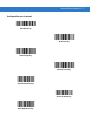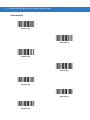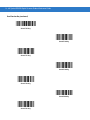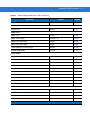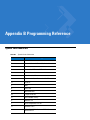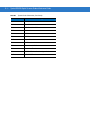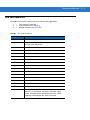
1
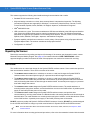
Symbol DS3578 Digital Scanner
Product Reference Guide
Symbol DS3578 Digital Scanner
Product Reference Guide
72E-110462-02
Revision A
March 2010
ii
Symbol DS3578 Digital Scanner Product Reference Guide
© 2010 by Motorola, Inc. All rights reserved.
No part of this publication may be reproduced or used in any form, or by any electrical or mechanical means,
without permission in writing from Motorola. This includes electronic or mechanical means, such as
photocopying, recording, or information storage and retrieval systems. The material in this manual is subject to
change without notice.
The software is provided strictly on an “as is” basis. All software, including firmware, furnished to the user is on
a licensed basis. Motorola grants to the user a non-transferable and non-exclusive license to use each
software or firmware program delivered hereunder (licensed program). Except as noted below, such license
may not be assigned, sublicensed, or otherwise transferred by the user without prior written consent of
Motorola. No right to copy a licensed program in whole or in part is granted, except as permitted under
copyright law. The user shall not modify, merge, or incorporate any form or portion of a licensed program with
other program material, create a derivative work from a licensed program, or use a licensed program in a
network without written permission from Motorola. The user agrees to maintain Motorola’s copyright notice on
the licensed programs delivered hereunder, and to include the same on any authorized copies it makes, in
whole or in part. The user agrees not to decompile, disassemble, decode, or reverse engineer any licensed
program delivered to the user or any portion thereof.
Motorola reserves the right to make changes to any software or product to improve reliability, function, or
design.
Motorola does not assume any product liability arising out of, or in connection with, the application or use of
any product, circuit, or application described herein.
No license is granted, either expressly or by implication, estoppel, or otherwise under any Motorola, Inc.,
intellectual property rights. An implied license only exists for equipment, circuits, and subsystems contained in
Motorola products.
MOTOROLA and the Stylized M Logo and Symbol and the Symbol logo are registered in the US Patent &
Trademark Office. Bluetooth is a registered trademark of Bluetooth SIG. Microsoft, Windows and ActiveSync
are either registered trademarks or trademarks of Microsoft Corporation. All other product or service names
are the property of their respective owners.
Motorola, Inc.
One Motorola Plaza
Holtsville, New York 11742-1300
http://www.motorola.com/enterprisemobility
Warranty
For the complete Motorola hardware product warranty statement, go to:
http://www.motorola.com/enterprisemobility/warranty.
iii
Revision History
Changes to the original manual are listed below:
Change
Date
Description
-01 Rev A
1/2010
Initial release
-02 Rev A
2/2010
Added:
- UID bar codes
- DPM.
iv
Symbol DS3578 Digital Scanner Product Reference Guide
Table of Contents
Warranty ........................................................................................................................ ii
Revision History ............................................................................................................. iii
About This Guide
Introduction ....................................................................................................................
Chapter Descriptions .....................................................................................................
Notational Conventions..................................................................................................
Related Documents .......................................................................................................
Service Information........................................................................................................
xv
xv
xvi
xvii
xvii
Chapter 1: Getting Started
Introduction ...................................................................................................................
Unpacking the Scanner ................................................................................................
The Cradle ....................................................................................................................
Cradle Parts ............................................................................................................
Connecting the Cradle ............................................................................................
Connecting STB3508/3578 Cradle ...................................................................
Connecting FLB3508/3578 Cradle ....................................................................
Changing the Host Interface .............................................................................
Supplying Power to the Cradle ...............................................................................
Using the USB Interface to Supply Power ........................................................
Connecting a Synapse Cable Interface ..................................................................
Mounting the Cradle ................................................................................................
Inserting the Battery ......................................................................................................
Removing the Battery .............................................................................................
Charging the Scanner Battery in the Cradle .................................................................
Scanner Charging LED ...........................................................................................
Inserting the Scanner in the Cradle ..............................................................................
Sending Data to the Host Computer .............................................................................
Pairing .....................................................................................................................
Lost Connection to Host ..........................................................................................
Configuring the Scanner ...............................................................................................
1-1
1-2
1-2
1-3
1-4
1-4
1-5
1-5
1-6
1-6
1-6
1-6
1-7
1-8
1-8
1-8
1-9
1-10
1-10
1-10
1-10
vi
Symbol DS3578 Digital Scanner Product Reference Guide
Radio Communications ................................................................................................. 1-10
Chapter 2: Scanning
Introduction ...................................................................................................................
Beeper Definitions ........................................................................................................
LED Definitions .............................................................................................................
Scanning .......................................................................................................................
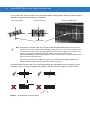
Aiming ....................................................................................................................
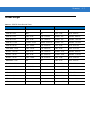
Decode Ranges ............................................................................................................
2-1
2-1
2-4
2-5
2-5
2-7
Chapter 3: Maintenance and Technical Specifications
Introduction ...................................................................................................................
Maintenance .................................................................................................................
Battery Maintenance ...............................................................................................
Troubleshooting ............................................................................................................
Technical Specifications ...............................................................................................
Scanner Signal Descriptions .........................................................................................
3-1
3-1
3-1
3-2
3-5
3-8
Chapter 4: Radio Communications
Introduction ...................................................................................................................
Scanning Sequence Examples ...............................................................................
Errors While Scanning ............................................................................................
Radio Communications Parameter Defaults .................................................................
Wireless Beeper Definitions ..........................................................................................
Radio Communications Host Types .............................................................................
Bluetooth Technology Profile Support ..........................................................................
Master/Slave Set Up ...............................................................................................
Master ...............................................................................................................
Slave .................................................................................................................
Bluetooth Friendly Name ........................................................................................
Discoverable Mode .................................................................................................
HID Host Parameters ....................................................................................................
HID Country Keyboard Types (Country Codes) ......................................................
HID Keyboard Keystroke Delay ..............................................................................
HID CAPS Lock Override ........................................................................................
HID Ignore Unknown Characters ............................................................................
Emulate Keypad ......................................................................................................
HID Keyboard FN1 Substitution ..............................................................................
HID Function Key Mapping .....................................................................................
Simulated Caps Lock ..............................................................................................
Convert Case ..........................................................................................................
Auto-reconnect Feature ................................................................................................
Reconnect Attempt Beep Feedback .......................................................................
Reconnect Attempt Interval .....................................................................................
Auto-reconnect in Bluetooth Keyboard Emulation (HID Slave) Mode .....................
Out of Range Indicator ..................................................................................................
Scanner(s) to Cradle Support .......................................................................................
4-1
4-1
4-1
4-2
4-3
4-4
4-6
4-6
4-6
4-6
4-7
4-7
4-8
4-9
4-11
4-11
4-12
4-12
4-13
4-13
4-14
4-14
4-15
4-15
4-16
4-18
4-19
4-20
Table of Contents
Modes of Operation ................................................................................................. 4-20
Point-to-Point Communication .......................................................................... 4-20
Multipoint-to-Point Communication ................................................................... 4-20
Parameter Broadcast (Cradle Host Only) ............................................................... 4-21
Pairing ..................................................................................................................... 4-21
Pairing Modes ................................................................................................... 4-22
Lock Override .................................................................................................... 4-22
Pairing Methods ................................................................................................ 4-23
Unpairing ........................................................................................................... 4-23
Pairing Bar Code Format ........................................................................................ 4-24
Pairing Bar Code Example ................................................................................ 4-24
Connection Maintenance Interval ............................................................................ 4-24
Considerations .................................................................................................. 4-25
Bluetooth Security ......................................................................................................... 4-27
Authentication ......................................................................................................... 4-27
PIN Code ................................................................................................................. 4-28
Variable PIN Code ............................................................................................ 4-28
Encryption ............................................................................................................... 4-29
Chapter 5: User Preferences
Introduction ................................................................................................................... 5-1
Scanning Sequence Examples ..................................................................................... 5-2
Errors While Scanning .................................................................................................. 5-2
User Preferences Default Parameters .......................................................................... 5-2
User Preferences .......................................................................................................... 5-4
Default Parameters ................................................................................................. 5-4
Beeper Tone ........................................................................................................... 5-5
Beeper Volume ....................................................................................................... 5-6
Laser On Time ........................................................................................................ 5-7
Beep After Good Decode ........................................................................................ 5-7
Pager Motor Actuation After Good Decode ............................................................. 5-8
Beep on Insertion .................................................................................................... 5-8
Time Delay to Reduced Power Mode ..................................................................... 5-9
Picklist Mode ........................................................................................................... 5-10
Decoding Illumination .............................................................................................. 5-10
DPM Scanning ........................................................................................................ 5-11
Decode Aiming Pattern ........................................................................................... 5-12
Transmit Code ID Character ................................................................................... 5-13
Prefix/Suffix Values ................................................................................................. 5-14
Scan Data Transmission Format ............................................................................. 5-15
FN1 Substitution Values .......................................................................................... 5-17
Transmit “No Read” Message ................................................................................. 5-17
Synapse Interface ................................................................................................... 5-18
Batch Mode ............................................................................................................. 5-19
Modes of Operation ........................................................................................... 5-19
UID Parsing ............................................................................................................. 5-21
UID Parsing Output ........................................................................................... 5-22
UID Error Mode Options .................................................................................... 5-23
Sample ADF Rule for UID ................................................................................. 5-24
vii
viii
Symbol DS3578 Digital Scanner Product Reference Guide
UID Sample Bar Codes ..................................................................................... 5-25
Chapter 6: Keyboard Wedge Interface
Introduction ...................................................................................................................
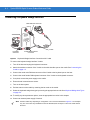
Connecting a Keyboard Wedge Interface .....................................................................
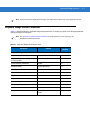
Keyboard Wedge Default Parameters ..........................................................................
Keyboard Wedge Host Types .......................................................................................
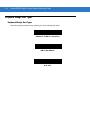
Keyboard Wedge Host Types .................................................................................
Keyboard Wedge Country Types (Country Codes) ................................................
Ignore Unknown Characters ...................................................................................
Keystroke Delay ......................................................................................................
Intra-Keystroke Delay .............................................................................................
Alternate Numeric Keypad Emulation .....................................................................
Caps Lock On .........................................................................................................
Caps Lock Override ................................................................................................
Convert Wedge Data ..............................................................................................
Function Key Mapping ............................................................................................
FN1 Substitution .....................................................................................................
Send Make and Break ............................................................................................
Keyboard Maps .............................................................................................................
ASCII Character Set .....................................................................................................
6-1
6-2
6-3
6-4
6-4
6-5
6-7
6-7
6-8
6-8
6-9
6-9
6-10
6-10
6-11
6-11
6-12
6-14
Chapter 7: RS-232 Interface
Introduction ...................................................................................................................
Connecting an RS-232 Interface ..................................................................................
RS-232 Default Parameters ..........................................................................................
RS-232 Host Parameters ..............................................................................................
RS-232 Host Types .................................................................................................
Baud Rate ...............................................................................................................
Parity .......................................................................................................................
Check Receive Errors .............................................................................................
Stop Bit Select ........................................................................................................
Data Bits .................................................................................................................
Hardware Handshaking ..........................................................................................
None .................................................................................................................
Standard RTS/CTS ...........................................................................................
RTS/CTS Option 1 ............................................................................................
RTS/CTS Option 2 ............................................................................................
RTS/CTS Option 3 ............................................................................................
Software Handshaking ............................................................................................
None .................................................................................................................
ACK/NAK ..........................................................................................................
ENQ ..................................................................................................................
ACK/NAK with ENQ ..........................................................................................
XON/XOFF ........................................................................................................
Host Serial Response Time-out ..............................................................................
RTS Line State ........................................................................................................
Beep on <BEL> .......................................................................................................
7-1
7-2
7-3
7-4
7-6
7-7
7-9
7-10
7-11
7-11
7-12
7-12
7-12
7-13
7-13
7-13
7-14
7-14
7-14
7-15
7-15
7-15
7-16
7-17
7-17
Table of Contents
Point-to-Point Mode Only .................................................................................. 7-17
Intercharacter Delay ................................................................................................ 7-18
Nixdorf Mode A/B and OPOS/JPOS Beep/LED Options ........................................ 7-19
Ignore Unknown Characters ................................................................................... 7-20
RS-232 ASCII Character Set ........................................................................................ 7-20
Chapter 8: USB Interface
Introduction ................................................................................................................... 8-1
Connecting a USB Interface ......................................................................................... 8-2
USB Default Parameters ............................................................................................... 8-4
USB Host Parameters ................................................................................................... 8-5
USB Device Type .................................................................................................... 8-5
USB Country Keyboard Types (Country Codes) ..................................................... 8-6
USB Keystroke Delay .............................................................................................. 8-8
USB Caps Lock Override ........................................................................................ 8-9
USB Ignore Unknown Characters ........................................................................... 8-9
Emulate Keypad ...................................................................................................... 8-10
USB Keyboard FN 1 Substitution ............................................................................ 8-10
Function Key Mapping ............................................................................................ 8-11
Simulated Caps Lock .............................................................................................. 8-11
Convert Case .......................................................................................................... 8-12
USB ASCII Character Set ............................................................................................. 8-13
Chapter 9: IBM 468X/469X Interface
Introduction ................................................................................................................... 9-1
Connecting to an IBM 468X/469X Host ........................................................................ 9-2
IBM Default Parameters ................................................................................................ 9-3
IBM 468X/469X Host Parameters ................................................................................. 9-4
Port Address ........................................................................................................... 9-4
Convert Unknown to Code 39 ................................................................................. 9-4
Chapter 10: Symbologies
Introduction ................................................................................................................... 10-1
Scanning Sequence Examples ..................................................................................... 10-1
Errors While Scanning .................................................................................................. 10-2
Symbology Parameter Defaults .................................................................................... 10-2
UPC/EAN ...................................................................................................................... 10-7
Enable/Disable UPC-A ............................................................................................ 10-7
Enable/Disable UPC-E ............................................................................................ 10-7
Enable/Disable UPC-E1 .......................................................................................... 10-8
Enable/Disable EAN-8/JAN-8 ................................................................................. 10-8
Enable/Disable EAN-13/JAN-13 ............................................................................. 10-9
Enable/Disable Bookland EAN ................................................................................ 10-9
Decode UPC/EAN/JAN Supplementals .................................................................. 10-10
User-Programmable Supplementals ....................................................................... 10-13
UPC/EAN/JAN Supplemental Redundancy ............................................................ 10-14
UPC/EAN/JAN Supplemental AIM ID Format ......................................................... 10-14
ix
x
Symbol DS3578 Digital Scanner Product Reference Guide
Transmit UPC-A Check Digit ..................................................................................
Transmit UPC-E Check Digit ..................................................................................
Transmit UPC-E1 Check Digit ................................................................................
UPC-A Preamble ....................................................................................................
UPC-E Preamble ....................................................................................................
UPC-E1 Preamble ..................................................................................................
Convert UPC-E to UPC-A .......................................................................................
Convert UPC-E1 to UPC-A .....................................................................................
EAN-8/JAN-8 Extend ..............................................................................................
UCC Coupon Extended Code .................................................................................
ISSN EAN ...............................................................................................................
Code 128 ......................................................................................................................
Enable/Disable Code 128 .......................................................................................
Set Lengths for Code 128 .......................................................................................
Enable/Disable GS1-128 (formerly UCC/EAN-128) ................................................
Enable/Disable ISBT 128 ........................................................................................
ISBT Concatenation ................................................................................................
Check ISBT Table ...................................................................................................
ISBT Concatenation Redundancy ...........................................................................
Code 39 ........................................................................................................................
Enable/Disable Code 39 .........................................................................................
Enable/Disable Trioptic Code 39 ............................................................................
Convert Code 39 to Code 32 ..................................................................................
Code 32 Prefix ........................................................................................................
Set Lengths for Code 39 .........................................................................................
Code 39 Check Digit Verification ............................................................................
Transmit Code 39 Check Digit ................................................................................
Code 39 Full ASCII Conversion ..............................................................................
Code 39 Buffering (Scan & Store) ..........................................................................
Buffer Data ........................................................................................................
Clear Transmission Buffer ................................................................................
Transmit Buffer .................................................................................................
Overfilling Transmission Buffer .........................................................................
Attempt to Transmit an Empty Buffer ................................................................
Code 93 ........................................................................................................................
Enable/Disable Code 93 .........................................................................................
Set Lengths for Code 93 .........................................................................................
Code 11 ........................................................................................................................
Code 11 ..................................................................................................................
Set Lengths for Code 11 .........................................................................................
Code 11 Check Digit Verification ............................................................................
Transmit Code 11 Check Digits ..............................................................................
Interleaved 2 of 5 (ITF) .................................................................................................
Enable/Disable Interleaved 2 of 5 ...........................................................................
Set Lengths for Interleaved 2 of 5 ...........................................................................
I 2 of 5 Check Digit Verification ...............................................................................
Transmit I 2 of 5 Check Digit ...................................................................................
Convert I 2 of 5 to EAN-13 ......................................................................................
Discrete 2 of 5 (DTF) ....................................................................................................
Enable/Disable Discrete 2 of 5 ................................................................................
10-15
10-15
10-16
10-16
10-17
10-18
10-18
10-19
10-19
10-21
10-21
10-22
10-22
10-22
10-24
10-24
10-25
10-26
10-26
10-27
10-27
10-27
10-28
10-28
10-29
10-30
10-31
10-31
10-32
10-32
10-33
10-33
10-34
10-34
10-35
10-35
10-35
10-37
10-37
10-37
10-39
10-40
10-41
10-41
10-41
10-43
10-43
10-44
10-45
10-45
Table of Contents
Set Lengths for Discrete 2 of 5 ................................................................................ 10-45
Codabar (NW - 7) .......................................................................................................... 10-47
Enable/Disable Codabar ......................................................................................... 10-47
Set Lengths for Codabar ......................................................................................... 10-47
CLSI Editing ............................................................................................................ 10-49
NOTIS Editing ......................................................................................................... 10-49
MSI ................................................................................................................................ 10-50
Enable/Disable MSI ................................................................................................. 10-50
Set Lengths for MSI ................................................................................................ 10-50
MSI Check Digits ..................................................................................................... 10-51
Transmit MSI Check Digit(s) ................................................................................... 10-52
MSI Check Digit Algorithm ...................................................................................... 10-52
Chinese 2 of 5 ............................................................................................................... 10-53
Enable/Disable Chinese 2 of 5 ................................................................................ 10-53
Matrix 2 of 5 .................................................................................................................. 10-53
Enable/Disable Matrix 2 of 5 ................................................................................... 10-53
Set Lengths for Matrix 2 of 5 ................................................................................... 10-54
Matrix 2 of 5 Redundancy ....................................................................................... 10-55
Matrix 2 of 5 Check Digit ......................................................................................... 10-55
Transmit Matrix 2 of 5 Check Digit .......................................................................... 10-56
Inverse 1D ..................................................................................................................... 10-57
Postal Codes ................................................................................................................. 10-58
US Postnet .............................................................................................................. 10-58
US Planet ................................................................................................................ 10-58
Transmit US Postal Check Digit .............................................................................. 10-59
UK Postal ................................................................................................................ 10-59
Transmit UK Postal Check Digit .............................................................................. 10-60
Japan Postal ........................................................................................................... 10-60
Australian Postal ..................................................................................................... 10-61
Netherlands KIX Code ............................................................................................ 10-61
USPS 4CB/One Code/Intelligent Mail ..................................................................... 10-62
UPU FICS Postal .................................................................................................... 10-62
GS1 DataBar ................................................................................................................. 10-63
GS1 DataBar-14 ...................................................................................................... 10-64
GS1 DataBar Limited .............................................................................................. 10-64
GS1 DataBar Expanded .......................................................................................... 10-64
Convert GS1 DataBar to UPC/EAN ........................................................................ 10-65
Composite ..................................................................................................................... 10-65
Composite CC-C ..................................................................................................... 10-65
Composite CC-A/B .................................................................................................. 10-66
Composite TLC-39 .................................................................................................. 10-66
UPC Composite Mode ............................................................................................ 10-67
Composite Beep Mode ............................................................................................ 10-68
GS1-128 Emulation Mode for UCC/EAN Composite Codes ................................... 10-68
2D Symbologies ............................................................................................................ 10-69
Enable/Disable PDF417 .......................................................................................... 10-69
Enable/Disable MicroPDF417 ................................................................................. 10-69
Code 128 Emulation ................................................................................................ 10-70
Data Matrix .............................................................................................................. 10-71
Data Matrix Inverse ................................................................................................. 10-71
xi
xii
Symbol DS3578 Digital Scanner Product Reference Guide
Maxicode .................................................................................................................
QR Code .................................................................................................................
QR Inverse ..............................................................................................................
MicroQR ..................................................................................................................
Aztec .......................................................................................................................
Aztec Inverse ..........................................................................................................
Redundancy Level ........................................................................................................
Redundancy Level 1 ...............................................................................................
Redundancy Level 2 ...............................................................................................
Redundancy Level 3 ...............................................................................................
Redundancy Level 4 ...............................................................................................
Security Level ...............................................................................................................
Intercharacter Gap Size ..........................................................................................
10-72
10-72
10-73
10-73
10-74
10-74
10-75
10-75
10-75
10-75
10-76
10-77
10-78
Chapter 11: 123Scan2
Introduction ................................................................................................................... 11-1
Communication with 123Scan2 .................................................................................... 11-1
123Scan2 Requirements .............................................................................................. 11-1
Chapter 12: Advanced Data Formatting
Introduction ...................................................................................................................
Rules: Criteria Linked to Actions ...................................................................................
Using ADF Bar Codes ..................................................................................................
ADF Bar Code Menu Example .....................................................................................
Rule 1: The Code 128 Scanning Rule ....................................................................
Rule 2: The UPC Scanning Rule ............................................................................
Alternate Rule Sets .................................................................................................
Rules Hierarchy (in Bar Codes) ..............................................................................
Default Rules ..........................................................................................................
ADF Bar Codes .............................................................................................................
Special Commands .......................................................................................................
Pause Duration .......................................................................................................
Begin New Rule ......................................................................................................
Save Rule ...............................................................................................................
Erase .......................................................................................................................
Quit Entering Rules .................................................................................................
Disable Rule Set .....................................................................................................
Criteria ..........................................................................................................................
Code Types .............................................................................................................
Code Lengths ..........................................................................................................
Message Containing A Specific Data String ...........................................................
Specific String at Start ......................................................................................
Specific String, Any Location ............................................................................
Specific String Search .......................................................................................
Any Message OK ..............................................................................................
Numeric Keypad ...............................................................................................
Rule Belongs To Set .........................................................................................
12-1
12-1
12-2
12-2
12-3
12-3
12-3
12-4
12-5
12-6
12-8
12-8
12-8
12-8
12-9
12-9
12-10
12-11
12-11
12-18
12-22
12-22
12-23
12-23
12-23
12-24
12-26
Table of Contents
Actions ..........................................................................................................................
Send Data ...............................................................................................................
Setup Field(s) ..........................................................................................................
Move Cursor ...........................................................................................................
Move Cursor (continued) ..................................................................................
Send Pause ......................................................................................................
Skip Ahead ........................................................................................................
Skip Back .........................................................................................................
Send Preset Value ............................................................................................
Modify Data .............................................................................................................
Remove All Spaces ...........................................................................................
Crunch All Spaces ............................................................................................
Stop Space Removal ........................................................................................
Remove Leading Zeros .....................................................................................
Stop Zero Removal ...........................................................................................
Pad Data with Spaces .............................................................................................
Pad Data with Zeros ...............................................................................................
Beeps ......................................................................................................................
Send Keystroke (Control Characters and Keyboard Characters) ...........................
Control Characters ............................................................................................
Keyboard Characters ........................................................................................
Send ALT Characters .......................................................................................
Send Keypad Characters ..................................................................................
Send Function Key ............................................................................................
Send Right Control Key ..........................................................................................
Send Graphic User Interface (GUI) Characters ......................................................
Turn On/Off Rule Sets ............................................................................................
Alphanumeric Keyboard ...............................................................................................
12-27
12-27
12-30
12-31
12-32
12-32
12-33
12-35
12-36
12-37
12-37
12-37
12-37
12-37
12-37
12-38
12-43
12-48
12-49
12-49
12-54
12-68
12-73
12-78
12-85
12-86
12-91
12-93
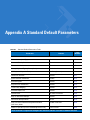
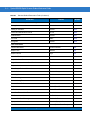
Appendix A: Standard Default Parameters
Appendix B: Programming Reference
Symbol Code Identifiers ................................................................................................ B-1
AIM Code Identifiers ..................................................................................................... B-3
Appendix C: Sample Bar Codes
UPC-A ...........................................................................................................................
UPC-E ...........................................................................................................................
UPC-E1 .........................................................................................................................
EAN-13 .........................................................................................................................
EAN-8 ...........................................................................................................................
Code 39 ........................................................................................................................
Trioptic Code 39 ...........................................................................................................
Code 93 ........................................................................................................................
Code 11 ........................................................................................................................
Code 128 ......................................................................................................................
Codabar ........................................................................................................................
C-1
C-1
C-2
C-2
C-2
C-2
C-3
C-3
C-3
C-4
C-4
xiii
xiv
Symbol DS3578 Digital Scanner Product Reference Guide
MSI ...............................................................................................................................
Interleaved 2 of 5 ..........................................................................................................
PDF417 .........................................................................................................................
Data Matrix ...................................................................................................................
Maxicode ......................................................................................................................
QR Code .......................................................................................................................
US Postnet ....................................................................................................................
UK Postal ......................................................................................................................
C-4
C-4
C-5
C-5
C-5
C-6
C-6
C-6
Appendix D: Numeric Bar Codes
0, 1, 2, 3 ........................................................................................................................
4, 5, 6, 7 ........................................................................................................................
8, 9 ................................................................................................................................
Cancel ...........................................................................................................................
D-1
D-2
D-3
D-3
Appendix E: Alphanumeric Bar Codes
Alphanumeric Keyboard ............................................................................................... E-1
Glossary
Index
Tell Us What You Think...
About This Guide
Introduction
The Symbol DS3578 Product Reference Guide provides general instructions for setting up, operating, maintaining,
and troubleshooting the scanner.
Chapter Descriptions
Topics covered in this guide are as follows:
• Chapter 1, Getting Started provides a product overview and unpacking instructions.
• Chapter 2, Scanning describes parts of the scanner, beeper and LED definitions, and how to use the
scanner.
• Chapter 3, Maintenance and Technical Specifications provides information on how to care for the scanner,
troubleshooting, and technical specifications.
• Chapter 4, Radio Communications provides information about the modes of operation and features available
for wireless communication between scanners, cradles and hosts, and also includes the parameters
necessary to configure the scanner.
• Chapter 5, User Preferences describes each user preference feature and provides the programming bar
codes for selecting these features for the scanner. It also includes commonly used bar codes to customize
how data is transmitted to the host device.
• Chapter 6, Keyboard Wedge Interface provides information for setting up the scanner for keyboard wedge
operation.
• Chapter 7, RS-232 Interface provides information for setting up the scanner for RS-232 operation.
• Chapter 8, USB Interface provides information for setting up the scanner for USB operation.
• Chapter 9, IBM 468X/469X Interface provides information for setting up the scanner with IBM 468X/469X
POS systems.
• Chapter 10, Symbologies describes all symbology features and provides the programming bar codes for
selecting these features.
• Chapter 11, 123Scan2 provides information on the PC-based scanner configuration tool 123Scan2.
xvi
Symbol DS3578 Digital Scanner Product Reference Guide
• Chapter 12, Advanced Data Formatting (ADF) describes how to customize scanned data before transmitting
to the host.
• Appendix A, Standard Default Parameters provides a table of all host devices and miscellaneous scanner
defaults.
• Appendix B, Programming Reference provides a table of AIM code identifiers, ASCII character conversions,
and keyboard maps.
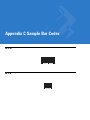
• Appendix C, Sample Bar Codes includes sample bar codes.
• Appendix D, Numeric Bar Codes includes the numeric bar codes to scan for parameters requiring specific
numeric values.
• Appendix E, Alphanumeric Bar Codes includes the alphanumeric bar codes to scan for parameters requiring
alphanumeric values.
Notational Conventions
The following conventions are used in this document:
• Italics are used to highlight the following:
• Chapters and sections in this and related documents
• Bold text is used to highlight the following:
• Key names on a keypad
• Button names on a screen or window.
• bullets (•) indicate:
• Action items
• Lists of alternatives
• Lists of required steps that are not necessarily sequential
• Sequential lists (e.g., those that describe step-by-step procedures) appear as numbered lists.
• Throughout the programming bar code menus, asterisks (*) are used to denote default parameter settings.
* Indicates Default
NOTE
*Baud Rate 9600
Feature/Option
This symbol indicates something of special interest or importance to the reader. Failure to read the note
will not result in physical harm to the reader, equipment or data.
CAUTION
This symbol indicates that if this information is ignored, the possibility of data or material damage may
occur.
About This Guide
WARNING!
xvii
This symbol indicates that if this information is ignored the possibility that serious personal
injury may occur.
Related Documents
• Symbol DS3578 Quick Start Guide (p/n 72-111604-xx) provides general information to help the user get
started with the scanner, including basic setup and operation instructions.
• Symbol STB3508/3578 Cradle Quick Reference Guide (p/n 72-93912-xx) provides information on installing
and operating STB3508/3578 cradles.
• Symbol FLB3508/3578 Cradle Quick Reference Guide (p/n 72-94604-xx) provides information on installing
and operating FLB3508/3578 cradles.
For the latest version of this guide and all guides, go to: http://www.motorola.com/enterprisemobility/manuals.
Service Information
If you have a problem with your equipment, contact Motorola Enterprise Mobility Support for your region. Contact
information is available at: http://www.motorola.com/enterprisemobility/support.
When contacting Enterprise Mobility Support, please have the following information available:
• Serial number of the unit
• Model number or product name
• Software type and version number.
Motorola responds to calls by E-mail, telephone or fax within the time limits set forth in support agreements.
If your problem cannot be solved by Motorola Enterprise Mobility Support, you may need to return your equipment
for servicing and will be given specific directions. Motorola is not responsible for any damages incurred during
shipment if the approved shipping container is not used. Shipping the units improperly can possibly void the
warranty.
If you purchased your Enterprise Mobility business product from a Motorola business partner, contact that business
partner for support.
xviii
Symbol DS3578 Digital Scanner Product Reference Guide
Chapter 1 Getting Started
Introduction
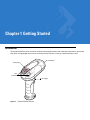
The Symbol DS3578 scanner combines excellent scanning performance and advanced ergonomics to provide the
best value in a lightweight laser scanner, ensuring comfort and ease of use for extended periods of time.
Scan Window
Tether Plate
LED
Indicators
Scan Trigger
Figure 1-1 Symbol DS3578 Scanner
1-2
Symbol DS3578 Digital Scanner Product Reference Guide
This scanner supports the following host interfaces through communication with a cradle:
• Standard RS-232 connection to a host.
• Keyboard wedge connection to a host, where scanned data is interpreted as keystrokes. The following
international keyboards are supported (for Windows™ environment): North American, German, French,
French Canadian, Spanish, Italian, Swedish, UK English, Japanese, and Brazilian-Portuguese.
• IBM® 468X/469X hosts.
• USB connection to a host. The scanner autodetects a USB host and defaults to the HID keyboard interface
type. Select other USB interface types by scanning programming bar codes. The following international
keyboards are supported (for Windows™ environment): North America, German, French, French Canadian,
Spanish, Italian, Swedish, UK English, Japanese, and Brazilian-Portuguese.
• Synapse capability, which allows connection to a wide variety of host systems using a Synapse cable and
Synapse adapter cable. The scanner autodetects the Synapse interface.
• Configuration via 123Scan2.
Unpacking the Scanner
Remove the scanner from its packing and inspect it for damage. If the scanner was damaged in transit, contact
Motorola Enterprise Mobility Support. See page xvii for contact information. KEEP THE PACKING. It is the
approved shipping container and should be used if the equipment ever needs to be returned for servicing.
The Cradle
The cradles serve as a stand and charger for the Symbol DS3578 cordless scanner. Some models also provide a
host communication interface. There are four versions of the cradle:
• The STB3508 cordless cradle sits on a desktop or mounts on a wall, and charges the Symbol DS3578
cordless scanner. An external power supply or a powered host cable charges the scanner.
• The STB3578 cordless cradle sits on a desktop or mounts on a wall, and charges the Symbol DS3578
cordless scanner This cradle also provides host communication by receiving scanner data via a Bluetooth
radio, and sending that data to the host through an attached cable. An external power supply or a powered
host cable charges the scanner.
• The FLB3508 cordless cradle charges the Symbol DS3578 cordless scanner. The cradle attaches to a
mounting bracket using three isolators, and the bracket then mounts on the forklift surface. A portable power
supply on the forklift provides power to the cradle.
• The FLB3578 cordless cradle charges the Symbol DS3578 cordless scanner, and provides host
communication by receiving scanner data via a Bluetooth radio, and sending that data to the host through an
attached cable. The cradle attaches to a mounting bracket using three isolators, and the bracket then mounts
on the forklift surface. A portable power supply on the forklift provides power to the cradle.
DO NOT use these cradles with Symbol LS3478 and DS3478 scanners. Likewise, DO NOT use cradles designed
for the LS3478 and DS3478 to charge or provide communication for Symbol LS3578 and DS3578 scanners.
NOTE
For more information about communication between the scanner, cradle, and host, see Chapter 4, Radio
Communications.
For more information about mounting options and procedures, refer to the documentation included with the cradle.
Getting Started
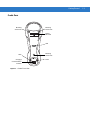
Cradle Parts
Mounting
Screw Hole
Mounting
Screw Hole
Pairing
Bar Code
LED
Latch
Charging/
Communications
Contacts
Figure 1-2 Cradle Front View
Mounting
Screw Hole
Latch
1-3
1-4
Symbol DS3578 Digital Scanner Product Reference Guide
Cable Hook
Rubber Feet
(STB3508/3578 Only)
Mounting Screw Hole
Mounting Screw Hole
Host Port
Power Cable Groove
Power Port
Host Cable Groove
Mounting Screw Hole
Converter Knob
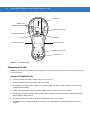
Figure 1-3 Cradle Back View
Connecting the Cradle
Important: Connect the interface cable and power supply (if necessary) in the following order to ensure proper operation of the
scanner and cradle.
Connecting STB3508/3578 Cradle
1.
Insert the interface cable into the cradle's host port. See Figure 1-4.
2.
Connect the other end of the interface cable to the host.
3.
If necessary, connect the power supply to the cradle's power port (if the interface requires, or to allow fast
charging of the scanner).
4.
Connect the appropriate cable to the power supply and an AC power source, if necessary.
5.
If applicable, thread the interface cable over the cable support hook and run the host and power cables into
their respective cable grooves.
6.
Pair the scanner to the cradle by scanning the pairing bar code on the cradle.
7.
If necessary, scan the appropriate host bar code (for non-autodetected interfaces). See the specific host
chapter.
Getting Started
Host Port
1-5
Power Port
Figure 1-4 Connecting the Cables to the Cradle
NOTE
Disconnect the power supply before changing host cables, or the scanner may not recognize the new
host.
Different cables are required for different hosts. The connectors illustrated in each host chapter are
examples only. The connectors may be different from those illustrated, but the steps to connect the
scanner remain the same
Connecting FLB3508/3578 Cradle
1.
Insert the interface cable from the host computer into the cradle's host port. See Figure 1-4.
2.
Connect the forklift power supply to the cradle's power port, if applicable.
3.
Optionally, thread the host cable over the cable hook and run the host and power cables into their respective
cable grooves, or use cable ties to secure them to the mounting plate after attaching it to the cradle. For more
information about mounting options and procedures, refer to the documentation included with the cradle.
4.
Pair the scanner with the cradle by scanning the pairing bar code on the cradle.
5.
If necessary, scan the appropriate host bar code (for non-autodetected interfaces). See the specific host
chapter.
Changing the Host Interface
To connect to a different host, or to the same host using a different cable:
1.
Disconnect the power supply from the cradle, if used.
2.
Disconnect the interface cable from the host.
3.
Connect the interface cable to the new host, or the new interface cable to the existing host.
4.
Reconnect the power supply, if required.
5.
If necessary, scan the appropriate host bar code (for non-autodetected interfaces). See the specific host
chapter.
1-6
Symbol DS3578 Digital Scanner Product Reference Guide
CAUTION
If the scanner does not recognize the host, disconnect the power supply, then reconnect after
connecting the host cable.
Supplying Power to the Cradle
The cradle receives power from one of two sources:
• An external power supply.
• When connected to the host through an interface cable that supplies power.
The cradle detects whether the host or the external supply is supplying power. It always draws power from the
external supply when available, regardless of the presence of power from a host.
Using the USB Interface to Supply Power
When the cradle is connected to the host via the USB interface, the USB port can power the cradle so that an
external power supply is not necessary. Note that powering from a USB host charges the scanner at a slower rate
than when charging from an external power supply.
Connecting a Synapse Cable Interface
NOTE
Refer to the Synapse Interface Guide provided with the Synapse cable for more information.
Symbol’s Synapse Smart Cables enable interfacing to a variety of hosts. The appropriate Synapse cable detects
the host.
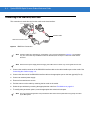
To host
Synapse adapter cable
Synapse Smart Cable
To cradle
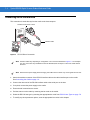
Figure 1-5 Synapse Cable Connection
1.
Insert the Synapse adapter cable into the bottom of the cradle, as described in Connecting the Cables to the
Cradle on page 1-5.
2.
Align the ‘S’ on the Synapse adapter cable with the ‘S’ on the Synapse Smart Cable and plug the cable in.
3.
Connect the other end of the Synapse Smart Cable to the host.
Mounting the Cradle
For information on mounting the cradle, refer to the documentation included with the cradle.
Getting Started
1-7
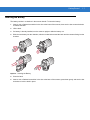
Inserting the Battery
The battery resides in a chamber in the scanner handle. To insert the battery:
1.
Insert a coin or flathead screwdriver in the slot at the base of the scanner, then turn the slot counterclockwise
to release the latch.
2.
Lift the latch.
3.
If a battery is already installed, turn the scanner upright to slide the battery out.
4.
Slide the new battery into the chamber, with the rounded side toward the back and the contacts facing into the
chamber.
Figure 1-6 Inserting the Battery
5.
Close the latch.
6.
Insert a coin or flathead screwdriver in the slot at the base of the scanner, press down gently, and turn the slot
clockwise to lock the latch in place.
1-8
Symbol DS3578 Digital Scanner Product Reference Guide
Removing the Battery
To remove the battery:
1.
Insert a coin or flathead screwdriver in the slot at the base of the scanner, then turn the slot counterclockwise
to release the latch.
2.
Lift the latch.
3.
Turn the scanner upright to slide the battery out.
Charging the Scanner Battery in the Cradle
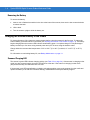
For best performance, fully charge the scanner battery before using the scanner for the first time. To charge the
scanner battery, place the scanner in the cradle (see Inserting the Scanner in the Cradle on page 1-9). The battery
begins charging when the scanner LED indicator starts flashing green. A complete charge of a fully discharged
battery can take up to four hours using external power and up to 10 hours using the interface cable.
Charge within the recommended temperature of 32° to 104° F (0° to 40° C) nominal, 41° to 95° F (5° to 35° C)
ideal.
For information on maximizing battery life, see Battery Maintenance on page 3-1.
Scanner Charging LED
The scanner’s green LED indicates charging activity (see Table 2-2 on page 2-4). If the scanner is charging in fast
mode (non-bus powered mode), the green LED blinks at a fast rate. If the scanner is charging in slow mode
(bus-powered mode), the LED blinks at a slow rate.
If the scanner’s red LED begins flashing, indicating a charging problem, remove the scanner from the cradle and
replace the battery. If the red LED continues flashing, contact Motorola Enterprise Mobility Support.
Getting Started
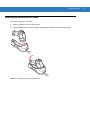
Inserting the Scanner in the Cradle
To insert the scanner in the cradle:
1.
Insert the scanner into the cradle top first.
2.
Push the handle until it clicks into place, engaging the contacts in the cradle and scanner.
Figure 1-7 Inserting the Scanner in the Cradle
1-9
1 - 10 Symbol DS3578 Digital Scanner Product Reference Guide
Sending Data to the Host Computer
The cradle receives data from the scanner via a wireless radio connection and transmits it to the host computer via
the host cable. The scanner and cradle must be paired for successful wireless communication.
Pairing
Pairing registers a scanner to the cradle such that the scanner and cradle can exchange information. The
STB3578 and FLB3578 operate in two modes: Point-to-Point and Multipoint-to-Point. In Point-to-Point mode, pair
the scanner to the cradle either by inserting it in the cradle (if pairing on insertion is enabled), or by scanning the
pairing bar code. In Multipoint-to-Point mode, you can pair up to three scanners to one cradle. To use this feature,
scan the multipoint bar code in Multipoint-to-Point Communication on page 4-20.
The cradle includes pairing bar codes on both its front and back. To pair the scanner with the cradle, scan a pairing
bar code. A high-low-high-low beep sequence followed by a low-high beep sequence indicates successful pairing
and connection to the remote device. A long low, long high beep sequence indicates unsuccessful pairing.
NOTE
The pairing bar code that connects the scanner to a cradle is unique to each cradle.
Do not scan data or parameters until pairing completes.
Lost Connection to Host
If scanned data does not transmit to the cradle's host, ensure that all cables are firmly inserted and the power
supply is connected to an appropriate AC outlet, if applicable. If scanned data still does not transmit to the host,
reestablish a connection with the host:
1.
Disconnect the power supply from the cradle.
2.
Disconnect the host interface cable from the cradle.
3.
Wait three seconds.
4.
Reconnect the host interface cable to the cradle.
5.
Reconnect the power supply to the cradle, if the host requires.
6.
Reestablish pairing with the cradle by scanning the pairing bar code.
Configuring the Scanner
Use the bar codes in this manual or the 123Scan2 configuration program to configure the scanner. See Chapter 5,
User Preferences and each host chapter for information about programming the scanner using bar code menus.
See Chapter 11, 123Scan2 to configure the scanner using this configuration program. 123Scan2 includes a help
file.
Radio Communications
The scanner can communicate with remote devices via Bluetooth Technology Profile Support, or by pairing with a
cradle. For radio communication parameters, detailed information about operational modes, Bluetooth Technology
Profile Support and pairing, see Chapter 4, Radio Communications.
Chapter 2 Scanning
Introduction
This chapter provides beeper and LED definitions, scanning techniques, general scanning instructions and tips,
and decode zone diagrams.
Beeper Definitions
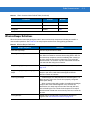
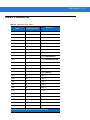
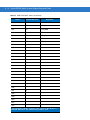
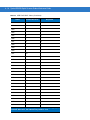
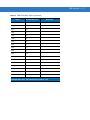
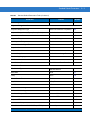
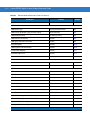
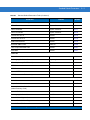
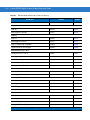
The scanner emits different beeper sequences and patterns to indicate its status. Table 2-1 defines beep
sequences that occur during both normal scanning and while programming the scanner.
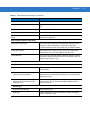
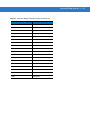
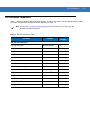
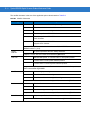
Table 2-1 Standard Beeper Definitions
Beeper Sequence
Indication
Standard Use
Short low-short medium-short high beeps
Power up.
One short high beep
A bar code symbol was decoded (if decode beeper is enabled).
Four long low beeps
A communication error occurred while transmitting a scanned
symbol to a host. The data is ignored. This occurs if the scanner is
not properly configured or if the scanner has disconnected from
the cradle.
Low beep
The scanner detects power when inserted into a cradle.
Note: This feature can be disabled.
Low-high-low-high beeps
Out of memory - the scanner cannot store the new bar code data.
The scanner was inserted in an incompatible/older cradle.
Four short high beeps
Low battery indication.
Five long low beeps
Conversion or format error.
2-2
Symbol DS3578 Digital Scanner Product Reference Guide
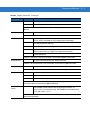
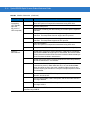
Table 2-1 Standard Beeper Definitions (Continued)
Beeper Sequence
Indication
Wireless Operation
Short low-high beeps
Scanner has paired with the cradle.
Short high-low beeps
Scanner has unpaired with the cradle.
Note: When connected to a remote device using SPP or HID, if a
disconnect beep sequence sounds immediately after scanning a
bar code, check the host device to determine if it received the
transmitted data. The scanner may have transmitted the last bar
code scanned after losing the connection.
Long low-long high beeps
Unsuccessful pairing attempt. See Auto-reconnect Feature on
page 4-15.
Long low-long high-long low-long high
beeps
Remote device rejected connection attempt, possibly due to an
attempt to pair with a cradle that is already paired with the
maximum number of scanners.
Four long low beeps
1. A transmission error was detected in a scanned symbol. The
data is ignored. This occurs if a unit is not properly configured.
Check option setting.
2. When communicating with a cradle, the cradle acknowledges
receipt of data. If the acknowledgment is not received, this
transmission error beep sequence sounds. Data may still have
been received by the host. Check the host system for receipt of
transmitted data. If data was not received by the host, re-scan the
bar code.
Five high beeps
Emitted every 5 seconds while a reconnection attempt is in
progress. See Auto-reconnect Feature on page 4-15.
Parameter Menu Scanning
Short high beep
Correct entry scanned or correct menu sequence performed.
Long low-long high beeps
Input error; incorrect bar code, programming sequence, or Cancel
scanned. Scanner remains in program mode.
Short high-short low beeps
Keyboard parameter selected. Enter value using numeric bar
codes.
Short high-short low-short high-short low
beeps
Successful program exit with change in the parameter setting.
Long low-long high-long low-long high
beeps
Out of host parameter storage space. See Default Parameters on
page 5-4.
ADF Programming Normal Data Entry
High-low beeps
Enter another digit. Add leading zeros to the front if necessary.
Low-low beeps
Enter another alphabetic character or scan the End of Message
bar code.
High-high beeps
Enter another criterion or action, or scan the Save Rule bar code.
Scanning
Table 2-1 Standard Beeper Definitions (Continued)
Beeper Sequence
Indication
High-low-high-low beeps
Rule saved. Rule entry mode exited.
High-low-low beeps
All criteria or actions cleared for current rule, continue entering
rule.
Low beep
Delete last saved rule. The current rule is left intact.
Low-high-high beeps
All rules have been deleted.
Short low-short high-short low-short high
beeps
Out of host ADF parameter storage space. See Default
Parameters on page 5-4.
ADF Programming Error Indications
Low-high-low-high beeps
Out of rule memory. Erase some existing rules, then try to save
rule again. (It is not necessary to re-enter the current rule.)
A Symbol DS3578 scanner was inserted into an STB3478 cradle.
Low-high-low beeps
ADF transmit error. Cancel rule entry. Rule entry mode exited
because of an error or the user asked to exit rule entry.
Low-high beeps
Entry error, wrong bar code scanned. Re-enter criterion or action.
All previously entered criteria and actions are retained. Criteria or
action list is too long for a rule.
Host Specific
USB Only
Four high beeps
The scanner did not complete initialization. Wait several seconds
and scan again.
Short low-short medium-short high
beeps (power-up sequence)
The scanner scanned a USB device type. The scanner must
establish communication with the bus before it can operate at the
highest power level.
Short low-short medium-short high
beeps (power-up sequence) occur
more than once
The USB bus may cause power to the scanner to cycle on and off
more than once. This is normal and usually happens when the
host PC cold boots.
RS-232 only
High-high-high-low beeps
RS-232 receive error.
High beep
A <BEL> character is received and Beep on <BEL> is enabled
(Point-to-Point mode only).
2-3
2-4
Symbol DS3578 Digital Scanner Product Reference Guide
LED Definitions
In addition to beeper sequences, the scanner uses a two-color LED to indicate its status, and the cradle’s LED
indicates charge and communication status. Table 2-2 explains scanner LED sequences, and Table 2-3 explains
cradle LED sequences.
Table 2-2 Scanner LED Status Indications
LED
Indication
Standard Use
Off
No power is applied to the scanner (battery is discharged or removed);
scanner is in low power and ready to scan.
Green
A bar code was successfully decoded.
Red
A data transmission error, scanner malfunction, or the Symbol DS3578
scanner was inserted into an STB3478 cradle.
Charging Use
Green Slow Flash
The scanner charges at the slow rate (used when a host cable powers the
cradle).
Green Fast Flash
The scanner charges at the fast rate (used when an external power supply
powers the cradle).
Red flash
Charging problem. Contact Motorola Enterprise Mobility Support.
The Symbol DS3578 scanner was inserted into an STB3478 cradle.
Red and green flash
Temperature fault. Move the cradle to a location where the temperature is
0o - 40o C; optimal charging temperature is 5o - 35o C.
Table 2-3 Cradle LED Status Indications
LED
Indication
Flashing Green
The cradle is externally powered with a USB host interface that has
suspended the cradle. The cradle is no longer connected to the scanner but
the can charge the scanner. Scan the pairing bar code to re-pair the
scanner.
Flashing Red
Transmission error, or you inserted an DS3478 scanner into the STB3578
cradle.
Scanning
2-5
Scanning
Install and program the digital scanner (see Chapter 1, Getting Started). For assistance, contact the local supplier
or Motorola Enterprise Mobility Support.
1.
Aim the digital scanner at the bar code.
Figure 2-1 Scanning in Hand-Held Mode
2.
Hold the trigger until the digital scanner beeps, indicating the bar code is successfully decoded. For more
information on beeper and LED definitions, see Table 2-1 and Table 2-2.
Aiming
When scanning, the digital scanner projects a red laser aiming pattern which allows positioning the bar code within
its field of view. See Decode Ranges on page 2-7 for the proper distance to achieve between the digital scanner
and a bar code.
Figure 2-2 Imager Aiming Pattern
If necessary, the digital scanner turns on its red LEDs to illuminate the target bar code.
2-6
Symbol DS3578 Digital Scanner Product Reference Guide
To scan a bar code, center the symbol in any orientation within the aiming pattern. Be sure the entire symbol is
within the rectangular area formed by the cross pattern.
1D bar code symbol
2D bar code symbol
2D dot peen DPM symbol
Aiming Pattern
Figure 2-3 Scanning Orientation with Imager Aiming Pattern
NOTE
Scanning Direct Part Mark (DPM) bar codes with the DS3578-DP20005WR digital scanner: Due to the
reflective nature of some surfaces used with DPM bar codes (see Figure 2-3), it may be necessary to tilt
the scanner at an angle relative to the target (Motorola recommends 25-45 degrees). For example, when
scanning a 15 mil dot peen Datamatrix bar code marked on an aluminum surface with the
DS3578-DP20005WR, present the target between two and three inches from the nose of the scanner, and
tilt the scanner at a 30 degree angle.
When scanning standard (non-DPM) bar codes with any configuration of the DS3578 digital scanner,
follow the standard aiming instructions described in Aiming on page 2-5.
The digital scanner can also read a bar code presented within the aiming pattern but not centered. The top
examples in Figure 2-4 show acceptable aiming options, while the bottom examples can not be decoded.
012345
012345
012345
012345
Figure 2-4 Acceptable and Incorrect Aiming
Scanning
Decode Ranges
Table 2-4 DS3578 Series Decode Zones
Label Density
DS3578-SR
DS3578-HD/DS3578-DP
Paper Label
English
Metric
English
Metric
Code 39 - 3 mil
N/A
N/A
1.10" - 1.60"
2.79 - 4.06 cm
Code 39 - 4 mil
2.60" - 4.50"
6.60 - 11.43 cm
Contact - 3.5"
Contact - 8.89 cm
Code 39 - 5 mil
1.00" - 6.30"
2.54 - 16.00 cm
Contact - 4.2"
Contact - 10.67 cm
Code 39 - 7.5 mil
Contact - 10.10"
Contact - 25.65 cm
Contact - 5.4"
Contact - 13.72 cm
Code 39 - 20 mil
1.00" - 20.90"
2.54 - 53.09 cm
1.10" - 9.20"
2.79 - 23.37 cm
100% UPC - 13 mil
0.90" - 15.10"
2.29 - 38.35 cm
0.80" - 6.20"
2.03 - 15.75 cm
PDF417 - 6.67 mil
2.70" - 6.10"
6.86 - 15.49 cm
Contact - 3.70"
Contact - 9.40 cm
PDF417 - 10 mil
0.40" - 9.30"
1.02 - 23.62 cm
Contact - 4.50"
Contact - 11.43 cm
PDF417 - 15 mil
3.30" - 14.80"
8.38 - 37.59 cm
3.20" - 5.60"
8.13 - 14.22 cm
Data Matrix - 4 mil
N/A
N/A
1.00" - 2.10"
2.54 - 5.33 cm
Data Matrix - 5 mil
N/A
N/A
0.40" - 2.70"
1.02 - 6.86 cm
Data Matrix - 7.5 mil
2.10" - 5.50"
5.33 - 13.97 cm
Contact - 3.50"
Contact - 8.89 cm
Data Matrix - 10 mil
1.10" - 7.10"
2.79 - 18.03 cm
Contact - 4.40"
Contact - 11.18 cm
QR Code - 4 mil
N/A
N/A
1.10 - 1.40"
2.79 - 3.56 cm
QR Code - 5 mil
N/A
N/A
0.50" - 2.20"
1.27 - 5.59 cm
QR Code - 7.5 mil
N/A
N/A
Contact - 3.30"
Contact - 8.38 cm
QR Code - 10 mil
1.50" - 6.10"
3.81 - 15.49 cm
Contact - 4.00"
Contact - 10.16 cm
2-7
2-8
Symbol DS3578 Digital Scanner Product Reference Guide
Chapter 3 Maintenance and Technical
Specifications
Introduction
This chapter provides suggested scanner maintenance, troubleshooting, technical specifications, and signal
descriptions (pinouts).
Maintenance
Cleaning the scan window is the only maintenance required. A dirty window can affect scanning accuracy.
• Do not allow any abrasive material to touch the window.
• Remove any dirt particles with a damp cloth.
• Wipe the window using a tissue moistened with ammonia/water.
• Do not spray water or other cleaning liquids directly onto the window.
Battery Maintenance
When batteries are stored over a year, battery cell manufacturers advise that some irreversible deterioration in
overall battery quality may occur. To minimize this loss, they recommend storing batteries half charged in a dry,
cool place between 41° and 77°F (5° and 25°C), the cooler the better, and removed from the equipment to prevent
the loss of capacity. Batteries should be charged to half capacity at least once a year. In order to charge a battery
to half capacity, take a fully discharged battery and charge it for 2 hours. If an electrolyte leakage is observed, avoid
any contact with the affected area and properly dispose of the battery.
3-2
Symbol DS3578 Digital Scanner Product Reference Guide
Troubleshooting
Table 3-1 Troubleshooting
Problem
Possible Causes
Possible Solutions
Scanner emits short low-short
medium-short high beep
sequence.
Scanner is powering up.
Normal when scanner battery is inserted.
Nothing happens when scan
trigger is pressed.
No power to the scanner.
Check battery.
Ensure that end cap to battery chamber is
secured.
Scanner is disabled.
For Simple Serial Interface (SSI), Synapse, or
IBM-468x mode, enable the scanner via the host
interface. Otherwise, call Motorola Enterprise
Mobility Support (see page xvii) for contact
information).
If using RS-232 Nixdorf B
mode, CTS is not asserted.
Assert CTS line.
Scanner is not programmed
for the correct bar code
type.
Ensure the scanner is programmed to read the
type of bar code being scanned.
Bar code symbol is
unreadable.
Check the symbol to ensure it is not defaced. Try
scanning test bar codes of the same bar code
type. See Appendix C, Sample Bar Codes for test
bar codes.
Bar code is out of range of
the scanner.
Move scanner closer to or further from bar code.
Scanner emits four short high
beeps.
Battery is low.
Charge the battery. See Charging the Scanner
Battery in the Cradle on page 1-8.
Scanner emits a disconnect
(short high-short low) beep
sequence.
Scanner has disconnected
from cradle because it is too
far from the cradle.
Move closer to the cradle and listen for a
reconnection beep (short low-short high).
Scanner has disconnected
from the cradle because the
cradle has lost power or
been placed in USB
suspend mode.
Check power connections to cradle, and if using a
USB cable, check to make sure PC has not
entered a power save mode.
Laser comes on, but scanner
does not decode the bar code.
Maintenance and Technical Specifications
3-3
Table 3-1 Troubleshooting (Continued)
Problem
Scanner emits four long low
beeps after scanning a bar
code.
Possible Causes
Possible Solutions
Incorrect host interface
cable is used.
Ensure that correct host interface cable is used.
Interface/power cables to
cradle are loose.
Ensure all cable connections are secure.
Scanner is not paired to a
cradle.
Scan the PAIR bar code on the cradle that is
connected to the host that is to receive data.
Scanner has disconnected.
See disconnect beep sequence above.
A transmission error was
detected.
Ensure the cradle’s communication parameters
match the host's setting.
Cradle has not completed
USB initialization.
Wait several seconds and scan again.
Scanner not paired to
host-connected cradle.
Pair the scanner to the cradle (using PAIR bar
code on the cradle).
Cradle not programmed for
correct host interface.
Check scanner host parameters or edit options.
Interface cable is loose.
Ensure all cable connections are secure.
Cradle has lost connection
to host.
In this exact order: disconnect power supply;
disconnect host cable; wait three seconds;
reconnect host cable; reconnect power supply;
reestablish pairing.
Five long low beeps sound
after a bar code is decoded
A conversion error or format
error has been detected.
Ensure the scanner’s conversion parameters are
properly configured.
Scanned data is incorrectly
displayed on the host.
Cradle host communication
parameters do not match
host’s parameters.
Ensure proper host is selected.
Bar code is decoded, but data
is not transmitted to the host.
For RS-232, ensure the cradle’s communication
parameters match the host’s settings.
For a Keyboard Wedge configuration, ensure the
system is programmed for the correct keyboard
type, and the CAPS LOCK key is off.
Ensure editing options (e.g., UPC-E to UPC-A
conversion) are properly programmed.
Scanner emits short high-short
high-short high-long low beep
sequence when it is not in use.
RS-232 receive error.
Normal during host reset. Otherwise, ensure the
scanner’s RS-232 parity setting matches the host
setting.
Scanner emits long low-long
high beep sequence during
programming.
Input error or Cancel bar
code was scanned.
Ensure the correct numeric bar codes, that are
within range for the parameter being programmed,
are being scanned.
3-4
Symbol DS3578 Digital Scanner Product Reference Guide
Table 3-1 Troubleshooting (Continued)
Problem
Possible Causes
Possible Solutions
Scanner emits short low-short
high- short low-short high beep
sequence while it is being
programmed.
Out of ADF parameter
storage space.
Erase all rules and re-program with shorter rules.
Out of Synapse parameter
storage space.
Scan Set Synapse Defaults code, from the
appropriate Synapse Interface Guide, for cables
no longer in use and re-program the scanner for
the current host interface.
Scanner emits one short high
beep when it is not in use.
In RS-232 mode, a <BEL>
character is received and
Beep on <BEL> option is
enabled.
Normal when Beep on <BEL> is enabled and the
scanner is in RS-232 mode.
Cradle does not work after
following installation
procedures.
Cradle is not receiving
power.
Check system power.
Cable connections are not
secure.
Reinsert cables properly.
The scanner is not inserted
properly in the cradle.
Reinsert scanner.
Cradle is not properly
connected to the host.
Check that host settings are correct, and connect
the cradle to the appropriate port on the host.
Battery does not charge.
NOTE
Cradle is outside the
Charge within the recommended temperature of
charging temperature range. 32° to 104° F (0° to 40° C) nominal, 41° to 95° F
(5° to 35° C) ideal.
If problems still occur, contact the distributor or Motorola Enterprise Mobility Support. See page xvii for
contact information.
Maintenance and Technical Specifications
3-5
Technical Specifications
Table 3-2 Technical Specifications - Scanner
Item
Description
Physical Characteristics
Dimensions:
Height
Width
Depth
7.34 in. (18.65 cm)
4.82 in. (12.25 cm)
2.93 in. (7.43 cm)
Weight
14.6 oz (414 grams)
Performance Characteristics
Yaw Tolerance
± 60º from nominal
Pitch Tolerance
± 65º from nominal
Roll Tolerance
360º from nominal
Laser
650nm laser diode
ESD
15 kV air discharge
8 kV contact discharge
Radio
Bluetooth, Class 2, Version 1.2, Serial Port & HID Profiles
2.402 to 2.480 GHz Adaptive Frequency Hopping
(co-existence with 802.11 wireless networks)
Data rate: 720 kbps
Beeper Tone
User-selectable: Three tones
Minimum Element Width
5 mil (0.127 mm)
Symbology Decode Capability
1D
UPC/EAN (UPCA/UPCE/UPCE1/EAN-8/EAN-13/ JAN-8/JAN-13
plus supplementals, ISBN (Bookland), ISSN, Coupon Code),
Code 39 (Standard, Full ASCII, Trioptic), Code 128 (Standard,
Full ASCII, UCC/EAN-128, ISBT-128 Concatenated), Code 93,
Codabar/NW7, Code 11 (Standard, Matrix 2 of 5), MSI Plessey, I
2 of 5 (Interleaved 2 of 5 / ITF, Discrete 2 of 5, IATA, Chinese 2 of
5), GS1 DataBar (Omnidirectional, Truncated, Stacked, Stacked
Omnidirectional, Limited, Expanded, Expanded Stacked,
Inverse), Base 32 (Italian Pharmacode)
PDF417 (and variants)
PDF417 (Standard, Macro), MicroPDF417 (Standard, Macro),
Composite Codes (CC-A, CC-B, CC-C)
Postal
U.S. Postnet, U.S. Planet, U.K. Postal, Japan Postal, Australian
Postal, Dutch Postal, 4State Postal
3-6
Symbol DS3578 Digital Scanner Product Reference Guide
Table 3-2 Technical Specifications - Scanner (Continued)
Item
Description
DPM Marks
(DPM unit only)
Datamatrix marks applied by dot -peening. All supported barcode
types listed above marked by laser etching, chemical etching, ink
marking, molding, stamping or casting methods on surfaces such
as including metal, plastic, rubber or glass
2D
TLC-39, Aztec (Standard, Inverse), MaxiCode, DataMatrix/ECC
200 (Standard, Inverse), QR Code (Standard, Inverse, Micro)
IUID Support
Supports IUID parsing. The ability to read and separate IUID
fields per application requirements
Typical Working Distance
See Decode Ranges on page 2-7
Print Contrast Minimum
25% minimum reflectance differential, measured at 650 nm.
Motion Tolerances
Horizontal Velocity: 5 in. (12.7 cm) per second
Interfaces Supported
Keyboard Wedge, RS-232, USB, IBM 468X/469X, Synapse,
123Scan2
User Environment
Operating Temperature
-4° to 122° F (-20° to 50° C)
Storage Temperature
-40° to 158° F (-40° to 70° C)
Charging Temperature
32° to 104° F (0° to 40° C) nominal, 41° to 95° F (5° to 35° C)
ideal
Humidity
5% to 95% (non-condensing)
Ambient Light Immunity
Indoor:
Outdoor:
450 Ft Candles (4,842 Lux)
8,000 Ft Candles (86,080 Lux)
Durability
6.5 ft (2.0 m) drops to concrete;
5 ft (1.5 m) at -4° F (-20° C)
Regulatory
RoHS
Compliance with RoHS Directive 2002/95/EEC
Electrical Safety
Certified Pending to UL1950, CSA C22.2 No.950.
EN60950/IC950
Laser Classifications
IEC 825-1 Class 2
EMI
FCC Part 15 Class B, ICES-003 Class B European Union EMC
Directive, Australian SMA, Taiwan EMC, Japan
VCCI/MITI/Dentori
Input Transient Protection
IEC 1000-4-(2,3,4,5,6,11)
Maintenance and Technical Specifications
3-7
Table 3-3 Technical Specifications - Cradles
Description
Item
STB3508 and FLB3508
Power Requirements
STB3578 and FLB3578
4.75 - 14.0 VDC
Typical Current Draw
Not Charging:
35 mA @ 5V
45 mA @ 9V
80 mA @ 5V
85 mA @ 9V
Fast Rate Charge:
850 mA @ 5V
610 mA @ 9V
920 mA @ 5V
655 mA @ 9V
Slow Rate Charge:
400 mA @ 5V
275 mA @ 9V
440 mA @ 5V
310 mA @ 9V
Interfaces Supported
None
Keyboard Wedge, RS-232, USB,
IBM 468X/469X, Synapse
Operating Temperature
-4° to 122° F (-20° to 50° C)
Storage Temperature
-40° to 158° F (-40° to 70° C)
Charging Temperature
32° to 104° F (0° to 40° C) nominal, 41° to 95° F (5° to 35° C) ideal
Humidity
5% to 95% (non-condensing)
ESD
15 kV air discharge
8 kV contact discharge
Weight
10.5 oz (298 grams)
Dimensions:
Height
Width
Depth
9.5 in. (24.1 cm)
4.0 in (10.2 cm)
2.9 in (7.4 cm)
Radio
N/A
Electrical Safety
Certified Pending to UL1950, CSA C22.2 No.950. EN60950/IC950
Input Transient Protection
IEC 1000-4-(2,3,4,5,6,11)
EMI
FCC Part 15 Class B, ICES-003 Class B European Union EMC Directive,
Australian SMA, Taiwan EMC, Japan VCCI/MITI/Dentori
Bluetooth, Class 2, Version 1.2,
Serial Port & HID Profiles
2.402 to 2.480 GHz Adaptive Frequency
Hopping (co-existence with 802.11
wireless networks)
Data rate: 720 kbps
3-8
Symbol DS3578 Digital Scanner Product Reference Guide
Scanner Signal Descriptions
The signal descriptions in Table 3-4 apply to the 10-pin RJ connector on the cradle and are for reference only.
Table 3-4 Cradle to Host Pin-outs
Pin
IBM
Synapse
RS-232
Keyboard
Wedge
USB
1
Reserved
SynClock
Reserved
Reserved
Jump to Pin 6
2
Power
Power
Power
Power
Power
3
Ground
Ground
Ground
Ground
Ground
4
IBM_A(+)
Reserved
TxD
KeyClock
Reserved
5
Reserved
Reserved
RxD
TermData
D+
6
IBM_B(-)
SynData
RTS
KeyData
Jump to Pin 1
7
Reserved
Reserved
CTS
TermClock
D-
8
Reserved
Reserved
Reserved
Reserved
Reserved
9
Reserved
Reserved
Reserved
Reserved
Reserved
10
Reserved
Reserved
Reserved
Reserved
Reserved
Figure 3-1 illustrates the positions of the cradle pins.
Pin 4
Pin 3
Pin 2
Pin 1
Figure 3-1 Cradle Pin Assignments
The signal descriptions in Table 3-5 apply to the connector from the scanner to the cradle and are for reference
only.
Table 3-5 Scanner to Cradle Pin-outs
Pin
Signal
1
VCC
2
CRADLE_TXD
3
CRADLE_RXD
4
GND
Chapter 4 Radio Communications
Introduction
This chapter provides information about the modes of operation and features available for wireless communication
between scanners, cradles and hosts. The chapter also includes the parameters necessary to configure the
scanner.
The scanner ships with the settings shown in the Table 4-1 on page 4-2 (also see Appendix A, Standard Default
Parameters for all host device and miscellaneous scanner defaults). If the default values suit requirements,
programming is not necessary.
To set feature values, scan a single bar code or a short bar code sequence. The settings are stored in non-volatile
memory and are preserved even when the scanner is powered down.
If not using a Synapse or USB cable with the cradle, select a host type (see each host chapter for specific host
information) after the power-up beeps sound. This is only necessary upon the first power-up when connected to a
new host.
To return all features to default values, scan a bar code in Default Parameters on page 5-4. Throughout the
programming bar code menus, default values are indicated with asterisks (*).
* Indicates Default
*Disable Pair on Contacts
Feature/Option
Scanning Sequence Examples
In most cases, scan one bar code to set a specific parameter value.
Errors While Scanning
Unless otherwise specified, to correct an error during a scanning sequence, just re-scan the correct parameter.
4-2
Symbol DS3578 Digital Scanner Product Reference Guide
Radio Communications Parameter Defaults
Table 4-1 lists the defaults for radio communication parameters. If you wish to change any option, scan the
appropriate bar code(s) provided in this chapter.
NOTE
Table 4-1
See Appendix A, Standard Default Parameters for all user preferences, hosts, symbologies, and
miscellaneous default parameters.
Radio Communication Default Table
Parameter
Default
Page
Number
Bluetooth Host (Host Type)
Cradle Host
4-5
Bluetooth Friendly Name
Scanner name and
serial number
4-7
Discoverable Mode
General
4-7
Country Keyboard Types (Country Code)
North American
4-9
HID Keyboard Keystroke Delay
No Delay (0 msec)
4-11
CAPS Lock Override
Disable
4-11
Ignore Unknown Characters
Enable
4-12
Emulate Keypad
Disable
4-12
Keyboard FN1 Substitution
Disable
4-13
Function Key Mapping
Disable
4-13
Simulated Caps Lock
Disable
4-14
Convert Case
No Case Conversion
4-14
Beep on Reconnect Attempt
Disable
4-15
Reconnect Attempt Interval
30 sec
4-16
Auto-reconnect in Bluetooth Keyboard
Emulation (HID Slave) Mode
On Bar Code Data
4-18
Modes of Operation
(Point-to-Point/Multipoint-to-Point)
Point-to-Point
4-20
Parameter Broadcast (Cradle Host Only)
Enable
4-21
Pairing Modes
Unlocked
4-22
Pairing on Contacts
Disable
4-23
Connection Maintenance Interval
15 min
4-24
Radio Communications
Table 4-1
Radio Communication Default Table (Continued)
Parameter
Default
Page
Number
Authentication
Disable
4-27
Variable Pin Code
Static
4-28
Encryption
Disable
4-29
Wireless Beeper Definitions
When the scanner scans the pairing bar code it issues various beep sequences indicating successful or
unsuccessful operations. See Table 4-2 for beep sequences that occur during pairing operations.
Table 4-2 Wireless Beeper Definitions
Beeper Sequence
Indication
Short low-high beeps
Scanner has paired with the cradle.
Short high-low beeps
Scanner has unpaired with the cradle.
Note: When connected to a remote device using SPP or HID, if a
disconnect beep sequence sounds immediately after scanning a
bar code, check the host device to determine if it received the
transmitted data. The scanner may have transmitted the last bar
code scanned after losing the connection.
Long low-long high beeps
Unsuccessful pairing attempt. See Auto-reconnect Feature on
page 4-15.
Long low-long high-long low-long high
beeps
Remote device rejected connection attempt, possibly due to an
attempt to pair with a cradle that is already paired with the
maximum number of scanners.
Four long low beeps
1. A transmission error was detected in a scanned symbol. The
data is ignored. This occurs if a unit is not properly configured.
Check option setting.
2. When communicating with a cradle, the cradle acknowledges
receipt of data. If the acknowledgment is not received, this
transmission error beep sequence sounds. Data may still have
been received by the host. Check the host system for receipt of
transmitted data. If data was not received by the host, re-scan the
bar code.
Five high beeps
Emitted every 5 seconds while a reconnection attempt is in
progress. See Auto-reconnect Feature on page 4-15.
4-3
4-4
Symbol DS3578 Digital Scanner Product Reference Guide
Radio Communications Host Types
To set up the scanner for communication with a cradle, or to use standard Bluetooth profiles, scan the appropriate
host type bar code below.
• Cradle Host (default) - Select this host type for scanner(s) to cradle operation. The scanner must then be
paired to the cradle and the cradle communicates directly to the host via the host interface cable connection.
• Serial Port Profile (Master) - Select this host type for Bluetooth Technology Profile Support (see page 4-6).
The scanner connects to the PC/host via Bluetooth and behaves like there’s a serial connection. The scanner
initiates the connection to the remote device and is the Master. Scan Serial Port Profile (Master), then scan
the PAIR bar code for the remote device. See Pairing Bar Code Format on page 4-24 for information about
creating a pairing bar code for a remote device.
• Serial Port Profile (Slave) - Select this host type for Bluetooth Technology Profile Support (see page 4-6). The
scanner connects to the PC/host via Bluetooth and behaves like there’s a serial connection. The scanner
accepts incoming connection requested from a remote device and is the Slave. Scan Serial Port Profile
(Slave) and wait for the incoming connection.
• Bluetooth Keyboard Emulation (HID Slave) - Select this host type for Bluetooth Technology Profile Support.
(See page 4-6 for Bluetooth Technology Profile Support and Master/Slave definitions.) The scanner connects
to the PC/host via Bluetooth and behaves like a keyboard. The scanner accepts incoming connection
requested from a remote device and is the slave. Scan Bluetooth Keyboard Emulation (HID Slave) and
wait for the incoming connection.
NOTE
1.The scanner supports keyboard emulation over the Bluetooth HID profile. For detailed information, and
HID host parameters, see HID Host Parameters on page 4-8.
2. When the scanner is paired to the cradle in SPP Master or Cradle Host mode, the scanner
automatically tries to reconnect to a remote device when a disconnection occurs that is due to the radio
losing communication. For more information see Auto-reconnect Feature on page 4-15.
Radio Communications
Radio Communications Host Types (continued)
*Cradle Host
Serial Port Profile (Master)
Serial Port Profile (Slave)
Bluetooth Keyboard Emulation (HID Slave)
4-5
4-6
Symbol DS3578 Digital Scanner Product Reference Guide
Bluetooth Technology Profile Support
With Bluetooth Technology Profile Support, the cradle is not required for wireless communication. The scanner
communicates directly to the host using Bluetooth technology. The scanner supports the standard Bluetooth Serial
Port Profile (SPP) and HID Profiles which enable the scanner to communicate with other Bluetooth devices that
support these profiles.
• SPP - the scanner connects to the PC/host via Bluetooth and performs like there’s a serial connection.
• HID - the scanner connects to the PC/host via Bluetooth and performs like a keyboard.
Master/Slave Set Up
The scanner can be set up as a Master or Slave.
When the scanner is set up as a Slave, it is discoverable and connectable to other devices. When the scanner is
set up as a Master, the Bluetooth address of the remote device to which a connection is requested is required. A
pairing bar code with the remote device address must be created and scanned to attempt a connection to the
remote device. See the Pairing Bar Code Format on page 4-24 for information about creating a pairing bar code.
Master
When the scanner is set up as a Master (SPP), it initiates the radio connection to a slave device. Initiating the
connection is done by scanning a pairing bar code for the remote device (see Pairing Bar Code Format on page
4-24).
Slave
When the scanner is set up as a Slave device (SPP or HID), the scanner accepts an incoming connection request
from a remote device.
NOTE
The number of scanners is dependent on the host’s capability.
Radio Communications
4-7
Bluetooth Friendly Name
You can set a meaningful name for the scanner that appears in the application during device discovery. The default
name is the scanner name followed by its serial number, e.g., DS3578 123456789ABCDEF. Scanning Set Defaults
reverts the scanner to this name; use custom defaults to maintain the user-programmed name through a Set
Defaults operation.
To set a new Bluetooth Friendly Name, scan the following bar code, then scan up to 23 characters from Appendix
E, Alphanumeric Bar Codes. If the name contains less than 23 characters, scan End of Message on page E-7 after
entering the name.
NOTE
If your application allows you to set a device name, this takes precedence over the Bluetooth Friendly
Name.
Bluetooth Friendly Name
Discoverable Mode
Select a discoverable mode based on the device initiating discovery:
• Select General Discoverable Mode when initiating connection from a PC.
• Select Limited Discoverable Mode when initiating connection from a mobile device (e.g., Motorola Q), and
the device does not appear in General Discoverable Mode. Note that it can take longer to discover the device
in this mode.
The device remains in Limited Discoverable Mode for 30 seconds, and green LEDs flash while in this mode.
It is then non-discoverable. To re-active Limited Discoverable Mode, press the trigger.
*General Discoverable Mode
Limited Discoverable Mode
4-8
Symbol DS3578 Digital Scanner Product Reference Guide
HID Host Parameters
The scanner supports keyboard emulation over the Bluetooth HID profile. In this mode the scanner can interact
with Bluetooth enabled hosts supporting the HID profile as a Bluetooth keyboard. Scanned data is transmitted to
the host as keystrokes.
Following are the keyboard parameters supported by the HID host.
Radio Communications
HID Country Keyboard Types (Country Codes)
Scan the bar code corresponding to the keyboard type.
*North American Standard Keyboards
French Windows
German Windows
French Canadian Windows 98
Spanish Windows
Italian Windows
4-9
4 - 10 Symbol DS3578 Digital Scanner Product Reference Guide
HID Country Keyboard Types (Country Codes - continued)
Swedish Windows
UK English Windows
Japanese Windows
French Canadian Windows 2000/XP
Portuguese/Brazilian Windows
Radio Communications 4 - 11
HID Keyboard Keystroke Delay
This parameter sets the delay, in milliseconds, between emulated keystrokes. Scan a bar code below to increase
the delay when the HID host requires a slower transmission of data.
*No Delay (0 msec)
Medium Delay (20 msec)
Long Delay (40 msec)
HID CAPS Lock Override
When enabled, the case of the data is preserved regardless of the state of the caps lock key. This setting is always
enabled for the “Japanese, Windows (ASCII)” keyboard type and can not be disabled.
*Do Not Override Caps Lock Key
(Disable)
Override Caps Lock Key
(Enable)
4 - 12 Symbol DS3578 Digital Scanner Product Reference Guide
HID Ignore Unknown Characters
Unknown characters are characters the host does not recognize. When Send Bar Codes With Unknown
Characters is scanned, all bar code data is sent except for unknown characters, and no error beeps sound. When
Do Not Send Bar Codes With Unknown Characters is scanned, bar codes containing at least one unknown
character are not sent to the host, and an error beep sounds.
*Send Bar Codes With Unknown Characters
(Enable)
Do Not Send Bar Codes With Unknown Characters
(Disable)
Emulate Keypad
When enabled, all characters are sent as ASCII sequences over the numeric keypad. For example, ASCII A is sent
as "ALT make" 0 6 5 "ALT Break."
*Disable Keypad Emulation
Enable Keypad Emulation
Radio Communications 4 - 13
HID Keyboard FN1 Substitution
When enabled, this parameter allows replacement of any FN1 character in an EAN128 bar code with a Key
Category and value chosen by the user. See Set FN1 Substitution Value on page 5-17 to set the Key Category and
Key Value.
*Disable Keyboard FN1 Substitution
Enable Keyboard FN1 Substitution
HID Function Key Mapping
ASCII values under 32 are normally sent as control-key sequences. When this parameter is enabled, the keys in
bold are sent in place of the standard key mapping (see Table 8-2 on page 8-13). Table entries that do not have a
bold entry remain the same whether or not this parameter is enabled.
*Disable Function Key Mapping
Enable Function Key Mapping
4 - 14 Symbol DS3578 Digital Scanner Product Reference Guide
Simulated Caps Lock
When enabled, the scanner inverts upper and lower case characters on the scanner bar code as if the Caps Lock
state is enabled on the keyboard. This inversion is done regardless of the current state of the keyboard Caps Lock
state.
*Disable Simulated Caps Lock
Enable Simulated Caps Lock
Convert Case
When enabled, the scanner converts all bar code data to the selected case.
*No Case Conversion
Convert All to Upper Case
Convert All to LowerCase
Radio Communications 4 - 15
Auto-reconnect Feature
When in SPP Master or Cradle Host mode, the scanner automatically tries to reconnect to a remote device when a
disconnection occurs that is due to the radio losing communication. This can happen if the scanner goes out of
range with the remote device, or if the remote device powers down. The scanner tries to reconnect for the period of
time specified by the Reconnect Attempt Interval setting. During that time the green LED continues to blink.
If the auto-reconnect process fails due to page timeouts, the scanner sounds a page timeout beep (long low/long
high) and enters low power mode. The auto-reconnect process can be re-started by pulling the scanner trigger.
If the auto-reconnect process fails because the remote device rejects the connection attempt, the scanner sounds
a connection reject beep sequence (see Wireless Beeper Definitions on page 4-3) and deletes the remote pairing
address. If this happens, a pairing bar code must be scanned to attempt a new connection to the remote device.
NOTE
If a bar code is scanned while the auto-reconnect sequence is in process, a transmission error beep
sequence sounds and the data is not transmitted to the host. After a connection is reestablished, normal
scanning operation returns. For error beep sequence definitions, see Beeper Definitions on page 2-1.
The scanner has memory available for storing a remote Bluetooth address for each Master mode (SPP, Cradle).
When switching between these modes, the scanner automatically tries to reconnect to the last device it was
connected to in that mode.
NOTE
Switching between Bluetooth host types by scanning a host type bar code (page 4-4) causes the radio to
be reset. Scanning is disabled during this time. It takes several seconds for the scanner to re-initialize the
radio at which time scanning is enabled.
Reconnect Attempt Beep Feedback
When a scanner disconnects as it goes out of range, it immediately attempts to reconnect. While the scanner
attempts to reconnect, the green LED continues to blink. If the auto-reconnect process fails, the scanner emits a
page timeout beep (long low/long high) and stops blinking the LED. The process can be restarted by pulling the
trigger.
The Beep on Reconnect Attempt feature is disabled by default. When enabled, the scanner emits 5 short high
beeps every 5 seconds while the reconnection attempt is in progress.
Scan a bar code below to enable or disable Beep on Reconnect Attempt.
*Disable Beep on Reconnect Attempt
Enable Beep on Reconnect Attempt
4 - 16 Symbol DS3578 Digital Scanner Product Reference Guide
Reconnect Attempt Interval
When a scanner disconnects as it goes out of range, it immediately attempts to reconnect for the default time
interval of 30 seconds. This time interval can be changed to one of the following options:
• 30 seconds
• 1 minute
• 5 minutes
• 30 minutes
• 1 hour
• Indefinitely.
To set the Reconnect Attempt Interval, scan one of the bar codes below
*Attempt to Reconnect for 30 Seconds
Attempt to Reconnect for 1 Minute
Attempt to Reconnect for 5 Minutes
Attempt to Reconnect for 30 Minutes
Radio Communications 4 - 17
Reconnect Attempt Interval (continued)
Attempt to Reconnect for 1 Hour
Attempt to Reconnect Indefinitely
4 - 18 Symbol DS3578 Digital Scanner Product Reference Guide
Auto-reconnect in Bluetooth Keyboard Emulation (HID Slave) Mode
In Bluetooth Keyboard Emulation (HID Slave) mode, select a re-connect option for when the scanner loses its
connection with a remote device:
• Auto-reconnect on Bar Code Data: The scanner auto-reconnects when you scan a bar code. With this
option, a delay can occur when transmitting the first characters. The scanner sounds a decode beep upon
bar code scan, followed by a connection, a page timeout, a rejection beep, or a transmission error beep.
Select this option to optimize battery life on the scanner and mobile device. Note that auto-reconnect does
not occur on rejection and cable unplug commands.
• Auto-reconnect Immediately: When the scanner loses connection, it attempts to reconnect. If a page
timeout occurs, the scanner attempts reconnect on a trigger pull. Select this option if the scanner’s battery life
is not an issue and you do not want a delay to occur when the first bar code is transmitted. Note that
auto-reconnect does not occur on rejection and cable unplug commands.
• Disable Auto-reconnect in Bluetooth Keyboard Emulation (HID Slave) Mode: When the scanner loses
connection, you must re-establish it manually.
*Auto-reconnect on Bar Code Data
Auto-reconnect Immediately
Disable Auto-reconnect in
Bluetooth Keyboard Emulation (HID Slave) Mode
Radio Communications 4 - 19
Out of Range Indicator
An out of range indicator can be set by scanning Enable Beep on Reconnect Attempt on page 4-15 and extending
the time using the Reconnect Attempt Interval on page 4-16.
For example, with Beep on Reconnect Attempt disabled while the scanner loses radio connection when it is taken
out of range, the scanner attempts to reconnect silently during the time interval set by scanning a Reconnect
Attempt Interval.
When Beep on Reconnect Attempt is enabled, the scanner emits 5 high beeps every 5 seconds while the
reconnection attempt is in progress. If the Reconnect Attempt Interval is adjusted to a longer period of time, such
as 30 minutes, the scanner emits 5 high beeps every 5 seconds for 30 minutes providing an out of range indicator.
4 - 20 Symbol DS3578 Digital Scanner Product Reference Guide
Scanner(s) to Cradle Support
NOTE
Customers who purchased STB3578 and/or FLB3578 cradles prior to February 1, 2010 (manufacturing
date) and plan to use them in radio communication mode with the DS3578 must download 123Scan2 (see
Chapter 11, 123Scan2) and update the scanner to the latest firmware revision.
Modes of Operation
The charging cradle with radio supports two radio communication modes of operation, allowing the scanner to
communicate wirelessly:
• Point-to-Point
• Multipoint-to-Point.
Point-to-Point Communication
In Point-to-Point communication mode, the cradle allows one scanner to connect to it at a time. In this mode, the
scanner is paired to the cradle either by insertion into the cradle (if pairing on contacts is enabled, page 4-23), or by
scanning the PAIR bar code on the cradle. Communication can be locked, unlocked (default), or in a lock override
state (see Pairing Modes on page 4-22). In locked mode, locking intervals must be set by scanning a connection
maintenance interval bar code beginning on page 4-24.
To activate this mode of operation, scan Point-to-Point.
Multipoint-to-Point Communication
In Multipoint-to-Point communication mode, up to three scanners can be paired to one cradle.
To activate this mode, the first scanner connected to the cradle must scan the Multipoint-to-Point bar code. This
mode allows a parameter broadcast (page 4-21) that clones all scanners paired to the cradle so only one scanner
needs to be programmed.
To select Point-to-Point or Multipoint-to-Point mode, scan the appropriate bar code.
Multipoint-to-Point Mode
*Point-to-Point Mode
Radio Communications 4 - 21
Parameter Broadcast (Cradle Host Only)
When in multipoint-to-point mode, enable Parameter Broadcast to broadcast all parameter bar codes scanned to
all other scanners in the piconet. If disabled, parameter bar codes are processed by the individual scanner only,
and the scanner ignores parameters broadcast from other scanners or from the cradle.
*Enable Parameter Broadcast
Disable Parameter Broadcast
Pairing
Pairing is the process by which a scanner initiates communication with a cradle. Scanning Multipoint-to-Point
activates multi scanner-to-cradle operation and allows up to three scanners to pair to one cradle. The cradle
includes a pairing bar code.
To pair the scanner with the cradle, scan the pairing bar code on the cradle. A high/low/high/low beep sequence
indicates that the pairing bar code was decoded. When a connection between the cradle and scanner is
established, a low/high beep sounds.
NOTE
1. The pairing bar code that connects the scanner to a cradle is unique to each cradle.
2. Do not scan data or parameters until pairing completes.
3. When the scanner is paired to the cradle in SPP Master or Cradle Host mode, the scanner
automatically tries to reconnect to a remote device when a disconnection occurs that is due to the radio
losing communication. For more information see Auto-reconnect Feature on page 4-15.
4 - 22 Symbol DS3578 Digital Scanner Product Reference Guide
Pairing Modes
When operating with the cradle, two modes of pairing are supported:
• Locked Pairing Mode - When a cradle is paired (connected) to the scanner (or to three scanners in
Multipoint-to-Point mode), any attempt to connect a different scanner, by either scanning the PAIR bar code
on the cradle or by inserting it into the cradle with the pairing on contacts feature enabled (page 4-23), is
rejected. The currently connected scanner(s) maintain connection. In this mode, you must set a Connection
Maintenance Interval on page 4-24.
• Unlocked Pairing Mode - Pair (connect) a new scanner to a cradle at any time by either scanning the PAIR
bar code on the cradle or by inserting it into the cradle with the pairing on contacts feature enabled. This
unpairs the previous scanner from the cradle.
NOTE
In Multipoint-to-Point mode, pairing a 4th scanner while in Unlocked mode replaces any disconnected (out
of range) scanner. However, if three scanners are actively connected to the cradle, a 4th scanner cannot
connect regardless of the pairing mode.
To set the cradle pairing mode, scan the appropriate bar code below.
*Unlocked Pairing Mode
Locked Pairing Mode
Lock Override
Lock Override overrides a locked scanner base pairing and connects a new scanner. In Multipoint-to-Point mode,
this unpairs any disconnected (out of range) scanner first, in order to connect the new scanner.
To use Lock Override, scan the bar code below, followed by the pairing bar code on the cradle.
LockOverride
Radio Communications 4 - 23
Pairing Methods
There are two pairing methods. The default method allows the scanner and cradle to pair (connect) when the
pairing bar code on the cradle is scanned. A second method pairs the scanner and cradle when the scanner is
inserted in the cradle. To enable this feature, scan Enable Pair On Contacts below. With this feature enabled it is
not necessary to scan the pairing bar code on the cradle. If the pairing is successful, a low/high connection beep
sequence sounds a few seconds after the scanner is placed in the cradle. See Wireless Beeper Definitions on
page 4-3 for other beep sequences.
To enable or disable pairing on contacts, scan the appropriate bar code below.
Enable Pair On Contacts
*Disable Pair on Contacts
Unpairing
Unpair the scanner from the cradle or PC/host to make the cradle available for pairing with another scanner. Scan
the bar code below to disconnect the scanner from its cradle/PC host.
An unpairing bar code is also included in the Symbol DS3578 Quick Start Guide.
Unpairing
4 - 24 Symbol DS3578 Digital Scanner Product Reference Guide
Pairing Bar Code Format
When the scanner is configured as an SPP Master, you must create a pairing bar code for the remote Bluetooth
device to which the scanner can connect. You must know the Bluetooth address of the remote device. Pairing bar
codes are Code 128 bar codes and are formatted as follows:
<Fnc 3>Bxxxxxxxxxxxx
where:
• B (or LNKB) is the prefix
• xxxxxxxxxxxx represents the 12-character Bluetooth address.
Pairing Bar Code Example
If the remote device to which the scanner can connect has a Bluetooth address of 11:22:33:44:55:66, then the
pairing bar code is:
Paring Bar Code Content:
‘B’ or ‘LNKB’ + Bluetooth Address
B112233445566
Connection Maintenance Interval
NOTE
The Connection Maintenance Interval only applies in locked pairing mode (see page 4-22).
When a scanner disconnects from a cradle due to a Link Supervision Timeout, the scanner immediately attempts
to reconnect to the cradle for 30 seconds. If the auto-reconnect process fails, it can be restarted by pulling the
scanner trigger.
To guarantee that a disconnected scanner can reconnect when it comes back in range, the cradle reserves the
connection for that scanner for a period of time defined by the Connection Maintenance Interval. If the cradle is
supporting the maximum three scanners and one scanner disconnects, a fourth scanner cannot pair to the cradle
during this interval. To connect another scanner, either wait until the connection maintenance interval expires then
scan the PAIR bar code on the cradle with the new scanner; or scan Lock Override (page 4-22) with the new
scanner then scan the PAIR bar code on the cradle.
NOTE
When the cradle supports the maximum three scanners, it stores the remote pairing address of each
scanner in memory regardless of the scanner condition (e.g., discharged battery). When you want to
change the scanners paired to the cradle, unpair each scanner currently connected to the cradle by
scanning the Unpairing bar code prior and reconnect each appropriate scanner by scanning the PAIR bar
code on the cradle.
Connection Maintenance Interval options are:
• 15 minutes
• 30 minutes
• One hour
• Two hours
• Four hours
• Eight hours
Radio Communications 4 - 25
• 24 hours
• Indefinitely.
Considerations
The system administrator determines the Connection Maintenance Interval. A shorter interval allows new users to
gain access to abandoned connections more quickly, but causes problems if users leave the work area for
extended periods. A longer interval allows existing users to leave the work area for longer periods of time, but ties
up the system for new users.
To avoid this conflict, users who are going off-shift can scan the unpair bar code on page 4-23 to ignore the
Connection Maintenance Interval and make the connection immediately available.
To set the Connection Maintenance Interval, scan one of the bar codes below.
*Set Interval to 15 Minutes
Set Interval to 30 Minutes
Set Interval to 60 Minutes
Set Interval to 2 Hours
4 - 26 Symbol DS3578 Digital Scanner Product Reference Guide
Connection Maintenance Interval (continued)
Set Interval to 4 Hours
Set Interval to 8 Hours
Set Interval to 24 Hours
Set Interval to Forever
Radio Communications 4 - 27
Bluetooth Security
The scanner supports Bluetooth Authentication and Encryption. Authentication can be requested by either the
remote device or the scanner. When Authentication is requested, the scanner uses its programmed PIN code to
generate a link key. The scanner stores this link key upon pairing, so you do not have to re-enter the PIN code
when moving in and out of range, switching profiles, or switching between devices (e.g., between the cradle and
the application).
Once Authentication is complete, either device may then negotiate to enable Encryption.
NOTE
A remote device can still request Authentication.
Authentication
To force Authentication with a remote device (including the cradle), scan the Enable Authentication bar code
below. To prevent the scanner from forcing Authentication, scan the Disable Authentication bar code below.
Enable Authentication
*Disable Authentication
4 - 28 Symbol DS3578 Digital Scanner Product Reference Guide
PIN Code
To set the PIN code (e.g., password) on the scanner, scan the bar code below followed by five alphanumeric
programming bar codes from Appendix E, Alphanumeric Bar Codes. The default PIN code is 12345.
If the scanner communicates with a cradle with security enabled, synchronize the PIN codes on the scanner and
cradle. To achieve this, connect the scanner to the cradle when setting the PIN codes. If the scanner is not
connected to a cradle, the PIN code change only takes effect on the scanner. If security is required between the
scanner and cradle, and the PIN codes do not match, pairing fails. If the PIN codes are not synchronized,
re-synchronize them by disabling security, establishing a connection to the cradle, and then programming a new
PIN code.
Set PIN Code
Variable PIN Code
The default PIN code is the user-programmed Static PIN Code. Typically, however, HID connections require
entering a Variable PIN Code. If, when attempting connection, the application presents a text box that includes a
PIN, scan the Variable PIN Code bar code, then re-attempt connection. When you hear a beep indicating the
scanner is waiting for an alphanumeric entry, enter the provided variable PIN using the Alphanumeric Keyboard on
page E-1, then scan End of Message on page E-7 if the code is less than 16 characters. The scanner discards the
variable PIN code after connection.
*Static PIN Code
Variable PIN Code
Radio Communications 4 - 29
Encryption
NOTE
Authentication must be performed before Encryption can take effect.
To set up the scanner for enabling Encryption, scan Enable Encryption. To prevent the scanner from enabling
Encryption, scan Disable Encryption. When enabled, the radio encrypts data.
Enable Encryption
* Disable Encryption
4 - 30 Symbol DS3578 Digital Scanner Product Reference Guide
Chapter 5 User Preferences
Introduction
This chapter describes each user preference feature and provides the programming bar codes for selecting these
features for the scanner.
The scanner ships with the settings shown in the User Preferences Default Table on page 5-2 (also see Appendix
A, Standard Default Parameters for all host device and miscellaneous scanner defaults). If the default values suit
the requirements, programming is not necessary.
Set feature values by scanning single bar codes or short bar code sequences. The settings are stored in
non-volatile memory and are preserved when the scanner powers down.
The scanner communicates with the host through the cradle. During scanner setup, the scanner is paired with a
cradle, which is connected to the host through one of several interfaces (see Pairing on page 1-10 and the
applicable host interface chapter). Each cradle can pair with up to four scanners.
If not using a Synapse or USB cable, select the host type (see the specific host chapter) after the scanner emits
power-up beeps. This is only done upon the first power-up when connecting to a new host.
NOTE
Disconnect the power supply before changing host cables or the scanner may not recognize the new host.
To return all features to their default values, scan a Default Parameters bar code on page 5-4. Throughout the
programming bar code menus, default values are indicated with asterisks (*).
* Indicates Default
*High Frequency
Feature/Option
5-2
Symbol DS3578 Digital Scanner Product Reference Guide
Scanning Sequence Examples
In most cases, scan only one bar code to set a parameter value. For example, to set the beeper tone to high, scan
the High Frequency (beeper tone) bar code under Beeper Tone on page 5-5. The scanner issues a fast warble
beep and the LED turns green, indicating a successful parameter entry.
Other parameters, such as Laser On Time or Data Transmission Formats, require scanning several bar codes.
See the parameter description for this procedure.
Errors While Scanning
Unless otherwise specified, if an error is made during a scanning sequence, re-scan the correct parameter.
User Preferences Default Parameters
Table 5-1 lists the defaults for user preference parameters. To change any option, scan the appropriate bar code(s)
provided in User Preferences on page 5-4.
NOTE
Table 5-1
See Appendix A, Standard Default Parameters for all user preference, host, symbology, and
miscellaneous default parameters.
User Preferences Default Table
Parameter
Default
Page
Number
User Preferences
Default Parameters
Restore Defaults
5-4
Beeper Tone
Medium
5-5
Beeper Volume
High
5-6
Laser On Time
3.0 sec
5-7
Beep After Good Decode
Enable
5-7
Pager Motor Actuation After Good Decode
Enable
5-8
Beep on Insertion
Enable
5-8
Time Delay to Reduced Power Mode
1 Second
5-9
Picklist Mode
Disabled Always
5-10
DPM Scanning
Enable
5-11
Decoding Illumination
Enable
5-10
Decode Aiming Pattern
Enable
5-12
Transmit Code ID Character
None
5-13
User Preferences
Table 5-1
User Preferences Default Table (Continued)
Parameter
Default
Page
Number
Prefix Value
7013 <CR><LF>
5-14
Suffix Value
7013 <CR><LF>
5-14
Scan Data Transmission Format
Data As Is
5-15
FN1 Substitution Values
Set FN1 Substitution Value
5-17
Transmit “No Read” Message
Disable No Read
5-17
Synapse Interface
Standard Synapse Connection
5-18
Batch Mode
Normal
(Do Not Batch Data)
5-19
UID Parsing
Disable
5-21
5-3
5-4
Symbol DS3578 Digital Scanner Product Reference Guide
User Preferences
Default Parameters
The scanner can be reset to two types of defaults: factory defaults or custom defaults. Scan the appropriate bar
code below to reset the scanner to its default settings and/or set the scanner’s current settings as the custom
default.
• Restore Defaults - Scan this bar code to reset all default parameters as follows:
• If you configured custom default values (see Write to Custom Defaults), this sets the custom default
values for all parameters.
• If you did not configure custom default values, this sets the factory default values for all parameters. (For
factory default values, see Table A-1 on page A-1.)
• Set Factory Defaults - Scan this bar code to eliminate all custom default values and set the scanner to
factory default values. (For factory default values, see Table A-1 on page A-1.)
• Write to Custom Defaults - This bar code configures custom default parameters that set unique default
values for all parameters. After changing all parameters to the desired default values, scan the Write to
Custom Defaults bar code below to configure custom defaults.
NOTE
Scanning Restore Defaults or Set Factory Defaults unpairs the scanner with the cradle, and you must
rescan the pairing bar code.
*Restore Defaults
Set Factory Defaults
Write to Custom Defaults
User Preferences
5-5
Beeper Tone
To select a decode beep frequency (tone), scan the Low Frequency, Medium Frequency, or High Frequency bar
code.
Low Frequency
*Medium Frequency
High Frequency
5-6
Symbol DS3578 Digital Scanner Product Reference Guide
Beeper Volume
To select a beeper volume, scan the Low Volume, Medium Volume, or High Volume bar code.
Low Volume
Medium Volume
*High Volume
User Preferences
5-7
Laser On Time
This parameter sets the maximum time that decode processing continues during a scan attempt. It is
programmable in 0.1 second increments from 0.5 to 9.9 seconds. The default Laser On Time is 3.0 seconds.
To set a Laser On Time, scan the bar code below. Next, scan two numeric bar codes from Appendix D, Numeric
Bar Codes that correspond to the desired on time. Include a leading zero for single digit numbers. For example, to
set a Laser On Time of 0.5 seconds, scan the bar code below, then scan the 0 and 5 bar codes. To correct an error
or change the selection, scan Cancel on page D-3.
Laser On Time
Beep After Good Decode
Scan one of the following bar codes to select whether the scanner beeps after a good decode. If Do Not Beep
After Good Decode is selected, the beeper still operates during parameter menu scanning and indicates error
conditions.
*Beep After Good Decode
(Enable)
Do Not Beep After Good Decode
(Disable)
5-8
Symbol DS3578 Digital Scanner Product Reference Guide
Pager Motor Actuation After Good Decode
When enabled, the digital scanner pager motor activates (vibrates) after a good decode. Scan one of the following
bar codes to enable or disable this feature.
*Actuate Pager Motor After Good Decode
(Enable)
Do Not Actuate Pager Motor After Good Decode
(Disable)
Beep on Insertion
When a scanner is inserted into a cradle and detects power, it emits a short low beep by default. To enable or
disable beeping on insertion, scan the appropriate bar code below.
*Enable Beep on Insertion
Disable Beep on Insertion
User Preferences
5-9
Time Delay to Reduced Power Mode
This parameter sets the time it takes the scanner to enter reduced power mode after any scanning activity. Scan
the appropriate bar code below to set the time.
.
*1 second
2 seconds
3 seconds
4 seconds
5 seconds
5 - 10 Symbol DS3578 Digital Scanner Product Reference Guide
Picklist Mode
Picklist mode enables the decoder to decode only bar codes that are aligned within the center of the digital scanner
laser aiming pattern. Select one of the following picklist modes for the decoder:
• Disabled Always - Picklist mode is always disabled.
• Enabled Always- Picklist mode is always enabled.
NOTE
If you enabled DPM Scanning on page 5-11, disable Picklist Mode when scanning a DPM bar code.
Picklist performance is not guaranteed for DPM bar codes.
*Disabled Always
Enabled Always
Decoding Illumination
Selecting Enable Decoding Illumination causes the digital scanner to flash illumination to aid decoding. Select
Disable Decoding Illumination to prevent the digital scanner from using decoding illumination.
Enabling illumination usually results in superior images. The effectiveness of the illumination decreases as the
distance to the target increases.
*Enable Decoding Illumination
Disable Decoding Illumination
User Preferences 5 - 11
DPM Scanning
Parameter # F1h, 09h
Unlike bar codes that are typically printed on labels, a direct part mark (DPM) is a symbol that is marked directly on
an item’s surface for permanent identification. These symbols are marked using methods such as laser etching
and dot peening (see Figure 2-3 on page 2-6 for an example of a dot peen symbol). The DS3578-DP (DPM) reader
scans these types of symbols.
NOTE
When the DS3578-DP digital scanner is DPM enabled, the digital scanner reads all symbols including
DPM, 1D, PDF417, etc. If you do not require DPM reading, scan Disable DPM Scanning to ensure
optimum scanner performance.
If you enable DPM Scanning, disable Picklist Mode on page 5-10 when scanning a DPM bar code.
Picklist performance is not guaranteed for DPM bar codes.
Also, if you enable DPM Scanning, the scanner behaves as if the Data Matrix Inverse Autodetect setting
is selected. When you disable DPM Scanning, the previous (user-selected) Data Matrix Inverse setting
remains in effect. SeeData Matrix Inverse on page 10-71.
To configure the DS3578-DP digital scanner for DPM reading:
1.
If you disabled DPM scanning in the DS3578-DP digital scanner, scan Enable DPM Scanning below.
2.
Before scanning a DPM bar code, ensure you enabled Data Matrix on page 10-71.
*Enable DPM Scanning
(01h)
Disable DPM Scanning
(00h)
5 - 12 Symbol DS3578 Digital Scanner Product Reference Guide
Decode Aiming Pattern
This parameter only applies when in Decode Mode. Select Enable Decode Aiming Pattern to project the aiming
pattern during bar code capture, or Disable Decode Aiming Pattern to turn the aiming pattern off.
NOTE
With picklist enabled, the decode aiming pattern flashes even when the Decode Aiming Pattern is
disabled.
*Enable Decode Aiming Pattern
Disable Decode Aiming Pattern
User Preferences 5 - 13
Transmit Code ID Character
A Code ID character identifies the code type of a scanned bar code. This is useful when the scanner is decoding
more than one code type. Select a Code ID character to insert between the prefix and the decoded symbol.
Select no Code ID character, a Symbol Code ID character, or an AIM Code ID character. For Code ID Characters,
see Symbol Code Identifiers on page B-1 and AIM Code Identifiers on page B-3.
NOTE
If you enable Symbol Code ID Character or AIM Code ID Character, and enable Transmit “No Read”
Message on page 5-17, the scanner appends the code ID for Code 39 to the NR message.
.
Symbol Code ID Character
AIM Code ID Character
*None
5 - 14 Symbol DS3578 Digital Scanner Product Reference Guide
Prefix/Suffix Values
To append a prefix or suffix to scan data for use in data editing, scan the appropriate bar code, then scan a
four-digit number (i.e., four numeric bar codes) from Appendix D, Numeric Bar Codes that corresponds to key
codes for various terminals. For conversion information, see the ASCII Character Set tables in the appropriate host
chapter. To correct an error or change the selection, scan Cancel on page D-3.
Scan Prefix
Scan Suffix
User Preferences 5 - 15
Scan Data Transmission Format
To change the Scan Data Transmission Format:
1.
Scan the Scan Options bar code.
2.
Select one of four options:
• Data As Is
• <DATA> <SUFFIX>
• <PREFIX> <DATA>
• <PREFIX> <DATA> <SUFFIX>
3.
Scan the Enter bar code on page 5-16.
To correct a mistake, scan the Data Format Cancel bar code on page 5-16.
To program a carriage return/enter after each bar code scanned, scan the following bar codes in order:
1.
<SCAN OPTIONS>
2.
<DATA> <SUFFIX>
3.
Enter (on page 5-16).
.
Scan Options
*Data As Is
<DATA> <SUFFIX>
5 - 16 Symbol DS3578 Digital Scanner Product Reference Guide
Scan Data Transmission Format (continued)
.
<PREFIX> <DATA>
<PREFIX> <DATA> <SUFFIX>
Enter
Data Format Cancel
User Preferences 5 - 17
FN1 Substitution Values
The keyboard wedge and USB HID keyboard hosts support a FN1 Substitution feature. Enable this to replace any
FN1 character (0x1b) in an EAN128 bar code with a defined value. This value defaults to 7013 (Enter Key).
1.
To select a FN1 substitution value, scan the following bar code.
Set FN1 Substitution Value
2.
Enter the 4-digit FN1 substitution (ASCII) value by scanning each digit in Appendix D, Numeric Bar Codes. See
the ASCII Character Set table for the host interface.
To correct an error or change the selection, scan CANCEL.
To enable FN1 Substitution for keyboard wedge, scan the Enable Keyboard Wedge FN1 Substitution bar code on
page 6-11.
To enable FN1 Substitution for the USB HID keyboard, scan the Enable USB Keyboard FN1 Substitution bar code
on page 8-10.
Transmit “No Read” Message
Scan one of the following bar codes to select whether or not to transmit a “No Read” message. When enabled, the
characters NR transmit when a bar code is not decoded. When disabled, if a symbol does not decode, nothing
transmits to the host.
NOTE
If you enable Transmit No Read, and also enable Symbol Code ID Character or AIM Code ID Character
for Transmit Code ID Character on page 5-13, the scanner appends the code ID for Code 39 to the NR
message.
Enable No Read
*Disable No Read
5 - 18 Symbol DS3578 Digital Scanner Product Reference Guide
Synapse Interface
The auto-detection of a Synapse cable varies in duration depending on the type of Synapse connection. If
connecting a scanner to another scanner using a Synapse cable, use the Auxiliary Synapse Port connection.
Otherwise, when using a Synapse cable, use the default setting.
To disconnect and reconnect the scanner from a Synapse cable that is connected to a live host via Synapse, use
the “Plug and Play” setting. Do not change this setting from the default if an on-board wedge host is enabled.
*Standard Synapse Connection
Auxiliary Synapse Port Connection
“Plug and Play” Synapse Connection
User Preferences 5 - 19
Batch Mode
The scanner supports three versions of batch mode. When the scanner is configured for any of the batch modes, it
attempts to store bar code data (not parameter bar codes) until transmission is initialized, or the maximum number
of bar codes are stored. When a bar code is saved successfully, a good decode beep sounds and the LED flashes
green. If the scanner is unable to store a new bar code, a low/high/low/high out of memory beep sounds. (See
pages 2-1 and 2-4 for all beeper and LED definitions.)
In all modes, calculate the amount of data (number of bar codes) the scanner can store as follows:
Number of storable bar codes = 2,000 bytes of memory / (number of characters in the bar code + 3).
Modes of Operation
• Normal (default) - Do not batch data. The scanner attempts to transmit every scanned bar code.
• Out of Range Batch Mode - The scanner starts storing bar code data when it loses its connection to a
remote device (for example, when a user holding the scanner walks out of range). Data transmission is
triggered by reestablishing the connection with the remote device (for example, when a user holding the
scanner walks back into range).
• Standard Batch Mode - The scanner starts storing bar code data after Enter Batch Mode is scanned. Data
transmission is triggered by scanning Send Batch Data.
NOTE
Transmission is halted if the connection to the remote device is lost.
• Cradle Contact Batch Mode - The scanner starts storing bar code data when Enter Batch Mode is
scanned. Data transmission is triggered by insertion of the scanner into the cradle.
NOTE
If the scanner is removed from the cradle during batch data transfer, transmission halts until the scanner is
re-inserted in the cradle.
In all modes, transmissions are halted if the scanner is moved out of range. The scanner resumes when it is back
in range. If a bar code is scanned while batch data is transmitted it is appended to the end of the batched data;
parameter bar codes are not stored.
5 - 20 Symbol DS3578 Digital Scanner Product Reference Guide
Batch Mode (continued)
*Normal
Out of Range Batch Mode
Standard Batch Mode
Cradle Contact Batch Mode
Enter Batch Mode
Send Batch Data
User Preferences 5 - 21
UID Parsing
NOTE
UID parsing is only supported by DP configurations of the digital scanner.
NOTE
UID constructs are compliant with the US Department of Defense MIL - STD - 130N.
A UID, or Unique Identifier, is used to identify and track data (e.g., manufacturer, distribution, lifetime of products
and other information) specified by the United States Department of Defense for all imported packages containing
merchandise equal to or greater than $5,000.00. Vendors are required to provide a legible and permanent UID
marking, in the form of a data matrix bar code, with the contents.
DP configurations of the digital scanner read the data matrix bar code, verify it is a valid UID bar code and parse
the data into a UID bar code (Criterion: Parsed UID bar code type with UID fields). This output can be used at a
later date.
To enable/disable UID parsing, scan the appropriate bar code below. UID parsing is disabled by default. Scan
Enable Embedded UID Parsing to start the parsing process.
* Disable UID Parsing
Enable Embedded UID Parsing
5 - 22 Symbol DS3578 Digital Scanner Product Reference Guide
UID Parsing Output
When a UID successfully parses the fields shown in Table 5-2 are created. Each field is separated by a comma. If
data is missing from a field in the UID, a lone comma fills the field.
NOTE
When a UID successfully parses, a parsed UID bar code type transmits to the host.
When parsing is unsuccessful but data transmits to the host anyway, the data is in the data matrix format.
Table 5-2 Output Fields
Field
Description
1
Concatenated UID
2
Construct type (UID1 or UID2)
3
Enterprise ID
4
Serialized part #
5
Original part #
6
Lot #
7
Current part #
8
Scanned data in ASCII mode
Example Output - Successful Parsed Data
D12345WS51-004041,UID2,12345,041,WS51-004,,,[)> rs 06 gs 17V12345 gs 1PWS51-004 gs S041 rs eot
Table 5-3 Output Fields
Field
Description
1
D12345WS51-004041
2
UID2
3
12345
4
041
5
WS51-004
6
(no data supplied, comma filled field)
7
(no data supplied, comma filled field)
8
[)> rs 06 gs 17V12345 gs 1PWS51-004 gs S041 rs eot
User Preferences 5 - 23
UID Error Mode Options
• UID Error Beep (default):
Scan UID Error Beep to program the digital scanner not to parse the data
contained in the UID when the UID is not formatted correctly. An error
tone sounds and no data transmits to the host.
• UID Error Pass Data:
Scan UID Error Pass Data to program the digital scanner to transmit data
to the host even when parsing fails. The digital scanner reads the
incorrectly encoded UID, assumes the host can process the data and
transmits the unformatted contents of the bar code. No error tone sounds.
• UID Error Beep and Pass Data: Scan UID Error Pass Data to program the digital scanner to transmit data
to the host even when parsing fails. The digital scanner reads the
incorrectly encoded UID, assumes the host can process the data and
transmits the unformatted contents of the bar code. An error tone sounds.
Scan the appropriate bar code below to program potential error conditions.
UID Error Beep
UID Error Pass Data
UID Error Beep and Pass Data
5 - 24 Symbol DS3578 Digital Scanner Product Reference Guide
Sample ADF Rule for UID
To transmit only the concatenated UID field of the parsed UID, scan the bar codes below, in order.
Begin New Rule
Criterion: Parsed UID
Send Data Up to Character
,
(Comma)
Save Rule
User Preferences 5 - 25
UID Sample Bar Codes
05 Format
WS51-004041,UID2,,041,WS51-004,,,[)> rs 05 gs 01WS51-004 gs 21041 rs eot
Table 5-4 Sample 05 Formatted Data
Field
Description
1 - Concatenated UID
WS51-004041
2 - Construct type (UID1 or UID2)
UID2
3 - Enterprise ID
, (no data supplied)
4 - Serialized part #
041
5 - Original part #
WS51-004
6 - Lot #
, (no data supplied)
7 - Current part #
, (no data supplied)
8 - Scanned data in ASCII mode
[)> rs 05 gs 01WS51-004 gs 21041 rs eot
06 Format
D12345WS51-004041,UID2,12345,041,WS51-004,,,[)> rs 06 gs 17V12345 gs 1PWS51-004 gs S041 rs eot
Table 5-5 Sample 06 Formatted Data
Field
Description
1 - Concatenated UID
D12345WS51-004041
2 - Construct type (UID1 or UID2)
UID2
3 - Enterprise ID
12345
4 - Serialized part #
041
5 - Original part #
WS51-004
6 - Lot #
, (no data supplied)
7 - Current part #
, (no data supplied)
8 - Scanned data in ASCII mode
[)> rs 06 gs 17V12345 gs 1PWS51-004 gs S041 rs eot
5 - 26 Symbol DS3578 Digital Scanner Product Reference Guide
12 Format
D12345WS51-004041,UID2,12345,041,WS51-004,,,[)> rs 12 gs MFR 12345 gs PNO WS51-004 gs SEQ 041 rs eot
Table 5-6 Sample 12 Formatted Data
Field
Description
1 - Concatenated UID
D12345WS51-004041
2 - Construct type (UID1 or UID2)
UID2
3 - Enterprise ID
12345
4 - Serialized part #
041
5 - Original part #
WS51-004
6 - Lot #
, (no data supplied)
7 - Current part #
, (no data supplied)
8 - Scanned data in ASCII mode
[)> rs 12 gs MFR 12345 gs PNO WS51-004 gs SEQ 041 rs eot
DD Format
D12345WS51-004041,UID2,12345,041,WS51-004,,,[)> rs DD gs MFR 12345 gs PNO WS51-004 gs SEQ 041 rs eot
Table 5-7 Sample DD Formatted Data
Field
Description
1 - Concatenated UID
D12345WS51-004041
2 - Construct type (UID1 or UID2)
UID2
3 - Enterprise ID
12345
4 - Serialized part #
041
5 - Original part #
WS51-004
6 - Lot #
, (no data supplied)
7 - Current part #
, (no data supplied)
8 - Scanned data in ASCII mode
[)> rs DD gs MFR 12345 gs PNO WS51-004 gs SEQ 041 rs eot
Chapter 6 Keyboard Wedge Interface
Introduction
This chapter provides instructions for programming the scanner for keyboard wedge host interface, used to
connect the scanner between the keyboard and host computer. The scanner translates the bar code data into
keystrokes, and transmits the information to the host computer via the cradle interface. The host computer accepts
the keystrokes as if they originated from the keyboard.
This interface adds bar code reading functionality to a system designed for manual keyboard input. In this mode
the keyboard keystrokes are simply passed through.
Throughout the programming bar code menus, default values are indicated with asterisks (*).
* Indicates Default
*North American
Feature/Option
6-2
Symbol DS3578 Digital Scanner Product Reference Guide
Connecting a Keyboard Wedge Interface
Male DIN Host Connector
Y-cable
Keyboard
Connector
Female DIN Keyboard
Connector
Figure 6-1 Keyboard Wedge Interface Connection with Y-cable
To connect the keyboard wedge interface Y-cable:
1.
Turn off the host and unplug the keyboard connector.
2.
Attach the modular connector of the Y-cable to the cable interface port on the cradle. See Connecting the
Cradle on page 1-4.
3.
Connect the round male DIN host connector of the Y-cable to the keyboard port on the host.
4.
Connect the round female DIN keyboard connector of the Y-cable to the keyboard connector.
5.
If required, connect the power supply to the cradle.
6.
Ensure that all connections are secure.
7.
Turn on the host system.
8.
Pair the scanner to the cradle by scanning the bar code on the cradle.
9.
Select the keyboard wedge host type by scanning the appropriate bar code from Keyboard Wedge Host Types
on page 6-4.
10. To modify any other parameter options, scan the appropriate bar codes in this chapter.
11. Connect an external power supply if desired.
NOTE
Interface cables vary depending on configuration. The connectors illustrated in Figure 6-1 are examples
only. The connectors may be different from those illustrated, but the steps to connect the cradle remain
the same.
Keyboard Wedge Interface
NOTE
6-3
Disconnect the power supply before changing host cables or the scanner may not recognize the new host.
Keyboard Wedge Default Parameters
Table 6-1 lists the defaults for keyboard wedge host parameters. To change any option, scan the appropriate bar
code(s) provided in this chapter.
NOTE
See Appendix A, Standard Default Parameters for all user preference, host, symbology, and
miscellaneous default parameters.
Table 6-1 Keyboard Wedge Host Default Table
Parameter
Default
Page
Number
Keyboard Wedge Host Parameters
Keyboard Wedge Host Type
IBM PC/AT& IBM PC Compatibles
6-4
Keyboard Wedge Country Types
(Country Codes)
North American
6-5
Ignore Unknown Characters
Enable
6-7
Keystroke Delay
0 msec (No Delay)
6-7
Intra-Keystroke Delay
Disable
6-8
Alternate Numeric Keypad Emulation
Disable
6-8
Caps Lock On
Disable
6-9
Caps Lock Override
Disable
6-9
Convert Wedge Data
Do Not Convert Wedge Data
6-10
Function Key Mapping
Disable
6-10
FN1 Substitution
Disable
6-11
Send Make and Break
Send Make and Break Scan
Codes
6-11
6-4
Symbol DS3578 Digital Scanner Product Reference Guide
Keyboard Wedge Host Types
Keyboard Wedge Host Types
Select the keyboard wedge host by scanning one of the following bar codes.
*IBM PC/AT & IBM PC Compatibles
IBM AT NOTEBOOK
NCR 7052
Keyboard Wedge Interface
6-5
Keyboard Wedge Country Types (Country Codes)
Scan the bar code corresponding to the keyboard type. If the particular keyboard type is not listed, see Alternate
Numeric Keypad Emulation on page 6-8.
*North American
German Windows
French Windows
French Canadian Windows 95/98
French Canadian Windows XP/2000
French Belgian Windows
6-6
Symbol DS3578 Digital Scanner Product Reference Guide
Keyboard Wedge Country Types (Country Codes) (continued)
Spanish Windows
Italian Windows
Swedish Windows
UK English Windows
Japanese Windows
Brazilian-Portuguese Windows
Keyboard Wedge Interface
6-7
Ignore Unknown Characters
Unknown characters are characters the host does not recognize. When Send Bar Codes With Unknown
Characters is selected, all bar code data is sent except for unknown characters, and the scanner emits no error
beeps. When Do Not Send Bar Codes With Unknown Characters is selected, bar code data is sent until the first
unknown character is encountered, and the scanner emits an error beep.
*Send Bar Codes with Unknown Characters
(Enable)
Do Not Send Bar Codes with Unknown Characters
(Disable)
Keystroke Delay
This is the delay in milliseconds between emulated keystrokes. Scan a bar code below to increase the delay when
hosts require a slower data transmission.
*0 msec (No Delay)
20 msec (Medium Delay)
40 msec (Long Delay)
6-8
Symbol DS3578 Digital Scanner Product Reference Guide
Intra-Keystroke Delay
Enable Intra-Keystroke Delay to insert an additional delay between each emulated key press and release. This
also sets the Keystroke Delay parameter to a minimum of 5 msec.
Enable Intra-Keystroke Delay
*Disable Intra-Keystroke Delay
Alternate Numeric Keypad Emulation
This allows emulation of most other country keyboard types not listed in Keyboard Wedge Country Types (Country
Codes) on page 6-5 in a Microsoft® operating system environment.
Enable Alternate Numeric Keypad
*Disable Alternate Numeric Keypad
Keyboard Wedge Interface
6-9
Caps Lock On
When enabled, the scanner emulates keystrokes as if the Caps Lock key is always pressed.
Enable Caps Lock On
*Disable Caps Lock On
Caps Lock Override
When enabled, on AT or AT Notebook hosts, the keyboard ignores the state of the Caps Lock key and matches the
case (upper or lower) of the sent character. Therefore, an upper case ‘A’ in the bar code is sent as an upper case
‘A,’ and a lower case ‘a’ in the bar code is sent as a lower case ‘a,’ no matter what the state of the keyboard’s Caps
Lock key.
Enable Caps Lock Override
*Disable Caps Lock Override
NOTE
If both Caps Lock On and Caps Lock Override are enabled, Caps Lock Override takes precedence.
6 - 10 Symbol DS3578 Digital Scanner Product Reference Guide
Convert Wedge Data
When enabled, the scanner converts all bar code data to the selected case.
Convert Wedge Data to Upper Case
Convert Wedge Data to Lower Case
*Do Not Convert Wedge Data
Function Key Mapping
ASCII values under 32 are normally sent as control key sequences (see Table 6-2 on page 6-14). Enable this
parameter to send the keys in bold in place of the standard key mapping. Table entries that do not have a bold
entry remain the same regardless of this parameter.
Enable Function Key Mapping
*Disable Function Key Mapping
Keyboard Wedge Interface 6 - 11
FN1 Substitution
When enabled, this parameter replaces any FN1 character in an EAN128 bar code with a keystroke chosen by the
user. See FN1 Substitution Values on page 5-17.
Enable FN1 Substitution
*Disable FN1 Substitution
Send Make and Break
When enabled, the scan codes for releasing a key are not sent.
*Send Make and Break Scan Codes
Send Make Scan Code Only
6 - 12 Symbol DS3578 Digital Scanner Product Reference Guide
Keyboard Maps
The following keyboard maps are provided for prefix/suffix keystroke parameters. To program the prefix/suffix
values, see the bar codes on page 5-14.
7014
5001
5002
5003
5004
5005
5006
5007
5008
5009
5010
5011
5012
7008
7009
7010
7007
7006
7001
7011
7012
7003
7002
7004
7005
7013
7015
7017
7016
7018
Figure 6-2 IBM PS2 Type Keyboard
5001
5002
5003
5004
7008
7009
7014
7012
7003
7013
5005
5006
5007
5008
5009
5010
7004
7011
Figure 6-3 IBM PC/AT
5001
5002
1045
5013
5003
5004
5014
5015
5005
5006
1043
5016
5007
5008
5017
5018
5009
5010
7013
5019
5011
1048
5012
(1048 if double key)
Figure 6-4 NCR 7052 32-KEY
1046
(7013 if double key)
7002
Keyboard Wedge Interface 6 - 13
1065
1066
1067
1068
1072
1073
1074
1079
1080
1081
5001
5002
5011
5003
1069
1070
1071
1075
1076
1077
1078
1082
1083
1084
1085
1045
5013
1086
5004
5014
5015
1087
5005
5006
1043
5016
1088
5007
5008
5017
5018
1089
5009
5010
7013
5019
1090
1048
5012
(1048 if double key)
Figure 6-5 NCR 7052 58-KEY
1046
(1043 if double key)
6 - 14 Symbol DS3578 Digital Scanner Product Reference Guide
ASCII Character Set
NOTE
Code 39 Full ASCII interprets the bar code special character ($ + % /) preceding a Code 39 character and
assigns an ASCII character value to the pair. For example, when Code 39 Full ASCII is enabled and a +B
is scanned, it is interpreted as b, %J as ?, and %V as @. Scanning ABC%I outputs the keystroke
equivalent of ABC >.
Table 6-2 Keyboard Wedge ASCII Character Set
Full ASCII
Code 39
Encode
Character
ASCII Value
Keystroke
1001
$A
CTRL A
1002
$B
CTRL B
1003
$C
CTRL C
1004
$D
CTRL D
1005
$E
CTRL E
1006
$F
CTRL F
1007
$G
CTRL G
1008
$H
CTRL H/ BACKSPACE1
1009
$I
CTRL I/ HORIZONTAL TAB1
1010
$J
CTRL J
1011
$K
CTRL K
1012
$L
CTRL L
1013
$M
CTRL M/ENTER1
1014
$N
CTRL N
1015
$O
CTRL O
1016
$P
CTRL P
1017
$Q
CTRL Q
1018
$R
CTRL R
1019
$S
CTRL S
1020
$T
CTRL T
1The keystroke
in bold is sent only if the “Function Key Mapping” is
enabled. Otherwise, the unbolded keystroke is sent.
Keyboard Wedge Interface 6 - 15
Table 6-2 Keyboard Wedge ASCII Character Set (Continued)
Full ASCII
Code 39
Encode
Character
ASCII Value
Keystroke
1021
$U
CTRL U
1022
$V
CTRL V
1023
$W
CTRL W
1024
$X
CTRL X
1025
$Y
CTRL Y
1026
$Z
CTRL Z
1027
%A
CTRL [/ESC1
1028
%B
CTRL \
1029
%C
CTRL ]
1030
%D
CTRL 6
1031
%E
CTRL -
1032
Space
Space
1033
/A
!
1034
/B
“
1035
/C
#
1036
/D
$
1037
/E
%
1038
/F
&
1039
/G
‘
1040
/H
(
1041
/I
)
1042
/J
*
1043
/K
+
1044
/L
,
1045
-
-
1046
.
.
1047
/O
/
1The keystroke
in bold is sent only if the “Function Key Mapping” is
enabled. Otherwise, the unbolded keystroke is sent.
6 - 16 Symbol DS3578 Digital Scanner Product Reference Guide
Table 6-2 Keyboard Wedge ASCII Character Set (Continued)
Full ASCII
Code 39
Encode
Character
ASCII Value
Keystroke
1048
0
0
1049
1
1
1050
2
2
1051
3
3
1052
4
4
1053
5
5
1054
6
6
1055
7
7
1056
8
8
1057
9
9
1058
/Z
:
1059
%F
;
1060
%G
<
1061
%H
=
1062
%I
>
1063
%J
?
1064
%V
@
1065
A
A
1066
B
B
1067
C
C
1068
D
D
1069
E
E
1070
F
F
1071
G
G
1072
H
H
1073
I
I
1074
J
J
1
The keystroke in bold is sent only if the “Function Key Mapping” is
enabled. Otherwise, the unbolded keystroke is sent.
Keyboard Wedge Interface 6 - 17
Table 6-2 Keyboard Wedge ASCII Character Set (Continued)
Full ASCII
Code 39
Encode
Character
ASCII Value
Keystroke
1075
K
K
1076
L
L
1077
M
M
1078
N
N
1079
O
O
1080
P
P
1081
Q
Q
1082
R
R
1083
S
S
1084
T
T
1085
U
U
1086
V
V
1087
W
W
1088
X
X
1089
Y
Y
1090
Z
Z
1091
%K
[
1092
%L
\
1093
%M
]
1094
%N
^
1095
%O
_
1096
%W
‘
1097
+A
a
1098
+B
b
1099
+C
c
1100
+D
d
1101
+E
e
1
The keystroke in bold is sent only if the “Function Key Mapping” is
enabled. Otherwise, the unbolded keystroke is sent.
6 - 18 Symbol DS3578 Digital Scanner Product Reference Guide
Table 6-2 Keyboard Wedge ASCII Character Set (Continued)
Full ASCII
Code 39
Encode
Character
ASCII Value
Keystroke
1102
+F
f
1103
+G
g
1104
+H
h
1105
+I
i
1106
+J
j
1107
+K
k
1108
+L
l
1109
+M
m
1110
+N
n
1111
+O
o
1112
+P
p
1113
+Q
q
1114
+R
r
1115
+S
s
1116
+T
t
1117
+U
u
1118
+V
v
1119
+W
w
1120
+X
x
1121
+Y
y
1122
+Z
z
1123
%P
{
1124
%Q
|
1125
%R
}
1126
%S
~
1The keystroke
in bold is sent only if the “Function Key Mapping” is
enabled. Otherwise, the unbolded keystroke is sent.
Keyboard Wedge Interface 6 - 19
Table 6-3 Keyboard Wedge ALT Key Character Set
ALT Keys
Keystroke
2065
ALT A
2066
ALT B
2067
ALT C
2068
ALT D
2069
ALT E
2070
ALT F
2071
ALT G
2072
ALT H
2073
ALT I
2074
ALT J
2075
ALT K
2076
ALT L
2077
ALT M
2078
ALT N
2079
ALT O
2080
ALT P
2081
ALT Q
2082
ALT R
2083
ALT S
2084
ALT T
2085
ALT U
2086
ALT V
2087
ALT W
2088
ALT X
2089
ALT Y
2090
ALT Z
6 - 20 Symbol DS3578 Digital Scanner Product Reference Guide
Table 6-4 Keyboard Wedge GUI Key Character Set
GUI Keys
Keystrokes
3000
Right Control Key
3048
GUI 0
3049
GUI 1
3050
GUI 2
3051
GUI 3
3052
GUI 4
3053
GUI 5
3054
GUI 6
3055
GUI 7
3056
GUI 8
3057
GUI 9
3065
GUI A
3066
GUI B
3067
GUI C
3068
GUI D
3069
GUI E
3070
GUI F
3071
GUI G
3072
GUI H
3073
GUI I
3074
GUI J
3075
GUI K
3076
GUI L
3077
GUI M
3078
GUI N
3079
GUI O
3080
GUI P
3081
GUI Q
3082
GUI R
3083
GUI S
Keyboard Wedge Interface 6 - 21
Table 6-4 Keyboard Wedge GUI Key Character Set (Continued)
GUI Keys
Keystrokes
3084
GUI T
3085
GUI U
3086
GUI V
3087
GUI W
3088
GUI X
3089
GUI Y
3090
GUI Z
Table 6-5 Keyboard Wedge F Key Character Set
F Keys
Keystroke
5001
F1
5002
F2
5003
F3
5004
F4
5005
F5
5006
F6
5007
F7
5008
F8
5009
F9
5010
F10
5011
F11
5012
F12
5013
F13
5014
F14
5015
F15
5016
F16
5017
F17
5018
F18
5019
F19
5020
F20
6 - 22 Symbol DS3578 Digital Scanner Product Reference Guide
Table 6-5 Keyboard Wedge F Key Character Set (Continued)
F Keys
Keystroke
5021
F21
5022
F22
5023
F23
5024
F24
Table 6-6 Keyboard Wedge Numeric Keypad Character Set
Numeric Keypad
Keystroke
6042
*
6043
+
6044
undefined
6045
-
6046
.
6047
/
6048
0
6049
1
6050
2
6051
3
6052
4
6053
5
6054
6
6055
7
6056
8
6057
9
6058
Enter
6059
Num Lock
Keyboard Wedge Interface 6 - 23
Table 6-7 Keyboard Wedge Extended Keypad Character Set
Extended Keypad
Keystroke
7001
Break
7002
Delete
7003
Pg Up
7004
End
7005
Pg Dn
7006
Pause
7007
Scroll Lock
7008
Backspace
7009
Tab
7010
Print Screen
7011
Insert
7012
Home
7013
Enter
7014
Escape
7015
Up Arrow
7016
Dn Arrow
7017
Left Arrow
7018
Right Arrow
6 - 24 Symbol DS3578 Digital Scanner Product Reference Guide
Chapter 7 RS-232 Interface
Introduction
This chapter provides instructions for programming the scanner to interface with an RS-232 host interface. The
RS-232 interface is used to attach the cradle to point-of-sale devices, host computers, or other devices with an
available RS-232 port (i.e., COM port).
If the particular host is not listed in Table 7-2, set the communication parameters to match the host device. Refer to
the documentation for the host device.
NOTE
This scanner uses TTL RS-232 signal levels, which interface with most system architectures. For system
architectures requiring RS-232C signal levels, Motorola offers different cables providing the TTL to
RS-232C conversion. Contact Motorola Enterprise Mobility Support for more information.
Throughout the bar code menus, default values are indicated with asterisks (*).
* Indicates Default
*Baud Rate 9600
Feature/Option
7-2
Symbol DS3578 Digital Scanner Product Reference Guide
Connecting an RS-232 Interface
This connection is made directly from the cradle to the host computer.
Serial Port Connector to Host
Interface cable
Figure 7-1 RS-232 Direct Connection
NOTE
Interface cables vary depending on configuration. The connectors illustrated in Figure 7-1 are examples
only. The connectors may be different from those illustrated, but the steps to connect the cradle remain
the same.
NOTE
Disconnect the power supply before changing host cables or the scanner may not recognize the new host.
1.
Attach the modular connector of the RS-232 interface cable to the cable interface port on the cradle.
See Connecting the Cradle on page 1-4.
2.
Connect the other end of the RS-232 interface cable to the serial port on the host.
3.
If required, connect the power supply to the cradle.
4.
Ensure that all connections are secure.
5.
Pair the scanner to the cradle by scanning the bar code on the cradle.
6.
Select the RS-232 host type by scanning the appropriate bar code from RS-232 Host Types on page 7-6.
7.
To modify any other parameter options, scan the appropriate bar codes in this chapter.
RS-232 Interface
7-3
RS-232 Default Parameters
Table 7-1 lists the defaults for RS-232 host parameters. To change any option, scan the appropriate bar code(s)
provided in the parameter descriptions section beginning on page 7-4.
NOTE
See Appendix A, Standard Default Parameters for all user preference, host, symbology, and
miscellaneous default parameters.
Table 7-1 RS-232 Host Default Table
Parameter
Default
Page
Number
RS-232 Host Parameters
RS-232 Host Types
Standard RS-232
7-6
Baud Rate
9600
7-7
Parity
None
7-9
Check Receive Errors
Enable
7-10
Stop Bit Select
1 Stop Bit
7-11
Data Bits
8-Bit
7-11
Hardware Handshaking
None
7-12
Software Handshaking
None
7-14
Host Serial Response Time-out
Minimum: 2 sec
7-16
RTS Line State
Host: Low RTS
7-17
Beep on <BEL>
Disable
7-17
Intercharacter Delay
Minimum: 0 msec
7-18
Nixdorf Beep/LED Options
Normal Operation
7-19
Ignore Unknown Characters
Send Bar Code
7-20
7-4
Symbol DS3578 Digital Scanner Product Reference Guide
RS-232 Host Parameters
Various RS-232 host types are set up with their own parameter default settings. Selecting the host type sets the
parameter defaults as listed in Table 7-2.
Table 7-2
Terminal Specific RS-232
Parameter
Standard
RS-232
(Default)
ICL
WincorNixdorf
Mode A
WincorNixdorf
Mode B
Olivetti
Omron
OPOS/
JPOS
Fujitsu
Transmit Code
ID
No
Yes
Yes
Yes
Yes
Yes
Yes
Yes
Data Transmission Format
Data as is
Data/Suffix
Data/Suffix
Data/
Suffix
Prefix/
Data/
Suffix
Data/
Suffix
Data/
Suffix
Data/
Suffix
Suffix
CR/LF
(7013)
CR (1013)
CR (1013)
CR
(1013)
ETX
(1002)
CR
(1013)
CR
(1013)
CR
(1013)
Baud Rate
9600
9600
9600
9600
9600
9600
9600
9600
Parity
None
Even
Odd
Odd
Even
None
Odd
None
Hardware
Handshaking
None
RTS/CTS
Option 3
RTS/CTS
Option 3
RTS/CTS
Option 3
None
None
RTS/CTS
Option 3
None
Software
Handshaking
None
None
None
None
Ack/Nak
None
None
None
Serial Response
Time-out
2 Sec.
9.9 Sec.
9.9 Sec.
9.9 Sec.
9.9 Sec.
9.9
Sec.
9.9 Sec.
2 Sec.
Stop Bit Select
One
One
One
One
One
One
One
One
ASCII Format
8-Bit
8-Bit
8-Bit
8-Bit
7-Bit
8-Bit
8-Bit
8-Bit
Beep On <BEL>
Disable
Disable
Disable
Disable
Disable
Disable
Disable
Disable
RTS Line State
Low
High
Low
Low = No
data to
send
Low
High
Low = No
data to
send
Low
Prefix
None
None
None
None
STX
(1003)
None
None
None
*In the Nixdorf Mode B or OPOS/JPOS, if CTS is Low, scanning is disabled. When CTS is High, the
user can scan bar codes.
**If Nixdorf Mode B or OPOS/JPOS is scanned without the scanner connected to the proper host, it
may appear unable to scan. If this happens, scan a different RS-232 host type within 5 seconds of
cycling power to the scanner.
RS-232 Interface
7-5
RS-232 Host Parameters (continued)
Selecting the ICL, Wincor-Nixdorf Mode A, Wincor-Nixdorf Mode B, Olivetti, Omron, OPOS/JPOS or Fujitsu host
type enables the transmission of code ID characters listed in Table 7-3. These code ID characters are not
programmable and are separate from the Transmit Code ID feature. Do not enable the Transmit Code ID feature
for these terminals.
Table 7-3
Terminal Specific Code ID Characters
ICL
WincorNixdorf
Mode A
WincorNixdorf
Mode B
Olivetti
OPOS/
JPOS
Omron
Fujitsu
UPC-A
A
A
A
A
A
A
A
UPC-E
E
C
C
C
E
C
E
EAN-8/JAN-8
FF
B
B
B
FF
B
FF
EAN-13/JAN-13
F
A
A
A
F
A
F
Code 39
C <len>
M
M
M <len>
C <len>
M
None
Code 39 Full ASCII
None
M
M
None
None
M
None
Codabar
N <len>
N
N
N <len>
N <len>
N
None
Code 128
L <len>
K
K
K <len>
L <len>
K
None
I 2 of 5
I <len>
I
I
I <len>
I <len>
I
None
Code 93
None
L
L
L <len>
None
L
None
D 2 of 5
H <len>
H
H
H <len>
H <len>
H
None
GS1-128
L <len>
P
P
P <len>
L <len>
P
None
MSI
None
O
O
O <len>
None
O
None
Bookland EAN
F
A
A
A
F
A
F
Trioptic
None
None
None
None
None
None
None
Code 11
None
None
None
None
None
None
None
IATA
H<len>
H
H
None
None
H
None
Code 32
None
None
None
None
None
None
None
GS1 Databar Variants
None
E
E
None
None
None
None
PDF417
None
Q
Q
None
None
None
None
7-6
Symbol DS3578 Digital Scanner Product Reference Guide
RS-232 Host Types
To select an RS-232 host type, scan one of the following bar codes.
*Standard RS-232
ICL RS-232
Wincor-Nixdorf RS-232 Mode A
Wincor-Nixdorf RS-232 Mode B
Olivetti ORS4500
Omron
RS-232 Interface
7-7
RS-232 Host Types (continued)
OPOS/JPOS
Fujitsu RS-232
Baud Rate
Baud rate is the number of bits of data transmitted per second. Set the scanner’s baud rate to match the baud rate
setting of the host device. Otherwise, data may not reach the host device or may reach it in distorted form.
Baud Rate 600
Baud Rate 1200
Baud Rate 2400
7-8
Symbol DS3578 Digital Scanner Product Reference Guide
Baud Rate (continued)
Baud Rate 4800
*Baud Rate 9600
Baud Rate 19,200
Baud Rate 38,400
RS-232 Interface
7-9
Parity
A parity check bit is the most significant bit of each ASCII coded character. Select the parity type according to host
device requirements.
Select Odd parity to set the parity bit value to 0 or 1, based on data, to ensure that an odd number of 1 bits are
contained in the coded character.
Odd
Select Even parity to set the parity bit value to 0 or 1, based on data, to ensure that an even number of 1 bits are
contained in the coded character.
Even
Select Mark parity and the parity bit is always 1.
Mark
7 - 10 Symbol DS3578 Digital Scanner Product Reference Guide
Parity (continued)
Select Space parity and the parity bit is always 0.
Space
Select None when no parity bit is required.
*None
Check Receive Errors
Select whether or not to check the parity, framing, and overrun of received characters. The parity value of received
characters is verified against the parity parameter selected above.
*Check For Received Errors (Enable)
Do Not Check For Received Errors (Disable)
RS-232 Interface 7 - 11
Stop Bit Select
The stop bit(s) at the end of each transmitted character marks the end of transmission of one character and
prepares the receiving device for the next character in the serial data stream. The number of stop bits selected
(one or two) depends on the number the receiving terminal is programmed to accommodate. Set the number of
stop bits to match host device requirements.
*1 Stop Bit
2 Stop Bits
Data Bits
This parameter allows the scanner to interface with devices requiring a 7-bit or 8-bit ASCII protocol.
7-Bit
*8-Bit
7 - 12 Symbol DS3578 Digital Scanner Product Reference Guide
Hardware Handshaking
The data interface consists of an RS-232 port designed to operate either with or without the hardware handshaking
lines, Request to Send (RTS), and Clear to Send (CTS).
If Standard RTS/CTS handshaking is not selected, scan data is transmitted as it becomes available. If Standard
RTS/CTS handshaking is selected, scan data is transmitted according to the following sequence:
• The scanner reads the CTS line for activity. If CTS is asserted, the scanner waits up to the Host Serial
Response Time-out for the host to de-assert the CTS line. If, after Host Serial Response Time-out (default),
the CTS line is still asserted, the scanner sounds a transmit error, and any scanned data is lost.
• When the CTS line is de-asserted, the scanner asserts the RTS line and waits up to the Host Serial
Response Time-out for the host to assert CTS. When the host asserts CTS, data is transmitted. If, after Host
Serial Response Time-out (default), the CTS line is still de-asserted, the scanner sounds a transmit error,
and discards the data.
• When data transmission is complete, the scanner de-asserts RTS 10 msec after sending the last character.
• The host should respond by de-asserting CTS. The scanner checks for a de-asserted CTS upon the next
transmission of data.
During the transmission of data, the CTS line should be asserted. If CTS is de-asserted for more than 50 ms
between characters, the transmission is aborted, the scanner sounds a transmission error, and the data is
discarded.
If this communications sequence fails, the scanner issues an error indication. In this case, the data is lost and must
be rescanned.
If Hardware Handshaking and Software Handshaking are both enabled, Hardware Handshaking takes
precedence.
NOTE
The DTR signal is jumpered (set) to the active state.
None
Scan the bar code below if no Hardware Handshaking is desired.
*None
Standard RTS/CTS
Scan the bar code below to select Standard RTS/CTS Hardware Handshaking.
Standard RTS/CTS
RS-232 Interface 7 - 13
Hardware Handshaking (continued)
RTS/CTS Option 1
When RTS/CTS Option 1 is selected, the scanner asserts RTS before transmitting and ignores the state of CTS.
The scanner de-asserts RTS when the transmission is complete.
RTS/CTS Option 1
RTS/CTS Option 2
When Option 2 is selected, RTS is always high or low (user-programmed logic level). However, the scanner waits
for CTS to be asserted before transmitting data. If CTS is not asserted within Host Serial Response Time-out
(default), the scanner issues an error indication and discards the data.
RTS/CTS Option 2
RTS/CTS Option 3
When Option 3 is selected, the scanner asserts RTS prior to any data transmission, regardless of the state of CTS.
The scanner waits up to Host Serial Response Time-out (default) for CTS to be asserted. If CTS is not asserted
during this time, the scanner issues an error indication and discards the data. The scanner de-asserts RTS when
transmission is complete.
RTS/CTS Option 3
7 - 14 Symbol DS3578 Digital Scanner Product Reference Guide
Software Handshaking
This parameter offers control of the data transmission process in addition to, or instead of, that offered by hardware
handshaking. There are five options.
If Software Handshaking and Hardware Handshaking are both enabled, Hardware Handshaking takes
precedence.
None
When this option is selected, data is transmitted immediately. No response is expected from the host.
*None
ACK/NAK
When this option is selected, after transmitting data, the scanner expects either an ACK or NAK response from the
host. When a NAK is received, the scanner transmits the same data again and waits for either an ACK or NAK.
After three unsuccessful attempts to send data when NAKs are received, the scanner issues an error indication
and discards the data.
The scanner waits up to the programmable Host Serial Response Time-out to receive an ACK or NAK. If the
scanner does not get a response in this time, it issues an error indication and discards the data. There are no
retries when a time-out occurs.
ACK/NAK
RS-232 Interface 7 - 15
Software Handshaking (continued)
ENQ
When this option is selected, the scanner waits for an ENQ character from the host before transmitting data. If an
ENQ is not received within the Host Serial Response Time-out, the scanner issues an error indication and discards
the data. The host must transmit an ENQ character at least every Host Serial Response Time-out to prevent
transmission errors.
ENQ
ACK/NAK with ENQ
This combines the two previous options. For re-transmissions of data, due to a NAK from the host, an additional
ENQ is not required.
ACK/NAK with ENQ
XON/XOFF
An XOFF character turns the scanner transmission off until the scanner receives an XON character. There are two
situations for XON/XOFF:
• XOFF is received before the scanner has data to send. When the scanner has data to send, it waits up to
Host Serial Response Time-out for an XON character before transmission. If the XON is not received within
this time, the scanner issues an error indication and discards the data.
• XOFF is received during a transmission. Data transmission then stops after sending the current byte. When
the scanner receives an XON character, it sends the rest of the data message. The scanner waits up to 30
seconds for the XON.
XON/XOFF
7 - 16 Symbol DS3578 Digital Scanner Product Reference Guide
Host Serial Response Time-out
This parameter specifies how long the scanner waits for an ACK, NAK, or CTS before determining that a
transmission error has occurred. This only applies when in one of the ACK/NAK Software Handshaking modes, or
RTS/CTS Hardware Handshaking option.
NOTE
This parameter does not apply to the Wincor-Nixdorf RS-232 Mode A/B and the OPOS/JPOS host types.
*Minimum: 2 sec
Low: 2.5 Sec
Medium: 5 Sec
High: 7.5 Sec
Maximum: 9.9 Sec
RS-232 Interface 7 - 17
RTS Line State
This parameter sets the idle state of the Serial Host RTS line. Scan a bar code below to select Low RTS or High
RTS line state.
*Host: Low RTS
Host: High RTS
Beep on <BEL>
Point-to-Point Mode Only
When this parameter is enabled, the scanner issues a beep when a <BEL> character is detected on the RS-232
serial line. <BEL> is issued to indicate an illegal entry or other important event.
NOTE
This parameter is not supported in Multipoint-to-Point Mode.
Beep On <BEL> Character
(Enable)
*Do Not Beep On <BEL> Character
(Disable)
7 - 18 Symbol DS3578 Digital Scanner Product Reference Guide
Intercharacter Delay
This parameter specifies the intercharacter delay inserted between character transmissions.
*Minimum: 0 msec
Low: 25 msec
Medium: 50 msec
High: 75 msec
Maximum: 99 msec
RS-232 Interface 7 - 19
Nixdorf Mode A/B and OPOS/JPOS Beep/LED Options
When Nixdorf Mode A, Nixdorf Mode B, or OPOS/JPOS is selected, this parameter indicates when the scanner
should beep and turn on its LED after a decode.
NOTE
The Beep/LED After CTS Pulse option is not valid when Nixdorf Mode A is selected.
*Normal Operation
(Beep/LED Immediately After Decode)
Beep/LED After Transmission
Beep/LED After CTS Pulse
7 - 20 Symbol DS3578 Digital Scanner Product Reference Guide
Ignore Unknown Characters
Unknown characters are characters the host does not recognize. When Send Bar Codes with Unknown
Characters is selected, all bar code data is sent except for unknown characters, and no error beeps sound on the
scanner. When Do Not Send Bar Codes With Unknown Characters is selected, bar code data is sent up to the
first unknown character and then an error beep sounds on the scanner.
*Send Bar Code with Unknown Characters
(Enable)
Do Not Send Bar Codes with Unknown Characters
(Disable)
RS-232 ASCII Character Set
The values in Table 7-4 can be assigned as prefixes or suffixes for ASCII character data transmission.
Table 7-4 RS-232 Prefix/Suffix Values
Prefix/Suffix
Value
Full ASCII Code 39
Encode Character
ASCII Character
1000
%U
NUL
1001
$A
SOH
1002
$B
STX
1003
$C
ETX
1004
$D
EOT
1005
$E
ENQ
1006
$F
ACK
1007
$G
BELL
1008
$H
BCKSPC
1009
$I
HORIZ TAB
1010
$J
LF/NW LN
1011
$K
VT
RS-232 Interface 7 - 21
Table 7-4 RS-232 Prefix/Suffix Values (Continued)
Prefix/Suffix
Value
Full ASCII Code 39
Encode Character
ASCII Character
1012
$L
FF
1013
$M
CR/ENTER
1014
$N
SO
1015
$O
SI
1016
$P
DLE
1017
$Q
DC1/XON
1018
$R
DC2
1019
$S
DC3/XOFF
1020
$T
DC4
1021
$U
NAK
1022
$V
SYN
1023
$W
ETB
1024
$X
CAN
1025
$Y
EM
1026
$Z
SUB
1027
%A
ESC
1028
%B
FS
1029
%C
GS
1030
%D
RS
1031
%E
US
1032
Space
Space
1033
/A
!
1034
/B
"
1035
/C
#
1036
/D
$
1037
/E
%
1038
/F
&
1039
/G
‘
1040
/H
(
1041
/I
)
7 - 22 Symbol DS3578 Digital Scanner Product Reference Guide
Table 7-4 RS-232 Prefix/Suffix Values (Continued)
Prefix/Suffix
Value
Full ASCII Code 39
Encode Character
ASCII Character
1042
/J
*
1043
/K
+
1044
/L
,
1045
-
-
1046
.
.
1047
/O
/
1048
0
0
1049
1
1
1050
2
2
1051
3
3
1052
4
4
1053
5
5
1054
6
6
1057
7
7
1056
8
8
1057
9
9
1058
/Z
:
1059
%F
;
1060
%G
<
1061
%H
=
1062
%I
>
1063
%J
?
1064
%V
@
1065
A
A
1066
B
B
1067
C
C
1068
D
D
1069
E
E
1070
F
F
1071
G
G
RS-232 Interface 7 - 23
Table 7-4 RS-232 Prefix/Suffix Values (Continued)
Prefix/Suffix
Value
Full ASCII Code 39
Encode Character
ASCII Character
1072
H
H
1073
I
I
1074
J
J
1075
K
K
1076
L
L
1077
M
M
1078
N
N
1079
O
O
1080
P
P
1081
Q
Q
1082
R
R
1083
S
S
1084
T
T
1085
U
U
1086
V
V
1087
W
W
1088
X
X
1089
Y
Y
1090
Z
Z
1091
%K
[
1092
%L
\
1093
%M
]
1094
%N
^
1095
%O
_
1096
%W
`
1097
+A
a
1098
+B
b
1099
+C
c
1100
+D
d
1101
+E
e
7 - 24 Symbol DS3578 Digital Scanner Product Reference Guide
Table 7-4 RS-232 Prefix/Suffix Values (Continued)
Prefix/Suffix
Value
Full ASCII Code 39
Encode Character
ASCII Character
1102
+F
f
1103
+G
g
1104
+H
h
1105
+I
i
1106
+J
j
1107
+K
k
1108
+L
l
1109
+M
m
1110
+N
n
1111
+O
o
1112
+P
p
1113
+Q
q
1114
+R
r
1115
+S
s
1116
+T
t
1117
+U
u
1118
+V
v
1119
+W
w
1120
+X
x
1121
+Y
y
1122
+Z
z
1123
%P
{
1124
%Q
|
1125
%R
}
1126
%S
~
1127
Undefined
7013
ENTER
Chapter 8 USB Interface
Introduction
This chapter provides instructions for programming the scanner to interface with a USB host. The cradle connects
directly to a USB host, or a powered USB hub. The USB host can power the cradle and recharge the scanner
battery, but this charging method has limitations. See Using the USB Interface to Supply Power on page 1-6.
Throughout the programming bar code menus, default values are indicated with asterisks (*).
* Indicates Default
*North American Standard USB Keyboard
Feature/Option
8-2
Symbol DS3578 Digital Scanner Product Reference Guide
Connecting a USB Interface
USB Series A Connector
Interface cable
Figure 8-1 USB Connection
The cradle connects with USB-capable hosts including:
• Desktop PCs and notebooks
• Apple™ Macintosh
• IBM SurePOS terminals
• Sun, IBM, and other network computers that support more than one keyboard.
The following operating systems support the scanner through USB:
• Windows® 98, 2000, ME, XP, Vista
• Mac OS 8.5 and above
• IBM 4690 OS.
The cradle also interfaces with other USB hosts which support USB Human Interface Devices (HID).
To connect the cradle to a USB host:
1.
Attach the modular connector of the USB interface cable to the cable interface port on the scanner. See
Connecting the Cradle on page 1-4.
2.
Plug the series A connector in the USB host or hub, or plug the Plus Power connector in an available port of
the IBM SurePOS terminal.
3.
Ensure all connections are secure.
4.
Pair the scanner to the cradle by scanning the bar code on the cradle.
5.
Select the USB device type by scanning the appropriate bar code from USB Device Type on page 8-5.
USB Interface
8-3
6.
On first installation when using Windows, the software displays a prompt to select or install the Human
Interface Device driver. To install the Human Interface Device driver provided by Windows, click Next through
all the choices and click Finished on the last choice. The scanner powers up during this installation.
7.
To modify any other parameter options, scan the appropriate bar codes in this chapter.
8.
Connect an external power supply if desired.
NOTE
Interface cables vary depending on configuration. The connectors illustrated in Figure 8-1 are examples
only. The connectors may be different from those illustrated, but the steps to connect the cradle remain
the same.
NOTE
Disconnect the power supply before changing host cables or the scanner may not recognize the new host.
If problems occur, see Troubleshooting on page 3-2.
8-4
Symbol DS3578 Digital Scanner Product Reference Guide
USB Default Parameters
Table 8-1 lists the defaults for USB host parameters. To change any option, scan the appropriate bar code(s)
provided in the parameter descriptions section beginning on page 8-5.
NOTE
See Appendix A, Standard Default Parameters for all user preference, host, symbology, and
miscellaneous default parameters.
Table 8-1 USB Host Default Table
Parameter
Default
Page
Number
USB Host Parameters
USB Device Type
HID Keyboard
Emulation
8-5
USB Country Keyboard Types (Country Codes)
North American
8-6
USB Keystroke Delay
No Delay (0 msec)
8-8
USB Caps Lock Override
Disable
8-9
USB Ignore Unknown Characters
Enable
8-9
Emulate Keypad
Disable
8-10
USB Keyboard FN1 Substitution
Disable
8-10
Function Key Mapping
Disable
8-11
Simulated Caps Lock
Disable
8-11
Convert Case
No Case Conversion
8-12
USB Interface
USB Host Parameters
USB Device Type
Select the desired USB device type.
NOTE
When changing USB Device Types, the scanner disconnects and reconnects as the cradle re-enumerates
on the USB bus.
*HID Keyboard Emulation
IBM Table Top USB
IBM Hand-Held USB
USB OPOS Handheld
8-5
8-6
Symbol DS3578 Digital Scanner Product Reference Guide
USB Country Keyboard Types (Country Codes)
Scan the bar code corresponding to the keyboard type. This setting applies only to the USB HID Keyboard
Emulation device.
NOTE
When changing USB Country Keyboard Types, the scanner resets and issues the standard startup beep
sequences.
*North American Standard USB Keyboard
German Windows
French Windows
French Canadian Windows 95/98
French Canadian Windows 2000/XP
USB Interface
USB Country Keyboard Types (Country Codes) (continued)
French Belgian Windows
Spanish Windows
Italian Windows
Swedish Windows
UK English Windows
Japanese Windows (ASCII)
Brazilian-Portuguese Windows
8-7
8-8
Symbol DS3578 Digital Scanner Product Reference Guide
USB Keystroke Delay
This parameter sets the delay, in milliseconds, between emulated keystrokes. Scan a bar code below to increase
the delay when hosts require slower data transmission.
*No Delay (0 msec)
Medium Delay (20 msec)
Long Delay (40 msec)
USB Interface
8-9
USB Caps Lock Override
This option applies only to the HID Keyboard Emulation device. When enabled, the case of the data is preserved
regardless of the state of the caps lock key. This setting is always enabled for the Japanese, Windows (ASCII)
keyboard type and can not be disabled.
Override Caps Lock Key
(Enable)
*Do Not Override Caps Lock Key
(Disable)
USB Ignore Unknown Characters
Unknown characters are characters the host does not recognize. When Send Bar Codes With Unknown
Characters is selected, all bar code data is sent except for unknown characters, and no error beeps sound. When
Do Not Send Bar Codes With Unknown Characters is selected, bar codes containing at least one unknown
character are not sent to the host, and an error beep sounds.
*Send Bar Codes with Unknown Characters
(Enable)
Do Not Send Bar Codes with Unknown Characters
(Disable)
8 - 10 Symbol DS3578 Digital Scanner Product Reference Guide
Emulate Keypad
When enabled, all characters are sent as ASCII sequences over the numeric keypad. For example ASCII A is sent
as “ALT make” 0 6 5 “ALT Break.”
*Disable Keypad Emulation
Enable Keypad Emulation
USB Keyboard FN 1 Substitution
This option applies only to the USB HID Keyboard Emulation device. When enabled, this replaces any FN 1
characters in an EAN 128 bar code with a Key Category and a selected value. See FN1 Substitution Values on
page 5-17 to set the Key Category and Key Value.
Enable USB Keyboard FN 1 Substitution
*Disable USB Keyboard FN 1 Substitution
USB Interface 8 - 11
Function Key Mapping
ASCII values under 32 are normally sent as control-key sequences (see Table 8-2 on page 8-13). When this
parameter is enabled, the keys in bold are sent in place of the standard key mapping. Table entries that do not
have a bold entry remain the same regardless of this parameter.
*Disable Function Key Mapping
Enable Function Key Mapping
Simulated Caps Lock
When enabled, the scanner inverts upper and lower case characters on the scanner bar code as if the Caps Lock
state is enabled on the keyboard. This inversion is done regardless of the keyboard’s Caps Lock state.
*Disable Simulated Caps Lock
Enable Simulated Caps Lock
8 - 12 Symbol DS3578 Digital Scanner Product Reference Guide
Convert Case
When enabled, the scanner converts all bar code data to the selected case.
*No Case Conversion
Convert All to Upper Case
Convert All to Lower Case
USB Interface 8 - 13
USB ASCII Character Set
Table 8-2 USB Prefix/Suffix Values
Prefix/ Suffix
Value
Full ASCII Code 39
Encode Character
Keystroke
1000
%U
CTRL 2
1001
$A
CTRL A
1002
$B
CTRL B
1003
$C
CTRL C
1004
$D
CTRL D
1005
$E
CTRL E
1006
$F
CTRL F
1007
$G
CTRL G
1008
$H
CTRL H/ BACKSPACE1
1009
$I
CTRL I /HORIZONTAL TAB1
1010
$J
CTRL J
1011
$K
CTRL K
1012
$L
CTRL L
1013
$M
CTRL M/ENTER1
1014
$N
CTRL N
1015
$O
CTRL O
1016
$P
CTRL P
1017
$Q
CTRL Q
1018
$R
CTRL R
1019
$S
CTRL S
1020
$T
CTRL T
1021
$U
CTRL U
1022
$V
CTRL V
1023
$W
CTRL W
1024
$X
CTRL X
1
The keystroke in bold is sent only if the “Function Key Mapping” is
enabled. Otherwise, the unbolded keystroke is sent.
8 - 14 Symbol DS3578 Digital Scanner Product Reference Guide
Table 8-2 USB Prefix/Suffix Values (Continued)
Prefix/ Suffix
Value
Full ASCII Code 39
Encode Character
Keystroke
1025
$Y
CTRL Y
1026
$Z
CTRL Z
1027
%A
CTRL [/ESC1
1028
%B
CTRL \
1029
%C
CTRL ]
1030
%D
CTRL 6
1031
%E
CTRL -
1032
Space
Space
1033
/A
!
1034
/B
“
1035
/C
#
1036
/D
$
1037
/E
%
1038
/F
&
1039
/G
‘
1040
/H
(
1041
/I
)
1042
/J
*
1043
/K
+
1044
/L
,
1045
-
-
1046
.
.
1047
/O
/
1048
0
0
1049
1
1
1050
2
2
1051
3
3
1052
4
4
1The keystroke
in bold is sent only if the “Function Key Mapping” is
enabled. Otherwise, the unbolded keystroke is sent.
USB Interface 8 - 15
Table 8-2 USB Prefix/Suffix Values (Continued)
Prefix/ Suffix
Value
Full ASCII Code 39
Encode Character
Keystroke
1053
5
5
1054
6
6
1055
7
7
1056
8
8
1057
9
9
1058
/Z
:
1059
%F
;
1060
%G
<
1061
%H
=
1062
%I
>
1063
%J
?
1064
%V
@
1065
A
A
1066
B
B
1067
C
C
1068
D
D
1069
E
E
1070
F
F
1071
G
G
1072
H
H
1073
I
I
1074
J
J
1075
K
K
1076
L
L
1077
M
M
1078
N
N
1079
O
O
1080
P
P
1
The keystroke in bold is sent only if the “Function Key Mapping” is
enabled. Otherwise, the unbolded keystroke is sent.
8 - 16 Symbol DS3578 Digital Scanner Product Reference Guide
Table 8-2 USB Prefix/Suffix Values (Continued)
Prefix/ Suffix
Value
Full ASCII Code 39
Encode Character
Keystroke
1081
Q
Q
1082
R
R
1083
S
S
1084
T
T
1085
U
U
1086
V
V
1087
W
W
1088
X
X
1089
Y
Y
1090
Z
Z
1091
%K
[
1092
%L
\
1093
%M
]
1094
%N
^
1095
%O
_
1096
%W
`
1097
+A
a
1098
+B
b
1099
+C
c
1100
+D
d
1101
+E
e
1102
+F
f
1103
+G
g
1104
+H
h
1105
+I
i
1106
+J
j
1107
+K
k
1108
+L
l
1
The keystroke in bold is sent only if the “Function Key Mapping” is
enabled. Otherwise, the unbolded keystroke is sent.
USB Interface 8 - 17
Table 8-2 USB Prefix/Suffix Values (Continued)
Prefix/ Suffix
Value
Full ASCII Code 39
Encode Character
Keystroke
1109
+M
m
1110
+N
n
1111
+O
o
1112
+P
p
1113
+Q
q
1114
+R
r
1115
+S
s
1116
+T
t
1117
+U
u
1118
+V
v
1119
+W
w
1120
+X
x
1121
+Y
y
1122
+Z
z
1123
%P
{
1124
%Q
|
1125
%R
}
1126
%S
~
1The keystroke
in bold is sent only if the “Function Key Mapping” is
enabled. Otherwise, the unbolded keystroke is sent.
8 - 18 Symbol DS3578 Digital Scanner Product Reference Guide
Table 8-3 USB ALT Key Character Set
ALT Keys
Keystroke
2064
ALT 2
2065
ALT A
2066
ALT B
2067
ALT C
2068
ALT D
2069
ALT E
2070
ALT F
2071
ALT G
2072
ALT H
2073
ALT I
2074
ALT J
2075
ALT K
2076
ALT L
2077
ALT M
2078
ALT N
2079
ALT O
2080
ALT P
2081
ALT Q
2082
ALT R
2083
ALT S
2084
ALT T
2085
ALT U
2086
ALT V
2087
ALT W
2088
ALT X
2089
ALT Y
2090
ALT Z
USB Interface 8 - 19
Table 8-4 USB GUI Key Character Set
GUI Key
Keystroke
3000
Right Control Key
3048
GUI 0
3049
GUI 1
3050
GUI 2
3051
GUI 3
3052
GUI 4
3053
GUI 5
3054
GUI 6
3055
GUI 7
3056
GUI 8
3057
GUI 9
3065
GUI A
3066
GUI B
3067
GUI C
3068
GUI D
3069
GUI E
3070
GUI F
3071
GUI G
3072
GUI H
3073
GUI I
3074
GUI J
3075
GUI K
3076
GUI L
3077
GUI M
3078
GUI N
3079
GUI O
3080
GUI P
Note: GUI Shift Keys - The Apple™ iMac keyboard has an apple key on
either side of the space bar. Windows-based systems have a GUI key to the
left of the left ALT key, and to the right of the right ALT key.
8 - 20 Symbol DS3578 Digital Scanner Product Reference Guide
Table 8-4 USB GUI Key Character Set (Continued)
GUI Key
Keystroke
3081
GUI Q
3082
GUI R
3083
GUI S
3084
GUI T
3085
GUI U
3086
GUI V
3087
GUI W
3088
GUI X
3089
GUI Y
3090
GUI Z
Note: GUI Shift Keys - The Apple™ iMac keyboard has an apple key on
either side of the space bar. Windows-based systems have a GUI key to the
left of the left ALT key, and to the right of the right ALT key.
Table 8-5 USB F Key Character Set
F Keys
Keystroke
5001
F1
5002
F2
5003
F3
5004
F4
5005
F5
5006
F6
5007
F7
5008
F8
5009
F9
5010
F10
5011
F11
5012
F12
5013
F13
5014
F14
5015
F15
USB Interface 8 - 21
Table 8-5 USB F Key Character Set (Continued)
F Keys
Keystroke
5016
F16
5017
F17
5018
F18
5019
F19
5020
F20
5021
F21
5022
F22
5023
F23
5024
F24
Table 8-6 USB Numeric Keypad Character Set
Numeric Keypad
Keystroke
6042
*
6043
+
6044
undefined
6045
-
6046
.
6047
/
6048
0
6049
1
6050
2
6051
3
6052
4
6053
5
6054
6
6055
7
6056
8
6057
9
6058
Enter
6059
Num Lock
8 - 22 Symbol DS3578 Digital Scanner Product Reference Guide
Table 8-7 USB Extended Keypad Character Set
Extended Keypad
Keystroke
7001
Break
7002
Delete
7003
PgUp
7004
End
7005
Pg Dn
7006
Pause
7007
Scroll Lock
7008
Backspace
7009
Tab
7010
Print Screen
7011
Insert
7012
Home
7013
Enter
7014
Escape
7015
Up Arrow
7016
Down Arrow
7017
Left Arrow
7018
Right Arrow
Chapter 9 IBM 468X/469X Interface
Introduction
This chapter provides instructions for programming the scanner to interface with an IBM 468X/469X host computer.
Throughout the programming bar code menus, default values are indicated with asterisks (*).
* Indicates Default
*Disable Convert to
Code 39
Feature/Option
9-2
Symbol DS3578 Digital Scanner Product Reference Guide
Connecting to an IBM 468X/469X Host
This connection is made directly from the cradle to the host interface.
Interface cable
Host Port Connector
Figure 9-1 IBM Direct Connection
NOTE
Interface cables vary depending on configuration. The connectors illustrated in Figure 9-1 are examples
only. The connectors may be different from those illustrated, but the steps to connect the cradle remain
the same.
NOTE
Disconnect the power supply before changing host cables or the scanner may not recognize the new host.
1.
Connect the modular connector of the IBM 46XX interface cable to the cable interface port on the cradle. See
Connecting the Cradle on page 1-4.
2.
Connect the other end of the IBM 46XX interface cable to the appropriate port on the host (typically Port 9).
3.
Connect an external power supply.
4.
Ensure all connections are secure.
5.
Pair the scanner to the cradle by scanning the bar code on the cradle.
6.
Select the port address by scanning the appropriate bar code from Port Address on page 9-4.
7.
To modify other parameter options, scan the appropriate bar codes in this chapter.
NOTE
The only required configuration is the port address. Most other scanner parameters are typically controlled
by the IBM system.
IBM 468X/469X Interface
IBM Default Parameters
Table 9-1 lists the defaults for IBM host parameters. To change any option, scan the appropriate bar code(s)
provided in the parameter descriptions section beginning on page 9-4.
NOTE
See Appendix A, Standard Default Parameters for all user preference, host, symbology, and
miscellaneous default parameters.
Table 9-1 IBM Host Default Table
Parameter
Default
Page
Number
IBM 468X/469X Host Parameters
Port Address
None Selected
9-4
Convert Unknown to Code 39
Disable
9-4
9-3
9-4
Symbol DS3578 Digital Scanner Product Reference Guide
IBM 468X/469X Host Parameters
Port Address
Use this parameter to set the IBM 468X/469X port.
NOTE
Scanning one of these bar codes enables the RS-485 interface on the scanner.
Hand-held Scanner Emulation (Port 9B)
Non-IBM Scanner Emulation (Port 5B)
Table-top Scanner Emulation (Port 17)
Convert Unknown to Code 39
Scan one of the following bar codes to enable or disable the conversion of unknown bar code type data to Code
39.
Convert Unknown to Code 39 (Enable)
*Do Not Convert Unknown to Code 39 (Disable)
Chapter 10 Symbologies
Introduction
This chapter describes symbology features and provides the programming bar codes for selecting these features.
Before programming, follow the instructions in Chapter 1, Getting Started.
To set feature values, scan a single bar code or a short bar code sequence. The settings are stored in non-volatile
memory and are preserved even when the digital scanner is powered down.
NOTE
Most computer monitors allow scanning the bar codes directly on the screen. When scanning from the
screen, be sure to set the document magnification to a level where the bar code can be seen clearly, and
bars and/or spaces are not merging.
Select a host type (see each host chapter for specific host information) after the power-up beeps sound. This is
only necessary upon the first power-up when connected to a new host.
To return all features to default values, scan the Default Parameters on page 5-4. Throughout the programming bar
code menus, default values are indicated with asterisks (*).
* Indicates Default
*Enable UPC-A
Feature/Option
Scanning Sequence Examples
In most cases, scanning one bar code sets the parameter value. For example, to transmit bar code data without the
UPC-A check digit, simply scan the Do Not Transmit UPC-A Check Digit bar code under Transmit UPC-A Check
Digit on page 10-15. The digital scanner issues a fast warble beep and the LED turns green, signifying a successful
parameter entry.
Other parameters, such as Set Length(s) for D 2 of 5 require scanning several bar codes. See the individual
parameter, such as Set Length(s) for D 2 of 5, for this procedure.
10 - 2 Symbol DS3578 Digital Scanner Product Reference Guide
Errors While Scanning
Unless otherwise specified, to correct an error during a scanning sequence, just re-scan the correct parameter.
Symbology Parameter Defaults
Table 10-1 lists the defaults for all symbologies parameters. There are two ways to change the default values:
• Scan the appropriate bar codes in this guide. These new values replace the standard default values in
memory. To recall the default parameter values, scan the Default Parameters on page 5-4.
• Download data through the device’s serial port using SSI. Hexadecimal parameter numbers are shown in this
chapter below the parameter title, and options are shown in parenthesis beneath the accompanying bar
codes. See the Simple Serial Interface (SSI) Programmer’s Guide for detailed instructions for changing
parameters using this method.
NOTE
See Appendix A, Standard Default Parameters for all user preferences, hosts, and miscellaneous default
parameters.
Table 10-1 Parameter Defaults
Parameter
Default
Page
Number
UPC/EAN
UPC-A
Enable
10-7
UPC-E
Enable
10-7
UPC-E1
Disable
10-8
EAN-8/JAN 8
Enable
10-8
EAN-13/JAN 13
Enable
10-9
Bookland EAN
Disable
10-9
Decode UPC/EAN/JAN Supplementals (2 and 5 digits)
Ignore
10-10
User-Programmable Supplementals
10-13
UPC/EAN/JAN Supplemental Redundancy
10
10-14
UPC/EAN/JAN Supplemental AIM ID Format
Combined
10-14
Transmit UPC-A Check Digit
Enable
10-15
Transmit UPC-E Check Digit
Enable
10-15
Transmit UPC-E1 Check Digit
Enable
10-16
UPC-A Preamble
System Character
10-16
UPC-E Preamble
System Character
10-16
UPC-E1 Preamble
System Character
10-18
Symbologies 10 - 3
Table 10-1 Parameter Defaults (Continued)
Parameter
Default
Page
Number
Convert UPC-E to A
Disable
10-18
Convert UPC-E1 to A
Disable
10-19
EAN-8/JAN-8 Extend
Disable
10-19
Bookland ISBN Format
ISBN-10
10-20
UCC Coupon Extended Code
Disable
10-21
ISSN EAN
Disable
10-21
Code 128
Enable
10-22
Set Length(s) for Code 128
Any Length
10-22
GS1-128 (formerly UCC/EAN-128)
Enable
10-24
ISBT 128
Enable
10-24
ISBT Concatenation
Disable
10-25
Check ISBT Table
Enable
10-26
ISBT Concatenation Redundancy
10
10-26
Code 39
Enable
10-27
Trioptic Code 39
Disable
10-27
Convert Code 39 to Code 32 (Italian Pharmacy Code)
Disable
10-28
Code 32 Prefix
Disable
10-28
Set Length(s) for Code 39
2 to 55
10-29
Code 39 Check Digit Verification
Disable
10-30
Transmit Code 39 Check Digit
Disable
10-31
Code 39 Full ASCII Conversion
Disable
10-31
Buffer Code 39
Disable
10-32
Code 93
Disable
10-35
Set Length(s) for Code 93
4 to 55
10-35
Code 11
Disable
10-37
Set Lengths for Code 11
4 to 55
10-37
Code 128
Code 39
Code 93
Code 11
10 - 4 Symbol DS3578 Digital Scanner Product Reference Guide
Table 10-1 Parameter Defaults (Continued)
Parameter
Default
Page
Number
Code 11 Check Digit Verification
Disable
10-39
Transmit Code 11 Check Digit(s)
Disable
10-40
Interleaved 2 of 5 (ITF)
Enable
10-41
Set Lengths for I 2 of 5
14
10-41
I 2 of 5 Check Digit Verification
Disable
10-43
Transmit I 2 of 5 Check Digit
Disable
10-43
Convert I 2 of 5 to EAN 13
Disable
10-44
Discrete 2 of 5
Disable
10-45
Set Length(s) for D 2 of 5
12
10-45
Codabar
Disable
10-47
Set Lengths for Codabar
5 to 55
10-47
CLSI Editing
Disable
10-49
NOTIS Editing
Disable
10-49
MSI
Disable
10-50
Set Length(s) for MSI
4 to 55
10-50
MSI Check Digits
One
10-51
Transmit MSI Check Digit
Disable
10-52
MSI Check Digit Algorithm
Mod 10/Mod 10
10-52
Disable
10-53
Matrix 2 of 5
Disable
10-53
Matrix 2 of 5 Lengths
1 Length - 14
10-54
Matrix 2 of 5 Redundancy
Disable
10-55
Matrix 2 of 5 Check Digit
Disable
10-55
Transmit Matrix 2 of 5 Check Digit
Disable
10-56
Interleaved 2 of 5 (ITF)
Discrete 2 of 5 (DTF)
Codabar (NW - 7)
MSI
Chinese 2 of 5
Chinese 2 of 5
Matrix 2 of 5
Symbologies 10 - 5
Table 10-1 Parameter Defaults (Continued)
Parameter
Inverse 1D
Default
Page
Number
Regular
10-57
US Postnet
Enable
10-58
US Planet
Enable
10-58
Transmit US Postal Check Digit
Enable
10-59
UK Postal
Enable
10-59
Transmit UK Postal Check Digit
Enable
10-60
Japan Postal
Enable
10-60
Australian Postal
Enable
10-61
Netherlands KIX Code
Enable
10-61
USPS 4CB/One Code/Intelligent Mail
Disable
10-62
UPU FICS Postal
Disable
10-62
GS1 DataBar-14
Enable
10-64
GS1 DataBar Limited
Disable
10-64
GS1 DataBar Expanded
Enable
10-64
Convert GS1 DataBar to UPC/EAN
Disable
10-65
Composite CC-C
Disable
10-65
Composite CC-A/B
Disable
10-66
Composite TLC-39
Disable
10-66
UPC Composite Mode
Always Linked
10-67
Composite Beep Mode
Beep As Each Code
Type is Decoded
10-68
GS1-128 Emulation Mode for UCC/EAN Composite
Codes
Disable
10-68
PDF417
Enable
10-69
MicroPDF417
Disable
10-69
Code 128 Emulation
Disable
10-70
Data Matrix
Enable
10-71
Postal Codes
GS1 DataBar
Composite
2D Symbologies
10 - 6 Symbol DS3578 Digital Scanner Product Reference Guide
Table 10-1 Parameter Defaults (Continued)
Parameter
Default
Page
Number
Data Matrix Inverse
Regular
10-71
Maxicode
Enable
10-72
QR Code
Enable
10-72
QR Inverse
Regular
10-73
MicroQR
Enable
10-73
Aztec
Enable
10-74
Aztec Inverse
Regular
10-74
Redundancy Level
1
10-75
Security Level
1
10-77
Intercharacter Gap Size
Normal
10-78
Symbology-Specific Security Levels
Symbologies 10 - 7
UPC/EAN
Enable/Disable UPC-A
To enable or disable UPC-A, scan the appropriate bar code below.
*Enable UPC-A
Disable UPC-A
Enable/Disable UPC-E
To enable or disable UPC-E, scan the appropriate bar code below.
*Enable UPC-E
Disable UPC-E
10 - 8 Symbol DS3578 Digital Scanner Product Reference Guide
Enable/Disable UPC-E1
UPC-E1 is disabled by default.
To enable or disable UPC-E1, scan the appropriate bar code below.
NOTE
UPC-E1 is not a UCC (Uniform Code Council) approved symbology.
Enable UPC-E1
*Disable UPC-E1
Enable/Disable EAN-8/JAN-8
To enable or disable EAN-8/JAN-8, scan the appropriate bar code below.
*Enable EAN-8/JAN-8
Disable EAN-8/JAN-8
Symbologies 10 - 9
Enable/Disable EAN-13/JAN-13
To enable or disable EAN-13/JAN-13, scan the appropriate bar code below.
*Enable EAN-13/JAN-13
Disable EAN-13/JAN-13
Enable/Disable Bookland EAN
To enable or disable Bookland EAN, scan the appropriate bar code below.
Enable Bookland EAN
*Disable Bookland EAN
NOTE
If you enable Bookland EAN, select a Bookland ISBN Format on page 10-20. Also select either Decode
UPC/EAN Supplementals, Autodiscriminate UPC/EAN Supplementals, or Enable 978/979 Supplemental
Mode in Decode UPC/EAN/JAN Supplementals on page 10-10.
10 - 10 Symbol DS3578 Digital Scanner Product Reference Guide
Decode UPC/EAN/JAN Supplementals
Supplementals are bar codes appended according to specific format conventions (e.g., UPC A+2, UPC E+2, EAN
13+2). The following options are available:
•
If you select Ignore UPC/EAN with Supplementals, and the scanner is presented with a UPC/EAN
plus supplemental symbol, the scanner decodes UPC/EAN and ignores the supplemental characters.
•
If you select Decode UPC/EAN with Supplementals, the scanner only decodes UPC/EAN symbols with
supplemental characters, and ignores symbols without supplementals.
•
If you select Autodiscriminate UPC/EAN Supplementals, the scanner decodes UPC/EAN symbols with
supplemental characters immediately. If the symbol does not have a supplemental, the scanner must
decode the bar code the number of times set via UPC/EAN/JAN Supplemental Redundancy on page 10-14
before transmitting its data to confirm that there is no supplemental.
•
If you select one of the following Supplemental Mode options, the scanner immediately transmits EAN-13
bar codes starting with that prefix that have supplemental characters. If the symbol does not have a
supplemental, the scanner must decode the bar code the number of times set via UPC/EAN/JAN
Supplemental Redundancy on page 10-14 before transmitting its data to confirm that there is no
supplemental. The scanner transmits UPC/EAN bar codes that do not have that prefix immediately.
•
Enable 378/379 Supplemental Mode
•
Enable 978/979 Supplemental Mode
NOTE
If you select 978/979 Supplemental Mode and are scanning Bookland EAN bar codes, see
Enable/Disable Bookland EAN on page 10-9 to enable Bookland EAN, and select a format using
Bookland ISBN Format on page 10-20.
•
Enable 977 Supplemental Mode
•
Enable 414/419/434/439 Supplemental Mode
•
Enable 491 Supplemental Mode
•
Enable Smart Supplemental Mode - applies to EAN-13 bar codes starting with any prefix listed
previously.
•
Supplemental User-Programmable Type 1 - applies to EAN-13 bar codes starting with a 3-digit
user-defined prefix. Set this 3-digit prefix using User-Programmable Supplementals on page 10-13.
•
Supplemental User-Programmable Type 1 and 2 - applies to EAN-13 bar codes starting with either of
two 3-digit user-defined prefixes. Set the 3-digit prefixes using User-Programmable Supplementals on
page 10-13.
•
Smart Supplemental Plus User-Programmable 1 - applies to EAN-13 bar codes starting with any
prefix listed previously or the user-defined prefix set using User-Programmable Supplementals on page
10-13.
•
Smart Supplemental Plus User-Programmable 1 and 2 - applies to EAN-13 bar codes starting with
any prefix listed previously or one of the two user-defined prefixes set using User-Programmable
Supplementals on page 10-13.
NOTE
To minimize the risk of invalid data transmission, select either to decode or ignore supplemental
characters.
Symbologies 10 - 11
Decode UPC/EAN/JAN Supplementals (continued)
Decode UPC/EAN/JAN Only With Supplementals
*Ignore Supplementals
Autodiscriminate UPC/EAN/JAN Supplementals
Enable 378/379 Supplemental Mode
Enable 978/979 Supplemental Mode
Enable 977 Supplemental Mode
10 - 12 Symbol DS3578 Digital Scanner Product Reference Guide
Decode UPC/EAN/JAN Supplementals (continued)
Enable 414/419/434/439 Supplemental Mode
Enable 491 Supplemental Mode
Enable Smart Supplemental Mode
Supplemental User-Programmable Type 1
Supplemental User-Programmable Type 1 and 2
Smart Supplemental Plus User-Programmable 1
Smart Supplemental Plus User-Programmable 1 and 2
Symbologies 10 - 13
User-Programmable Supplementals
Supplemental 1: Parameter # F1h 43h
Supplemental 2: Parameter # F1h 44h
If you selected a Supplemental User-Programmable option from Decode UPC/EAN/JAN Supplementals on page
10-10, select User-Programmable Supplemental 1 to set the 3-digit prefix. Then select the 3 digits using the
numeric bar codes beginning on page D-1. Select User-Programmable Supplemental 2 to set a second 3-digit
prefix. Then select the 3 digits using the numeric bar codes beginning on page D-1.
User-Programmable Supplemental 1
User-Programmable Supplemental 2
10 - 14 Symbol DS3578 Digital Scanner Product Reference Guide
UPC/EAN/JAN Supplemental Redundancy
With Autodiscriminate UPC/EAN/JAN Supplementals selected, this option adjusts the number of times a
symbol without supplementals is decoded before transmission. The range is from two to thirty times. Five or above
is recommended when decoding a mix of UPC/EAN/JAN symbols with and without supplementals, and the
autodiscriminate option is selected. The default is set at 10.
Scan the bar code below to set a decode redundancy value. Next, scan two numeric bar codes in Appendix D,
Numeric Bar Codes. Single digit numbers must have a leading zero. To correct an error or change a selection,
scan Cancel on page D-3.
UPC/EAN/JAN Supplemental Redundancy
UPC/EAN/JAN Supplemental AIM ID Format
Select an output format when reporting UPC/EAN/JAN bar codes with supplementals with AIM ID enabled:
• Separate - UPC/EAN with supplementals transmit as ]E<0 or 4><data>]E<1 or 2>[supp data]
• Combined - EAN-8 with supplementals transmit as ]E4<data>]E<1 or 2>[supp data]
All other UPC/EAN with supplementals transmit as ]E3<data+supps>
Separate
*Combined
Symbologies 10 - 15
Transmit UPC-A Check Digit
The check digit is the last character of the symbol used to verify the integrity of the data. Scan the appropriate bar
code below to transmit the bar code data with or without the UPC-A check digit. It is always verified to guarantee
the integrity of the data.
*Transmit UPC-A Check Digit
Do Not Transmit UPC-A Check Digit
Transmit UPC-E Check Digit
The check digit is the last character of the symbol used to verify the integrity of the data. Scan the appropriate bar
code below to transmit the bar code data with or without the UPC-E check digit. It is always verified to guarantee
the integrity of the data.
*Transmit UPC-E Check Digit
Do Not Transmit UPC-E Check Digit
10 - 16 Symbol DS3578 Digital Scanner Product Reference Guide
Transmit UPC-E1 Check Digit
The check digit is the last character of the symbol used to verify the integrity of the data. Scan the appropriate bar
code below to transmit the bar code data with or without the UPC-E1 check digit. It is always verified to guarantee
the integrity of the data.
*Transmit UPC-E1 Check Digit
Do Not Transmit UPC-E1 Check Digit
UPC-A Preamble
Preamble characters are part of the UPC symbol, and include Country Code and System Character. There are
three options for transmitting a UPC-A preamble to the host device: transmit System Character only, transmit
System Character and Country Code (“0” for USA), and transmit no preamble. Select the appropriate option to
match the host system.
No Preamble (<DATA>)
*System Character (<SYSTEM CHARACTER> <DATA>)
System Character & Country Code
(< COUNTRY CODE> <SYSTEM CHARACTER> <DATA>)
Symbologies 10 - 17
UPC-E Preamble
Preamble characters are part of the UPC symbol, and include Country Code and System Character. There are
three options for transmitting a UPC-E preamble to the host device: transmit System Character only, transmit
System Character and Country Code (“0” for USA), and transmit no preamble. Select the appropriate option to
match the host system.
No Preamble (<DATA>)
*System Character (<SYSTEM CHARACTER> <DATA>)
System Character & Country Code
(< COUNTRY CODE> <SYSTEM CHARACTER> <DATA>)
10 - 18 Symbol DS3578 Digital Scanner Product Reference Guide
UPC-E1 Preamble
Preamble characters are part of the UPC symbol, and include Country Code and System Character. There are
three options for transmitting a UPC-E1 preamble to the host device: transmit System Character only, transmit
System Character and Country Code (“0” for USA), and transmit no preamble. Select the appropriate option to
match the host system.
No Preamble (<DATA>)
*System Character (<SYSTEM CHARACTER> <DATA>)
System Character & Country Code
(< COUNTRY CODE> <SYSTEM CHARACTER> <DATA>)
Convert UPC-E to UPC-A
Enable this to convert UPC-E (zero suppressed) decoded data to UPC-A format before transmission. After
conversion, the data follows UPC-A format and is affected by UPC-A programming selections (e.g., Preamble,
Check Digit).
When disabled, UPC-E decoded data is transmitted as UPC-E data, without conversion.
Convert UPC-E to UPC-A (Enable)
*Do Not Convert UPC-E to UPC-A (Disable)
Symbologies 10 - 19
Convert UPC-E1 to UPC-A
Enable this to convert UPC-E1 decoded data to UPC-A format before transmission. After conversion, the data
follows UPC-A format and is affected by UPC-A programming selections (e.g., Preamble, Check Digit).
When disabled, UPC-E1 decoded data is transmitted as UPC-E1 data, without conversion.
Convert UPC-E1 to UPC-A (Enable)
*Do Not Convert UPC-E1 to UPC-A (Disable)
EAN-8/JAN-8 Extend
When enabled, this parameter adds five leading zeros to decoded EAN-8 symbols to make them compatible in
format to EAN-13 symbols.
When disabled, EAN-8 symbols are transmitted as is.
Enable EAN/JAN Zero Extend
*Disable EAN/JAN Zero Extend
10 - 20 Symbol DS3578 Digital Scanner Product Reference Guide
Bookland ISBN Format
If you enabled Bookland EAN using Enable/Disable Bookland EAN on page 10-9, select one of the following
formats for Bookland data:
• Bookland ISBN-10 - The scanner reports Bookland data starting with 978 in traditional 10-digit format with
the special Bookland check digit for backward-compatibility. Data starting with 979 is not considered
Bookland in this mode.
• Bookland ISBN-13 - The scanner reports Bookland data (starting with either 978 or 979) as EAN-13 in
13-digit format to meet the 2007 ISBN-13 protocol.
*Bookland ISBN-10
Bookland ISBN-13
NOTE
For Bookland EAN to function properly, first enable Bookland EAN using Enable/Disable Bookland EAN
on page 10-9, then select either Decode UPC/EAN Supplementals, Autodiscriminate UPC/EAN
Supplementals, or Enable 978/979 Supplemental Mode in Decode UPC/EAN/JAN Supplementals on
page 10-10.
Symbologies 10 - 21
UCC Coupon Extended Code
When enabled, this parameter decodes UPC-A bar codes starting with digit ‘5’, EAN-13 bar codes starting with
digit ‘99’, and UPC-A/GS1-128 Coupon Codes. UPCA, EAN-13, and GS1-128 must be enabled to scan all
types of Coupon Codes.
Enable UCC Coupon Extended Code
*Disable UCC Coupon Extended Code
NOTE
Use the UPC/EAN/JAN Supplemental Redundancy on page 10-14 parameter to control autodiscrimination
of the GS1-128 (right half) of a coupon code.
ISSN EAN
To enable or disable ISSN EAN, scan the appropriate bar code below.
Enable ISSN EAN
*Disable ISSN EAN
10 - 22 Symbol DS3578 Digital Scanner Product Reference Guide
Code 128
Enable/Disable Code 128
To enable or disable Code 128, scan the appropriate bar code below.
*Enable Code 128
Disable Code 128
Set Lengths for Code 128
The length of a code refers to the number of characters (i.e., human readable characters), including check digit(s)
the code contains. Set lengths for Code 128 to any length, one or two discrete lengths, or lengths within a specific
range.
NOTE
When setting lengths for different bar code types, enter a leading zero for single digit numbers.
• One Discrete Length - Select this option to decode only Code 128 symbols containing a selected length.
Select the length using the numeric bar codes in Appendix D, Numeric Bar Codes. For example, to decode
only Code 128 symbols with 14 characters, scan Code 128 - One Discrete Length, then scan 1 followed by
4. To correct an error or change the selection, scan Cancel on page D-3.
• Two Discrete Lengths - Select this option to decode only Code 128 symbols containing either of two
selected lengths. Select lengths using the numeric bar codes in Appendix D, Numeric Bar Codes. For
example, to decode only Code 128 symbols containing either 2 or 14 characters, select Code 128 - Two
Discrete Lengths, then scan 0, 2, 1, and then 4. To correct an error or change the selection, scan
Cancel on page D-3.
• Length Within Range - Select this option to decode a Code 128 symbol with a specific length range.
Select lengths using numeric bar codes in Appendix D, Numeric Bar Codes. For example, to decode
Code 128 symbols containing between 4 and 12 characters, first scan Code 128 - Length Within Range.
Then scan 0, 4, 1, and 2 (enter a leading zero for single digit numbers). To correct an error or change the
selection, scan Cancel on page D-3.
• Any Length - Select this option to decode Code 128 symbols containing any number of characters within the
digital scanner’s capability.
Symbologies 10 - 23
Set Lengths for Code 128 (continued)
Code 128 - One Discrete Length
Code 128 - Two Discrete Lengths
Code 128 - Length Within Range
*Code 128 - Any Length
10 - 24 Symbol DS3578 Digital Scanner Product Reference Guide
Enable/Disable GS1-128 (formerly UCC/EAN-128)
To enable or disable GS1-128, scan the appropriate bar code below.
*Enable GS1-128
Disable GS1-128
Enable/Disable ISBT 128
ISBT 128 is a variant of Code 128 used in the blood bank industry. Scan a bar code below to enable or disable
ISBT 128. If necessary, the host must perform concatenation of the ISBT data.
*Enable ISBT 128
Disable ISBT 128
Symbologies 10 - 25
ISBT Concatenation
Select an option for concatenating pairs of ISBT code types:
• If you select Disable ISBT Concatenation, the digital scanner does not concatenate pairs of ISBT
codes it encounters.
• If you select Enable ISBT Concatenation, there must be two ISBT codes in order for the digital scanner to
decode and perform concatenation. The digital scanner does not decode single ISBT symbols.
• If you select Autodiscriminate ISBT Concatenation, the digital scanner decodes and concatenates pairs
of ISBT codes immediately. If only a single ISBT symbol is present, the digital scanner must decode the
symbol the number of times set via ISBT Concatenation Redundancy on page 10-26 before transmitting its
data to confirm that there is no additional ISBT symbol.
*Disable ISBT Concatenation
Enable ISBT Concatenation
Autodiscriminate ISBT Concatenation
10 - 26 Symbol DS3578 Digital Scanner Product Reference Guide
Check ISBT Table
The ISBT specification includes a table that lists several types of ISBT bar codes that are commonly used in pairs.
If you set ISBT Concatenation to Enable, enable Check ISBT Table to concatenate only those pairs found in this
table. Other types of ISBT codes are not concatenated.
*Enable Check ISBT Table
Disable Check ISBT Table
ISBT Concatenation Redundancy
If you set ISBT Concatenation to Autodiscriminate, use this parameter to set the number of times the digital
scanner must decode an ISBT symbol before determining that there is no additional symbol.
Scan the bar code below, then scan two numeric bar codes in Appendix D, Numeric Bar Codes to set a value
between 2 and 20. Enter a leading zero for single digit numbers. To correct an error or change a selection, scan
Cancel on page D-3. The default is 10.
ISBT Concatenation Redundancy
Symbologies 10 - 27
Code 39
Enable/Disable Code 39
To enable or disable Code 39, scan the appropriate bar code below.
*Enable Code 39
Disable Code 39
Enable/Disable Trioptic Code 39
Trioptic Code 39 is a variant of Code 39 used in the marking of computer tape cartridges. Trioptic Code 39 symbols
always contain six characters. To enable or disable Trioptic Code 39, scan the appropriate bar code below.
Enable Trioptic Code 39
*Disable Trioptic Code 39
NOTE
Trioptic Code 39 and Code 39 Full ASCII cannot be enabled simultaneously.
10 - 28 Symbol DS3578 Digital Scanner Product Reference Guide
Convert Code 39 to Code 32
Code 32 is a variant of Code 39 used by the Italian pharmaceutical industry. Scan the appropriate bar code below
to enable or disable converting Code 39 to Code 32.
NOTE
Code 39 must be enabled for this parameter to function.
Enable Convert Code 39 to Code 32
*Disable Convert Code 39 to Code 32
Code 32 Prefix
Scan the appropriate bar code below to enable or disable adding the prefix character “A” to all Code 32 bar codes.
NOTE
Convert Code 39 to Code 32 must be enabled for this parameter to function.
Enable Code 32 Prefix
*Disable Code 32 Prefix
Symbologies 10 - 29
Set Lengths for Code 39
The length of a code refers to the number of characters (i.e., human readable characters), including check digit(s)
the code contains. Set lengths for Code 39 to any length, one or two discrete lengths, or lengths within a specific
range. If Code 39 Full ASCII is enabled, Length Within a Range or Any Length are the preferred options.
NOTE
When setting lengths for different bar code types by scanning single digit numbers, single digit numbers
must always be preceded by a leading zero.
• One Discrete Length - Select this option to decode only Code 39 symbols containing a selected length.
Select the length using the numeric bar codes in Appendix D, Numeric Bar Codes. For example, to decode
only Code 39 symbols with 14 characters, scan Code 39 - One Discrete Length, then scan 1 followed by 4.
To correct an error or change the selection, scan Cancel on page D-3.
• Two Discrete Lengths - Select this option to decode only Code 39 symbols containing either of two
selected lengths. Select lengths using the numeric bar codes in Appendix D, Numeric Bar Codes. For
example, to decode only those Code 39 symbols containing either 2 or 14 characters, select Code 39 - Two
Discrete Lengths, then scan 0, 2, 1, and then 4. To correct an error or change the selection, scan
Cancel on page D-3.
• Length Within Range - Select this option to decode a Code 39 symbol with a specific length range.
Select lengths using numeric bar codes in Appendix D, Numeric Bar Codes. For example, to decode
Code 39 symbols containing between 4 and 12 characters, first scan Code 39 - Length Within Range.
Then scan 0, 4, 1, and 2 (single digit numbers must always be preceded by a leading zero). To correct an
error or change the selection, scan Cancel on page D-3.
• Any Length - Select this option to decode Code 39 symbols containing any number of characters within the
digital scanner capability.
Code 39 - One Discrete Length
Code 39 - Two Discrete Lengths
10 - 30 Symbol DS3578 Digital Scanner Product Reference Guide
Set Lengths for Code 39 (continued)
Code 39 - Length Within Range
Code 39 - Any Length
Code 39 Check Digit Verification
When this feature is enabled, the digital scanner checks the integrity of all Code 39 symbols to verify that the data
complies with specified check digit algorithm. Only Code 39 symbols which include a modulo 43 check digit are
decoded. Enable this feature if the Code 39 symbols contain a Modulo 43 check digit.
Enable Code 39 Check Digit
*Disable Code 39 Check Digit
Symbologies 10 - 31
Transmit Code 39 Check Digit
Scan a bar code below to transmit Code 39 data with or without the check digit.
Transmit Code 39 Check Digit (Enable)
*Do Not Transmit Code 39 Check Digit (Disable)
NOTE
Code 39 Check Digit Verification must be enabled for this parameter to function.
Code 39 Full ASCII Conversion
Code 39 Full ASCII is a variant of Code 39 which pairs characters to encode the full ASCII character set. To enable
or disable Code 39 Full ASCII, scan the appropriate bar code below.
Enable Code 39 Full ASCII
*Disable Code 39 Full ASCII
NOTE
Trioptic Code 39 and Code 39 Full ASCII cannot be enabled simultaneously.
Code 39 Full ASCII to Full ASCII Correlation is host-dependent, and is therefore described in the ASCII
Character Set Table for the appropriate interface. See the RS-232 ASCII Character Set on page 7-20 or
the USB ASCII Character Set on page 8-13.
10 - 32 Symbol DS3578 Digital Scanner Product Reference Guide
Code 39 Buffering (Scan & Store)
This feature allows the digital scanner to accumulate data from multiple Code 39 symbols.
Selecting the Scan and Store option (Buffer Code 39) temporarily buffers all Code 39 symbols having a leading
space as a first character for later transmission. The leading space is not buffered.
Decoding a Code 39 symbol with no leading space transmits in sequence all buffered data in a first-in first-out
format, plus the “triggering” symbol. See the following pages for further details.
Select Do Not Buffer Code 39 to transmit all decoded Code 39 symbols immediately without storing them in the
buffer.
This feature affects Code 39 only. If selecting Buffer Code 39, we recommend configuring the digital scanner to
decode Code 39 symbology only.
Buffer Code 39 (Enable)
*Do Not Buffer Code 39 (Disable)
While there is data in the transmission buffer, you cannot select Do Not Buffer Code 39. The buffer holds 200
bytes of information.
To disable Code 39 buffering when there is data in the transmission buffer, first force the buffer transmission (see
Transmit Buffer on page 10-33) or clear the buffer.
Buffer Data
To buffer data, enable Code 39 buffering and scan a Code 39 symbol with a space immediately following the start
pattern.
• Unless the data overflows the transmission buffer, the digital scanner issues a low/high beep to indicate
successful decode and buffering. For overflow conditions, see Overfilling Transmission Buffer.
• The digital scanner adds the decoded data excluding the leading space to the transmission buffer.
• No transmission occurs.
Symbologies 10 - 33
Clear Transmission Buffer
To clear the transmission buffer, scan the Clear Buffer bar code below, which contains only a start character, a
dash (minus), and a stop character.
• The digital scanner issues a short high/low/high beep.
• The digital scanner erases the transmission buffer.
• No transmission occurs.
Clear Buffer
NOTE
The Clear Buffer contains only the dash (minus) character. In order to scan this command, set Code 39
lengths to include length 1.
Transmit Buffer
There are two methods to transmit the Code 39 buffer.
1.
Scan the Transmit Buffer bar code below, which includes only a start character, a plus (+), and a stop
character.
2.
The digital scanner transmits and clears the buffer.
• The digital scanner issues a low/high beep.
Transmit Buffer
3.
Scan a Code 39 bar code with a leading character other than a space.
• The digital scanner appends new decode data to buffered data.
• The digital scanner transmits and clears the buffer.
• The digital scanner signals that it transmitted the buffer with a low/high beep.
• The digital scanner transmits and clears the buffer.
NOTE
The Transmit Buffer contains only a plus (+) character. In order to scan this command, set Code 39
lengths to include length 1.
10 - 34 Symbol DS3578 Digital Scanner Product Reference Guide
Overfilling Transmission Buffer
The Code 39 buffer holds 200 characters. If the symbol just read results in an overflow of the transmission buffer:
• The digital scanner indicates that it rejected the symbol by issuing three long, high beeps.
• No transmission occurs. The data in the buffer is not affected.
Attempt to Transmit an Empty Buffer
If you scan the Transmit Buffer symbol and the Code 39 buffer is empty:
• A short low/high/low beep signals that the buffer is empty.
• No transmission occurs.
• The buffer remains empty.
Symbologies 10 - 35
Code 93
Enable/Disable Code 93
To enable or disable Code 93, scan the appropriate bar code below.
Enable Code 93
*Disable Code 93
Set Lengths for Code 93
The length of a code refers to the number of characters (i.e., human readable characters), including check digit(s)
the code contains. Set lengths for Code 93 to any length, one or two discrete lengths, or lengths within a specific
range.
• One Discrete Length - Select this option to decode only Code 93 symbols containing a selected length.
Select the length using the numeric bar codes in Appendix D, Numeric Bar Codes. For example, to decode
only Code 93 symbols with 14 characters, scan Code 93 - One Discrete Length, then scan 1 followed by 4.
To correct an error or to change the selection, scan Cancel on page D-3.
• Two Discrete Lengths - Select this option to decode only Code 93 symbols containing either of two
selected lengths. Select lengths using the numeric bar codes in Appendix D, Numeric Bar Codes. For
example, to decode only those Code 93 symbols containing either 2 or 14 characters, select Code 93 - Two
Discrete Lengths, then scan 0, 2, 1, and then 4. To correct an error or to change the selection, scan
Cancel on page D-3.
• Length Within Range - Select this option to decode a Code 93 symbol with a specific length range.
Select lengths using the numeric bar codes in Appendix D, Numeric Bar Codes. For example, to decode
Code 93 symbols containing between 4 and 12 characters, first scan Code 93 - Length Within Range.
Then scan 0, 4, 1, and 2 (single digit numbers must always be preceded by a leading zero). To correct an
error or change the selection, scan Cancel on page D-3.
• Any Length - Scan this option to decode Code 93 symbols containing any number of characters within the
digital scanner’s capability.
10 - 36 Symbol DS3578 Digital Scanner Product Reference Guide
Set Lengths for Code 93 (continued)
Code 93 - One Discrete Length
Code 93 - Two Discrete Lengths
Code 93 - Length Within Range
Code 93 - Any Length
Symbologies 10 - 37
Code 11
Code 11
To enable or disable Code 11, scan the appropriate bar code below.
Enable Code 11
*Disable Code 11
Set Lengths for Code 11
The length of a code refers to the number of characters (i.e., human readable characters), including check digit(s)
the code contains. Set lengths for Code 11 to any length, one or two discrete lengths, or lengths within a specific
range.
• One Discrete Length - Select this option to decode only Code 11 symbols containing a selected length.
Select the length using the numeric bar codes in Appendix D, Numeric Bar Codes. For example, to decode
only Code 11 symbols with 14 characters, scan Code 11 - One Discrete Length, then scan 1 followed by 4.
To correct an error or to change the selection, scan Cancel on page D-3.
• Two Discrete Lengths - Select this option to decode only Code 11 symbols containing either of two
selected lengths. Select lengths using the numeric bar codes in Appendix D, Numeric Bar Codes. For
example, to decode only those Code 11 symbols containing either 2 or 14 characters, select Code 11 - Two
Discrete Lengths, then scan 0, 2, 1, and then 4. To correct an error or to change the selection, scan
Cancel on page D-3.
• Length Within Range - Select this option to decode a Code 11 symbol with a specific length range.
Select lengths using numeric bar codes in Appendix D, Numeric Bar Codes. For example, to decode
Code 11 symbols containing between 4 and 12 characters, first scan Code 11 - Length Within Range.
Then scan 0, 4, 1, and 2 (single digit numbers must always be preceded by a leading zero). To correct an
error or change the selection, scan Cancel on page D-3.
• Any Length - Scan this option to decode Code 11 symbols containing any number of characters within the
digital scanner capability.
10 - 38 Symbol DS3578 Digital Scanner Product Reference Guide
Set Lengths for Code 11 (continued)
Code 11 - One Discrete Length
Code 11 - Two Discrete Lengths
Code 11 - Length Within Range
Code 11 - Any Length
Symbologies 10 - 39
Code 11 Check Digit Verification
This feature allows the digital scanner to check the integrity of all Code 11 symbols to verify that the data complies
with the specified check digit algorithm. This selects the check digit mechanism for the decoded Code 11 bar code.
The options are to check for one check digit, check for two check digits, or disable the feature.
To enable this feature, scan the bar code below corresponding to the number of check digits encoded in the Code
11 symbols.
*Disable
One Check Digit
Two Check Digits
10 - 40 Symbol DS3578 Digital Scanner Product Reference Guide
Transmit Code 11 Check Digits
This feature selects whether or not to transmit the Code 11 check digit(s).
Transmit Code 11 Check Digit(s) (Enable)
*Do Not Transmit Code 11 Check Digit(s) (Disable)
NOTE
Code 11 Check Digit Verification must be enabled for this parameter to function.
Symbologies 10 - 41
Interleaved 2 of 5 (ITF)
Enable/Disable Interleaved 2 of 5
To enable or disable Interleaved 2 of 5, scan the appropriate bar code below, and select an Interleaved 2 of 5
length from the following pages.
*Enable Interleaved 2 of 5
Disable Interleaved 2 of 5
Set Lengths for Interleaved 2 of 5
The length of a code refers to the number of characters (i.e., human readable characters), including check digit(s)
the code contains. Set lengths for I 2 of 5 to any length, one or two discrete lengths, or lengths within a specific
range.
• One Discrete Length - Select this option to decode only I 2 of 5 symbols containing a selected length. Select
the length using the numeric bar codes in Appendix D, Numeric Bar Codes. For example, to decode only I 2
of 5 symbols with 14 characters, scan I 2 of 5 - One Discrete Length, then scan 1 followed by 4. To correct
an error or to change the selection, scan Cancel on page D-3.
• Two Discrete Lengths - Select this option to decode only I 2 of 5 symbols containing either of two
selected lengths. Select lengths using the numeric bar codes in Appendix D, Numeric Bar Codes. For
example, to decode only those I 2 of 5 symbols containing either 2 or 14 characters, select I 2 of 5 - Two
Discrete Lengths, then scan 0, 2, 1, and then 4. To correct an error or to change the selection, scan
Cancel on page D-3.
• Length Within Range - Select this option to decode an I 2 of 5 symbol with a specific length range.
Select lengths using numeric bar codes in Appendix D, Numeric Bar Codes. For example, to decode I 2 of
5 symbols containing between 4 and 12 characters, first scan I 2 of 5 - Length Within Range. Then scan 0,
4, 1, and 2 (single digit numbers must always be preceded by a leading zero). To correct an error or change
the selection, scan Cancel on page D-3.
• Any Length - Scan this option to decode I 2 of 5 symbols containing any number of characters within the
digital scanner capability.
NOTE
Due to the construction of the I 2 of 5 symbology, it is possible for a scan line covering only a portion of the
code to be interpreted as a complete scan, yielding less data than is encoded in the bar code. To prevent
this, select specific lengths (I 2 of 5 - One Discrete Length - Two Discrete Lengths) for I 2 of 5 applications.
10 - 42 Symbol DS3578 Digital Scanner Product Reference Guide
Set Lengths for Interleaved 2 of 5
I 2 of 5 - One Discrete Length
I 2 of 5 - Two Discrete Lengths
I 2 of 5 - Length Within Range
I 2 of 5 - Any Length
Symbologies 10 - 43
I 2 of 5 Check Digit Verification
When this feature is enabled, the digital scanner checks the integrity of all I 2 of 5 symbols to verify the data
complies with either the specified Uniform Symbology Specification (USS), or the Optical Product Code Council
(OPCC) check digit algorithm.
*Disable
USS Check Digit
OPCC Check Digit
Transmit I 2 of 5 Check Digit
Scan the appropriate bar code below to transmit I 2 of 5 data with or without the check digit.
Transmit I 2 of 5 Check Digit (Enable)
*Do Not Transmit I 2 of 5 Check Digit (Disable)
10 - 44 Symbol DS3578 Digital Scanner Product Reference Guide
Convert I 2 of 5 to EAN-13
Enable this parameter to convert 14-character I 2 of 5 codes to EAN-13, and transmit to the host as EAN-13. To
accomplish this, the I 2 of 5 code must be enabled, and the code must have a leading zero and a valid EAN-13
check digit.
Convert I 2 of 5 to EAN-13 (Enable)
*Do Not Convert I 2 of 5 to EAN-13 (Disable)
Symbologies 10 - 45
Discrete 2 of 5 (DTF)
Enable/Disable Discrete 2 of 5
To enable or disable Discrete 2 of 5, scan the appropriate bar code below.
Enable Discrete 2 of 5
*Disable Discrete 2 of 5
Set Lengths for Discrete 2 of 5
The length of a code refers to the number of characters (i.e., human readable characters), including check digit(s)
the code contains. Set lengths for D 2 of 5 to any length, one or two discrete lengths, or lengths within a specific
range.
• One Discrete Length - Select this option to decode only D 2 of 5 symbols containing a selected length.
Select the length using the numeric bar codes in Appendix D, Numeric Bar Codes. For example, to decode
only D 2 of 5 symbols with 14 characters, scan D 2 of 5 - One Discrete Length, then scan 1 followed by 4.
To correct an error or to change the selection, scan Cancel on page D-3.
• Two Discrete Lengths - Select this option to decode only D 2 of 5 symbols containing either of two
selected lengths. Select lengths using the numeric bar codes in Appendix D, Numeric Bar Codes. For
example, to decode only those D 2 of 5 symbols containing either 2 or 14 characters, select D 2 of 5 - Two
Discrete Lengths, then scan 0, 2, 1, and then 4. To correct an error or to change the selection, scan
Cancel on page D-3.
• Length Within Range - Select this option to decode a D 2 of 5 symbol with a specific length range.
Select lengths using numeric bar codes in Appendix D, Numeric Bar Codes. For example, to decode D 2
of 5 symbols containing between 4 and 12 characters, first scan D 2 of 5 - Length Within Range. Then
scan 0, 4, 1, and 2 (single digit numbers must always be preceded by a leading zero). To correct an error or
change the selection, scan Cancel on page D-3.
• Any Length - Scan this option to decode D 2 of 5 symbols containing any number of characters within the
digital scanner capability.
NOTE
Due to the construction of the D 2 of 5 symbology, it is possible for a scan line covering only a portion of
the code to be interpreted as a complete scan, yielding less data than is encoded in the bar code. To
prevent this, select specific lengths (D 2 of 5 - One Discrete Length - Two Discrete Lengths) for D 2 of 5
applications.
10 - 46 Symbol DS3578 Digital Scanner Product Reference Guide
Set Lengths for Discrete 2 of 5 (continued)
D 2 of 5 - One Discrete Length
D 2 of 5 - Two Discrete Lengths
D 2 of 5 - Length Within Range
D 2 of 5 - Any Length
Symbologies 10 - 47
Codabar (NW - 7)
Enable/Disable Codabar
To enable or disable Codabar, scan the appropriate bar code below.
Enable Codabar
*Disable Codabar
Set Lengths for Codabar
The length of a code refers to the number of characters (i.e., human readable characters), including check digit(s)
the code contains. Set lengths for Codabar to any length, one or two discrete lengths, or lengths within a specific
range.
• One Discrete Length - Select this option to decode only Codabar symbols containing a selected length.
Select the length using the numeric bar codes in Appendix D, Numeric Bar Codes. For example, to decode
only Codabar symbols with 14 characters, scan Codabar - One Discrete Length, then scan 1 followed by 4.
To correct an error or to change the selection, scan Cancel on page D-3.
• Two Discrete Lengths - Select this option to decode only Codabar symbols containing either of two
selected lengths. Select lengths using the numeric bar codes in Appendix D, Numeric Bar Codes. For
example, to decode only Codabar symbols containing either 2 or 14 characters, select Codabar - Two
Discrete Lengths, then scan 0, 2, 1, and then 4. To correct an error or to change the selection, scan
Cancel on page D-3.
• Length Within Range - Select this option to decode a Codabar symbol with a specific length range.
Select lengths using numeric bar codes in Appendix D, Numeric Bar Codes. For example, to decode
Codabar symbols containing between 4 and 12 characters, first scan Codabar - Length Within Range.
Then scan 0, 4, 1, and 2 (single digit numbers must always be preceded by a leading zero). To correct an
error or change the selection, scan Cancel on page D-3.
• Any Length - Scan this option to decode Codabar symbols containing any number of characters within the
digital scanner capability.
10 - 48 Symbol DS3578 Digital Scanner Product Reference Guide
Set Lengths for Codabar (continued)
Codabar - One Discrete Length
Codabar - Two Discrete Lengths
Codabar - Length Within Range
Codabar - Any Length
Symbologies 10 - 49
CLSI Editing
When enabled, this parameter strips the start and stop characters and inserts a space after the first, fifth, and tenth
characters of a 14-character Codabar symbol. Enable this feature if the host system requires this data format.
Symbol length does not include start and stop characters.
NOTE
Enable CLSI Editing
*Disable CLSI Editing
NOTIS Editing
When enabled, this parameter strips the start and stop characters from a decoded Codabar symbol. Enable this
feature if the host system requires this data format.
Enable NOTIS Editing
*Disable NOTIS Editing
10 - 50 Symbol DS3578 Digital Scanner Product Reference Guide
MSI
Enable/Disable MSI
To enable or disable MSI, scan the appropriate bar code below.
Enable MSI
*Disable MSI
Set Lengths for MSI
The length of a code refers to the number of characters (i.e., human readable characters), including check digit(s)
the code contains. Set lengths for MSI to any length, one or two discrete lengths, or lengths within a specific range.
• One Discrete Length - Select this option to decode only MSI symbols containing a selected length. Select
the length using the numeric bar codes in Appendix D, Numeric Bar Codes. For example, to decode only MSI
symbols with 14 characters, scan MSI - One Discrete Length, then scan 1 followed by 4. To correct an
error or to change the selection, scan Cancel on page D-3.
• Two Discrete Lengths - Select this option to decode only MSI symbols containing either of two selected
lengths. Select lengths using the numeric bar codes in Appendix D, Numeric Bar Codes. For example, to
decode only MSI symbols containing either 2 or 14 characters, select MSI - Two Discrete Lengths, then
scan 0, 2, 1, and then 4. To correct an error or to change the selection, scan Cancel on page D-3.
• Length Within Range - Select this option to decode a MSI symbol with a specific length range. Select
lengths using numeric bar codes in Appendix D, Numeric Bar Codes. For example, to decode MSI
symbols containing between 4 and 12 characters, first scan MSI - Length Within Range. Then scan 0, 4,
1, and 2 (single digit numbers must always be preceded by a leading zero). To correct an error or change
the selection, scan Cancel on page D-3.
• Any Length - Scan this option to decode MSI symbols containing any number of characters within the digital
scanner capability.
NOTE
Due to the construction of the MSI symbology, it is possible for a scan line covering only a portion of the
code to be interpreted as a complete scan, yielding less data than is encoded in the bar code. To prevent
this, select specific lengths (MSI - One Discrete Length - Two Discrete Lengths) for MSI applications.
Symbologies 10 - 51
Set Lengths for MSI (continued)
MSI - One Discrete Length
MSI - Two Discrete Lengths
MSI - Length Within Range
MSI - Any Length
MSI Check Digits
With MSI symbols, one check digit is mandatory and always verified by the reader. The second check digit is
optional. If the MSI codes include two check digits, scan the Two MSI Check Digits bar code to enable verification
of the second check digit.
See MSI Check Digit Algorithm on page 10-52 for the selection of second digit algorithms.
*One MSI Check Digit
Two MSI Check Digits
10 - 52 Symbol DS3578 Digital Scanner Product Reference Guide
Transmit MSI Check Digit(s)
Scan a bar code below to transmit MSI data with or without the check digit.
Transmit MSI Check Digit(s) (Enable)
*Do Not Transmit MSI Check Digit(s) (Disable)
MSI Check Digit Algorithm
Two algorithms are possible for the verification of the second MSI check digit. Select the bar code below
corresponding to the algorithm used to encode the check digit.
MOD 10/MOD 11
*MOD 10/MOD 10
Symbologies 10 - 53
Chinese 2 of 5
Enable/Disable Chinese 2 of 5
To enable or disable Chinese 2 of 5, scan the appropriate bar code below.
Enable Chinese 2 of 5
*Disable Chinese 2 of 5
Matrix 2 of 5
Enable/Disable Matrix 2 of 5
To enable or disable Matrix 2 of 5, scan the appropriate bar code below.
Enable Matrix 2 of 5
*Disable Matrix 2 of 5
10 - 54 Symbol DS3578 Digital Scanner Product Reference Guide
Set Lengths for Matrix 2 of 5
The length of a code refers to the number of characters (i.e., human readable characters), including check digit(s)
the code contains. Set lengths for Matrix 2 of 5 to any length, one or two discrete lengths, or lengths within a
specific range.
• One Discrete Length - Select this option to decode only Matrix 2 of 5 symbols containing a selected length.
Select the length using the numeric bar codes in Appendix D, Numeric Bar Codes. For example, to decode
only Matrix 2 of 5 symbols with 14 characters, scan Matrix 2 of 5 - One Discrete Length, then scan 1
followed by 4. To correct an error or to change the selection, scan Cancel on page D-3.
• Two Discrete Lengths - Select this option to decode only Matrix 2 of 5 symbols containing either of two
selected lengths. Select lengths using the numeric bar codes in Appendix D, Numeric Bar Codes. For
example, to decode only Matrix 2 of 5 symbols containing either 2 or 14 characters, select Matrix 2 of 5 Two Discrete Lengths, then scan 0, 2, 1, and then 4. To correct an error or to change the selection,
scan Cancel on page D-3.
• Length Within Range - Select this option to decode a Matrix 2 of 5 symbol with a specific length
range. Select lengths using the numeric bar codes in Appendix D, Numeric Bar Codes. For example, to
decode Matrix 2 of 5 symbols containing between 4 and 12 characters, first scan Matrix 2 of 5 - Length
Within Range. Then scan 0, 4, 1, and 2 (enter a leading zero for single digit numbers). To correct an error
or change the selection, scan Cancel on page D-3.
• Any Length - Scan this option to decode Matrix 2 of 5 symbols containing any number of characters within
the digital scanner’s capability.
*Matrix 2 of 5 - One Discrete Length
Matrix 2 of 5 - Two Discrete Lengths
Matrix 2 of 5 - Length Within Range
Matrix 2 of 5 - Any Length
Symbologies 10 - 55
Matrix 2 of 5 Redundancy
To enable or disable Matrix 2 of 5 redundancy, scan the appropriate bar code below.
Enable Matrix 2 of 5 Redundancy
*Disable Matrix 2 of 5 Redundancy
Matrix 2 of 5 Check Digit
The check digit is the last character of the symbol used to verify the integrity of the data. Scan the appropriate bar
code below to transmit the bar code data with or without the Matrix 2 of 5 check digit.
Enable Matrix 2 of 5 Check Digit
*Disable Matrix 2 of 5 Check Digit
10 - 56 Symbol DS3578 Digital Scanner Product Reference Guide
Transmit Matrix 2 of 5 Check Digit
Scan a bar code below to transmit Matrix 2 of 5 data with or without the check digit.
Transmit Matrix 2 of 5 Check Digit
*Do Not Transmit Matrix 2 of 5 Check Digit
Symbologies 10 - 57
Inverse 1D
This parameter sets the 1-D inverse decoder setting. Options are:
• Regular Only - the scanner decodes regular 1-D bar codes only.
• Inverse Only - the scanner decodes inverse 1-D bar codes only.
• Inverse Autodetect - the scanner decodes both regular and inverse 1-D bar codes.
*Regular
Inverse Only
Inverse Autodetect
10 - 58 Symbol DS3578 Digital Scanner Product Reference Guide
Postal Codes
US Postnet
To enable or disable US Postnet, scan the appropriate bar code below.
*Enable US Postnet
Disable US Postnet
US Planet
To enable or disable US Planet, scan the appropriate bar code below.
*Enable US Planet
Disable US Planet
Symbologies 10 - 59
Transmit US Postal Check Digit
Select whether to transmit US Postal data, which includes both US Postnet and US Planet, with or without the
check digit.
*Transmit US Postal Check Digit
Do Not Transmit US Postal Check Digit
UK Postal
To enable or disable UK Postal, scan the appropriate bar code below.
*Enable UK Postal
Disable UK Postal
10 - 60 Symbol DS3578 Digital Scanner Product Reference Guide
Transmit UK Postal Check Digit
Select whether to transmit UK Postal data with or without the check digit.
*Transmit UK Postal
Check Digit
Do Not Transmit UK Postal Check Digit
Japan Postal
To enable or disable Japan Postal, scan the appropriate bar code below.
*Enable Japan Postal
Disable Japan Postal
Symbologies 10 - 61
Australian Postal
To enable or disable Australian Postal, scan the appropriate bar code below.
*Enable Australian Postal
Disable Australian Postal
Netherlands KIX Code
To enable or disable Netherlands KIX Code, scan the appropriate bar code below.
*Enable Netherlands KIX Code
Disable Netherlands KIX Code
10 - 62 Symbol DS3578 Digital Scanner Product Reference Guide
USPS 4CB/One Code/Intelligent Mail
To enable or disable USPS 4CB/One Code/Intelligent Mail, scan the appropriate bar code below.
Enable USPS 4CB/One Code/Intelligent Mail
*Disable USPS 4CB/One Code/Intelligent Mail
UPU FICS Postal
To enable or disable UPU FICS Postal, scan the appropriate bar code below.
Enable UPU FICS Postal
*Disable UPU FICS Postal
Symbologies 10 - 63
GS1 DataBar
The variants of GS1 DataBar are DataBar-14, DataBar Expanded, and DataBar Limited. The limited and expanded
versions have stacked variants. Scan the appropriate bar code below to enable or disable each variant of GS1
DataBar.
10 - 64 Symbol DS3578 Digital Scanner Product Reference Guide
GS1 DataBar-14
*Enable GS1 DataBar-14
Disable GS1 DataBar-14
GS1 DataBar Limited
Enable GS1 DataBar Limited
*Disable GS1 DataBar Limited
GS1 DataBar Expanded
*Enable GS1 DataBar Expanded
Disable GS1 DataBar Expanded
Symbologies 10 - 65
Convert GS1 DataBar to UPC/EAN
This parameter only applies to DataBar-14 and DataBar Limited symbols not decoded as part of a Composite
symbol. Enable this to strip the leading '010' from DataBar-14 and DataBar Limited symbols encoding a single zero
as the first digit, and report the bar code as EAN-13.
For bar codes beginning with two or more zeros but not six zeros, this parameter strips the leading '0100' and
reports the bar code as UPC-A. The UPC-A Preamble parameter that transmits the system character and country
code applies to converted bar codes. Note that neither the system character nor the check digit can be stripped.
Enable Convert GS1 DataBar to UPC/EAN
*Disable Convert GS1 DataBar to UPC/EAN
Composite
Composite CC-C
Scan a bar code below to enable or disable Composite bar codes of type CC-C.
Enable CC-C
*Disable CC-C
10 - 66 Symbol DS3578 Digital Scanner Product Reference Guide
Composite CC-A/B
Scan a bar code below to enable or disable Composite bar codes of type CC-A/B.
Enable CC-A/B
*Disable CC-A/B
Composite TLC-39
Scan a bar code below to enable or disable Composite bar codes of type TLC-39.
Enable TLC39
*Disable TLC39
Symbologies 10 - 67
UPC Composite Mode
UPC symbols can be “linked” with a 2-D symbol during transmission as if they were one symbol. There are three
options for these symbols:
• Select UPC Never Linked to transmit UPC bar codes regardless of whether a 2-D symbol is detected.
• Select UPC Always Linked to transmit UPC bar codes and the 2-D portion.
If 2-D is not present, the UPC bar code does not transmit.
• If Autodiscriminate UPC Composites is selected, the scanner determines if there is a 2-D portion, then
transmits the UPC, as well as the 2-D portion if present.
UPC Never Linked
*UPC Always Linked
Autodiscriminate UPC Composites
10 - 68 Symbol DS3578 Digital Scanner Product Reference Guide
Composite Beep Mode
To select the number of decode beeps when a composite bar code is decoded, scan the appropriate bar code.
Single Beep after both are decoded
*Beep as each code type is decoded
Double Beep after both are decoded
GS1-128 Emulation Mode for UCC/EAN Composite Codes
Select whether to enable or disable this mode.
Enable GS1-128 Emulation Mode for
UCC/EAN Composite Codes
*Disable GS1-128 Emulation Mode for
UCC/EAN Composite Codes
Symbologies 10 - 69
2D Symbologies
Enable/Disable PDF417
To enable or disable PDF417, scan the appropriate bar code below.
*Enable PDF417
Disable PDF417
Enable/Disable MicroPDF417
To enable or disable MicroPDF417, scan the appropriate bar code below.
Enable MicroPDF417
*Disable MicroPDF417
10 - 70 Symbol DS3578 Digital Scanner Product Reference Guide
Code 128 Emulation
Enable this parameter to transmit data from certain MicroPDF417 symbols as Code 128. AIM Code ID Character
on page 5-13 must be enabled for this parameter to work.
Enable Code 128 Emulation to transmit these MicroPDF417 symbols with one of the following prefixes:
]C1
if the first codeword is 903-905
]C2
if the first codeword is 908 or 909
]C0
if the first codeword is 910 or 911
Disable Code 128 Emulation to transmit these MicroPDF417 symbols with one of the following prefixes:
]L3
if the first codeword is 903-905
]L4
if the first codeword is 908 or 909
]L5
if the first codeword is 910 or 911
Scan a bar code below to enable or disable Code 128 Emulation.
NOTE
Linked MicroPDF codewords 906, 907, 912, 914, and 915 are not supported. Use GS1 Composites
instead.
Enable Code 128 Emulation
*Disable Code 128 Emulation
Symbologies 10 - 71
Data Matrix
To enable or disable Data Matrix, scan the appropriate bar code below.
*Enable Data Matrix
Disable Data Matrix
Data Matrix Inverse
This parameter sets the Data Matrix inverse decoder setting. Options are:
• Regular Only - the scanner decodes regular Data Matrix bar codes only.
• Inverse Only - the scanner decodes inverse Data Matrix bar codes only.
• Inverse Autodetect - the scanner decodes both regular and inverse Data Matrix bar codes.
*Regular
Inverse Only
Inverse Autodetect
10 - 72 Symbol DS3578 Digital Scanner Product Reference Guide
Maxicode
To enable or disable Maxicode, scan the appropriate bar code below.
*Enable Maxicode
Disable Maxicode
QR Code
To enable or disable QR Code, scan the appropriate bar code below.
*Enable QR Code
Disable QR Code
Symbologies 10 - 73
QR Inverse
This parameter sets the QR inverse decoder setting. Options are:
• Regular Only - the scanner decodes regular QR bar codes only.
• Inverse Only - the scanner decodes inverse QR bar codes only.
• Inverse Autodetect - the scanner decodes both regular and inverse QR bar codes.
*Regular
Inverse Only
Inverse Autodetect
MicroQR
To enable or disable MicroQR, scan the appropriate bar code below.
*Enable MicroQR
Disable MicroQR
10 - 74 Symbol DS3578 Digital Scanner Product Reference Guide
Aztec
To enable or disable Aztec, scan the appropriate bar code below.
*Enable Aztec
Disable Aztec
Aztec Inverse
This parameter sets the Aztec inverse decoder setting. Options are:
• Regular Only - the scanner decodes regular Aztec bar codes only.
• Inverse Only - the scanner decodes inverse Aztec bar codes only.
• Inverse Autodetect - the scanner decodes both regular and inverse Aztec bar codes.
*Regular
Inverse Only
Inverse Autodetect
Symbologies 10 - 75
Redundancy Level
The digital scanner offers four levels of decode redundancy. Select higher redundancy levels for decreasing levels
of bar code quality. As redundancy levels increase, the digital scanner’s aggressiveness decreases.
Select the redundancy level appropriate for the bar code quality.
Redundancy Level 1
The following code types must be successfully read twice before being decoded:
Table 10-2 Redundancy Level 1 Codes
Code Type
Code Length
Codabar
8 characters or less
MSI
4 characters or less
D 2 of 5
8 characters or less
I 2 of 5
8 characters or less
Redundancy Level 2
The following code types must be successfully read twice before being decoded:
Table 10-3 Redundancy Level 2 Codes
Code Type
All
Code Length
All
Redundancy Level 3
Code types other than the following must be successfully read twice before being decoded. The following codes
must be read three times:
Table 10-4 Redundancy Level 3 Codes
Code Type
Code Length
MSI Plessey
4 characters or less
D 2 of 5
8 characters or less
I 2 of 5
8 characters or less
Codabar
8 characters or less
10 - 76 Symbol DS3578 Digital Scanner Product Reference Guide
Redundancy Level (continued)
Redundancy Level 4
The following code types must be successfully read three times before being decoded:
Table 10-5 Redundancy Level 4 Codes
Code Type
All
Code Length
All
*Redundancy Level 1
Redundancy Level 2
Redundancy Level 3
Redundancy Level 4
Symbologies 10 - 77
Security Level
The digital scanner offers four levels of decode security for delta bar codes, which include the Code 128 family,
UPC/EAN, and Code 93. Select increasing levels of security for decreasing levels of bar code quality. There is an
inverse relationship between security and digital scanner aggressiveness, so choose only that level of security
necessary for any given application.
• Security Level 0: This setting allows the digital scanner to operate in its most aggressive state, while
providing sufficient security in decoding most “in-spec” bar codes.
• Security Level 1: This default setting should eliminate most misdecodes.
• Security Level 2: Select this option if Security level 1 fails to eliminate misdecodes.
• Security Level 3: If Security Level 2 was selected and misdecodes still occur, select this security level. Be
advised, selecting this option is an extreme measure against mis-decoding severely out of spec bar codes.
Selecting this level of security significantly impairs the decoding ability of the digital scanner. If this level of
security is necessary, try to improve the quality of the bar codes.
Security Level 0
*Security Level 1
Security Level 2
Security Level 3
10 - 78 Symbol DS3578 Digital Scanner Product Reference Guide
Intercharacter Gap Size
The Code 39 and Codabar symbologies have an intercharacter gap that is typically quite small. Due to various bar
code-printing technologies, this gap can grow larger than the maximum size allowed, preventing the digital scanner
from decoding the symbol. If this problem occurs, scan the Large Intercharacter Gaps parameter to tolerate these
out-of-specification bar codes.
*Normal Intercharacter Gaps
Large Intercharacter Gaps
Chapter 11 123Scan2
Introduction
123Scan² is an easy-to-use, PC-based software tool that enables rapid and easy customized setup of Symbol
scanners by Motorola.
123Scan² uses a wizard tool to guide users through a streamlined set up process. Settings are saved in a
configuration file that can be distributed via e-mail, electronically downloaded via a USB cable, or used to generate
a sheet of scannable programming bar codes.
Additionally 123Scan² can upgrade scanner firmware, check online to enable support for newly released products,
generate a collection of multi-setting bar codes if the number of settings is very large, stage a large number of
scanners simultaneously, generate reports with asset tracking information and create custom products.
Communication with 123Scan2
To communicate with the 123Scan² program which runs on a host computer running a Windows XP SP2 or
Windows Vista operating system, use a USB cable to connect the scanner to the host computer (see Connecting a
USB Interface on page 8-2).
123Scan2 Requirements
• Host computer with Windows XP SP2 or Windows Vista
• Scanner
• Cradle
• USB cable.
For more information on 123Scan², go to: http://www.motorola.com/123Scan2.
To download 123Scan² software and access the help file integrated in the utility, go to:
http://support.symbol.com/support/product/123Scan2.html.
11 - 2 Symbol DS9808 Product Reference Guide
Chapter 12 Advanced Data Formatting
Introduction
Advanced Data Formatting (ADF) is a means of customizing data before transmission to the host device. Scan
data can be edited to suit particular requirements.
To implement ADF, scan a related series of bar codes which begin on page 12-8, or install the 123Scan2 utility (see
Chapter 11, 123Scan2) which allows programming the digital scanner ADF rules.
Avoid using ADF formatting with bar codes containing more than 60 characters. To add a prefix or suffix value for
such bar codes, use Prefix/Suffix Values on page 5-14. Using ADF with longer bar codes transmits the bar code in
segments of length 252 or less (depending on the host selected), and applies the rule to each segment.
Rules: Criteria Linked to Actions
ADF uses rules to customize data. These rules perform detailed actions when the data meets certain criteria. One
rule may consist of single or multiple criteria applied to single or multiple actions.
For instance, a data formatting rule could be:
Criteria:
When scan data is Code 39, length 12, and data at the start position is
the string “129”,
Actions:
pad all sends with zeros to length 8,
send all data up to X,
send a space.
Scanning a Code 39 bar code of 1299X1559828 transmits: 00001299<space>. If you scan a Code 39 bar code of
1299X15598, this rule is ignored because the bar code didn’t meet the length criteria.
The rule specifies the editing conditions and requirements before data transmission occurs.
12 - 2 Symbol DS3578 Digital Scanner Product Reference Guide
Using ADF Bar Codes
When programming a rule, make sure the rule is logically correct. Plan ahead before scanning.
To program each data formatting rule:
• Start the Rule. Scan the Begin New Rule bar code on page 12-8.
• Specify Criteria. Scan the bar codes for all pertinent criteria. Criteria can include code type (e.g., Code 128),
code length, or data that contains a specific character string (e.g., the digits “129”). See Criteria on page
12-11.
• Select Actions. Scan all actions related to, or affecting, these criteria. The actions of a rule specify how to
format the data for transmission. See Actions on page 12-27.
• Save the Rule. Scan the Save Rule bar code on page 12-8. This places the rule in the “top” position in the
rule buffer.
• Use special-purpose bar codes to correct errors during this process. Erase criteria, actions, and entire rules
by scanning the appropriate bar code on page 12-9.
Beeper Definitions on page 2-1 guide through the programming steps.
ADF Bar Code Menu Example
This section provides an example of how ADF rules are entered and used for scan data.
An auto parts distribution center wants to encode manufacturer ID, part number, and destination code into their
own Code 128 bar codes. The distribution center also has products that carry UPC bar codes, placed there by the
manufacturer. The Code 128 bar codes have the following format:
MMMMMPPPPPDD
Where:
M = Manufacturer ID
P = Part Number
D = Destination Code
The distribution center uses a PC with dedicated control characters for manufacturer ID <CTRL M>, part number
<CTRL P>, and destination code <CTRL D>. At this center the UPC data is treated as manufacturer ID code.
The following rules must be entered:
When scanning data of code type Code 128, send the next 5 characters, send the manufacturer ID key
<CTRL M>, send the next 5 characters, send the part number key <CTRL P>, send the next 2 characters,
send the destination code key <CTRL D>.
When scanning data of code type UPC/EAN, send all data, send the manufacturer ID key <CTRL M>.
To enter these rules, use the following steps:
Advanced Data Formatting 12 - 3
Rule 1: The Code 128 Scanning Rule
Step
Bar Code
On Page
Beep Indication
1
Begin New Rule
12-8
High High
2
Code 128
12-11
High High
3
Send next 5 characters
12-28
High High
4
Send <CTRL M>
12-51
High High
5
Send next 5 characters
12-28
High High
6
Send <CTRL P>
12-51
High High
7
Send next 2 characters
12-27
High High
8
Send <CTRL D>
12-49
High High
9
Save Rule
12-8
High Low High Low
Rule 2: The UPC Scanning Rule
Step
Bar Code
On Page
Beep Indication
1
Begin New Rule
12-8
High High
2
UPC/EAN
12-12
High High
3
Send all remaining data
12-27
High High
4
Send <CTRL M>
12-51
High High
5
Save Rule
12-8
High Low High Low
To correct any errors while entering this rule, scan the Quit Entering Rules bar code on page 12-9. If you already
saved the rule, scan the Erase Previously Saved Rule bar code on page 12-9.
Alternate Rule Sets
Group ADF rules into one of four alternate sets which you can turn on and off when needed. This is useful to format
the same message in different ways. For example, a Code 128 bar code contains the following information:
Class (2 digits), Stock Number (8) digits, Price (5 digits)
The bar code might look like this:
245671243701500
where:
Class = 24
Stock Number = 56712437
Price = 01500
Ordinarily, data transmits as follows:
24 (class key)
56712437 (stock key)
01500 (enter key)
But, when there is a sale, send only the following:
24 (class key)
56712437 (stock key)
12 - 4 Symbol DS3578 Digital Scanner Product Reference Guide
and the cashier keys the price manually.
To implement this, first enter an ADF rule that applies to the normal situation, such as:
Scan Rule Belongs to Set 1. When scanning a bar code of length 15, send the next 2 characters, send the class
key, send the next 8 characters, send the stock key, send the data that remains, send the Enter key.
The “sale” rule may look like this:
Scan Rule Belongs to Set 2. When scanning a bar code of length 15, send the next 2 characters, send the class
key, send the next 8 characters, send the stock key.
To switch between the two sets of rules, program a “switching rule” to specify the type of bar code to scan to switch
between the rule sets. For example, in the case of the “sale” rule above, the rule programmer wants the cashier to
scan the bar code “M” before a sale. To do this, enter the following rule:
When scanning a bar code of length 1 that begins with “M”, select rule set number 1.
Program another rule to switch back.
When scanning a bar code of length 1 that begins with “N”, turn off rule set number 1.
Or include the switching back rules in the “sale” rule:
When scanning a bar code of length 15, send the next 2 characters, send the class key, send the next 8
characters, send the stock key, turn off rule set 1.
Motorola recommends scanning the Disable All Rule Sets bar code on page 12-10 after programming a rule
belonging to an alternate rule set.
In addition to enabling and disabling rule sets within the rules, enable or disable them by scanning the appropriate
bar codes on page 12-10.
Rules Hierarchy (in Bar Codes)
The order of programming individual rules is important.Program the most general rule first.
All programmed rules are stored in a buffer. As they are programmed, they are stored at the “top” of a rules list. If
you created three rules, the list is configured as follows:
Third Rule
Second Rule
First Rule
When you scan data, the rules list is checked from top to bottom to determine if the criteria matches (and therefore,
if the actions occur). Input is modified into the data format specified by the first matching set of criteria it finds. Be
sure to program the most general rule first.
For example, if the THIRD rule states:
When scanning a bar code of any length, send all data, then send the ENTER key.
And the SECOND rule states:
When scanning a Code 128 bar code of length 12, send the first four characters, then send the ENTER key,
then send all remaining data.
and you scan a Code 128 bar code of length 12, the THIRD rule applies, and the SECOND rule does not function.
Advanced Data Formatting 12 - 5
Note also that using standard data editing functions also creates ADF rules. Scan options are entered as ADF
rules, and the previous hierarchy also applies to them. For the decoder, this applies to prefix/suffix programming in
the parameter Scan Data Transmission Format on page 5-15.
These rules reside in the same “rule list” as ADF Rules, so the order of their creation is also important.
Default Rules
Every unit has a default rule to send all scan data. Units with custom software may have one or more default rules
burned in. The rules hierarchy checks user programmable rules first, then the default rules. To disable default rules
enter the following general rule in the user programmable buffer:
When receiving scan data, send all data.
Since this rule always applies, ADF never enters the default rules.
12 - 6 Symbol DS3578 Digital Scanner Product Reference Guide
ADF Bar Codes
Table 12-1 lists the bar codes available through ADF.
Table 12-1 ADF Bar Codes
Parameter
Page
Number
Special Commands
12-8
Pause Duration
12-8
Begin New Rule
12-8
Save Rule
12-8
Erase
12-9
Quit Entering Rules
12-9
Disable Rule Set
12-10
Criteria
12-11
Code Types
12-11
Code Lengths
12-18
1 Character - 6 Characters
12-18
7 Characters - 13 Characters
12-19
14 Characters - 20 Characters
12-20
21 Characters - 27 Characters
12-21
28 Characters - 30 Characters
12-22
Specific String at Start
12-22
Specific String, Any Location
12-23
Specific String Search
12-23
Any Message OK
12-23
Numeric Keypad
12-24
Rule Belongs To Set
12-26
Actions
Send Data
12-27
12-27
Send Data Up To Character
12-27
Send Next Character
12-27
Send All Data That Remains
12-27
Send Next 2 Characters - Send Next 20 Characters
12-27
Advanced Data Formatting 12 - 7
Table 12-1 ADF Bar Codes (Continued)
Parameter
Page
Number
Move Cursor
12-31
Send Pause
12-32
Skip Ahead
12-33
Skip Back
12-35
Send Preset Value
12-36
Remove All Spaces
12-37
Crunch All Spaces
12-37
Stop Space Removal
12-37
Remove Leading Zeros
12-37
Stop Zero Removal
12-37
Pad Data with Spaces
12-38
Pad Data with Zeros
12-43
Beeps
12-48
Control Characters
12-49
Keyboard Characters
12-54
Send ALT Characters
12-68
Send Keypad Characters
12-73
Send Function Key
12-78
Send F1 Key - Send F24 Key
12-78
Send PF1 Key - Send PF30 Key
12-81
Send Right Control Key
12-85
Send Graphic User Interface (GUI) Characters
12-86
Send GUI 0 - Send GUI 9
12-86
Send GUI A - Send GUI Z
12-87
Turn On/Off Rule Sets
12-91
Alphanumeric Keyboard
12-93
Space - `
12-93
0-9
12-97
A-Z
12-98
Cancel
12-102
12 - 8 Symbol DS3578 Digital Scanner Product Reference Guide
Table 12-1 ADF Bar Codes (Continued)
Page
Number
Parameter
End of Message
12-102
a-z
12-102
{-~
12-106
Special Commands
Pause Duration
This parameter, along with Send Pause on page 12-32, inserts a pause in the data transmission. Set the pause by
scanning a two-digit number (i.e., two bar codes) representing a 0.1 second interval in the range of 0.1 to 9.9. For
example, scanning bar codes 0 and 1 inserts a 0.1 second pause; 0 and 5 gives a 0.5 second delay. The default is
1 second. See Appendix D, Numeric Bar Codes. To correct an error or change a selection, scan Cancel on page
D-3.
Pause Duration
Begin New Rule
Scan the bar code below to start entering a new rule
.
Begin New Rule
Save Rule
Scan the bar code below to save the rule.
Save Rule
Advanced Data Formatting 12 - 9
Erase
Use these bar codes to erase criteria, actions, or rules.
Erase Criteria And Start Again
Erase Actions And Start Again
Erase Previously Saved Rule
Erase All Rules
Quit Entering Rules
Scan the bar code below to quit entering rules.
Quit Entering Rules
12 - 10 Symbol DS3578 Digital Scanner Product Reference Guide
Disable Rule Set
Use these bar codes to disable rule sets.
Disable Rule Set 1
Disable Rule Set 2
Disable Rule Set 3
Disable Rule Set 4
Disable All Rule Sets
Advanced Data Formatting 12 - 11
Criteria
Code Types
Select all code types to be affected by the rule. Scan all desired codes in succession, before selecting other
criteria. Do not select a code type to apply the rule to all code types.
Code 39
Codabar
GS1 DataBar-14
GS1 DataBar Limited
GS1 DataBar Expanded
Code 128
D 2 OF 5
12 - 12 Symbol DS3578 Digital Scanner Product Reference Guide
Code Types (continued)
IATA 2 OF 5
I 2 OF 5
Code 93
UPC-A
UPC-E
EAN-8
EAN-13
ISSN
Advanced Data Formatting 12 - 13
Code Types (continued)
MSI
GS1-128
UPC-E1
Bookland EAN
Trioptic Code 39
Code 11
Code 32
12 - 14 Symbol DS3578 Digital Scanner Product Reference Guide
Code Types (continued)
ISBT 128
Coupon Code
Chinese 2 of 5
Matrix 2 of 5
US Postnet
US Planet
UK Postal
Advanced Data Formatting 12 - 15
Code Types (continued)
Japan Postal
Australian Postal
Netherlands KIX Code
USPS 4CB/One Code/Intelligent Mail
UPU FICS Postal
PDF417
MicroPDF
12 - 16 Symbol DS3578 Digital Scanner Product Reference Guide
Code Types (continued)
Macro PDF
Macro MicroPDF
MaxiCode
Datamatrix
QR Code
MicroQR
TLC 39
Advanced Data Formatting 12 - 17
Code Types (continued)
UPC/EAN Composites
GS1 DataBar and EAN128 Composites
Aztec
Aztec Rune
NOTE
When selecting composite bar codes, enable AIM IDs if parsing UPC or EAN composite data, or data from
an application that uses symbol separators.
12 - 18 Symbol DS3578 Digital Scanner Product Reference Guide
Code Lengths
Define the number of characters the selected code type must contain. Do not select any code length to select code
types of any length.
Scan these bar codes to define the number of characters the selected code types must contain. Select one length
per rule only.
1 Character
2 Characters
3 Characters
4 Characters
5 Characters
6 Characters
Advanced Data Formatting 12 - 19
Code Lengths (continued)
7 Characters
8 Characters
9 Characters
10 Characters
11 Characters
12 Characters
13 Characters
12 - 20 Symbol DS3578 Digital Scanner Product Reference Guide
Code Lengths (continued)
14 Characters
15 Characters
16 Characters
17 Characters
18 Characters
19 Characters
20 Characters
Advanced Data Formatting 12 - 21
Code Lengths (continued)
21 Characters
22 Characters
23 Characters
24 Characters
25 Characters
26 Characters
27 Characters
12 - 22 Symbol DS3578 Digital Scanner Product Reference Guide
Code Lengths (continued)
28 Characters
29 Characters
30 Characters
Message Containing A Specific Data String
Use this feature to select whether the formatting affects data that begins with a specific character or data string, or
contains a specific character or data string.
There are five features:
• Specific String at Start
• Specific String, Any Location
• Specific String Search
• Any Message OK
• Rule Belongs to Set
Specific String at Start
1.
Scan the following bar code.
2.
Scan the bar codes representing the desired character or characters (up to a total of 8) using the Alphanumeric
Keyboard on page 12-93.
3.
Scan End of Message on page 12-102.
Specific String At Start
Advanced Data Formatting 12 - 23
Specific String, Any Location
1.
Scan the following bar code.
2.
Enter a location by scanning a two-digit number representing the position (use a leading “zero” if necessary)
using the Numeric Keypad on page 12-24.
3.
Scan the bar codes representing the desired character or characters (up to a total of 8) using the Alphanumeric
Keyboard on page 12-93.
4.
Scan End of Message on page 12-102.
Specific String Any Location
Specific String Search
1.
Scan the following bar code.
2.
Scan the bar codes representing the desired character or characters (up to a total of 10) using the
Alphanumeric Keyboard on page 12-93.
3.
Scan End of Message on page 12-102.
Specific String Search
Any Message OK
Do not scan any Specific String bar codes to format all selected code types, regardless of information contained.
12 - 24 Symbol DS3578 Digital Scanner Product Reference Guide
Numeric Keypad
Do not confuse bar codes on this page with those on the alphanumeric keyboard.
0
1
2
3
4
5
6
Advanced Data Formatting 12 - 25
Numeric Keypad (continued)
7
8
9
Cancel
12 - 26 Symbol DS3578 Digital Scanner Product Reference Guide
Rule Belongs To Set
Select the set to which a rule belongs. There are four possible rule sets. See Alternate Rule Sets on page 12-3 for
more information.
Rule Belongs To Set 1
Rule Belongs To Set 2
Rule Belongs To Set 3
Rule Belongs To Set 4
Advanced Data Formatting 12 - 27
Actions
Select how to format the data for transmission.
Send Data
Send all data that follows, send all data up to a specific character selected from the Alphanumeric Keyboard on
page 12-93, or send the next X characters. Note that only bar codes for Send Next 1 to 20 appear here, and can
be scanned multiple times to send values greater then 20. For instance, to send the next 28 characters, scan Send
Next 20 Characters, then Send Next 8 Characters.
Send Data Up To Character
Send All Data That Remains
Send Next Character
Send Next 2 Characters
Send Next 3 Characters
Send Next 4 Characters
12 - 28 Symbol DS3578 Digital Scanner Product Reference Guide
Send Data (continued)
Send Next 5 Characters
Send Next 6 Characters
Send Next 7 Characters
Send Next 8 Characters
Send Next 9 Characters
Send Next 10 Characters
Send Next 11 Characters
Advanced Data Formatting 12 - 29
Send Data (continued)
Send Next 12 Characters
Send Next 13 Characters
Send Next 14 Characters
Send Next 15 Characters
Send Next 16 Characters
Send Next 17 Characters
Send Next 18 Characters
12 - 30 Symbol DS3578 Digital Scanner Product Reference Guide
Send Data (continued)
Send Next 19 Characters
Send Next 20 Characters
Setup Field(s)
Table 12-2 Setup Field(s) Definitions
Parameter
Description
Page
Move Cursor
Move Cursor To a Character
Scan the Move Cursor To Character, then any printable ASCII
character from the Alphanumeric Keyboard on page 12-93. This
moves the cursor to the position after the matching character. If the
character is not there, the rule fails and ADF tries the next rule.
12-31
Move Cursor to Start of Data
Scan this bar code to move the cursor to the beginning of the data.
12-31
Move Cursor Past a Character
This parameter moves the cursor past all sequential occurrences of a
selected character. For example, if the selected character is ‘A’, the
cursor moves past ‘A’, ‘AA’, ‘AAA’, etc. Scan the Move Cursor Past
Character, then select a character from the Alphanumeric Keyboard.
If the character is not there, the cursor does not move (i.e., has no
effect).
12-32
Move Cursor Past a Specific
String
This action moves the cursor past the first occurrence of a selected
string. Scan Move Cursor Past Specific String, then select the
character(s) (up to 10) using the Alphanumeric Keyboard. Scan the
End of Message bar code on page 12-102.
12-32
Move Cursor to Specific
String and Replace
This action moves the cursor to the first occurrence of a selected
string and replaces the string with another user-defined string. Scan
Move Cursor to Specific String and Replace, then enter an
alphanumeric string representing the character(s) (up to 10) to match
and delete using the Alphanumeric Keyboard. Scan the End of
Message bar code on page 12-102. Enter another alphanumeric
string representing the character(s) (up to 10) to insert using the
Alphanumeric Keyboard. Scan End of Message.
12-32
Advanced Data Formatting 12 - 31
Table 12-2 Setup Field(s) Definitions (Continued)
Parameter
Description
Page
Move Cursor to Last
Occurrence of String and
Replace All
This action replaces all occurrences of a selected string with another
user-defined string, and moves the cursor to the beginning of the last
occurrence. Scan Move Cursor to Last Occurrence of String and
Replace All, then enter an alphanumeric string representing the
character(s) (up to 10) to match and delete using the Alphanumeric
Keyboard. Scan the End of Message. Enter another alphanumeric
string representing the character(s) (up to 10) to insert using the
Alphanumeric Keyboard. Scan End of Message.
12-32
Skip to End
Scan Skip to End to move the cursor to the end of the data.
12-32
Skip Ahead “N” Characters
Scan one of these bar codes to select the number of positions ahead
to move the cursor.
12-33
Skip Back “N” Characters
Scan one of these bar codes to select the number of positions back to
move the cursor.
12-35
Send Preset Value
Send Values 1 through 6 by scanning the appropriate bar code. To
set these values use the prefix/suffix values in Table 7-4 on page
7-20.
Value 1 = Scan Suffix
Value 2 = Scan Prefix
Values 3-6 are not applicable
12-35
Move Cursor
Scan a bar code below to move the cursor in relation to a specified character. Then enter a character by scanning
a bar code from the Alphanumeric Keyboard on page 12-93.
NOTE
If there is no match when the rule is interpreted and the rule fails, the next rule is checked.
Move Cursor To Character
Move Cursor To Start
12 - 32 Symbol DS3578 Digital Scanner Product Reference Guide
Move Cursor (continued)
Move Cursor Past Character
Move Cursor Past Specific String
Move Cursor to
Specific String and Replace
Move Cursor to Last Occurrence
of String and Replace All
Skip to End
Send Pause
Scan the bar code below to insert a pause in the transmission of data. Use Pause Duration on page 12-8 to set the
length of this pause.
Send Pause
Advanced Data Formatting 12 - 33
Skip Ahead
Use the following bar codes to skip ahead characters.
Skip Ahead 1 Character
Skip Ahead 2 Characters
Skip Ahead 3 Characters
Skip Ahead 4 Characters
Skip Ahead 5 Characters
Skip Ahead 6 Characters
12 - 34 Symbol DS3578 Digital Scanner Product Reference Guide
Skip Ahead (continued)
Skip Ahead 7 Characters
Skip Ahead 8 Characters
Skip Ahead 9 Characters
Skip Ahead 10 Characters
Advanced Data Formatting 12 - 35
Skip Back
Use the following bar codes to skip back characters.
Skip Back 1 Character
Skip Back 2 Characters
Skip Back 3 Characters
Skip Back 4 Characters
Skip Back 5 Characters
Skip Back 6 Characters
12 - 36 Symbol DS3578 Digital Scanner Product Reference Guide
Skip Back (continued)
Skip Back 7 Characters
Skip Back 8 Characters
Skip Back 9 Characters
Skip Back 10 Characters
Send Preset Value
Use these bar codes to send preset values. Use the Scan Prefix and Scan Suffix bar codes on page 5-14 to set
these values.
Send Prefix
Send Suffix
Advanced Data Formatting 12 - 37
Modify Data
Modify data in the ways listed. The following actions work for all send commands that follow it within a rule.
Programming pad zeros to length 6, send next 3 characters, stop padding, send next 5 characters, adds three
zeros to the first send, and the next send is unaffected by the padding. These options do not apply to the Send
Keystroke or Send Preset Value options.
Remove All Spaces
To remove all spaces in the send commands that follow, scan the bar code below.
Remove All Spaces
Crunch All Spaces
To leave one space between words, scan the bar code below. This also removes all leading and trailing spaces.
Crunch All Spaces
Stop Space Removal
Scan the bar code below to disable space removal.
Stop Space Removal
Remove Leading Zeros
Scan the bar code below to remove all leading zeros.
Remove Leading Zeros
Stop Zero Removal
Scan the bar code below to disable the removal of zeros.
Stop Zero Removal
12 - 38 Symbol DS3578 Digital Scanner Product Reference Guide
Pad Data with Spaces
To pad data to the left, scan the bar code containing the desired number of spaces. Use Send commands to
activate this parameter.
Pad Spaces To Length 1
Pad Spaces To Length 2
Pad Spaces To Length 3
Pad Spaces To Length 4
Pad Spaces To Length 5
Pad Spaces To Length 6
Pad Spaces To Length 7
Advanced Data Formatting 12 - 39
Pad Data with Spaces (continued)
Pad Spaces To Length 8
Pad Spaces To Length 9
Pad Spaces To Length 10
Pad Spaces To Length 11
Pad Spaces To Length 12
Pad Spaces To Length 13
Pad Spaces To Length 14
12 - 40 Symbol DS3578 Digital Scanner Product Reference Guide
Pad Data with Spaces (continued)
Pad Spaces To Length 15
Pad Spaces To Length 16
Pad Spaces To Length 17
Pad Spaces To Length 18
Pad Spaces To Length 19
Pad Spaces To Length 20
Pad Spaces To Length 21
Advanced Data Formatting 12 - 41
Pad Data with Spaces (continued)
Pad Spaces To Length 22
Pad Spaces To Length 23
Pad Spaces To Length 24
Pad Spaces To Length 25
Pad Spaces To Length 26
Pad Spaces To Length 27
Pad Spaces To Length 28
12 - 42 Symbol DS3578 Digital Scanner Product Reference Guide
Pad Data with Spaces (continued)
Pad Spaces To Length 29
Pad Spaces To Length 30
Stop Pad Spaces
Advanced Data Formatting 12 - 43
Pad Data with Zeros
To pad data to the left, scan the bar code containing the desired number of zeros. Use Send commands to activate
this parameter.
Pad Zeros To Length 1
Pad Zeros To Length 2
Pad Zeros To Length 3
Pad Zeros To Length 4
Pad Zeros To Length 5
Pad Zeros To Length 6
12 - 44 Symbol DS3578 Digital Scanner Product Reference Guide
Pad Data with Zeros (continued)
Pad Zeros To Length 7
Pad Zeros To Length 8
Pad Zeros To Length 9
Pad Zeros To Length 10
Advanced Data Formatting 12 - 45
Pad Data with Zeros (continued)
Pad Zeros To Length 11
Pad Zeros To Length 12
Pad Zeros To Length 13
Pad Zeros To Length 14
Pad Zeros To Length 15
Pad Zeros To Length 16
Pad Zeros To Length 17
12 - 46 Symbol DS3578 Digital Scanner Product Reference Guide
Pad Data with Zeros (continued)
Pad Zeros To Length 18
Pad Zeros To Length 19
Pad Zeros To Length 20
Pad Zeros To Length 21
Pad Zeros To Length 22
Pad Zeros To Length 23
Pad Zeros To Length 24
Advanced Data Formatting 12 - 47
Pad Data with Zeros (continued)
Pad Zeros To Length 25
Pad Zeros To Length 26
Pad Zeros To Length 27
Pad Zeros To Length 28
Pad Zeros To Length 29
Pad Zeros To Length 30
Stop Pad Zeros
12 - 48 Symbol DS3578 Digital Scanner Product Reference Guide
Beeps
Select a beep sequence for each ADF rule.
Beep Once
Beep Twice
Beep Three Times
Advanced Data Formatting 12 - 49
Send Keystroke (Control Characters and Keyboard Characters)
Control Characters
Scan the “Send __” bar code for the keystroke to send
Send Control 2
Send Control A
Send Control B
Send Control C
Send Control D
Send Control E
12 - 50 Symbol DS3578 Digital Scanner Product Reference Guide
Control Characters (continued)
Send Control F
Send Control G
Send Control H
Send Control I
Send Control J
Send Control K
Advanced Data Formatting 12 - 51
Control Characters (continued)
Send Control L
Send Control M
Send Control N
Send Control O
Send Control P
Send Control Q
12 - 52 Symbol DS3578 Digital Scanner Product Reference Guide
Control Characters (continued)
Send Control R
Send Control S
Send Control T
Send Control U
Send Control V
Send Control W
Advanced Data Formatting 12 - 53
Control Characters (continued)
Send Control X
Send Control Y
Send Control Z
Send Control [
Send Control \
Send Control ]
12 - 54 Symbol DS3578 Digital Scanner Product Reference Guide
Control Characters (continued)
Send Control 6
Send Control -
Keyboard Characters
Scan the “Send __” bar code for the keyboard characters to send.
Send Space
Send !
Send “
Send #
Advanced Data Formatting 12 - 55
Keyboard Characters (continued)
Send $
Send %
Send &
Send ‘
Send (
Send )
Send *
12 - 56 Symbol DS3578 Digital Scanner Product Reference Guide
Keyboard Characters (continued)
Send +
Send ,
Send -
Send .
Send /
Send 0
Send 1
Advanced Data Formatting 12 - 57
Keyboard Characters (continued)
Send 2
Send 3
Send 4
Send 5
Send 6
Send 7
Send 8
12 - 58 Symbol DS3578 Digital Scanner Product Reference Guide
Keyboard Characters (continued)
Send 9
Send :
Send ;
Send <
Send =
Send >
Send ?
Advanced Data Formatting 12 - 59
Keyboard Characters (continued)
Send @
Send A
Send B
Send C
Send D
Send E
Send F
12 - 60 Symbol DS3578 Digital Scanner Product Reference Guide
Keyboard Characters (continued)
Send G
Send H
Send I
Send J
Send K
Send L
Send M
Advanced Data Formatting 12 - 61
Keyboard Characters (continued)
Send N
Send O
Send P
Send Q
Send R
Send S
Send T
12 - 62 Symbol DS3578 Digital Scanner Product Reference Guide
Keyboard Characters (continued)
Send U
Send V
Send W
Send X
Send Y
Send Z
Send [
Advanced Data Formatting 12 - 63
Keyboard Characters (continued)
Send \
Send ]
Send ^
Send _
Send `
Send a
Send b
12 - 64 Symbol DS3578 Digital Scanner Product Reference Guide
Keyboard Characters (continued)
Send c
Send d
Send e
Send f
Send g
Send h
Send i
Advanced Data Formatting 12 - 65
Keyboard Characters (continued)
Send j
Send k
Send l
Send m
Send n
Send o
Send p
12 - 66 Symbol DS3578 Digital Scanner Product Reference Guide
Keyboard Characters (continued)
Send q
Send r
Send s
Send t
Send u
Send v
Send w
Advanced Data Formatting 12 - 67
Keyboard Characters (continued)
Send x
Send y
Send z
Send {
Send |
Send }
Send ~
12 - 68 Symbol DS3578 Digital Scanner Product Reference Guide
Send ALT Characters
Send Alt 2
Send Alt A
Send Alt B
Send Alt C
Send Alt D
Send Alt E
Send Alt F
Advanced Data Formatting 12 - 69
Send ALT Characters (continued)
Send Alt G
Send Alt H
Send Alt I
Send Alt J
Send Alt K
Send Alt L
Send Alt M
12 - 70 Symbol DS3578 Digital Scanner Product Reference Guide
Send ALT Characters (continued)
Send Alt N
Send Alt O
Send Alt P
Send Alt Q
Send Alt R
Send Alt S
Send Alt T
Advanced Data Formatting 12 - 71
Send ALT Characters (continued)
Send Alt U
Send Alt V
Send Alt W
Send Alt X
Send Alt Y
Send Alt Z
Send Alt [
12 - 72 Symbol DS3578 Digital Scanner Product Reference Guide
Send ALT Characters (continued)
Send Alt \
Send Alt ]
Send Alt 6
Send Alt -
Advanced Data Formatting 12 - 73
Send Keypad Characters
Send Keypad *
Send Keypad +
Send Keypad -
Send Keypad .
Send Keypad /
Send Keypad 0
Send Keypad 1
12 - 74 Symbol DS3578 Digital Scanner Product Reference Guide
Send Keypad Characters (continued)
Send Keypad 2
Send Keypad 3
Send Keypad 4
Send Keypad 5
Send Keypad 6
Send Keypad 7
Send Keypad 8
Advanced Data Formatting 12 - 75
Send Keypad Characters (continued)
Send Keypad 9
Send Keypad Enter
Send Keypad Numlock
Send Break Key
Send Delete Key
Send Page Up Key
Send End Key
12 - 76 Symbol DS3578 Digital Scanner Product Reference Guide
Send Keypad Characters (continued)
Send Page Down Key
Send Pause Key
Send Scroll Lock Key
Send Backspace Key
Send Tab Key
Send Print Screen Key
Send Insert Key
Advanced Data Formatting 12 - 77
Send Keypad Characters (continued)
Send Home Key
Send Enter Key
Send Escape Key
Send Up Arrow Key
Send Down Arrow Key
Send Left Arrow Key
Send Right Arrow Key
12 - 78 Symbol DS3578 Digital Scanner Product Reference Guide
Send Function Key
Send F1 Key
Send F2 Key
Send F3 Key
Send F4 Key
Send F5 Key
Send F6 Key
Send F7 Key
Advanced Data Formatting 12 - 79
Send Function Key (continued)
Send F8 Key
Send F9 Key
Send F10 Key
Send F11 Key
Send F12 Key
Send F13 Key
Send F14 Key
12 - 80 Symbol DS3578 Digital Scanner Product Reference Guide
Send Function Key (continued)
Send F15 Key
Send F16 Key
Send F17 Key
Send F18 Key
Send F19 Key
Send F20 Key
Send F21 Key
Advanced Data Formatting 12 - 81
Send Function Key (continued)
Send F22 Key
Send F23 Key
Send F24 Key
Send PF1 Key
Send PF2 Key
Send PF3 Key
Send PF4 Key
12 - 82 Symbol DS3578 Digital Scanner Product Reference Guide
Send Function Key (continued)
Send PF5 Key
Send PF6 Key
Send PF7 Key
Send PF8 Key
Send PF9 Key
Send PF10 Key
Send PF11 Key
Advanced Data Formatting 12 - 83
Send Function Key (continued)
Send PF12 Key
Send PF13 Key
Send PF14 Key
Send PF15 Key
Send PF16 Key
Send PF17 Key
Send PF18 Key
12 - 84 Symbol DS3578 Digital Scanner Product Reference Guide
Send Function Key (continued)
Send PF19 Key
Send PF20 Key
Send PF21 Key
Send PF22 Key
Send PF23 Key
Send PF24 Key
Send PF25 Key
Advanced Data Formatting 12 - 85
Send Function Key (continued)
Send PF26 Key
Send PF27 Key
Send PF28 Key
Send PF29 Key
Send PF30 Key
Send Right Control Key
The “Send Right Control Key” action will send a tap (press and release) of the Right Control Key.
Send Right Control Key
12 - 86 Symbol DS3578 Digital Scanner Product Reference Guide
Send Graphic User Interface (GUI) Characters
The “Send Graphic User Interface Character” actions will tap the specified key while holding the System
Dependent Graphic User Interface (GUI) Key. The definition of the Graphic User Interface key is dependant upon
the attached system:
Send GUI 0
Send GUI 1
Send GUI 2
Send GUI 3
Send GUI 4
Send GUI 5
Advanced Data Formatting 12 - 87
Send Graphic User Interface (GUI) Characters (continued)
Send GUI 6
Send GUI 7
Send GUI 8
Send GUI 9
Send GUI A
Send GUI B
Send GUI C
12 - 88 Symbol DS3578 Digital Scanner Product Reference Guide
Send Graphic User Interface (GUI) Characters (continued)
Send GUI D
Send GUI E
Send GUI F
Send GUI G
Send GUI H
Send GUI I
Send GUI J
Advanced Data Formatting 12 - 89
Send Graphic User Interface (GUI) Characters (continued)
Send GUI K
Send GUI L
Send GUI M
Send GUI N
Send GUI O
Send GUI P
Send GUI Q
12 - 90 Symbol DS3578 Digital Scanner Product Reference Guide
Send Graphic User Interface (GUI) Characters (continued)
Send GUI R
Send GUI S
Send GUI T
Send GUI U
Send GUI V
Send GUI W
Send GUI X
Advanced Data Formatting 12 - 91
Send Graphic User Interface (GUI) Characters (continued)
Send GUI Y
Send GUI Z
Turn On/Off Rule Sets
Use these bar codes to turn rule sets on and off.
Turn On Rule Set 1
Turn On Rule Set 2
Turn On Rule Set 3
Turn On Rule Set 4
12 - 92 Symbol DS3578 Digital Scanner Product Reference Guide
Turn On/Off Rule Sets (continued)
Use these bar codes to turn rule sets on and off.
Turn Off Rule Set 1
Turn Off Rule Set 2
Turn Off Rule Set 3
Turn Off Rule Set 4
Advanced Data Formatting 12 - 93
Alphanumeric Keyboard
Space
#
$
%
*
+
(Dash)
12 - 94 Symbol DS3578 Digital Scanner Product Reference Guide
Alphanumeric Keyboard (continued)
.
/
!
“
&
‘
(
Advanced Data Formatting 12 - 95
Alphanumeric Keyboard (continued)
)
:
;
<
=
>
?
12 - 96 Symbol DS3578 Digital Scanner Product Reference Guide
Alphanumeric Keyboard (continued)
@
[
\
]
^
_
(Underscore)
`
Advanced Data Formatting 12 - 97
Alphanumeric Keyboard (continued)
NOTENumeric bar codes below should not be confused with those on the numeric keypad.
0
1
2
3
4
5
12 - 98 Symbol DS3578 Digital Scanner Product Reference Guide
Alphanumeric Keyboard (continued)
6
7
8
9
A
B
C
Advanced Data Formatting 12 - 99
Alphanumeric Keyboard (continued)
D
E
F
G
H
I
J
12 - 100Symbol DS3578 Digital Scanner Product Reference Guide
Alphanumeric Keyboard (continued)
K
L
M
N
O
P
Q
Advanced Data Formatting12 - 101
Alphanumeric Keyboard (continued)
R
S
T
U
V
W
X
12 - 102Symbol DS3578 Digital Scanner Product Reference Guide
Alphanumeric Keyboard (continued)
Y
Z
Cancel
End of Message
a
b
c
Advanced Data Formatting12 - 103
Alphanumeric Keyboard (continued)
d
e
f
g
h
i
j
12 - 104Symbol DS3578 Digital Scanner Product Reference Guide
Alphanumeric Keyboard (continued)
k
l
m
n
o
p
q
Advanced Data Formatting12 - 105
Alphanumeric Keyboard (continued)
r
s
t
u
v
w
x
12 - 106Symbol DS3578 Digital Scanner Product Reference Guide
Alphanumeric Keyboard (continued)
y
z
{
|
}
~
Appendix A Standard Default Parameters
Table A-1
Standard Default Parameters Table
Parameter
Default
Page
Number
Radio Communications
Bluetooth Host (Host Type)
Cradle Host
4-5
Bluetooth Friendly Name
Scanner name and serial number
4-7
Discoverable Mode
General
4-7
Country Keyboard Types (Country Code)
North American
4-9
HID Keyboard Keystroke Delay
No Delay (0 msec)
4-11
CAPS Lock Override
Disable
4-11
Ignore Unknown Characters
Enable
4-12
Emulate Keypad
Disable
4-12
Keyboard FN1 Substitution
Disable
4-13
Function Key Mapping
Disable
4-13
Simulated Caps Lock
Disable
4-14
Convert Case
No Case Conversion
4-14
Beep on Reconnect Attempt
Disable
4-15
Reconnect Attempt Interval
30 sec
4-16
Auto-reconnect in Bluetooth Keyboard Emulation
(HID Slave) Mode
On Bar Code Data
4-18
Modes of Operation (Point-to-Point/Multipoint-to-Point)
Point-to-Point
4-20
1User
selection is required to configure this interface and this is the most common selection.
A-2
Symbol DS3578 Digital Scanner Product Reference Guide
Table A-1
Standard Default Parameters Table (Continued)
Parameter
Default
Page
Number
Parameter Broadcast (Cradle Host Only)
Enable
4-21
Pairing Modes
Unlocked
4-22
Pairing on Contacts
Disable
4-23
Connection Maintenance Interval
15 min
4-24
Authentication
Disable
4-27
Pin Code
Static
4-28
Encryption
Disable
4-29
Default Parameters
Restore Defaults
5-4
Beeper Tone
Medium
5-5
Beeper Volume
High
5-6
Laser On Time
3.0 sec
5-7
Beep After Good Decode
Enable
5-7
Pager Motor Actuation on Good Decode
Enable
5-8
Beep on Insertion
Enable
5-8
Time Delay to Reduced Power Mode
1 Second
5-9
Picklist Mode
Disabled Always
5-10
Decoding Illumination
Enable
5-10
DPM Scanning
Enable
5-11
Decode Aiming Pattern
Enable
5-12
Transmit Code ID Character
None
5-13
Prefix Value
7013 <CR><LF>
5-14
Suffix Value
7013 <CR><LF>
5-14
Scan Data Transmission Format
Data As Is
5-15
FN1 Substitution Values
Set FN1 Substitution Value
5-17
Transmit “No Read” Message
Disable No Read
5-17
Synapse Interface
Standard Synapse Connection
5-18
Batch Mode
Normal (Do Not Batch Data)
5-19
User Preferences
1
User selection is required to configure this interface and this is the most common selection.
Standard Default Parameters
Table A-1
Standard Default Parameters Table (Continued)
Parameter
UID Parsing
Default
Page
Number
Disable
5-21
Keyboard Wedge Host Type
IBM PC/AT& IBM PC Compatibles1
6-4
Keyboard Wedge Country Types (Country Codes)
North American
6-5
Ignore Unknown Characters
Enable
6-7
Keystroke Delay
0 msec (No Delay)
6-7
Intra-Keystroke Delay
Disable
6-8
Alternate Numeric Keypad Emulation
Disable
6-8
Caps Lock On
Disable
6-9
Caps Lock Override
Disable
6-9
Convert Wedge Data
Do Not Convert Wedge Data
6-10
Function Key Mapping
Disable
6-10
FN1 Substitution
Disable
6-11
Send Make and Break
Send Make and Break Scan Codes
6-11
RS-232 Host Types
Standard RS-2321
7-6
Baud Rate
9600
7-7
Parity
None
7-9
Check Receive Errors
Enable
7-10
Stop Bit Select
1 Stop Bit
7-11
Data Bits
8-Bit
7-11
Hardware Handshaking
None
7-12
Software Handshaking
None
7-14
Host Serial Response Time-out
Minimum: 2 Sec
7-16
RTS Line State
Host: Low RTS
7-17
Beep on <BEL>
Disable
7-17
Intercharacter Delay
Minimum: 0 msec
7-18
Nixdorf Mode A/B and OPOS/JPOS Beep/LED Options
Normal Operation
7-19
Keyboard Wedge Host Parameters
RS-232 Host Parameters
1User
selection is required to configure this interface and this is the most common selection.
A-3
A-4
Symbol DS3578 Digital Scanner Product Reference Guide
Table A-1
Standard Default Parameters Table (Continued)
Parameter
Ignore Unknown Characters
Default
Page
Number
Send Bar Code
7-20
USB Device Type
HID Keyboard Emulation
8-5
USB Country Keyboard Types (Country Codes)
North American
8-6
USB Keystroke Delay
No Delay (0 msec)
8-8
USB CAPS Lock Override
Disable
8-9
USB Ignore Unknown Characters
Enable
8-9
Emulate Keypad
Disable
8-10
USB Keyboard FN1 Substitution
Disable
8-10
Function Key Mapping
Disable
8-11
Simulated Caps Lock
Disable
8-11
Convert Case
No Case Conversion
8-12
Port Address
None Selected
9-4
Convert Unknown to Code 39
Disable
9-4
UPC-A
Enable
10-7
UPC-E
Enable
10-7
UPC-E1
Disable
10-8
EAN-13/JAN 13
Enable
10-9
EAN-8/JAN 8
Enable
10-8
Bookland EAN
Disable
10-9
Decode UPC/EAN/JAN Supplementals (2 and 5 digits)
Ignore Supplementals
10-10
USB Host Parameters
IBM 468X/469X Host Parameters
UPC/EAN
User-Programmable Supplementals
10-13
UPC/EAN/JAN Supplemental Redundancy
10
10-14
UPC/EAN/JAN Supplemental AIM ID Format
Combined
10-14
Transmit UPC-A Check Digit
Enable
10-15
Transmit UPC-E Check Digit
Enable
10-15
1
User selection is required to configure this interface and this is the most common selection.
Standard Default Parameters
Table A-1
Standard Default Parameters Table (Continued)
Parameter
Default
Page
Number
Transmit UPC-E1 Check Digit
Enable
10-15
UPC-A Preamble
System Character
10-16
UPC-E Preamble
System Character
10-17
UPC-E1 Preamble
System Character
10-18
Convert UPC-E to A
Disable
10-18
Convert UPC-E1 to A
Disable
10-19
EAN-8/JAN-8 Extend
Disable
10-19
Bookland ISBN Format
ISBN-10
10-20
UCC Coupon Extended Code
Disable
10-21
ISSN EAN
Disable
10-21
Code 128
Enable
10-22
Set Length(s) for Code 128
Any Length
10-22
GS1-128 (formerly UCC/EAN-128)
Enable
10-24
ISBT 128
Enable
10-24
ISBT Concatenation
Disable
10-25
Check ISBT Table
Enable
10-26
ISBT Concatenation Redundancy
10
10-26
Code 39
Enable
10-27
Trioptic Code 39
Disable
10-27
Convert Code 39 to Code 32
(Italian Pharmacy Code)
Disable
10-28
Code 32 Prefix
Disable
10-28
Set Length(s) for Code 39
2 to 55
10-29
Code 39 Check Digit Verification
Disable
10-30
Transmit Code 39 Check Digit
Disable
10-31
Code 39 Full ASCII Conversion
Disable
10-31
Code 128
Code 39
1User
selection is required to configure this interface and this is the most common selection.
A-5
A-6
Symbol DS3578 Digital Scanner Product Reference Guide
Table A-1
Standard Default Parameters Table (Continued)
Parameter
Buffer Code 39
Default
Page
Number
Disable
10-31
Code 93
Disable
10-35
Set Lengths for Code 93
4 to 55
10-35
Code 11
Disable
10-37
Set Lengths for Code 11
4 to 55
10-37
Code 11 Check Digit Verification
Disable
10-39
Transmit Code 11 Check Digits
Disable
10-40
Interleaved 2 of 5 (I 2 of 5)
Enable
10-41
Set Lengths for Interleaved 2 of 5
14
10-41
I 2 of 5 Check Digit Verification
Disable
10-43
Transmit I 2 of 5 Check Digit
Disable
10-43
Convert I 2 of 5 to EAN-13
Disable
10-44
Discrete 2 of 5
Disable
10-45
Set Lengths for D 2 of 5
12
10-45
Codabar
Disable
10-47
Set Lengths for Codabar
5 to 55
10-47
CLSI Editing
Disable
10-49
NOTIS Editing
Disable
10-49
MSI
Disable
10-50
Set Lengths for MSI
4 to 55
10-50
MSI Check Digits
One
10-51
Transmit MSI Check Digit(s)
Disable
10-52
Code 93
Code 11
Interleaved 2 of 5 (I 2 of 5)
Discrete 2 of 5 (D 2 of 5)
Codabar (NW - 7)
MSI
1
User selection is required to configure this interface and this is the most common selection.
Standard Default Parameters
Table A-1
Standard Default Parameters Table (Continued)
Parameter
MSI Check Digit Algorithm
Default
Page
Number
Mod 10/Mod 10
10-52
Disable
10-53
Matrix 2 of 5
Disable
10-53
Matrix 2 of 5 Lengths
1 Length - 14
10-54
Matrix 2 of 5 Redundancy
Disable
10-55
Matrix 2 of 5 Check Digit
Disable
10-55
Transmit Matrix 2 of 5 Check Digit
Disable
10-56
Inverse 1D Decoder
Regular
10-57
US Postnet
Enable
10-58
US Planet
Enable
10-58
Transmit US Postal Check Digit
Enable
10-59
UK Postal
Enable
10-59
Transmit UK Postal Check Digit
Enable
10-60
Japan Postal
Enable
10-60
Australian Postal
Enable
10-61
Netherlands KIX Code
Enable
10-61
USPS 4CB/One Code/Intelligent Mail
Disable
10-62
UPU FICS Postal
Disable
10-62
GS1 DataBar-14
Enable
10-64
GS1 DataBar Limited
Disable
10-64
GS1 DataBar Expanded
Enable
10-64
Convert GS1 DataBar to UPC/EAN
Disable
10-65
Chinese 2 of 5
Chinese 2 of 5
Matrix 2 of 5
Postal Codes
GS1 DataBar
1User
selection is required to configure this interface and this is the most common selection.
A-7
A-8
Symbol DS3578 Digital Scanner Product Reference Guide
Table A-1
Standard Default Parameters Table (Continued)
Parameter
Default
Page
Number
Composite
Composite CC-C
Disable
10-65
Composite CC-A/B
Disable
10-66
Composite TLC-39
Disable
10-66
UPC Composite Mode
Always Linked
10-67
Composite Beep Mode
Beep As Each Code Type is
Decoded
10-68
GS1-128 Emulation Mode for UCC/EAN Composite
Codes
Disable
10-68
PDF417
Enable
10-69
MicroPDF417
Disable
10-69
Code 128 Emulation
Disable
10-70
Data Matrix
Enable
10-71
Data Matrix Inverse
Regular
10-71
Maxicode
Enable
10-72
QR Code
Enable
10-72
QR Inverse
Regular
10-73
MicroQR
Enable
10-73
Aztec
Enable
10-74
Aztec Inverse
Regular
10-74
Redundancy Level
1
10-75
Security Levels
1
10-77
Intercharacter Gap Size
Normal
10-78
2D Symbologies
Symbology - Specific Security Levels
1
User selection is required to configure this interface and this is the most common selection.
Appendix B Programming Reference
Symbol Code Identifiers
Table B-1
Symbol Code Characters
Code Character
Code Type
A
UPC/EAN
B
Code 39, Code 39 Full ASCII, Code 32
C
Codabar
D
Code 128, ISBT 128, ISBT 128 Concatenated
E
Code 93
F
Interleaved 2 of 5
G
Discrete 2 of 5, or Discrete 2 of 5 IATA
H
Code 11
J
MSI
K
GS1-128
L
Bookland EAN
M
Trioptic Code 39
R
GS1 DataBar Family
S
Matrix 2 of 5
T
UCC Composite, TLC 39
U
Chinese 2 of 5
X
ISSN EAN, PDF417, Macro PDF417,
MicroPDF417
B-2
Symbol DS3578 Digital Scanner Product Reference Guide
Table B-1
Symbol Code Characters (Continued)
Code Character
Code Type
z
Aztec, Aztec Rune
P00
Data Matrix
P01
QR Code, MicroQR
P02
Maxicode
P03
US Postnet
P04
US Planet
P05
Japan Postal
P06
UK Postal
P08
Netherlands KIX Code
P09
Australian Postal
P0A
USPS 4CB/One Code/Intelligent Mail
P0B
UPU FICS Postal
Programming Reference
AIM Code Identifiers
Each AIM Code Identifier contains the three-character string ]cm where:
]
c
m
Table B-2
=
=
=
Flag Character (ASCII 93)
Code Character (see Table B-2)
Modifier Character (see Table B-3)
Aim Code Characters
Code Character
Code Type
A
Code 39, Code 39 Full ASCII, Code 32
C
Code 128, ISBT 128, ISBT 128 Concatenated, GS1-128,
Coupon (Code 128 portion)
d
Data Matrix
E
UPC/EAN, Coupon (UPC portion)
e
GS1 DataBar Family
F
Codabar
G
Code 93
H
Code 11
I
Interleaved 2 of 5
L
PDF417, Macro PDF417, Micro PDF417
L2
TLC 39
M
MSI
Q
QR Code, MicroQR
S
Discrete 2 of 5, IATA 2 of 5
U
Maxicode
z
Aztec, Aztec Rune
X
Bookland EAN, ISSN EAN, Trioptic Code 39, Chinese 2 of 5,
Matrix 2 of 5, US Postnet, US Planet, UK Postal, Japan
Postal, Australian Postal, Netherlands KIX Code, USPS
4CB/One Code/Intelligent Mail, UPU FICS Postal
B-3
B-4
Symbol DS3578 Digital Scanner Product Reference Guide
The modifier character is the sum of the applicable option values based on Table B-3.
Table B-3 Modifier Characters
Code Type
Code 39
Option Value
Option
0
No check character or Full ASCII processing.
1
Reader has checked one check character.
3
Reader has checked and stripped check character.
4
Reader has performed Full ASCII character conversion.
5
Reader has performed Full ASCII character conversion and checked one
check character.
7
Reader has performed Full ASCII character conversion and checked and
stripped check character.
Example: A Full ASCII bar code with check character W, A+I+MI+DW, is transmitted as
]A7AIMID where 7 = (3+4).
Trioptic
Code 39
0
No option specified at this time. Always transmit 0.
Code 128
0
Standard data packet, no Function code 1 in first symbol position.
1
Function code 1 in first symbol character position.
2
Function code 1 in second symbol character position.
Example: A Trioptic bar code 412356 is transmitted as ]X0412356.
Example: ACode (EAN) 128 bar code with Function 1 characterFNC1 in the first position,
AIMID is transmitted as ]C1AIMID.
I 2 of 5
0
No check digit processing.
1
Reader has validated check digit.
3
Reader has validated and stripped check digit.
Example: An I 2 of 5 bar code without check digit, 4123, is transmitted as ]I04123.
Codabar
0
Standard Codabar.
1
ABC Codabar.
3
Reader has stripped check digit before transmission.
Example: A Codabar bar code without check digit, 4123, is transmitted as ]F04123
Code 93
0
No options specified at this time. Always transmit 0.
Example: A Code 93 bar code 012345678905 is transmitted as ]G0012345678905.
Programming Reference
Table B-3 Modifier Characters (Continued)
Code Type
MSI
Option Value
Option
0
Check digits are sent.
1
No check digit is sent.
Example: An MSI bar code 4123, with a single check digit checked, is transmitted as
]M14123.
D 2 of 5
0
No options specified at this time. Always transmit 0.
Example: A D 2 of 5 bar code 4123, is transmitted as ]S04123
UPC/EAN
0
Standard packet in full EAN country code format, which is 13 digits for
UPC-A, UPC-E, and EAN-13 (not including supplemental data).
1
Two-digit supplement data only.
2
Five-digit supplement data only.
3
Combined data packet comprising 13 digits from a UPC-A, UPC-E, or
EAN-13 symbol and 2 or 5 digits from a supplemental symbol.
4
EAN-8 data packet.
Example: A UPC-A bar code 012345678905 is transmitted as ]E00012345678905.
Bookland EAN
0
No options specified at this time. Always transmit 0.
Example: A Bookland EAN bar code 123456789X is transmitted as ]X0123456789X.
ISSN EAN
0
No options specified at this time. Always transmit 0.
Example: An ISSN EAN bar code 123456789X is transmitted as ]X0123456789X
Code 11
0
Single check digit
1
Two check digits
3
Check characters validated but not transmitted.
Example: A Code 11 bar code 12345678901, with one check digit enabled and transmit
check digit enabled, is transmitted as ]H012345678901.
GS1 DataBar
Family
No option specified at this time. Always transmit 0. GS1 DataBar-14 and
GS1 DataBar Limited transmit with an Application Identifier “01”.
Note: In GS1-128 emulation mode, GS1 DataBar is transmitted using
Code 128 rules (i.e., ]C1).
Example: A GS1 DataBar-14 bar code 0110012345678902 is transmitted as
]e00110012345678902.
B-5
B-6
Symbol DS3578 Digital Scanner Product Reference Guide
Table B-3 Modifier Characters (Continued)
Code Type
EAN.UCC
Composites
(GS1 DataBar,
GS1-128,
2D portion of
UPC composite)
Option Value
Option
Native mode transmission.
Note: UPC portion of composite is transmitted using UPC rules.
0
Standard data packet.
1
Data packet containing the data following an encoded symbol separator
character.
2
Data packet containing the data following an escape mechanism
character. The data packet does not support the ECI protocol.
3
Data packet containing the data following an escape mechanism
character. The data packet supports the ECI protocol.
GS1-128 emulation
Note: UPC portion of composite is transmitted using UPC rules.
PDF417,
Micro PDF417
1
Data packet is a GS1-128 symbol (i.e., data is preceded with ]JC1).
0
Reader set to conform to protocol defined in 1994 PDF417 symbology
specifications. Note: When this option is transmitted, the receiver cannot
reliably determine whether ECIs have been invoked or whether data byte
92DEC has been doubled in transmission.
1
Reader set to follow the ECI protocol (Extended Channel Interpretation).
All data characters 92DEC are doubled.
2
Reader set for Basic Channel operation (no escape character
transmission protocol). Data characters 92DEC are not doubled. Note:
When decoders are set to this mode, unbuffered Macro symbols and
symbols requiring the decoder to convey ECI escape sequences cannot
be transmitted.
3
The bar code contains a GS1-128 symbol, and the first code word is
903-907, 912, 914, 915.
4
The bar code contains a GS1-128 symbol, and the first code word is in
the range 908-909.
5
The bar code contains a GS1-128 symbol, and the first code word is in
the range 910-911.
Example: A PDF417 bar code ABCD, with no transmission protocol enabled, is
transmitted as ]L2ABCD.
Programming Reference
Table B-3 Modifier Characters (Continued)
Code Type
Data Matrix
MaxiCode
QR Code
Aztec
Option Value
Option
0
ECC 000-140, not supported.
1
ECC 200.
2
ECC 200, FNC1 in first or fifth position.
3
ECC 200, FNC1 in second or sixth position.
4
ECC 200, ECI protocol implemented.
5
ECC 200, FNC1 in first or fifth position, ECI protocol implemented.
6
ECC 200, FNC1 in second or sixth position, ECI protocol implemented.
0
Symbol in Mode 4 or 5.
1
Symbol in Mode 2 or 3.
2
Symbol in Mode 4 or 5, ECI protocol implemented.
3
Symbol in Mode 2 or 3, ECI protocol implemented in secondary
message.
0
Model 1 symbol.
1
Model 2 / MicroQR symbol, ECI protocol not implemented.
2
Model 2 symbol, ECI protocol implemented.
3
Model 2 symbol, ECI protocol not implemented, FNC1 implied in first
position.
4
Model 2 symbol, ECI protocol implemented, FNC1 implied in first
position.
5
Model 2 symbol, ECI protocol not implemented, FNC1 implied in second
position.
6
Model 2 symbol, ECI protocol implemented, FNC1 implied in second
position.
0
Aztec symbol.
C
Aztec Rune symbol.
B-7
B-8
Symbol DS3578 Digital Scanner Product Reference Guide
Appendix C Sample Bar Codes
UPC-A
0
12345 67890
UPC-E
0
123456
5
5
C-2
Symbol DS3578 Digital Scanner Product Reference Guide
UPC-E1
1
123456
2
EAN-13
3 456789 012340
EAN-8
1234 5670
Code 39
123ABC
Sample Bar Codes
Trioptic Code 39
456123
Code 93
12345ABCDE
Code 11
Æ1234567890Æ
C-3
C-4
Symbol DS3578 Digital Scanner Product Reference Guide
Code 128
1234567890
Codabar
A1234567890A
MSI
123456789
Interleaved 2 of 5
12345678912345
Sample Bar Codes
PDF417
Data Matrix
Maxicode
C-5
C-6
Symbol DS3578 Digital Scanner Product Reference Guide
QR Code
US Postnet
UK Postal
Appendix D Numeric Bar Codes
0, 1, 2, 3
For parameters requiring specific numeric values, scan the appropriately numbered bar code(s).
0
1
2
3
D-2
Symbol DS3578 Digital Scanner Product Reference Guide
4, 5, 6, 7
For parameters requiring specific numeric values, scan the appropriately numbered bar code(s).
4
5
6
7
Numeric Bar Codes
8, 9
For parameters requiring specific numeric values, scan the appropriately numbered bar code(s).
8
9
Cancel
In case of an error or to change the selection, scan the bar code below.
Cancel
D-3
D-4
Symbol DS3578 Digital Scanner Product Reference Guide
Appendix E Alphanumeric Bar Codes
Alphanumeric Keyboard
Space
#
$
%
E-2
Symbol DS3578 Digital Scanner Product Reference Guide
Alphanumeric Keyboard (continued)
*
+
-
.
/
!
Alphanumeric Bar Codes
Alphanumeric Keyboard (continued)
“
&
‘
(
)
:
E-3
E-4
Symbol DS3578 Digital Scanner Product Reference Guide
Alphanumeric Keyboard (continued)
;
<
=
>
?
@
Alphanumeric Bar Codes
Alphanumeric Keyboard (continued)
[
\
]
^
_
`
E-5
E-6
Symbol DS3578 Digital Scanner Product Reference Guide
Alphanumeric Keyboard (continued)
NOTE
Do not confuse the bar codes that follow with those on the numeric keypad.
0
1
2
3
4
Alphanumeric Bar Codes
Alphanumeric Keyboard (continued)
5
6
7
8
9
End of Message
Cancel
E-7
E-8
Symbol DS3578 Digital Scanner Product Reference Guide
Alphanumeric Keyboard (continued)
A
B
C
D
E
F
Alphanumeric Bar Codes
Alphanumeric Keyboard (continued)
G
H
I
J
K
L
E-9
E - 10 Symbol DS3578 Digital Scanner Product Reference Guide
Alphanumeric Keyboard (continued)
M
N
O
P
Q
R
Alphanumeric Bar Codes E - 11
Alphanumeric Keyboard (continued)
S
T
U
V
W
X
E - 12 Symbol DS3578 Digital Scanner Product Reference Guide
Alphanumeric Keyboard (continued)
Y
Z
a
b
c
d
Alphanumeric Bar Codes E - 13
Alphanumeric Keyboard (continued)
e
f
g
h
i
j
E - 14 Symbol DS3578 Digital Scanner Product Reference Guide
Alphanumeric Keyboard (continued)
k
l
m
n
o
p
Alphanumeric Bar Codes E - 15
Alphanumeric Keyboard (continued)
q
r
s
t
u
v
E - 16 Symbol DS3578 Digital Scanner Product Reference Guide
Alphanumeric Keyboard (continued)
w
x
y
z
{
|
Alphanumeric Bar Codes E - 17
Alphanumeric Keyboard (continued)
}
~
E - 18 Symbol DS3578 Digital Scanner Product Reference Guide
Glossary
A
Aperture. The opening in an optical system defined by a lens or baffle that establishes the field of view.
ASCII. American Standard Code for Information Interchange. A 7 bit-plus-parity code representing 128 letters, numerals,
punctuation marks and control characters. It is a standard data transmission code in the U.S.
Autodiscrimination. The ability of an interface controller to determine the code type of a scanned bar code. After this
determination is made, the information content is decoded.
B
Bar. The dark element in a printed bar code symbol.
Bar Code. A pattern of variable-width bars and spaces which represents numeric or alphanumeric data in machine-readable
form. The general format of a bar code symbol consists of a leading margin, start character, data or message character,
check character (if any), stop character, and trailing margin. Within this framework, each recognizable symbology uses
its own unique format. See Symbology.
Bar Code Density. The number of characters represented per unit of measurement (e.g., characters per inch).
Bar Height. The dimension of a bar measured perpendicular to the bar width.
Bar Width. Thickness of a bar measured from the edge closest to the symbol start character to the trailing edge of the same
bar.
Bit. Binary digit. One bit is the basic unit of binary information. Generally, eight consecutive bits compose one byte of data.
The pattern of 0 and 1 values within the byte determines its meaning.
Bits per Second (bps). Bits transmitted or received.
Bluetooth. A technology that provides a way to connect and exchange information between devices such as scanners,
mobile phones, laptops, PCs, and printers over a secure, globally unlicensed short-range radio frequency.
Glossary - 2
Symbol DS3578 Digital Scanner Product Reference Guide
Boot or Boot-up. The process a computer goes through when it starts. During boot-up, the computer can run
self-diagnostic tests and configure hardware and software.
bps. See Bits Per Second.
Byte. On an addressable boundary, eight adjacent binary digits (0 and 1) combined in a pattern to represent a specific
character or numeric value. Bits are numbered from the right, 0 through 7, with bit 0 the low-order bit. One byte in
memory is used to store one ASCII character.
C
CDRH. Center for Devices and Radiological Health. A federal agency responsible for regulating laser product safety. This
agency specifies various laser operation classes based on power output during operation.
CDRH Class 1. This is the lowest power CDRH laser classification. This class is considered intrinsically safe, even if all laser
output were directed into the eye's pupil. There are no special operating procedures for this class.
CDRH Class 2. No additional software mechanisms are needed to conform to this limit. Laser operation in this class poses
no danger for unintentional direct human exposure.
Character. A pattern of bars and spaces which either directly represents data or indicates a control function, such as a
number, letter, punctuation mark, or communications control contained in a message.
Character Set. Those characters available for encoding in a particular bar code symbology.
Check Digit. A digit used to verify a correct symbol decode. The scanner inserts the decoded data into an arithmetic formula
and checks that the resulting number matches the encoded check digit. Check digits are required for UPC but are
optional for other symbologies. Using check digits decreases the chance of substitution errors when a symbol is
decoded.
Codabar. A discrete self-checking code with a character set consisting of digits 0 to 9 and six additional characters: ( - $ : /
, +).
Code 128. A high density symbology which allows the controller to encode all 128 ASCII characters without adding extra
symbol elements.
Code 3 of 9 (Code 39). A versatile and widely used alphanumeric bar code symbology with a set of 43 character types,
including all uppercase letters, numerals from 0 to 9 and 7 special characters (- . / + % $ and space). The code name is
derived from the fact that 3 of 9 elements representing a character are wide, while the remaining 6 are narrow.
Code 93. An industrial symbology compatible with Code 39 but offering a full character ASCII set and a higher coding
density than Code 39.
Code Length. Number of data characters in a bar code between the start and stop characters, not including those
characters.
Cold Boot. A cold boot restarts a computer and closes all running programs.
COM Port. Communication port; ports are identified by number, e.g., COM1, COM2.
Glossary - 3
Continuous Code. A bar code or symbol in which all spaces within the symbol are parts of characters. There are no
intercharacter gaps in a continuous code. The absence of gaps allows for greater information density.
Cradle. A cradle is used for charging the terminal battery and for communicating with a host computer, and provides a
storage place for the terminal when not in use.
D
Dead Zone. An area within a scanner's field of view, in which specular reflection may prevent a successful decode.
Decode. To recognize a bar code symbology (e.g., UPC/EAN) and then analyze the content of the specific bar code
scanned.
Decode Algorithm. A decoding scheme that converts pulse widths into data representation of the letters or numbers
encoded within a bar code symbol.
Decryption. Decryption is the decoding and unscrambling of received encrypted data. Also see, Encryption and Key.
Depth of Field. The range between minimum and maximum distances at which a scanner can read a symbol with a certain
minimum element width.
Discrete Code. A bar code or symbol in which the spaces between characters (intercharacter gaps) are not part of the code.
Discrete 2 of 5. A binary bar code symbology representing each character by a group of five bars, two of which are wide.
The location of wide bars in the group determines which character is encoded; spaces are insignificant. Only numeric
characters (0 to 9) and START/STOP characters may be encoded.
E
EAN. European Article Number. This European/International version of the UPC provides its own coding format and
symbology standards. Element dimensions are specified metrically. EAN is used primarily in retail.
Element. Generic term for a bar or space.
Encoded Area. Total linear dimension occupied by all characters of a code pattern, including start/stop characters and data.
ENQ (RS-232). ENQ software handshaking is also supported for the data sent to the host.
ESD. Electro-Static Discharge
H
HID. Human Interface Device. A Bluetooth host type.
Host Computer. A computer that serves other terminals in a network, providing such services as computation, database
access, supervisory programs and network control.
Glossary - 4
Symbol DS3578 Digital Scanner Product Reference Guide
Hz. Hertz; A unit of frequency equal to one cycle per second.
I
IEC. International Electrotechnical Commission. This international agency regulates laser safety by specifying various laser
operation classes based on power output during operation.
IEC (825) Class 1. This is the lowest power IEC laser classification. Conformity is ensured through a software restriction of
120 seconds of laser operation within any 1000 second window and an automatic laser shutdown if the scanner's
oscillating mirror fails.
Intercharacter Gap. The space between two adjacent bar code characters in a discrete code.
Interleaved 2 of 5. A binary bar code symbology representing character pairs in groups of five bars and five interleaved
spaces. Interleaving provides for greater information density. The location of wide elements (bar/spaces) within each
group determines which characters are encoded. This continuous code type uses no intercharacter spaces. Only
numeric (0 to 9) and START/STOP characters may be encoded.
Interleaved Bar Code. A bar code in which characters are paired together, using bars to represent the first character and
the intervening spaces to represent the second.
Input/Output Ports. I/O ports are primarily dedicated to passing information into or out of the terminal’s memory. Series
9000 mobile computers include Serial and USB ports.
I/O Ports. interface The connection between two devices, defined by common physical characteristics, signal
characteristics, and signal meanings. Types of interfaces include RS-232 and PCMCIA.
K
Key. A key is the specific code used by the algorithm to encrypt or decrypt the data. Also see, Encryption and Decrypting.
L
LASER. Light Amplification by Stimulated Emission of Radiation.The laser is an intense light source. Light from a laser is
all the same frequency, unlike the output of an incandescent bulb. Laser light is typically coherent and has a high energy
density.
Laser Diode. A gallium-arsenide semiconductor type of laser connected to a power source to generate a laser beam. This
laser type is a compact source of coherent light.
Laser Scanner. A type of bar code reader that uses a beam of laser light.
LED Indicator. A semiconductor diode (LED - Light Emitting Diode) used as an indicator, often in digital displays. The
semiconductor uses applied voltage to produce light of a certain frequency determined by the semiconductor's particular
chemical composition.
Glossary - 5
Light Emitting Diode. See LED.
M
MIL. 1 mil = 1 thousandth of an inch.
MIN. Mobile Identification Number. The unique account number associated with a cellular device. It is broadcast by the
cellular device when accessing the cellular system.
Misread (Misdecode). A condition which occurs when the data output of a reader or interface controller does not agree with
the data encoded within a bar code symbol.
MRD. Minimum reflective difference. A measurement of print contrast.
N
Nominal. The exact (or ideal) intended value for a specified parameter. Tolerances are specified as positive and negative
deviations from this value.
Nominal Size. Standard size for a bar code symbol. Most UPC/EAN codes are used over a range of magnifications (e.g.,
from 0.80 to 2.00 of nominal).
O
ODI. See Open Data-Link Interface.
Open Data-Link Interface (ODI). Novell’s driver specification for an interface between network hardware and higher-level
protocols. It supports multiple protocols on a single NIC (Network Interface Controller). It is capable of understanding
and translating any network information or request sent by any other ODI-compatible protocol into something a NetWare
client can understand and process.
Open System Authentication. Open System authentication is a null authentication algorithm.
P
PAN . Personal area network. Using Bluetooth wireless technology, PANs enable devices to communicate wirelessly.
Generally, a wireless PAN consists of a dynamic group of less than 255 devices that communicate within about a 33-foot
range. Only devices within this limited area typically participate in the network.
Parameter. A variable that can have different values assigned to it.
Percent Decode. The average probability that a single scan of a bar code would result in a successful decode. In a
well-designed bar code scanning system, that probability should approach near 100%.
Glossary - 6
Symbol DS3578 Digital Scanner Product Reference Guide
Print Contrast Signal (PCS). Measurement of the contrast (brightness difference) between the bars and spaces of a
symbol. A minimum PCS value is needed for a bar code symbol to be scannable. PCS = (RL - RD) / RL, where RL is
the reflectance factor of the background and RD the reflectance factor of the dark bars.
Programming Mode. The state in which a scanner is configured for parameter values. See Scanning Mode.
Q
Quiet Zone. A clear space, containing no dark marks, which precedes the start character of a bar code symbol and follows
the stop character.
QWERTY. A standard keyboard commonly used on North American and some European PC keyboards. “QWERTY” refers
to the arrangement of keys on the left side of the third row of keys.
R
Reflectance. Amount of light returned from an illuminated surface.
Resolution. The narrowest element dimension which is distinguished by a particular reading device or printed with a
particular device or method.
RF. Radio Frequency.
RS-232. An Electronic Industries Association (EIA) standard that defines the connector, connector pins, and signals used to
transfer data serially from one device to another.
S
Scan Area. Area intended to contain a symbol.
Scanner. An electronic device used to scan bar code symbols and produce a digitized pattern that corresponds to the bars
and spaces of the symbol. Its three main components are: 1) Light source (laser or photoelectric cell) - illuminates a bar
code,; 2) Photodetector - registers the difference in reflected light (more light reflected from spaces); 3) Signal
conditioning circuit - transforms optical detector output into a digitized bar pattern.
Scanning Mode. The scanner is energized, programmed and ready to read a bar code.
Scanning Sequence. A method of programming or configuring parameters for a bar code reading system by scanning bar
code menus.
Self-Checking Code. A symbology that uses a checking algorithm to detect encoding errors within the characters of a bar
code symbol.
Space. The lighter element of a bar code formed by the background between bars.
Specular Reflection. The mirror-like direct reflection of light from a surface, which can cause difficulty decoding a bar code.
Glossary - 7
SPP. Serial Port Profile.
Start/Stop Character. A pattern of bars and spaces that provides the scanner with start and stop reading instructions and
scanning direction. The start and stop characters are normally to the left and right margins of a horizontal code.
Substrate. A foundation material on which a substance or image is placed.
Symbol. A scannable unit that encodes data within the conventions of a certain symbology, usually including start/stop
characters, quiet zones, data characters and check characters.
Symbol Aspect Ratio. The ratio of symbol height to symbol width.
Symbol Height. The distance between the outside edges of the quiet zones of the first row and the last row.
Symbol Length. Length of symbol measured from the beginning of the quiet zone (margin) adjacent to the start character
to the end of the quiet zone (margin) adjacent to a stop character.
Symbology. The structural rules and conventions for representing data within a particular bar code type (e.g. UPC/EAN,
Code 39, PDF417, etc.).
T
Tolerance. Allowable deviation from the nominal bar or space width.
U
UPC. Universal Product Code. A relatively complex numeric symbology. Each character consists of two bars and two
spaces, each of which is any of four widths. The standard symbology for retail food packages in the United States.
V
Visible Laser Diode (VLD). A solid state device which produces visible laser light.
Glossary - 8
Symbol DS3578 Digital Scanner Product Reference Guide
Index
Numerics
123Scan2 . . . . . . . . . . . . . . . . . . . . . . . . . . . . . . . . 11-1
2D bar codes
aztec . . . . . . . . . . . . . . . . . . . . . . . . . . . . . . . . 10-74
aztec inverse . . . . . . . . . . . . . . . . . . . . . . . . . . 10-74
code 128 emulation . . . . . . . . . . . . . . . . . . . . . 10-70
data matrix . . . . . . . . . . . . . . . . . . . . . . . . . . . 10-71
data matrix inverse . . . . . . . . . . . . . . . . . . . . . 10-71
maxicode . . . . . . . . . . . . . . . . . . . . . . . . . . . . . 10-72
microPDF417 . . . . . . . . . . . . . . . . . . . . . . . . . 10-69
MicroQR . . . . . . . . . . . . . . . . . . . . . . . . . . . . . 10-73
PDF417 . . . . . . . . . . . . . . . . . . . . . . . . . . . . . . 10-69
QR code . . . . . . . . . . . . . . . . . . . . . . . . . . . . . 10-72
QR inverse . . . . . . . . . . . . . . . . . . . . . . . . . . . 10-73
A
actions . . . . . . . . . . . . . . . . . . . . . . . . . . . . . . . . . . . 12-2
ADF . . . . . . . . . . . . . . . . . . . . . . . . . . . . . . . . . . . . . 12-1
actions . . . . . . . . . . . . . . . . . . . . . . . . . . .12-1, 12-27
move cursor . . . . . . . . . . . . . . . . . .12-31, 12-32
send data . . . . . . . . . . . . . . . . . . . . . . . . . 12-27
setup fields . . . . . . . . . . . . . . . . . . . . . . . . 12-30
alphanumeric keyboard . . . . . . . . . . . . . . . . . . 12-93
alternate rule sets . . . . . . . . . . . . . . . . . . . . . . . 12-3
bar code list . . . . . . . . . . . . . . . . . . . . . . . . . . . . 12-6
bar code menu example . . . . . . . . . . . . . . . . . . 12-2
beep . . . . . . . . . . . . . . . . . . . . . . . . . . . . . . . . 12-48
code lengths . . . . . . . . . . . . . . . . . . . . . . . . . . 12-18
code types . . . . . . . . . . . . . . . . . . . . . . . . . . . . 12-11
criteria . . . . . . . . . . . . . . . . . . . . . . . . . . .12-1, 12-11
default rules . . . . . . . . . . . . . . . . . . . . . . . . . . . 12-5
move cursor past a character . . . . . . . . . . . . . 12-30
move cursor past string . . . . . . . . . . . . . . . . . . 12-30
move cursor to a character . . . . . . . . . . . . . . . 12-30
move cursor to last occurrence of
string and replace . . . . . . . . . . . . . . . 12-31
move cursor to start of data . . . . . . . . . . . . . . 12-30
move cursor to string and replace . . . . . . . . . 12-30
numeric keypad . . . . . . . . . . . . . . . . . . 12-24, 12-25
pad spaces . . . . . . . . . . . . . . . . . . . . . . . . . . . 12-38
pad zeros . . . . . . . . . . . . . . . . . . . . . . . . . . . . 12-43
rules . . . . . . . . . . . . . . . . . . . . . . . . . . . . . . . . . 12-1
rules hierarchy . . . . . . . . . . . . . . . . . . . . . . . . . 12-4
send alt characters . . . . . . . . . . . . . . . . . . . . . 12-68
send control characters . . . . . . . . . . . . . . . . . 12-49
send function key . . . . . . . . . . . . . . . . . . . . . . 12-78
send keyboard characters . . . . . . . . . . . . . . . 12-54
send keypad characters . . . . . . . . . . . . . . . . . 12-73
send preset value . . . . . . . . . . . . . . . . . . . . . . 12-31
send value . . . . . . . . . . . . . . . . . . . . . . . . . . . 12-36
skip ahead "n" characters . . . . . . . . . . . . . . . . 12-31
skip ahead characters . . . . . . . . . . . . . . . . . . 12-33
skip back "n" characters . . . . . . . . . . . . . . . . . 12-31
skip back characters . . . . . . . . . . . . . . . . . . . . 12-35
skip cursor to end . . . . . . . . . . . . . . . . . . . . . . 12-31
space removal . . . . . . . . . . . . . . . . . . . . . . . . 12-37
special commands . . . . . . . . . . . . . . . . . . . . . . 12-8
specific data string . . . . . . . . . . . . . . . . . . . . . 12-22
specific string
any location . . . . . . . . . . . . . . . . . . . . . . . 12-23
any message ok . . . . . . . . . . . . . . . . . . . . 12-23
at start . . . . . . . . . . . . . . . . . . . . . . . . . . . 12-22
rule belongs to set . . . . . . . . . . . . . . . . . . 12-26
search . . . . . . . . . . . . . . . . . . . . . . . . . . . 12-23
turn off rule sets . . . . . . . . . . . . . . . . . . 12-91, 12-92
zero removal . . . . . . . . . . . . . . . . . . . . . . . . . . 12-37
advanced data formatting . . . . . . . . . . . . . . . . . . . . 12-1
actions . . . . . . . . . . . . . . . . . . . . . . . . . . 12-1, 12-27
alphanumeric keyboard . . . . . . . . . . . . . . . . . 12-93
alternate rule sets . . . . . . . . . . . . . . . . . . . . . . . 12-3
bar code menu example . . . . . . . . . . . . . . . . . . 12-2
Index - 2
Symbol DS3578 Digital Scanner Product Reference Guide
beep . . . . . . . . . . . . . . . . . . . . . . . . . . . . . . . . 12-48
code lengths . . . . . . . . . . . . . . . . . . . . . . . . . . 12-18
code types . . . . . . . . . . . . . . . . . . . . . . . . . . . . 12-11
criteria . . . . . . . . . . . . . . . . . . . . . . . . . . .12-1, 12-11
default rules . . . . . . . . . . . . . . . . . . . . . . . . . . . 12-5
numeric keypad . . . . . . . . . . . . . . . . . . .12-24, 12-25
pad spaces . . . . . . . . . . . . . . . . . . . . . . . . . . . 12-38
pad zeros . . . . . . . . . . . . . . . . . . . . . . . . . . . . 12-43
rules . . . . . . . . . . . . . . . . . . . . . . . . . . . . . . . . . 12-1
rules hierarchy . . . . . . . . . . . . . . . . . . . . . . . . . 12-4
send alt characters . . . . . . . . . . . . . . . . . . . . . 12-68
send control characters . . . . . . . . . . . . . . . . . . 12-49
send function key . . . . . . . . . . . . . . . . . . . . . . 12-78
send keyboard characters . . . . . . . . . . . . . . . . 12-54
send keypad characters . . . . . . . . . . . . . . . . . 12-73
send preset value . . . . . . . . . . . . . . . . . . . . . . 12-36
setup fields . . . . . . . . . . . . . . . . . . . . . . . . . . . 12-30
skip ahead characters . . . . . . . . . . . . . . . . . . . 12-33
skip back characters . . . . . . . . . . . . . . . . . . . . 12-35
space removal . . . . . . . . . . . . . . . . . . . . . . . . . 12-37
special commands . . . . . . . . . . . . . . . . . . . . . . 12-8
specific data string . . . . . . . . . . . . . . . . . . . . . 12-22
turn off rule sets . . . . . . . . . . . . . . . . . .12-91, 12-92
zero removal . . . . . . . . . . . . . . . . . . . . . . . . . . 12-37
AIM code identifiers . . . . . . . . . . . . . . . . . . . . . . . . . . B-3
aiming options
decode aiming pattern . . . . . . . . . . . . . . . . . . . 5-12
aiming pattern . . . . . . . . . . . . . . . . . . . . . . . . . . . . . . 2-5
enabling . . . . . . . . . . . . . . . . . . . . . . . . . . . . . . 5-12
orientation . . . . . . . . . . . . . . . . . . . . . . . . . . . . . . 2-6
aiming tips . . . . . . . . . . . . . . . . . . . . . . . . . . . . . . . . . 2-5
ASCII character set . . . . . . . . . . . . . . . . 6-14, 7-20, 8-13
ASCII values . . . . . . . . . . . . . . . . . . . . . . . . . . . . . . 7-20
authentication . . . . . . . . . . . . . . . . . . . . . . 4-3, 4-27, A-2
auto-reconnect . . . . . . . . . . . . . . . . 4-4, 4-15, 4-21, 4-24
B
bar code defaults
radio communication . . . . . . . . . . . . . . . . . . . . . . 4-2
bar codes
ADF list . . . . . . . . . . . . . . . . . . . . . . . . . . . . . . . 12-6
Australian postal . . . . . . . . . . . . . . . . . . . . . . . 10-61
authentication . . . . . . . . . . . . . . . . . . . . . . . . . . 4-27
auto-reconnect in Bluetooth keyboard
emulation (HID slave) mode . . . . . . . . . 4-18
auto-reconnect interval . . . . . . . . . . . . . . . . . . . 4-15
aztec . . . . . . . . . . . . . . . . . . . . . . . . . . . . . . . . 10-74
aztec inverse . . . . . . . . . . . . . . . . . . . . . . . . . . 10-74
batch mode . . . . . . . . . . . . . . . . . . . . . . . .5-19, 5-20
beep after good decode . . . . . . . . . . . . . . . . . . . 5-7
beep on insertion . . . . . . . . . . . . . . . . . . . . . . . . 5-8
beeper tone . . . . . . . . . . . . . . . . . . . . . . . . . . . . . 5-5
beeper volume . . . . . . . . . . . . . . . . . . . . . . . . . . 5-6
bluetooth friendly name . . . . . . . . . . . . . . . . . . . . 4-7
Bluetooth technology support . . . . . . . . . . . . . . . 4-8
bookland EAN . . . . . . . . . . . . . . . . . . . . . . . . . . 10-9
bookland ISBN . . . . . . . . . . . . . . . . . . . . . . . . 10-20
buffering . . . . . . . . . . . . . . . . . . . . . . . . . . . . . 10-32
cancel . . . . . . . . . . . . . . . . . . . . . . . . . . . . . . . . . D-3
check ISBT table . . . . . . . . . . . . . . . . . . . . . . . 10-26
Chinese 2 of 5 . . . . . . . . . . . . . . . . . . . . . . . . . 10-53
codabar . . . . . . . . . . . . . . . . . . . . . . . . . . . . . . 10-47
codabar CLSI editing . . . . . . . . . . . . . . . . . . . . 10-49
codabar lengths . . . . . . . . . . . . . . . . . . . . . . . . 10-47
codabar NOTIS editing . . . . . . . . . . . . . . . . . . 10-49
code 11 . . . . . . . . . . . . . . . . . . . . . . . . . . . . . . 10-37
code 11 lengths . . . . . . . . . . . . . . . . . . . . . . . . 10-37
code 128 . . . . . . . . . . . . . . . . . . . . . . . . . . . . . 10-22
code 128 emulation . . . . . . . . . . . . . . . . . . . . . 10-70
code 128 lengths . . . . . . . . . . . . . . . . . . . . . . . 10-22
code 32 prefix . . . . . . . . . . . . . . . . . . . . . . . . . 10-28
code 39 . . . . . . . . . . . . . . . . . . . . . . . . . . . . . . 10-27
code 39 check digit verification . . . . . . . . . . . . 10-30
code 39 full ASCII . . . . . . . . . . . . . . . . . . . . . . 10-31
code 39 lengths . . . . . . . . . . . . . . . . . . . . . . . . 10-29
code 39 transmit check digit . . . . . . . . . . . . . . 10-31
code 93 . . . . . . . . . . . . . . . . . . . . . . . . . . . . . . 10-35
code 93 lengths . . . . . . . . . . . . . . . . . . . . . . . . 10-35
composite beep mode . . . . . . . . . . . . . . . . . . . 10-68
composite CC-A/B . . . . . . . . . . . . . . . . . . . . . . 10-66
composite CC-C . . . . . . . . . . . . . . . . . . . . . . . 10-65
composite TLC-39 . . . . . . . . . . . . . . . . . . . . . . 10-66
connection maintenance interval . . . . . . . . . . . . 4-24
convert case . . . . . . . . . . . . . . . . . . . . . . . . . . . 4-14
convert code 39 to code 32 . . . . . . . . . . . . . . . 10-28
convert GS1 databar to UPC/EAN . . . . . . . . . 10-65
convert UPC-E to UPC-A . . . . . . . . . . . . . . . . 10-18
convert UPC-E1 to UPC-A . . . . . . . . . . . . . . . 10-19
data matrix . . . . . . . . . . . . . . . . . . . . . . . . . . . . 10-71
data matrix inverse . . . . . . . . . . . . . . . . . . . . . 10-71
data options
pause duration . . . . . . . . . . . . . . . . . . . . . . 12-8
prefix/suffix values . . . . . . . . . . . . . . . . . . . 5-14
transmit code ID character . . . . . . . . . . . . . 5-13
decode aiming pattern . . . . . . . . . . . . . . . . . . . . 5-12
direct part marking . . . . . . . . . . . . . . . . . . . . . . . 5-11
discoverable mode . . . . . . . . . . . . . . . . . . . . . . . 4-7
discrete 2 of 5 . . . . . . . . . . . . . . . . . . . . . . . . . 10-45
discrete 2 of 5 lengths . . . . . . . . . . . . . . . . . . . 10-45
DPM . . . . . . . . . . . . . . . . . . . . . . . . . . . . . . . . . 5-11
EAN zero extend . . . . . . . . . . . . . . . . . . . . . . . 10-19
EAN-13/JAN-13 . . . . . . . . . . . . . . . . . . . . . . . . . 10-9
EAN-8/JAN-8 . . . . . . . . . . . . . . . . . . . . . . . . . . . 10-8
emulate keypad . . . . . . . . . . . . . . . . . . . . . . . . . 4-12
encryption . . . . . . . . . . . . . . . . . . . . . . . . . . . . . 4-29
FN1 substitution values . . . . . . . . . . . . . . . . . . . 5-17
GS1 databar . . . . . . . . . . . . . . . . . . . . . . . . . . 10-63
Index - 3
GS1 databar expanded . . . . . . . . . . . . . . . . . . 10-64
GS1 databar limited . . . . . . . . . . . . . . . . . . . . 10-64
GS1 databar-14 . . . . . . . . . . . . . . . . . . . . . . . 10-64
GS1-128 . . . . . . . . . . . . . . . . . . . . . . . . . . . . . 10-24
GS1-128 emulation mode for UCC/EAN
composite codes . . . . . . . . . . . . . . . . 10-68
HID CAPS lock override . . . . . . . . . . . . . . . . . . 4-11
HID country codes . . . . . . . . . . . . . . . . . . . . . . . 4-9
HID function key mapping . . . . . . . . . . . . . . . . . 4-13
HID ignore unknown characters . . . . . . . . . . . . 4-12
HID keyboard FN1 substitution . . . . . . . . . . . . . 4-13
HID keyboard keystroke delay . . . . . . . . . . . . . 4-11
I 2 of 5 check digit verification . . . . . . . . . . . . . 10-43
I 2 of 5 convert to EAN-13 . . . . . . . . . . . . . . . . 10-44
I 2 of 5 transmit check digit . . . . . . . . . . . . . . . 10-43
IBM 468X/469X . . . . . . . . . . . . . . . . . . . . . . . . . . 9-4
convert unknown to code 39 . . . . . . . . . . . . . 9-4
default parameters . . . . . . . . . . . . . . . . . . . . 9-3
port address . . . . . . . . . . . . . . . . . . . . . . . . . 9-4
illumination . . . . . . . . . . . . . . . . . . . . . . . . . . . . 5-10
intercharacter gap size . . . . . . . . . . . . . . . . . . 10-78
interleaved 2 of 5 . . . . . . . . . . . . . . . . . . . . . . 10-41
inverse 1D . . . . . . . . . . . . . . . . . . . . . . . . . . . . 10-57
ISBT 128 . . . . . . . . . . . . . . . . . . . . . . . . . . . . . 10-24
ISBT concatenation . . . . . . . . . . . . . . . . . . . . . 10-25
ISBT concatenation redundancy . . . . . . . . . . . 10-26
ISSN EAN . . . . . . . . . . . . . . . . . . . . . . . . . . . . 10-21
Japan postal . . . . . . . . . . . . . . . . . . . . . . . . . . 10-60
keyboard wedge . . . . . . . . . . . . . . . . . . . . . . . . . 6-4
alternate numeric keypad emulation . . . . . . . 6-8
caps lock on . . . . . . . . . . . . . . . . . . . . . . . . . 6-9
caps lock override . . . . . . . . . . . . . . . . . . . . . 6-9
convert wedge data . . . . . . . . . . . . . . . . . . 6-10
country keyboard types . . . . . . . . . . . . . . . . 6-5
default table . . . . . . . . . . . . . . . . . . . . . . . . . 6-3
FN1 substitution . . . . . . . . . . . . . . . . . . . . . 6-11
function key mapping . . . . . . . . . . . . . . . . . 6-10
host types . . . . . . . . . . . . . . . . . . . . . . . . . . . 6-4
ignore unknown characters . . . . . . . . . . . . . 6-7
intra-keystroke delay . . . . . . . . . . . . . . . . . . 6-8
keystroke delay . . . . . . . . . . . . . . . . . . . . . . . 6-7
send make and break . . . . . . . . . . . . . . . . . 6-11
laser on time . . . . . . . . . . . . . . . . . . . . . . . . . . . . 5-7
lock override . . . . . . . . . . . . . . . . . . . . . . . . . . . 4-22
matrix 2 of 5 . . . . . . . . . . . . . . . . . . . . . . . . . . 10-53
matrix 2 of 5 check digit . . . . . . . . . . . . . . . . . 10-55
matrix 2 of 5 lengths . . . . . . . . . . . . . . . . . . . . 10-54
matrix 2 of 5 redundancy . . . . . . . . . . . . . . . . 10-55
maxicode . . . . . . . . . . . . . . . . . . . . . . . . . . . . . 10-72
microPDF417 . . . . . . . . . . . . . . . . . . . . . . . . . 10-69
MicroQR . . . . . . . . . . . . . . . . . . . . . . . . . . . . . 10-73
miscellaneous
FN1 substitution values . . . . . . . . . . . . . . . 5-17
prefix/suffix values . . . . . . . . . . . . . . . . . . . 5-14
scan data options . . . . . . . . . . . . . . . . . . . . 5-15
Synapse interface . . . . . . . . . . . . . . . . . . . . 5-18
transmit code ID . . . . . . . . . . . . . . . . . . . . . 5-13
transmit no read message . . . . . . . . . . . . . 5-17
MSI . . . . . . . . . . . . . . . . . . . . . . . . . . . . . . . . . 10-50
MSI check digit algorithm . . . . . . . . . . . . . . . . 10-52
MSI check digits . . . . . . . . . . . . . . . . . . . . . . . 10-51
MSI lengths . . . . . . . . . . . . . . . . . . . . . . . . . . . 10-50
MSI transmit check digit . . . . . . . . . . . . . . . . . 10-52
Netherlands KIX code . . . . . . . . . . . . . . . . . . . 10-61
numeric bar codes . . . . . . . . . . . . . . . . . . . . . . . . D-1
pager motor actuation after good decode . . . . . . 5-8
pairing modes . . . . . . . . . . . . . . . . . . . . . . . . . . 4-22
parameter broadcast . . . . . . . . . . . . . . . . . . . . . 4-21
PDF417 . . . . . . . . . . . . . . . . . . . . . . . . . . . . . . 10-69
picklist modes . . . . . . . . . . . . . . . . . . . . . . . . . . 5-10
PIN code . . . . . . . . . . . . . . . . . . . . . . . . . . . . . . 4-28
postal . . . . . . . . . . . . . . . . . . . . . . . . . . . . . . . . 10-58
prefix/suffix values . . . . . . . . . . . . . . . . . . . . . . . 5-14
QR code . . . . . . . . . . . . . . . . . . . . . . . . . . . . . 10-72
QR inverse . . . . . . . . . . . . . . . . . . . . . . . . . . . 10-73
radio communication . . . . . . . . . . . . . . . . . . 4-4, 4-5
host types . . . . . . . . . . . . . . . . . . . . . . . 4-4, 4-5
pairing . . . . . . . . . . . . . . . . . . . . . . . . . . . . . 4-21
radio output power . . . . . . . . . . . . . . . . . . . . . . . 4-21
reconnect attempt beep . . . . . . . . . . . . . . . . . . . 4-15
reconnect attempt interval . . . . . . . . . . . . . . . . . 4-16
redundancy level . . . . . . . . . . . . . . . . . . . . . . . 10-75
RS-232
baud rate . . . . . . . . . . . . . . . . . . . . . . . . . . . . 7-7
beep on BEL . . . . . . . . . . . . . . . . . . . . . . . . 7-17
beep on bel . . . . . . . . . . . . . . . . . . . . . . . . . 7-17
check receive errors . . . . . . . . . . . . . . . . . . 7-10
data bits . . . . . . . . . . . . . . . . . . . . . . . . . . . 7-11
default table . . . . . . . . . . . . . . . . . . . . . . . . . 7-3
hardware handshaking . . . . . . . . . . . . . . . . 7-12
host serial response time-out . . . . . . . . . . . 7-16
host types . . . . . . . . . . . . . . . . . . . . . . . . . . . 7-6
ignore unknown characters . . . . . . . . . . . . . 7-20
intercharacter delay . . . . . . . . . . . . . . . . . . 7-18
Nixdorf mode . . . . . . . . . . . . . . . . . . . . . . . . 7-19
parity . . . . . . . . . . . . . . . . . . . . . . . . . . . . . . . 7-9
RTS line state . . . . . . . . . . . . . . . . . . . . . . . 7-17
stop bits . . . . . . . . . . . . . . . . . . . . . . . . . . . . 7-11
RS-232 parameters
software handshaking . . . . . . . . . . . . . . . . . 7-14
sample . . . . . . . . . . . . . . . . . . . . . . . . . . . . . . . . . C-1
scan data options . . . . . . . . . . . . . . . . . . . . . . . 5-15
scanner to cradle support . . . . . . . . . . . . . . . . . 4-20
security level . . . . . . . . . . . . . . . . . . . . . . . . . . 10-77
set defaults . . . . . . . . . . . . . . . . . . . . . . . . . . . . . 5-4
simulated caps lock . . . . . . . . . . . . . . . . . . . . . . 4-14
supplementals . . . . . . . . . . . . . . . . . . . . . . . . . 10-10
symbologies
Index - 4
Symbol DS3578 Digital Scanner Product Reference Guide
default table . . . . . . . . . . . . . . . . . . . . . . . . 10-2
Synapse interface . . . . . . . . . . . . . . . . . . . . . . . 5-18
time delay to reduced power mode . . . . . . . . . . . 5-9
transmit buffer . . . . . . . . . . . . . . . . . . . . . . . . . 10-33
transmit code ID . . . . . . . . . . . . . . . . . . . . . . . . 5-13
transmit matrix 2 of 5 check digit . . . . . . . . . . 10-56
transmit no read message . . . . . . . . . . . . . . . . 5-17
transmit UK postal check digit . . . . . . . . . . . . . 10-60
transmit US postal check digit . . . . . . . . . . . . . 10-59
trioptic code 39 . . . . . . . . . . . . . . . . . . . . . . . . 10-27
UCC coupon extended code . . . . . . . . . . . . . . 10-21
UID . . . . . . . . . . . . . . . . . . . . . . . . . . . . . . . . . . 5-21
UK postal . . . . . . . . . . . . . . . . . . . . . . . . . . . . 10-59
unpair . . . . . . . . . . . . . . . . . . . . . . . . . . . . . . . . 4-23
UPC composite mode . . . . . . . . . . . . . . . . . . . 10-67
UPC/EAN/JAN
supplemental AIM ID format . . . . . . . . . . . 10-14
supplemental redundancy . . . . . . . . . . . . 10-14
UPC-A . . . . . . . . . . . . . . . . . . . . . . . . . . . . . . . . 10-7
UPC-A preamble . . . . . . . . . . . . . . . . . . . . . . . 10-16
UPC-A/E/E1 check digit . . . . . . . . . . . .10-15, 10-16
UPC-E . . . . . . . . . . . . . . . . . . . . . . . . . . . . . . . . 10-7
UPC-E preamble . . . . . . . . . . . . . . . . . . . . . . . 10-17
UPC-E1 . . . . . . . . . . . . . . . . . . . . . . . . . . . . . . . 10-8
UPC-E1 preamble . . . . . . . . . . . . . . . . . . . . . . 10-18
UPU FICS postal . . . . . . . . . . . . . . . . . . . . . . . 10-62
US planet . . . . . . . . . . . . . . . . . . . . . . . . . . . . 10-58
US postnet . . . . . . . . . . . . . . . . . . . . . . . . . . . 10-58
USB
caps lock override . . . . . . . . . . . . . . . . . . . . . 8-9
convert case . . . . . . . . . . . . . . . . . . . . . . . . 8-12
country keyboard types . . . . . . . . . . . . . . . . 8-6
default table . . . . . . . . . . . . . . . . . . . . . . . . . 8-4
device type . . . . . . . . . . . . . . . . . . . . . . . . . . 8-5
emulate keypad . . . . . . . . . . . . . . . . . . . . . 8-10
function key mapping . . . . . . . . . . . . . . . . . 8-11
keyboard FN 1 substitution . . . . . . . . . . . . . 8-10
keystroke delay . . . . . . . . . . . . . . . . . . . . . . . 8-8
simulated caps lock . . . . . . . . . . . . . . . . . . 8-11
unknown characters . . . . . . . . . . . . . . . . . . . 8-9
USPS 4CB/one code/intelligent mail . . . . . . . . 10-62
variable PIN code . . . . . . . . . . . . . . . . . . . . . . . 4-28
batch mode stored data . . . . . . . . . . . . . . . . . . . . . . 5-19
battery
charging . . . . . . . . . . . . . . . . . . . . . . . . . . . . . . . 1-8
charging problems . . . . . . . . . . . . . . . . . . . . . . . 1-8
inserting . . . . . . . . . . . . . . . . . . . . . . . . . . . . . . . 1-7
removing . . . . . . . . . . . . . . . . . . . . . . . . . . . . . . . 1-8
beeper
setting tone . . . . . . . . . . . . . . . . . . . . . . . . . . . . . 5-5
setting volume . . . . . . . . . . . . . . . . . . . . . . . . . . . 5-6
beeper definitions . . . . . . . . . . . . . . . . . . . . . . . . . . . 2-1
pairing . . . . . . . . . . . . . . . . . . . . . . . . . . . . . . . . . 4-3
wireless . . . . . . . . . . . . . . . . . . . . . . . . . . . . . . . . 4-3
Bluetooth . . . . . . . . . . . . . . . . . . . . . . . . . . . . . 1-2, 1-10
security . . . . . . . . . . . . . . . . . . . . . . . . . . . . . . . 4-27
bluetooth keyboard emulation . . . . . . . . . . . . . . . . . . 4-4
bullets . . . . . . . . . . . . . . . . . . . . . . . . . . . . . . . . . . . . xvi
C
cables
installing . . . . . . . . . . . . . . . . . . . . . . . . . . . . . . . 1-4
character set . . . . . . . . . . . . . . . . . . . . . . . . . 7-20, 8-13
charging . . . . . . . . . . . . . . . . . . . . . . . . . . . . . . . . . . . 1-8
LEDs . . . . . . . . . . . . . . . . . . . . . . . . . . . . . . . . . . 1-8
problems . . . . . . . . . . . . . . . . . . . . . . . . . . . . . . . 1-8
via USB . . . . . . . . . . . . . . . . . . . . . . . . . . . . . . . . 1-6
Chinese 2 of 5 . . . . . . . . . . . . . . . . . . . . . . . . . . . . 10-53
cleaning . . . . . . . . . . . . . . . . . . . . . . . . . . . . . . . . . . . 3-1
codabar bar codes . . . . . . . . . . . . . . . . . . . . . . . . . 10-47
CLSI editing . . . . . . . . . . . . . . . . . . . . . . . . . . . 10-49
lengths . . . . . . . . . . . . . . . . . . . . . . . . . . . . . . . 10-47
NOTIS editing . . . . . . . . . . . . . . . . . . . . . . . . . 10-49
code 11 bar codes . . . . . . . . . . . . . . . . . . . . . . . . . 10-37
lengths . . . . . . . . . . . . . . . . . . . . . . . . . . . . . . . 10-37
code 128 bar codes
check ISBT table . . . . . . . . . . . . . . . . . . . . . . . 10-26
code 128 . . . . . . . . . . . . . . . . . . . . . . . . . . . . . 10-22
GS1-128 . . . . . . . . . . . . . . . . . . . . . . . . . . . . . 10-24
ISBT 128 . . . . . . . . . . . . . . . . . . . . . . . . . . . . . 10-24
ISBT concatenation . . . . . . . . . . . . . . . . . . . . . 10-25
ISBT concatenation redundancy . . . . . . . . . . . 10-26
lengths . . . . . . . . . . . . . . . . . . . . . . . . . . . . . . . 10-22
code 128 emulation bar codes . . . . . . . . . . . . . . . . 10-70
code 39 bar codes
buffering . . . . . . . . . . . . . . . . . . . . . . . . . . . . . 10-32
check digit verification . . . . . . . . . . . . . . . . . . . 10-30
code 32 prefix . . . . . . . . . . . . . . . . . . . . . . . . . 10-28
code 39 . . . . . . . . . . . . . . . . . . . . . . . . . . . . . . 10-27
convert code 39 to code 32 . . . . . . . . . . . . . . . 10-28
full ASCII . . . . . . . . . . . . . . . . . . . . . . . . . . . . . 10-31
lengths . . . . . . . . . . . . . . . . . . . . . . . . . . . . . . . 10-29
transmit buffer . . . . . . . . . . . . . . . . . . . . . . . . . 10-33
transmit check digit . . . . . . . . . . . . . . . . . . . . . 10-31
trioptic code 39 . . . . . . . . . . . . . . . . . . . . . . . . 10-27
code 93 bar codes
code 93 . . . . . . . . . . . . . . . . . . . . . . . . . . . . . . 10-35
lengths . . . . . . . . . . . . . . . . . . . . . . . . . . . . . . . 10-35
code identifiers
AIM code identifiers . . . . . . . . . . . . . . . . . . . . . . . B-3
Symbol code identifiers . . . . . . . . . . . . . . . . . . . . B-1
code types
ADF . . . . . . . . . . . . . . . . . . . . . . . . . . . . . . . . . 12-11
composite bar codes
composite beep mode . . . . . . . . . . . . . . . . . . . 10-68
composite CC-A/B . . . . . . . . . . . . . . . . . . . . . . 10-66
composite CC-C . . . . . . . . . . . . . . . . . . . . . . . 10-65
Index - 5
composite TLC-39 . . . . . . . . . . . . . . . . . . . . . . 10-66
GS1-128 emulation mode for UCC/EAN
composite codes . . . . . . . . . . . . . . . . 10-68
UPC composite mode . . . . . . . . . . . . . . . . . . . 10-67
configuring scanner . . . . . . . . . . . . . . . . . . . . . . . . . 1-10
connecting
IBM host . . . . . . . . . . . . . . . . . . . . . . . . . . . . . . . 9-2
keyboard wedge . . . . . . . . . . . . . . . . . . . . . . . . . 6-2
lost connection . . . . . . . . . . . . . . . . . . . . . . . . . 1-10
RS-232 . . . . . . . . . . . . . . . . . . . . . . . . . . . . . . . . 7-2
Synapse interface . . . . . . . . . . . . . . . . . . . . . . . . 1-6
USB . . . . . . . . . . . . . . . . . . . . . . . . . . . . . . . . . . . 8-2
conventions
notational . . . . . . . . . . . . . . . . . . . . . . . . . . . . . . .xvi
cradle . . . . . . . . . . . . . . . . . . . . . . . . . . . . . . . . . . . . . 1-2
connecting . . . . . . . . . . . . . . . . . . . . . . . . . . . . . . 1-4
diagram . . . . . . . . . . . . . . . . . . . . . . . . . . . . .1-3, 1-4
inserting scanner . . . . . . . . . . . . . . . . . . . . . . . . . 1-9
mounting . . . . . . . . . . . . . . . . . . . . . . . . . . . . . . . 1-6
pinouts . . . . . . . . . . . . . . . . . . . . . . . . . . . . . . . . 3-8
supply power . . . . . . . . . . . . . . . . . . . . . . . . . . . . 1-6
D
data matrix bar codes . . . . . . . . . . . . . . . . . . . . . . 10-71
databar bar codes . . . . . . . . . . . . . . . . . . . . . . . . . 10-63
convert GS1 databar to UPC/EAN . . . . . . . . . 10-65
GS1 databar expanded . . . . . . . . . . . . . . . . . . 10-64
GS1 databar limited . . . . . . . . . . . . . . . . . . . . 10-64
GS1 databar-14 . . . . . . . . . . . . . . . . . . . . . . . 10-64
decode zone . . . . . . . . . . . . . . . . . . . . . . . . . . . . . . . 2-7
default parameters . . . . . . . . . . . . . . . . . . . . . . . . . . . 5-2
IBM 468X/469X . . . . . . . . . . . . . . . . . . . . . . . . . . 9-3
keyboard wedge . . . . . . . . . . . . . . . . . . . . . . . . . 6-3
radio communication . . . . . . . . . . . . . . . . . . . . . . 4-2
RS-232 . . . . . . . . . . . . . . . . . . . . . . . . . . . . . . . . 7-3
standard default table . . . . . . . . . . . . . . . . . . . . . A-1
symbologies . . . . . . . . . . . . . . . . . . . . . . . . . . . 10-2
USB . . . . . . . . . . . . . . . . . . . . . . . . . . . . . . . . . . . 8-4
user preferences . . . . . . . . . . . . . . . . . . . . . . . . . 5-2
direct part marking . . . . . . . . . . . . . . . . . . . . . . . . . . . 2-6
bar codes . . . . . . . . . . . . . . . . . . . . . . . . . . . . . 5-11
scanning . . . . . . . . . . . . . . . . . . . . . . . . . . . . . . . 2-6
discrete 2 of 5 bar codes . . . . . . . . . . . . . . . . . . . . 10-45
lengths . . . . . . . . . . . . . . . . . . . . . . . . . . . . . . 10-45
DPM . . . . . . . . . . . . . . . . . . . . . . . . . . . . . . . . . . . . . . 2-6
bar codes . . . . . . . . . . . . . . . . . . . . . . . . . . . . . 5-11
scanning . . . . . . . . . . . . . . . . . . . . . . . . . . . . . . . 2-6
exposure options
illumination . . . . . . . . . . . . . . . . . . . . . . . . . . . . 5-10
G
GS1 databar bar codes . . . . . . . . . . . . . . . . . . . . .
convert GS1 databar to UPC/EAN . . . . . . . . .
GS1 databar expanded . . . . . . . . . . . . . . . . . .
GS1 databar limited . . . . . . . . . . . . . . . . . . . . .
GS1 databar-14 . . . . . . . . . . . . . . . . . . . . . . . .
10-63
10-65
10-64
10-64
10-64
H
HID Profile . . . . . . . . . . . . . . . . . . . . . . . . . . . . . . . . .
HID slave . . . . . . . . . . . . . . . . . . . . . . . . . . . . . . . . . .
host types
keyboard wedge . . . . . . . . . . . . . . . . . . . . . . . . .
RS-232 . . . . . . . . . . . . . . . . . . . . . . . . . . . . . . . .
4-6
4-4
6-4
7-6
I
IBM 468X/469X connection . . . . . . . . . . . . . . . . . . . . 9-2
IBM 468X/469X default parameters . . . . . . . . . . . . . . 9-3
ID . . . . . . . . . . . . . . . . . . . . . . . . . . . . . . . . . . . . . . . 4-11
illumination . . . . . . . . . . . . . . . . . . . . . . . . . . . . . . . . 5-10
inserting battery . . . . . . . . . . . . . . . . . . . . . . . . . . . . . 1-7
interfaces supported . . . . . . . . . . . . . . . . . . . . . . . . . 1-2
interleaved 2 of 5 bar codes . . . . . . . . . . . . . . . . . . 10-41
check digit verification . . . . . . . . . . . . . . . . . . . 10-43
convert to EAN-13 . . . . . . . . . . . . . . . . . . . . . . 10-44
lengths . . . . . . . . . . . . . . . . . . . . . . . . . . . . . . . 10-41
transmit check digit . . . . . . . . . . . . . . . . . . . . . 10-43
inverse 1D . . . . . . . . . . . . . . . . . . . . . . . . . . . . . . . 10-57
K
keyboard maps . . . . . . . . . . . . . . . . . . . . . . . . . . . . 6-12
keyboard wedge connection . . . . . . . . . . . . . . . . . . . 6-2
keyboard wedge default parameters . . . . . . . . . . . . . 6-3
L
LED
charging . . . . . . . . . . . . . . . . . . . . . . . . . . . . . . . . 1-8
definitions . . . . . . . . . . . . . . . . . . . . . . . . . . . . . . 2-4
lock override . . . . . . . . . . . . . . . . . . . . . . . . . . . . . . . 4-22
locked pairing mode . . . . . . . . . . . . . . . . . . . . 4-22, 4-24
low power mode . . . . . . . . . . . . . . . . . . . . . . . . . . . . 4-15
E
M
encryption . . . . . . . . . . . . . . . . . . . . . . . . . 4-3, 4-29, A-2
error indications
miscellaneous scanner options . . . . . . . . . . . . . . 4-1
maintenance . . . . . . . . . . . . . . . . . . . . . . . . . . . . . . . 3-1
master . . . . . . . . . . . . . . . . . . . . . . . 4-4, 4-6, 4-15, 4-21
matrix 2 of 5 bar codes . . . . . . . . . . . . . . . . . . . . . 10-53
Index - 6
Symbol DS3578 Digital Scanner Product Reference Guide
check digit . . . . . . . . . . . . . . . . . . . . . . . . . . . . 10-55
lengths . . . . . . . . . . . . . . . . . . . . . . . . . . . . . . 10-54
redundancy . . . . . . . . . . . . . . . . . . . . . . . . . . . 10-55
transmit check digit . . . . . . . . . . . . . . . . . . . . . 10-56
maxicode bar codes . . . . . . . . . . . . . . . . . . . . . . . 10-72
microPDF417 bar codes . . . . . . . . . . . . . . . . . . . . 10-69
Motorola enterprise mobility support . . . . . . . . . . . . . xvii
mounting
cradle . . . . . . . . . . . . . . . . . . . . . . . . . . . . . . . . . 1-6
MSI bar codes . . . . . . . . . . . . . . . . . . . . . . . . . . . . 10-50
check digit algorithm . . . . . . . . . . . . . . . . . . . . 10-52
check digits . . . . . . . . . . . . . . . . . . . . . . . . . . . 10-51
lengths . . . . . . . . . . . . . . . . . . . . . . . . . . . . . . 10-50
transmit check digit . . . . . . . . . . . . . . . . . . . . . 10-52
multipoint-to-point communication . . . . . . . . . . . . . . 4-20
Japan postal . . . . . . . . . . . . . . . . . . . . . . . . . . 10-60
Netherlands KIX code . . . . . . . . . . . . . . . . . . . 10-61
transmit UK postal check digit . . . . . . . . . . . . . 10-60
transmit US postal check digit . . . . . . . . . . . . . 10-59
UK postal . . . . . . . . . . . . . . . . . . . . . . . . . . . . . 10-59
UPU FICS postal . . . . . . . . . . . . . . . . . . . . . . . 10-62
US planet . . . . . . . . . . . . . . . . . . . . . . . . . . . . . 10-58
US postnet . . . . . . . . . . . . . . . . . . . . . . . . . . . . 10-58
USPS 4CB/one code/intelligent mail . . . . . . . . 10-62
power . . . . . . . . . . . . . . . . . . . . . . . . . . . . . . . . . . . . . 1-6
via USB . . . . . . . . . . . . . . . . . . . . . . . . . . . . . . . . 1-6
Q
QR code bar codes . . . . . . . . . . . . . . . . . . . . . . . . 10-72
N
R
notational conventions . . . . . . . . . . . . . . . . . . . . . . . . .xvi
radio communication
bar codes . . . . . . . . . . . . . . . . . . . . . . . . . . . 4-4, 4-5
Bluetooth . . . . . . . . . . . . . . . . . . . . . . . . . . . . . . . 1-2
Bluetooth Technology Profile support . . . . . . . . 1-10
defaults . . . . . . . . . . . . . . . . . . . . . . . . . . . . . . . . 4-2
multipoint-to-point . . . . . . . . . . . . . . . . . . . . . . . 4-20
pairing . . . . . . . . . . . . . . . . . . . . . . . . . . . . . . . . 1-10
point-to-point . . . . . . . . . . . . . . . . . . . . . . . . . . . 4-20
reconnect attempt . . . . . . . . . . . . . . . . . . . . . . . 4-16
reconnect attempt beep . . . . . . . . . . . . . . . . . . . 4-15
range indicator . . . . . . . . . . . . . . . . . . . . . . . . . . . . . 4-19
reconnect attempt . . . . . . . . . . . . . . . . . . . . . . . . . . 4-16
beep . . . . . . . . . . . . . . . . . . . . . . . . . . . . . . . . . 4-15
removing battery . . . . . . . . . . . . . . . . . . . . . . . . . . . . 1-8
RS-232
connection . . . . . . . . . . . . . . . . . . . . . . . . . . . . . . 7-2
default parameters . . . . . . . . . . . . . . . . . . . . . . . 7-3
host types . . . . . . . . . . . . . . . . . . . . . . . . . . . . . . 7-6
parameters . . . . . . . . . . . . . . . . . . . . . . . . . . . . . 7-4
O
out of range indicator . . . . . . . . . . . . . . . . . . . . . . . . 4-19
P
pairing . . . . . . . . . . . . . . . . . . . . . . . . . . . . . . . . . . . 1-10
address . . . . . . . . . . . . . . . . . . . . . . . . . . . . . . . 4-15
bar code . . . . . . . . . . . . . . . . . . . . . . . . . . . . . . . 4-3
bar code format . . . . . . . . . . . . . . . . . . . . . . . . . 4-24
beeper definitions . . . . . . . . . . . . . . . . . . . . . . . . 4-3
connection maintenance interval . . . . . . . . . . . 4-24
cradle host . . . . . . . . . . . . . . . . . . . . . . . . . . . . . 4-4
lock override . . . . . . . . . . . . . . . . . . . . . . . . . . . 4-22
master/slave setup . . . . . . . . . . . . . . . . . . . . . . . 4-6
methods . . . . . . . . . . . . . . . . . . . . . . . . . . . . . . 4-23
modes . . . . . . . . . . . . . . . . . . . . . . . . . 4-2, 4-21, A-2
mulitpoint-to-point . . . . . . . . . . . . . . . . . . . . . . . 4-20
on contacts . . . . . . . . . . . . . . . . . . . . . . . . . 4-2, A-2
pin codes . . . . . . . . . . . . . . . . . . . . . . . . . . . . . . 4-28
point-to-point . . . . . . . . . . . . . . . . . . . . . . . . . . . 4-20
radio communication . . . . . . . . . . . . . . . . . . . . . 1-10
SPP . . . . . . . . . . . . . . . . . . . . . . . . . . . . . . . . . . . 4-4
unpair . . . . . . . . . . . . . . . . . . . . . . . . . . . . . . . . 4-23
parameter defaults
radio communication . . . . . . . . . . . . . . . . . . . . . . 4-2
PDF417 bar codes . . . . . . . . . . . . . . . . . . . . . . . . . 10-69
PIN code . . . . . . . . . . . . . . . . . . . . . . . . . . . . . . . . . 4-28
static . . . . . . . . . . . . . . . . . . . . . . . . . . . . . . . . . 4-28
variable . . . . . . . . . . . . . . . . . . . . . . . . . . . . . . . 4-28
pinouts . . . . . . . . . . . . . . . . . . . . . . . . . . . . . . . . . . . . 3-8
point-to-point communication . . . . . . . . . . . . . . . . . 4-20
postal codes . . . . . . . . . . . . . . . . . . . . . . . . . . . . . 10-58
Australian postal . . . . . . . . . . . . . . . . . . . . . . . 10-61
S
sample bar codes . . . . . . . . . . . . . . . . . . . . . . . . . . . . C-1
scanner defaults . . . . . . . . . . . . . . . . . . . . . . . . . . . . 5-2
scanner to cradle support . . . . . . . . . . . . . . . . . . . . 4-20
scanning . . . . . . . . . . . . . . . . . . . . . . . . . . . . . . . . . . 2-5
aiming . . . . . . . . . . . . . . . . . . . . . . . . . . . . . . . . . 2-5
errors . . . . . . . . . . . . . . . . . . . . . . . . . . . . . 5-2, 10-2
parameters . . . . . . . . . . . . . . . . . . . . . . . . . . . . . 5-2
radio communications sequence example . . . . . 4-1
sequence example . . . . . . . . . . . . . . . . . . . . . . 10-1
Serial Port Profile . . . . . . . . . . . . . . . . . . . . . . . . . . . . 4-6
master . . . . . . . . . . . . . . . . . . . . . . . . 4-4, 4-15, 4-21
slave . . . . . . . . . . . . . . . . . . . . . . . . . . . . . . . . . . 4-4
service information . . . . . . . . . . . . . . . . . . . . . . . . . . . xvii
setup
Index - 7
connecting a USB interface . . . . . . . . . . . . . . . . 8-2
connecting an RS-232 interface . . . . . . . . . . . . . 7-2
connecting keyboard wedge interface . . . . . . . . 6-2
connecting to an IBM 468X/469X host . . . . . . . . 9-2
cradle . . . . . . . . . . . . . . . . . . . . . . . . . . . . . . . . . 1-2
inserting scanner in cradle . . . . . . . . . . . . . . . . . 1-9
installing the cable . . . . . . . . . . . . . . . . . . . . . . . 1-4
lost host connection . . . . . . . . . . . . . . . . . . . . . 1-10
mounting cradle . . . . . . . . . . . . . . . . . . . . . . . . . 1-6
scanner . . . . . . . . . . . . . . . . . . . . . . . . . . . . . . . . 1-2
supplying power . . . . . . . . . . . . . . . . . . . . . . . . . 1-6
unpacking . . . . . . . . . . . . . . . . . . . . . . . . . . . . . . 1-2
signal descriptions . . . . . . . . . . . . . . . . . . . . . . . . . . . 3-8
slave . . . . . . . . . . . . . . . . . . . . . . . . . . . . . . . . . .4-4, 4-6
specifications . . . . . . . . . . . . . . . . . . . . . . . . . . . . . . . 3-5
SPP . . . . . . . . . . . . . . . . . . . . . . . . . . . . . . . . . . . . . . 4-6
master . . . . . . . . . . . . . . . . . . . . . . . . 4-4, 4-15, 4-21
slave . . . . . . . . . . . . . . . . . . . . . . . . . . . . . . . . . . 4-4
standard default parameters . . . . . . . . . . . . . . . . . . . A-1
standard defaults . . . . . . . . . . . . . . . . . . . . . . . . . . . . 5-2
stored data
batch mode . . . . . . . . . . . . . . . . . . . . . . . . . . . . 5-19
support . . . . . . . . . . . . . . . . . . . . . . . . . . . . . . . . . . . . xvii
Symbol code identifiers . . . . . . . . . . . . . . . . . . . . . . . B-1
symbology default parameters . . . . . . . . . . . . . . . . 10-2
Synapse . . . . . . . . . . . . . . . . . . . . . . . . . . . . . . . . . . . 1-6
selecting interface . . . . . . . . . . . . . . . . . . . . . . . 5-18
T
technical specifications . . . . . . . . . . . . . . . . . . . . . . . 3-5
troubleshooting . . . . . . . . . . . . . . . . . . . . . . . . . . . . . 3-2
U
unlocked pairing mode . . . . . . . . . . . . . . . . . . . . . . 4-22
unpacking . . . . . . . . . . . . . . . . . . . . . . . . . . . . . . . . . 1-2
unpairing
bar codes . . . . . . . . . . . . . . . . . . . . . . . . . . . . . 4-23
UPC/EAN bar codes
bookland EAN . . . . . . . . . . . . . . . . . . . . . . . . . . 10-9
bookland ISBN . . . . . . . . . . . . . . . . . . . . . . . . 10-20
check digit . . . . . . . . . . . . . . . . . . . . . . .10-15, 10-16
convert UPC-E to UPC-A . . . . . . . . . . . . . . . . 10-18
convert UPC-E1 to UPC-A . . . . . . . . . . . . . . . 10-19
EAN zero extend . . . . . . . . . . . . . . . . . . . . . . . 10-19
EAN-13/JAN-13 . . . . . . . . . . . . . . . . . . . . . . . . 10-9
EAN-8/JAN-8 . . . . . . . . . . . . . . . . . . . . . . . . . . 10-8
ISSN EAN . . . . . . . . . . . . . . . . . . . . . . . . . . . . 10-21
supplementals . . . . . . . . . . . . . . . . . . . . . . . . . 10-10
UCC coupon extended code . . . . . . . . . . . . . . 10-21
UPC-A . . . . . . . . . . . . . . . . . . . . . . . . . . . . . . . . 10-7
UPC-A preamble . . . . . . . . . . . . . . . . . . . . . . . 10-16
UPC-E . . . . . . . . . . . . . . . . . . . . . . . . . . . . . . . . 10-7
UPC-E preamble . . . . . . . . . . . . . . . . . . . . . . . 10-17
UPC-E1 . . . . . . . . . . . . . . . . . . . . . . . . . . . . . . . 10-8
UPC-E1 preamble . . . . . . . . . . . . . . . . . . . . . . 10-18
USB
connection . . . . . . . . . . . . . . . . . . . . . . . . . . . . . . 8-2
default parameters . . . . . . . . . . . . . . . . . . . . . . . 8-4
parameters . . . . . . . . . . . . . . . . . . . . . . . . . . . . . 8-5
user preferences bar codes
batch mode . . . . . . . . . . . . . . . . . . . . . . . 5-19, 5-20
beep on insertion . . . . . . . . . . . . . . . . . . . . . . . . . 5-8
time delay to reduced power mode . . . . . . . . . . . 5-9
user preferences parameters . . . . . . . . . . . . . . . . . . . 5-2
Index - 8
Symbol DS3578 Digital Scanner Product Reference Guide
Tell Us What You Think...
We’d like to know what you think about this Manual. Please take a moment to fill out this questionnaire and fax this form
to: (631) 627-7184, or mail to:
Motorola, Inc.
One Motorola Plaza M/S B-10
Holtsville, NY 11742-1300
Attention: Technical Publications Manager
Advanced Data Capture Division
IMPORTANT: If you need product support, please call the appropriate customer support number provided. Unfortunately,
we cannot provide customer support at the fax number above.
Manual Title:___________________________________________
(please include revision level)
How familiar were you with this product before using this manual?
Very familiar
Slightly familiar
Not at all familiar
Did this manual meet your needs? If not, please explain.
______________________________________________________________________________________
______________________________________________________________________________________
______________________________________________________________________________________
______________________________________________________________________________________
What topics need to be added to the index, if applicable?
______________________________________________________________________________________
______________________________________________________________________________________
______________________________________________________________________________________
______________________________________________________________________________________
What topics do you feel need to be better discussed? Please be specific.
______________________________________________________________________________________
______________________________________________________________________________________
______________________________________________________________________________________
______________________________________________________________________________________
What can we do to further improve our manuals?
______________________________________________________________________________________
______________________________________________________________________________________
______________________________________________________________________________________
______________________________________________________________________________________
Thank you for your input—We value your comments.
Motorola, Inc.
One Motorola Plaza
Holtsville, New York 11742, USA
1-800-927-9626
http://www.motorola.com/enterprise
MOTOROLA and the Stylized M Logo and Symbol and the Symbol logo are registered in the U.S. Patent and Trademark Office.
All other product or service names are the property of their respective owners.
© Motorola, Inc. 2010
72E-110462-02 Revision A - March 2010