1
Complete User Manual
Settings
ENGLISH
Cervantes
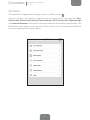
User information
You can check which account the device is linked to and disconnect it. You
also have the option to link your bq device to your Adobe DRM account and
you can also view the legal terms for the e-reader.
Device information
You can check the status of the battery, the space available on the internal
memory and SD card if in use
Basic information
Enables you to view information on the software of your device, the internal
and external memories, the battery power and the kernel version, etc.
Restore factory settings
Removes all personal information from your account and restores the
device to the factory settings.
Update device
Here you can check for the latest version to update your device.
Device options
Language
Choose from Spanish, Catalan, Basque, Galician, English and Portuguese.
Date and time
Select your time zone.
Dictionaries
You can select the default dictionary so that definitions are shown in
Spanish, in English and translated from English to Spanish, and vice versa.
You can also view the information on the dictionaries stored on the device.
33