1
Chapter 1
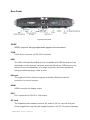
Card Reader
3-in-1 SD/MCC/MS Card Reader
Combo Connector
1x eSATA and USB combo connector (Power eSATA)
Phone Jack
Audio Out
The stereo headphone jack is used to connect the system’s audio out signal to
amplified speakers or headphones.
MIC-IN
The microphone jack is designed to connect the microphone used for video
conferencing, voice narrations, or simple audio recordings.
Line-IN
The Line-in jack is designed to take input from a higher-powered sound source.
CAUTION
This connector do not support hot-swapping. Users should not connect or
disconnect their eSATA/USB devices from PC when the system is working.
KUBE-8060 User’s Manual
16