Download GA-MA78GM-S2H

Transcript
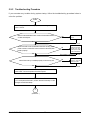
A
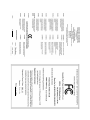
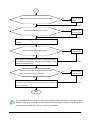
When the computer is turned on, is the CPU cooler running?
Yes
No
The power supply,
CPU or CPU socket
might fail.
The problem is verified and solved.
Check if there is display on your monitor.
Yes
No
The graphics card,
expansion slot, or
monitor might fail.
The problem is verified and solved.
Turn off the computer. Plugg in the keyboard and mouse and restart the
computer.
Check if the keyboard is working properly.
No
The keyboard or
mouse might fail.
Yes
Press <Delete> to enter BIOS Setup. Select "Load Fail-Safe Defaults"
(or "Load Optimized Defaults"). Select "Save & Exit Setup" to save
changes and exit BIOS Setup.
Turn off the computer and connect the IDE/SATA devices.
Check if the system can boot successfully.
The problem is verified and solved.
No
The IDE/SATA
device, connector,
or cable might fail.
Yes
Reinstall the operating system. Reinstall other devices one by one (install
one device at one time and then boot the system to see if the device
The problem is verified and solved.
works successfully).
END
If the procedure above is unable to solve your problem, contact the place of purchase or local
dealer for help. Or go to the Support\Technical Service Zone page to submit your question. Our
customer service staff will reply you as soon as possible.
- 93 -
Appendix