1
• •
•
• •
•
•
• •
•
•
• •
•
•
• •
•
• •
•
•
• •
•
•
Medalist Pro
• •
•
• •
•
•
• •
•
•
• •
•
•
• •
•
• •
•
•
• •
•
•
•
•
• •
•
•
• •
•
• •
•
•
• •
•
•
Disc Drive
• •
•
• •
•
•
• •
ST39140N/W/WC/LW/LC
• •
•
• •
•
•
• •
•
•
• •
•
•
• •
•
• •
•
•
• •
•
•
•
• •
•
• •
•
•
• •
•
•
ST36530N/W/WC
• •
•
• •
•
•
• •
•
•
• •
•
ST34520N/W/WC/LW/LC
• •
•
• •
•
•
• •
•
•
• •
•
•
• •
•
• •
•
•
• •
•
•
• •
•
• •
•
•
• •
•
•
Installation Guide
• •
•
• •
•
•
• •
•
•
• •
•
•
Contents
Preface.........................................................................................1
Electrostatic discharge protection ................................................2
Important safety information and precautions.............................. 3
Wichtige Sicherheitshinweise ...................................................... 5
Regulatory agency compliance.................................................... 8
Seagate Technology support services ....................................... 10
General description....................................................................16
Initial setup information .............................................................. 22
Kühlung des Systems ................................................................33
Installation des Laufwerkes
und Anschluß der Kabel..........................................................35
N drives section .........................................................................42
W/LW drives section ..................................................................46
WC/LC drives section ................................................................52
©1997, 1998 Seagate Technology, Inc. All rights reserved
Publication Number: 32663-001, Rev. B
December 1998
Seagate, Seagate Technology, and the Seagate logo are registered trademarks of Seagate Technology, Inc. Medalist, SeaFAX,
SeaFONE, SeaBOARD, and SeaTDD are either trademarks or
registered trademarks of Seagate Technology, Inc. or one of its
subsidiaries. All other trademarks or registered trademarks are
the property of their respective owners.
No part of this publication may be reproduced in any form without
written permission from Seagate Technology, Inc.
Medalist Pro Installation Guide, Rev. B
1
Preface
This manual contains information for users of the Seagate®
Medalist Pro SCSI disc drives. It provides support services, performance specifications, and initial setup information. Additional
information is available in the Medalist Pro Product Manual (part
number 32661-001). Contact your Seagate sales representative
if you need to order this publication.
Handling precautions
•
Disc drives are fragile. Do not drop or jar the drive. Use a
padded surface during installation to avoid damaging the
drive.
•
Keep the drive in its antistatic bag until you are ready to
install it.
•
Protect the drive from static discharge by making sure you
are well grounded before touching the drive. We recommend
wearing a grounded wrist strap (Seagate part number
12263496) throughout the installation process. Do not touch
the connectors or any part of the printed circuit board.
•
Always handle the drive by its edges or frame.
•
Do not apply pressure or attach labels to the circuit board or
the top of the drive.
2
Medalist Pro Installation Guide, Rev. B
Electrostatic discharge protection
Caution. Removal of circuit boards by personnel not performing depot repair will damage components and may
void the warranty.
All drive electronic assemblies are sensitive to static electricity,
due to the electrostatically sensitive devices used within the
drive circuitry. Although some devices such as metal-oxide semiconductors are extremely sensitive, all semiconductors, as well
as some resistors and capacitors, may be damaged or degraded
by exposure to static electricity.
Electrostatic damage to electronic devices may be caused by the
direct discharge of a charged conductor or by exposure to the
static fields surrounding charged objects. To avoid damaging
drive electronic assemblies, observe the following precautions
when installing or servicing the drive:
• Ground yourself to the drive whenever the drive electronics
are or will be exposed. Connect yourself to ground with a wrist
strap (Seagate part number 12263496). Connection may be
made to any grounded metal assembly. As a general rule,
remember that you and the drive electronics must all be
grounded to avoid potentially damaging static discharges.
• Turn off the power before removing or installing the DC power
cable.
• Do not remove any circuit boards from the drive.
• Never use an ohmmeter on any circuit boards.
• When installing the drive on a carrier or tray, discharge the carrier or tray prior to inserting it into the system.
Medalist Pro Installation Guide, Rev. B
3
Important safety information and precautions
Caution. Use forced-air ventilation when bench-testing the
drive to ensure proper cooling of drive components.
Use proper safety techniques for safe, reliable operation of this
unit.
The procedures in this manual and labels on the unit contain
warnings and cautions that must be carefully read and followed
to minimize or eliminate the risk of personal injury. The warnings
point out conditions or practices that may endanger you or others. The cautions point out conditions or practices that may damage the unit, possibly making it unsafe for use.
Always observe the following warnings and precautions:
• Follow all cautions and warnings in the procedures.
• Use sound safety practices when operating, installing, or
removing the unit.
• Use caution when troubleshooting a unit that has voltages
present. Turn off power to the unit before removing it.
• Ensure that the internal temperature of the rack or cabinet
does not exceed the limits defined for the drive when the drive
is mounted in an equipment rack or cabinet. When units are
stacked vertically, pay special attention to the top where temperatures are usually highest.
• Follow the precautions listed above in “Electrostatic discharge
protection.”
• Do not remove any circuit boards from the drive. Return the
entire drive for depot repair if any circuit board is defective.
Removal of circuit boards by personnel not performing depot
repair will damage components and may void the warranty.
4
Medalist Pro Installation Guide, Rev. B
• Do not remove the head and disc assembly (HDA) from the
drive. Return the entire drive for depot repair if the HDA is
defective.
• Do not attempt to disassemble the HDA. It is not field repairable. If the sealed HDA is opened by personnel not performing
depot repair, this will damage components and void the
warranty.
As a component, this drive is designed to be installed and operated in accordance with UL1950, EN60950, CSA C22.2 950M89, and VDE0805.
Seagate takes all reasonable steps to ensure that its products
are certifiable to currently accepted standards. Typical applications of these disc drives include customer packaging and subsystem design. Safety agencies conditionally certify component
assemblies, such as the Medalist disc drive, based on their final
acceptability in the end-use product. The subsystem designers
are responsible for meeting these conditions of acceptability in
obtaining safety-regulatory agency compliance in their end-use
products and for certifying where required by law. A necessary
part of meeting safety requirements is the provision for overcurrent protection on drive SELV supply voltages.
This unit is a component part and as such is not meant to comply with FCC or similar national requirements as a stand-alone
unit. Engineering radiated emissions test results are available
through the Seagate Safety Department to assist the subsystem
designer.
Medalist Pro Installation Guide, Rev. B
5
Wichtige Sicherheitshinweise
Vorsicht. Beim Testen des Laufwerks auf dem Prüftisch ist
Fremdbelüftung vorzusehen, um eine ausreichende Kühlung der
Laufwerkkomponenten sicherzustellen.
Verwenden Sie geeignete Sicherheits- um den sicheren, zuverlässigen Betrieb dieser Einheit zu gewährleisten.
Die Verfahren in diesem Handbuch und die Aufkleber auf dem
Gerät enthalten Warn- und Vorsichtshinweise. Diese Hinweise
sind sorgfältig durchzulesen und zu beachten, um das Risiko
von Verletzungen auf ein Mindestmaß zu beschränken oder
ganz zu vermeiden. Die Warnhinweise machen auf Situationen
oder Praktiken aufmerksam, die Sie oder andere gefährden
könnten. Die Vorsichtshinweise machen auf Situationen oder
Praktiken aufmerksam, die Einheit beschädigen können, so daß
deren Gebrauch mit Risiko behaftet ist.
Die Warn- und Vorsichtshinweise sind nicht allumfassend! Es ist
uns einfach nicht möglich, alle Wartungsmethoden oder die
eventuellen Risiken jeder Methode zu kennen, zu beurteilen und
Sie entsprechend zu beraten. Aus diesem Grund haben wir auf
eine derartige umfassende Beurteilung verzichtet. Falls Sie ein
hier nicht beschriebenes Verfahren oder Werkzeug verwenden,
stellen Sie zuerst sicher, daß das gewählte Verfahren weder Ihre
persönliche Sicherheit noch die Leistung der Einheit gefährdet.
Beachten Sie in jedem Fall die folgenden Warn-und Vorsichtshinweise:
• Beachten Sie alle Warn- und Vorsichtshinweise in diesem
Handbuch.
6
Medalist Pro Installation Guide, Rev. B
• Treffen Sie beim Betrieb, bei der Installation oder bei der
Entfernung der Einheit angemessene Sicherheitsvorkehrungen.
• Wenn eine Einheit unter Spannung steht, gehen Sie bei der
Fehlerdiagnose besonders vorsichtig vor. Schalten Sie die
Einheit aus, bevor Sie mit den Installations-und Entfernungsarbeiten beginnen.
• Wenn das Laufwerk in einem Einbaugestell oder Gehäuse
montiert ist, sorgen Sie dafür, daß die Temperatur im Inneren
des Gestells oder Gehäuses die für das Laufwerk vorgegebenen Grenzwerte nicht übersteigt. Wenn Einheiten vertikal
übereinander betestigt werden, achten Sie besonders auf den
oberen Stapelbereich, da dort die Temperatur gewöhnlich am
höchsten ist.
• Befolgen Sie die oben unter “Electrostatic Discharge Protection” angegebenen Sicherheitsmaßnahmen.
• Nehmen Sie keine Platinen aus dem Laufwerk. Wenn eine
Platine defekt ist, muß das gesamte Laufwerk zur Reparatur
eingeschickt werden. Die Herausnahme von Platinen durch
andere Personen als die für die werkseitige Reparatur zuständigen kann zu einer Beschädigung der Komponenten und
Erlöschen des Garantieanspruchs führen.
• Die vormontierte Kopf- und Festplatteneinheit (HDA) nicht aus
dem Laufwerk nehmen! Falls die HDA beschädigt ist, schicken
Sie das gesamte Laufwerk zur Reparatur ein.
• Die HDA ist nicht vor Ort reparierbar und darf nicht auseinandergenommen werden! Öffnen der versiegelten HDA durch
andere Personen als die für die werkseitige Reparatur zustän-
Medalist Pro Installation Guide, Rev. B
digen hat eine Beschädigung der Komponenten
Erlöschen des Garantieanspruchs zur Folge.
7
und
Als Teilkomponente ist dieses Laufwerk für die Installation und
den Betrieb in Übereinstimmung mit UL 1950, EN60950, CSA
C22.2 950-M89 und VDE0805 vorgesehen.
Seagate ist ständig bemüht, die Zulassungsfähigkeit von
Seagate-Produkten im Rahmen der gegenwärtig geltenden
Standards zu gewährleisten. Zu den typischen Anwendungen
dieser Festplattenwerke zählen Systemeinbau durch den
Kunden und die Konstruktion von Untersystemen. Sicherheitsbehörden gewähren eine bedingte Zulassung für Komponenten wie
das Medalist-Festplattenlaufwerk vorbehaltlich der endgültigen
Zulasssung im Endprodukt. Designer von Untersystemen sind
dafür verantwortlich, die Voraussetzungen für die Einhaltung
sicherheits- oder aufsichtsbehördlicher Vorschriften in ihren
Endprodukten und - falls gesetzlich vorgeschrieben - für die
Zulassung zu schaffen. Eine Grundvoraussetzung zur Einhaltung der Sicherheitsanforderungen ist die Bereitstellung eines
Überlastschutzes für die SELV-Versorgungsspannungen des
Laufwerks.
Dieses Gerät ist eine Baugruppe und unterliegt als solche nicht
den Anforderungen der FCC oder ähnlicher nationaler Behörden
für eigenständige Geräte. Technische Testergebnisse zu elektromagnetische Strahlung sind für Designer von Untersystemen auf
Anfrage von der Seagate-Sicherheitsabteilung erhältlich.
8
Medalist Pro Installation Guide, Rev. B
Regulatory agency compliance
Electromagnetic susceptibility
As a component assembly, the drive is not required to meet any
susceptibility performance requirements. It is the responsibility of
those integrating the drive within their systems to perform those
tests required and design their system to ensure that equipment
operating in the same system as the drive or external to the system does not adversely affect the performance of the drive. See
Table 2a, DC power requirements.
Electromagnetic compliance
Seagate uses an independent laboratory to confirm compliance
to the directives/standard(s) for CE Marking and C-Tick Marking.
The drive was tested in a representative system for typical applications. The selected system represents the most popular characteristics for test platforms. The system configurations include:
• 486, Pentium, and PowerPC microprocessors
• 3.5-inch floppy disc drive
• Keyboard
• Monitor/display
• Printer
• External modem
• Mouse
Although the test system with this Seagate model complies to
the directives/standard(s), we cannot guarantee that all systems
will comply. The computer manufacturer or system integrator
shall confirm EMC compliance and provide CE Marking and CTick Marking for their product.
Medalist Pro Installation Guide, Rev. B
9
Electromagnetic compliance for the European Union
If this model has the CE Marking it complies with the European
Union requirements of the Electromagnetic Compatibility Directive 89/336/EEC of 03 May 1989 as amended by Directive 92/31/
EEC of 28 April 1992 and Directive 93/68/EEC of 22 July 1993.
Australian C-Tick
If this model has the C-Tick Marking it complies with the Australia/New Zealand Standard AS/NZS3548 1995 and meets the
Electromagnetic Compatibility (EMC) Framework requirements
of Australia’s Spectrum Management Agency (SMA).
10
Medalist Pro Installation Guide, Rev. B
Seagate Technology support services
Online Services
Internet
Visit www.seagate.com for online information about Seagate
products or e-mail your disc or tape questions to:
Presales Support:
Disc: http://www.seagate.com/support/email/
email_presales.shtml or [email protected]
Tape: http://www.seagate.com/support/email/
email_tape_presales.shtml or
[email protected]
Technical Support:
Disc: http://www.seagate.com/support/email/
email_disc_support.shtml or [email protected]
Tape: http://www.seagate.com/support/email/
email_tape_support.shtml or [email protected]
SeaBOARD ® is a computer bulletin board system that contains
information about Seagate disc and tape drive products and is
available 24 hours daily. Set your communications software to
eight data bits, no parity and one stop bit (8-N-1). This service is
available worldwide.
Automated Services
SeaFONE ® (1-800-SEAGATE) is Seagate's toll-free number (1800-732-4283) to access our automated self-help services.
Using a touch-tone phone, you can find answers to service
Medalist Pro Installation Guide, Rev. B
11
phone numbers, commonly asked questions, troubleshooting
tips and specifications for disc drives and tape drives 24 hours
daily. International callers can reach this service by dialing 1405-936-1234.
SeaFAX ® is Seagate's automated FAX delivery system. Using a
touch-tone phone, you can obtain technical support information
by return FAX 24 hours daily. This service is available worldwide.
Presales Support
Our Presales Support staff can help you determine which
Seagate products are best suited for your specific application or
computer system.
Seagate Express
You can purchase select tape products and tape accessories
through Seagate Express 24 hours daily by calling 1-800-5310968 or by faxing your order to: 1-972-481-4812.
Technical Support
If you need help installing your drive, consult your dealer. Dealers are familiar with their unique system configurations and can
help you with system conflicts and other technical issues. If you
need additional help, you can talk to a Seagate technical support
specialist. Before calling, note your system configuration and
drive model number (STxxxxx).
SeaTDD™(1-405-936-1687) is a telecommunications device for
the deaf (TDD). You can send questions or comments 24 hours
daily and exchange messages with a technical support specialist
12
Medalist Pro Installation Guide, Rev. B
from 8:00 A.M. to 12:15 P.M. and 1:30 P.M. to 6:00 P.M. (central
time) Monday through Friday.
Customer Service (CSO)
Warranty Repair
Seagate offers worldwide customer support for Seagate drives.
Seagate direct OEM, Distribution and System Integrator customers should contact their Seagate service center representative
for warranty information. Other customers should contact their
place of purchase.
Authorized Service Centers
If your live outside the U.S., you can contact an Authorized Service Center for service or repair.
USA/Canada/Latin America Support Services
Presales Support
Disc: 1-877-271-3285 or 1-405-936-1210 FAX: 1-405-936-1683
Tape: 1-800-626-6637 or 1-714-641-2500 FAX: 1-714-641-2410
Technical Support (SeaFONE)
1-800-SEAGATE or 1-405-936-1234 (for specific product phone
number)
FAX: Disc: 1-405-936-1685; Tape: 1-405-936-1683
SeaFAX
SeaTDD
SeaBOARD
1-800-SEAGATE
1-405-936-1687
Disc: 1-405-936-1600; Tape: 1-405-936-1630
Medalist Pro Installation Guide, Rev. B
13
Warranty Repair
USA/Canada 1-800-468-3472
Latin America 1-405-949-7758
FAX: 1-405-949-6740
FAX: 1-405-949-6738
Authorized Service Centers
Brazil
MA Informatica
Canada
Memofix
Adtech
55-21-516-6649
FAX: 55-21-516-5280
1-905-660-4936
1-905-812-8099 or
1-800-624-9857
FAX: 1-905-660-4951
FAX: 1-905-812-7807
European Support Services
For European customer support, dial the toll-free number for
your specific country for presales support, technical support,
SeaFAX and warranty repair.
If your country is not listed here, dial our European call center at
31-20-316-7222 from 8:30 A.M. to 5:00 P.M. (European central
time) Monday through Friday. The European call center is
located in Amsterdam, The Netherlands.
Call Center
Austria
Belgium
Denmark
France
Germany
Ireland
Italy
Netherlands
0 800-20 12 90
0 800-74 876
80 88 12 66
0 800-90 90 52
0 800-182 6831
1 800-55 21 22
1 677 90 695
0 800-732 4283
14
Norway
Poland
Spain
Sweden
Switzerland
Turkey
United Kingdom
Medalist Pro Installation Guide, Rev. B
800-113 91
00 800-311 12 38
900-98 31 24
0 207 90 073
0 800-83 84 11
00 800-31 92 91 40
0 800-783 5177
SeaBOARD
Germany
49-89-1409331
Fax Services—All European Countries
Presales/Technical Support 31-20-653-3513
Warranty Repair
31-20-653-4320
Africa/Middle East Support Services
For presales, technical support, warranty repair and FAX services in Africa and the Middle East, dial our European call center
at 31-20-316-7222 from 8:30 a.m. to 5:00 p.m. (European central time) Monday through Friday, or send a FAX to 31-20-6534320. The European call center is located in Amsterdam, The
Netherlands.
Asia/Pacific East Support Services
Technical Support
Australia
Hong Kong
Japan
Singapore
Taiwan
61-2-9725-3366
852-2368 9918
—
65-488-7584
886-2-2514-2237
FAX: 61-2-9725-4052
FAX: 852-2368 7173
FAX: 81-3-5462-2979
FAX: 65-488-7528
FAX: 886-2-2715-2923
Medalist Pro Installation Guide, Rev. B
SeaFAX
Australia
61-2-9756-5170
Warranty Repair
Japan81-3-5462-2904FAX: 81-3-5462-2979
Asia/Pacific and65-485-3595FAX: 65-488-7503
Australia
15
16
Medalist Pro Installation Guide, Rev. B
General description
Medalist Pro SCSI disc drives are high-speed, random-access
digital-data storage devices.
The drive is a component for installation in an enclosure
designed for the drive. This is often a rack within the system or
an external enclosure designed to house one or more disc drives
or other peripheral units. In either case, the disc drive must
receive adequate cooling (refer to “Providing adequate cooling”)
and it must be sufficiently grounded and shielded from emissions. The Medalist Pro Product Manual (part number 32661001) contains guidelines for a properly designed enclosure.
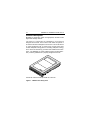
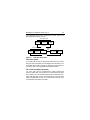
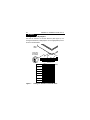
*
*Model “N” version with 50-pin SCSI I/O connector
Figure 1. Medalist Pro family drive
Medalist Pro Installation Guide, Rev. B
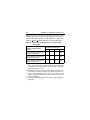
Table 1.
Interface
17
Drive characteristics
Ultra SCSI [1]
Capacity
ST39140
ST36530
ST34520
Recording
Cylinders (user)
Read/write data heads
ST39140
ST36530
ST34520
Formatted
9.1 Gbyte
6.5 Gbyte
4.55 Gbyte
User LBAs
17,783,240
12,715,920
8,888,924
9,006
8
6
4
Access time [2]
Average read
Average write
9.5 msec
10.5 msec
Disk rotation
RPM
Average latency
7,200 r/min
4.17 msec
Internal transfer rate (variable with zone)
ST39140
110–193.88 Mbits/sec
ST36530
110–193.88 Mbits/sec
ST34520
110–193.88 Mbits/sec
Maximum synchronous SCSI transfer rate
N model
20 Mbytes/sec
W/WC models
40 Mbytes/sec
LW/LC models
80 Mbytes/sec
Cache (1 or 3 segments)
N/W/WC models
LW/LC models
380 Kbytes
860.5 Kbytes
18
Medalist Pro Installation Guide, Rev. B
[1] Can be operated according to SCSI-2/SCSI-3 protocols. Referred to
also as “SCSI Fast-20” or “Fast-40.”
[2] Includes controller overhead.
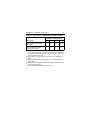
Table 2a.
DC power requirements (Amps) for N/W/WC
models
ST39140
N/W/WC
ST36530
N/W/WC
ST34520
N/W/WC
Voltage
+5V +12V
+5V +12V
+5V +12V
Regulation [5]
±5% ±5% [2] ±5% ±5%[2] ±5% ±5%[2]
Max. operating
current DC [1]
0.55 2.4
0.55 2.4
0.55 2.4
Avg. idle current
DCX [1]
0.51 0.81
0.51 0.81
0.51 0.81
2.5
N/A
2.5
N/A
2.5
N/A
0.51 0.13
0.51 0.13
0.51 0.13
Peak operating
current
Typical DCX [1][6] 0.51 0.96
Maximum DC [1]
0.55 1.17
0.51 0.96
0.55‘ 1.17
0.51 0.96
0.55 1.17
Max. starting
current
(peak DC) DC [3]
(peak AC) AC [3]
Delayed motor
start (max)
DC [1] [4]
Medalist Pro Installation Guide, Rev. B
19
Table 2b. DC power requirements (Amps) for LW/LC
models
ST39140
LW/LC
ST34520
LW/LC
Voltage
+5V +12V
+5V +12V
Regulation [5]
±5% ±5% [2] ±5% ±5%[2]
Max. operating
current DC [1]
0.81 2.4
0.81 2.4
Avg. idle current
DCX [1]
0.53 0.90
0.53 0.90
2.5
N/A
2.5
N/A
0.51 0.16
0.51 0.16
Peak operating
current
Typical DCX [1][6] 0.58 1.0
Maximum DC [1]
0.81 1.53
0.58 1.0
0.81 1.37
Max. starting
current
(peak DC) DC [3]
(peak AC) AC [3]
Delayed motor
start (max)
DC [1] [4]
Notes for Tables 2a and 2b.
[1] Measured with an average reading DC ammeter. Instantaneous +12V current peaks will exceed these values.
[2] A –10% droop is permissible during initial start of the spindle
but must return to ±5% before reaching 7,200 RPM. The
20
[3]
[4]
[5]
[6]
Medalist Pro Installation Guide, Rev. B
±5% must be maintained after the drive signifies that its
power-up sequence has been completed and that the drive is
able to accept selection by the host initiator.
See the +12V current profile in the Medalist Pro Product
Manual (publication number 32661-001).
This condition occurs when the Motor Start option is enabled
and the drive has not yet received a Start Motor command.
See “Conducted noise immunity” in the Medalist Pro Product
Manual. The specified voltage tolerance is inclusive of ripple,
noise, and transient response.
Operating condition is defined as random seek read operations with a block count of 64.
General Notes for Tables 2a and 2b:
1.
Minimum current loading for each supply voltage is not less
than 4% of the maximum operating current shown.
2.
3.
Use separate ground returns for +5V and +12V supplies.
Where power is provided to multiple drives from a common
supply, carefully consider individual drive power requirements. Where multiple units are powered on simultaneously,
be sure the peak starting current is available to each device.
Medalist Pro Installation Guide, Rev. B
21
Table 3 shows the nominal (no tolerance specified) dimensions
and weight of the drive.
Table 3.
Dimensions of the drive
inches
mm
Height
1.028
26.9
Width
4.023
102.2
Depth
5.787
146.99
Weight 1.5 pounds (0.68 kilograms)
22
Medalist Pro Installation Guide, Rev. B
Initial setup information
The general information beginning on this page applies to all of
the Medalist Pro drive models. After reading the general information topics, refer to the appropriate drive-specific section listed
below for additional information about configuring and installing
your particular model.
Drive models
Page
ST39140N
ST36530N
ST34520N
42
ST39140W/LW
ST36530W
ST34520W/LW
46
ST34520WC/LC
52
ST39140WC/LC ST36530WC
General information
The following general information topics are discussed:
•
•
•
•
•
•
•
•
SCSI ID jumpers
Drive termination
Terminator power
Interface drivers and data path width notes
Other applicable jumper options
Providing adequate cooling
Mounting the drive and connecting cables1
Formatting the drive
1This
mounting procedure does not apply to “WC” or “LC” model
drives. To mount “WC” or “LC” drives, plug the drive into the
system’s single connector attachment (SCA) position on the
system’s back panel.
Medalist Pro Installation Guide, Rev. B
23
SCSI ID jumpers
Each device on the SCSI chain must have a unique SCSI ID.
The host system’s SCSI controller usually uses the ID that has
the highest priority in the SCSI I/O system. This is always ID7.
ID0 is lowest priority in an 8-bit I/O system. ID8 is lowest priority
in a 16-bit I/O system. The lower priority SCSI IDs are normally
used for other SCSI devices such as this Medalist disc drive.
Note. Most SCSI controllers (host adapters) allow you to skip a
SCSI ID. For example, you can have ID0, ID1, and ID3
(skipping ID2). Other controllers do not allow this so be
sure to refer to your system or controller user’s manual
for details about its requirements for proper SCSI device
installation.
Note. This drive is a SCAM (SCSI Configured Auto Magically)
compliant drive. If the system into which you are installing
this drive requires SCAM compliant drives, you do not
need to be concerned about the drive ID jumper settings,
as the system automatically assigns your new drive the
ID it wants it to have. The system may or may not use the
existing drive ID jumper settings. Setting the drive ID
doesn’t hurt anything, but is not necessary in a SCAM
compliant system.
The Medalist disc drives are factory set with the SCSI ID set at 0.
To change the SCSI ID, refer to the appropriate drive section for
your model.
If, after completing the installation process, the drive’s LED does
not show on/off activity when the host is trying to communicate
with the drive, a duplicate SCSI ID may be the problem. If this is
the case, change the ID so that each device on the SCSI chain
24
Medalist Pro Installation Guide, Rev. B
has its own unique ID. Also check your system or controller
user’s manual to ensure that you have not violated its SCSI ID
numbering recommendations.
Drive termination
If you are installing a Medalist drive in a system that has other
SCSI devices installed, terminate only the end devices on the
SCSI chain. A SCSI “device” is any disc drive, scanner, tape
backup unit, or other piece of hardware connected to your system using the SCSI bus.
The top example in Figure 2 shows an internal hard disc at one
end of the SCSI bus with the SCSI controller at the other end
(both are terminated). The bottom example shows two additional
SCSI devices connected externally—this means the SCSI controller is no longer on the end of the SCSI chain and should not
be terminated.
Note. Some controllers prefer to remain terminated even if they
are in the middle of the chain. Also, some controllers treat
the internal and external chains as separate logical
buses. This means you may need to terminate both the
first and last devices on both logical buses to achieve
proper termination. If necessary, refer to your system or
controller documentation to see how this is handled in
your particular system.
Medalist Pro Installation Guide, Rev. B
25
For information about how to terminate your drive, refer to the
appropriate drive-specific section.
Internal SCSI cable
Internal
SCSI device
Internal
SCSI device
Controller
Terminate
Internal SCSI cable
Internal
SCSI device
Internal
SCSI device
Controller
External
SCSI
cable
External
SCSI device
External
SCSI device
Terminate
Figure 2.
SCSI bus termination
Terminator power
You usually will not need to change this option and can normally
leave the drive configured as it was shipped from the factory. For
information about how to change the terminator power option on
your drive, refer to the appropriate drive-specific section.
I/O circuits and data path widths
“W,” “WC,” “LW,” and “LC” models have a “wide” (16-bit) SCSI
data bus rather than the standard (non-wide) 8-bit SCSI data
bus; however, you can use these wide drives on a standard (nonwide) 8-bit data bus using a terminated 68-pin to 50-pin SCSI
cable (not applicable to “WC” or “LC” drives which are not to be
connected into the system via cable).
26
Medalist Pro Installation Guide, Rev. B
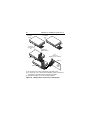
Figures 3a, 3b, 3c, and 3d show typical drive connections. The
following table lists the maximum cable lengths and number of
devices with single-ended I/O circuits allowed on a daisy-chain
cable for <10 and <20 M transfers/sec I/O data transfer rates.
Table 4a.
Interconnect characteristics for single-ended
I/O circuits
Number of attached SCSI
devices
Maximum distance between
terminators (meters) [1] [3]
Fast-5 Fast-10 Fast-20 Fast-40
1 to 4 maximum capacitance
(25pF) SCSI devices
6
3
3
N/A
5 to 8 maximum capacitance
(25pF) SCSI devices
6
3
1.5
N/A
9 to 16 maximum capacitance 6
(25pF) SCSI devices
3
[2]
N/A
[1] For environments where all elements of the bus (cables, device interfaces, environmental noise and other parameters) are controlled to
be better than minimally required, it may be possible to extend the
path length and device count.
[2] Extending the device count beyond eight requires specification control beyond the minimum specified in the ANSI T10/1302D document. It is recommended that the devices be uniformly spaced
between terminators with the end devices located as close as possible to the terminators.
[3] Values specified by data rate shall apply even if a slower data rate is
negotiated.
Medalist Pro Installation Guide, Rev. B
Table 5a.
27
Interconnect characteristics for LVD I/O circuits
Maximum distance between
terminators (meters) [1] [3] [5]
Interconnect
Fast-5 Fast-10 Fast-20 Fast-40
Point-to-point interconnect
(2 devices)
25
25
25
25 [2]
Daisy-chain interconnect
(up to 16 devices) [4]
15
15
15
12
[1] For environments where all elements of the bus (cables, device interfaces, environmental noise and other parameters) are controlled to
be better than minimally required, it may be possible to extend the
path length and device count.
[2] SCSI devices shall be within a stub length of the termination (.1
meter).
[3] Values specified by data rate shall apply even if a slower data rate is
negotiated.
[4] Loads spaced at least 8 inches (20.3 cm) apart (refer to SCSI EPI
T10/1143D specification).
[5] See ANSI T10/1302D specification for details.
28
Medalist Pro Installation Guide, Rev. B
HDA
Pin 1
Figure 3a.
Fifty pin I/O connection to drive
HDA
Pin 1
Figure 3b. Sixty-eight pin connection to drive
Medalist Pro Installation Guide, Rev. B
29
“N” Model
Drive
SCSI ID X
(or last drive)
[1]
Additional
SCSI devices
SCSI ID 1
Pin 1
(check your
adapter for Pin 1 location)
SCSI ID 7
SCSI ID 0
Host
Adapter
PCB
[1] “X” means up to 6 or the maximum allowable number of devices on
the SCSI bus. See Table 4a and system documentation.
Figure 3c. Multiple drive connection to host adapter
30
Medalist Pro Installation Guide, Rev. B
“LW” Model
Drive
[1]
“W” Model
Drive
[3]
SCSI ID X
(or last drive)
[2]
Additional
SCSI devices
SCSI ID 1
Pin 1
(check your
adapter for Pin 1 location)
SCSI ID 7
SCSI ID 0
Host
Adapter
PCB
[1] Do not mix “W” and “LW” model drives on the daisy chain.
[2] “X” means up to 15 or the maximum allowable number of devices on
the SCSI bus. See Table 4a and system documentation.
[3] External terminator may not be furnished with drive.
Figure 3d. Multiple-drive connection to host adapter
Medalist Pro Installation Guide, Rev. B
31
Note. This drive model plugs directly into a backplane connector and therefore does not use cables.
Figure 3e. Drive model WC or LC with single 80-pin I/O and
power connector
32
Medalist Pro Installation Guide, Rev. B
Providing adequate cooling
The enclosure design must ensure adequate cooling for the
drive. The maximum ambient temperature is 50°C.
The drive’s product manual (32661-001) describes how to evaluate the air-flow design. The evaluation consists of ensuring that
the case temperature of certain critical components remains
within acceptable limits during drive operation.
We recommend orienting the drive or directing the air flow in a
way that creates the least amount of air-flow resistance while
providing air flow above the circuit boards and around the head
and disc assembly (HDA). Also, choose the shortest possible
path between the air inlet and exit. This minimizes the distance
traveled by air that is heated by the drive and by other nearby
heat sources.
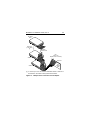
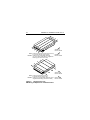
Figure 4 shows two design approaches with one or more fans
used to generate air flow. The air-flow patterns can be created
by the fans either pushing or drawing air. The overall flow pattern
can be directed from front to back, back to front, or side to side.
Medalist Pro Installation Guide, Rev. B
33
Kühlung des Systems
Die Gehäusekonstruktion muß eine ausreichende Kühlung des
Laufwerkes gewährleisten. Die Umgebungstemperatur darf maximal 50°C betragen.
Die Produkthandbuch Medalist Pro (Dokument 32661-001)
enthalten Anweisungen zur Beurteilung der Luftstromkonstruktion. Die Beurteilung muß sicherstellen, daß sich die Gehäuset e m p e r a t u r b e s t i m m t e r k r i t i s c h e r Ko m p o n e n t e n b e i
Laufwerkbetrieb innerhalb zugelassener Grenzen hält.
Wir empfehlen, das Laufwerk so zu orientieren oder den Luftstrom so zu lenken, daß der geringste Luftstromwiderstand
erzeugt wird und gleichzeitig ein Luftstrom über den Platinen
und um die Kopf- und Festplatteneinheit (HDA) gegeben ist.
Wählen Sie einen möglichst kurzen Weg zwischen Lufteinlaß
und -auslaß. Dadurch wird die Strecke, die die vom Laufwerk
und anderen nahegelegenen Hitzequellen aufgewärmte Luft
zurücklegt, auf ein Minimum beschränkt.
Abbildung 4 zeigt zwei Konstruktionsmöglichkeiten, bei denen
ein oder mehrere Lüfter den Luftstrom erzeugen. Der Luftstromverlauf wird durch die Lüfter gesteuert, die entweder Luft einblasen oder abziehen. Generell kann der Luftstrom entweder von
vorne nach hinten oder von hinten nach vorne verlaufen.
34
Medalist Pro Installation Guide, Rev. B
.
Above unit
Über der Einheit
Note. Air flows in the direction shown (back to front)
or in reverse direction (front to back)
Under unit
Unter der Einheit
Hinweis. Luftstrom in der angezeigten Richtung
(von vorne nach hinten) oder in umgekehrter
Richtung (von hinten nach vorne)
Above unit
Über der Einheit
Note. Air flows in the direction shown or
in reverse direction (side to side)
Hinweis. Luftstrom in der angezeigten Richtung oder in Under unit
Unter der Einheit
umgekehrter Richtung (von Seite zu Seite)
Figure 4. Suggested air flow
Abbildung 4. Empfohlener Luftstromverlauf
Medalist Pro Installation Guide, Rev. B
35
Mounting the drive and connecting cables
Do not touch the connector pins or any components on the control board without observing static-discharge precautions.
Always handle the drive by the frame only.
The drive may be mounted in any orientation (horizontally, vertically, and any combination thereof); however, you must ensure
that the drive receives adequate air flow for cooling.
1.
Mount the drive to the host system’s chassis using four 6-32
UNC screws. Two mounting holes are in each side of the
drive and there are four mounting holes in the bottom of the
drive.
The maximum length that the screws should extend into the
chassis mounting holes is 0.15 inch (3.81 mm), measured
from the outer surface of the chassis. Tighten the screws
down evenly. Do not over-tighten or force the screw if it does
not seem to screw in easily, because this means the threads
are not properly aligned. In this case, back the screw out
and try again.
Installation des Laufwerkes
und Anschluß der Kabel
Beachten Sie beim Handhaben und Anfassen der Anschlußstifte
und Komponenten die Vorsichtsmaßnahmen zur Verhinderung
statischer Aufladung. Fassen Sie das Laufwerk nur am Rahmen
an.
Das Laufwerk kann in beliebiger Orientierung (horizontal, vertikal oder schräg) installiert werden; jedoch muß dafür gesorgt
werden, daß ein ausreichender Luftstrom zur Kühlung des Laufwerkes vorhanden ist.
36
Medalist Pro Installation Guide, Rev. B
1.
Befestigen Sie das Laufwerk mit vier 6-32-UNC-Schrauben
am Gehäuse des Host-Systems. Die beiden Seiten des
Laufwerkes sind mit jeweils zwei Befestigungslöchern
versehen, die Unterseite des Laufwerkes weist vier weitere
Befestigungslöcher auf.
Gemessen von der Außenfläche des Gehäuses dürfen die
Schrauben maximal 3,81 mm in die Befestigungslöcher des
Gehüuses hineinragen. Die Schrauben müssen gleichmäßig, jedoch nicht zu fest, angezogen werden. Wenn sich
eine Schraube nicht ohne Widerstand einschrauben läßt,
sind die Gewinde nicht korrekt aneinander ausgerichtet. In
di esem Fal l die Schraube ni cht in das Gewi ndeloch
forcieren, sondern die Schraube herausnehmen und erneut
in das Gewindeloch einführen.
2.
Verify that all connections between the drive and the host
system are correctly installed.
2.
Prüfen Sie, ob alle Verbindungen zwischen dem Laufwerk
und dem Host-System korrekt hergestellt sind.
3.
Verify that you have correctly installed jumpers.
3.
Stellen Sie sicher, daß die Kennungsbrücken installiert sind.
4.
Connect the SCSI cable into the drive’s SCSI connector.
Take care not to stretch or crimp this cable, and do not block
the system’s cooling air flow with the cable.
The drive receives DC power through a 4-pin connector
mounted next to the SCSI connector. The output of a power
supply must meet SELV (safety extra low voltage) as
Medalist Pro Installation Guide, Rev. B
37
defined in IEC 950. Figure 5 provides the pin information for
the DC power connector. To connect the DC power cable to
the drive, simply insert the cable end into the drive’s DC
power connector.
4.
Schließen Sie das SCSI-Kabel an den SCSI-Steckverbinder
des Laufwerkes an. Das Kabel darf nicht gedehnt oder
gedrückt werden und es darf den Luftstrom zur Kühlung des
Systems nicht behindern.
Das Laufwerk wird über einen 4-poligen, neben dem SCSIAnschluß befestigten Steckverbinder mit Gleichstrom versorgt. Der Ausgang eines Netzteils muß SELV (safety extra
low voltage) nach IEC 950 entsprechen. Abbildung 5 zeigt
die Steckerbelegung für den Gleichstromanschluß. Zum
Anschluß des Gleichstromkabels an das Laufwerk das
Kabelende in den Gleichstromanschluß des Laufwerkes
stecken.
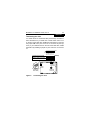
DC Power
Connector
Pin
1
2
3
4
4 3 2 1
Power
Cable
Figure 5. DC power connector
Abbildung 5. Gleichstromanschluß
Pin
1
2
3
4
Power
+12V
+12V ret
+ 5V ret
+ 5V
Gleichstrom
+12V
+12V Rückleitung
+ 5V Rückleitung
+ 5V
38
Medalist Pro Installation Guide, Rev. B
Note. Signal ground on the power control board (PCB) and the
head and disc assembly (HDA) are connected together in
this drive and you cannot separate them. The equipment
in which you have mounted the drive is connected
directly to the HDA and PCB without electrically isolating
shock mounts. Maximizing the conductive contact area
between HDA ground and system ground may reduce
radiated emissions.
If you do not want the system chassis to be connected to
the HDA/PCB ground, you must provide a nonconductive
(electrically isolating) method of mounting the drive in the
host system. This may increase radiated emissions and
is the system designer’s responsibility.
Hinweis:
Die Signalerde auf der Stromregelungskarte (PCB) und
der Kopf- und Festplatteneinheit (HDA) sind in diesem
Laufwerk miteinander verbunden und können nicht
getrennt werden. Das Gerät, in das Sie das Laufwerk
eingebaut haben, i st ohne el ektri sch i solierende
Stoßdämpfer direkt an die HDA und PCB angeschlossen.
Die elektromagnetische Strahlung kann reduziert werden, indem Sie eine möglichst große leitende Kontakfläche zwischen der HDA-Erdung und der Systemerdung
vorsehen.
Wenn Sie das Systemgehäuse nicht an die HDA/PCBErdung anschließen wollen, müssen Sie das Laufwerk
auf nichtleitende Weise (galvanisch isoliert) im Host-Sys-
Medalist Pro Installation Guide, Rev. B
39
tem einbauen. Die daraus u.U. resultierende verstärkte
elektromagnetische Strahlung fällt in den Zuständigkeitsbereich des Systemdesigners.
5.
Replace the host system’s cover.
5.
Setzen Sie das Gehäuseoberteil des Host-Systems wieder
auf.
40
Medalist Pro Installation Guide, Rev. B
C
[3]
G
[1]
E
D
F
A [3]
Notes:
[1] Mounting holes three on each side, 6-32 UNC. Max
screw length into side of drive 0.15 in. (3.81 mm). Screw
tightening torque 6.0 in-lb (.675 NM) max with minimum
thread engagement of 0.12 in. (3.05 mm).
[2] Mounting holes four on bottom, 6-32 UNC. Max screw
length into bottom of drive 0.15 in. (3.81 mm). Screw
tightening torque 6.0 in-lb (.675 NM) max with minimum
thread engagement of 0.12 in. (3.05 mm).
B
[3] Power and interface connectors can extend past the “A”
dimension by 0.040 in. (1.02 mm).
J
[4] Centerline of pad for Pin 1 of power connector.
[4] L
K
[5] Centerline of pad for Pin 1 of J6.
[6] Centerline of pad for Pin 1 of J2. Dimensions indicated are
for reference only.
[2]
[7] Dimensions to Pin 1 of each connector are nominal values.
[8] To pin ends on J6. Pin ends on J6 are nominally flush with
end of drive.
M [6]
[6] N
J2
H
S [8]
J6
LED
P [5]
R
Figure 6.
[9] Although the illustration shows the 50 pin I/O connector
drive model, mounting hole locations are the same for
all Medalist Pro models.
Dimension Table
Millimeters
Inches
A
146.99 ± .25
5.787 ± .010
B
102.2 ± .25
4.023 ± .010
C
26.9 + .53
1.28 + .021
– .009
– .22
D
60.00 ± .25
2.362 ± .010
E
28.45 ± .51
1.120 ± .020
F
101.60 ± .25
4.000 ± .010
G
6.35 + .25
.250 + .010
– .005
– .12
H
44.45 ± .25
1.750 ± .010
J
95.25 ± .25
3.750 ± .010
K
41.28 ± .51
1.625 ± .020
L
3.63
0.143
M
6.60
0.260
N
1.55
0.061
[7]
[7]
P
10.29
0.405
R
57.53
2.265
S
59.69
2.350
Mounting configuration dimensions
Medalist Pro Installation Guide, Rev. B
41
Formatting the drive
Warning. Formatting a drive erases all user data. Be sure that
you understand this principle before formatting any
hard disc drive. It is not necessary to format a drive
that previously has been used to store data, unless
your intention is to erase all user data.
Note. Seagate is not responsible for lost user data.
1.
2.
3.
Turn on DC power.
Boot the system from a system floppy disc or from a previously installed hard disc drive if there is one.
Format the disc drive. Medalist Pro disc drives are designed
to operate with a variety of operating systems. Please refer
to your system or SCSI controller manual for information
about formatting and setting up the drive. Some quick desktop system notes are provided below.
Quick reference desktop system notes
Note. Refer to your system or utility manual for detailed instructions)
• DOS. Set the drive type in CMOS to “Zero,” “None,” or “No
hard drive installed.” Use FDISK.EXE and FORMAT.EXE. Systems that have operating system Windows 95 release 950B or
later do not need to partition the drive.
• Macintosh. Use a third-party drive utility (Apple’s HD Setup
utility only works with drives having special Apple firmware).
42
Medalist Pro Installation Guide, Rev. B
N drives
Setting the SCSI ID jumpers
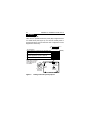
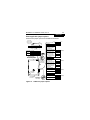
Use the J6 connector to set the SCSI ID (see Figure 7). To
change the SCSI ID, install jumpers on the appropriate pins as
shown in the illustration.
Drive
Front
Jumper Plug
(enlarged to
show detail)
Pin 1
J6
Reserved
SCSI ID = 0
L R R
E E EA A A
D S S 2 1 0
(default)
SCSI ID = 1
SCSI ID = 2
SCSI ID = 3
SCSI ID = 4
SCSI ID = 5
SCSI ID = 6
SCSI ID = 7
Figure 7.
Setting the SCSI ID on model N drives
Medalist Pro Installation Guide, Rev. B
43
N drives
Terminating the drive
“N” model drives are terminated with permanently mounted IC
active terminators. If you install one of these drives and it is not
on the end of the SCSI bus, disable the terminators by removing
the jumper “TE” from pins 15 and 16 of connector J2 (see Figure 8). If you install the drive on the end of the SCSI bus, enable
termination by installing a jumper on pins 15 and 16 of connector
J2.
Pin 1
J2
R
T D MW P E T T
E S E P D S P P
Enable SCSI terminator
(default)
Disable SCSI terminator
J2
J6
SCSI I/O J1
Connector
Drive
Front
J2 Jumper Type
(enlarged to
show detail)
Figure 8.
Terminating the drive
DC Power
Connector
44
Medalist Pro Installation Guide, Rev. B
N drives
Terminator power
There are four possible terminator power (TP) configurations for
“N” model drives (see Figure 9). You will not normally need to
change this option and can leave the drive configured as it was
shipped from the factory.
Pin 1
J2
“N” model drives
Drive supplies term. power for its own terminators only
R
T D MW P E T T
E S E P D S P P
(default)
Drive supplies term. power to SCSI bus only
Drive supplies term. power for its own terminators
and drive supplies term. power to SCSI bus
Drive takes term. power from SCSI bus
Note: TP jumper(s) must
always be in one of the
configurations shown,
even if TE jumper is
not installed.
Position A
J2
J6
SCSI I/O J1
Connector
Drive
Front
J2 Jumper Type
(enlarged to
show detail)
Figure 9.
DC Power
Connector
Setting terminator power jumpers
Medalist Pro Installation Guide, Rev. B
45
N drives
Other applicable jumper options
Several other jumper options are available as illustrated.
Drive with
HDA up, PCB
down, viewed
from front
J2
Pin 1
HDA
Reserved
Delay Motor Start option
(valid only if the Enable
Motor Start jumper is
not connected)
J6
Reserved
L R R
E E EA A A
D S S 2 1 0
Reserved
11
Remote
LED
12
CATH
Shipped with cover installed.
Do not remove.
Do not install jumpers
on these four positions.
Drive Front
Disable the Delay Motor
Start option.
Motor start delay equal
to the SCSI ID multiplied
by 12 seconds. For
example, if the SCSI
ID = 2, the drive starts
in 24 seconds.
(default)
Motor Start option
J6
J6
Jumper Type
(enlarged to
show detail)
Pin 1
End
J2
Pin 1
Disable motor start.
The drive starts
according to the
Delay Motor Start option.
(default)
Enable motor start. The
drive waits for the Start
Unit command from the
host before starting the
spindle motor.
Write Protect option
Write protect = Off
(enables writing).
(default)
Write protect = On
(disables writing).
DC Power
Connector
J1
SCSI I/O
Connector
Pin 1
J2 Jumper Type
(enlarged to
show detail)
Parity Check option
Enable parity check of
SCSI bus.
Disable parity check.
Figure 10. Additional jumper options
(default)
46
Medalist Pro Installation Guide, Rev. B
W/LW drives
Setting the SCSI W/WD
ID jumpers
drives section
Use the J6 jumper block to set the SCSI ID (Figure 11). To
change the SCSI ID, install jumpers on the appropriate pins as
shown in the illustration. Optional connections to switching circuits in host equipment are provided on J1 auxiliary to set the
SCSI ID (see Figure 12).
Drive
Front
Jumper Plug
(enlarged to
show detail)
Pin 1
J6
Reserved
SCSI ID = 0
L R
E E A A A A
D S 3 2 1 0
(default)
SCSI ID = 1
SCSI ID = 2
SCSI ID = 3
SCSI ID = 4
SCSI ID = 5
SCSI ID = 6
SCSI ID = 7
SCSI ID = 8
SCSI ID = 9
SCSI ID = 10
SCSI ID = 11
SCSI ID = 12
SCSI ID = 13
SCSI ID = 14
SCSI ID = 15
Figure 11. Setting the SCSI ID on model W/LW drives
Medalist Pro Installation Guide, Rev. B
47
W/LW drives
68 Pin SCSI I/O
+5V
Connector
Ground
Pin 1
J1-Auxiliary
Pin 1A
4P
J1-DC Power
3P2P
Drive
HDA
Rear
1P
J1
(default)
SCSI ID = 0
PCB
SCSI ID = 1
SCSI ID = 2
SCSI ID = 3
SCSI ID = 4
SCSI ID = 5
SCSI ID = 6
For ID selection use
jumpers as shown or
connect a cable for
remote switching as
shown below.
SCSI ID = 7
SCSI ID = 8
SCSI ID = 9
SCSI ID = 10
SCSI ID = 11
SCSI ID = 12
SCSI ID = 13
SCSI ID = 14
SCSI ID = 15
Pins 1, 3, 5, and 7 are
optional connections to
switching circuits in host
Host Alternate
equipment to establish
Usage Plug
11 9 7 5 3 1
drive ID.
A0 A1 A2 A3
Remote Switches
12 10 8 6 4 2
+5V
Pins 2, 4, 6, and 8 are normally
+5V
N.C.
not grounded. They are driven low
Ground
(ground) for 250 ms after a Reset or
PWR ON to allow drive to read
Drive Activity LED
SCSI ID selected. Pin 8 may
Dashed area is optional host circuitry (external to the also be used to drive the cathode
drive) connected to host supplied optional usage plug. of an external Activity LED.
not used
A 3 A 2 A 1A 0
Figure 12. Using J1-Auxillary connector for model W/LW
drives alternate ID select and LED connection
48
Medalist Pro Installation Guide, Rev. B
W drives
Terminating the drive
“W” model drives are terminated with permanently mounted IC
active terminators. If you install one of these drives and it is not
on the end of the SCSI bus, disable the terminators by removing
the jumper “TE” from pins 15 and 16 of connector J2. If you
install the drive on the end of the SCSI bus, enable termination
by installing a jumper on pins 15 and 16 of connector J2 (see
Figure 13).
Note. Use active (ANSI SCSI-2 Alternative 2) terminators when
terminating the bus.
Pin 1
J2
R
T D MW P E T T
E S E P D S P P
*Enable SCSI terminator
(default)
*Disable SCSI terminator
*“W” model only
J2
J6
SCSI I/O J1
Connector
Drive
Front
J2 Jumper Type
(enlarged to
show detail)
Figure 13. Terminating the drive
DC Power
Connector
Medalist Pro Installation Guide, Rev. B
49
W drives
Terminator power
There are four possible terminator power (TP) configurations for
“W” model drives (see Figure 14). You will not normally need to
change this option and can leave the drive configured as it was
shipped from the factory.
Pin 1
J2
“W” model drives
Drive supplies term. power for its own terminators only
R
T D MW P E T T
E S E P D S P P
(default)
Drive supplies term. power to SCSI bus only
Drive supplies term. power for its own terminators
and drive supplies term. power to SCSI bus
Drive takes term. power from SCSI bus
Note: TP jumper(s) must
always be in one of the
configurations shown,
even if TE jumper is
not installed.
Position A
J2
J6
SCSI I/O J1
Connector
Drive
Front
J2 Jumper Type
(enlarged to
show detail)
DC Power
Connector
Figure 14. Setting terminator power jumpers
50
Medalist Pro Installation Guide, Rev. B
W/LW drives
Other applicable jumper options
Other option jumpers are available as illustrated below.
Drive with
HDA up, PCB
down, viewed
from front
J2
Pin 1
HDA
Reserved
Delay Motor Start option
(valid only if the Enable
Motor Start jumper is
not connected)
J6
Reserved
L R
E EA A A A
D S 3 2 1 0
Reserved
11
Remote
LED
12
CATH
Shipped with cover installed.
Do not remove.
Do not install jumpers
on these four positions.
Drive Front
Disable the Delay Motor
Start option.
Motor start delay equal
to the SCSI ID multiplied
by 12 seconds. For
example, if the SCSI
ID = 2, the drive starts
in 24 seconds.
(default)
Motor Start option
J6
J6
Jumper Type
(enlarged to
show detail)
Pin 1
End
J2
Pin 1
Disable motor start
(default). The drive
starts according to the
Delay Motor Start option.
(default)
Enable motor start. The
drive waits for the Start
Unit command from the
host before starting the
spindle motor.
Write Protect option
Write protect = Off
(enables writing.
(default)
Write protect = On
(disables writing).
DC Power
Connector
J1
SCSI I/O
Connector
Pin 1
J2 Jumper Type
(enlarged to
show detail)
Parity Check option
Enable parity check of
SCSI bus.
(default)
Disable parity check.
Figure 15. Additional jumper options for W/LW drives
Medalist Pro Installation Guide, Rev. B
51
LW drives
Pin 1
J2
RR
D D MW P E E T
F S E P D S S P
A jumper here forces single-ended
I/O operation.
No jumper allows host to select either
single-ended or DF operation.
Term. Power to SCSI Bus
Host adapter or other device provides
term. power to external terminator.
(default)
J2
J6
J2 Jumper Plug
(enlarged to
show detail)
Drive
Front
Figure 16. Additional jumper option for LW drives
52
Medalist Pro Installation Guide, Rev. B
WC/LC drives
Setting the SCSI ID jumpers
The SCSI ID for “WC” and “LC” model drives is normally set over
the SCSI bus by the host system using connector contacts 39
(ID0), 40 (ID2), 79 (ID1), and 80 (ID3). Users need not install
jumpers to select SCSI ID.
Terminating the drive
“WC” and “LC” model drives do not have internal terminators or
any other way of adding internal termination to the drive. External termination for these drives is normally supplied by the host
equipment when termination is required.
Medalist Pro Installation Guide, Rev. B
53
WC drives
Applicable jumper options
Option jumpers are available as illustrated below.
Pin 1
J2 R
Delay Motor Start option
The host system has complete control over
motor start functions. Do not install a jumper
on these pins.
RR R
E D MW P E E E
S S E P D S S S
Enable Motor Start option
The host system has complete control over
motor start functions. Do not install a jumper
on these pins.
Write Protect option
(default)
Write protect = Off (enables writing)
Write protect = On (disables writing)
Parity Check option
Enable parity check of SCSI bus.
(default)
Disable parity check.
Reserved. These locations may be marked
“TE” or “TP” but are reserved.
J2
J6
SCSI I/O J1
Connector
Drive
Front
J2 Jumper Type
(enlarged to
show detail)
Figure 17. Jumper options
DC Power
Connector
54
Medalist Pro Installation Guide, Rev. B
LC drives
Pin 1
J2
Delay Motor Start option
The host system has complete control over
motor start functions. Do not install a jumper
on these pins.
RR R
D D MW P E E E
F S E P D S S S
(default)
Enable Motor Start option
The host system has complete control over
motor start functions. Do not install a jumper
on these pins.
(default)
Write Protect option
(default)
Write protect = Off (enables writing)
Write protect = On (disables writing)
Parity Check option
Enable parity check of SCSI bus.
(default)
Disable parity check.
J2
J6
J2 Jumper Plug
(enlarged to
show detail)
Drive
Front
Figure 18. Jumper options for LC drives
Medalist Pro Installation Guide, Rev. B
55
LC drives
Pin 1
J2
Single-Ended I/O
A jumper here forces single-ended I/O
operation.
RR R
D D MW P E E E
F S E P D S S S
No jumper allows host to select either
single-ended or DF operation.
(default)
J2
J6
J2 Jumper Plug
(enlarged to
show detail)
Drive
Front
Figure 19. Additional jumper options for LC drives
Seagate Technology, Inc.
920 Disc Drive, Scotts Valley, CA 95066-4544, USA
Publication Number: 32663-001, Rev. B, Printed in USA