1
Biller Information
2.
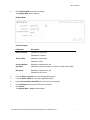
Click Add New Biller to register a new biller.
The Register Biller screen appears.
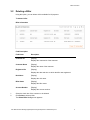
Register Biller
Field Description
Field Name
Description
Select Customer
[Mandatory, Drop-Down]
Indicates the customer.
Select a Biller
[Mandatory, Drop-Down]
Indicates the biller.
Account Number
with Biller
[Mandatory, Alphanumeric, 20]
Nick Name
[Mandatory, Alphanumeric, 20]
Indicates the account number or consumer number with the biller.
Indicates the nick name.
3.
From the Select Customer list, select the appropriate option.
4.
From the Select a Biller list, select the appropriate option.
5.
In the Account Number with Biller field, enter the account number.
6.
In the Nick Name field, enter the nick name of the biller.
7.
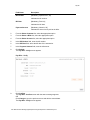
Click Submit.
The Register Biller - Verify screen appears
User Manual Oracle Banking Digital Experience Digital Experience Retail Bill Payment
7