1
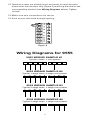
• If you have any questions about cross referencing the old terminal to
the new label, reference your equipment installation manual, a
licensed contractor, or call Robertshaw Technical Support at
(800) 445-8299.
4. Remove existing thermostat base from wall.
Recycling Thermostat
If this thermostat is replacing a thermostat that contains mercury
in a sealed tube, do not place your old thermostat in the garbage.
Contact your local waste management authority for instructions
regarding proper disposal of the thermostat. If you have any questions, call Robertshaw technical support at 1-800-445-8299.
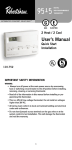
Step 2: Installing Model 9555 Thermostat
NOTE: FOR NEW INSTALLATIONS, MOUNT THERMOSTAT ON
INSIDE WALL, FIVE FEET ABOVE THE FLOOR. DO NOT
INSTALL BEHIND A DOOR, IN A CORNER, NEAR AIR
VENTS, IN DIRECT SUNLIGHT, OR NEAR ANY HEAT OR
STEAM GENERATING FIXTURES. INSTALLATION AT THESE
LOCATIONS WILL AFFECT THERMOSTAT OPERATION.
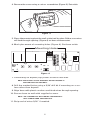
1. Turn power off to the heating and cooling systems.
2. Place AUTO-HEAT-OFF-COOL in OFF position (Figure 2).
-ON-AUTO switch into AUTO position (Figure 2).
Maple Chase Company
www.maplechase.com
Tech Service: 1-800-445-8299
M-F 7:30 a.m. - 5:30 p.m. CST
MADE IN MEXICO
TM
Item
9555
3. Place
SETTING OR CHANGING THE SETPOINT TEMPERATURE:
1. Press or button. Display will show SET and the current
temperature setpoint.
2. Press or button to adjust temperature setpoint.
3. After completing the change, the display will return to the current
room temperature after a few seconds.
CHANGING THE TEMPERATURE DIFFERENTIAL,
DEAD BAND, AND RESIDUAL COOL:
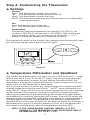
The temperature differentials are factory set at 1˚F and 2˚F for
1ST and 2ND stages respectively. The dead band for Autochangeover is set at 3˚F. To change settings:
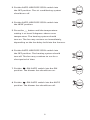
1. Press the and buttons at the same time and hold for 1
second. Display will indicate: DIFFERENTIAL 1ST.
2. Press either the or button to adjust the 1st stage differential between 0.5˚F – 3˚F (0.5˚C - 1.5˚C).
3. Either wait five seconds or press the
button. The display
will indicate: DIFFERENTIAL 2ND.
4. Press either the or button to adjust 2nd stage differential between 1˚F – 6˚F (1˚C - 3˚C).
5. Either wait five seconds or press the
button. The display
will indicate: DEADBAND.
6. Press either the or button to adjust the dead band
between 3˚F – 6˚F (1.5˚C - 3˚C).
7. Either wait five seconds or press the
button. The fan
icon and ON will be displayed.
8. Press either the or button to adjust the Residual Cool
fan delay between 0, 30, 60, or 90 seconds.
9. The display will return to the current room temperature after
a few seconds.
120-1523
Figure 2
3