1
Chapter 5
Configuring the Replay Tool
When you start the Replay tool, you must specify a configuration file in XML format. In
that file, you can set properties that control the data source, which topics to replay, and
attributes such as the replay speed. This chapter describes how to write a configuration
file.
5.1
How to Load Replay’s XML Configuration File
The Replay tool loads its XML configuration from multiple locations. This section presents the various approaches, listed in load order.
❏ $NDDSHOME/resource/qos_profiles_4.5x1/xml/NDDS_QOS_PROFILES.xml
This file contains the Connext default QoS values; it is loaded automatically if it
exists. (First to be loaded.)
❏ File in NDDS_QOS_PROFILES
The files (or XML strings) separated by semicolons referenced in this environment variable are loaded automatically.
❏ <working directory>/USER_QOS_PROFILES.xml
This file is loaded automatically if it exists. If the USER_QOS_PROFILES file is
found and there is a default profile specified in it, this default profile is automatically applied to the QoS settings of the Recording Service entities.
1. x stands for the version letter of the current release.
5-1
5. Configuring
Replay
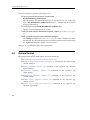
The first three locations only contain QoS Profiles and are inherited from Connext (see
Chapter 15 in the RTI Core Libraries and Utilities User's Manual).