1
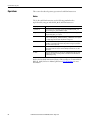
n-Position Device (P_nPos)
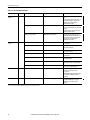
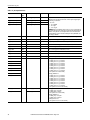
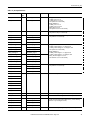
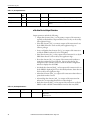
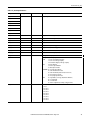
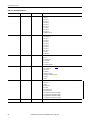
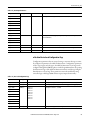
Table 3 - P_nPos Input Parameters
Input Parameter
Data
Type
Alias For
Default
Description
Cfg_PosFailSeverity
INT
PosFail.Cfg_Severity
1000
Cfg_LockFailSeverity
LockFail.Cfg_Severity
1000
Cfg_IntlkTripSeverity
IntlkTrip.Cfg_Severity
500
Cfg_IOFaultSeverity
IOFault.Cfg_Severity
1000
These parameters determine the severity of each alarm. This drives the color and
symbol that are used to indicate alarm status on the faceplate and global object.
The following are valid values:
1…250 = Low
251…500 = Medium
501…750 = High
751…1000 = Urgent
IMPORTANT: For FactoryTalk View software version 7.0, these severity parameters
drive only the indication on the global object and faceplate. The Alarms and Events
definition severity drives the color and symbol that is used on the alarm banner
and alarm summary as well as the value returned by the FactoryTalk Alarms and
Events display commands.
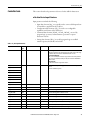
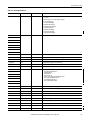
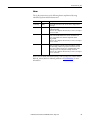
Cfg_Retries
SINT
0
Number of retries via Position 1 before declaring failure (0=don't retry).
Cfg_ExtendT
REAL
0.0
Delay before extending cylinder to engage for move (seconds).
Cfg_VerifyT
REAL
1.0
Delay to verify device has settled in commanded position (seconds).
Cfg_PosChkT
DINT
30
Maximum time to reach target position before fail (seconds).
Cfg_LockChkT
DINT
5
Maximum time to get locked /unlocked feedback before fail (seconds).
Cfg_PosSimT
REAL
1.0
Time to reach target position in simulation (seconds).
Cfg_LockSimT
REAL
1.0
Time to lock or unlock in simulation (seconds).
Cfg_CylSimT
REAL
1.0
Time to simulate index cylinder feedback in simulation (seconds).
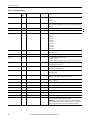
PSet_Owner
DINT
0
Program owner request ID (non-zero) or release (zero).
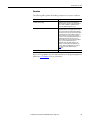
PCmd_Pos1
BOOL
0
When Cfg_PCmdClear is 1:
• Set PCmd_Pos1 to 1 to go to Position 1
• Set PCmd_Pos2 to 1 to go to Position 2
• Set PCmd_Pos3 to 1 to go to Position 3
• Set PCmd_Pos4 to 1 to go to Position 4
• Set PCmd_Pos5 to 1 to go to Position 5
• Set PCmd_Pos6 to 1 to go to Position 6
• Set PCmd_Pos7 to 1 to go to Position 7
• Set PCmd_Pos8 to 1 to go to Position 8
• These parameters reset automatically
PCmd_Pos2
PCmd_Pos3
PCmd_Pos4
PCmd_Pos5
PCmd_Pos6
PCmd_Pos7
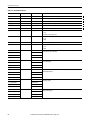
When Cfg_PCmdClear is 0:
• Set PCmd_Pos1 to 1 to go to Position 1
• Set PCmd_Pos2 to 1 to go to Position 2
• Set PCmd_Pos3 to 1 to go to Position 3
• Set PCmd_Pos4 to 1 to go to Position 4
• Set PCmd_Pos5 to 1 to go to Position 5
• Set PCmd_Pos6 to 1 to go to Position 6
• Set PCmd_Pos7 to 1 to go to Position 7
• Set PCmd_Pos8 to 1 to go to Position 8
• These parameters do not reset automatically
PCmd_Pos8
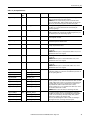
PCmd_Acq
PCmd_Rel
16
BOOL
Mode.PCmd_Acq
Mode.PCmd_Rel
0
When Cfg_PCmdClear is 1:
• Set PCmd_Acq to 1 to Acquire
• Set PCmd_Rel to 1 to Release
• These parameters reset automatically
When Cfg_PCmdClear is 0:
• Set PCmd_Acq to 1 to Acquire
• Set PCmd_Acq to 0 to Release
• PCmd_Rel is not used
• These parameters do not reset automatically
Rockwell Automation Publication SYSLIB-RM031C-EN-P - August 2014