1
Unit 3: Installation
MEMORY EXPANSION
The memory cartridge provides additional storage of user data and graphics. Access to the
memory cartridge port, and its installation, is very simple. The instructions below provide
guidance.
CAUTION: INSTALL THE MEMORY CARTRIDGE PRIOR TO SENDING
RELATIVE COMMANDS OR AN ERROR WILL OCCUR. REMOVE POWER
TO THE PRINTER PRIOR TO INSTALLING THE CARTRIDGE.
1 Disconnect power supply cord.
2
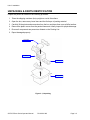
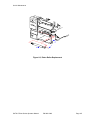
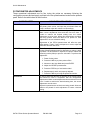
Detach memory cartridge cover (1, Figure 3-7) from center frame (2).
3
Fully insert memory cartridge (3) into its respective port and replace cover (1).
4
Restore power to the printer and send commands.
3
1
2
Figure 3-7, PCMCIA Memory Expansion
SATO GT4xxe Series Operator Manual
PN 9001138C
Page 3-12