1
Chapter 4: Using Your Freeze Dryer
Manual Start-Up
(Models not equipped with a purge valve)
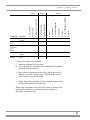
To manually run the freeze dry process, press the REFRIGERATION
MAN switch. This will start the refrigeration system. The green LED
above the switch will illuminate. When the collector temperature reaches
–40°C, the vacuum pump may be started by pressing the VACUUM
switch. The Temperature and Vacuum Graphs will indicate collector
temperature and system vacuum. The LCD display will show the actual
temperature of the collector. When the vacuum in the system is above 5
mBar the vacuum display will indicate “HI.” At 5 mBar and below, the
display will show the actual vacuum.
When the system vacuum is between 0.450 and 0.133 mBar, the lower
green vacuum graph LED will flash. When the system vacuum level is
<0.133 mBar, the green LED will be lit steadily indicating that samples
may be added.
Manual Start-Up
(Models equipped with a purge valve)
To manually run the Freeze Dryer, press the REFRIGERATION MAN
switch. The green LED above the switch will illuminate. The PURGE
switch and VACUUM switch may be pressed. LED’s above the switches
will illuminate. The purge valve will close and the vacuum pump will
start. (Do not start the vacuum pump without first closing the purge
valve). When the collector temperature reaches –40°C or any time
afterwards, press the PURGE switch to open the purge valve. The
Temperature and Vacuum Graphs will indicate collector temperature and
system vacuum. The LCD display will show the actual temperature of the
collector. When the vacuum in the system is above 5 mBar the vacuum
display will indicate “HI”. At 5 mBar and below, the display will show
the actual vacuum.
When the system vacuum is between 0.450 and 0.133 mBar, the lower
green vacuum graph LED will flash. When the system vacuum level is
<0.133 mBar, the green LED will be lit steadily indicating that samples
may be added.
26