1
Please refer to MS01/MS02 User Guide for more information.
7.6 Track by GPRS (Meiligao Protocol) between Server and Tracker
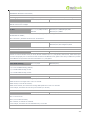
7.6.1 Set Tracker’s GPRS ID
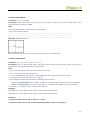
Command: W******,010,ID
Description: Set a digital GPRS ID for the tracker.
Note: GPRS ID must not over 14 digits.
Example:
W000000,010,00001
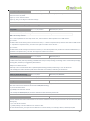
7.6.2 Set APN
Command: W******,011,APN,Username,Password
Description: Set APN details for the tracker
Note:
1. APN username and password are optional. If no APN username and password are required, just input APN
only;
2. APN defaulted as ‘CMNET’;
3. APN + username + password should not over 39 characters.
Example:
W000000,011,CMNET,Meiligao,6688
W000000,011,CMNET
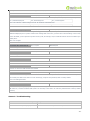
7.6.3 Set IP and Port
Command: W******,012,IP,Port
Description: Set IP and Port for tracker for GPRS communication.
Note:
1. IP is your server’s IP or the domain name.
2. Port: [1,65534]
Example:
W000000,012, 220.121.7.89,8500
W000000,012,www.meiligao.net,8500
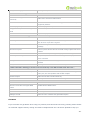
7.6.4 Set DNS Server IP (optional)
Command: W******,009,DNS Server IP
Description: In case the domain name you set by the last command (W******,012,IP, Port) doesn’t work,
which means your server IP is not properly set. You can first use this command to set DNS Server IP (please
check with your DNS server provider for the DNS Server IP) and then redo the command W******,012,IP,
Port.
Example: W000000,009,220.23.4.90
7.6.5 Enable GPRS Tracking
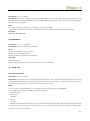
Command: W******,013,X
Description: Enable GPRS tracking function.
Note:
- 10 -