1
Intense wash button
o Press this button to select the “intense” wash programme option.
o The appliance will then increase the washing time of the main wash.
o The increased time will depend on the wash cycle and the
temperature, or any other selected options, however the time
remaining will be displayed.
Child lock
o Your appliance has a child lock option. If this is set, it will mean that
the control panel is locked and nobody can affect the operation of
the wash programme once it has started.
o The child lock should be activated once a wash programme and any
programme options that you wish to use have been selected.
o Press the Start/pause button to commence the wash cycle. Then
press the delay start button and the start/pause button
simultaneously for three seconds.
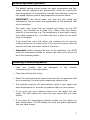
o The child lock symbol
will appear on the LED display.
o When the child lock is engaged, all other buttons on the control
panel are disabled.
o To switch the child lock off, you should press the start/pause button
and the delay start button simultaneously again for three seconds.
The child lock symbol will go out.
Door lock
o Your appliance has a door lock which will be activated at the
beginning of a wash cycle to prevent access to the machine while it
is operating. You must wait until this symbol has gone out before
attempting to open the door.
Power off memory
o If there is an abrupt power failure, the power off memory will
remember the preset or running operation and will resume when
the power is restored.
21