1
Panel Controls and OSD Functions
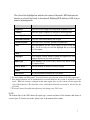
ML18 power and video adjustment controls are located on the rear of the monitor. All monitor video adjustments are made via the OSD (On-Screen Display) controls.
POWER
U
U
+
MENU
POWER
Toggles power On/Off
Power indicator light
OSD Control Keys
+
1. Scrolls up the highlighted bar.
2. Increases the value of a parameter.
-
1. Scrolls down the highlighted bar.
2. Decreases the value of a parameter.
MENU
1. Activates the OSD on-screen display menu.
2. Selects a parameter for adjustment.
3. Exit or save the adjustment and return to the Main menu.
5