1
12.NUMBER BUTTONS
Press the NUMBER BUTTONS to learn numbers or to answer
number-related questions.
To preserve battery life, the unit will automatically turn off after
several minutes without input. The unit can be turned on again by
pressing the ON/OFF Button. The unit will also automatically
turn off when the batteries are very low. A warning will be displayed
on screen as a reminder to change the batteries.
ACTIVITIES:
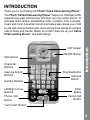
The VTech® Call & Chat Learning PhoneTM offers a total of 10 fun
activities to play.
Activities
13.AUTOMATIC SHUT-OFF
1: Phone Book
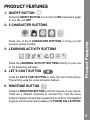
Press any of the 5 CHARACTER BUTTONS to
enter that person’s phone number page. Press the
Call button to call them, then use the microphone
feature to leave a message when you see the light
go on. You can also edit the default phone number
for each person. Just press Enter when in the phone
number page and use the arrow and number buttons
to change the phone number.
2: Letter Chat
In this activity, you can learn the letters of the
alphabet by using the arrow buttons to scroll from
A to Z.
7