1
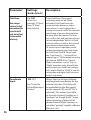
Setup Menu: Parameter/Settings Reference
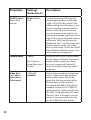
Parameter
Settings
Description
Mode
Camera, Video*
Selects whether still photos or video
clips are captured when the camera
is triggered.
Image Size
(only affects
still photos in
Camera mode)
3M Pixel,
5M Pixel,
8M Pixel,
Selects resolution for still photos from
3 to 8 megapixels. Higher resolution
produces better quality photos, but
creates larger files that take up more
of the SD card capacity (fills up faster).
5M is a good compromise between
quality and file size.
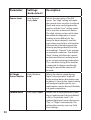
Image Format
(only affects still
photosformat for video
is tied to Video
Size)
Full Screen, Wide
Screen
Selects 4:3 (Fullscreen, like old TV sets)
or 16:9 (Widescreen, like new flat TVs)
“aspect ratio” for still photos. If you
like to view your photos on a TV set
or computer monitor, you can set the
format to match it.
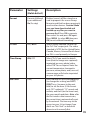
Capture
Number
(only affects
still photos in
Camera mode)
1 Photo,
2 Photo,
3 Photo
Selects how many photos are taken
in sequence per trigger in Camera
mode. This setting affects photos
taken in Field Scan mode as well (to
snap two photos every 10 minutes,
for example). Please also refer to the
Interval parameter.
(Bold=default)
* Only still photos can be transmitted wirelessly, due to the large files generated by video
and carrier bandwidth limitations. When the camera is set to video mode, the video files
are stored on the SD card for later review (see PLAYING BACK/DELETING THE PHOTOS/VIDEOS,
pg.42)
31