1
VCUBE 3.2 Release Notes
Installation:
WARNING: DO NOT INSTALL MXFix/VCube 3.2 ON A COMPUTER ON WHICH PYRAMIX IS INSTALLED
This may cause instabilities in the software. These PC configurations will NOT be supported by Merging.
NEW FEATURES
MXFix:
Merging Technologies introduces the MXFix™ batch wrapper. Designed to make wrap processing of
large amounts of broadcast quality video files as simple as possible for all users in a video workflow.
MXFix can perform any or all of the following tasks in combination with each other as needed. Each
watch folder has its own set of tasks to be performed on the files that are copied to it.
Possibilities:
Scan multiple video files in multiple watch folders to determine process priority and
compatibility
Decode Dolby E audio streams to PCM (for re-wrapping or measurement) with the SurCode
Dolby E® decoder plug-in
Scan and correct loudness levels of stereo and surround channels to user defined target
values of stereo and surround channels with Jünger Audio’s Level Magic®
Measure EBU R-128/ITU.1770 (ATSC) loudness levels of any stereo or surround channels
with Merging’s Final Check™ technology
Generate a loudness level report file in .xml format with Final Check
Correct MXF aspect ratio metadata
Correct audio word length values
Correct audio track counts to fit MXF hardware manufacturers’ standards
Encode Dolby E audio streams
Wrap it all to a new video file
Push that newly wrapped video file to an Output Folder for deployment
Erase or move the original file away from the watch folder for archiving
MXFix Web Monitor:
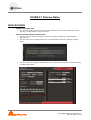
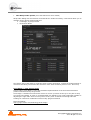
The Web Monitor is available from the moment VCube is running in MXFix mode [Alt + M]. It is
accessed through a Web Browser, Merging recommends the use of Chrome or Safari. You simply need
to be logged onto the same network domain as that of VCube running MXFix.
We recommend the use of the Chrome web browser.
Log on to your VCube’s IP address and add following the URL :7777
Example: http://10.0.0.80:7777
You may also log on to the MXFix Web Monitor from a browser on the local machine by
entering the following URL in your Web Browser: http://localhost:7777
Optional with new keys:
MXFix Key
Jünger Level Magic Key
Final Check metering Key
Note: All Details on the MXFix & Web Monitor workflows are available in the VCube User Manual
© Copyright Merging Technologies Inc.
2010. All rights reserved