1
ION EEM 4.0 R2 User Guide
Chapter 2: Trend Analysis Module
Set a Fixed Time Range for charts
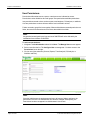
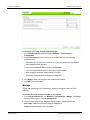
1. Click the Trend Analysis tab.
2. Select Fixed Time from the Time Range drop-down list in the Data Group area.
3. Enter the date range information in either a mm/dd/yyyy format, or click the calendar icon
to select the start and end dates. Time can be entered as a standard twelve hour clock
value, or use the up/down arrows beside the time field to set the time values.
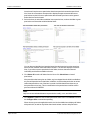
When analyzing sources of data from different time zones, you may find it easier to view the
data in UTC in order to see the data in a consistent time reference. Select (UTC)
Coordinated Universal Time from the time zone dropdown menu next to the date and time
fields.
Note
Data can be retrieved in any time zone configured within your system. Time zones are
configurable in the ION EEM system. Once a time zone has been configured, it becomes a
selection in the time zone dropdown menu. The default option returns all data in the
source’s local time. Contact your ION EEM Administrator for more information.
© 2012 Schneider Electric. All rights reserved.
Page 33 of 150