1
PanelView Plus and PanelView Plus Compact 400 and 600 Terminals
15
Remove and Install the Power Terminal Block
The terminals ship with a power block installed. You can remove the power terminal block
for ease of installation, wiring, and maintenance.
WARNING
Explosion Hazard
Substitution of components may impair suitability for hazardous locations.
Do not disconnect equipment unless power has been switched off and area is known to
be non-hazardous.
Do not connect or disconnect components unless power has been switched off.
All wiring must comply with N.E.C. articles 501, 502, 503, and/or C.E.C. section 18-1J2 as
appropriate.
Peripheral equipment must be suitable for the location in which it is used.
ATTENTION
Disconnect all power before installing or replacing components. Failure to disconnect
power may result in electrical shock or damage to the terminal.
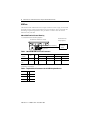
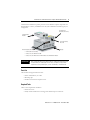
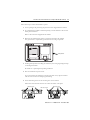
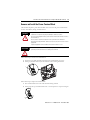
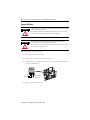
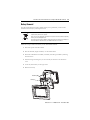
Follow these steps to remove the terminal block.
1. Insert the tip of small, flat-blade, screw driver into terminal block access slot.
2. Gently pry terminal block away from terminal to release locking mechanism.
1
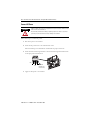
Follow these steps to replace the terminal block.
1. Press terminal block base in first with the block leaning outward.
2. Gently push the top of terminal block back to vertical position to snap in locking tab.
2
1
Publication 2711P-IN002G-EN-P - November 2009