1
The content of this document is proprietary. No part of this document shall be reproduced nor shall any use or disclosure of the information contained herein
be made without written authorization from Sparton Electronics.
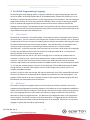
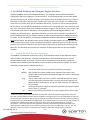
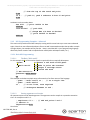
// quaternion vector (w,x,y,z) respectively
0 quat.p // disables
5.1.2.3 3D Compass Calibration
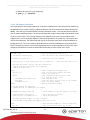
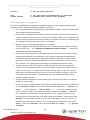
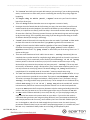
This script performs 3D compass calibration. To perform calibration use a dumb terminal to send this to
the NavMod (if you see huh? flying by, add some delay to each line transmitted or reduce the baud to
38400). Once the script has been loaded, send the command “cal3D”. The script will then prompt the
user to capture calibration points. The user should move the compass around and select between 4 and
12 points, then hit ESC. The script will then print the magnetic error at a 0.5 Hz rate. Observe the
magnetic error until it converges sufficiently then hit the spacebar or any other key. The compass will
now be field calibrated. The cal3D command may be re-entered as many times as desired without reloading the macro. The macro needs to be loaded only once while the NavMod remains powered up.
There is enough information in the basic programming section and the appendix to analyze this macro
sufficiently should the user desire to extend this functionality to other custom user scripts.
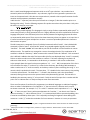
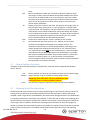
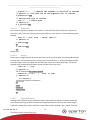
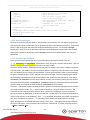
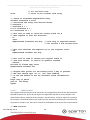
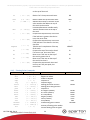
: cal3D
calmode 1 set
." Calibration starting" cr
// start compiling a new word, called cal3D
// set the calibration mode to 3D
// tell the user we are starting then <CR>
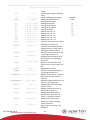
calCommand cal_start set
// issue the cal_start command
." Press any key to take next point, ESC to finish" cr
// Tell the user what to do
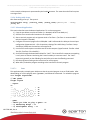
// The code now grabs a point, the user changes the
// compass position and repeats the cal3DState
// from 4-12 times total.
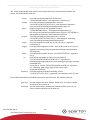
begin
key 27 = 0=
while
calCommand cal_capture set
250 delay
calNumPoints di.
repeat
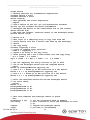
//
//
//
//
//
//
//
//
//
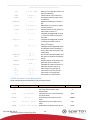
begin a begin-while-repeat loop
wait for key input compare with ESC
invert the logic (0=)
only continue if the TOS has a true,
i.e. user hit a key != ESC
take another point
wait 250 msecs to allow point to be counted
print out point number
end of begin-while-repeat
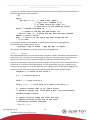
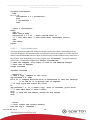
// Now the points are captured,
// command the SW to compute the cal values:
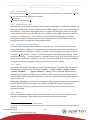
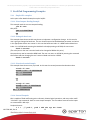
calCommand cal_end_capture set
// issue command to end the capture of points
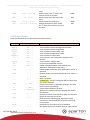
." Starting error settling" cr
." Press any key to terminate" cr
// tell user what’s going on
// issue instructions
// The user observes magErr to watch it settle
// at a minimum value (EKit can display every sec or so):
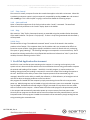
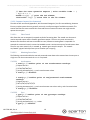
begin
?key 0=
130-7546-001, Rev A
// keep printing magErr at .250 sec intervals
// ?key returns false hit a key is hit
21