1
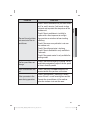
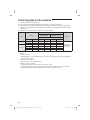
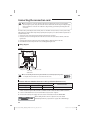
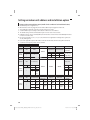
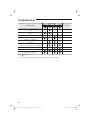
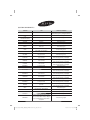
Option No. : 0AXXXX-1XXXXX-2XXXXX-3XXXXX Option SEG1 Explanation SEG2 PAGE MODE Indication Details Indication 0 Option SEG7 Explanation PAGE CAUTION SEG6 The unit digit of an indoor unit Indication Details 0 No Main address 1 Main address setting mode SEG8 RESERVED SEG9 SEG10 Setting RMC address RESERVED SEG5 Setting Main address A Indication Details Indication and Details SEG4 Indication Details 0 No RMC address 1 RMC address setting mode 1 Indication Details 0~3 A single digit RESERVED SEG11 SEG12 Group channel(*16) Group address Indication Details Indication Details RMC1 0~2 RMC2 0~F ENGLISH Indication and Details Details SEG3 RESERVED • You can set the Main address(SEG6) 0~3 range and if you set other numbers,”communication error”will occur. • If you set the SEG 3 as 0, the indoor unit will maintain the previous MAIN ADDRESS even if you input the option value of SEG6. • If you set the SEG 9 as 0, the indoor unit will maintain previous RMC ADDRESS even if you input the option value of SEG11~12. Example) If you want to set as “MAIN : 3, CHANNEL : 1, RMC : B”, SEG1 SEG2 SEG3 SEG4 SEG5 0 A 1 - - SEG6 3 SEG7 SEG8 SEG9 SEG10 SEG11 SEG12 1 - 1 - 1 B assign option codes except SEG 1, 7 which are page options. 49 [ GpG⺵䛙piptluki]_TW\XZ^hTWWjz]UGGG[` YWX[TXYTZXGGG㝘㤸G`aY[a\\