1
business approaches we discussed earlier is that the people who are
investigating and evaluating risks can alter the perception of risk. The
single most effective strategy for avoiding these pitfalls is to be aware of
their existence, so you can consciously identify and counter them. After
all, success is based on understanding the situation as it truly is, rather
than how we would wish it to be. As the late physicist Richard Feynman
very eloquently pointed out,6 "For a successful technology, reality must
take precedence over public relations, for nature cannot be fooled."
Corporate Culture and Risk
Experts in company behavior have demonstrated that, contrary to what
we might assume, organizational culture is often independent of maturity;
that is, culture is more closely aligned to the style of leadership
encouraged by company executives. According to Geofee and Jones7 there
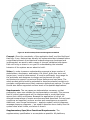
are four basic cultural types, each with a positive and negative form:
Fragmented, Networked, Mercenary, and Communal.
A Fragmented culture is typified by independent action, such as scientific
research. A well-connected, in-group mentality typifies Networked
cultures, with a focus on personal relationships. Mercenary cultures are
strongly goal-oriented, even at the expense of team morale or well-being.
Finally, Communal cultures are typified by a closely connected group with
well-focused goals (i.e., a "we are family" approach).
As it is for different levels of organizational maturity, the perception of risk
is dramatically different for each culture. A Fragmented culture might view
risk through each individual's eyes, biasing the risk analysis toward
personal gain. Networked cultures are typically more concerned with risks
such as political issues that might affect the health of the team (even over
the health of the company), potentially ignoring other risks to project
success. Mercenary cultures focus on all risks that affect project success,
but are often less concerned with risk to people, such as the risk of
burnout or strained team relationships. Communal cultures, which are
fairly rare, have well-developed interpersonal relationships and are least
likely to bias the risk analysis. However, they are also the most likely to
exhibit arrogance regarding their own success and therefore to assume
risks without enough potential gain to sufficiently counter the potential
loss.
Culture and Maturity Risk Profiles
Within each of the four cultures, it is important, during risk analysis, to
understand the effect that the corporate culture will have on the
interpretation and ranking of risk. The assignment of importance based on
perception should always be considered, or at least reviewed, in this light.
Although corporate culture is relatively independent of corporate maturity,
there are several typical combinations.
The Entrepreneurial Profile. Entrepreneurial companies are often
Mercenary or Communal in nature, and are most influenced by the
company founder. If the founder has a relentless focus on business
success, then the culture will tend to be more Mercenary. If a family