1
Read the installation instructions before installing and connecting the IP camera.
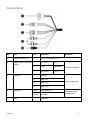
Power Connection
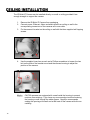
Make sure that the camera’s power cable is correctly and firmly connected.
OpenEye recommends against using more than one power source at a
time. Do not use a PoE power source when providing the camera with
12vDC or 24vAC power.
Make sure the camera’s power cable is correctly and firmly connected. If using Power
over Ethernet (PoE), make sure Power Sourcing Equipment (PSE) is in use in the
network.
Ethernet Cable Connection
OpenEye recommends using Category 5 Ethernet cable to connect the camera to your
network. For the best transmission quality, the cable length should not exceed 328 feet
(100 meters). Connect a network cable to the camera using the RJ45 input and connect
the other end of the cable to your network switch or recorder.
If you are connecting the camera directly to a recorder, a crossover cable is
necessary for most configurations.
Check the status of the network connection by looking at the link indicator and activity
indicator LEDs. If the LEDs are not lit check your network connection. The green link LED
indicates a network connection and the orange activity LED flashes to indicate network
activity.
31051AD
17