1
IJCST Vol. 2, Issue 2, June 2011
ISSN : 2229-4333(Print) | ISSN : 0976-8491(Online)
designed for programming embedded systems, and features quick
compile and interactive debugging. You should do your software
development in the flash memory on the RCM5700. The flash
memory and options are selected with the Options > Program
Options > Compiler menu. The RCM5700 and Dynamic C were
designed to accommodate flash devices with various sector
sizes in response to the volatility of the flash-memory market.
Developing software with Dynamic C is simple. Users can
write, compile, and test C and assembly code without leaving
the Dynamic C development environment. Debugging occurs
while the application runs on the target [8]. Alternatively, users
can compile a program to an image file for later loading. Dynamic
C runs on PCs under Windows NT. for additional information
if you are using a Dynamic C under Windows Vista. Programs
can be downloaded at baud rates of up to 460,800 bps after the
program compiles.
Dynamic C has a number of standard features.
A. Full-feature source and/or assembly-level debugger, no incircuit emulator required.
B. Royalty-free TCP/IP stacks with source code and most
common protocols.
C. Powerful language extensions for cooperative or preemptive
multitasking
D. Loader utility program to load binary images into Rabbit
targets in the absence of Dynamic C.
E. Provision for customers to create their own source code
libraries and augment on-line help by creating “function
description” block comments using a special format for
library functions.
III. TCP/IP based embedded internet working
The TCP/IP layers are located in the middle of the entire
communication stack. They ensure proper point-to-point
communication and take care of the routing and delivery of packets.
To get any device hooked-up to the Internet successfully, at least
one path through the entire communication stack is required. If
the device supports multiple applications and/or multiple physical
interfaces, several paths through the stack are possible [2, 4].
The Dynamic C TCP/IP is intended for embedded system designers
and support professionals who are using a Rabbit-based controller
board. Most of the information contained here is meant for use
with Ethernet- or Wi-Fi-enabled boards, but using only serial
communication is also an option. Knowledge of networks and
TCP/IP (Transmission Control Protocol/Internet Protocol) is
assumed. The Dynamic C implementation of TCP/IP comprises
several libraries. The main library is DCRTCP.LIB. As of Dynamic
C 10.54, this library is a light wrapper around DNS.LIB, IP.LIB,
NET.LIB, TCP.LIB and UDP.LIB. These libraries implement
DNS (Domain Name Server), IP, TCP, and UDP (User Datagram
Protocol). This, along with the libraries ARP.LIB, ICMP.LIB,
IGMP.LIB and PPP.LIB are the transport and network layers of
the TCP/IP protocol stack [9].
We have provided a number of programs demonstrating various
uses of TCP/IP for networking embedded systems. These
programs require you to connect your PC and the RCM5700
module together on the same network. This network can be a
local private network (preferred for initial experimentation
and debugging), or a connection via the Internet Obtaining IP
addresses to interact over an existing, operating, network can
involve a number of complications, and must usually be done with
cooperation from your ISP and/or network systems administrator.
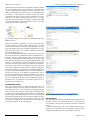
Socket Architecture is shown in Fig. 3
w w w. i j c s t. c o m
Fig. 3: Socket Architecture of TCP/IP
Fig. 4.Network Connection
IV. Problem formulation
Dynamic C provides libraries that implement most of the functions
required to implement a web server, more formally known as
an HTTP (Hypertext Transfer Protocol) server. (The browser is
formally called an HTTP client). You only need to write code
specific to your application, such as dealing with I/Os and the
Rabbit peripheral devices, and possibly some code to help the
HTTP server generate the appropriate responses back to the user’s
web browser. In addition, there is a small amount of “boilerplate”
that needs to be written to include and conFig. the HTTP server
and any ancillary libraries such as the TCP/IP suite and file systems
[3].
Fig. 4: The development processes
V. Design methodology
We probably need to lay out some forms. Forms, in web parlance,
allow the browser’s user to fill in some information then submit it
to the server [9]. The server then performs the requested actions
and sends a confirmation back to the browser. This is the most
common means for implementing control of the server as opposed
to merely querying it.
Relate to the HTTP upload facility [3]. The last two questions
concern the overall design of your application; in particular, a large
International Journal of Computer Science and Technology 101