1
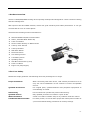
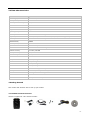
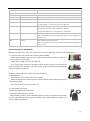
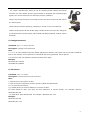
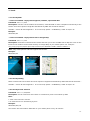
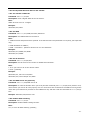
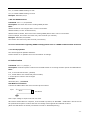
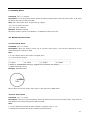
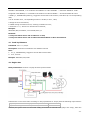
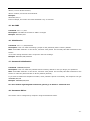
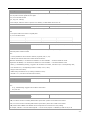
GPS Vehicle Tracker User Manual V7.0 VT300 Contents 1 2 3 4 Product Overview .................................................................................................................. - 3 For Your Safety ..................................................................................................................... - 3 VT300 Characteristics ............................................................................................................ - 4 Getting Started ..................................................................................................................... - 4 4.1 Hardware and Accessories ............................................................................................. - 4 4.2 View ........................................................................................................................... - 5 4.3 Functional Parts ............................................................................................................ - 5 4.4 Connecting and Installation ............................................................................................ - 6 5. Change Password ................................................................................................................. - 7 6. Time Zone........................................................................................................................... - 7 7. Track .................................................................................................................................. - 8 7.1 Track by SMS ............................................................................................................... - 8 7.2 Track by Calling ............................................................................................................ - 8 7.3 Track by Preset Interval ................................................................................................. - 8 7.4 Google Earth and Google Map ........................................................................................ - 9 7.5 Track by MS01/MS02 .................................................................................................... - 9 7.6 Track by GPRS between Server and Tracker ....................................................................- 10 7.6.1 Set Tracker‟s GPRS ID ..........................................................................................- 10 7.6.2 Set APN .............................................................................................................- 10 7.6.3 Set IP and Port ...................................................................................................- 10 7.6.4 Set DNS Server IP (optional) ................................................................................- 10 7.6.5 Enable GPRS Tracking ..........................................................................................- 10 7.6.6 Set GPRS Interval ...............................................................................................- 11 7.7 Track by GpsGate ........................................................................................................- 11 8. Authorization ......................................................................................................................- 11 9. Speeding Alarm ..................................................................................................................- 12 10. Movement/Geo-fence.........................................................................................................- 12 10.1 Movement Alarm........................................................................................................- 12 10.2 Geo-fence Alarm ........................................................................................................- 12 11. Track by Distance ..............................................................................................................- 13 12. Engine Cut .......................................................................................................................- 13 12.1 Output Control (Immediate) ........................................................................................- 14 12.2 Output Control (Conditional) .......................................................................................- 14 13. Heading Change Report .....................................................................................................- 14 14. Heartbeat .........................................................................................................................- 14 15. Get IMEI ..........................................................................................................................- 15 16. Initialization .....................................................................................................................- 15 17. Password Initialization .......................................................................................................- 15 18. Parameter Editor ...............................................................................................................- 15 Annex 1. SMS Command List ...................................................................................................- 16 Annex 2. Troubleshooting ........................................................................................................- 21 - -2- 1 Product Overview VT300 is a GPS/GSM/GPRS tracking device specially developed and designed for vehicle real-time tracking and fleet management. With superior GPS and GPRS modules, VT300 has good sensitivity and stable performance. It can get accurate GPS fix even in remote places. VT300 has the following functions and features: SMS and GPRS TCP/UDP Communication AGPS ( with GSM Base Station ID) Track on Demand Show Location Directly on Mobile Phone Track by Time Interval Track by Distance SOS Panic Button Movement Alarm Geo-fencing Control Low Battery Alarm Speeding Alarm GPS Blind Area Alarm (in/out) Power-cut Alarm Engine Cut (Stop Engine) 2 For Your Safety Read these simple guidelines. Not following them may be dangerous or illegal. Proper Connection When connecting with other device, read carefully its manual so as to carry out correct installation. Do not connect it to other incompatible devices. Qualified Accessories Use original parts, qualified batteries and peripheral equipments to avoid damage to VT300. Safe Driving Drivers should not operate this product while driving. Qualified Service Only qualified personnel can install or repair VT300. Water Resistance VT300 is not water resistant. Keep it dry. Install it inside the vehicle Confidential Phone Number For safety reason, do not tell other people the mobile phone number of your VT300 without taking precautions of security settings. -3- 3 VT300 Characteristics Items Specification Power Supply +9V - +36V / 1.5A Backup Battery 850mAh Normal power consumption 85mA/h Dimension 115mm x 60mm x 21mm Installation Dimension 115mm x 79mm x 21mm Weight 140g Operating temperature -20°to 55°C Humidity 5% to 95% Non-condensing Frequency GSM 900/1800/1900Mhz or GSM 850/900/1800/1900Mhz (optional) GPS Chipset latest GPS SIRF-Star III chipset GPS Sensitivity -158Db GPS Frequency L1, 1575.42 MHz C/A Code 1.023 MHz chip rate Channels 20 channel all-in-view tracking Position Accuracy 10 meters, 2D RMS Velocity Accuracy 0.1 m/s Time Accuracy 1 us synchronized to GPS time Default datum WGS-84 Reacquisition 0.1 sec., average Hot start 1 sec., average Warm start 38 sec., average Cold start 42 sec., average Altitude Limit 18,000 meters (60,000 feet) max. Velocity Limit 515 meters/second (1000 knots) max. LED 1 LED light to show working status. Button One SOS button Interface One input and one output 4 Getting Started This section will describe how to set up your VT300. 4.1 Hardware and Accessories VT300 is supplied in a box which includes: -4- VT300 with Battery GPS Antenna GSM Antenna Screws Wires with SOS Button CD 4.2 View Front View Side View Back View 4.3 Functional Parts Battery LED Off Power is off or charging is complete Flashing (every 0.1 second) Low power On Charging Flashing (1 second on and 2 seconds off) Working Power On/Off Button To turn on/off VT300. Note: The switch is on off side as factory default. When the wires are plugged in, VT300 will be switched on automatically as the two yellow cables (SW1 and SW2) are connected together. SOS Button SOS button is connected with the wires. Press it to send SOS alarm to the preauthorized phone number. Mini USB Used for firmware update and configuration on PC. (USB-to-Serial Adaptor is required for firmware update and configuration by computer) SIM Card To insert SIM card here GSM Antenna Connector for GSM antenna GPS Antenna Connector for GPS antenna Screw Holes There are 4 screw holes on the tracker, 2 along either side that act as fixing -5- points to the vehicle PINs Connector PIN Color Function DC IN Red DC In (power input). Input voltage: 9V~36V. 12V suggested. GND Black GND IN White Input. Negative triggering. Low voltage (0V) when effective and open drain or HIGH voltage (>1V and max. 45V) when ineffective. OUT1 Blue Output. Low voltage (0V) when effective and open drain when ineffective. Output open drain sink voltage (ineffective): 45V max. Output LOW voltage sink current (effective): 500mA max. SW1 Yellow SW1 connected with power switch Note: if you need to connect it to other switch, make sure the voltage should not over 4.5V. SW2 Yellow SW2 connected with power switch Note: if you need to connect it to other switch, make sure the voltage should not over 4.5V. 4.4 Connecting and Installation Read this manual before using your VT300 and check if all parts are included in the packaging box. 4.4.1 Ensure that your VT300 has a working SIM installed. - Check that the SIM has not run out of credit (test the SIM in a phone to make sure it can send and receive SMS) - Check that the SIM Lock code is turned off - If you require the function of sending an SMS location report to the authorized phone number when it makes a call to the VT300, please make sure the SIM installed supports displaying caller ID. Before inserting SIM card, cut off the power for VT300. Install SIM Card - Unscrew and remove the front cover of VT300. - Insert the SIM card by sliding it into the card slot with the chip module facing to the connectors on PCB. - Put back the front cover and screw it up. 4.4.2 Antenna Connection Connect the GSM Antenna to VT300. Connect the GPS Antenna to VT300. - GPS antenna is used to receive satellite signals in the sky. It should be fixed to face the sky and should not be covered or shielded by any objects containing metal, such as the metallic windshield. -6- 4.4.3 Find a suitable place inside the car for installing VT300. Wiring connections must be firm and reliable and the joints should be wrapped with insulating tape tightly. The unused electrical wire should be properly insulated. Check if all wirings have been connected correctly and then connect the AVL unit to the motor power. Check that the Red LED (Battery) is flashing 1 second on and 2 seconds off. Make a missed phone call the VT300 using a mobile phone to check if the calling can go through and the VT300 replies with an SMS indicating longitude, latitude, speed and date. 5. Change Password Command: W******,001,###### Description: Change user‟s password. Note: 1. ****** is user‟s password and the default password is 000000. The tracker will only accept commands from a user with the correct password. Commands with wrong password will be ignored. 2. ###### is the new password. Password should be 6 digits. Example: W000000,001,123456 W123456,001,999999 6. Time Zone Command: W******,032,T Description: Correct time into your local time Note: 1. Default time of the tracker is GMT 2. This correction is applied to location reports by SMS and SMS alarms. T=0, to turn off this function. T=[-32768,32767] to set time difference in minute to GMT. For those ahead of GMT, just input the time difference in minute directly. For example, GMT+8, W000000,032,480 „-„is required for those behind GMT. For example, W000000,032,-120. Example: W000000,032,480 W000000,032,-120 -7- 7. Track 7.1 Track by SMS - Track on Demand - Reply with longitude, latitude, speed and date Command: W******,000 Description: Get the current location of the tracker, send this SMS or make a telephone call directly to the tracker and it will report its longitude and latitude by SMS with format as follows:Latitude = 22 32 36.63N Longitude = 114 04 57.37E, Speed = 2.6854Km/h, 2008-12-24,01:50 Example: W000000,000 - Track on Demand - Reply with a link to Google Map Command: W******,100 Description: Send this command to the tracker and then you receive an SMS with an http link. Click on the link then the location can be shown directly on Google Map on your mobile phone. For example: http://maps.google.com/maps?f=q&hl=en&q=22.540103,114.082329&ie=UTF8&z=16&iwloc=addr&om=1 Note: Only smart phones and PDA support this function. Example: W000000,100 7.2 Track by Calling Make a missed call to the tracker and it will report its longitude and latitude by SMS with format as follows:Latitude = 22 32 36.63N Longitude = 114 04 57.37E, Speed = 2.6854Km/h, 2008-12-24,01:50 7.3 Track by Preset Interval Command: W******,002,XXX Description: Set an interval for the tracker to continuously return its location by SMS Note: 1. XXX is the interval in minute. 2. If XXX=000 to turn off tracking by time Example: W000000,002,030 The tracker will send location data back to your mobile phone every 30 minutes. -8- 7.4 Google Earth and Google Map Download Google Earth from http://earth.google.com/. Start Google Earth (For more information about Google Earth please refer to http://earth.google.com/) or go to http://maps.google.com in your Internet Explorer Input the latitude and longitude that you receive from the tracker by SMS and click the search button. Google Earth or Google Maps will display the location for you. Example: When you receive: Latitude = 22 32 40.05N Longitude = 114 04 57.74E Type as the following picture shows: (Note: you should input the latitude and longitude as: 22 32 40.05N 114 04 57.74E) And then you can find the location of your tracker: Or you can use local map software on PDA or car navigation device to input the coordinates. 7.5 Track by MS01/MS02 If you have bought our GPS Tracking Software MS01 or MS02, after proper configuration, you can do tracking on MS01/MS02. Please refer to MS01/MS02 User Guide for more information. -9- 7.6 Track by GPRS between Server and Tracker 7.6.1 Set Tracker’s GPRS ID Command: W******,010,ID Description: Sets a digital GPRS ID for the tracker. Note: GPRS ID must not over 14 digits. Example: W000000,010,00001 7.6.2 Set APN Command: W******,011,APN,Username,Password Description: Set APN details for the tracker Note: 1. APN username and password are optional. If no APN username and password are required, just input APN only; 2. APN defaulted as „CMNET‟; 3. APN + username + password should not over 39 characters. Example: W000000,011,CMNET,user,6688 W000000,011,CMNET 7.6.3 Set IP and Port Command: W******,012,IP,Port Description: Set IP and Port for tracker for GPRS communication. Note: 1. IP is your server‟s IP or the domain name. 2. Port: [1,65534] Example: W000000,012, 220.121.7.89,8500 W000000,012,www.example.com,8500 7.6.4 Set DNS Server IP (optional) Command: W******,009,DNS Server IP Description: In case the domain name you set by the last command (W******,012,IP, Port) doesn‟t work, which means your server IP is not properly set. You can first use this command to set DNS Server IP (please check with your DNS server provider for the DNS Server IP) and then redo the command W******,012,IP, Port. Example: W000000,009,220.23.4.90 7.6.5 Enable GPRS Tracking Command: W******,013,X Description: Enable GPRS tracking function. Note: X=0, to turn off GPRS tracking (default); - 10 - X=1, to enable GPRS tracking via TCP X=2, to enable GPRS tracking via UDP Example: W000000,013,1 7.6.6 Set GPRS Interval Command: W******,014,XXXXX Description: Set time interval for sending GPRS packets. Note: XXXXX should be in five digits and in unit of 10 seconds. XXXXX=00000, to turn off this function; XXXXX=00001~65535, time interval for sending GPRS packet and in unit of 10 seconds. In this example, the tracker will send every 600 seconds (10 minutes). Example: W000000,014,00060 The tracker will send every 600 seconds (10 minutes). For more information regarding GPRS tracking please refer to <GPRS Communication Protocol> 7.7 Track by GpsGate The VT300 supports GpsGate Software. Please contact us or GpsGate for more information of settings. 8. Authorization Command: W******,003,F,1,T Description: Authorize phone numbers for the SOS button for receiving location reports and SMS alarms. Note: F=0, to turn off this function; (default) F=1, Sends SMS to the authorized phone number; T: Preset phone number. Max.16 digits Example: W000000,003,1,1,88888888 SOS Button Connection: Connect the SOS button and wires as below picture shows: Input White SOS Button Note: input voltage to Input must not over 45V. After above authorization is complete, once the SOS is pressed, an SOS SMS - “SOS Alarm” will be sent to the preauthorized phone number and then a message with longitude and latitude to follow. (Note: An SOS button is already connected to VT300 in standard packing) - 11 - 9. Speeding Alarm Command: W******,005,XX Description: Turns on speeding alarm. When the tracker speeds higher than the preset value, it will send an SMS to the phone number for SOS. Note: XX is the preset value of speed and in 2 digits. =00 , to turn off this function =[01, 20] (unit: 10Km/h) Example: W000000,005,08 When the tracker‟s speed is over 80km/h, an SMS alarm will be sent out. 10. Movement/Geo-fence 10.1 Movement Alarm Command: W******,006,X Description: When the tracker moves out of a preset circle scope, it will send an SMS alarm to the authorized phone number for SOS. Note: 1. X is the preset radii to the tracker‟s original place =0, to turn off this function =1, 30m =2, 50m =3, 100m =4, 200m =5, 300m =6, 500m =7, 1000m =8, 2000m 2. Radii: [1, 4294967295] meter(s), suggest to be set above 100 meters; 3. GPRS command is 0x12 Example: W000000,006,1 When tracker moves out of this circle scope, it will send out an SMS alarm. 10.2 Geo-fence Alarm Command: W******,302,X Description: Turns on Geo-fencing alarm. When the tracker moves in/out the preset scope, it will send an SMS alarm to the authorized phone number for SOS. Note: 1. X is the parameters which includes: latitude, longitude, radii, in, out; 2. Latitude and lonitudes should be in ASCII format as follows: - 12 - Latitude is ddd.dddddd, „0‟ is needed to be stuffed if no value available. „-‟ should be added for south. Longitude is dd.dddddd, „0‟ is needed to be stuffed if no value available. „-‟ should be added for west. 3. Radii: [1, 4294967295] meter(s), suggest to be set above 100 meters, if set above 8, it is corresponding radii; 4. If In and Out are 0, corresponding function is invalid, if are 1, valid; 5. Reply as Geo-Fence Alarm; 6. GPRS exiting command is 0x12, entering command is 0x13; 7. Send W******, 302 to turn off Geo-fence function; Example: W000000,302,22.000000,-114.123456,3000,1,1 Remarks: 1. Only one alarm can be set in either In or Out; 2. Only one alarm can be set in either Movement Alarm or Geo-fence Alarm. 11. Track by Distance Command: W******,303,X Description: Send this command to set distance interval Note: 1. X= [1, 4294967295], suggest to be set above 300 meters 2. X=0, turn off Example: W000000,303,1000 12. Engine Cut Relay Connection: Connect a replay as below picture shows: Calculate the correct VCC value according to relay‟s parameter to comply with the following requirements: Output open drain sink voltage (ineffective) 45V max Output low voltage sink current (effective) 500mA max Normally two green wires are connected solidly (P1 and P2 are Normal Close [NC] in the relay), when the - 13 - Output (Out1) is open (Out1 be Low voltage), two green wires will disconnect, the engine is then cut. 12.1 Output Control (Immediate) Command: W******,020,1,F Description: Send this command to control the Output of VT300 Note: F=0, to close the output (open drain); F=1, to open the output (low voltage). Example: W000000,020,1,1 Once the relay is properly installed, send this command to stop the engine. 12.2 Output Control (Conditional) Command: W******,120,F or W******,220,F Description: Send this command to control the Output of VT300. This command is only workable when the speed is below 10km/h(command 120) or 20km/h(command 220) and meantime GPS is available. Note: F=0, to close the output (open drain); F=1, to open the output (low voltage). Example: W000000,120,1 W000000,220,1 Once the relay is properly installed, send this command to VT300. When its speed reaches at 10km/h or 20km/h, it will stop the engine. 13. Heading Change Report Command: W******,036,degree Description: when the heading direction of the tracker changes over the preset degree, a message with location data will be sent back to the server by GPRS. This is to enhance the accuracy when the tracker make a direction change. Note: degree=0, to turn off this function. degree=[1,360], to set degree of direction change. Example: W000000,036,90 When the tracker turns more than 90 degree, a message will be sent back to the server. 14. Heartbeat Command: W******,015,data Description: Set an interval for heartbeat. Note: data is the interval in unit of minute - 14 - data=0, to turn off this function; data=1~65535, set interval for heartbeat. Example: W000000,015,10 In this example, the tracker will send heartbeat every 10 minutes. 15. Get IMEI Command: W******,601 Description: Get IMEI of the tracker. IMEI is 15 digits Example: W000000,601 16. Initialization Command: W******,990,099### Description: This is to make all settings (except for the password) back to factory default. Note: Send SMS “Default?” to the device, and then send (within 120 seconds) this SMS command to the tracker. ### is the ending character and is required in the text message. Example: W000000,990,099### 17. Password Initialization Command: W888888,999,666 Description: This is to make the password back to factory default in case you forget your password. Note: Send SMS “Default?” to the device, and then send (within 120 seconds) this SMS command to the tracker to make the password back to factory default (000000). If you had set authorized telephone number, when password preset successfully, the telephone will get W888888,999,666 Example: W888888,999,666 For more details regarding SMS commands, please go to Annex 1 Command List. 18. Parameter Editor The tracker can be configured by computer using the Parameter Editor. - 15 - GPS Tracker Parameter Editor V1.39 Please refer to <GPS Tracker Parameter Editor> for more information. Annex 1. SMS Command List Note: ****** is user‟s password and the default password is 000000. The tracker will only accept commands from a user with the correct password. Commands with wrong password will be ignored. Description SMS Command Example Track on Demand W******,000 W000000,000 Remarks: To get the current location of the tracker, send this SMS or make a telephone call directly to the tracker and it will report its longitude and latitude by SMS with format as follows:Latitude = 22 32 36.63N Longitude = 114 04 57.37E, Speed = 2.6854Km/h, 2008-12-24,01:50 Track on Demand W******,100 W000000,100 -Google Link Remarks: Send this command to the tracker and then you receive an SMS with an http link. Click on the link then the location can be shown directly on Google Map on your mobile phone. For example: http://maps.google.com/maps?f=q&hl=en&q=22.540103,114.082329&ie=UTF8&z=16&iwloc=addr&om=1 (Note: Only smart phones and PDA support this function.) Change Password W******,001,###### W000000,001,123456 Remarks: To change user‟s password. ###### is the new password. Password should be 6 digits. Track by Interval W******,002,XXX W000000,002,030 Remarks: To set interval for automatic timed report. XXX is the interval in minute. If XXX=000 to turn off tracking by time. In this example, the tracker will send location data back to your mobile phone every 30 minutes. Authorization W******,003,F,1,T W000000,003,1,1,88888888 Remarks: To authorize phone numbers for the SOS button (input) for receiving location reports and SMS alarms. F=0, to turn off this function (default). F=1, to turn on the function of sending SMS reports/alarms to the authorized phone number. T: Preset phone number. Max.16 digits - 16 - Speeding Alarm W******,005,XX W000000,005,08 Remarks: When the tracker speeds higher than the pre-set value, it will send an SMS to the authorized phone number for SOS. XX is the preset value of speed and in 2 digits. =00 , to turn off this function =[01, 20] (unit: 10Km/h) In this example, when the tracker‟s speed is over 80km/h, an SMS alarm will be sent out. Movement Alarm W******,006,X W000000,006,6 Remarks: When the tracker moves out of a preset circle scope, it will send an SMS alarm to the authorized phone number for SOS. X is the preset radii to the tracker‟s original place =0, to turn off this function =1, 30m =2, 50m =3, 100m =4, 200m =5, 300m =6, 500m =7, 1000m =8, 2000m Geo-fence Alarm W******,302,X W000000,302,22.000000,-114.123456,3000,1,1 Remarks: Turns on Geo-fencing alarm. When the tracker moves in/out the preset scope, it will send an SMS alarm to the authorized phone number for SOS. Note: 1. X is the parameters which includes: latitude, longitude, radii, in, out; 2. Latitude and lonitudes should be in ASCII format as follows: Latitude is ddd.dddddd, „0‟ is needed to be stuffed if no value available. „-‟ should be added for south. Longitude is dd.dddddd, „0‟ is needed to be stuffed if no value available. „-‟ should be added for west. 3. Radii: [1, 4294967295] meter(s), suggest to be set above 100 meters, if set above 8, it is corresponding radii; 4. If In and Out are 0, corresponding function is invalid, if are 1, valid; 5. Reply as Geo-Fence Alarm; 6. GPRS exiting command is 0x12, entering command is 0x13; 7. Send W******, 302 to turn off Geo-fence function; Track by Distance W******,303,X W000000,303,1000 Remarks: Send this command to set distance interval Note: 1. X= [1, 4294967295], suggest to be set above 300 meters 2. X=0, turn off Extended Functions W******,008,ABCDEFGHIJ## W000000,008,1011100011### # Remarks: A=0, turn off the function of sending SMS location report after a phone call is made to the tracker. A=1, turn on the function of sending SMS locaiton report after a phone call is made to the tracker. B=0, location data of NMEA 0183 GPRMC will be interpreted into normal text for easy reading. For example, Latitude = 22 32 36.63N Longitude = 114 04 57.37E, Speed = 2.6854Km/h, 2008-12-24,01:50 - 17 - B=1, location data complies with NMEA 0183 GPRMC protocol. For example, $GPRMC,161509.000,A,2232.5485,N,11404.6887,E,0.3,153.7,290709,,*03 C=0, turn off the function to automatically hang up an incoming call. C=1, turn on the function to automatically hang up an incoming call after 4 - 5 rings. D=0, turn off the function of sending an SMS when the tracker is turned on. D=1, turn on the function of sending an SMS to the authorized phone number for SOS when the tracker is turned on. E, defaulted as 1 (the tracker shuts down automatically when the power voltage is lower than 3V). F=0, turn off the SMS alarm when the tracker enters GPS blind area. F=1, turn on the SMS alarm when the tracker enters GPS blind area. SMS is to be sent to the authorized phone number for SOS. G=0, all LEDs work normally. G=1, all LEDs stop flashing when the tracker is working. H, reserved and defaulted as „0‟ I=0, turn off the function of sending SMS alarm when the extra power of the vehicle tracker is cut. I=1, turn on the function of sending an SMS alarm to the authorized phone number for SOS when the extra power of the vehicle tracker is cut. J, defaulted as 1 ### is the ending character (ABCDEFGHIJ defaulted as 1000100001) Presetting by SMS for GPRS tracking (Ensure that your SIM card supports GPRS connection prior to setting) Set Tracker’s GPRS ID W******,010,ID W000000,010,00001 Remarks: to set a digital GPRS ID for the tracker. GPRS ID must not over 14 digits. Set APN W******,011,APN,Username, W000000,011,CMNET,user,6688 Password W000000,011,CMNET Remarks: If no APN username and password are required, just input APN only; APN defaulted as „CMNET‟; APN + username + password should not over 39 characters. Set IP and Port W******,012,IP,Port W000000,012, 220.121.7.89,8500 W000000,012,www.example.com,8500 Remarks: IP is your server‟s IP or the domain name. Port: [1,65534] Set DNS Server IP W******,009,DNS Server IP W000000,009,220.23.4.90 Remarks: In case the domain name you set by the last command (W******,012,IP, Port) doesn‟t work, which means your server IP is not properly set. You can first use this command to set DNS Server IP (please check with your DNS server provider for the DNS Server IP) and then redo the command W******,012,IP,Port. Enable GPRS Tracking W******,013,X W000000,013,1 Remarks: X=0, to turn off GPRS tracking (default); X=1, to enable GPRS tracking via TCP - 18 - X=2, to enable GPRS tracking via UDP Set GPRS Interval W******,014,XXXXX W000000,014,00060 Remarks: to set time interval for sending GPRS packets. XXXXX should be in five digits and in unit of 10 seconds. XXXXX=00000, to turn off this function; XXXXX=00001~65535, time interval for sending GPRS packet and in unit of 10 seconds. In this example, the tracker will send every 600 seconds (10 minutes). Set Heartbeat Interval W******,015,data W000000,015,10 Remarks: to set interval for heartbeat. Data: in unit of minute data=0, to turn off this function; data=1~65535, set interval for heartbeat. In this example, the tracker will send heartbeat every 10 minutes. Set Sensitivity of Tremble W******,035,XX W000000,035,30 Sensor Remarks: Send this command to set sensitivity of tremble sensor Note: 1. XX=[1,255], it will more sensitive if XX is more smaller 2. Default value is 30 Example: W000000,035,30 Heading Change Report W******,036,degree W000000,036,90 Remarks: when the heading direction of the tracker changes over the preset degree, a message with location data will be sent back to the server by GPRS. degree=0, to turn off this function. degree=[1,360], to set degree of direction change. For more information regarding GPRS tracking please refer to <GPRS Communication Protocol> Output Control (Immediate) W******,020,1,F W000000,020,1,1 Remarks: F =0, to close the output (open drain) =1, to open the output (low voltage) For example, if you have connected Output1 with a relay, you can send W000000,020,1,1 to stop the engine. Output Control (Conditional) W******,120,F W000000,120,1 W******,220,F W000000,220,1 Remarks: This function is achievable only when the speed is below 10km/h (command 120) or 20km/h (command 220) and meantime GPS is available. F=0, to close the output (open drain) =1, to open the output (low voltage) - 19 - Sleep Mode W******,021,X W000000,021,2 Remarks: this setting is for power saving. X=0 turn off sleep mode X=1 Level I X=2 Level II X=3 Level III Here is some explanation for the sleep mode. GPS module will be closed for 64 seconds * X ( X=1, 2, 3), if it gets continuous GPS fixed for 32 times or Non-GPS fixed for 128 times。After that, GPS module will periodically work and close Power Down W******,026,XX W000000,026,10 Remarks: to set power down mode when the tracker is inactive (stationary) for a period of time. In Power Down mode, GPS stops working and GSM enters sleep and stop sending out message until it is activated by message, incoming calls, movement or input changes. XX=00, to turn off this function. XX=01~99, to turn on Power Down after a specified period of being inactive. It is in unit of minute. In this example, the tracker will enter power down mode after it is inactive for 10 minutes. Time Zone W******,032,T W000000,032,480 W000000,032,-120 Remarks: Default time of the tracker is GMT, you can use this comment to correct it to your local time. This command is for SMS tracking only. T=0, to turn off this function. T=[-32768,32767] to set time difference in minute to GMT. For those ahead of GMT, just input the time difference in minute directly. For example, GMT+8, W000000,032,480 „-„is required for those behind GMT. For example, W000000,032,-120. Set SMS Header W******,033,P,Char W000000,033,1,help Remarks: this command is to set initial characters for SOS message when SOS/IN1, Button B/IN2, Button C/IN3 is pressed. P=1, SOS button/Input1 P=2, B button/Input2 P=3, C button/Input3 Char is the character in SOS message and max 32 characters and defaulted as: 1 SOS Alarm! Get Version No. and Serial No. 2 Cry For Help! W******,600 3 Call The Police! W000000,600 Remarks: to get the version and serial number of tracker‟s firmware Get IMEI W******,601 W000000,601 W******,901### W000000,901### Remarks: to get IMEI of the tracker Reboot GSM Remarks: to reboot the GSM module of the tracker Reboot GPS W******,902### W000000,902### Remarks: to reboot the GPS module of the tracker Initialization W******,990,099### W000000,990,099### Remarks: Send SMS “Default?” to the device, and then send (within 120 seconds) this SMS command to the tracker to make - 20 - all settings (except for the password) back to factory default. ### is the ending character. Password Initialization W888888,999,666 W888888,999,666 Remarks: In case you forget your password, Send SMS “Default?” to the device, and then send (within 120 seconds) this SMS command to the tracker to make the password back to factory default (000000). Annex 2. Troubleshooting Problem: Unit will not turn on Possible Cause: Resolution: Wiring was not connected properly Check and make sure wiring connection is in order. Battery needs charging Recharge battery Problem: Unit will not respond to SMS Possible Cause: Resolution: GSM antenna was not installed properly Make VT300 connected to GSM network. GSM Network is slow Some GSM networks slow down during peak time or when they have equipment problems. Unit is sleeping Cancel sleeping mode Wrong password in your SMS or wrong SMS Write correct password or SMS format format The SIM in VT300 has run out of credit Replace or top up the SIM card No SIM card Insert a working SIM card. Check in phone that the SIM can send SMS message. SIM card has expired Check in phone that the SIM can send SMS message. Replace SIM card if needed. SIM has PIN code set Remove PIN code by inserting SIM in you phone and deleting the code. SIM is warped or damaged Inspect SIM, clean the contacts. If re-inserting does not help try another to see if it will work. Roaming not enabled If you are in a different country your SIM account must have roaming enabled. Error connecting GSM antenna Make sure the GSM antenna is connected to the GSM interface. Problem: SMS received starts with ‘Last…’ Possible Cause: Resolution: Unit does not have clear view of the sky Move the antenna of the unit to a location where the sky is visible. VT300 is in an inner place Wait for the target to come out Battery is low Recharge the unit and the GPS will start working. Error connecting GPS antenna Make sure the GPS antenna is connected to the GPS interface. Problem: Unit Fails to Connect to Server via GPRS Possible Cause: Resolution: SIM card in VT300 does not support GPRS Enable SIM card GPRS function. function - 21 - GPRS function of VT300 is turned off Turn on GPRS function of VT300. Incorrect IP address or PORT Get the right IP address and PORT and reset to VT300. GSM signal is weak Move the unit to a location with good GSM reception. - 22 -