1
Endpoint Types
3.
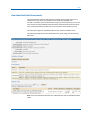
In JXplorer, navigate to the entry:
eTConfigParamName=Managed
Branches,eTConfigParamFolderName=JCS_<*>_TLS_20411,eTConfigPara
mFolderName=Connector
Servers,eTConfigParamContainerName=Parameters,eTConfigContainer
Name=Configuration,eTNamespaceName=CommonObjects,dc=<im dc
name>,dc=etadb
4.
Change eTConfigParamValue=eTNamespaceName=RSA SecurId 7,dc=ADMR12 to
eTConfigParamValue=eTNamespaceName=RSA SecurID 7,dc=ADMR12.
That is, change the lower case d in the string RSA SecurId 7 to an uppercase D. For
example, change RSA SecurId 7 to RSA SecurID 7.
5.
In JXplorer, navigate to the entry:
eTNamespaceName=RSA SecurId 7,dc=<im dc name>,dc=etadb
a.
Right click the entry and rename it to the following:
eTNamespaceName=RSA SecurIdx 7,dc=<im dc name>,dc=etadb
b. Right click the entry you renamed in step a again and rename it to the
following:
eTNamespaceName=RSA SecurID 7,dc=<im dc name>,dc=etadb
6.
Restart the CA Identity Manager Provisioning Server service.
RSA SSL Considerations
The RSA 7 connector uses RSA 7 SDK to communicate with RSA 7 endpoints. The RSA 7
SDK uses its own SSL implementation and key store. This changes the SSL behavior of
JCS and causes other connectors to fail when SSL is used. For example, connection
issues are found when running RSA7 connector with Google Apps connector when using
SSL and a Proxy.
So, we recommend using the RSA 7 connector in its own JCS in such scenario.
Salesforce.com
The following sections describe the known issues for the Salesforce.com connector.
136 Release Notes