1
Interaction Design and Architecture(s) Journal - IxD&A, N. 3-4, 2008, pp. 9-16
Teaching HCI to make it come alive
Harold Thimbleb y
Future Interaction Technology Lab
Swansea University
Wales
h.thimb leb [email protected]
Press On [24].)
ABSTRACT
We review how to teach effectively in higher education
(covering both the literature and the author’s own opinions),
with particular reference to HCI and using real life-and-death
examples, based on simple medical design issues. Students are
motivated because even elementary HCI knowledge empowers
them to make a real and significant difference in the world.
If user interfaces are bad and we have the processes and
knowledge to do better, then somehow HCI education has
failed the developers (or marketing people or managers…) who
create current poor systems — it has certainly failed the users
of these systems, and the people affected detrimentally b y
them.
“When I see how much education can be reformed,
I have hope that society may be reformed.”
Gottfried Wilhelm Leibniz
Questions about understanding a subject are rarely addressed
in the literature about that subject. Kline [11] presents many
ways that our academic culture undervalues pedagogy —
pedagogy being one way of understanding and thinking about
a subject. While many organisations have research arms, many
universities have essentially no research in-house in one of
their core activities: teaching. The instructions for formatting
this paper (the ACM computing classification system) gave an
explicit list of topics, but they did not expect to classify
articles that talk about how any subject is acquired,
understood, used or let alone taught; they expected topics like
“human factors,” not the topics of thinking about or reflecting
about “human factors,” whether teaching, communicating or
using it. It’s as if just stating facts are sufficient; as if nobody
needs to think about how facts are presented or learnt, whether
by readers of papers or by students. (This view will be
encountered again, below, as an expression of Ramsden’s
Theory 1.)
“The main part of intellectual education
is not the acquisition of facts
but learning how to make facts live.”
Oliver Wendell Holmes, Jr.
Categories and Subject Descriptors
K.3.2 [Computer and Information Science Education]:
Computer science education, Curriculum, Information systems
education, Literacy. K.7.4 [Professional Ethics]: Codes of
good practice.
General Terms
Management, Design, Human Factors.
Keywords
Teaching and learning. HCI (human-computer interaction).
Human error. Medical device design. Calculators.
1. INTRODUCTION
It is obvious that the world could be a better place, and of all
the things that need improving, user interfaces are near the top
of the list (they’re the top of my list anyway), not least because
their bad design makes other things worse: for example, a bad
web site user interface might cause users to make expensive
errors, or a bad car radio design might so distract a driver from
attending to the road that they have an accident. Many user
interfaces are bad, and their faults, at least to those who know
HCI and can see the faults, are so obvious that they ought to be
a point of high leverage where we should invest to improve
things. A badly designed web site can detrimentally influence
millions of people: it has a huge and invisible social cost. (If
you do not believe user interfaces are bad, read on or read
Permission to make digital or hard copies of all or part of this work for
personal or classroom use is granted without fee provided that copies
are not made or distributed for profit or commercial advantage and that
copies bear this notice and the full citation on the first page. To copy
otherwise, or republish, to post on servers or to redistribute to lists,
requires prior specific permission and/or a fee.
HCIed, April 2–4, 2008, Rome, Italy.
Copyright 2008 ACM 1-58113-000-0/00/0008…$5.00.
How then should we teach and think about teaching HCI?
Teaching is the highest form of understanding; if we do not
understand how to teach, we do not understand our subject. If
we are not thinking about teaching, we are not thinking about
communicating. Even the most hardened researchers must be
concerned about the impact their research papers have; in fact,
their research papers must surely aim to teach their readers new
ideas and new ways of thinking about their subject. This isn’t
so different from wanting to teach students.
According to Ramsden’s excellent survey [17], teachers (for
instance, teachers of HCI) consider there are three approaches:
one, that teaching is telling or transmitting facts; two, that
teaching is organising student activity; and, three, that
teaching is about making learning possible. That is, teachers
(lecturers, professors) adopt an explicit or implicit theoretical
stance to teaching and learning, and that teachers can be
divided into roughly three classes depending on their
approach to teaching, namely these three theories.
Many HCI textbooks are encyclopaedias of knowledge about
HCI techniques, as if their authors fall into a Theory 1
approach, or into a style that supports an assumed Theory 1
style of teaching. The teacher’s job, using such books, is t o
teach the students the facts of HCI, preferably as presented i n
the particular book. Theory 1 encourages a style of thinking
that every fact must be covered, that it is the teacher’s (or the
textbook author’s) job to provide all facts that need teaching.
Interaction Design and Architecture(s) Journal - IxD&A, N. 3-4, 2008, pp. 9-16
Fig 1. Imaginary map of all HCI
concepts.
Fig 2. Forgotten facts can be
triangulated from known facts
Different subjects and different stages of learning in those
subjects call for different approaches. One can imagine that i n
an early anatomy or geography course there are indeed a lot of
independent facts to learn, but these facts give way to deeper
learning if the student progresses. Similarly in HCI, there are
indeed many important facts to learn — what is affordance?
what is contextual design? what is immersion? — before one
can build deeper knowledge and understanding.
There are of course many more examples where Theory 1 i s
entirely appropriate, most obviously at elementary levels
when the student is not expected to have (or want) any
understanding of the subject. We have all been there. A student
might be taught to “always end a sentence with a full stop.” At
school, there may be no room for debate on this fact. Yet when
the student becomes a designer, they will discover that posters
often have sentences without full stops, and that one can
decide not on rigid grammar but on visual criteria, or perhaps
on unrelated criteria such as whether your client will pay. In
fact, because language is necessarily taught in elementary
ways to young learners, many of us have grown up thinking
that our use of language is rigidly constrained by what we were
taught [4]. We’ve learnt that it’s just non-negotiable rules —
unrelated facts. Perhaps this formative learning experience
during a major part of our lives, learning our own language,
has influenced our approach to all other learning and
teaching?
Crystal gives the example of the use of commas; they mean
different things in sentences. Occasionally, as he shows, their
multiple uses may collide, and it ceases to be obvious how t o
punctuate — one has to rely on context. We shall see exactly
the same problem with user interfaces, in an example used
below. And, what is crucial, we see teaching, learning, and HCI
all coming together, in commas, of all things!
Theory 1 is necessary, but it is not necessarily sufficient. We
spent many of our formative years being taught elementary
facts, and it is understandable how we end up ourselves being
teachers who emphasise facts. If we are not careful, we end u p
with students who know some facts, namely, exactly the ones
we teach them to pass their courses, but don’t they know how
to think for themselves about HCI, and are therefore unable t o
apply their knowledge to the work environment they later find
themselves in. Ultimately, as students graduate and get jobs,
we end up with interactive systems — web sites, ticket
machines, voice menus, aircraft, medical equipment — that
have bad user interfaces. Or as students graduate and become
Fig 3. New discoveries are made by
triangulating from the known to the
unknown.
academics, their views influence how they participate in the
academic community: they become referees. The Theory 1
attitude affects referees for research papers and research
proposals [22]: a common criticism in HCI refereeing is that
some facts were missing (i.e., facts from a different subdomain
of HCI that the referee wishes to emphasise), as opposed t o
some reasoning was flawed.
Ultimately, then, I believe, Theory 1 is not an effective form of
teaching for HCI. Indeed, Ramsden makes it very clear that
Theory 3 is, for most things, better.
An example of Theory 3 teaching comes from Feynman [7],
who is widely recognised as one of the most inspiring teachers
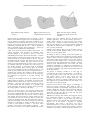
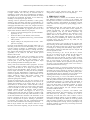
of physics. Figure 1 shows an imaginary map of all HCI ideas
and concepts within a region drawn as a grey blob; figure 2
shows how a student might be able to reconstruct a forgotten
fact from several other remembered facts. Probably a student
would use some remembered facts, some books, and some
experiments: triangulation is somewhat of a simplification t o
the idea. (In reality, HCI is so complex that lots of facts would
be needed to triangulate, and perhaps the idea might better be
called interpolation.)
The purpose of teaching a student is so that they are
eventually able to construct new knowledge — it would be a
sorry state of affairs if they could only ever know less than
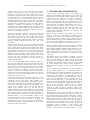
their teacher! Figure 3 shows how exactly the same
triangulation idea works for a student discovering new
knowledge. The point is, by teaching a student how to connect
ideas together, they are empowered to learn new things, even
ideas they were not directly taught.
Feynman sees the blobs in these figures as knowledge, as
known by everyone. Instead the blobs might be used t o
represent the student’s own knowledge. Then, perhaps that star
in figure 3 might have been the x my friend missed. Would i t
not be more useful for a student to know that x was missing
and be able to work it out, than not to think but only know
what they were taught from figure 1?
William Perry’s study of how students learn suggests that the
least sophisticated students, or students at early stages of
learning a subject, tend to want to learn true facts [15].
Students at this level thus dovetail their expectations with the
teacher’s use of the Theory 1 approach to teaching.
Unfortunately, both Theory 1 and Perry’s low end of
sophistication interact in a sort-of vicious circle: they support
each other, and are ideal for teachers and students with little
confidence in the subject. Neither enables the students to g o
Interaction Design and Architecture(s) Journal - IxD&A, N. 3-4, 2008, pp. 9-16
beyond the teacher, so the students are limited to exactly what
is taught. Students soon will only do work that leads t o
assessment. It is but a short step to automating the assessment,
with multiple choice, to see exactly what facts that the student
has learned: once automated, the student is even denied any
flexibility in interpreting the right answers.
Teaching, at least as presented by Ramsden, is about getting
students to learn and engage with ideas. Correspondingly, we
can consider that HCI is concerned with getting users to learn
and engage with ideas about, in this case, complex interactive
systems. It’s the same thing. Research in HCI, such as Carroll’s
classic work on “minimalism” [3], suggests that users are best
helped when instruction follows four principles:
1
Choose an action-oriented approach; provide immediate
opportunity to act;
2
Anchor the ideas in a task domain; select real tasks;
3
Support error recognition and recovery; prevent mistakes
where possible;
4
Support reading to do, study and locate; be brief — don’t
spell out everything.
Of course Carroll elaborates these principles further, but it i s
interesting to note that even from this summary, it is clear that
Carroll’s principle 4 manages to simultaneously contradict
Theory 1 teaching and support Theory 3 teaching. HCI itself,
then, suggests that teaching HCI should provide an immediate
opportunity to act, based on real tasks, should prevent
mistakes, and be brief.
Kline suggests that the worst sort of teaching just presents
unmotivated facts [11]; the facts may be motivated for the
teacher, but to the student they seem pointless. Or take
Carroll’s point 3, above, that suggests that students might
learn by making mistakes and learning from them.
Theory 1 does not do well from Carroll’s perspective. It is hard
for a student to make a mistake when their teacher adopts
Theory 1 and for them not to be simply wrong; there is n o
incentive to learn from mistakes. Worse, as Theory 1 approach
leads to simple assessment, it’s likely that the only feedback
students get on their understanding is when they are formally
assessed: a significant disincentive to make mistakes or even
explore around the subject. Why would a learner make
experiment, possibly making mistakes, when doing s o
guarantees getting fewer marks?
As Ong has suggested [14], ever since the invention of the
alphabet (one of the earliest technologies) we have taken it for
granted that knowledge can be written down. If it can be
written down, we can teach what is written. But that is Theory
1. Rather, ask why do we lecture if we have books? The answer
is that we should not teach facts: that encourages shallow
learning. Instead, we need to motivate, make accessible,
enthuse. Just as Carroll’s work suggests, we need to get
students engaged with real tasks as quickly as possible. Why
do students go to lectures when they could read books or read
off the web? Somehow the interaction and excitement of the
lecturer is supposed to rub off in a way that the textualised
book or web page does not permit. Teaching is performance,
not instilling facts. Books, web sites, computerised teaching
tools as an end in themselves turn teaching into dead text.
How do we get students into real activities? How can we d o
that when, at least at the beginning, they do not know enough
HCI to reason or apply what they know: they don’t know
enough. Well, actually, they do: we can ramp them up.
2. PERSONAL VALUES
We, whether students or teachers, are all different and we all
have different perspectives to bring to the teaching and
learning forum. As teachers, we have had formative experiences
as students ourselves, and sometimes we emphasise personal
values rather than ones supported by good pedagogy. I am n o
exception.
Of Ramsden’s theories, then, I lean towards Theory 3, but that
isn’t everything. Here are some further factors, emphases, I
consider very important — but I offer no scholarship to back
up my prejudices, only my own limited experience. My
experience, as is obvious, influences the experience of my
students and even the students who choose to come on my
courses. This biased sampling will reinforce my prejudices,
even when they are misleading me. Indeed, I know that not
everybody agrees with me; these are my values, not my
unqualified recommendations.
Teaching and learning is fun. If people are not enjoying what
they are doing, this in itself is demotivating. If students enjoy
their work, they will do it better, they will be more committed
to working on it, working hard, and thinking deeply about it.
And work that a student has done that they have enjoyed will
be more enjoyable to mark.
Teaching and learning is fire. It’s not just fun, it’s serious
fun: fire in our hearts, fire that spreads, fire that lights the
imagination. It’s about things we feel strongly about —
nothing luke warm. By teaching we light up many students
and are more effective than in ordinary jobs where we would
have no such leverage. In each class we want to inspire
especially those students who are sparked by the subject and
are going to carry the flames forward. (Later in this article, I
present some ideas that fire me up.)
Teaching and learning is exploration. I know the terrain, but I
want students to find things out for themselves, and even find
out things I don’t know. Because my lectures are interactive, I
was once told the students like leading me down garden paths.
The students think they are distracting me; but I know we are
exploring the HCI issues of what they are interested in.
Teaching and learning is research. The students can find out
things, test ideas, and find out things none of us knew to start
with. The problem with this style of teaching is that it is hard
to predetermine outcomes; it is certainly nearly impossible t o
provide notes beforehand. (But notes fall into the Theory 1
view.) This stance makes it particularly difficult to support
students with certain needs, such as dyslexics, who benefit
from more prepared material and (for example) material
presented in different media.
Teaching and learning is formative. The students want
feedback from me about their achievements; I want feedback
from them about my teaching — and both of us want i t
formatively, not at the end of the course. I believe I can d o
better, and I encourage students to give me feedback, to point
out mistakes or things they like. Indeed, as Carroll [3] wanted
with user training, if students can recognise my mistakes, I am
lifting them from passive learning to active participation. By
discussing mistakes in lectures, they are learning much more
useful attitudes and skills.
Interaction Design and Architecture(s) Journal - IxD&A, N. 3-4, 2008, pp. 9-16
Teaching and learning is open. There are many horrible
arguments for being secretive about teaching and learning.
Failure is private. Success causes envy. People may steal my
good ideas. It surprises me how rarely teachers share insights
into each others’ work — even if they know about it. I feel I am
intruding when I go to other lecturer’s classes! (And n o
colleague has been to one of my own classes for a long time.) I
am increasingly assessing students in open ways: for example,
asking them to do coursework as posters, not essays. Then an
afternoon’s “conference” can both have me marking the
coursework (and interacting helpfully with the students at the
same time), as the system requires, but more importantly each
student sees the quality of each other student’s work. They
learn by my creating open processes.
Teaching and learning is reflective. I teach how I teach and
why I choose particular approaches, and I teach how students
may learn better, and I do this within the HCI course. We all
then engage consciously with the teaching and learning
process, and renegotiate changes each time I teach. I encourage
students to think explicitly about how they want to be
successful.
Teaching and learning are paradoxical. I have learnt many
complex things, like speaking and walking without anybody
really trying to teach me; and I’m glad I learnt these things
before school. School “taught” me lots of things I have not, i n
the end, learnt, and it put me off many other things, like
speaking French. Conversely, I have taught many complex
things by not trying to teach at all. My children know how t o
solder, but I didn’t teach them in any way a university would
recognise, with notes, assessments or learning outcomes; i t
was a lot easier than that, and they never said they’d only
comply if I marked them.
Less is more. I could extend this list indefinitely, but less i s
more. You, the reader, must surely have started to have ideas
about teaching and learning (you don’t have to agree with me),
and if I carry on with my ideas you will lose your own ideas.
The last point, less is more, applies recursively. If as teachers
we put more effort in to teaching — writing more detailed
notes, say — the more we do the less we leave for the students,
and the less we leave for the lecturing to unfold in the dynamic
relationship we create with the students. Then, the less the
students own of what we teach.
Teaching and learning don’t stop. There’s always more. I want
at least some of my students to learn more than I know. One
consequence of this view is that, where possible, I use
coursework rather than examinations. With exams, there is a
fixed syllabus represented by the questions, and at some stage
you have to start playing games with the students: in a
revision class, for instance, you can’t really tell them the
answers to the questions you’ve set. You then get into
complex political games, which are made worse by “marking
schemes” and other devices. With coursework (portfolios and
other techniques) you as a teacher always want the students t o
do as well as possible, and there is no need to hold back o n
telling the answers — you want the students to know, so they
can go beyond them. Conversely, the students don’t ask, “do
we need to learn this for the exams?” as anything and
everything you teach can help in their coursework (and, later,
in their real world work) — there are virtually no exams in the
real world, so why teach to them?
3. LIFE & DEATH EXAMPLES IN HCI
I want to teach an important subject where students can
identify with the problems, and feel that they can recognise the
faults and start to see solutions that they could be part of. HCI
is ideal for this sort of teaching. It is ideal for interactive
lectures that involve students; it is ideal for encouraging
students to bring gadgets that they are frustrated with, and
then to enable them to see how the principles of HCI can g o
beyond problems to solutions. Some students will go on t o
work where they can influence future design. All of the
students graduating from an HCI course will have some
influence on design decisions; they will know about user
centred design, individual differences, etc, and they will
influence others to do better.
Imagine a picture of a patient in an intensive care unit in a
hospital — in the lecture environment, this could be a picture
displayed for the class to see. Imagine, then, the patient i s
surrounded by gadgets: ventilator, syringe pumps, and so on.
Even the bed they are lying on has numerous buttons. Who i n
the class has been in intensive care, perhaps to see a relative?
Don’t we want those gadgets to be safe and easy to use?
Interactive medical devices are safety-critical devices whose
correct operation is essential. Errors in their design or use can
lead to medical incidents, including death. Medical error is a
major problem, though not widely recognised. In paediatrics, a
study showed that 55% of patients received incorrect drug
doses, approximately 10% of which were potential adverse
events [10].
The problems are not just technical, or problems associated
with using complex devices (that, for example, might be
solved by better training); in studies, 58% of nurses make
calculation errors when doing relatively simple drug dosage
calculations [19]; alarming comments such as “The potential
for serious clinical errors caused by faulty calculation of
dosage by house staff officers is high” [16] are routine in the
literature.
The UK Medicines and Healthcare products Regulatory
Agency’s safety guidance says “an increasing number of
incidents that result in significant morbidity or mortality arise
out of user/device interface problems or because of poor
practices” [13]. The problems are exacerbated by poor and
over-complex device design — bad HCI. Clinicians accept as
routine using workarounds, such as switching off and o n
devices to recover from errors — often losing data (e.g., body
weight) in doing so. Indeed, there are many near misses that are
not reported as design problems because they do not lead t o
adverse clinical incidents. Around 10% of hospital
intravenous pump uses have errors, and 1% have serious
outcomes [8]. HCI will have a significant impact, then,
particularly with the substantial skills and background that I
bring to the area.
Medical errors are in fact worse than AIDS, car accidents and
other high-profile social problems [6], by a factor of over two:
they are under-reported partly because of litigation problems,
and also partly because medical errors are typically resolved
through private settlement. “Near misses” are not reported,
because clinicians do not recognise device design problems as
such, and because near misses have no clinical consequences
that need to be reported. Often, too the operator (such as the
responsible nurse) is blamed, or their training and
management is blamed. Thus the root causes of the medical
incident — which includes technology problems — are not
Interaction Design and Architecture(s) Journal - IxD&A, N. 3-4, 2008, pp. 9-16
properly addressed. Moreover, incident investigations after an
adverse clinical incident often ignore technical factors; if a
device “operates as designed” it is taken to be correct, and
problems in its use are then supposed to be due to operator
problems, even if those operator problems may (to us) be a
symptom of bad design!
As a case in point, in a commissioned human factors study of a
clinical procedure, numerous human factors problems with an
infusion pump were identified, but rather than criticise the
device design, however, the conclusion drawn was that
hospitals should perform human factors studies and better
train nurses to conform to the device design requirements [9].
From HCI (e.g., as codified in ISO13047, for instance) this i s
exactly the wrong way around: device design should be based
on a clear understanding of the user’s tasks and behaviour. The
student can see that what they are learning could change the
world.
Of course, there are also hospital management and operator
problems [e.g., 2] and better teaching can improve performance
[e.g., 5], whether or not device design is improved: each
should be considered a defense, in the sense of Reason [18],
and hence part of proper professional clinical practice. What
seems beyond the reach of clinical practice, however, is t o
improve the HCI.
There are numerous problems with device design, particularly
computational issues (such as drug dosage calculation: see
example below), and you want students to identify with these
problems and see that they could really make a difference. The
medical community is not thinking about these issues; our
HCI students could be the ones to improve health!
Tell a story … consider a cancer nurse asked to program an
infusion pump for a patient requiring a dose of the
chemotherapy drug fluorouracil. The nurse goes to the
hospital pharmacy with the order, and returns with a labelled
bag of diluted fluorouracil. The nurse’s task is now t o
calculate from the pharmacy data a dose in millilitres per hour
to programme an infusion pump to deliver that dose rate over
the coming four days. The relevant numbers and units are
5250mg of fluorouracil diluted to 45.57mg/mL, and to be
delivered over 4 days. Because the infusion pump uses units
of mL/hr, the nurse must calculate 5250/45.57 as the volume
to be delivered, and at an appropriate rate for over 24×4 hours.
They would do a calculation as follows:
5250
(4 × 24)
45.57
This calculation will be done by the nurse using a calculator,
and will be checked by a second nurse as a precaution. If using
a calculator, the nurse must convert the calculation into a
sequence of operations (button presses or mouse clicks, if it i s
€ calculator) to perform this calculation. For
a PC-based
example, AC 5250 ÷ 45.57 ÷ (4×24) = will obtain the correct
result 1.2. However, we can imagine it likely that the nurse
does not have a calculator with brackets available, and instead
they should do AC 5250 ÷ 45.57 ÷ 4 ÷ 24 =. One wonders what
nurse knows that dividing by a product is equivalent t o
repeated division (and note that the term 4 ÷ 24 in the
sequence of operations does not calculate the quotient 4/24);
far more likely, then, that the nurse will calculate 4×24 either
on paper or use the calculator and store the result in the
calculator’s memory. One would then anticipate doing AC
5250 ÷ 45.57 ÷ MRC = to get the right answer.
This is all familiar work, but it is showing how “simple”
interaction is in fact much more complex once it is analysed.
We could digress into task/action maps, GOMS and other
areas.
In this example, 4×24 is perhaps easy enough to do mentally
or perhaps the nurse can remember 96 without using the
calculator’s memory, but in general a drug dose calculation
(e.g., a pharmacy dilution) will be harder than these figures
suggest — and in any case it is wise to independently doublecheck with a calculator. How then can we work out 4×24 and
store it in memory? A typical basic calculator like the Casio
HS8V has a memory. Like many such calculators it does not
have a single store-in-memory key; it has an add-to-memory
key instead. In order to store a number to memory, then, the
memory must first be set to zero, otherwise the number stored
will be undefined. If the nurse starts to calculate 4×24 before
zeroing the memory, it is essentially impossible to store the
result correctly. In fact, to be correct, the nurse must do the
following sequence of operations: AC MRC MRC 4 × 2 4
MPLUS 5250 ÷ 45.57 ÷ MRC =. The button MRC must be
pressed twice, and on some calculators, AC must be pressed
more than once.
In computer science terms what the nurse has just done i s
called compiling [e.g., 1]; the nurse has compiled a formula
into a sequence of machine code operations (button presses) t o
execute the calculation. To compile correctly, the semantics of
the target machine (here, the calculator) must be known; but
unfortunately there are no published calculator semantics t o
help — and we know many calculators are very different (and,
worse, mathematically wrong) despite even looking alike [21].
Clearly compiling is a non-trivial task for a user, and indeed
one can imagine it is especially difficult for people trained as
nurses rather than as computer scientists.
Conventional calculators have numerous usability problems,
some due to their ergonomics, some due to their programming,
and some due to “feature interaction” — inevitable problems
due to their design. The small size of typical LCD displays
creates ergonomic problems: users may misread results, for
example confusing 4 and 9 (which may be indistinguishable if
the top segment of a 7 segment display is not visible to the
user). If incorrect buttons are pressed (e.g., – instead of +) there
will be no error, just the wrong result. The user can typically
only see the result and not the formula that leads to it; worse,
if the = button is not pressed, the LCD will be incorrect.
Examples of feature interaction include the multiple roles of
operators. Users may make mistakes, so multiple operator use
may retain only the last used operator: operators are then both
mathematical operators and editing operators. Thus ×– would
be treated as (edited to) –. This makes performing a calculation
like 4×–5 difficult (this is a simple example to show the nature
of the problem) because it is evaluated as 4–5; unless the user
knows the ± key, or is able to transform 4×–5 into a different
calculation, such as 4×5 and then mentally change sign, the
feature interaction is deeply confusing.
Here, we have got a problem redolent of commas: the user’s
actions, pressing buttons, means different things even though
they are pressing the same buttons. The first press defines just
a mathematical operator; the second press is also a correction.
Interaction Design and Architecture(s) Journal - IxD&A, N. 3-4, 2008, pp. 9-16
The designers wanted to permit correction, but by doing s o
they implicitly forbade a user being able to enter sequences of
operators. Perhaps they thought that – – really means + s o
should never be used, but they forgot that ×– does mean
something more interesting than –. Worse, when we look at the
frequency of use, these situations arise so rarely that users will
not know what is going on; they won’t be familiar with the
complex semantics. Typically, they will simply want to d o
sums, not experiment and learn how to use the calculator.
Indeed, people use calculators because they do not know the
correct result, so they may think the answer (in the example)
really is –1 instead of –20, believing the calculator is correct;
it usually is.
There is a similar problem with the decimal point (a frequent
factor in dosage errors). Entering 3.2.1 on a calculator
generally gets 32.1, but on the Graseby 3400, a medical device,
although the user manual says “it works like a calculator,”
entering 3.2.1 gets 3.1 — losing the 2, and reporting no error
to the user.
Each decimal point on this medical device is taken to zero the
decimal part of any number being entered (hence the
intermediate step 3.2. gets 3.0, silently) — with final results
differing by more than a factor of ten compared to a calculator.
Whereas on a calculator, entering decimal points loses n o
digits, but starts the decimal part of the number. Despite the
manual saying they are the same, in fact the two approaches are
completely different ways to handle the ambiguity of the dot
meaning two different things. It’s the comma problem again i n
another guise. We do not know whether this difference matters
clinically, but it seems very sloppy that user manuals are
misleading. We need to do experiments to find out. Our
students need to do experiments to find out.
Students, however, assume that calculators “just work” and
therefore they are not objects of serious study as such: it’s
Perry’s early levels again — there is a right and wrong way of
using calculators and students should know the right way
(Ramsden’s Theory 1 again). But at higher levels of
intellectual sophistication in Perry’s levels, the students see
that “the right way” is a naïve view of HCI.
The example shows that interacting with a calculator is nontrivial, induces latent errors, yet is amenable to computer
science (here, compiling). In fact, the example above was based
very closely on a real case, where a patient died in 2006 as a
result of the above calculation having an error in the execution
of the 4×24 step [9]. Students can obtain this report, or find
other similar reports on the internet [e.g., 20], and critique
them.
As this example came from a real case, it is interesting to look
at the interactive device involved in the fatal incident. The
infusion pump itself was an Abbott AIM Plus. In the mode
where the nurse should enter mL/hr, the display option i s
incorrectly shown as mL; moreover, the HELP button provides
information on 2 out of 3 options — which does not include
the incorrectly labeled mL (mL/hr) option! The pharmacy
computer printed the label on the fluorouracil bag, including
many numbers 1.2mL/hr, 28.8, 50, etc. Both nurses incorrectly
calculated 28.8 (i.e., a factor of 24 too high), yet this incorrect
number had been calculated by the pharmacy, presumably i n
case the infusion pump in use was calibrated in mL/day. The
label would have provided confirmation bias for the nurses
and reduced their attention to relevant detail; indeed, the
cognitive load of compiling a complex calculation would have
reduced their vigilance generally.
The analysis of this incident [9] performed a human factors
study of the Abbott pump. Five chemotherapy nurses worked
through a scenario similar to the actual incident. All five
nurses had significant problems, including repeating the
errors that led to the fatality. It took the analysis maybe an
afternoon to establish that nurses had problems. What should
one conclude? That nurses should be better trained? That
hospitals should do more careful procurement? That designers
should do human factors studies before releasing products?
All of these! What should one conclude? That HCI
understanding is missing from the entire process, from the
earliest concept, even to the final report after the something
has gone dreadfully wrong.
The Abbott AIM does do some things that are recommended b y
good HCI practice. For example, it provides dose reviews. We
can imagine that the designer was taught in their HCI course
that validation is important, so the AIM validates the numbers
the user entered. If the user enters 28.8, later the device says
(not in so many words) “is 28.8 what you really meant?”
Unfortunately that is merely recycling a simple HCI fact in the
design, not thinking it through.
The report [9] criticises the design for merely reviewing
numbers entered rather than numbers calculated from them;
that is, the Abbott confirmed the nurse had entered 28.8 —
which is what the nurse mistakenly intended to enter, s o
telling them what they wanted and expected is not very good
validation — but if it had calculated that at this rate the
volume of drug to be infused (which the pump knows) would
be consumed in four hours, the nurse would most probably
have been alarmed as the infusion should have lasted four
days (96 hours). The way the AIM pump is currently designed,
it does not make the user think. The user entered 28.8. Did you
mean to enter 28.8? Isn’t that just what I said? Of course, I said
28.8. Yes. The device has engaged with the user at a Theory 1
level. What fact did you teach me? Please confirm. Nobody
thinks. Nobody realises that the facts can be triangulated t o
new facts. In this case, the AIM pump had several facts — such
as the rate of drug delivery and the volume of the drug
available. A simple triangulation could calculate that it will
only run for four hours. The nurse (we presume) knows it is for
four days, but the device never asked if anything made sense.
These examples show that calculations and calculators are very
problematic in the medical domain. The examples also suggest
that proper attention to easily taught HCI principles could
have an enormous and very worthwhile impact on the world.
Conversely it is obvious that awareness in the medical
profession and the medical device industry of the potential for
improvement is very limited; the incident analyses cited
above ignore these issues. Reports suggest clinicians should
be better trained to use the devices; yet the standard view i n
usability is that the devices should be designed to fit the
users’ tasks. It is easier (and cheaper) to blame operators
and/or their training than question the whole culture of
interactive systems technology! Why aren’t devices made
simpler and consistent with clinical practice so that operator
training becomes simpler, rather than the other way around?
What are our students going to do?
Can calculators be made better? Will Thimbleby shows a
prototype calculator that appears to make dosage calculations
a lot easier [25]. There are many reasons why the calculator i s
Interaction Design and Architecture(s) Journal - IxD&A, N. 3-4, 2008, pp. 9-16
good [23], but students should be encouraged to try using it,
and to devise experiments to determine whether our intuitions
about its usability survive the rigors of the laboratory. One
might also do experiments with nurses, as they are likely t o
have weaker arithmetic skills than HCI students.
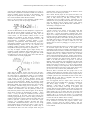
Here is a real screen-shot of the calculation example shown
above taken directly from our prototype calculator:
potential value; won’t it be motivating for the student to know
their work, even as sketchy, has value?
Since current clinical papers do not explore the HCI at all,
strictly we are at present unable to say whether incidents are
partly or fully caused by bad HCI. Certainly, there i s
considerable scope for student projects, particularly if any
students know of any friendly nurses who they can interview.
Soon our students will be writing projects, then writing
papers, then engaging with the HCI and user communities —
and starting to change the world.
4. CONCLUSIONS
All text was hand-written, but then morphed in a typeset font.
Note that the user has failed to provide a closing bracket “)”
and this has been supplied automatically, along with the
correct answer 1.2. The calculator reduces the size of the
decimal part of numbers, as this improves readability. The
calculator is based on sophisticated computer science: a 2D
parser/compiler, a numerical constraint satisfier, a nonproprietary (cross-platform) maths handwriting recogniser,
and graphical animation. The calculator also has many more
smoothly-interacting features we do not describe here,
including complex exponents, radicals, font scaling, a direct
manipulation memory and repository of equations, etc.
It is easy to imagine a student project might develop this
calculator to make calculations more reliable. Below is a very
simple possibility (drawn in a graphics program) that would
be displayed on an LCD in colour so the nurse’s data and the
1.2 mL/hr answer are clearly highlighted:
Notice how the calculator “knows” that days have 24 hours,
thus avoiding at least one source of error. As the nurse writes
the values 5250 etc, confirmational sound or voice feedback
can be provided; the highlighting circle might have a varying
visual texture to make it salient. Different layouts and
semantic constraints (e.g., type checking) need to be evaluated
in use for their effectiveness. Ideally, the calculator would
handshake the rate and the units with the infusion pump using
Bluetooth or IRDA, then confirm with the nurse, thus avoiding
the possibility of further keying error on the device — or, of
course, the calculator could be in the device. Further, if the
calculator can communicate with the pharmacy (and/or the
EPR, electronic patient record), then all figures on the display
shown above can either be automatically provided — hence
correct — or they can simply be confirmed (in some straight
forward interaction) by the nurse, rather than entered, thus
avoiding typing/writing errors. There are many possibilities;
usability experiments will find, evaluate and refine them. The
picture is just that: a picture that is no more than a paper
prototype, yet it stimulates thinking. We know that using
conventional calculation/calculators, nurses use the wrong
dosage formula 29.5% of the time [12]; this is a source of error
that should be fixable in the same way, or similar ways, t o
those illustrated above. Even such a simple sketch has great
A proper concern of any subject is how people learn that
subject, for if they do not learn it successfully, then the
subject fails — certainly the academic community fails. If the
subject is too complex, obfuscated, uninteresting, dead, then i t
becomes at best the isolated thinking of the few. In any subject
with practical application, such as HCI, the subject needs to be
successful in the world: it needs practitioners who understand
and can apply the subject in order to make use of it. We
therefore have to focus on pedagogy as a proper part of the
discipline.
How do we teach HCI? My answer is to enthuse students with
the enormous impact HCI can make to the quality of life
around them. In this article, we looked at life-and-death stories
about medical devices because, considered as examples in HCI,
they are in fact relatively simple and uncluttered compared t o
examples based on, say, consumer devices such as mobile
phones (with integrated music players, cameras, web browsers,
etc). It’s also clear in this domain that the HCI answers are not
a matter of learning facts and answering questions. There i s
debate to be had, and students can get into it and start
thinking, doing experiments, and triangulating new ideas from
what they are learning. From the compelling examples shown
briefly in this paper (in section 3), it is easy to show students
that they are starting to learn important, life and death things
that the world needs to know and to apply. Some of them may
go on to have a role in that in their professional careers.
Moreover, HCI is concerned with how people learn to use
complex systems effectively, and many issues in HCI can also
be presented as reflections on how HCI itself is taught; HCI i s
a complex system of sorts, and students are users of sorts. Am I
teaching HCI in a way that is compatible with what I am
teaching about good HCI practice?
If, as I’ve suggested, HCI is a subject with a crucial role i n
quality of life, then we should take it seriously. It amazes me
that taking things seriously — particularly in higher
education — often leads to us making things private and
unexciting. On the contrary, HCI begs to be public and
exciting. Why do we hide academic results (and get bored) but
get excited over football games, where success and failure are
public? People strive to get better when they get excited, and
frankly most students fail to work out how to get excited over
anything that is as private and secretive as conventional
education has become. As teachers we have a pleasurable duty
to work out with our students what is exciting.
HCI is indeed a life and death subject that is everywhere, even
in the classroom. Even when the projector doesn’t work,
perhaps especially when the teacher despairs with the
projector’s terrible HCI, then HCI becomes relevant and alive
to the students.
Interaction Design and Architecture(s) Journal - IxD&A, N. 3-4, 2008, pp. 9-16
5. ACKNOWLEDGMENTS
Just as teaching gets better when students engage with the
teacher, this paper is far better than it would have been because
some of its early readers took the trouble to engage with its
author. Alan Blackwell (Cambridge University), Paul Cairns
(University of York), and Tony Hoare (Microsoft), each made
extremely valuable comments, indeed valuable criticisms, for
which I am very grateful.
6. REFERENCES
[1]
Appel, A. W. & Palsberg, J. 2002. Modern compiler
implementation in Java, Cambridge University Press.
[2] Brennan, T. A., Leape, L. L., Laird, N. M., Hebert, L.,
Localio, A. R., Lawthers, A. G., Newhouse, J. P., Weiler, P.
C. & Hiatt, H. H. 1991. “Incidence of adverse events and
negligence in hospitalized patients.” Results of the
Harvard Medical Practice Study I, New England Journal
of Medicine, 324:377–84.
[3] Carroll, J. M. ed., 1998. Minimalism: Beyond the
Nurnberg Funnel, MIT Press.
[4] Crystal, D. 2006. The fight for English, Oxford
University Press.
[5] Degnan, B. A., Murray, L. J., Dunling, C. P., Whittlestone,
K. D., Standley, T. D. A., Gupta, A. K. & Wheeler, D. W.
2006. “The effect of additional teaching on medical
students’ drug administration skills in a simulated
emergency scenario,” Anaesthesia, 61(12):1155-1160.
[6] Department of Health, UK, 2003. Design for patient
safety.
[7] Feynman, R. P., Gottlieb, M. A. & Leighton, R. 2006.
Feynman’s tips on physics, Addison-Wesley.
[8] Husch M., Sullivan C., Rooney D., Barnard C., Fotis M.,
Clarke J., Noskin G., 2005. Insights for the sharp end of
intravenous medication errors: implications for infusion
pump technology, Quality and Safety in Health Care,
14:80-86.
[9] ISMP, Institute for Safe Medication Practices, Canada,
2007. Fluorouracial Incident Root Cause Analysis.
http://www.ismp-canada.org
[10] Kaushal, R., Bates, D. W., Landrigan, C., McKenna, K. J.,
Clapp, M. D., Federico, F., Goldmann, D. A. (2001)
“Medication Errors and Adverse Drug Events in Pediatric
[11]
[12]
[13]
[14]
[15]
[16]
[17]
[18]
[19]
[20]
[21]
[22]
[23]
[24]
[25]
Patients,” Journal of the American Medical Association,
285(16):2114-2120.
Kline, M. 1977. Why the professor can’t teach, St
Martin’s Press.
Lesar, T. S. 1998. “Errors in the use of medication dosage
equations,” Archives of Pediatrics & Adolescent
Medicine, 152:340-344.
MHRA, UK Medicines and Healthcare products
Regulatory Agency, 2006. One Liners.
Ong, W. 1982. Orality and literacy: the technologizing
of the word, Methuen.
Perry, W. G. 1999. Forms of ethical and intellectual
development in the college years, Jossey-Bass.
Potts, M. J. & Phelan, K. W. 1996. “Deficiencies in
calculation and applied mathematics skills in pediatrics
among primary care interns,” Archives of Pediatrics &
Adolescent Medicine, 150(7):748-752.
Ramsden, P. 2003. Learning to teach in higher
education, 2nd ed., RoutledgeFarmer, 2003.
Reason, J. 1990. Human Error, Cambridge University
Press.
Santamaria, N., Norris, H., Clayton, L. & Scott, D., 1996.
“Drug Dosage Calculation Abilities of Graduate Nurses,”
Joint ERA-AARE Conference.
Scottish Executive, 2006. Unintended overexposure of
patient Lisa Norris during radiotherapy treatment at
the Beatson Oncology Centre, Glasgow in January 2006.
Thimbleby, H. 2000. “Calculators are Needlessly Bad,”
International Journal of Human-Computer Studies,
52(6):1031-1069.
Thimbleby, H. 2004. “Supporting Diverse HCI Research,”
Proceedings BCS HCI Conference, 2, edited by A.
Dearden and L. Watts, Research Press International,
pp125-128.
Thimbleby, H. 2006. “Applying Bohm’s ideas in the age
of intelligent environments,” International Symposium
on Intelligent Environments, pp27-33.
Thimbleby, H. 2007. Press on: Principles of interaction
programming, MIT Press.
Thimbleby, W. 2004. “A Novel Pen-Based Calculator and
Its Evaluation,” Proceedings of the third Nordic
conference on Human-Computer Interaction, pp445448.