1
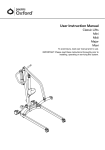
User Instruction Manual
Oxford Smart Monitor
®
To avoid injury, read user manual prior to use.
Oxford
Smart Monitor
®
English
Contents
1.
Introduction: A
bout Your Product......................................................................................3
2.Oxford Smart Monitor........................................................................................................4
3.
2
Assembly & Commissioning Instructions..........................................................................5
4.
User Handset Operating Instructions................................................................................6
5.
Operating Instructions: Smart Monitor..............................................................................7
6.
Warranty............................................................................................................................ 9
Oxford
Smart Monitor
®
English
1.Introduction: About Your Product
Please ensure you take time to read this manual thoroughly before using your Oxford Smart
Monitor. This will help ensure both patient and carer remain safe and free from injury throughout
the lifting and transfer process as well as to familiarise yourself with the product’s features and
functions.
If you are unsure on the use of this product or any specific element, please contact your local
authorised service provider or Joerns Healthcare for further advice.
Warning
Do not attempt to use the Oxford Smart Monitor without first understanding this manual.
The CE Mark: The Oxford Smart Monitor carries the CE mark and complies with the following EC directives:
• Medical Device Directive (93/42/EEC)
• EMC Directive (89/336/EEC) (Electrics only)
• Low Voltage Directive (73/23/EEC) (Electrics only)
Statement of Intended Use
The Oxford Smart Monitor is a control system for Oxford patient lifts. It stores useful servicing
information about the lift that can be recalled when required. This servicing information includes:
• Number of patient lift cycles
• Total work done by actuator
• Number of lift overloads (attempted lifts above the safe working load)
• Number of days since last service interval
The Smart monitor replaces the existing control box and is fully compatible and retro-fitable to
the following Oxford patient lifts (manufactured post 2003), fitted with a Linak actuator:
•
•
•
•
Oxford
Oxford
Oxford
Oxford
Mini
Midi
Major
Maxi
•
•
•
•
Oxford
Oxford
Oxford
Oxford
Journey
Elevate
Ascend
Stature
• Oxford Presence
• Oxford Calibre
• Oxford Advance
For products not listed above, please consult Joerns Healthcare to verify and confirm
compatibility.
Warning
Do not attempt to install a Smart Monitor Control box on a lift that is not listed above
without consulting Joerns Healthcare for advice.
3
Oxford
Smart Monitor
®
English
2.Oxford Smart Monitor
Emergency
Stop Button
Raise & Lower Buttons
Legs Open / Close Buttons
Emergency Raise & Lower
Redundant Controls
(Model dependent)
User Handset
Legs Open / Close
Redundant Controls
(Model dependent)
User Handset
Connection
Socket
User Handset
Connection
Plug
Actuator
Connection
Socket
LCD
Information
Screen
Fig. 1
4
Oxford
Smart Monitor
®
English
3. Assembly & Commissioning Instructions
The following components are included with the Smart Monitor Retro-fit Kit:
• 1 x Oxford Smart Monitor
• 1 x User Handset
• 1 x M5 x 8mm Long Fixing Screw
• 1 x Battery Pack
• 1 x User Manual
NOTE: The Oxford Smart Monitor can only be operated with the User Handset supplied.
WARNING
The Oxford Smart Monitor requires calibrating prior to use. Specific calibration is dependent
on lift type and must be performed by an authorised service provider only. Failure to do
this may result in serious injury to the patient and/or caregiver.
WARNING
The User Handset supplied with the Smart Monitor control box cannot be used in conjunction
with a standard control box.
5
Oxford
Smart Monitor
®
English
4. Operating Instructions
The day-to-day functionality of your lift is not affected by the installation of the Oxford Smart
Monitor. This section covers the basic lift operations.
WARNING
Refer to your lift’s user guide for full operating instructions, safety guidance and daily
checks prior to lifting and transferring patients.
WARNING
DO NOT exceed the safe working load of the lift and/or sling.
To raise or lower the boom following the retro-fit of an Oxford Smart Monitor, simply press the raise
and lower buttons on the User Handset (Fig. 2). If your lift incorporates powered leg positioning, the
legs can be opened/closed using the appropriate button on the User Handset (Fig. 2).
Raise
Legs Open
(Model dependent)
Lower
Legs Close
(Model dependent)
Fig. 2
NOTE: The Oxford Smart Monitor can only be operated with the User Handset supplied.
In the event of the User Handset becoming faulty or damaged, you may continue to use the lift for
a short period of time until the User Handset has been replaced by using the emergency redundant
controls, located beneath the emergency stop button on the Smart Monitor (Fig. 3).
NOTE: If the User Handset becomes faulty or damaged, contact your authorised Oxford service
provider immediately to arrange a replacement.
Emergency Stop
Button
Redundant Control
(Emergency Raise)
Redundant Control
(Emergency Lower)
Redundant Control
(Legs Open)
Redundant Control
(Legs Close)
(Model dependent)
(Model dependent)
Fig. 3
6
Oxford
Smart Monitor
®
English
5. Smart Monitor Display
The Oxford Smart Monitor has the option to read out information via the LCD display screen. It is
possible to read out total lifting cycles, total work done, overloads and number of days since last
service, which can be used to quickly and easily evaluate the condition of the lift actuator.
This information is accessed by a ½ second press on the ‘RAISE’ button on the User Handset or
redundant ‘RAISE’ button on the Smart Monitor.
Total Lifting Cycles
Total Work Done (Amps * Seconds)
Number of Overloads
Number of Days (since last service) /
Number of Days (between services)
Service & Usage Information
When it is time for a service, the service symbol will appear on the
display. In addition, when the User Handset is activated, the Smart
Monitor will give an audible signal giving notice to users that a service
is required.
The service symbol will be displayed each time the raise or lower keys
are depressed on the User Handset. When the service symbol is displayed,
contact your authorised service provider immediately to arrange a service.
You may continue to use your lift for a short period of time until a
service has been carried out.
If the lift stops because of an overload (an attempt to lift more than the
safe working load) the overload symbol will appear on the LCD display
and the lift will cease to operate until the additional load (above the
SWL) has been removed.
WARNING
If the LCD display screen on your Smart Monitor has recorded
an overload, Joerns Healthcare recommend that ALL routine
daily checks are carried out on the lift prior to further use (for a
list of daily checks, please refer to your lift user manual). Joerns
Healthcare also recommend that you contact your authorised
Oxford service provider for additional guidance.
7
Oxford
Smart Monitor
®
English
On-Board Redundant Controls
On-board redundant controls enable the lift to be raised or lowered in
the event of an emergency.
If your lift incorporates powered leg positioning, there are redundant
controls to both open and close the legs.
Battery Information
The display showing full battery means that the battery is fully charged
and the lift is ready for use.
The display showing a half empty battery indicates that it is time to
charge the battery.
The empty battery symbol showing on the display indicates that
the battery has no capacity left and should be placed on charge
immediately.
WARNING
To avoid possible permanent damage to the battery, the battery should be placed on
charge as soon as the display indicates the half empty battery symbol.
8
Oxford
Smart Monitor
®
English
5. Warranty
Joerns Healthcare has an established network of reputable distributors and dealers who will be
pleased to handle all your purchasing, warranty, repair and maintenance enquiries.
This product is guaranteed for a period of twelve months from the date of manufacture or twelve
months from the date of purchase if commissioned by an authorised dealer. We recommend
that all of our products are commissioned by your dealer and are supported by them for future
servicing.
The dealer or distributor operates the warranty programme, so it is important to keep a record of
their name address and telephone number so they can be contacted should any problem arise.
If you are in doubt as to where your product was purchased, Joerns Healthcare can trace the
supplier if you quote the serial number of the lift. Contact details can be found on the rear cover
of this manual.
REMEMBER: Contact your distributor for purchases, warranty, repairs, servicing and
certified maintenance.
Your distributor:
9
Joerns Healthcare Limited
Drakes Broughton Business Park, Worcester Road, Drakes Broughton
Pershore, Worcestershire, WR10 2AG United Kingdom
(T) 0844 811 1156 • (F) 0844 811 1157
www.joerns.co.uk • email: [email protected]
© 2014, Joerns Healthcare • 294000.10379 Rev C • DCO14-0003