1
AC Connection
Before having AC connection, match the power requirements of connected
devices with the power output of Inverex to avoid overload. Consult a
qualified electrician, and follow local code for the proper wire sizes,
connectors and conduit requirements.
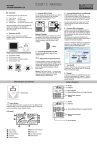
Step 1- A three-station terminal block is provided to make AC input
connections. Remove the cover plate.
Caution!! Be sure that AC source is disconnected before attempting to
connect AC to Inverex.
Step 2- Connect the hot wire (black/brown)
of AC input cable to the HOT IN terminal.
Step 3- Connect the neutral wire (white/blue)
of AC input cable to the NEU IN terminal
Step 4- Connect the ground wire
(green) of AC input cable
to the GND IN terminal
Step 5- Tighten screws to affix wires
in terminal block.
Step 6- Cover up the AC Input by the
plastic cover.
Step 7- Simply plug your equipment(s)
into the output receptacle(s).
Step 8- Turn on Inverex when you are
using connected equipment(s).
Figure 5
AC Input Connections