1
BATTERY & TIME KEEPING
G310C
A battery is used to keep time when the unit is without power. Typical
accuracy of the G310 time keeping is less than one minute per month drift. The
battery of a G310 unit does not affect the unit’s memory, all configurations and
data is stored in non-volatile memory.
CAUTION: RISK OF ELECTRIC SHOCK
The inverter board, attached to the mounting plate, supplies the
high voltage to operate the backlight. Touching the inverter board
may result in injury to personnel.
CAUTION: The circuit board contains static sensitive
components. Before handling the operator interface without the
rear cover attached, discharge static charges from your body by
touching a grounded bare metal object. Ideally, handle the
operator interface at a static controlled clean workstation. Also,
do not touch the surface areas of the circuit board. Dirt, oil, or
other contaminants may adversely affect circuit operation.
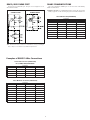
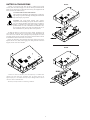
To change the battery of a G310, remove power, cabling, and then the rear
cover of the unit. To remove the cover, remove the five screws designated by the
arrows on the rear of the unit. Then, by lifting the top side, hinge the cover, thus
providing clearance for the connectors on the bottom side of the PCB as shown
in the illustration below. Install in the reverse manner.
Remove the old battery* from the holder and replace with the new battery.
Replace the rear cover, cables, and re-apply power. Using Crimson or the unit’s
keypad, enter the correct time and date.
G310S
* Please note that the old battery must be disposed of in a manner that
complies with your local waste regulations. Also, the battery must not be
disposed of in fire, or in a manner whereby it may be damaged and its contents
come into contact with human skin.
The battery used by the G310 is a lithium type CR2025.
7