1
Card Setup
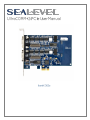
The UltraCOMM+2i.PCIe is automatically assigned I/O addresses and IRQs by your motherboard BIOS or by
a ‘Plug-n-Play’ Operating System. Adding or removing other hardware or moving the adapter to another slot
may change the assignment of I/O addresses and IRQs.
The Ultra COMM+4.PCIe derives a 62.5MHz clock from the PCI express link which is divided by a 8 bit clock
prescaler and a 16 bit clock divisor to provide a wide range of possible baud rates. Note that there are
many combinations that can give the same result (e.g. Prescaler=1 and Divisor = 8, Prescaler =2 and Divisor
= 4, or Prescaler=8 and Divisor = 1). As long as the calculated data rate is within +/- 2% you should
communicate fine.
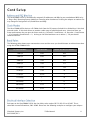
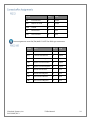
The following table shows some common data rates and the rates you should choose to achieve them when
using the ULTRA COMM+4.PCIe.
For This Data Rate
Clock Prescaler
Choose This Divisor DLM:DLL
1200 bps
3.625
898
2400 bps
3.625
449
4800 bps
1.875
434
9600 bps
1.875
217
19.2K bps
1.375
148
38.4K bps
1.375
74
57.6K bps
22.625
3
115.2K bps
1
34
230.4K bps
1
17
460.8K bps
2.125
4
921.6K bps
2.125
2
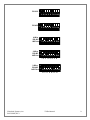
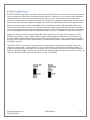
Each port on the UltraCOMM+2i.PCIe has the ability to be used as RS-232, RS-422 or RS-485. This is
selectable via two DIP-switches, SW1 & SW2. Please use the following examples to configure your adapter.
©Sealevel Systems, Inc.
SL9238 06/2013
7203e Manual
8