1
!
!
MacGourmet Deluxe
User Guide
!
!
©2013 Mariner Software Inc.. All Rights reserved.
Under the copyright laws, this manual may not be copied, in whole or in part,
without the written consent of Mariner Software Inc. Your rights to the software
are governed by the accompanying software license agreement.
MacGourmet Deluxe is a trademark of Mariner Software, Inc.
MacGourmet is a trademark of Mariner Software, Inc.
Gourmet iOS is a pending trademark of Mariner Software, Inc.
Mac and the Mac logo are trademarks of Apple Computer, Inc., registered in the
U.S. and other countries. Apple, the Apple logo, AppleScript, and Macintosh are
trademarks of Apple Computer, Inc., registered in the U.S. and other countries.
All other products and company names mentioned in this document may be
trademarks of their respective owners.
Mariner Software
PO Box 1912
Minneapolis, MN 55311
Phone - 800-240-6562
Email - [email protected]
1. Getting Started
Upgrading from MacGourmet Deluxe 1 and newer versions
9
Creating your MacGourmet Deluxe library
9
Loading the sample recipes and notes
Feature Overview
10
11
To create a new Recipe Smart List:
14
Creating a new User List
15
Recipe Box Widescreen and Normal Display Modes
15
Customizing Table Columns
16
Accessing the list of columns to display
16
Rearranging the columns
16
Creating and Editing
17
The Chef View - Your Kitchen Cooking Helper
18
Viewing More than One List at a Time
18
Changing the Display of Recipes and Notes
19
Viewing Larger Versions of Your Images
19
2. Creating and Editing Recipes
3
9
22
Creating Recipes
22
Editing Recipes
22
The Info Tab
22
The Ingredients Tab
24
The Directions Tab
25
The Preparation Tab
26
The Notes Tab
27
The Picture Tab
28
The Nutrition Tab
29
3. Creating and Editing Wine, Beer and Cheese
Notes
30
Creating Wine, Beer, and Cheese Notes
30
Editing Wine, Beer, and Cheese Notes
30
The Info Tab
30
The Tasting Notes Tab
32
The Winemaker, Brewery, and Dairy Notes Tab
32
The Label Tab
33
The Cellar (Wine Notes) and More Info (Beer and Cheese Notes) Tab34
4. Creating and Editing Cooking Notes
Creating Cooking Notes
35
Editing Cooking Notes
35
The Info Tab
35
The Picture Tab
36
5. Searching
37
The Search Field
37
Using Basic Search
38
Using “Ingredient Search”
38
Displaying the Cupboard Find window
Creating and Using Smart Lists
4
35
39
40
Creating a new Smart Recipe List
41
Doing a Suggest Recipe Search
42
Finding Recipes, Wine, Beer, Cheese, and Cooking Notes
42
Finding recipes
42
Finding wine notes
42
Finding beer notes
42
Finding cheese notes
42
Finding cooking notes
42
Finding duplicate recipes
42
Creating Smart Lists from Find Results
6. Importing and Exporting
Using the MacGourmet Deluxe Clipping Service
Making clippings (Alternate options)
43
44
44
46
Using the MacGourmet Deluxe Recipe Web Page Import Service 48
Using File Import and Export
49
Importing Recipes:
49
Exporting Recipes and Notes
51
Creating text versions of your recipes and notes
52
Exporting the names of items in a list
52
7. Publishing Recipes and Notes to the Web 53
Posting to your blog
55
7.5. Syncing your MacGourmet Deluxe Data with
the MacGourmet cloud server
56
5
8. Using the Lists Editor
59
Adding a New Piece of Equipment
61
Adding a New Category
62
9. Relating Recipes and Notes
Linking Recipes and Notes
Creating relationships between two things
10. Creating and Using Shopping Lists
Creating a Shopping List
63
63
63
65
65
Creating a new shopping list
65
Editing Your Shopping Lists
66
Maintaining the Shopping List Favorites List
67
Exporting a Shopping List as a Text File
67
11. Printing Recipes and Notes
68
12. Nutritional Analysis
70
6
About MacGourmet Deluxe Nutritional Information
70
Nutrition Analysis Based on USDA Database
70
**IMPORTANT** Use MacGourmet Deluxe Information with Care
70
Overview
71
The Nutritional Database
71
The Mappings Table
73
The Nutritional Info per Serving HUD
73
The Calculation Details Window
74
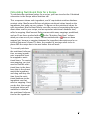
Calculating Nutritional Data for a Recipe
75
The Weight Resolver: Providing Needed Additional Information
76
When Mappings Are Not Found
76
Recalculating Your Nutritional Information
77
Comparing MacGourmet Deluxe: Nutrition Data to Data With a Recipe79
Adding a New Nutritional Item
80
Deleting Your Nutritional Items
81
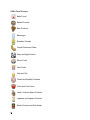
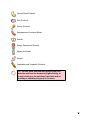
USDA Food Groups
82
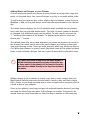
13. Meal Planning
84
Planning Meals with the Weekly Planner
84
Adding Meals and Recipes to your Planner
85
Adding Notes to your Weekly Planner
86
Printing a Weekly Planner
86
Creating Shopping Lists
87
Creating and Printing Menus
87
Sending your Mealplan to Calendar
88
Using Mealplan with iCal
88
Setting Mealplan Preferences
89
Weekly Planner
89
Printed Planner
89
Print Vertically
89
14. Creating Cookbooks
90
Building a Cookbook
90
Creating a cookbook
90
Chapters
91
7
Creating a chapter:
Text Pages
Creating a Text Page
Image Pages
Creating a Image Page
Blank Pages
Creating a Blank Page
Creating a PDF Cookbook
Creating a PDF cookbook file
92
92
92
92
92
93
94
94
Publishing and Printing a Cookbook
95
Tips for Creating Your Cookbook
95
Appendix A
96
Backing Up Your MacGourmet Deluxe Data
96
The MacGourmet4Database.mgdatabase file
96
The MacGourmet Deluxe Application Support folder
96
Changing the Location of Your MacGourmet Deluxe Data
Changing your database location at launch
8
91
96
97
1
1. Getting Started
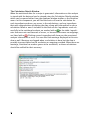
Welcome to MacGourmet Deluxe! In this chapter you will be introduced to the
basics of MacGourmet Deluxe, the professional version of MacGourmet Deluxe.
Running MacGourmet Deluxe for the First Time
Assuming that you have installed MacGourmet Deluxe (in either trial form or as
a registered copy) and upon your first launch, you will be asked a few questions
to get you started:
Upgrading from MacGourmet Deluxe 1 and newer versions
If you are upgrading from MacGourmet Deluxe 1, please contact
[email protected] and we’ll help you migrate your data to the latest version.
If you are upgrading from MacGourmet Deluxe 2, MacGourmet Deluxe 3,
MacGourmet Deluxe 1 or MacGourmet Deluxe 3, please follow the upgrade
steps within the app.
If you are installing a new copy, follow the directions below.
Creating your MacGourmet Deluxe library
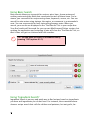
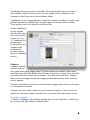
The next prompt will ask you where you’d like to store your library. Press the
“Use Documents” button to keep your library in your Documents folder. Press
the “Specify Location” button to specify a different folder for your library.
9
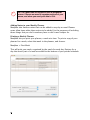
This database file cannot be moved (without changing the location in Advanced preferences) or renamed. If this occurs, MacGourmet Deluxe will think
that it needs to create a new database upon your next launch. You can restore
your information by just moving your MacGourmet Deluxe 4 Database file back
to the original location or by changing the name back to its original title.
L
TIP: Wherever you decide to create your database,
all of your information will be stored in a file
named MacGourmet4Database.mgdatabase. Don’t
forget to back up this library file from time to
time.
Loading the sample recipes and notes
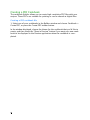
If you want to add some sample recipes, press the “Yes, Please” button to add
them to your initial library. If you’d rather start with an empty library, just press
the “No Thanks” button.
10
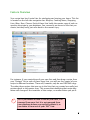
Feature Overview
Your recipe box has 6 main lists for cataloging and storing your items. This list
is located on the left side navigation bar: Recipes, Cooking Notes, Shopping
Lists, Wine, Beer, Cheese. Each of these lists holds the master copy of each respective item type in your database. You can easily put items in lists that you
create, but they really just refer back to the master copy.
For instance, if you create three of your own lists and then drag a recipe from
your “Recipes” list to each of these three lists, you will see four copies of your
recipe in different locations. There will, however, only be one ORIGINAL copy.
The other three recipes that you see in the lists that you created are really just
pointers back to the master copy. This means that modifying that recipe anywhere will change all the instances of that recipe, no matter where you put it.
L
TIP: If you delete an item in one of your lists, it is
removed from your list. It is not removed from
your database unless you explicitly delete it, or
you delete it from one of your “MY” lists.
11
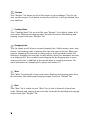
Recipes
Your “Recipes” list shows you all of the recipes in your database. This list can
only contain recipes. If you delete a recipe from this list, it will get deleted from
your database.
Cooking Notes
Your “Cooking Notes” list are a lot like your “Recipes” list in that it shows all of
your notes. Deleting and copying notes from this list works like deleting and
copying recipes from your “Recipes” list.
Shopping Lists
This list shows you all of your current shopping lists. Unlike recipes, wine, beer,
cheese, and cooking notes, shopping lists can only exist in this list. When you
create a shopping list from one or many recipes, it will get added to this list.
Deleting a shopping list from this list will delete it from your database, but only
as a shopping list. You can add a new shopping list by dragging one or more
recipes to this list, in addition to the normal ways of creating new items. For
more information on shopping lists, please see section 10.
Wine
Your “Wine” list shows all of your wine notes. Deleting and copying notes from
this list works like deleting and copying recipes from your “Recipes” list.
Beer
Your “Beer” list is similar to your “Wine” list, in that it shows all of your beer
notes. Deleting and copying notes from this list works like deleting and copying
recipes from your “Recipes” list.
12
Cheese
Your “Cheese” list is similar to your “Wine and Beer” list, in that it shows all of
your cheese notes. Deleting and copying notes from this list works like deleting
and copying recipes from your “Recipes” list.
Reference
The “Reference” icon contains reference items and pairing guides to help you
with cooking, wine, beer, cheese, meat, and other food and drink-related questions. The Reference lists are “read only” lists and cannot be deleted or edited.
Also on the left side navigation panel you will find the “Recent” and “My Lists”
sections. The Recent section includes: Clippings, Featured, Find Results, Last
Import, and Trash. My Lists will include specific lists that you create on your
own.
Clippings
The Clippings list contains selections of text “clipped” from web sites, using the
“Text Clipping” menu item in the Services menu, by dragging text from other
applications to this list, or by pasting text into this list. Clippings can be
double-clicked and imported using the Recipe Import Assistant.
Featured
Featured lists are lists of recipes, etc., that are published on the Mariner Software website and displayed within MacGourmet Deluxe. This list is retrieved
from the web and includes lots of recipe packages put together for MacGourmet Deluxe users. Importing them is as simple as finding the packages or recipes that you want to try and dragging the package or recipe image to a list in
your Recipe Box, or by clicking on the image for a package or recipe. This content is updated regularly and will offer users a quick and easy way to add great
recipes to their collections.
13
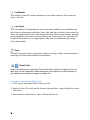
Find Results
The results of specific criteria searches you’ve done using the Find menu appear in this list.
Last Import
The "Last Import" list displays the items that were added to your database the
last time you imported something. Every time you do an import, the current list
items are replaced with any newly imported items. Don't worry though, because
even though the items were removed from your "Last Import" list, you will still
be able to find them in your appropriate "My Lists” and anywhere you might
have copied them.
Trash
The trash can gives you a convenient location to drag recipes, search results or
anything else from within MacGourmet Deluxe.
Smart Lists
Smart Lists allow you to create lists of items that match criteria you specify. Once created, they can be configured to keep themselves up-to-date as you make changes to
your database, like imports, changes to ratings, etc.
To create a new Recipe Smart List:
1. Click on the view that holds all of your lists.
2. Right-click or Ctrl-click on the list and choose New > Smart Recipe List from
the menu.
3. Alternatively, choose File > New > Smart Recipe List.
14
User Lists
User lists, unlike your master lists, can contain sub-lists, and any kind of item.
Also, unlike your master lists, deleting an item from a user list doesn't remove
it from your database. It only removes it from its user list. An item can be
added to and deleted from any user list, or moved and copied to any location
that you would like without fear of having it deleted from a master list. Removing an item from its master list however, will also remove it from any list that
contains it. This means that if you remove a recipe from your “Recipes” master
list, it will also be removed from all of your user lists that contain it.
Creating a new User List
1. Click on the left-hand view that holds all of your lists.
2. Press the “+” button at the bottom left of your recipe box.Creating a sub-list
within a list
1. Select the list you want to add the new sub-list to.
2. Right-click or Ctrl-click on the list and choose New > List from the menu.
3. Alternatively, choose File > New > List or ⇧⌘G (shift-⌘-G).
Recipe Box Widescreen and Normal Display Modes
Your recipe box is able to display your information in two different modes,
widescreen and normal. Widescreen mode stacks your columns side-by-side
and can better take advantage of more recent Apple widescreen displays. Normal mode uses a display similar to that used by Apple’s Mail application. The
mode used can be set in Preferences.
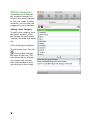
In addition to these modes, the column that displays the items in the main selected list can also be shown using either the normal multi-column “list”, or using a “summary” version of the list, which are more suited to widescreen mode.
When displayed using summaries, the items in the list will be displayed in a
single column, with taller rows that contain a summary of information for the
selected item, including its image, etc. To toggle between list and summary
lists, press the button at the bottom right of the main list column resize handle.
15
Customizing Table Columns
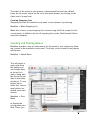
The table columns of each type of recipe box list is customizable. This lets you
show only the columns you are interested in. It also allows you to display them
in the order you desire.
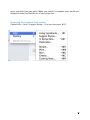
Accessing the list of columns to display
Hold the right mouse button down (or press the ctrl key on your keyboard and
hold down the mouse button) and click on any table column. When you do this,
a menu with all of the available columns is displayed, with a check mark next to
all of the columns that are set to display. If you want to hide a column, just select a checked column name from the list, the checkbox next to the item will no
longer appear, and the column will be hidden in your recipe box. To show column, select an unchecked column from the list to add a checkbox, and the column will be then displayed.
Rearranging the columns
Click on a column header and drag it to a new position. Note that there are different columns for different list types. For instance, selecting a list that only
displays recipes will have recipe-related columns available, selecting a wine
note will have wine-note related, etc. User lists, because they can contain any
type of item, will only display columns that are common to all of the items it
can contain.
16
Creating and Editing
Edit and view recipes and notes by double-clicking on an item in a list to open
the editor.
Creating an item is done by selecting the appropriate menu item from the File
> New submenu. You can also use the “New” toolbar item, which will create a
new item for the selected list. If you are in one of your user lists, which can
contain different kinds of items, you will be prompted for the type of item to
create.
Double-clicking on a recipe opens the recipe editor. The editor allows you to
view and change the item’s information, including adding notes and pictures.
L
TIP: You can display editors as both dialog windows and sheets, which are attached to the main
window. To specify the editor style you’d like to
use, change the “Display editors as sheets” option
in Preferences.
17
The Chef View - Your Kitchen Cooking Helper
If you prefer to have your laptop or computer in the kitchen while you cook (instead of Mariner’s Gourmet iOS), you can display any recipes you are working
on in a Chef View. Chef Views are windows containing a view of your recipe that
is optimized for use while cooking. The text is large enough so that you can
read the ingredients and directions from a distance. This view displays only
what you need to see while cooking-the list of ingredients and the directions.
Viewing More than One List at a Time
Not content with just viewing and organizing your recipes and notes in your
recipe box? No problem. MacGourmet Deluxe allows you to open lists in their
own windows, with their own item views, for extra flexibility. This allows you to
see one of your lists in its own “recipe box” like window, without a view on the
left side. In addition, updating or adding anything to a list when viewed in its
own window will also cause the update to happen in your main recipe box,
keeping everything synchronized for you.
To view a list in its own window, select a list and either press the “View List”
toolbar item, or choose “View List” from the File menu
18
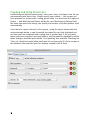
Changing the Display of Recipes and Notes
MacGourmet Deluxe offers a wide variety of themes for displaying your recipes
and notes. Just go to the General Preferences tab and select a theme. With a
recipe selected, you can see how your recipe looks with different themes.
Viewing Larger Versions of Your Images
If the image for a selected item is too small to see, you can increase the size by
clicking on the image in your recipe box (if there is one).
19
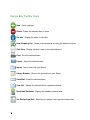
Recipe Box Toolbar Icons
New - Add a new item
Delete - Delete the selected item or items
Get Info - Display the editor for the item
New Shopping List - Create a new shopping list using the selected recipes
Chef View - Display the chef’s view for the selected items
Print - Print the selected items
Export - Export the selected items
Import - Import items into your library
Library Browser - Browse the information in your library
Send Mail - Email the selected items
View List - Display the selected list in a separate window
Nutritional Database - Display the database main window
Get Recipe from Web - Searches for recipes from supported recipe sites
20
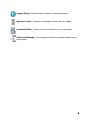
Suggest Recipe - Displays random recipes to consider preparing
Ingredient Search - Searches for ingredient criteria from your recipes
Cookbook Builder - Create your own cookbook from your own recipes
Relationship Manager - Link recipes and notes to remember recipes that go
well together
21
2
2. Creating and Editing Recipes
This section describes creating and editing recipes.
Creating Recipes
To create a new recipe:
1. Choose File > New > Recipe (⌘-N).
A new empty recipe in the currently selected list is created and the info window
is displayed.
Editing Recipes
You can edit and view recipes simply by doubleclicking on one in one of
your lists or by selecting
something in your recipe
box and choosing File >
Get Info.
The Info Tab
1. The recipe name.
2. The source of the recipe. This is where the
recipe came from.
3. Any additional source
info you’d like to note,
like the author or a
cookbook.
4. Free-form area where
22
you can enter any keywords or text that you’d like associated with the recipe.
5. The cuisine for the recipe, with up to 3 levels of specification. For example:
Asian, East Asian, or Hunan.
6. The course in which the recipe would normally be served.
7. The yield of the recipe, such as 24 cookies. This is different from servings,
which are used for nutritional calculation and which can only be a number.
8. The actual number of servings the recipe makes.
9. The difficulty level of the recipe, from easy to hard.
10. Any categories for the recipe. Categories are great for searching and organizing your recipes. Fields marked with a
are categories you’ve added.
Fields marked with a
are system categories and categories marked with a
are locked and can’t be deleted.
23
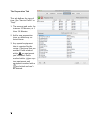
The Ingredients Tab
1. The quantity needed
for an ingredient.
2. The measurement of
the ingredient.
3. What the ingredient
actually is.
4. Any directions associated with the ingredient, like “chopped” or
“diced.”
5. Whether or not an ingredient is a divider.
A divider ingredient is
one used only to
separate ingredient
groups from each
other.
6. Whether or not an ingredient is one of the main recipe ingredients. Marking an ingredient as a
“main” ingredient makes it easier to search.
7. Add a new ingredient, or delete any selected ingredients.
8. Change the scale of the recipe. Enter any number you want here and the ingredients will change to reflect the new amount.
9. The measurement system used by the ingredient, U.S. Standard or metric.
24
The Directions Tab
The directions tab provides a place for the stepby-step how-to information about preparing the
recipe.
You can also add label
text, notes, images, as well
as an option to “highlight a
step” so as it stands out
from the other steps in
your recipe.
Press the Previous button
arrow to go to the last recipe and Next arrow to go
to the following button.
25
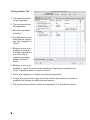
The Preparation Tab
This tab defines the type of
time, like “Start to Finish” or
“Prep.”
1. The amount and units, for
instance 25 Minutes, or 1
Hour 30 Minutes.
2. Add a new preparation
time, or delete any selected times.
3. Any special equipment
that is required by the
recipe. Check any that are
needed. Fields marked
with a
are equipment
you’ve added. Fields
marked with a
are system equipment and
equipment marked with a
are locked and can’t
be deleted.
26
The Notes Tab
1. Enter an introduction or
summary here. This can
be an introduction to
the recipe, why it’s
great, a little story associated with it, etc.
2. Enter any notes that
would be helpful when
making the recipe.
3. The Note details give
you a section to drill
down on specific areas
of the recipe you want
to showcase.
4. If you choose to, you
can add an image here.
5. The drop down menu
lets you link a recipe
note as a specific category such as Chef, Cooking, Pairing, Prep, Serving, or Private.
27
The Picture Tab
The area that displays the
primary image for the recipe. You can drag and
drop an image to this area
to change the picture, or
select it and choose Edit >
Paste.
1. The Crop Box. Dragging this box around
and pressing the “Crop”
button allows you to
save only part of the
image as the primary
image for the recipe.
2. The picture field.. In
this example, Belize
Beef on Spiced Potatoes, which is from the
sample recipes included with MacGourmet Deluxe.
3. Clears the current picture, making it so that the recipe no longer has a picture.
4. Uses the area surrounded by the “Crop box” to specify a smaller, more focused version of an image as the primary image.
5. Resets a cropped image to the original version.
6. Allows an image for the recipe to be opened from your computer’s disk
drive.
7. Changes the size of the crop box.
28
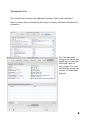
The Nutrition Tab
The nutrition tab contains two additional sections; Notes and Calculated.
Notes is a text area for displaying the recipe’s already-calculated nutritional information.
The Calculated tab
contains the tables that
enable you to calculate
nutritional data for
your recipes. For more
information, please see
section 12, Nutritional
Analysis.
29
3
3. Creating and Editing Wine, Beer and Cheese
Notes
This section describes creating and editing wine, beer and
cheese notes.
Creating Wine, Beer, and Cheese Notes
To create a new wine, beer, or cheese note, choose File > New > Wine/Beer/
Cheese Note. This will create a new empty wine/beer/cheese note in the currently selected list, provided it is editable and can contain wine/beer/cheese
notes.
Editing Wine, Beer, and Cheese Notes
To edit and view notes by double-clicking on one in a list or by selecting something in your recipe box and
choosing File >
Get Info.
The Info Tab
1. The name of
the winery,
brewery, or
dairy that produces the
wine, beer, or
cheese.
2. The name of
the wine, beer,
or cheese.
3. The region the
30
wine, beer, or cheese comes from.
4. Any subregion for the wine, beer, or cheese.
5. The wine vintage, the year brewed, or the date of the production of the
cheese.
6. The wine, beer, or cheese style. For example: light, medium, full-bodied for
wine, IPA or hoppy for beer, and soft or semi-soft for cheese.
7. The wine, beer, or cheese type, such as Red: Cabernet Sauvignon, German
Ale: Hefeweizen, or Goat Milk: Blue.
8. Free-form area where you can enter any keywords or text that you’d like associated with a the note.
31
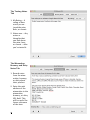
The Tasting Notes
Tab
1. My Rating - A
rating of how
much you enjoyed the wine,
beer, or cheese.
2. Notes area - Any
notes or
thoughts that
you had about
the wine, beer,
or cheese - after
you’ve tasted it.
The Winemaker,
Brewery, and Dairy
Notes Tab
1. Record notes
from the winemaker, brewery,
or dairy about
their product.
2. Enter the web
address of the
winemaker in the
winemaker,
brewery, or dairy
URL field. This
will be useful for
future reference
of the item.
32
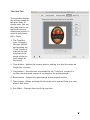
The Label Tab
The area that displays
the primary image for
the wine, beer, or
cheese note. You can
drag and drop an image to this area to
change the picture, or
select it and choose
Edit > Paste.
1. The Crop Box
area- Dragging
this box around
and pressing the
“Crop” button allows you to save
only part of the
image as the primary image for
the recipe.
2. Clear button - deletes the current picture, making it so that the recipe no
longer has a picture.
3. Crop button - Uses the area surrounded by the “Crop box” to specify a
smaller, more focused version of an image as the primary image.
4. Reset button - Reverts a cropped image to the original version.
5. Open button -Allows an image for the recipe to be opened from your computer’s disk drive.
6. Size Slider - Changes the size of the crop box.
33
The Cellar (Wine
Notes) and More
Info (Beer and
Cheese Notes) Tab
Here is a spot for info
about the purchase
and storage of the
wine, beer, and
cheese.
1. Purchase location
- The location
where you purchased the wine,
beer, and cheese.
2. Purchase date
-The date you
purchased the
wine, beer, and
cheese.
3. Maturation date - The date the wine, beer, and cheese matures.
4. Date opened - The date you opened the wine, beer, or cheese.
5. Number on hand - The number of bottles of the wine or quantity of beer or
cheese that you have on hand.
6. Price - The price you paid for each bottle of wine, quantity of beer, or block
of cheese.
34
4
4. Creating and Editing Cooking Notes
This section describes creating and editing your cooking
notes.
Creating Cooking Notes
To create a cooking note, choose File > New > Note (⇧-⌘-N). This will create
an empty cooking note in the currently selected list, provided it is editable and
can contain cooking notes.
Editing Cooking Notes
You can edit and view notes simply by double-clicking on one in a list or by selecting something in your recipe box and choosing File > Get Info.
The Info Tab
1. The cooking
note title.
2. The source of
the cooking
note.
3. Free-form
area where
you can enter
any keywords
or text that
you’d like associated with
the cooking
note.
4. The text of the
cooking note.
35
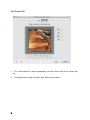
The Picture Tab
1.
2.
36
For a description of each component, see the Picture tab of the recipe editor.
Drag and drop image into box and edit to preference.
5
5. Searching
This chapter describes ways you can find recipes and notes
There are a variety of ways to find things in MacGourmet Deluxe. You can
quickly filter on certain fields, or all fields in your recipe box using the Search
Field. You can search for recipes, wine, beer, cheese and cooking notes using
the basic search functionality. You can create Smart Lists that search for items
based on criteria you specify: lists that keep themselves updated as you add
and delete items. You can search for recipes based on ingredients you have and
ingredients you do not have. Finally, you can do "Suggest Recipe" searches that
return random selections from your recipe collection. This is great if you can't
decide what to make!
The Search Field
The ingredient search field is found on the toolbar of your recipe box and your
list views. It allows you to pick a field to search on and quickly filter the selected list based on whatever you type into this field.
37
Using Basic Search
Basic search allows you to search for recipes, wine, beer, cheese notes and
cooking notes using the fields that correspond to each of those items. For instance, you can search for recipes using name, keywords, source, etc. You can
search for wine notes using vintage, the region, or comments in a winemaker's
note. You can even search for beer notes using brewery notes. When you
search, your results are displayed in the “Find Results” list in your recipe box.
Your find results will be saved for your current MacGourmet Deluxe session, but
quitting the application and restarting it later will clear the “Find Results” list, so
that it does not get too cluttered with old searches.
L
TIP: You can move the cursor to the search field by
pressing ⌥⌘F (option-⌘-F).
Using “Ingredient Search”
Ingredient Search is an easy and quick way to find recipes based on ingredients
you have and ingredients you do not have. For instance, the screenshot above
shows a recipe search that calls for chicken and potatoes, but not garlic, be-
38
cause you don’t have any garlic. When your search is complete, your results are
displayed in the Find Results list of your recipe box.
Displaying the Cupboard Find window
Choose Edit > Find > Suggest Recipe... (You can also press ⌘-F).
39
Creating and Using Smart Lists
Let MacGourmet Deluxe create recipe, note, wine, beer, and cheese lists for you
automatically with Smart Lists. Simply specify your criteria — like recipes you
have prepared or recipes with a rating greater than 3 or wine from the region of
France — and MacGourmet Deluxe will do the rest. MacGourmet Deluxe finds
the items that match the things you specify and creates a list that updates itself
automatically.
If you were to create a Smart List for recipes, using the values shown with the
recipe example below, a new list would be created for you that displayed recipes that you have prepared with a rating that is greater than 4. As you mark
more recipes as prepared, and rated others, this list would be updated to reflect
these changes, provided you had the "Live updating" box checked. Checking the
“Limit to” check box would allow the Smart list to show only 20 of the recipes in
the database that matched your list settings instead of all of them.
40
L
TIP: Because Smart Lists are updated each time something in the database changes, adding more and more
lists can slow response times in large databases. Large
databases will respond more quickly when there are
fewer lists that need updating.
Creating a new Smart Recipe List
1. Click on the view that holds all of your lists.
2. Choose File > New > Smart Recipe List. You can also right-click (or ctrl-click
for one button mouse users) on the view that holds all of your lists and
choose New > Smart Recipe List in the menu that pops up.
3. A new list will be added, which you can rename by double clicking on it. To
edit a list, select it and choose Edit > Modify Smart List. You can also select
it and right-click (or ctrl-click for one button mouse users) on it to display a
menu, from which you can then choose “Modify Smart List.”
41
Doing a Suggest Recipe Search
Can't decide on what to make? Not a problem. Suggest Recipe is a fun way to
search for 5 random recipes from your collection. To do a new Suggest Recipe
search:
Choose Edit > Find > Suggest Recipe.
Suggest Recipe can be used as often as you want, returning a new, different list
of recipes each time you use it.
Finding Recipes, Wine, Beer, Cheese, and Cooking Notes
You can search for each item type by selecting the appropriate command from
the Find menu.
Finding recipes
Choose Edit > Find > Find Recipes..., or press ⌃⌘R (ctrl-⌘-R).
Finding wine notes
Choose Edit > Find > Find Wine Notes..., or press ⌃⌘W (ctrl-⌘-W).
Finding beer notes
Choose Edit > Find > Find Wine Notes..., or press ⌃⌘W (ctrl-⌘-B).
Finding cheese notes
Choose Edit > Find > Find Wine Notes..., or press ⌃⌘W (ctrl-⌘-W).
Finding cooking notes
Choose Edit > Find > Find Cooking Notes..., or press ⌃⌘R (ctrl-⌘-N).
When you use any of these commands, a Find window appropriate for the type
of item you are searching for will be displayed, so that only the information appropriate to the type of item will be available for your search.
You can also search your library for potential duplicate recipes. Find Duplicates looks at the directions of each of your recipes and compares them to
those of all of your other recipes to see if there are any that might be the same.
The ones that look like duplicates are returned in a Find result, and added to
the Find Results list in your recipe box.
Finding duplicate recipes
Choose Edit > Find > Find Duplicates
42
Creating Smart Lists from Find Results
You can easily turn your find results into smart lists:
1. Select the Find result in the list
2. Choose File > New > Smart List From Find, to turn it into a Smart List.
This will create a new Smart List that uses the criteria in the selected Find result.
43
6
6. Importing and Exporting
This chapter describes ways of importing and exporting
your information.
MacGourmet Deluxe provides a variety of ways to get information into and out
of your recipe box.
L
TIP: If you do not see the “Clip Recipe” menu item in
the Services menu, try copying MacGourmet Deluxe to
the system Applications folder. You can also try logging out, and rebooting if that still doesn’t work. In rare
cases you might have to reboot twice.
Using the MacGourmet Deluxe Clipping Service
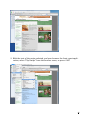
Getting recipes into MacGourmet Deluxe is as easy as 1-2-3:
1. Go to your favorite recipe web site in your web browser and select the text
of a recipe.
Hint: It’s often easier to clip from a “Print” version of a recipe, which will
usually display a recipe without ads and web site navigation.
44
2. With the text of the recipe selected, and your browser the front-most application, select "Clip Recipe" from the Services menu, or press ⇧⌘T
45
(shift-⌘-T). Doing this will add a text clipping of the recipe to the Clippings list
in your Recipe Box.
L
TIP: Not all web browsers support the Services menu.
Safari, Firefox, Chrome, and Opera all support the
Services menu.
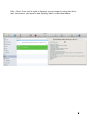
3. Double click your new clipping to bring up the Recipe Import Assistant. Copy
or drag the text from the top text area into the appropriate fields and text
areas. Make any corrections or modifications you desire. Text can also be
copied to import fields by selecting text in the area at the top of the assistant and choosing the desired target from the popup menu below the top
text area, and pressing the Set button. Alternatively, each menu item has an
associated keyboard shortcut. If your recipe is in the simple format: Title,
summary, ingredients, directions, you can also choose Quick Fill, which will
attempt to auto fill the fields for you. Tabs can be changed by pressing the
⌘-← (⌘-left arrow) or ⌘-→ (⌘-right arrow).
Before committing your
new recipe,
you can see
what it will
look like
when it's imported in the
import preview.
Making clippings (Alternate options)
In addition to using the Services menu item to create and add clippings to your
recipe box, you can also create clippings by either dragging and dropping text
from another application to the Clippings list, or by copying text from another
application, selecting the clippings list in MacGourmet Deluxe and choosing
46
Edit > Paste. Once you’ve made a clipping, you can import it using the Assistant, the same as you would a web clipping, which is described above.
47
Using the MacGourmet Deluxe Recipe Web Page Import
Service
MacGourmet Deluxe makes it super easy to import recipes from certain, supported web sites including allrecipes.com, epicurious.com, foodnetwork.com,
williams-sonoma.com, cookinglight.com, food.yahoo.com, plus many more.
1. Go to the recipe page on your favorite, supported web site. Note that you
have to go to one of their standard recipe pages for the importer to work.
Recipes on featured pages, special pages, etc. are not usually supported by
the importer.
2. Select the entire URL in the address bar of your web browser.
3. Choose Services > MacGourmet Deluxe > Import Recipe From Web Page, or
press ⇧⌘R
4. After a moment, a Recipe Import Assistant window (described above) will
open with all of the recipe information already filled in. Verify that your information is correct, make any desired changes, and Save. Note: Occasionally, because of the many variations of information, sometimes the information will not be retrieved in its entirety. When this happens, you can still
make a web clipping and import the recipe that way.
Note: MacGourmet Deluxe uses web page “scraping” to get recipe information.
Recipe web sites tend to change their code often, and this will sometimes break
the web page import service for that site. If this happens, while waiting for a
fix, you can still import a recipe using the web clipping service.
L
48
TIP: MacGourmet Deluxe can import files that have
been saved in the following formats:
Paprika, SousChef, MasterCook, MasterCook Mac,
Meal-Master, CookWare Deluxe, Cook’n text, RecipeML,
Yum XML, plus many more!
Using File Import and Export
You can choose to import existing files in various formats, described below:
Importing Recipes:
The image below shows a MasterCook import file selected.
While you should make sure that
you select the correct file format
for your import, MacGourmet Deluxe will verify that the file you selected matches the selected format before your import starts.
To import CookWare Deluxe
files:
1. Choose File > Export from the
menu bar.
2. Choose export type: Tab-Separated Text.
3. Click Save.
4. Choose the fields to export in the next window that is displayed. Just use all
of them.
5. Using MacGourmet Deluxe, choose File > Import...
6. Choose the text file you created, and select CookWare Deluxe for the format
of the file to import.
To import Yum XML files:
1. Choose File > Export All Recipes > As XML Text...
2. Save the file to your hard drive.
3. Using MacGourmet Deluxe, choose File > Import...
49
4. Choose the XML file you created, and select Yum XML for the format of the
file to import.
To import Cook’n text files:
1. Export
2. Using MacGourmet Deluxe, choose File > Import...
3. Choose the text file you created, and select Cook’n for the format of the file
to import.
To import Recipe ML, MasterCook MXP and Meal-Master files:
1. Using MacGourmet Deluxe, choose File > Import...
2. Choose the file you want to import and choose the appropriate file format,
RecipeML, MasterCook MXP or Meal-Master.
L
TIP: To import recipe collections from MasterCook 4.06
for Macintosh you need to take the collections files and
convert them to MasterCook export files
To import MasterCook Mac files:
1. You need to open a collection, say "15-minute Meals"
2. Go to the index, and select all of the recipes, or just the recipes that you
want to export.
3. Select the "Export Selected Recipe(s)" menu item from the Recipe menu, and
choose the "Mac Format" menu item in the save dialog.
This will create a file that is in the correct format for import into MacGourmet
Deluxe, a MasterCook Mac file. After saving the file as a "Mac Format" file, you
can then import that file into MacGourmet Deluxe.
50
You can also drag and drop an import file into your Recipe Box! Just select an
import file in the Finder and drag it into one of your lists, or onto one of your
lists. That's all there is to it.
Once imported, your new items can be found in both your appropriate "My" list,
and in your "Last Import" list.
Exporting Recipes and Notes
Exporting items is as easy as importing them. You can export recipes in a variety of formats, described below:
MacGourmet Deluxe Export Files
The MacGourmet Deluxe file export types include two different ways to export
both text and binary versions of recipes, wine notes and notes. The formats
with the word “Personal’ appended to them will create export files that include
both your personal ratings and whether you have prepared the recipe or not.
Those MacGourmet Deluxe formats not marked as personal will not include this
information. This allows you to make export files that will preserve your own
information, and files that are more generic, which is preferable when sharing
your items with others.
When you choose to export MacGourmet Deluxe Binary files, any embedded images will be saved in a format that is smaller and faster to import later. The text
format is useful when putting your export files on a web site or sending them
through email. In the text version of the format, any embedded images are
converted to text, making them easier to share across different mail and web
servers, but also making them larger.
Text and Rich Text
1. Choose the list or set of recipes in your recipe box that you’d like to export.
2. Choose File > Export... and choose either Text File or RTF File as the format.
51
MasterCook, MasterCook Mac and Meal-Master
1. Choose the list or set of recipes in your recipe box that you’d like to export.
2. Choose File > Export... and choose MasterCook MXP, MasterCook Mac or
Meal-Master as the format.
Note that you can only export recipes when a format other than one of the
MacGourmet Deluxe formats is selected. Wine and general notes will be ignored.
Creating text versions of your recipes and notes
Additionally, you can select one or more items and choose Edit > Copy. Doing
this will place text versions of the selected items into the Mac OS X Pasteboard,
letting you then paste the text into other applications like Mail, TextEdit, Entourage, etc.
Exporting the names of items in a list
To export the names of all of the items in one of your recipe box lists, select
the list, and choose Edit > Copy. This will add a text-based list of all of the
item names in the list to your pasteboard, which you can then paste into any
application you’d like.
52
7
7. Publishing Recipes and Notes to the Web
This chapter describes using the Web Publishing features.
MacGourmet Deluxe allows you to publish your recipes, wine, beer, or cheese
notes and general notes to the web, or to your local file system. This allows you
to easily share what you've created, entered, etc. with others. You create and
modify web site publications by going to the Publish panel in Preferences, and
selecting the Sites tab.
53
Create export files for published items - Checkbox that allows you to create
MacGourmet Deluxe export files as part of your publication, so that importing
your recipes by other users can be as simple as just dragging the image of an
export file from a web page into MacGourmet Deluxe.
Finally, the Template and Style pop up menus allow you to pick one of the included MacGourmet Deluxe themes for your publication.
After creating the specification for your publication, you
can publish it by choosing
Share > Publish.
The Publish menu contains
your publications, listed by
their titles. Selecting a publication from the menu will
create all of the files necessary for your site, in the location you specified. Once the publication is complete, you can access it using
the URL displayed in the field labeled "This site's address is:" when your publication is selected in the Publish preferences table.
54
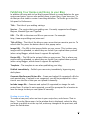
Publishing Your Recipes and Notes to your Blog
In addition to being able to use MacGourmet Deluxe to create websites for your
recipes and notes, you can also publish them to your blog, if you have one. To
do that you first need to create a new blog definition. To do this go to the Publish panel in Preferences.
Title - The title of your weblog settings.
Service - The service that your weblog uses. Currently supported are Blogger,
Blojsom, MovableType and TypePad.
URL - The URL to the atom.xml file on your server. For example:
http://www.mycoolblog.com/atom.xml
Title of Blog - The title of the blog on your server that you want to post to. To
refresh this list, press the button next to this popup menu.
Image URL - The URL to the images folder on your server. This is where your
images will be uploaded, or where they are found if you upload them yourself
(when using Blogger, which doesn’t support file uploads).
Recipe URL - The URL to the recipes folder on your server. This is where your
recipes will be uploaded, or where they are found if you upload them yourself
(when using Blogger, which doesn’t support file uploads).
Template - The template to use when publishing your blog.
Publish immediately - Publish your new entry immediately, bypassing any
draft phase.
Generate MacGourmet Deluxe file - Create and upload (if supported) a file for
each posted item. If upload is not supported, you will be prompted for a location to save the file so that you can upload it manually.
Include image file - Generate and upload (if supported) an image for each
posted item. If upload is not supported, you will be prompted for a location to
save the image so that you can upload it manually.
Posting to your blog
To create a new post, select an item in your recipe box, and choose “Post to
blog...” from the Share menu. In the window that is displayed, select the blog
you want to publish to at the top left, make any changes to the post text, and
press the Post button.
55
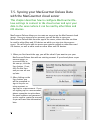
7.5. Syncing your MacGourmet Deluxe Data
with the MacGourmet cloud server
This chapter describes how to configure MacGourmet Deluxe settings to connect to the cloud server and sync your
data to the server where it can be read by other Macs and
iOS devices.
MacGourmet Deluxe allows you to create an account on the MacGourmet cloud
server. Once you signup for an account, you will be able to sync your
MacGourmet Deluxe data from the app to the server, where the data can then
be read by other Macs and iOS devices on which you sign into the same account. You will also be able to access new content created on other Macs and
iOS devices, as well as edits made on other Macs and iOS devices.
1. When you first launch the app, you will be asked if you want to sync your
MacGourmet Deluxe data with an existing account: If you already have a sync
account setup, or
you would like to
set one up, click the
Sync button. If not,
click Do Not Sync
and you can set one
up later.
2. After clicking on the
Sync button, you
will be prompted to
sign in to your existing account, or
sign up for a new account. If you
are signing up for a new account,
please remember to write down
the email address and password
you’ve used to create the account,
as you will need that information
later.
56
3. After signing up for a new account or signing into an existing
account, you’ll see the following.
At this point, you can click Sync
Now to sync your data to the
server.
4. When you sync, you will see
the Sync Manager window.
You can also access this any
time by selecting Sync Manager from the Window menu.
57
SyncManager
The Sync Manager shows the current sync status of your data, and provides you
with a few options,
Synchronize Manually/Automatically - If you opt to synchronize manually,
then none of the new or edited content will be sent to the sync server, and no
new and edited content on the sync server (for example, changes or additions
you have made on your other Macs or iOS devices) will not be read from the
sync server unless you manually sync it by clicking the Sync Now button. If you
opt to synchronize automatically, then new and edited content will be synced to
the server automatically.
Sync Now - Clicking this button will send new and edited content from your
Mac to the sync servers for other Macs and iOS devices to read, and will deliver
new and edited content on the sync server to your Mac.
Status List - In the status list, you can find out when your data was last synced
to the server. You can also check and uncheck the items you want to sync to
and from the server.
58
8
8. Using the Lists Editor
59
This chapter describes adding, modifying, and searching
your information, like categories, equipment and recipe ingredients.
L
TIP: The Lists Editor is a VERY powerful tool and caution should be exercised when using it to modify your
information. Make sure you check your changes before
pressing “Yes” when you are asked to confirm your
change.
The Lists Editor allows you to view and edit information in your database. The
library browser has six tabs: Recipes, Cooking Notes, Wines, Beers, Cheeses,
and Shopping Lists.
Each tab has a popup menu that displays the fields that can be browsed and
edited. Select a field in the popup to display the information associated with the
selected field in the list below.
= User created field
= Default MacGourmet Deluxe field
Either can be changed or deleted.
= Locked field and can’t be changed.
To change a field’s value, double-click on it, change the value and press Return
when finished.
Selecting an item from the list updates the “Used By” table at the bottom of the
library browser to display items that use the selected value. To go to the item in
your recipe box, double-click on the item in the “Used By” table.
Some lists, like categories, are lists you can directly modify, and some, like Ingredient Descriptions, are built from the information you have entered into your
database. Because of this, items in a list like “Ingredient Descriptions” can only
be “deleted” by removing the values from any items that are using them. If you
change one of these values in the middle table, all of the items that use the
value will be updated with the new value. When nothing uses a value, it is removed from the list.
60
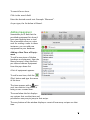
To search for an item:
Click in the search field.
Enter the desired search text. Example: “Macaroni”.
As you type, the list below is filtered.
Adding Equipment
Sometimes you’ll find that the
provided equipment list doesn’t
have your favorite item or tool
like a mandolin slicer or a wire
rack for cooling a cake. In these
instances, you can add new
equipment to your database.
Adding a New Piece of Equipment
To add a new piece of kitchen
hardware or equipment, from the
library browser, select the Recipes tab and choose Equipment
from the pop-down list.
A list of equipment appears.
To add a new item, click the
(Plus) button and type the name
of the item.
The item appears with a
(person) icon next to it to denote it
being a user-created item.
The area below the list displays
any recipes that use that item and
provides an easy way to jump to that recipe.
The very bottom of the window displays a count of how many recipes use that
item.
61
Adding Categories
Sometimes you’ll find that
the provided category list
doesn’t have every category
to suit your needs. In these
instances, you can add new
categories to your database.
Adding a New Category
To add a new category, from
the library browser, select
the Recipes tab and choose
Category from the pop-down
list.
A list of categories appears.
To add a new item, click the
(Plus) button and type
the name of the item. The
area below the list displays
any recipes that use that
item and provides an easy
way to jump to that recipe.
62
9
9. Relating Recipes and Notes
This chapter describes making links between recipes and
notes.
Linking Recipes and Notes
Link recipes and notes to remember recipes that go well together, wines, beers,
or cheeses that go well with recipes, and
notes that are useful when preparing
certain recipes.
Creating relationships between two
things
1. Select an item in your Recipe Box and
select Window>Relationship Manager... The item shown at the top of
the Relationship Manager is the name
of the currently selected item. To
keep the selection from changing as
you select items in your recipe box,
press the “Locked” checkbox.
2. Find an item in one of your recipe box lists that you want to link to the currently selected item and drag it to the Relationship Manager table. Selecting
a new item changes the selected item in the Relationship Manager unless
you’ve checked the lock checkbox. Note that it is possible to drag an item
without selecting it by quickly clicking and dragging the item, in one motion.
3. Drop the item. A new relationship between the selected manager item and
the dropped item will be created. This relationship is in both directions,
which means, if you make a relationship between a “Roasted Lemon
Chicken” recipe and a “How to roast a chicken” cooking note, you will see
that relationship when viewing either item in your recipe box.
63
You can add more relationships or delete relationships by selecting the relationship in the "Related Items" table of the Relationship Manager and pressing
the Delete key.
Double-clicking on an item in the relationship manager will select that item in
your recipe box.
64
10
10. Creating and Using Shopping Lists
This chapter describes ways to create, use and export
shopping lists.
Creating a Shopping List
MacGourmet Deluxe allows you easily to create shopping lists.
Creating a new shopping list
1. Select one or more recipes.
2. Next select “Shopping List From Selection” from the File > New menu. You
can also select “Shopping List From Selection” from the “New” contextual
menu by right clicking or command clicking on one of your selected recipes.
Additionally, you can create a new, blank shopping list by selecting the “Shopping List...” item from the File > New menu when you have your “My Shopping
Lists” list selected in your recipe box.
Alternatively, you can also create a new shopping list by selecting one or more
recipes and dragging and dropping the selection on the “My Shopping Lists” list
on the left side of your recipe box.
Combining Shopping Lists
Two shopping lists can be merged by dragging one shopping list and dropping
it onto another one. When shopping lists are merged, the ingredients in the list
are combined, assuming they are spelled exactly the same.
65
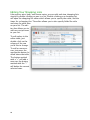
Editing Your Shopping Lists
Like recipes, wine, beer, and cheese notes, you can edit and view shopping lists
simply by double-clicking on one in a list. Double-clicking on a shopping list
will open the shopping list editor which allows you to specify the name, and the
items for a shopping list. The editor allows you to also specify fields like aisle
and store for each item
on your list. The editor also allows you to
add non-recipe items
to your list.
To edit values in the
editor table, just
double-click on the
column of the row
you’d like to change.
To add or remove a
row, just press the
appropriate button located above the table.
The button marked
with a “+” will add a
new row, the button
marked with the “-”
will delete the current
selected rows.
66
Maintaining the Shopping List Favorites List
Every shopping list displays a master Favorites list, shown above in the bottom
section of the shopping list editor window. The favorites list is a place to keep
often used items, such as pantry staples, so that they can be quickly added to
any shopping list. To add one or more favorite items to a shopping list, just
drag and drop the rows from the favorites list to the shopping list. The favorites
list can also be used to store pantry quantities, if desired, as well.
The favorites list can be hidden by dragging the window splitter to the bottom
of the window, or by double-clicking on it.
Items in the favorites list are also used to set the aisles, stores and categories
for items whenever a new shopping list is created. For instance, if the favorites
list has a row for “all-purpose flour” and a shopping list gets created that uses
this ingredient, the values for the “all-purpose flour” favorite item are used to
fill in the data for this item in the new shopping list.
Alternatively, if there are no favorites found, existing shopping lists are
searched for this information and the items in a new shopping list are filled in
using the values from existing shopping lists, so it’s also possible to keep a
“master” shopping list that is used to fill in information automatically.
Exporting a Shopping List as a Text File
MacGourmet Deluxe lets you easily export your shopping lists as a text file. To
export a shopping list, select it in your recipe box. Next choose Export... from
the File menu. Finally choose a name, location and format for your exported
shopping list. MacGourmet Deluxe also supports HandyShopper and SplashShopper, and plain text export formats.
67
11
11. Printing Recipes and Notes
This chapter describes how to print on regular paper and
on sheets formatted for index cards.
MacGourmet Deluxe offers you many printing options. You can print one item
or many items. You can print one item per page or many to a page.
To print, you just need to select one or many items in your recipe box and
press the Print toolbar item, or select Print... from the File menu. Either action
will cause the Print window to be displayed. The Print window allows you to
choose the template you’d like to use for printing and gives you an approximate preview of what your recipes or items will look like when printed. Note
that this is only approximate. To really see what your print out will look like,
press the “Print” button at the bottom of the Print window, which will display
the Print Settings sheet, and press the “Preview” button found at the bottom left
of the sheet.
It should be noted that dynamic templates are printed on normal printer paper,
and can be printed all at once.
L
68
TIP: You can only print one type of item at a time. This
means that if you are in your recipe list, you can select
as many recipes as you want and print them. However,
if you are in a user list, you can only select multiple
items of the same type.
To print each of your selected recipes on a separate page, check the “Print one
item per page” check box. To change the print margins, press the “Set Margins”
button. This will bring up up a sheet that allows you do set the top, bottom, left
and right margins.
69
12
12. Nutritional Analysis
This chapter describes the Nutritional Analysis feature of
MacGourmet Deluxe
MacGourmet Deluxe gives you the ability to calculate the nutritional data for all
of your recipes.
About MacGourmet Deluxe Nutritional Information
Nutrition Analysis Based on USDA Database
MacGourmet Deluxe is proud to use the abbreviated USDA National Nutrient
Database (2013 version)* for recipe nutrition analysis. Today, the National Nutrient Data Bank is a repository of information for hundreds of nutrients and for
over 8,000 foods. It is made available in their principle database--the USDA
National Nutrient Database for Standard Reference (SR). *U.S. Department of Agriculture, Agricultural Research Service. 2013. USDA Nutrient Database
for Standard Reference, Release 26. Nutrient Data Laboratory Home Page,
http://www.ars.usda.gov/nutrientdata Note: Release numbers change as new versions are released.
**IMPORTANT** Use MacGourmet Deluxe Information with Care
The nutrition values that are calculated by MacGourmet Deluxe are based on
individual recipe ingredients. If a nutrient value is not available at this time, you
will not find a mapping for the nutrient name. While Mariner Software takes the
utmost care in providing you with the most accurate nutritional values possible,
please note that this information is an estimate and is not intended for medical
nutrition therapy. If you are following a strict diet for medical or dietary reasons, it is important that you, first, consult your physician or registered dietitian before planning your meals based on MacGourmet Deluxe nutritional
analysis, and, second, remain under appropriate medical supervision while using the nutrition information calculated by MacGourmet Deluxe.
70
Overview
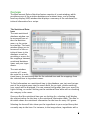
The MacGourmet Deluxe Nutrition feature consists of a main window, which
provides access of the nutrition database and nutrient items, and a floating
heads up display (HUD) window that displays a summary of the calculated nutritional information for a recipe.
The Nutritional Database
The main nutritional
database window can
be accessed from either the Nutrition
menu, or the recipe
box toolbar. The main
window allows you to
browse all of the nutritional items in the
database as well as
providing a source for
the mappings between
nutritional database
items and your ingredients.
The main window
consists of 3 areas,
the main list or nutritional items, the nutritional data for the selected item and the mappings from
the selected item to ingredient names.
To find information on a nutritional item in the database, you just need to type
part of the nutrient name into the search field. As you type, results matching
your search will be displayed. You can remove food groups from your search by
right-clicking, or control-clicking on the nutritional item table and un-checking
the category in the menu.
Once you find the nutritional item you are looking for, selecting it will display
the nutrient values for the item in the nutritional information table. The data in
this table shows the nutritional information for the item for every 100 grams.
Selecting the item will also show you the ingredients in your recipe library that
currently map to the item. For instance, in the image above, ingredients with a
71
description of either “chopped nuts” or “nuts” will use the selected nutritional
item in the nutritional calculations for a recipe.
72
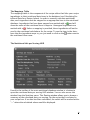
The Mappings Table
The mappings table is the component of the recipe editor that links your recipe
ingredients to their nutritional data items in the database (see Calculating Nutritional Data for a Recipe, below). In order to correctly calculate nutritional
data, each ingredient must be mapped to an appropriate item in the nutritional
database. Ingredients that have been mapped are marked with a
and will
show the name of the nutritional item it maps to. Unmapped ingredients are
marked with a
. Unless a mapping is provided, these ingredients will not be
used in the nutritional calculations for the recipe. To see the item in the database that the ingredient maps to, you just need to click on the button next to
the nutritional item name.
The Nutritional Info per Serving HUD
Found in the toolbar of the main nutritional database window is a button to
open the nutritional data per serving HUD window. You can also access this
window from the Nutrition menu. This floating window allows you to browse a
summary of the calculated data, per serving, for the recipe that is selected in
your recipe box. If no data has been calculated, the values will be marked with a
“--” where the calculated values would be displayed.
73
The Calculation Details Window
When the nutritional data for a recipe is generated, information on the analysis
is stored with the data and can be viewed using the Calculation Details window,
which can be opened either from the database window toolbar or the Nutrition
menu. In this component, you will find the basics of how the calculation for
each ingredient was done, any errors in the calculations, and any ingredients
that were skipped when calculating the data, along with information on why a
calculation failed or wasn’t included in the final results. Ingredients used successfully in the nutritional analysis are marked with a
in the table. Ingredients that were not used because of errors, or because there were no mappings,
are listed with a
. Clicking on each ingredient will show you the associated
analysis information or error. You can also find warnings displayed in this window as well. Warnings are logged when a calculation is done but the data is
possibly incorrect based on the resolution or mapping provided. When there are
warnings, Nutrition has made a guess at the resolution, so these calculations
should be verified for their accuracy.
74
Calculating Nutritional Data for a Recipe
To calculate the nutritional values for a recipe, you have to select the Calculated
subsection in the Recipe editor Nutrition tab.
This component shows each ingredient, and it’s equivalent nutrition database
nutrient value. MacGourmet Deluxe calculates nutritional values based on the
ingredients that make up your recipes. To figure out the nutritional values for
each ingredient, MacGourmet Deluxe uses the concept of associating the ingredient name used in your recipe, and an equivalent nutritional database item,
called a mapping. MacGourmet Deluxe comes with many mappings predefined,
and you’ll see these marked with a
in the “Nutrition Food Item” column
when you view one of your recipes. Values marked with a
have not been
mapped yet, because a mapping between the ingredient description and a nutritional item wasn’t found. To note, the number of servings needs to be in
place AND the recipe has to be save before this will work.
To correctly calculate
the nutritional information, as many ingredients as possible must
be mapped to nutritional items. To create a
new mapping, you just
need to find the nutritional item in the database that is the closest
match the ingredient,
and drag and drop the
item from the nutritional database to the
ingredient row that
needs a mapping. Once
you do this, the correct
nutritional values will
available to calculate
the nutritional information for the ingredient.
75
The Weight Resolver: Providing Needed Additional Information
Sometimes, even after mapping an ingredient, you need to provide more information to calculate nutritional values.
An example is an ingredient of “1 egg.”
While this value is
mapped to “Egg,
whole, raw, fresh” in
the nutritional database, when you press
the “Calculate” button,
you will be asked to
specify the size of the
egg you are using,
such as medium,
large, or extra large.
Once you provide this
additional information,
the correct values will
be determined for the
mapping. If you press
cancel at any point,
the calculation for the
recipe will be canceled
as well.
How do you decide what value to choose? You want to choose the item from the
list that most resembles your ingredient. For instance, if your ingredient has a
measurement of 3 tablespoons, you’d want to choose the “1 tablespoon”
choice. If tablespoon wasn’t an option “1 teaspoon” would also work (3 teaspoons in a tablespoon). If your ingredient is measured in something like slices,
and you only have an option like “1 cup” you might have to figure out and
change your ingredient so that it resolves correctly, by figuring out how many
slices would be in a cup and changing your ingredient measurement. Finally, if
you just want to skip this ingredient, choose “DO NOT RESOLVE” and it will be
ignored when calculating the data.
When Mappings Are Not Found
While most ingredients will have mappings, occasionally you’ll find that the nutritional database doesn’t have a good match. When this happens, the nutritional information for the recipe has to be calculated without the ingredient.
76
The USDA does update the database often, though, so at some point all of the
ingredients could be available for your calculations.
Recalculating Your Nutritional Information
While you can recalculate your nutritional information any time you desire,
sometimes you will have to recalculate your information because of changes in
ingredients, servings or mappings. When this happens, the table labeled “Calculated Nutritional Information per Serving” will be marked with an alert message stating that the data displayed needs to be recalculated. When you press
the Calculate button, the old values will be replaced with the new ones and the
alert will be cleared.
Tips on Getting the Best Calculations
MacGourmet Deluxe: Nutrition relies heavily on the USDA database of nutritional items to do calculations. We’ve chosen this method because not only is
the USDA database updated often, it also allows a simple method of mapping
ingredients in recipes to their equivalents in the nutrition database by using a
simple drag and drop process. This is easy enough but there are ways to make
this easier. For example:
You might have various ways of referring to boneless and skinless chicken
breasts in your recipes:
• skinless chicken breasts
• chicken breasts, skinless
• boneless, skinless chicken breasts
• boneless and skinless chicken beasts
77
All of these would ultimately map to “Chicken, broilers or fryers, breast, meat
only, raw” but each variation would have to be mapped by hand before a calculation could be done properly. Any new variations would also have to be
mapped. However, if all of the variants were replaced with “boneless, skinless
chicken breasts” and that description was used in most recipes, work would be
saved. This isn’t always possible of course, but the more standardized your information, the less work you’ll have when you do a calculation.
Another point worth mentioning: your choice of mappings can effect the accuracy of your calculations. Sometimes a mapping that initially seems to make
sense, won’t when the calculation is done. You’ll see this when you press the
Calculate button and the Weight Resolver is displayed. This is normal, because
as described previously, if you have “1 egg” in your recipe, the calculation
needs to know the size of the egg you are using.
Sometimes none of the resolver options seem to be appropriate. For example:
a recipe calls for “1 can chili, no beans” which you map to “HORMEL chili, No
beans, canned entree” in the nutrition database. When you go to calculate your
information however, you are given the following options: 1 cup, 1 package
yields, 1 serving. None of these resolutions are totally appropriate. Why? Well “1
can” cannot be converted to 1 cup, because there is no way to know from that
description how many cups are in a can. The same thing applies to the other
resolutions. In this case, it’s a good idea to look for something more appropriate for your mapping. If nothing appropriate seems to be found, you should
consider changing the ingredient to say “2 cups chili, about 1 can” because a
weight for “1 cup” is one of the available options. If you do either of these,
you’ll be able to resolve the weight and calculate the correct values for the ingredient.
Typically, if your ingredients have measurements like “1 can” or “1 package,”
it’s better for calculating nutrition if you change the ingredient measurement to
include the amount, in cups, tablespoons, etc., adding the package or can value
as an ingredient direction instead.
Another example:
Your recipe calls for something like “1 salmon filet, about 1 1/2 pounds.” Your
results will be better if you change the ingredient to be “1 1/2 pounds salmon,
one filet” instead, because there is no straightforward way to map “1 salmon
filet” to the nutritional database weight of “1/2 filet.” Why? Well 1/2 filet in the
nutritional database is 159g. So to get an accurate calculation, the “filet” needs
to be entered using that number, so you’d have to figure out how the filet in
the recipe properly equates to the database weight, and adjust accordingly. If
you do the conversion to “1 1/2 pounds” everything is taken care of for you.
78
Comparing MacGourmet Deluxe: Nutrition Data to Data With a Recipe
A word on MacGourmet Deluxe Nutrition calculations vs. information you might
already have for a recipe: While they should be in the same ballpark, the odds
of them being the same are slim, unless they were calculated using the same
resource. Some calculations you have will be estimates, like the MacGourmet
Deluxe Nutrition values. Some will be more accurate or have more detailed information, because they were calculated in a lab. It’s difficult to make a direct
comparison between both sets of data unless you know exactly how the recipe
data was calculated. Just something to keep in mind.
The values can also differ greatly based on the exact ingredients they used in
their calculations, and what you use in your mappings. For instance, some of
your mappings may be approximate matches rather than exact matches. This
can cause final values to be different. Not using the right mappings, or not
choosing the best resolutions can also cause the final values to be different,
sometimes by a significant amount. For example, if you have an ingredient of “5
cm Ginger root,” you’ll find that none of the resolutions match this measurement. If possible, figure out this amount in the units of the easiest resolution
you see, i.e. what 5 cm of ginger root might be in slices, cups, teaspoons or
grams.
The rules of thumb for good calculations are essentially these: Start with a recipe that is as clean and consistent as possible. Then, when mapping, make sure
you choose the best mappings possible. Finally, try and make sure that your ingredients resolve in the best way you can. When in doubt about the numbers,
check the Calculation Details window to see just how the data was generated.
This information can give you insight into ways to improve your mappings and
resolutions. If you follow these rules, you’ll get data that is as accurate as estimated nutritional data can be. In addition, the more you work with the USDA
database, you will become familiar with how ingredients are named and categorized and your mappings will improve (there is a learning curve using the USDA
database and the more it is used, the more one becomes familiar with it and
better (and faster) the mappings become).
Adding Your Own Nutritional Items
Sometimes you’ll find that the USDA hasn’t defined values or weights for an ingredient that your recipe uses. You might, however, have the nutritional information from the package available to you. In these instances, you can add new
items to your database for these ingredients, and then make mappings to them
just like you make mappings to the default USDA items that come with Nutrition.
79
Adding a New Nutritional Item
To add a new item, choose Nutrition > New Item or press the “New Item” button
in the toolbar. This will open a window that allows you to add information
commonly found on product packages in the “Nutrition Facts” box for your
item.
After filling in the name for your item and choosing
the group it belongs too, you must fill in the “Serving
Size” and “Weight” fields for your item. It’s best to
enter the size in as clear a manner as possible. For
instance, as “1 cup” or “1 tablespoon.”
At times you might have to do your own conversion
for your item to work properly. An example of this is
when you want to enter the
information for “1 can
cream of chicken soup.” The
USDA doesn’t offer a weight
for 1 can, so you’d have to
enter your own item, unless
you’re willing to convert
your ingredient into cups.
Unfortunately, when you
look at the can you find it
lists the amount for 1 cup in
milliliters, not in grams, and
your item weight has to be
entered in grams. To solve
this problem, you can find,
by doing a search in the nutrition database, that the
USDA does provide a measurement for the soup you
are using of 124g for each
1/2 cup. The soup can lists
that there are 2.5 1/2 cup
servings in each can, so you
can then fill in “1 can” for your Serving Size, and 310g for your Weight (124g x
2.5 = 310g). Now, if you map your soup ingredient to your nutritional item, you
can do your calculation correctly when your ingredient is in cans.
80
You’ll find items you’ve added in the list, marked with the
icon. To show just
your added items, right-mouse-click or control-mouse click on the table, and
choose “Show Only My Items” from the menu that pops up.
L
TIP: To prevent conflicts with ingredients that use
USDA items and ingredients that use your own, it’s a
good idea to make your ingredient description more
specific or unique for your own items.
Deleting Your Nutritional Items
To delete a nutritional item that you’ve added to the database, you just need to
select it, and choose Nutrition > Delete Item or press the “Delete Item” button
in the toolbar. Note that you can only delete items you’ve added, which are
marked with
.
81
USDA Food Groups
Baby Foods
Baked Products
Beef Products
Beverages
Breakfast Cereals
Cereal Grains and Pasta
Dairy and Egg Products
Ethnic Foods
Fast Foods
Fats and Oils
Finfish and Shellfish Products
Fruits and Fruit Juices
Lamb, Veal and Game Products
Legumes and Legume Products
Meals, Entrees and Side dishes
82
Nut and Seed Products
Pork Products
Poultry Products
Sausages and Luncheon Meats
Snacks
Soups, Sauces and Gravies
Spices and Herbs
Sweets
Vegetables and Vegetable Products
L
TIP: You can show and hide food groups from your
searches and from the browser by right-clicking, or
control-clicking on the nutritional item table and unchecking or checking the group in the menu.
83
13
13. Meal Planning
This chapter describes the meal planning feature of
MacGourmet Deluxe
MacGourmet Deluxe gives
you the ability to make
weekly meal plans and print
calendars and menus.
Planning Meals with
the Weekly Planner
Mealplan is based around a
weekly planner. The planner
shows you a week at a time,
and lets you plan meals for
each week, using meals and
the recipes you want to prepare.
You can move from week to
week by pressing the “Previous Week” and “Next Week”
buttons in the toolbar, or by
choosing Mealplan > Previous
Week and Mealplan > Next Week. You can return to the current week by pressing the “Current Week” toolbar button, or choosing Mealplan > Current Week.
To jump to a specific week, press the “Choose Week” toolbar button and click
on any day within the week.
84
Adding Meals and Recipes to your Planner
You can easily add meals and recipes to your planner by using either copy and
paste, or drag and drop. You can add recipes to a day, or to meals within a day.
To add a meal to a planner day, either select a day and choose a meal from the
Mealplan > Add, or drag and drop a meal from the meals drawer to the desired
day.
The meals drawer displays the list of available meals available for the planner,
and it also lets you add and delete meals. The built-in meals cannot be deleted
or changed, but additional meals can be added. To add a meal just press the
“+” button at the bottom of the drawer. To delete a meal select a meal and
choose the “-” button.
The default times (the times used whenever you create an instance of a meal in
the planner) for meals can be set in the meals drawer by clicking on the clock
icon and choosing a time. Times are used primarily when you send your data to
iCal. When your planner is synced, meals that have times will be placed at those
times in your calendar. Recipes that aren’t part of meals will be placed at noon.
L
TIP: When you delete a meal from the meals drawer, it
will be removed permanently and any recipes that are
in these meals in the planner will be removed from the
meal and then added directly to the days that included
the meals.
Adding recipes to your planner is simple: copy one or more recipes from any
MacGourmet Deluxe recipe box list and select a meal or day, and then choose
Edit > Paste, or just drag and drop one or more recipes from a recipe box list to
a meal or day in your planner.
Once in your planner, meals and recipes can ordered however desired, just drag
and drop the items from one place in the planner to another. Recipes can be
moved from one meal to another or from one day to another in the same way.
85
L
TIP: It’s a good idea for recipes to have a designated
course. Courses are used to organize sections of your
menus, and when you send your data to iCal.
Adding Notes to your Weekly Planner
Mealplan also features notes that can be added to any day or meal. Planner
notes allow items other than recipes to be added, for the purposes of including
those things that you don’t necessary have or don’t need recipes for.
Printing a Weekly Planner
Mealplan lets you print your planner, a week at a time. To print a copy of your
planner for a week, select that week in the planner, and choose:
Mealplan > Print Week
This will print your week, organized by the meals for each day. Recipes for a
day that aren’t part of a meal are added to the bottom of your printed schedule.
86
The order of the meals in your planner is determined based on the default
times for the meals, which can be set in the meals drawer, by clicking on the
clock icon of a meal row.
Creating Shopping Lists
Shopping lists can be created for any week in your planner, by choosing:
Mealplan > Make Shopping List
When this is done, a new shopping list, created using all of the recipes for the
current week, is added to the list of shopping lists in the MacGourmet Deluxe
recipe box window.
Creating and Printing Menus
Mealplan provides a way to make menus for the meals in your planner by allowing a menu to be attached to each meal. To do this, select a meal in the planner
and choose:
Mealplan > Attach Menu
This will attach a
menu and allow
the header and
sub-header lines
to be set for a
menu, along with
the format for the
date to use when
printing it. To see
what a menu
looks like, select a
meal with an attached menu and
choose:
Mealplan > Print
Menu
to display the
print preview window. There, you
87
can see what a menu will look like when printed, and you can choose from various available styles.
The order of the courses in a menu is determined by the order of the recipes in
the meal, and their courses. So recipes for an appetizer course should come
first in the meal, and should have their course set to “Appetizer” in MacGourmet
Deluxe. When making menus, it’s important that recipes have their courses set
appropriately.
Sending your Mealplan to Calendar
Mealplan doesn’t include a monthly calendar view, because it’s based around
the concept of a weekly planner, a month-based view of Mealplan data can be
viewed in iCal by sending the planner data to iCal.
Using Mealplan with iCal
Mealplan > Send Planner to calendar
to send the planner data to iCal. The rest will be taken care of automatically: a
new calendar named “Mealplan” will be created, and it will be populated with
your planner data.
L
TIP: Sending your planner to iCal is a one way operation. Each time you send the planner to iCal, the data in
iCal gets replaced, so any changes made to your
Mealplan calendar in iCal will be lost.
It a good idea to have appropriate times for meals set, and for all recipes to be
in meals when planner data is sent to iCal. When a planner is synced, meals that
have times will be placed at those times in your calendar. Recipes that aren’t in
meals will be placed at noon.
88
Setting Mealplan Preferences
Mealplan has a tab in the MacGourmet Deluxe preferences that lets you set the
following options:
Weekly Planner
Week starts on: Specifies the day of the week to start your planner on, currently
Sunday or Monday.
Printed Planner
Include Saturday and Sunday: Include the weekend days when printing your
planner.
Include date in planner day titles: Include the of the month and the month
number in the day headers.
Include recipes when printing.
Print Vertically
Print a “Stacked” vertical version of the planner, as opposed to the default horizontal planner.
89
14
14. Creating Cookbooks
This chapter describes the cookbook feature
MacGourmet Deluxe gives you the ability to easily create a cookbook as a PDF
suitable for printing.
Building a
Cookbook
Cookbook creation takes place
in the Builder
window. The
builder window
contains your library of cookbooks, each one
capable of containing one or
more chapters
with recipes and
text and image
pages.
Recipes are added to cookbooks by either dragging and dropping, or copying
and pasting them from the MacGourmet Deluxe recipe box window. Once in a
cookbook, they can be arranged by dragging them from one position to another, making it easy to list recipes in a chapter in the exact order desired.
Creating a cookbook
1. Open the Builder window and choose: Cookbook > New Cookbook or press
the New Cookbook toolbar button
90
Cookbooks have many options available. The optional book cover can have a
title, subtitle, edition, footer and an full size image. These settings can be
changed on the Cover tab of the cookbook editor.
Cookbooks can also optionally have a table of contents, an index, or author and
preface information. Additionally, recipe images can be included or hidden.
These options can all be found on the Detail tab.
Finally, cookbooks
can be created
with flexible page
and margin sizes.
Create an 8.5 x
11” cookbook for
printing on a
home printer, or a
custom sized
cookbook for
printing using a
print-on-demand
service.
Chapters
Chapters contain
recipes, and can
also contain full-page image pages. To add recipes to a chapter, either drag
and drop them from the MacGourmet Deluxe recipe box, or copy them from the
recipe box and paste them into a chapter. Once items are added to a chapter,
they can be rearranged simply by dragging and dropping them from one location to another.
Chapters themselves can also be reordered by dragging them from one location
in a cookbook to another.
Chapters can have titles as well as a brief optional summary. They can also include text useful for chapter introductions, or stories about the recipes listed.
Creating a chapter:
1. Select a cookbook in the Builder window and choose Cookbook > Add Chapter, or press the Add Chapter toolbar button
91
Text Pages
Text pages allow text to be placed at various locations in a cookbook. For instance, a text page could be added to a chapter, to separate one section of
recipes from another. One could also be added to the end of a cookbook, or to
the beginning to provide a family history or notes about the book.
Creating a Text Page
1. Select a cookbook or a chapter, and choose Cookbook > Add Text Page, or
press the Add Text Page toolbar button
Image Pages
Image pages allow high resolution, full-page-sized images to be added to a
cookbook or chapter. Image pages are different from the images that are included in your recipes. Smaller recipe images will be added to the chapters inline if the recipes have images, but image pages allow for any image to be
added to a cookbook. This is perfect for full-sized recipe images, but it also
useful as a way of adding personal, family images to a cookbook as well.
L
TIP: images should be high-resolution and should be in
the same ratio as your page size. If an image is too
small it will be scaled to fit the whole page. If an image
is too big, it will be cropped to fit within the page dimensions.
Creating a Image Page
1. Select a cookbook or a chapter, and choose Cookbook > Add Image Page, or
press the Add Image Page toolbar button.
Blank Pages
Blank pages are just that: pages with no text or images on them. Blank pages
can be added between chapters, or to the end of a cookbook, as a way of reserving space for notes, or personal handwritten messages. They are also useful to add “space” at the beginning of a cookbook. Some book styles actually
include an intentionally blank page at the beginning.
92
Creating a Blank Page
1. Select a cookbook, or a chapter, and choose Cookbook > Add Blank Page, or
press the Add Blank Page toolbar button.
93
Creating a PDF Cookbook
The cookbook Builder allows you to create high-resolution PDF files with your
recipes. These PDF’s are suitable for printing or can be shared as digital files.
Creating a PDF cookbook file
1. Select one of your cookbooks in the Builder window and choose Cookbook >
Create PDF, or press the Create PDF toolbar button.
In the window displayed, choose the theme for the cookbook that you’d like to
create, and then check the “Show in Preview” button if you want your new cookbook to be displayed in the Preview application when the cookbook is completed.
94
Publishing and Printing a Cookbook
There are many services that provide self publishing and printing of PDF cookbooks. Most allow uploads of PDF files without covers, and then provide a way
to add a book cover and choose from a variety of bindings for the finished output.
To create a cookbook without a cover, simply uncheck the “Has book cover”
box on the cookbook editor Cover tab. If a text title page is desired, check the
“Has title page” box on the Detail tab.
Once you have created your cookbook, you can then upload it to one of many
print-on-demand self publishing services that will let you print one or more
copies. Table 14-1 lists some recommended sites.
Lulu
www.lulu.com
CreateSpace
www.createspace.com
CafePress
www.cafepress.com
Table 14-1
Some of these sites will also allow you to sell your cookbook creation online,
which could be a great way to share your recipes.
Tips for Creating Your Cookbook
The “engine” that creates your cookbook is limited in that it won’t always know
what will work best for your output.
Occasionally the page breaks might not be optimal and your recipes may be divided over pages in a way that is not satisfying. When this happens, it might be
worth considering modifying a recipe to condense the text, or to make it
cleaner, so that the recipe is either shorter, or breaks in a more appealing manner.
Some recipe collections might also work better with certain themes. Trying another theme might produce a better cookbook with your content. It is also possible to try another style as well. For instance, it might work better for your
creation to have recipes start an new page after each one, rather than being
listed one right after the next.
95
A
Appendix A
Backing Up Your MacGourmet Deluxe Data
We can’t stress how critical it is to have a backup plan. While we can retrieve
lost serial numbers, we can’t retrieve lost data due to hard drive failures or
other such catastrophes. Files can be accidentally deleted, or corrupted too, so
it’s always a good idea to make copies of your information from time to time. If
you are someone who updates your recipes daily, you may want to consider
backing up your data even more frequently. There are two components of
MacGourmet Deluxe that should be backed up:
The MacGourmet4Database.mgdatabase file
This is the file you created the first time you ran MacGourmet Deluxe 4. If you
chose to put it in Documents, and you regularly back up that folder using
something like the Apple Backup application, your information will get saved. If
you put it somewhere else, make sure you add this file to whatever backup plan
you have.
The MacGourmet Deluxe Application Support folder
This folder stores things you’ve added to MacGourmet Deluxe, like themes, etc.
If you don’t use something like Backup, make sure you add the folder Library/
Application Support/MacGourmet Deluxe in your home directory to your
backup plan.
The application file itself will always be available from our servers, so you can
back that up, but it’s not critical.
Changing the Location of Your MacGourmet Deluxe Data
By default, your library is found in the “Documents” location on your hard drive.
To change this location (not recommended), open Preferences and navigate to
the Advanced tab. Next press the “Change...” button and select the folder that
you would like to use to store your MacGourmet4Database.mgdatabase file.
Make sure that this folder is read/write for any user that will be using
MacGourmet Deluxe. Note that this location is the folder that will CONTAIN the
96
database file. Note: The Mac App Store Version default location for the
MacGourmet Deluxe database is: ~/Library/Containers
To reset the location to the default, press the “Reset” button.
Note that you need to quit and restart MacGourmet Deluxe for this change to
take effect.
Changing your database location at launch
You can select an existing library other than your default library at application
launch time by holding down the option key while the application is starting up.
This will display an open dialog that lets you choose an existing MacGourmet
Deluxe Database file to load. This feature allows you to have multiple recipe libraries if you desire.
Note: When starting MacGourmet Deluxe without holding down the option key,
it will go back to loading the default library specified in Advanced preferences.
Happy Cooking from all of
us at Mariner Software!
97