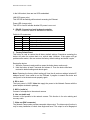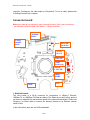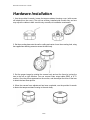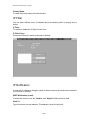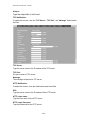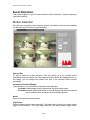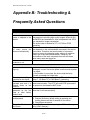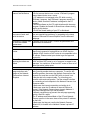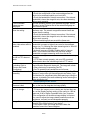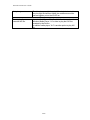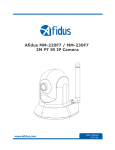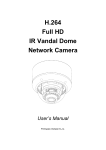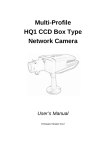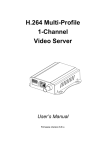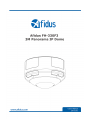
1
Network Camera User’s Guide Owner's Record The model and serial numbers are located at the bottom of device. Record these numbers in the spaces provided below. Refer to these numbers whenever you call upon your dealer regarding this product. Model No. FH-330F3 Serial No. ____________________ To prevent fire or shock hazard, do not expose the unit to rain or moisture. For AC Adaptor to avoid electrical shock, do not open the cabinet. Refer servicing to qualified personnel only. Notice: The changes or modifications not expressly approved by the party responsible for compliance could void the user’s authority to operate the equipment. For customers in the U.S.A. This equipment has been tested and found to comply with the limits for a digital device, pursuant to Part 15 of the FCC Rules. These limits are designed to provide reasonable protection against harmful interference in a residential installation. This equipment generates, uses, and can radiate radio frequency energy and, if not installed and used in accordance with the instructions, may cause harmful interference to radio communications. However, there is no guarantee that interference will not occur in a particular installation. If this equipment does cause harmful interference to radio or television reception, which can be determined by turning the equipment off and on, the user is encouraged to try to correct the interference by one or more of the following measures: – Reorient or relocate the receiving antenna. – Increase the separation between the equipment and receiver. – Connect the equipment into an outlet on a circuit different from that to which the receiver is connected. – Consult the dealer or an experienced radio/TV technician for help. You are cautioned that any changes or modifications not expressly approved in this manual could void your authority to operate this equipment. The shielded interface cable recommended in this manual must be used with this equipment in order to comply with the limits for a digital device pursuant to Subpart B of Part 15 of FCC Rules. 2/99 Network Camera User’s Guide Declaration of Conformity This device complies with part 15 of the FCC Rules. Operation is subject to the following two conditions: (1) this device may not cause harmful interference, and (2) this device must accept any interference received, including interference that may cause undesired operation. IMPORTANT NOTE: To comply with the FCC RF exposure compliance requirements, no change to the antenna or the device is permitted. Any change to the antenna or the device could result in the device exceeding the RF exposure requirements and void user’s authority to operate the device. NOTICE TO USERS © 2006~12 All rights reserved. This manual or the software described herein, in whole or in part, may not be reproduced, translated or reduced to any machine readable form without prior written approval. WE PROVIDES NO WARRANTY WITH REGARD TO THIS MANUAL, THE SOFTWARE OR OTHER INFORMATION CONTAINED HEREIN AND HEREBY EXPRESSLY DISCLAIMS ANY IMPLIED WARRANTIES OF MERCHANTABILITY OR FITNESS FOR ANY PARTICULAR PURPOSE WITH REGARD TO THIS MANUAL, THE SOFTWARE OR SUCH OTHER INFORMATION. IN NO EVENT SHALL WE BE LIABLE FOR ANY INCIDENTAL, CONSEQUENTIAL OR SPECIAL DAMAGES, WHETHER BASED ON TORT, CONTRACT, OR OTHERWISE, ARISING OUT OF OR IN CONNECTION WITH THIS MANUAL, THE SOFTWARE OR OTHER INFORMATION CONTAINED HEREIN OR THE USE THEREOF. We reserve the right to make any modification to this manual or the information contained herein at any time without notice. The software described herein may also be governed by the terms of a separate user license agreement. 3/99 Network Camera User’s Guide Table of Contents Overview ............................................................................................................................. 7 Introduction ................................................................................................................. 7 Features ....................................................................................................................... 7 Minimum System Requirements................................................................................. 8 Package Contents................................................................................................................ 9 Connections....................................................................................................................... 10 Hardware Installation ....................................................................................................... 15 Install the Camera in LAN ................................................................................................ 17 Preparation ....................................................................................................................... 18 Search and Set up by IPWizard II ............................................................................. 18 Search ................................................................................................................ 18 View .................................................................................................................. 19 LAN .................................................................................................................. 20 Wireless ............................................................................................................. 22 ® UPnP of Windows XP, Vista or 7 ............................................................................ 23 Install the Device behind a NAT Router ................................................................... 24 Access the device from the Internet Explorer for the first time................................ 25 Logging in as an Viewer ........................................................................................... 26 Logging in as an Administrator ................................................................................ 26 Operating the Network Camera ........................................................................................ 27 Monitor Image Section ............................................................................................. 27 Video Profile ............................................................................................................. 27 Streaming Protocol .................................................................................................... 28 Language ................................................................................................................... 28 2-Way Audio ............................................................................................................. 28 Full Screen ................................................................................................................ 28 Fisheye Control Panel ............................................................................................... 28 ActiveX Control ........................................................................................................ 30 Digital Zoom ..................................................................................................... 30 Snapshot ............................................................................................................ 30 Record ............................................................................................................... 31 Volume .............................................................................................................. 32 About................................................................................................................. 32 Administrating the Device................................................................................................. 34 System Setting .......................................................................................................... 34 Network: Configure Network settings .............................................................. 34 Network..................................................................................................... 34 IPv6 ........................................................................................................... 36 HTTPS ...................................................................................................... 37 DDNS service ........................................................................................... 37 PPPoE ....................................................................................................... 39 Streaming .................................................................................................. 40 UPnP ......................................................................................................... 41 4/99 Network Camera User’s Guide Bonjour ..................................................................................................... 42 IP Filter ..................................................................................................... 43 IP Notification ........................................................................................... 43 Camera: Adjust Camera parameters.................................................................. 46 Picture ....................................................................................................... 46 Privacy Mask ............................................................................................ 48 System: Configure and maintain system........................................................... 50 System ....................................................................................................... 50 Date & Time.............................................................................................. 51 Maintenance .............................................................................................. 52 Video: Configure OSD, Overlay, Profile, and ROI .......................................... 55 Common.................................................................................................... 55 Overlay Image ........................................................................................... 55 Video Profile ............................................................................................. 57 ONVIF Profile .......................................................................................... 58 ROI............................................................................................................ 60 AOI ........................................................................................................... 61 Audio: Audio parameters .................................................................................. 62 User: Manage user name, password and login privilege .................................. 63 Protocol .......................................................................................................................... 63 ONVIF ...................................................................................................... 63 SNMP........................................................................................................ 64 E-Mail: Setup E-Mail configuration ................................................................. 66 Event Detection:................................................................................................ 68 Motion Detection ...................................................................................... 68 Camera Tampering .................................................................................... 69 Audio Detection ........................................................................................ 69 Storage: Status and configuration of SD card and SAMBA Server .................. 71 SD Card..................................................................................................... 71 SAMBA Server ......................................................................................... 71 Continuous Recording: ..................................................................................... 73 Recording List: Files list inside the SD Card or SAMBA server ..................... 74 Recording List ........................................................................................... 74 Continuous Recording List ....................................................................... 74 Event Server: Setup FTP/TCP/HTTP/SAMBA server configuration ............... 76 FTP Server ................................................................................................ 76 TCP Server ................................................................................................ 77 HTTP Server ............................................................................................. 77 SAMBA Server ......................................................................................... 79 Event Schedule: Configure the event schedule ................................................. 80 Setting ....................................................................................................... 80 Record ....................................................................................................... 83 Port Status ................................................................................................. 83 Appendix A: Alarm I/O Connector.................................................................................... 85 Appendix B: Troubleshooting & Frequently Asked Questions.......................................... 87 Appendix C: PING IP Address .......................................................................................... 92 5/99 Network Camera User’s Guide Appendix D: Bandwidth Estimation.................................................................................. 93 Appendix E: Specifications ............................................................................................... 94 Appendix F: Configure Port Forwarding Manually ......................................................... 96 Appendix G: Power Line Frequency ................................................................................. 99 6/99 Network Camera User’s Guide Overview The user’s guide explains how to operate this camera from a computer. User should read this manual completely and carefully before you operate the device. Introduction This camera is an inexpensive and fully scalable surveillance device. Because the Network Cameras can be plugged into your existing local area network (LAN), you will potentially save thousands of dollars from unnecessary cabling. The device is accessible via the LAN or Internet connection. Connect your device directly to a local area network or xDSL modem, and with web browser you get instant, on demand video streams. Within minutes you can set up the device to capture a video sequence to a PC. The live video can be uploaded to a website for the world to see. Features 3Mega-pixel Sony Exmor™ image sensor Up to 20fps @ 1536x1536 ONVIF compliant Camera tampering and audio detection Gigabit 1000Base-T Ethernet Vandal proof and IP66 enclosure Day and night function with ICR Easy installation with setup wizard (IP Wizard II) UPnP device discovery and NAT router transversal for easy installation Dynamic IP Service, DDNS®, to search your IP camera from Internet easily H.264, MPEG4 and JPEG triple compression simultaneously 8-profile encoder simultaneously UDP / TCP / HTTP / HTTPS protocols selectable Smartphone accessible Event and Continuous recording to SD card or SAMBA server External microphone input Audio line out Two-way audio 7/99 Network Camera User’s Guide Composited video out Micro SD slot Intelligent motion detection up to 10 zones Voice alerting while event triggered Privacy masks 3D noise reduction to improve picture quality at low lux. Digital WDR to provide clear images even under back light circumstances Image transmission using an FTP or e-mail for event Digital sensor input and alarm output Multi-channel control software for surveillance application IEEE 802.3af PoE support Minimum System Requirements Microsoft Internet Explorer 8.0 or later Microsoft Media Player 11.0 or later (to playback recorded file) VGA Monitor resolution 1280 x 1024 or higher Intel Core 2 Duo E8600(3.33GHz) or faster Memory Size: 2GB or more Windows XP, Vista, 7 8/99 Network Camera User’s Guide Package Contents User can find the following items in the package: Item Descriptions 1. This camera is the main element of the product. 2. Accessories 3. User’s Manual CD provides important information and instructions for operating the Network Camera.. 4. Quick Start Guide provides important information and instructions for installing this device. If any of the above items are missing, please contact your dealer immediately. Note: Using a power supply with a different voltage than the one included with the Network Camera will cause damage and void the warranty for this product. 9/99 Network Camera User’s Guide Connections There are two types. One is cabling with built-in connector board and the other one is with connector cable. Note that user must choose only one of these two configurations. The camera does not support both cabling at the same time. Connector cable (option): 1. RJ45 LAN socket: Connect to PC or Hub/Switch. It’s for connections to 10Base-T Ethernet, 100Base-TX, or 1000Base-TX Ethernet cabling. This Ethernet port built N-Way protocol can detect or negotiate the transmission speed of the network automatically. Please use Category 5 or better cable to connect the Network Camera to an Ethernet network switch or hub. 10/99 Network Camera User’s Guide In the LAN socket, there are two LEDs embedded: LAN LED (green color) This LED will be flashing while network accessing via Ethernet. Power LED (orange color) This LED is used to indicate whether DC power is on or not. 2. RS-485: Connect to a local keyboard controller. DI/ DO: Connect to sensor in and alarm out devices Cable for I/O connectors: Name Number Function 12VDC 1 DC 12V (50mA maximum) DI 2 Digital signal input GND 3 GND DO 4 Digital signal output 485+ 5 RS485 data + 4856 RS485 data 3. Factory Default Reset This button is used to restore the all factory default settings. Sometimes restarting the device will make the system back to a normal state. However, if the system still got problems after restart, user can restore the factory default settings and install it again. Restore the device: 1. While the Camera is ready and then press the button down continuously. 2. Hold the button at least 5 seconds and release it. Then the device has been restored to default settings and reboot again. Note: Restoring the factory default setting will lose the all previous settings included IP address forever. User needs to run the IPWizard II program to search the device and configure it to let the device work properly again. 4. DC-in Jack The input power is 12VDC. Note that supply the power to the Network Camera with the power adapter included in package. 5. MIC in (audio in) Connect a microphone to the network camera. 6. Line out (audio out) Connect a loud speaker to the network camera. This function is for voice alerting and two-way audio. 7. Video out (BNC connector) The Network Camera also provides composite video output. The video output function is only for easy installation to check view angle and focus. The output is not a Mega-pixel 11/99 Network Camera User’s Guide resolution. Furthermore, the video output is off by default. To turn on video, please refer to Setting\Camera\Picture chapter. Connector board: Note that to cabling this camera by type of connector board, firstly, user must remove the attached “connector cable” from wafer 1~ 6 shown as below: Terminal Block Factory Default Reset Pin12 Pin1 Micro SD Card Slot 12VDC in (red) Video out Audio in/out (red) 1 2 3 4 5 Reset & LAN LED DIDO+ RS485 6 LAN RJ45 1. RJ45 LAN socket: The LAN socket is a RJ-45 connector for connections to 10Base-T Ethernet, 100Base-TX, or 1000Base-TX Ethernet cabling. This Ethernet port built N-Way protocol can detect or negotiate the transmission speed of the network automatically. Please use Category 5 or better cable to connect the Network Camera to an Ethernet network switch or hub. In the LAN socket, there are two LEDs embedded: 12/99 Network Camera User’s Guide LAN LED (green color) This LED will be flashing while network accessing via Ethernet. Power (orange color) This LED is used to indicate whether DC power is on or not. In addition, this LED will be flashing while the wireless accessing of the Camera. 2. Terminal block: Pin definition: Pin Name 1 12VDC in 2 MIC in3 MIC in+ 4 Audio out+ 5 Audio out6 Video out 7 12VDC out 8 DI 9 GND 10 DO 11 RS485+ 12 RS485- Function DC 12V power input External MIC inputExternal MIC input+ Composited video output DC 12V output (50mA maximum) Digital signal input Digital ground Digital signal output RS485 data + RS485 data - 12VDC in & Power GND The input power is 12VDC. Note that supply the power to the Network Camera with the power adapter included in package. MIC in (audio in) Connect an external microphone to the camera. Audio out +/Connect a loud speaker to the camera. This function is for voice alerting and two-way audio. Video out Connect a TV monitor to the camera. User can check the focus/zoom and view angle of the camera. 12VDC out The output power is 12VDC. This is used to support DI/DO devices. The output power is 12VDC/50mA maximum. DI/GND/DO/RS485 Interface of Digital input/output and RS485 3. Factory Default Reset This button is used to restore the all factory default settings. Sometimes restarting the device will make the system back to a normal state. However, if the system still got 13/99 Network Camera User’s Guide problems after restart, user can restore the factory default settings and configure it again. Restore the device: (i) Press the button down continuously. (ii) Hold the button at least 5 seconds and release it. Then the device has been restored to default settings and reboot again. Note: Restoring the factory default setting will lose the all previous settings included IP address forever. User needs to run the IPWizard II program to search the device and configure it to let the device work properly again. 4. Micro SD Card Slot User can insert a micro SD card into this slot for recording. In case, you want to use the attached cable to connect this camera again, please check and plug the cable to wafer 1~6 properly and carefully. 14/99 Network Camera User’s Guide Hardware Installation 1. Use the provided L-wrench, loosen the tamper-resistant housing cover (with screws still attached on the cover). The unit has a factory installed side conduit entry and one may adjust the cables to back conduit entry according to installation requirement. 2. Set the mounting base onto the wall or ceiling and center it over the mounting hole, using the supplied two retaining screws to secure the main body. 3. Set the proper image by rotating the camera body and set the focus by turning the lens to the left or right direction. You can connect video output cable (BNC) to a TV monitor. Once the picture appeared on the monitor, and then adjust the focus of the lens to obtain the best clear picture. 4. When the camera focus adjustment has been completed, use the provided L-wrench to fasten the tamper-resistant housing to the main body. 15/99 Network Camera User’s Guide 16/99 Network Camera User’s Guide Install the Camera in LAN 1. Plug an Ethernet cable into the Camera Connect an Ethernet cable to the LAN socket and attach it into the network. 2. Connect the external power supply to Camera, if not powering by PoE Connect the attached power adapter to the DC power jack of the camera. Note: Use the power adapter, 12VDC, included in the package and connect it to wall outlet for AC power. Once you have installed the camera well and powered it on, the Power LED (orange) will turn on later. The Power LED turned on, it means the system is booting up successfully. Furthermore, if you have a proper network connection, and access to the camera, the LAN LED (green) will flash. 17/99 Network Camera User’s Guide Preparation Search and Set up by IPWizard II Once you installed the Camera on a LAN environment, you have two easy ways to search your Cameras by IPWizard II or UPnP™ discovery. Here is the way to execute IPWizard II to discover Camera’s IP address and set up related parameter in a Camera. Search When launch the IPWizard II, a searching window will pop up. IPWizard II is starting to search Network Cameras on the LAN. The existed devices will be listed as below. 18/99 Network Camera User’s Guide View If IPWizard II finds network devices, View button will be available. Please select the device you want to view and click the View button. Then you could see the video from camera directly. Furthermore you could double click the left button of mouse to link to the network device by web browser. 19/99 Network Camera User’s Guide LAN In case you want to change the IP related parameters of wired interface, please select the device you want to configure and click the LAN button. Relative settings will be carried out as below. You could modify the relative settings of the selected device. Click “ <<” button will quit the LAN setting procedure and click “ >>” button will move to next page as below. 20/99 Network Camera User’s Guide In case, you do not want to change username and/or password, then just click “ Submit” button to perform your setting accordingly. Click “ <<” button will go back to previous page. If you like to change username and/or password of the device, just click the check button. Then, the related fields will show up as below. 21/99 Network Camera User’s Guide After keying in new username and password, click “ Submit” button to perform your setting accordingly. Click “ <<” button will go back to previous page. Wireless This model does not support wireless function. Therefore, IPWizard II disables this function automatically. 22/99 Network Camera User’s Guide ® UPnP of Windows XP, Vista or 7 UPnP™ is short for Universal Plug and Play, which is a networking architecture that provides compatibility among networking equipment, software, and peripherals. This device is an UPnP enabled device. If the operating system, Windows XP, Vista or 7, of your PC is UPnP enabled, the Network Camera will be very easy to be found. Please make sure to enable UPnP settings first if your operating system of PC is running Windows XP. Note: Windows 2000 does not support UPnP feature. To discover your device, go to your Desktop and click My Network Places. Click the targeted Device. Then Internet Explorer will connect to this Network Camera automatically. 23/99 Network Camera User’s Guide Install the Device behind a NAT Router Once installed, the device is accessible on your LAN. To access the device from the Internet you must configure your broadband router to allow incoming data traffic to the device. If the device is installed on the LAN with a router, then it may get a dynamic IP address from the DHCP server. However, if the device wants to be accessed from the WAN, its IP address needs to be setup as fixed IP, also the port forwarding or Virtual Server function of router needs to be setup. However, if your NAT router supports UPnP feature, it can be very easy to achieve NAT traversal automatically. To do this, enable the NAT-traversal feature, which will attempt to automatically configure the router to allow access to the camera. Installing the device with an UPnP router on your network is an easy 3–step procedure: (1) Enable UPnP option of your NAT router (2) Enable UPnP NAT traversal option of the Network Camera (default) (3) Access your Network Camera by DDNS (1) Enable UPnP option of your NAT router To use UPnP IGD function (NAT traversal), you need to make sure the UPnP function is enabled in your router. Most new home routers should support this function. Some of routers are default enable and others are not. Please check user’s manual of your NAT router for detail. (2) Enable UPnP NAT traversal option of the Network Camera Refer to Setting Network UPnP page for detail NAT traversal setting. Note that this option is default enabled. (3) Access your Network Camera by DDNS Refer to Setting System System page for detail DDNS information. 24/99 Network Camera User’s Guide Access the device from the Internet Explorer for the first time 1. If it’s the first you want to access your Network Camera by Windows PC, it would strongly recommend you to use Internet Explorer as default browser as possible. Start the web browser on the computer and type the IP address of the Camera you want to monitor as below: The Login Window of the Camera is prompted: 2. Type in your login name and password under “USERNAME” and “PASSWORD” textbox. For the first time use (default value), input the User Name: admin Password: admin 25/99 Network Camera User’s Guide That’s, type in “admin” on the “USERNAME” as a default name and “admin” PASSWORD. Click “OK” button to start the main menu. 3. According your browser’s security setting, the IE Web Page may prompt the “Security Warning” window. If so, select “Yes” to install and run the ActiveX control into your PC. Otherwise, the system will load the ActiveX silently. 4. After the ActiveX control was installed and ran, the first image will be displayed. Logging in as an Viewer If you log in the Camera as an ordinary User, “Setting” function will be not accessible. Logging in as an Administrator If you log in the Camera as the Administrator, you can perform all the settings provided by the device. 26/99 Network Camera User’s Guide Operating the Network Camera Start-up screen will be as follow no matter an ordinary users or an administrator. ActiveX Control Monitor Image Section 2-Way Audio Full Screen Monitor Image Section The image shot by the device is shown here. The date and time are displayed at the top of the window if Text Overlay enabled. Video Profile The device supports multi-profile function for H.264, MEPG4 and JPEG simultaneously. User can chose the proper and/or preferred profile which is listed here. 27/99 Network Camera User’s Guide Streaming Protocol User can select proper streaming protocol according to networking environment. Language The device could provide multiple languages to meet customer’s requirement. 2-Way Audio The device supports 2-way audio function. User can chose to enable or disable this function by toggling the icon below. : Disable audio uploading function. : Enable audio uploading function. Full Screen Enlarge video to full screen display. : Enlarge video to full screen display. Press “ESC” key to disable this function. Fisheye Control Panel Position: Choose the properly position depend on this camera installed. There are three options: Ceiling, Wall, and Desktop. Display Mode: Choose the display mode depend on this camera installed. Where: 1O - One Original fisheye view. 1P - One Panoramic view 1R - One Regional view 2P - Two Panoramic views 28/99 Network Camera User’s Guide 1O3R - One Original and three Regional views 4R - Four Regional views 4R PRO - Four Regional views interactively displayed when the field of view changes in any of the views 1P2R - One Panoramic and two Regional views 1P3R - One Panoramic and three Regional views Camera direction Window: Choose a window to activate PTZ function if the Display Mode supported. Camera direction: Control camera up/down/left/right and home position. Speed: Choose the speed of Pan and Tilt. Zoom: Press WIDE to zoom out, and press TELE to zoom in. Preset: Add/Update/Delete the preset positions or Go to one of these positions. 29/99 Network Camera User’s Guide ActiveX Control The plug-in ActiveX control supports a lot of functions by clicking the left mouse button. Note that this feature only supports on the ActiveX control within Microsoft® Internet Explorer. On the ActiveX control icon, click the LeftMouseButton, then a menu pop-up. This menu provides features that are unique to the ActiveX control. These features include: • “Digital Zoom”, • “Snapshot”, • “Record”, • “Volume”, • “About” Digital Zoom Click Digital Zoom to active this function as above. User can drag or scale the box over the video to adjust zoom ratio and position. Snapshot 30/99 Network Camera User’s Guide Click Snapshot to activate this function. Press Snapshot button to take a picture. The image file is saved as JPEG format into your local PC. Select Browser, the pop-up window to select the save path and file name prefix, select OK to continue. If you like to retrieve the saved image, select the file to display the saved image by using any one of graph editing tools. Record Click Record to activate this function. Press Record button to start recording. The video file is saved as ASF format into your local PC. While you want to stop it, press Stop to 31/99 Network Camera User’s Guide stop recording. Select Browser, the pop-up window to select the save path and file name prefix, select OK to continue. After stop recording, list the files, this file is named as Video_yyyymmddhhmmss.avi The ASF files can be display by the standard Windows Media Player, but it needs the DixectX 9.0 or later version to be installed. Volume Click Volume to activate this function. There are two control bars for speaker and microphone volume respectively. Scroll these control bars to adjust the audio attribute. Check the volume mute will mute the speaker output. About Click About to show this ActiveX information. 32/99 Network Camera User’s Guide 33/99 Network Camera User’s Guide Administrating the Device System Setting This function is only available for user logged into Camera as administrator. Click on each menu name to display its setting page. Item Action Network Configure Network settings such as DHCP, DDNS, RTSP, PPPoE and UPnP Camera Adjust camera parameters, position, and set camera tour System Configure system information, date & time, maintenance, and view system log file. Video Configure bit rate and frame rate of video profiles Audio Configure audio parameters User Setup user name, password and login privilege E-Mail Setup E-Mail configuration Event Detection Setup Motion detection, Camera tampering, Audio detection Storage Status and configuration of storage Continuous Recording Configure storage type and path Recording List Files list inside the SD Card Event Server Setup FTP/TCP/HTTP server for event Event Schedule Configure the schedule while event triggered Network: Configure Network settings Use this menu to configure the network to connect the device and the clients. Network This section provides the menu for connecting the device through Ethernet cable. 34/99 Network Camera User’s Guide MAC address: Displays the Ethernet MAC address of the device. Note that user can not modify it. Obtain IP address automatically (DHCP): DHCP: Stands for Dynamic Host Configuration Protocol. Enable this checked box when a DHCP server is installed on the network to issue IP address assignment. With this setting, the IP address is assigned automatically. If this device can not get an IP address within limited tries, the device will assign a default IP address, 192.168.0.100, by itself as the default IP address. IP address, Subnet mask, and Gateway: If you do not select Obtain an IP address automatically, then you need to enter these network parameters manually. Obtain DNS from DHCP: DNS: Stands for Domain Name System. Enable this checked box when a DHCP server is installed on the network and provide DNS service. Primary DNS and Secondary DNS: If you do not select Obtain DNS from DHCP, then you need to enter these parameters manually. HTTP Port: The device supports two HTTP ports. The first one is default port 80 and this port is fixed. This port is very useful for Intranet usage. The second HTTP port is changeable. Users could assign the second port number of http protocol, and the WAN users should follow the port number to login. If the http port is not assigned as 80, users have to add the port 35/99 Network Camera User’s Guide number in back of IP address. For example: http://192.168.0.100:8080. Therefore, the user can access the device by either http://xx.xx.xx.xx/, or http://xx.xx.xx.xx:xxxx/ to access the device. If multiple devices are installed on the LAN and also required to be accessed from the WAN, then the HTTP Port can be assigned as the virtual server port mapping to support multiple devices. Click “OK” to save and enable the setting. IPv6 The IP communication protocol used for current Internet is having the problem of insufficient IP addresses. The one-for-all solution is the new-generation internet protocol, IPv6. IPv6 has 16-byte long address space, offering a huge number of addresses, and also provides better scalability, quality of service, mobility, and security to the network. IPv6: To enable or disable the IPv6 service here. 36/99 Network Camera User’s Guide HTTPS HTTPS: Stands for Hypertext Transfer Protocol Secure HTTPS is a combination of the Hypertext Transfer Protocol with the SSL/TLS protocol to provide encrypted communication and secure identification of a network web server. HTTPS connections are often used for sensitive transactions in corporate information systems. The main idea of HTTPS is to create a secure channel over an insecure network. This ensures reasonable protection from eavesdroppers and man-in-the-middle attacks, provided that adequate cipher suites are used and that the server certificate is verified and trusted. HTTPS: To enable or disable the HTTPS service here. Note that the HTTPS function of this device is not only encrypted the web content but also audio/video data. If the HTTPS is enabled, there is further option for “HTTP&HTTPS” or “HTTPS only”. In case, the “HTTPS only” is enabled, all packets from the Camera will go through HTTPS only and HTTP service is no longer available. Port: Choose the HTTPS port. The default value is 443. DDNS service DDNS: Stands for Dynamic Domain Name Server 37/99 Network Camera User’s Guide Your Internet Service Provider (ISP) provides you at least one IP address which you use to connect to the Internet. The address you get may be static, meaning it never changes, or dynamic, meaning it’s likely to change periodically. Just how often it changes, depends on your ISP. A dynamic IP address complicates remote access since you may not know what your current WAN IP address is when you want to access your device over the Internet. One of the possible solutions to the dynamic IP address problem comes in the form of a dynamic DNS service. A dynamic DNS service is unique because it provides a means of updating your IP address so that your listing will remain current when your IP address changes. There are several excellent DDNS services available on the Internet. One such service you can use is www.DynDNS.org. You’ll need to register with the service and set up the domain name of your choice to begin using it. If your device is connected to xDSL directly, you might need this feature. However, if your device is behind a NAT router, you will not need to enable this feature because your NAT router should take care of this job. As to xDSL environment, most of the users will use dynamic IP addresses. If users want to set up a web or a FTP server, then the Dynamic Domain Name Server is necessary. DDNS: To enable or disable the DDNS service here. Server name: Choose one of the built-in DDNS servers. DDNSHost: The domain name is applied of this device. 38/99 Network Camera User’s Guide User name: The user name is used to log into DDNS. Password: The password is used to log into DDNS. PPPoE PPPoE: Stands for Point to Point Protocol over Ethernet A standard builds on Ethernet and Point-to-Point network protocol. It allows your device with xDSL or cable connects with broadband network directly, then your device can dial up and get a dynamic IP address. For more PPPoE and Internet configuration, please consult your dealer or ISP. The device can directly connect to the xDSL, however, it should be setup on a LAN environment to program the PPPoE information first, and then connect to the xDSL modem. Power on again, then the device will dial on to the ISP connect to the WAN through the xDSL modem. The procedures are • Connect to a LAN by DHCP or Fixed IP • Access the device, enter Setting Network PPPoE as below PPPoE: 39/99 Network Camera User’s Guide To enable or disable the PPPoE service here. User name: Type the user name for the PPPoE service which is provided by the ISP. Password: Type the password for the PPPoE service which is provided by the ISP. IP address, Subnet mask, and Gateway (read only): Shows the IP information got from PPPoE server site. Status: Shows the Status of PPPoE connection. Streaming RTSP is a streaming control protocol, and a starting point for negotiating transports such as RTP, multicast and Unicast, and for negotiating codecs. RTSP can be considered a "remote control" for controlling the media stream delivered by a media server. RTSP servers typically use RTP as the protocol for the actual transport of audio/video data. RTSP Port: Choose the RTSP port. The RTSP protocol allows a connecting client to start a video stream. Enter the RTSP port number to use. The default value is 554. 40/99 Network Camera User’s Guide RTP Port: Specify the range of transmission port number of video stream. The default range is 50000 to 50999. User can specify a number between 1024 and 65535. UPnP UPnP is short for Universal Plug and Play, which is a networking architecture that provides compatibility among networking equipment, software, and peripherals. This device is an UPnP enabled Network Camera. If your operating system is UPnP enabled, the device will automatically be detected and a new icon will be added to “My Network Places.” If you do not want to use the UPnP functionality, it can be disabled. In addition, this device also provides UPnP IGD function for NAT traversal easily. Use NAT traversal when your device is located on an intranet (LAN) and you wish to make it available from the other (WAN) side of a NAT router. With NAT traversal properly configured, all HTTP traffic to an external HTTP port in the NAT router will be forwarded to the device. UPnP: To enable or disable the UPnP service here. Friendly Name: To show the friendly name of this device here. UPnP NAT Traversal 41/99 Network Camera User’s Guide When enabled, the device will attempt to configure port mapping in a NAT router on your network, using UPnP™. Note that UPnP™ must be enabled in the NAT router first. Port Range: The port range will open in NAT router. External IP address: Show the IP address and port for WAN access through Internet. If NAT traversal is configured successfully, user can use this IP address and port to access this device. The external IP address is not shown in case NAT traversal function is failed. Bonjour Bonjour, also known as zero-configuration networking, enables automatic discovery of computers, devices, and services on IP networks. Bonjour uses industry standard IP protocols to allow devices to automatically discover each other without the need to enter IP addresses or configure DNS servers. Specifically, Bonjour enables automatic IP address assignment without a DHCP server, name to address translation without a DNS server, and service discovery without a directory server. Bonjour is an open protocol which Apple has submitted to the IETF as part of the ongoing standards-creation process. Bonjour: To enable or disable the Bonjour service here. 42/99 Network Camera User’s Guide Friendly Name: To show the friendly name of this device here. IP Filter You can enter different user’s IP address which are allowing enter or denying by the device. IP Filter: To enable or disable the IP filter function here. IP Filter Policy: Choose the filter policy where is denying or allowing. IP Notification In case the IP address is changed, system is able to send out an email to alert someone if the function is enabled. SMTP Notification (e-mail): If enable this function, then the “Send to“ and “Subject” fields need to be filled. Send To: Type the receiver’s e-mail address. This address is used for reply mail. 43/99 Network Camera User’s Guide Subject: Type the subject/title of the E-mail. TCP Notification: If enable this function, then the “TCP Server“, “TCP Port”, and “Message” fields need to be filled. TCP Server: Type the server name or the IP address of the TCP server. TCP Port: Set port number of TCP server. Message: The message will be sent to FTP server. HTTP Notification: If enable this function, then the fields below need to be filled. URL: Type the server name or the IP address of the HTTP server. HTTP Login name: Type the user name for the HTTP server. HTTP Login Password: Type the password for the HTTP server. 44/99 Network Camera User’s Guide Proxy Address: Type the server name or the IP address of the HTTP Proxy. Proxy Port: Set port number of Proxy. Proxy Login name: Type the user name for the HTTP Proxy. Proxy Login Password: Type the password for the HTTP Proxy. Custom parameter: User can set specific parameters to HTTP server. Message: The message will be sent to HTTP server. 45/99 Network Camera User’s Guide Camera: Adjust Camera parameters Use this menu to set the functions of the camera parameters of the device. Picture Rotation: Turn the “Mirror” and “Vertical Flip” On or OFF. The image will be overturned as below. White Balance: 46/99 Network Camera User’s Guide Auto: will adjust the white balance automatically. Hold: will hold the white balance. Exposure Control: Auto Exposure: will adjust the image sensor exposure automatically. Hold Exposure: will hold the exposure setting. Manual Exposure: User can configure sensor exposure to fixed setting. Maximum Exposure Time: Set the Maximum Exposure Time. However, the real exposure time may be shorter if good light condition. Power Frequency: Frequency of power line: 50 or 60Hz. Exposure Value: Exposure value is AE target value. This value is to adjust the integration, analog gain and digital gain to achieve the target brightness value (Exposure Value). This value is dependent to “Auto Exposure” only. Color Level: Large value will be colorful. Hue: Change the value will result to color tuning. Brightness: Large value will brighten camera. Contrast: Large value will contrast camera heavily. Sharpness: Large value will sharpen camera. Local video output: Enable or disable video signal of BNC connector. It’s very useful to check view angle or focus during camera installation. However, disable this function will save power a lot. Suggest to disabling it after camera installed well. ICR: There are 4 modes: Night (On), Day (Off), Auto or Schedule to control built-in mechanical ICR. This function is useful under low illumination environment. In case the Auto mode is selected, user needs to specify 3 parameters in advance: Night Mode Threshold (0~10000): this value set the threshold to switch ICR to night 47/99 Network Camera User’s Guide mode. It should be lower or equal to Day Mode Threshold. Day Mode Threshold (0~10000): this value set the threshold to switch ICR to day mode. It should be higher or equal to Night Mode Threshold. Delay Time: The delay time between ICR Day/Night switching. Note that Current Value is the current luminance from the captured video. It’s a useful reference to set ICR Day/Night Threshold. 3D De-Noise: This function can remove or lower unwanted noise and preserve fine details and edges as possible. WDR: This function is to provide clear images even under back light circumstances. The higher “Strength” level will adjust contrast compensation stronger. Default Settings: Restore to factory image settings. Privacy Mask Use this page to specify privacy mask window 1 to window 8 and set the name and gray level for selected window. 48/99 Network Camera User’s Guide Add and Delete: To add or delete the privacy mask windows, user can specify up to 7 windows to mask the video captured by this device. By dragging mouse on the image, you can change the position and size of the selected window accordingly. Name: Name of the specified privacy window. Level To define the gray level of mask block. The smaller value will be darker. Note that this function is not recommended for camera with PTZ/ePTZ actions. 49/99 Network Camera User’s Guide System: Configure and maintain system Use this menu to perform the principal settings of the device. System: Afidus DDNS: To enable or disable the Afidus DDNS function. Afidus DDNS ID: It’s a unique number of each device for identification and this ID is used for Afidus DDNS . To use this service, just follow four steps below: (1) Enable Afidus DDNS function of the device (2) Check your Device ID from this page. This is a unique number for each device. (3) If your device is behind a NAT router, please configure your device properly. You could refer to section “Install the Camera behind a NAT Router” above. You only need to do this job one time. (4) Visiting Afidus web site www.afidus.com, you can find DDNS service page as below: 50/99 Network Camera User’s Guide Enter your Device Number and press “OK” button. Then, a new web page will pop up and link to your device accordingly. You will see that Afidus DDNS is a much easier service than traditional DDNS. Device Title: You can enter the name of this unit here. It’s very useful to identify the specific device from multiple units. The information will be shown on IPWizard II once the device is found. Software Version: This information shows the software version of the device. Network (LAN) LED: To turn on or off Network(LAN) LED. Power LED (Wireless LED): To turn on or off the Power LED (wireless LED if WLAN model). Log: User can check the system log information of the device, including the Main Info, Appended Info, Operator IP, and so on … Reload: Click this button; user can refresh the log information of the device. Date & Time You can setup the device or make it synchronized with PC or remote NTP server. Also, you may select your time zone in order to synchronize time locally. Server Date & Time: Displays the date and time of the device. PC Time: Displays the date and time of the connected PC. 51/99 Network Camera User’s Guide Adjust: - Synchronize with PC: Click this option to enable time synchronization with PC time. - Manual setting: Click this option to set time and date manually. - Synchronize with NTP: Click this option if you want to synchronize the device’s date and time with those of time server called NTP server (Network Time Protocol). NTP Server: Type the host name or IP address or domain name of the NTP server. NTP sync. Interval: Select an interval between 1 and 24 hours at which you want to adjust the device’s time referring to NTP server Time zone: Set the time difference from Greenwich Mean Time in the area where the device is installed. Daylight Saving: Disable or enable the daylight saving adjustment. Maintenance Hard Factory Default (Include the network setting): 52/99 Network Camera User’s Guide Recall the device hard factory default settings. Note that click this button will reset all device’s parameters to the factory settings (including the IP address). Factory Default (Except the network setting): The unit is restarted and most current settings are reset to factory default values. This action will not reset the network setting. Backup Setting: To take a backup of all of the parameters, click this button. If necessary, it will then be possible to return to the previous settings, if settings are changed and there is unexpected behavior. Restore Setting: Click the “Browse” button to locate the saved backup file and then click the “Restore Setting” button. The settings will be restored to the previous configuration. Firmware Upgrade: The device supports new firmware upgrade (the software that controls the operation in the device). Please contact your dealer for the latest version if necessary. Download the latest firmware file from our website or your dealer. Unzip this firmware file to binary file and store it into your PC. Then follow the steps as bellow carefully: 1. Close all other application programs which are not necessary for firmware update. 2. Make sure that only you access this device while firmware updating. 3. Disable all event trigger and/or schedule trigger functions first. 4. In this web page, click “Browse” button. Select the Firmware binary file. 53/99 Network Camera User’s Guide 5. Once the firmware file was selected, click “Firmware Upgrade” button. 6. The upgrade progress information will be displayed. Once the uploading process completed, the device will reboot the system automatically. 7. Please wait for timer countdown, and then you can use IPWizard II to search the device again. Warning!!! The download firmware procedure cannot be interrupted. If the power and/or network connection are broken during the download procedure, it WILL cause serious damage to the device. Strongly suggest that DO NOT upgrade firmware via Wireless LAN due to high error rate possibly and don't allow any other clients to access this unit during updating procedure. Be aware that you SHALL NOT turn off the power during updating the firmware and wait for finish message. Furthermore, the firmware upgrade procedure is always risky and do not try to upgrade new firmware if it’s not necessary. System Restart: The device is restarted without changing any of the network settings. It means the IP address of the device will not change after firmware upgrade. 54/99 Network Camera User’s Guide Video: Configure OSD, Overlay, Profile, and ROI Common Text Overlay Setting: There are some important information can be embedded into image, including date, time, and/or text. User also can change the font color, background color, or Transparency. Overlay Image User can upload bitmap file to the camera and overlay the picture on streaming video and set its attributes. Upload own image: There are two options: “Image Overlay Setting” or “User Defined Text”. Image Overlay Setting: Check this item to enable image overlay. Otherwise, the uploaded bitmap will not be overlaid on video. In “Image Overlay Setting” mode, user can upload bitmap file to camera as below: 55/99 Network Camera User’s Guide In “User Defined Text” mode, user can overlay a text string onto camera image as below: The font style can be chosen in this page. Once the font type settled, click “Save” button to upload text to image. Coordinates: Set position of image on the video. 56/99 Network Camera User’s Guide File: Information of the uploaded bitmap file. Resolution: Size information of the uploaded bitmap file. Chroma Key (Background Color): Define the Chroma key of the uploaded bitmap file. Then user can set transparency of the bitmap. Transparency: Lower value will lower transparent. Value 0 means opacity. Video Profile Name: To assign a name to the selected profile. Video Type: Video codec of the selected profile. If the H.264 encoder is selected, then there are 3 modes of profile selectable: baseline, main and high profile. Resolution: Show the resolution of the selected profile. 57/99 Network Camera User’s Guide Rate Control: Defines the rate control method of this profile. There are three options: Constant Bit Rate (CBR), Variable Bit Rate (VBR), and Enhanced Variable Bit Rate (EVBR). For CBR, the video bit rate is between low to high bandwidth based on different resolutions. User can set the desired bit rate to match the limitation of bandwidth. For VBR, user should choose the quality level to set the video quality rather than bit rate. The quality level is between 1 and 100. The higher value can reach the better quality but of course will consume higher bandwidth. For EVBR, the video bitrate is based on normal VBR mode. However, the bitrate can be limited to the max bitrate while lots of motion in video. Max Frame Rate: Defines the targeted frame rate of this profile. For example, set the frame rate to 30 fps, then the image will be updated for 30 frames per second as possible. User need to set reasonable max frame rate versus video quality under the limited bandwidth. GOP Control: Defines the Intra/Inter-frame (I/P) ratio of this profile. For example, set the GOP to 30, then the video stream will have one Intra-frame every 30 frames. Multicast: Enable or disable the multicast function. Multicast Video: IP address and port for multicast video streaming of the selected profile. Multicast Audio: IP address and port for multicast audio streaming of the selected profile. Time to live: Time to live (TTL) is a mechanism that limits the lifespan of data in a computer or network. Once the prescribed event count or timespan has elapsed, data is discarded. TTL prevents a data packet from circulating indefinitely. Always Enable Multicast: Multicast streaming is always enabled or by request. Warning!!! To enable the multicast streaming, you shall make sure your Intranet does support multicast function. Otherwise, your Intranet may occur network storm seriously. ONVIF Profile ONVIF protocol defines profile of video streams. In case, the NVR, CMS and/or VMS connect to this device via ONVIF protocol. Use this page to define parameters of video streams. 58/99 Network Camera User’s Guide Name: To assign a name to the selected profile. Video Type: Video codec of the selected profile. If the H.264 encoder is selected, then there are 3 modes of profile selectable: baseline, main and high profile. Resolution: Show the resolution of the selected profile. Rate Control: Defines the rate control method of this profile. There are three options: Constant Bit Rate (CBR), Variable Bit Rate (VBR), and Enhanced Variable Bit Rate (EVBR). For CBR, the video bit rate is between low to high bandwidth based on different resolutions. User can set the desired bit rate to match the limitation of bandwidth. For VBR, user should choose the quality level to set the video quality rather than bit rate. The quality level is between 1 and 100. The higher value can reach the better quality but of course will consume higher bandwidth. For EVBR, the video bitrate is based on normal VBR mode. However, the bitrate can be limited to the max bitrate while lots of motion in video. Max Frame Rate: Defines the targeted frame rate of this profile. For example, set the frame rate to 30 fps, then the image will be updated for 30 frames per second as possible. User need to set reasonable max frame rate versus video quality under the limited bandwidth. GOP Control: Defines the Intra/Inter-frame (I/P) ratio of this profile. For example, set the GOP to 30, then the video stream will have one Intra-frame every 30 frames. 59/99 Network Camera User’s Guide Multicast: Enable or disable the multicast function. Multicast Video: IP address and port for multicast video streaming of the selected profile. Multicast Audio: IP address and port for multicast audio streaming of the selected profile. Time to live: Time to live (TTL) is a mechanism that limits the lifespan of data in a computer or network. Once the prescribed event count or timespan has elapsed, data is discarded. TTL prevents a data packet from circulating indefinitely. Always Enable Multicast: Multicast streaming is always enabled or by request. Warning!!! To enable the multicast streaming, you shall make sure your Intranet does support multicast function. Otherwise, your Intranet may occur network storm seriously. Show the resolution of the selected profile. ROI ROI means Region of Interest. Use this page to specify location and size of ROI windows. Only the maximum resolution profiles can be defined as ROI. In this model, user can define maximum two ROI windows for 3Mega mode. 60/99 Network Camera User’s Guide Note that this function is not recommended for camera with PTZ/ePTZ actions. AOI AOI means Area of Interest. Use this page to specify location and size of AOI windows. Only the profiles with H.264 codec and VBR rate control can support AOI function. It enables a non-uniform distribution of the image quality between a selected region (the AOI) and the rest of the image (background). Add and Del: To add or delete the AOI windows. User can specify up to 2 AOI windows to change the video quality in specified areas. By dragging mouse on the image, you can change the position and size of the selected AOI window accordingly. Name: Name of the specified AOI window. Level Adjust the video quality of specified AOI window. The higher value will be better video quality. Note that this function is not recommended for camera with PTZ/ePTZ actions. 61/99 Network Camera User’s Guide Audio: Audio parameters Audio: To enable or disable audio function Audio Type: To select audio codec Push to talk: Disable (Simplex) / Enable (2-way audio mode) Input Gain: To adjust gain of input audio Output Gain: To adjust gain of output audio 62/99 Network Camera User’s Guide User: Manage user name, password and login privilege Use this menu to add, update, or remove the usernames and passwords of the Administrator and viewer. Viewer login: Select “Anonymous” to allow any one viewing the video once connected. Otherwise, only users in database can view the video after login. Access Right: Administrator can access every function in this device. However, Viewers only can view the video and access limited function. PTZ Control: Authorize this user to control PTZ function or not. Add, update, and remove of Users account: Manage the user’s account of viewer user. Protocol ONVIF ONVIF is a global and open industry forum with the goal to facilitate the development and use of a global open standard for the interface of physical IP-based security products. In other words, to create a standard for how IP products within video surveillance and other physical security areas can communicate with each other. 63/99 Network Camera User’s Guide ONVIF: To enable or disable the ONVIF interface here. And select the ONVIF version to match client’s supported version. SNMP Simple Network Management Protocol (SNMP) is an "Internet-standard protocol for managing devices on IP networks". Devices that typically support SNMP include routers, switches, servers, workstations, printers, and more. It is used mostly in network management systems to monitor network-attached devices for conditions that warrant administrative attention. SNMP is a component of the Internet Protocol Suite as defined by the Internet Engineering Task Force (IETF). It consists of a set of standards for network management, including an application layer protocol, a database schema, and a set of data objects. SNMP exposes management data in the form of variables on the managed systems, which describe the system configuration. These variables can then be queried (and sometimes set) by managing applications. 64/99 Network Camera User’s Guide SNMP version 1 (SNMPv1) is the initial implementation of the SNMP protocol. SNMPv1 operates over protocols such as User Datagram Protocol (UDP), Internet Protocol (IP), OSI Connectionless Network Service (CLNS), AppleTalk Datagram-Delivery Protocol (DDP), and Novell Internet Packet Exchange (IPX). SNMPv1 is widely used and is the de facto network-management protocol in the Internet community SNMPv2c, is defined in RFC 1901–RFC 1908. In its initial stages, this was also informally known as SNMPv1.5. SNMPv2c comprises SNMPv2 without the controversial new SNMP v2 security model, using instead the simple community-based security scheme of SNMPv1. While officially only a "Draft Standard", this is widely considered the de facto SNMPv2 standard. 65/99 Network Camera User’s Guide E-Mail: Setup E-Mail configuration User may setup SMTP mail parameters for further operation of Event Schedule. That’s, if users want to send the alarm message out, it will need to configure parameters here first and also add at least one event schedule to enable event triggering. SMTP Server: Type the SMTP server name or the IP address of the SMTP server. Test: Send a test mail to mail server to check this account is available or not. SMTP Port: Set port number of SMTP service. SSL: Enable SSL function or not. SMTP Authentication: Select the authentication required when you send an e-mail. Disable: if no authentication is required when an e-mail is sent. Enable: if authentication is required when an e-mail is sent. Authentication User name: Type the user name for the SMTP server if Authentication is Enable. Authentication Password: Type the password for the SMTP server if Authentication is Enable. E-mail From: 66/99 Network Camera User’s Guide Type the sender’s E-mail address. This address is used for reply e-mails. E-mail To: Type the receiver’s e-mail address. E-mail Subject: Type the subject/title of the e-mail. 67/99 Network Camera User’s Guide Event Detection: This device supports 3 types of event detection: Motion detection, Camera tampering, and Audio detection. Motion Detection Use this menu to specify motion detection window 1 to window 10 and set the conditions for detection while observing a captured image. Add and Del: To add or delete the motion windows. User can specify up to 10 Included and/or Excluded windows to monitor the video captured by this device. By dragging mouse on the image, you can change the position and size of the selected motion window accordingly. Included or Excluded Window: These windows can be specified as Included or Excluded type. Included windows target specific areas within the whole video image Excluded windows define areas within an Include window that should be ignored (areas outside Include windows are automatically ignored) Name: Name of the specified motion window. Object Size: Define the object size of motion detection. The higher object size will only larger objects trigger motion detection. The lower object size will even small objects trigger motion 68/99 Network Camera User’s Guide detection too. Generally speaking, the smaller size will be easier to trigger event. Sensitivity Define the sensitivity value of motion detection. The higher value will be more sensitivity. Note that this function is not recommended for camera with PTZ/ePTZ actions. Camera Tampering Camera tampering detection is a new intelligent functionality that further strengthens the benefit of Network Camera. When the camera is moved, partially obscured, severely defocused, covered or sprayed, an event can be triggered to send notifications, upload images/files to remote server or email… Minimum duration: Define the minimum triggered duration by camera tampering detection. The triggered duration less than target value will be ignored to filter false alarms. Note that this function is not recommended for camera with PTZ/ePTZ actions. Audio Detection Audio detection alarm can be used as a complement to motion detection. Since audio 69/99 Network Camera User’s Guide detection can react to events in areas too dark for the video motion detection functionality to work properly. In addition, it can be used to detect activity in areas outside of the camera’s view. Audio Alarm Level: Define the threshold value of audio detection. 70/99 Network Camera User’s Guide Storage: Status and configuration of SD card and SAMBA Server SD Card This page shows the status of attached SD card. You may setup related parameters to manage the attached SD card also. Enable automatic disk cleanup: Delete old recorded files while the conditions are reached as below. Remove recordings order than: Delete old files by days. Remove oldest recordings when disk is: Delete old files by left capacity. Lock disk Lock the SD card. Once SD card is locked, all files can’t be deleted. SAMBA Server This page shows the status of SAMAB server. You may setup related parameters to manage the remote SAMBA server. 71/99 Network Camera User’s Guide Host: Type the SAMBA server domain name or the IP address of the SMTP server. Share: Type the share folder of remote SAMBA server which the camera will upload files to this space. User name: Type the user name for the remote SAMBA server. Password: Type the password for the remote SAMBA server. 72/99 Network Camera User’s Guide Continuous Recording: This camera can continuously record video stream into files and save them to attached SD card or remote SAMBA server as possible. Note that there are various factors affecting the recording results, such as the camera’s system loading, network condition, SD card performance, multiple client accessing, and so on. No guarantee will be given to “seamless recording” in the recorded video files. Continuous Recording: Enable or disable this function. Record File Type: Choose a video profile to record. DISK: Save recorded files to SD card or remote SAMBA server. Path: Define the folder path for the recorded files. Restart: Be careful, click this button will delete all continuous files recorded in SD card or remote SAMBA server. 73/99 Network Camera User’s Guide Recording List: Files list inside the SD Card or SAMBA server Recording List This page only shows the event recording files which stored in SD card. User may play or delete the selected file. Continuous Recording List This page only shows the continuous recording files which stored in SD card or remote SAMBA server. User may play or delete the selected file. 74/99 Network Camera User’s Guide 75/99 Network Camera User’s Guide Event Server: Setup FTP/TCP/HTTP/SAMBA server configuration FTP Server You may setup FTP parameters for further operation of Event Schedule. That’s, if users want to send the alarm message to an FTP server, it will need to configure parameters here and also add at least one event schedule to enable event triggering as SMTP. Name: User can specify multiple FTP paths as wish. Therefore, user needs to specify a name for each FTP setting. FTP Server: Type the server name or the IP address of the FTP server. Test: Check the FTP server whether this account is available or not. FTP Login name: Type the user name for the FTP server. FTP Login Password: Type the password for the FTP server. FTP Port: Set port number of FTP service. FTP Path: 76/99 Network Camera User’s Guide Set working directory path of FTP server. FTP Passive Mode: Select passive or active mode connecting to FTP server. TCP Server In addition to send video file to FTP server, the device also can send event message to specified TCP server. Name: User can specify multiple TCP servers as wish. Therefore, user needs to specify a name for each TCP server setting. TCP Server: Type the server name or the IP address of the TCP server. TCP Port: Set port number of TCP server. HTTP Server The device also can send event message to specified HTTP server. 77/99 Network Camera User’s Guide Name: User can specify multiple HTTP servers as wish. Therefore, user needs to specify a name for each HTTP server setting. URL: Type the server name or the IP address of the HTTP server. Test: Check the HTTP server whether it is available or not. HTTP Login name: Type the user name for the HTTP server. HTTP Login Password: Type the password for the HTTP server. Proxy Address: Type the server name or the IP address of the HTTP Proxy. Proxy Login name: Type the user name for the HTTP Proxy. Proxy Login Password: Type the password for the HTTP Proxy. Proxy Port: Set port number of Proxy. 78/99 Network Camera User’s Guide SAMBA Server The device also can send event recording video files to specified SAMBA server. Name: User can specify multiple HTTP servers as wish. Therefore, user needs to specify a name for each HTTP server setting. SAMBA Server: Type the server name or the IP address of the SAMBA server. Test: Check the SAMBA server whether this account is available or not. SAMBA Login name: Type the user name for the SAMBA server. SAMBA Login Password: Type the password for the SAMBA server. SAMBA Path: Set working directory path of SAMBA server. 79/99 Network Camera User’s Guide Event Schedule: Configure the event schedule Setting This menu is used to specify the schedule of Event or Schedule Trigger and activate the some actions provided by this device. Where the Schedule Trigger will be activated by user-define interval without event happened. Name: Name of the Event or Schedule. Enable: Enable or disable this Event or Schedule. Type: Event trigger or Schedule trigger. Enable Time: Define the feasible time slot. Trigger by: Select the triggered sources. Action: Define the actions once event triggered. 80/99 Network Camera User’s Guide Example 1: Send file to FTP server by motion triggered always: 1. Select event trigger 2. Enable time: start from 00:00 to 24:00 every day 3. Trigger by: Motion Area (Added in Object Detection page) 4. Action : Send FTP (Add in Event Server -> FTP Server page) Example 2: Send file to E-Mail server by motion triggered from Friday 18:00 to Saturday 06:00 1. Select event trigger. 2. Enable time: start from Friday 18:00 and keep work in 12 hous, so it will stop on Saturday 06:00. 3. Trigger by : Motion Area (Added in Object Detection page) 4. Action : Send e-mail (Add in E-Mail page) i. To email address: You need to input the receiver email address. ii. Subject: You could specify the email subject. iii. Message: You could specify the email content. 81/99 Network Camera User’s Guide Example 3: Enable Voice Alert every 10-minute during 18:00 to 24:00 from Monday to Friday. 1. Type: Select schedule trigger and interval is 10-minute. 2. Enable time: Select Monday to Friday, and set start time from 18:00 and keep work in 6 hours. 3. Trigger by : You do not need to choose it, because this will be triggered every 10 minute 4. Action : Voice Alert 82/99 Network Camera User’s Guide Record User can choose the type of record file for event or schedule application. Record File Type: Choose a profile to record. Record File Prefix: Define the prefix of recorded filename. Pre-Trigger Duration: Define the maximum duration of pre-alarm. Best Effort Duration: Define the best effort duration of post-alarm. Max File Size: Define the maximum buffer size of record file. Port Status User can check the status of digital input and output (DIDO). 83/99 Network Camera User’s Guide Input Status: Show either inactive or active. Output Status: Show either inactive or active. 84/99 Network Camera User’s Guide Appendix A: Alarm I/O Connector Some features of the Camera can be activated by the external sensor that senses physical changes in the area Camera is monitoring. These changes can include intrusion detection or certain physical change in the monitored area. For examples, the external sensor can be a door switch or an infrared motion detector. These devices are customer provided, and are available from dealers who carry surveillance and security products. Electrically, they must be able to provide a momentary contact closure. This Camera provides wires for general I/O terminal interface as below (depends on connector type): Connector cable: Cable for I/O connectors: Name Number Function 12VDC 1 DC 12V (50mA maximum) DI 2 Digital signal input GND 3 GND DO 4 Digital signal output 485+ 5 RS485 data + 4856 RS485 data - Connector board: Pin definition: Pin Name 1 12VDC in 2 MIC in3 MIC in+ 4 Audio out+ 5 Audio out6 Video out 7 12VDC out 8 DI 9 GND 10 DO 11 RS485+ 12 RS485- Function DC 12V power input External MIC inputExternal MIC input+ Composited video output DC 12V output (50mA maximum) Digital signal input Digital ground Digital signal output RS485 data + RS485 data - User can refer to the schematic below to make a proper connection between I/O connector and external sensor and output device. connector and external sensor and output device. 85/99 Network Camera User’s Guide Explanation of External I/O Circuit Diagram: CAUTION! • THE LOW VOLTAGE/CURRENT CIRCUITS AND HIGH VOLTAGE/ CURRENT CIRCUITS ARE IN THE NETWORK CAMERA CIRCUIT. THE QUALIFIED ELECTRICIAN SHOULD DO THE WIRING NOT BY YOURSELF. INCORRECT WIRING COULD DAMAGE NETWORK CAMERA AND YOU MIGHT RECEIVE THE FATAL ELECTRIC SHOCK. • THE EXTERNAL I/O IS NOT CAPABLE OF CONNECTING DIRECTLY TO DEVICES THAT REQUIRE LARGE AMOUNTS OF CURRENT. IN SOME CASES, A CUSTOM INTERFACE CIRCUIT (CUSTOMER PROVIDED) MAY HAVE TO BE USED. SERIOUS DAMAGE TO NETWORK CAMERA MAY RESULT IF A DEVICE IS CONNECTED TO THE EXTERNAL I/O THAT EXCEEDS ITS ELECTRICAL CAPABILITY. 86/99 Network Camera User’s Guide Appendix B: Troubleshooting & Frequently Asked Questions Question Answer or Resolution Features The video and audio The device utilizes H.264, MPEG4 and JPEG triple codec is adopted in the compression to providing high quality images. Where H.264 and MPEG4 are standards for video compression and JPEG device. is a standard for image compression. The audio codec is defined as G.711/G.726 for RTSP streaming. The maximum number The maximum number of users is limited to 20. However, it of users access the also depends on the total bandwidth accessed to this device from clients. Therefore, the actual number of connected device simultaneously. clients is varying by streaming mode, settings of resolution, codec type, frame rate and bandwidth. Obviously, the performance of the each connected client will slow down when many users are logged on. The device can be used The device is weatherproof. outdoors or not. Install this device Power LED does not light up. The network cabling is required for the device. The device will be installed and work if a firewall exists on the network. The username and password for the first time or after factory default reset Forgot the username and password Forgot the IP address of the device. • Check and confirm that the DC power adaptor, included in packaged, is used. Secure the power connector and re-power it on again. • If the problem is not solved, the device might be faulty. Contact your dealer for further help. The device uses Category 5 or better UTP cable allowing 10 Base-T, 100 Base-TX, or 1000 Base-T networking. If a firewall exists on the network, port 80 is open for ordinary data communication. The HTTP port and RTSP port need to be opened on the firewall or NAT router. Username = admin and leave password blank. Note that it’s all case sensitivity. Follow the steps below. 1. Restore the factory default setting by pressing and holding down more than 5 seconds on the device. 2. Reconfigure the device. Check IP address of device by using the IPWizard II program or by UPnP discovery. 87/99 Network Camera User’s Guide IPWizard II program cannot find the device. Internet Explorer does not seem to work well with the device IPWizard II program fails to save the network parameters. • Re-power the device if cannot find the unit within 1 minutes. • Do not connect device over a router. IPWizard II program cannot detect device over a router. • If IP address is not assigned to the PC which running IPWizard II program, then IPWizard II program cannot find device. Make sure that IP address is assigned to the PC properly. • Antivirus software on the PC might interfere with the setup program. Disable the firewall of the antivirus software during setting up this device. • Check the firewall setting of your PC or Notebook. Make sure that your Internet Explorer is version 8.0 or later. If you are experiencing problems, try upgrading to the latest version of Microsoft’s Internet Explorer from the Microsoft webpage. • Network may have trouble. Confirm the parameters and connections of the device. UPnP NAT Traversal Cannot work with NAT router Some IP cameras are working but others are failed • Maybe NAT router does not support UPnP function. Please check user’s manual of router and turn on UPnP function. • Maybe UPnP function of NAT router is not compatible to the IP camera. Please contact your dealer to get the approval routers list. • Maybe too many IP cameras have been installed on the LAN, and then NAT router is out of resource to support more cameras. You could turn off and on NAT router to clear out of date information inside router. Access this device Cannot access the login page and other web pages of the Network Camera from Internet Explorer • Maybe the IP Address of the Network Camera is already being used by another device or computer. To confirm this possible problem, disconnect the Network Camera from the network first, and then run the PING utility to check it out. • May be due to the network cable. Try correcting your network cable and configuration. Test the network interface by connecting a local computer to the Network Camera via a crossover cable. • Make sure the Internet connection and setting is ok. • Make sure enter the IP address of Internet Explorer is correct. If the Network Camera has a dynamic address, it may have changed since you last checked it. • Network congestion may prevent the web page appearing quickly. Wait for a while. The IP address and Subnet Mask of the PC and Network Camera must be in the same class of the private IP address on the LAN. • Make sure the http port used by the Network Camera, default=80, is forward to the Network Camera’s private IP address. 88/99 Network Camera User’s Guide Image or video does not appear in the main page. Check the device’s ActiveX is installed on your computer • The port number assigned in your Network Camera might not be available via Internet. Check your ISP for available port. • The proxy server may prevent you from connecting directly to the Network Camera, set up not to use the proxy server. • Confirm that Default Gateway address is correct. • The router needs Port Forwarding feature. Refer to your router's manual for details. • Packet Filtering of the router may prohibit access from an external network. Refer to your router's manual for details. • Access the Network Camera from the Internet with the global IP address of the router and port number of Network Camera. • Some routers reject the global IP address to access the Network Camera on the same LAN. Access with the private IP address and correct port number of Network Camera. • When you use DDNS, you need to set Default Gateway and DNS server address. • If it’s not working after above procedure, reset Network Camera to default setting and installed it again. • If the problem is not solved, the Network Camera might be faulty. Contact your dealer for further help. • The first time the PC connects to Network Camera, a pop-up Security Warning window will appear to download ActiveX Controls. When using Windows XP, or Vista, log on with an appropriate account that is authorized to install applications. • Network congestion may prevent the Image screen from appearing quickly. You may choose lower resolution to reduce the required bandwidth. Go to C:\Windows\Downloaded Program Files and check to see if there is an entry for the file “IPCamera Control”. The status column should show “Installed”. If the file is not listed, make sure your Security Settings in Internet Explorer are configured properly and then try reloading the device’s home page. Most likely, the ActiveX control did not download and install correctly. Check your Internet Explorer security settings and then close and restart Internet Explorer. Try to browse and log in again. Setup the IE security settings or configure the individual settings to allow downloading and scripting of ActiveX controls. Internet Explorer displays the following message: “Your current security settings prohibit downloading ActiveX controls”. The device work locally • Might be caused from the firewall protection. Check the but not externally. Internet firewall with your system or network administrator. The firewall may need to have some settings changed in order for the device to be accessible outside your LAN. • Make sure that the device isn’t conflicting with any other 89/99 Network Camera User’s Guide The unreadable characters are displayed. Frame rate is slower than the setting. Blank screen or very slow video when audio is enabled. Image Transfer on e-mail or FTP does not work. Pan/Tilt does not work. (including Click to Center and Preset Positioning) Pan/Tilt does not work smoothly. web server running on your LAN. • Check the configuration of the router settings allow the device to be accessed outside your local LAN. • Check the bandwidth of Internet connection. If the Internet bandwidth is lower than target bit rate, the video streaming will not work correctly. Use the operating system of the selected language. Set the Encoding or the Character Set of the selected language on the Internet Explorer. • The traffic of the network and the object of the image affect the frame rate. The network congestion causes frame rate slower than the setting. • Check the bandwidth of Internet connection. If the Internet bandwidth is lower than target bit rate, the video streaming will not work correctly. • Ethernet switching hub can smooth the frame rate. • Your connection to the device does not have enough bandwidth to support a higher frame rate for the streamed image size. Try reducing the video streaming size to 160x120 or 320x240 and/or disabling audio. • Audio will consume 32 kbps. Disable audio to improve video. Your Internet connection may not have enough bandwidth to support streaming audio from the device. • Default Gateway and DNS server address should be set up correctly. • If FTP does not work properly, ask your ISP or network administrator about the transferring mode of FTP server. • Click [Refresh] on the Internet Explorer when the communication stops with the device. The image will refresh. • Other clients may be operating Pan/Tilt. • Pan/Tilt operation has reached the end of corner. There may be a slight delay when you are using the Pan/Tilt feature in conjunction with streaming audio and video. If you find that there is a significant delay while panning or tilting the camera, try disabling the audio streaming and/or reducing the video streaming size. Video quality of the device The focus on the Camera is bad. The color of the image is poor or strange. Image flickers. • The lens is dirty or dust is attached. Fingerprints, dust, stain, etc. on the lens can degrade the image quality. • Adjust White Balance. • To insure the images you are viewing are the best they can be, set the Display property setting (color quality) to 16bit at least and 24 bit or higher if possible within your computer. •The configuration on the device image display is incorrect. You need to adjust the image related parameters such as brightness, contrast, hue and sharpness properly. • Wrong power line frequency makes images flicker. Make sure the 50 or 60Hz format of your device. • If the object is dark, the image will flicker. Make the condition around the Camera brighter. 90/99 Network Camera User’s Guide Noisy images occur. Cannot play the recorded AVI file The video images might be noisy if the device is located in a very low light environment. Make the condition around the camera brighter or turn the IR LED on. Miscellaneous Have installed Microsoft®’s DirectX 9.0 or later and use the Windows Media Player 11.0 or later to play the AVI files recorded by the Device. In addition media player, VLC is another option to play AVI file. 91/99 Network Camera User’s Guide Appendix C: PING IP Address The PING (stands for Packet Internet Groper) command is used to detect whether a specific IP address is accessible by sending a packet to the specific address and waiting for a reply. It’s also a very useful tool to confirm the device installed or if the IP address conflicts with any other devices over the network. If you want to make sure the IP address of the device, utilize the PING command as follows: Launch a Command Prompt. Type ping x.x.x.x, where x.x.x.x is the IP address of the device. For example, ping 192.168.0.100 The replies, as illustrated below, will provide an explanation to the problem. If you want to detect any other devices conflicts with the IP address of Network Camera, also can utilize the PING command but you must disconnect the Camera from the network first. 92/99 Network Camera User’s Guide Appendix D: Bandwidth Estimation The frame rate of video transmitted from the device depends on connection bandwidth between client and server, video resolution, codec type, and quality setting of server. Here is a guideline to help you roughly estimate the bandwidth requirements form your device. The required bandwidth depends on content of video source. The slow motion video will produce smaller bit rate generally and fast motion will produce higher bit rate vice versa. Actual results generated by the device may be varying. Image Resolution 384 x 384 768 x 768 1280 x 1280 1536 x 1536 Average range of data sizes for JPEG mode 10 ~ 30k byte per frame 25 ~ 60K byte per frame 200 ~ 500k byte per frame 300 ~ 750k byte per frame Average bit rate for MPEG4 mode Average bit rate for H.264 mode 256kbps~768kbps @ 20fps - 192kbps~512kbps @ 20fps 384kbps~1536kbps @ 20fps 1536kbps~10000kbps @ 20fps 2048kbps~12000kbps @ 20fps - Note: Audio streaming also takes bandwidth around 32kbps. Some xDSL/Cable modem upload speeds could not even reach up to 128 kbps. Thus, you may not be able to receive good quality video while also streaming audio on a 128 kbps or lower connection. Even though the upload speed is more than 128kbps, for optimal video performance, disabling audio streaming will get better video performance. 93/99 Network Camera User’s Guide Appendix E: Specifications Camera Image Device Effective Pixels Lens IRIS ICR WDR 1/2.8“ Sony Exmor™ image sensor 1536 x 1536 pixels f=1.25mm FOV=180 +/- 5°(D/H/V), F=2.0 Fixed IRIS Smart control mechanical ICR D-WDR IP Module Video Video Encoder Video Profile Frame Rate Iris / Exposure Control Image Setting Privacy Mask Area of Interest On Screen Display Streaming UI Layout Audio Audio Encoder Audio Streaming Microphone Audio Output Network Supported Protocols Security Users Ethernet H.264 and MJPEG simultaneously H.264 base line, main-profile, and hi-profile 8 video profiles Up to 20fps @ 3Mega mode Up to 30fps @ Full HD mode Auto Iris / Auto Exposure / Hold Exposure / Manual Exposure / Outdoor (Manual mode : 1/2~1/47,000 seconds) White Balance 3D Noise reduction Exposure value, Color, brightness, sharpness, contrast, Hue Image Mirror, Flip 7 areas Selectable area and quality level Text, time and date overlay Image overlay Multi-language OSD overlay Streaming over UDP, TCP, HTTP, or HTTPS M-JPEG streaming over HTTP (server push) Controllable GOP ( I/P frame ) Constant and variable bit rate ( VBR, CBR, EVBR ) Multiple UI layout modes: 1O / 1P / 1R / 2P / 1O3R / 4R / 1P2R / 1P3R / 4R PRO - Four Regional views interactively displayed when the field of view changes in any of the views RTSP: G.711 64kbps, G.726 32kbps One-way or two-way External microphone input External Line out IPv6, IPv4, TCP, UDP, HTTP, HTTPS, SMTP, FTP, NTP, DNS, DDNS, DHCP, DDNS, ARP, Bonjour, UPnP, RTSP, RTP, RTCP, IGMP, PPPoE, 3GPP, Samba, ICMP, SNMPv1,SNMPv2c Password protection, IP address filtering, HTTPS encrypted data transmission, user access log 20 simultaneous unicast users 10M /100M / Gigabit LAN auto negotiation 94/99 Network Camera User’s Guide System Integration ONVIF Event Detection Motion Detection Audio Detection Camera Tampering Alarm Events General Power Supply PoE Connectors ONVIF 1.0/ 1.1/ 1.2/ 2.0/ 2.1/ 2.2 (up to date) protocols ONVIF version switchable Intelligent motion detection Digital input Audio detection Camera tampering 10 zones motion detection Audio level 0-100 Camera dis-focus / move direction / mask File upload to FTP or email File upload via Samba to NAS Notification via email, HTTP, and TCP server External output activation Audio alerting output Push notify to smart phone mSD card local storage 12V DC power input or AC24V power input IEEE 802.3af class 3 RJ-45 10Base-T/100Base-TX/1000Base-T Power input jack 1 alarm input and 1 output (DI/ DO) RS485 Audio out External MIC input Factory default reset mSD card -10°C to 50°C (14°F to 122°F) 20% ~ 80% (non-condensing) Operating Temperature Operating Humidity Viewing System OS Windows® XP, Vista, 7, 8 Browser IE 6.0 or later, Firefox 2.0 or later, Safari , Google Chrome Software Afidus Cloud Service™, Afidus DDNS Service™, Afidus Smart Phone Apps, Afidus NVR64™ 95/99 Network Camera User’s Guide Appendix F: Configure Port Forwarding Manually The device can be used with a router. If the device wants to be accessed from the WAN, its IP address needs to be setup as fixed IP address, also the port forwarding or Virtual Server function of router needs to be setup. This device supports UPnP traversal function. Therefore, user could use this feature to configure port forwarding of NAT router first. However, if user needs to configure port forwarding manually, please follow the steps as below: Manually installing the device with a router on your network is an easy 3–step procedure as following: (1) Assign a local/fixed IP address to your device (2) Access the Router with Your Web browser (3) Open/Configure Virtual Server Ports of Your Router (1) Assign a local/fixed IP address to your device The device must be assigned a local and fixed IP Address that allows it to be recognized by the router. Manually setup the device with a fixed IP address, for example, 192.168.0.100. (2) Access the Router with Your Web browser The following steps generally apply to any router that you have on your network. The D-Link DI-624 is used as an example to clarify the configuration process. Configure the initial settings of the router by following the steps outlined in the router’s Quick Installation Guide. If you have cable or DSL service, you will most likely have a dynamically assigned WAN IP Address. ‘Dynamic’ means that your router’s WAN IP address can change from time to time depending on your ISP. A dynamic WAN IP Address identifies your router on the public network and allows it to access the Internet. To find out what your router’s WAN IP Address is, go to the Status screen on your router and locate the WAN information for your router. As shown on the following page the WAN IP Address will be listed. This will be the address that you will need to type in your web browser to view your camera over the Internet. Be sure to uncheck the Reset IP address at next boot button at the top of the screen after modifying the IP address. Failure to do so will reset the IP address when you restart your computer. 96/99 Network Camera User’s Guide Your WAN IP Address will be listed here. Note: Because a dynamic WAN IP can change from time to time depending on your ISP, you may want to obtain a Static IP address from your ISP. A Static IP address is a fixed IP address that will not change over time and will be more convenient for you to use to access your camera from a remote location. If you could not get a Static IP address from your ISP, the DDNS™ or DDNS is a solution alternatively. (3) Open/set Virtual Server Ports to enable remote image viewing The firewall security features built into the router and most routers prevent users from accessing the video from the device over the Internet. The router connects to the Internet over a series of numbered ports. The ports normally used by the device are blocked from access over the Internet. Therefore, these ports need to be made accessible over the Internet. This is accomplished using the Virtual Server function on the router. The Virtual Server ports used by the camera must be opened through the router for remote access to your camera. Virtual Server is accessed by clicking on the Advanced tab of the router screen. Follow these steps to configure your router’s Virtual Server settings • Click Enabled. • Enter a unique name for each entry. • Select Both under Protocol Type (TCP and UDP) • Enter your camera’s local IP Address (e.g., 192.168.0.100, for example) in the Private IP field. • If you are using the default camera port settings, enter 80 into the Public and 97/99 Network Camera User’s Guide Private Port section, click Apply. • Scheduling should be set to Always so that the camera images can be accessed at any time. A check mark appearing before the entry name will indicate that the ports are enabled. Important: Some ISPs block access to port 80. Be sure to check with your ISP so that you can open the appropriate ports accordingly. If your ISP does not pass traffic on port 80, you will need to change the port the camera uses from 80 to something else, such as 8080. Not all routers are the same, so refer to your user manual for specific instructions on how to open ports. Enter valid ports in the Virtual Server section of your router. Please make sure to check the box on this line to enable settings. Then the device can be access from WAN by the router’s WAN IP Address. By now, you have finished your entire PC configuration for this device. 98/99 Network Camera User’s Guide Appendix G: Power Line Frequency COUNTRY VOLTAGE FREQUENCY COMMENTS Argentina 220V 50 Hz *Neutral and line wires are reversed from that used in Australia and elsewhere. Australia 230V* 50 Hz *Outlets typically controlled by adjacent switch. Though nominal voltage has been officially changed to 230V, 240V is within tolerances and commonly found. Austria 230V 50 Hz Brazil 110/220V* 60 Hz Canada 120V 60 Hz China, People's Republic of 220V 50 Hz Finland 230V 50 Hz France 230V 50 Hz Germany 230V 50 Hz Hong Kong 220V* 50 Hz India 230V 50 Hz Italy 230V 50 Hz Japan 100V 50/60 Hz* Malaysia 240V 50 Hz Netherlands 230V 50 Hz Portugal 230V 50 Hz Spain 230V 50 Hz Sweden 230V 50 Hz Switzerland 230V 50 Hz Taiwan 110V 60 Hz Thailand 220V 50 Hz United Kingdom 230V* 50 Hz United States of America 120V 60 Hz 99/99 *127V found in states of Bahia, Paran?(including Curitiba), Rio de Janeiro, S 緌 Paulo and Minas Gerais (though 220V may be found in some hotels). Other areas are 220V only, with the exception of Fortaleza (240V). *Eastern Japan 50 Hz (Tokyo, Kawasaki, Sapporo, Yokohoma, and Sendai); Western Japan 60 Hz (Osaka, Kyoto, Nagoya, Hiroshima) *Outlets typically controlled by adjacent switch. Though nominal voltage has been officially changed to 230V, 240V is within tolerances and commonly found.