1
4.3 KVM OSD
Combo DB-15 KVM Usage
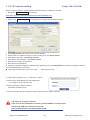
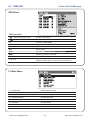
OSD Menu
OSD operation
next to the system name
The PC is powered on
next to the system name
The PC is selected
F1
Access F1 MAIN MENU
F2
Logout the OSD menu
F3
Previous menu
Esc
Cancel / Quit
Enter
Complete / Switch to selected port
Switch to previous or next port
PgUp/PgDn
Switch to previous bank or next bank
1/2/3/4
Display port 01 ~ 08 / 09 ~ 16 / 17 ~ 24 / 25 ~ 32
Remark: Display port 17 ~ 32 for 32 port model only
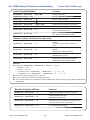
F1 Main Menu
01 LANGUAGE
OSD language change
02 PORT NAME EDIT
Define port name
03 PORT SEARCH
Quick searching by port name
04 USER SECURITY
Change password
05 ACCESS LIST
Define user access authority
06 HOTKEY
Change hotkey
07 TIME SETTINGS
Modify scan display time interval
08 OSD MOUSE
Modify OSD mouse speed
UM-CV-751-SKVM-Q113V1
P.17
www.rackmountsales.com