1
For Use with External USB DACs
For Use with External USB Peripherals
1. Shut down all audio applications (such as iTunes, JRiver, Qobuz, Tidal, Spotify,
Windows Media Player, or any other application you currently use to play music).
¡¡ When listening to music, USB DAC users should avoid connecting additional USB
devices (such as printers, cameras, and hard drives) to the computer. The reason
for this is simple: Each additional device requires valuable resources, and, as
greater demands are placed on the bus, the computer’s overall sonic performance
is diminished. However, we realize that limiting your computer’s peripherals to a
$
4 single external USB device may be impractical. You may, for instance, have to use
an external USB hard drive for media storage. In such cases, we recommend using a
E
JitterBug in series with the additional USB device, remembering that no more than
D
two JitterBug filters should be used on any given bus.
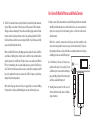
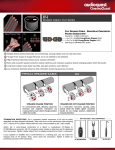
2. Insert JitterBug into any one of your computer’s available
USB ports. Next, use a USB cable to connect JitterBug to your
DAC. Open your computer’s Preferences/Configurations
to make sure that communication between the DAC and
computer is exactly as you left it.
escape
F1
~
`
!
1
F2
W
A
caps lock
S
Z
shift
control
alt
~
`
!
1
F2
F3
@
2
#
3
Q
tab
W
A
caps lock
S
Z
shift
control
cmnd
alt
cmnd
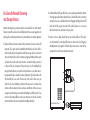
¡¡ If you have multiple USB peripherals (such
as printers, cameras, and hard drives) that
must always be connected to the computer,
we recommend that you install these
devices into an external powered USB hub.
The USB cable leading from the hub to
$ the computer should be connected to the
4
second JitterBug. This will ensure that noise
E
from all devices is significantly reduced.
escape
F1
~
`
!
1
@
F4
D
X
USB Hub
F1
X
HDD
escape
F4
#
3
Q
tab
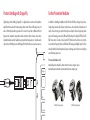
3. Many computers include more than one USB port. A second JitterBug filter can be
used in parallel, but not in series with the first filter. Plugging a second JitterBug
filter into an additional port will offer an incremental improvement to your system’s
overall sonic performance. That said, we do not recommend more than two JitterBug
filters per computer.*
(Footnote: In certain instances, your computer may have more than
one dedicated USB bus. For instance, an express card such as the Sonnet
USB 3.0 ExpressCard/34 adaptor (http://www.sonnettech.com/product/
usb3expresscard34.html) adds a second bus to your computer. In such
situations, where there are additional [and independent] USB bus
systems, each bus can support and will benefit from up to two JitterBug
filters. If you do not know how many USB buses exist on your computer,
we recommend that you err on the side of caution: Presume that your
computer has only one bus.)
F3
@
2
Q
tab
A
caps lock
USB DAC
shift
control
alt