1
English
English
For safes equipped with an electronic lock:
What should you do before using the safe for
the first time?
Please check that the safe works correctly
before installing it or securing items inside.
Access codes
The electronic lock has two access codes
and are programmed independently from
each other.
Default both access codes are active and
must be changed before you use the safe.
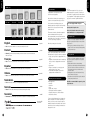
LCD display
emergency
key hole
pull knob
battery socket
battery holder
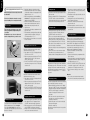
1. Install the 4 batteries in the battery holder.
2. Plug the battery holder into socket of keypad
(located at the bottom of the keypad); the LCD
display will show “ -SL- “.
3. Enter the default factory code: 1 2 3 4 5 6 or
8 8 8 8 8 8. The door will unlock and the LCD
display will show “OPENED”.
4. Remove the battery holder and remove the
batteries from the battery holder. Store the
battery holder safely away from the safe.
5. Open the door.
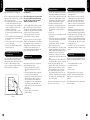
6. Open the lid of the battery compartment at the
back of the door.
7. Fit the batteries, ensuring that the positive and
negative terminals are aligned correctly; the
LCD display will show “ -SL- “.
8. Now change the 1st and 2nd access code; this
is done as follows:
Changing the 1st access code
Note: this can only been done when the safe is
unlocked and the door is open.
1. Press button: * * 1. The LCD display will show
“-PROG-” and “-CODE-”.
2. Enter now your personal 6-digit code. The LCD
display will show “-GOOD-”, when the new
code is stored correctly.
3. DO NOT CLOSE THE DOOR YET!; test the new
code before closing the safe. Go to “Testing the
electronic lock”.
Changing the 2nd access code
Note: this can only been done when the safe is
unlocked and the door is open.
1. Press button: * * 2. The LCD display will show
“-PROG-” and “-CODE-”.
2. Enter now your personal 6-digit code. The LCD
display will show “-GOOD-”, when the new
code is stored correctly.
3. DO NOT CLOSE THE DOOR YET!; test the new
code before closing the safe. Go to “Testing the
electronic lock”.
battery
compartment
Default factory codes
The electronic lock is supplied by the manufacturer
with the standard access codes 1 2 3 4 5 6
(1st code) and 8 8 8 8 8 8 (2nd code). These
codes must be changed before you use the safe.
Now do the following:
04
Testing the electronic lock
The lock should only be tested with the door open!
1. Press button: #. The LCD display will show
“CLOSED” and the bolts will be pushed out.
2. Enter your personal code. The LCD display will
show “OPENED” and the bolts will retract.
3. If steps 1 and 2 are carried out successfully, you
can close the door and lock the safe.
Closing the safe
1. Close the door and keep it gently pressed shut
with one hand.
2. Now press button: #. The LCD display will show
“CLOSED” and the lock mechanism will be
activated and the bolts (these are the metal pins
in the side of the door) will be pushed out.
Opening the safe
1. Enter your personal code; If the code has been
entered correctly the LCD display will show
“OPENED” and the door will unlock.
2 The door can be opened further by pulling the
black pin (left side in keypad) towards you.
• If an incorrect access code has been entered,
the LCD display will show “Error” or ”E-Code”.
• If the safe is not closed within 10 sec. you will
hear 2 short beeps as notification.
• An incorrect input can be cancelled by pressing
the * button.
• If an incorrect access code has been entered
three times, the lock will be blocked for 5
minutes and the LCD display will show “HOLD05”.
Security feature
If required the LCD input can be made unreadable
while entering your code. This feature is also called
“anti-spy” function and is enabled when pressing
the * button before entering your personal access
code. The LCD display shows “- - - - - -“ and not
your code!
Emergency opening
4. Turn the key clockwise turn until it stops. Do this
gently. The door can now be opened by pulling
the key towards you.
5. The batteries can be replaced and the door can
be closed again.
6. Gently push the door shut. Now turn the key
anti-clockwise until it stops.
7. Remove the override key and store if safely
away from the safe.
8. Put back the plastic cover in the key hole.
9. You can again use your personal access code to
open the safe.
Replacing the battery
When the safe is locked the battery power can be
checked by pressing the # button. When the
batteries have sufficient power, the display will
show “HI-BAT”. If the display shows “LO-BAT” the
batteries are weak and shall be replaced as soon
as possible. We recommend that you use only
alkaline model LR6-AM3-AA-1.5V batteries.
To replace the batteries, follow these steps:
1. Open the door.
2. Open the lid of the battery compartment at the
back of the door.
3. Replace the batteries; ensuring that the positive
and negative terminals are aligned correctly; the
LCD display will show “ -SL- “.
4. DO NOT CLOSE THE DOOR YET!; test the new
code before closing the safe. For this, see the
instructions on “Testing the electronic lock”.
5. If the lock works correctly, you can close the
safe.
Attention
• Do not store your user manual and override
keys in the safe, but safely away from the safe.
Your safe is equipped with a mechanical override in
case an emergency opening is necessary.
• When the batteries are weak, the LCD display
will show “LO-BAT”. The safe can be opened by
plugging the battery holder (with new batteries!)
into the socket of keypad - located at the
bottom of the keypad. Follow the normal
procedure.
1. If the safe can not be opened via the normal
procedure you can open the safe with the
emergency override key.
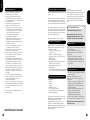
2. Remove the plastic cover located on the right
side below the keypad.
3. Insert the override key.
Note: the key only fits the key hole in one position:
do not force it!
05