1
LED LCD TV RECEIVER
USER MANUAL
Please read this manual carefully before using
your television and keep this manual in a good
place for future reference.
MODEL:
LET22T1000F
LET24T1000F
LET26T1000F
01 Safety and warnings
Welcome ………………………………………………………………………… P.02
Important information ……………………………………………………………P.02
Safety notice …………………………………………………………………… P.03
Warnings and cautions ………………………………………………………… P.05
02 Introduction
Main Parameter ………………………………………………………………… P.05
Base Stand Assembly Instruction …………………………………………… P.08
Wall Mounting Installation Guidelines ………………………………………
P.09
Control Panel …………………………………………………………………… P.10
Rear/Side Sockets ……………………………………………………………… P.10
Connecting your TV ……………………………………………………………… P.11
Common interface …………………………………………………………………P.12
03 Remote Control
04 Operation
Remote Control ………………………………………………………………… P.13
Installation Guide ………………………………………………………………… P.15
05 Trouble shooting
Trouble shooting ………………………………………………………………P.23
Specification …………………………………………………………………… P.25
Thanks for buying this 22"/24"/26" LED LCD TV. This guide will help you set up and begin using your TV.
22" Full HD 1080P Digital LED LCD TV
Remote control
AAA battery x2
Instruction Manual
Quick start guide
Stand
24" Full HD 1080P Digital LED LCD TV
Remote control
AAA battery x2
Instruction Manual
Quick start guide
Stand
26" HD Ready Digital LED LCD TV
Remote control
AAA battery x2
Instruction Manual
Quick start guide
Stand
Now you can get started!
IMPORTANT INFORMATION
READ ALL INSTRUCTIONS BEFORE USE AND KEEP FOR FUTURE REFERENCE.
CAUTION
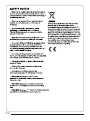
TO REDUCE THE RISK OF ELECTRIC SHOCK, DO NOT REMOVE COVER (OR BACK).NO USER SERVICEABLE PARTS INSIDE.
FOR ANY PROBLEMS, REFER SERVICING TO THE CUSTOMER HELP LINE. THERE IS A LIGHTNING ARROW SYMBOL IN
THE TRIANGLE: THIS SYMBOL INDICATES HIGH VOLTAGE IS PRESENT INSIDE. IT IS DANGEROUS TO MAKE ANY KIND OF
CONTACT WITH ANYINSIDE PART OF THIS PRODUCT.
THERE IS A EXCLAMATION MARK IN THE TRIANGLE: THIS SYMBOL ALERTS YOU THAT IMPORTANT LITERATURE
CONCERNING OPERATION AND MAINTENANCE HAS BEEN INCLUDED WITH THIS PRODUCT.
CAUTION:TO REDUCE THE RISK OF ELECTRIC SHOCK AND FIRE, DO NOT PUT THE TV SET NEAR
SOURCES OF HUMIDITY. DO NOT USE ANY ABRASIVE CLEANERS WHICH MAY SCRATCH OR DAMAGE
THE LCD SCREEN. AVOID CONTACT WITH OBJECTS THAT MAY SCRATCH THE LCD SCREEN.
NOTE: SERVICING THE UNIT YOURSELF IS UNAUTHORISED AND COULD LEAD TO INJURY OR PRODUCT
DAMAGE. REFER ALL SERVICING TO THE CUSTOMER HELPLINE.
This TV is optimised for use in the United Kingdom. It is not certified to work in other
countries and some features and signal inputs may not work as described in the
documentation.
P.02
the
P.03
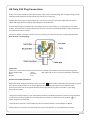
UK Only 13A Plug Connection.
If your TV is connected to the mains supply using a 3 pin 13 amp plug, the voltage rating is 220240 volts and should be protected by a 3 amp fuse in the plug.
Should the fuse require replacement for any reason, the fuse must be replaced with a fuse
rated at 3 amps and manufactured and approved to Bs1362.
If the mains plug is unsuitable for the socket outlet in your home or is removed for any other
reason, then the cut off plug should have its fuse removed and be disposed of safely to prevent
the hazard of electric shock.
There is a danger of electric shock if the cut off plug is inserted into any 13 amp socket outlet.
How to wire a 13 amp plug.
Important
The wires in the mains lead on a TV are colour coded in accordance with the following code.
Green and yellow
Earth
Not required on TV's as they are double insulated.
Blue
Neutral
Brown
Live
Double insulated appliances
Appliance with double insulation, have a symbol
than means that they do not have an earth
wire (green and yellow), so on these appliances only have two wires a blue and a brown.
If the colours do not correspond with the markings identifying the terminals in your plug,
proceed as follows.
The green and yellow wire, not required on double insulated appliances, must be connected to
the terminal in the plug which is marked with the letter E or with the earth symbol
or
coloured green and yellow.
The blue wire must be connected to the terminal marked N or coloured Blue or Black
The brown wire must be connected to the terminal marked L or coloured Brown or Red
P.04
WARNINGS AND CAUTIONS
Caution
Do not trap the power supply cord under
the television receiver.
Warning
To prevent fire or electrical shock
hazard, do not expose the television
receiver to rain or moisture.
Caution
Never stand on, lean on, or suddenly push
the television or its stand. You should pay
special attention to children. Serious injury
may result if it should fall.
Warning
Caution
Do not place your television on an unstable
cart, stand, shelf or table. Serious injury to
an individual , and damage to the
television, may result if it should fall.
Do not drop or push objects into the
television cabinet slots or openings.
Never spill any kind of liquid on the
television receiver.
Caution
When the television receiver is not
used for an extended period of time, it
is advisable to disconnect the AC power
cord from the AC outlet.
Caution
Do not block the ventilation holes in the
back cover. Adequate ventilation is
essential to prevent failure of electrical
components.
P.05
Dim:515*320mm(不包括底座)
Caution
If the television is to be built into a
compartment or similar enclosure, the
minimum distances must be maintained.
Heat build-up can reduce the service life of
your television, and can also be dangerous.
01Safety and warnings
Warning
High voltages are used in the operation
of this television receiver. Do not remove
the cabinet back from your set. Refer
servicing to qualified service personnel.
02 Introduction
CAUTION
INSTALLATION
Never tamper with any components inside
the TV, or any other adjustment controls not
described in this manual. All LED-TV's are
high voltage electrical equipment.
When you clean dust or any water drops off
the SCREEN or CABINET or around any of
the buttons or connectors, the power cabled
should be removed from the power socket.
Wipe the TV with a soft, dry, dust free cloth.
During thunderstorms, unplug the power
cable and aerial / antenna cable to prevent
damage to your TV and any other devices
connected to it.
All repairs to this TV should only be
performed by qualified TV service
personnel.
*Locate the TV in the room where light
does not strike the screen directly.
*Total darkness or a reflection on the
picture screen can cause eyestrain. Soft
and indirect lighting is recommended for
comfortable viewing.
*Allow enough space between the TV and
the wall to permit ventilation.
*Avoid excessively warm locations to
prevent possible damage to the cabinet or
premature component failure.
*Do not cover the ventilation openings
when using theTV.
Main features
2
Used as Television, display terminal,
PC display;
High luminance, wide viewing angle;
3
HDMI interface and SCART Interface;
1
4
NICAM;
5
Time-shift;
Main parameter
Panel
TV System
Video Signal System
Input Power Voltage
Power consumption
Standby Power consumption
Audio Output Power (THD 7%)
Signal Input
Signal output
Horizontal definition(TV line)
19
22
24
26
PAL-B/G、I、D/K
SECAM- B/G 、
D/K、L、L '
PAL/SECAM
AC 100-240V
50/60Hz
30W
38W
40W
55W
<0.5W
2x3W
Analog RGB(PC) x1; PC audio x1
High-Definition Multimedia Interface (HDMI)x2
Video Input x1
Audio Input x1
Y Pb Prx1
SCARTx1
CI x 1
USB x 1
RF Co-Ax x 1
Headphone x 1
S/PDIF x 1
Composite Video input >=350
YPbPr
>=400
P.06
PC
PRESET MODE
P.07
V.Freq.(Hz)
H.Freq.(KHz)
1
640x480
60
31.47
2
800x600
60
37.88
3
1024x768
60
48.36
4
1360x768
60
47.7
5
1280x1024
60
63.98
6
1920x1080
(Olny for 21.5",23.6")
60
66.64
02 Introduction
RESOLUTION
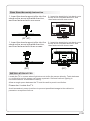
Base Stand Assembly Instruction
1. Insert the stand support pillar into the
stand as the arrow indicated direction,
and then fastened with one screw.
(22",24")
1. Insert the stand support pillar into the
stand as the arrow indicated direction,
and then fastened with three screws.
(26")
2. Insert the stand Ass'y into back cover
as the arrow indicated direction,and
then fastened with one screw.
(22",24")
2. Insert the stand Ass'y into back cover
as the arrow indicated direction,and
then fastened with two screws.
(26")
INSTALLATION NOTES
Locate the TV in a room where light does not strike the screen directly. Total darkness
or a reflection on the screen can cause eyestrain. Soft and indirect lighting is
recommended for comfortable viewing.
Allow enough space between the TV and the wall to permit ventilation.
Please don’t rotate the TV.
Avoid excessively warm locations to prevent possible damage to the cabinet or
premature component failure.
P.08
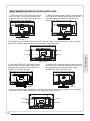
WALL MOUNTING INSTALLATION GUIDELINES
1.Place the LED LCD Television onto a
solid surface. Please place some soft
material over the front of the screen to
protect it from any damage.
2.Remove the screws from the lower part of
the television, where the base joins to the TV,
and take away the stand (put the stand
somewhere safe for future use).
(22",24")
(22",24")
3.Use the four screws provided to fix the TV onto a wall mounting bracket (not included)
via the four VESA standard holes on the back of the television.
M4X5
100mm
M4X5
M4X5
100mm
(22",24")
1.Place the LED LCD Television onto a
solid surface. Please place some soft
material over the front of the screen to
protect it from any damage.
2.Remove the screws from the lower part of
the television, where the base joins to the TV,
and take away the stand (put the stand
somewhere safe for future use).
(26")
(26")
3.Use the four screws provided to fix the TV onto a wall mounting bracket (not included)
via the four VESA standard holes on the back of the television.
M4X5
100mm
M4X5
200mm
(26")
P.09
M4X5
M4X5
02 Introduction
M4X5
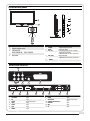
Front control panel
SOURCE
1
MENU
2
3
CH+
1
2
3
CHVOL+
4
VOLSTANDBY
30
1
2
3
5
30
Remote control sensor.
Indicator LED:
BLUE: POWER ON. RED: STAND BY.
Key board.
1
2
3
SOURCE
MENU
CH+/CH-
4
VOL+/VOL-
5
STANDBY
Display the input source menu.
Display main MENU.
In TV mode,press CH+ or CH- to change
the channel up and down.
In MENU, press CH+ or CH- to select items .
Adjust sound level.
In MENU,adjust the item that you Selected.
Rear/Side Sockets
4
SPDIF OUTPUT
1
3
2
6
1
2
3
4
5
6
7
L/R AUDIO
AV
S/PDIF
YPbPr
SCART
USB
HDMI2
5
COMMON INTERFACE (CI)
USB
7
8
input
input
digital audio output
input
input
input
input
9
10
11
8
9
10
11
12
13
12
HDMI1
HEADPHONE
COMMON INTERFACE(CI)
PC AUDIO
VGA
RF
13
input
analogue audio output
input
input
input
input
P.10
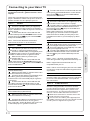
Connecting to your Haier TV
There are several options to connecting a DVD
player / Satellite or Cable set top box receiver /
games console / PC or Laptop to your TV.
Option 1
SCART
Connect a SCART cable (not supplied)
from the SCART socket on the TV to the DVD
player / Satellite or cable set top box receiver or
games consol.
To select the device connected with the
SCART cable press the SOURCE button on the
remote and use the
keys to select SCART
and press the OK button.
Note:- The TV will default to the SCART
connection when the TV is switched on.
Option 2
HDMI
If the device you want to connect to the TV
is switched on, switch off the device first.
Connect a HDMI cable (not supplied) from
the HDMI socket on the TV to the DVD player /
Satellite or cable receiver or games consol.
Switch on the device you have just
connected to the TV
To select the device connected with the
HDMI cable press the SOURCE button on the
remote and use the
keys to select HDMI and
press the OK button.
Option 3
AV Audio Visual
(Yellow/White/Red)
Make sure that both TV and the device are
switched off before connecting.
Connect the AV cables (not supplied) from
the Video (yellow) and Audio (white, red)
sockets on the TV to the DVD player or games
console etc.
To select the device connected with the
AVI cable press the SOURCE button on the
remote and use the
keys to select AV and
press the OK button.
Option 4
COMPONENT
(Green/Blue/Red)+(White/Red)
Make sure that both TV and the device are
switched off before connecting.
Connect the cables (not supplied) from the
COMPONENT IN sockets Y, Pb, Pr (green,
blue, red) and L-Audio-R (white, red) on the TV
to the DVD player or games console etc.
P.11
To select the device connected with the AVI
cable press the SOURCE button on the remote
and use the
keys to select COMPONENT
and press the OK button.
Option 5
VGA (15pin Sub-D)
Connect a VGA cable (not supplied) from the
VGA socket on the TV to the PC / Laptop.
To select the PC / Laptop connected with the
VGA cable press the SOURCE button on the
remote and use the
keys to select PC and
press the OK button.
Note VGA is video only. For audio from your
PC/Laptop you need to connect a separate
cable from the PC Audio (3.5mm jack) to the
headphone socket on you PC/Laptop (3.5mm
jack)
Option 6
USB
Most USB sticks can be connected to your TV
and some digital cameras may also work.
Connect USB stick (not supplied) or a USB
cable (not supplied) to the TV.
To select the USB device connected to the TV,
press the SOURCE button on the remote and
use the
keys to select USB and press the
OK button.
Note1:- Only *.jpg and *.mp3 files will work,
other file types are not guaranteed and may not.
Note 2. Apple iPhones and iPods are not
compatible with you TV.
Note 3. When connecting any device to the USB
connection, keep the USB cable length as short
as possible.
Option 7
HEADPHONE OUTPUT
Insert the plug of the earphone into the earphone
jack on the unit HEADPHONE. The speakers
are now muted.
Option 8
S/PDIF OUTPUT
S/PDIF is a digital audio connection used to
connect audio equipment, for example home
theatres and other digital HiFi systems over
short distances. The signal is transmitted over
either a coaxial cable with RCA connectors.
Make sure that both TV and the device are
switched off before connecting.
Connect the AV cables (not supplied) from
the S/PDIF socket on the TV to the Home Theater
sound system or digital HiFi system etc.
02 Introduction
Connecting a DVD player / Satellite / cable
set top box receiver / games console / PC or
Laptop
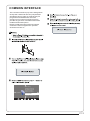
COMMON INTERFACE
The common interface (CI) slot is designed to
accept the conditional Access (CA) Module
and Smart card in order to view the pay TV
programmes and additional services.
Contact your Common Interface service
provider to get more information about the
modules and subscription.
Please noted that CA modules and smart
cards are neither supplied nor optional
accessories from us.
Auto Tuning
<
CHANNEL
DTV Manual Tuning
ATV Manual Tuning
Programme Edit
Signal Information
>
CI Information
Software Update(OAD)Off
Software Update(USB)
P.12
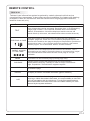
1.POWER:Press to turn on the TV.
2.D.MENU:No function.
3.P.Mode:To switch picture mode.
4.INFO:Press to display the current signal
status,including input source and channel audio
mode.
5.AUDIO I/II: Press to select MONO,Nicam stereo
for ATV channel. Select Audio language for DTV
channel.
6.SUBTITLE:Press to turn the subtitle On or Off.
7.Number Buttons:For direct access to channels.
8.SOURCE:To select input source.
9.MUTE:To disable or enable the sound output.
10.Volume Control:To adjust sound level.
11.MENU:To display TV menu.
12.OK:To confirm selection.
13.EXIT:To return to the previous menu or exit
menu.
14.Teletext Index/USB PLAY
15.REPEAT:No function
16.Teletext Green Button / USB Fast Forward
17.Teletext Red Button / USB Fast Rewind
18.Teletext Mix
19.Teletext Text
20.Teletext Reveal
21.Teletext Size
22.Teletext Time/ANGLE/REC.LIST(teletext time
is no function)
23.Teletext Mode:No function
24.Teletext Hold
25.Teletext Subcode:Teletext Subpage
26.Teletext Blue Button / USB Next File
27.Teletext Yellow Button / USB Previous File
28.USB STOP
29.USB PAUSE
30.START RECORD
31.UP,DOWN,LEFT,RIGHT Cursor:Press to
navigate your selection.
32.Fav:To access your favourite channels list in
TV or DTV mode.
33.Select Programme:Press / Button to select
the next or previous TV channel.
34.GUIDE:Press to display electronic programme
guide in TV mode.
35.Q.View:To access the previously viewed
channel.
36.CH.LIST: Press to display the channel list.
37.Screen:To change picture aspect ratio.
38.Sleep :Set timer to turn off the TV.
39.S.Mode:To switch sound mode.
40.OPEN/CLOSE:No Function
:No DVD function
P.13
03 Remote Control
03 Remote control
REMOTE CONTROL
TELETEXT
Press:
TEXT
E
Teletext is an information system broadcast by certain channels which can be
consulted like a newspaper. It also offers access to subtitles for viewers with hearing
problems or who are not familiar with the transmission language(cable networks,
satellite channels, etc.)
You will obtain:
This is used to call or exit teletext modes. The summary appears with
a list of items that can be accessed. Each item has a corresponding
3 digit page number. If the channel selected does not broadcast
teletext, theindication 100 will be displayed and the screen will
remain blank (in this case, exit teletext and select another channel).
Enter the number of the page required using the 0 to 9 up/down.
SELECTING A PAGE Example: page 120, enter 120. The number is displayed top left, the
counter turns and then the page is displayed. Repeat this operation to
view another page. If the counter continues to search, this means
that the page is not transmitted. Select another number.
DIRECT ACCESS
TO THE ITEMS
INDEX
SUB PAGE
HOLD
REVEAL
LIST
Coloured are as are displayed at the bottom of the screen. The 4
coloured keys are used to access the items or corresponding pages.
The coloured areas flash when the item or the page is not yet
available.
This returns to the contents page (usually page 100).
Certain pages contain sub-pages which are automatically
displayed successively. This key is used to stop or resume subpage acquisition. The indication appears top left.
To freeze the page.
To display or hide the concealed information (games solutions).
The user can set four favorite pages to be directly linked to the four
color keys. While list mode is activated, it is not possibility to use TOP
or FLOF navigation with the colorkeys. The favorite page numbers
should be stored and restored to/from nonvolatile memory for each
channel by the system software.
P.14
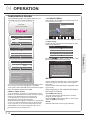
04 OPERATION
Installation Guide
The installation guide only appear when the TV
first time turn on or reset to factory set.
1.CHANNEL MENU
The first item of the MENU is channel menu( for
TV or DTV source only).
WELCOME!
Auto Tuning
Thank you for choosing
<
CHANNEL
DTV Manual Tuning
ATV Manual Tuning
Programme Edit
Signal Information
>
CI Information
Software Update(OAD)Off
Software Update(USB)
Please select an OSD Language
Cesky
English
Dansk
Espanol
Fran ais Magyar
Hrvatski Nederlands Portugues
Deutsch
E
Italiano
~
ka
Norsk
Polski
Pycck
OK
You can search channels and edit programs here.
1).Auto tuning:
Search all the channels automatically(you can
select ATV and DTV)
Tune Type
DTV+ATV
Mode Select
Germany
Italy
Greece
Luxembourg
Norway
Poland
Hungary
Netherlands
Portugal
Shop Mode
MENU
OK
Pls press
to select country at first , then
press OK button to start auto tuning .
Country
Channel Tuning
Norway
Rumania
Slovenia Switzerland
Morocco
Poland
Russian
Spain
UK
Tunis
Sweden
NewZealand Algeria
Portugal Serbia
TV : 0 Programme(s)
DTV : 0 Programme(s)
Radio : 0 Programme(s)
Data: 0 Programme(s)
OK
96%
UHF CH 68 DTV
Password
Please enter old password
Please enter new password
Confirm new password
You can choose OSD language,Home/Shop mode
and country, auto tuning programs .And after
tuning the screen will skip to the first DTV program.
Note:The default password is 6666.
HOME or SHOP modes
1. Home Mode is an energy-saving Mode. Home
Mode is recommended for normal viewing setting
and is set as default during manufacturer.
2. Shop Mode is an option for retailers for
Advertising or product presentation.
Shop Mode has a brighter image than Home Mode.
3. You may switch between Home or Shop Mode
as you choose.If you choose Shop Mode ,it will
enter HDMI1 source automatically,and you wil
press Exit key to exit POP menu.
P.15
NOTE:
All the channels including ATV, DTV and Radio
can be tuning by one time,if the Tune Type is
DTV+ATV .
All the stored channels will be disappear after
auto tuning .
After auto tuning , the channel will skip to
the first DTV channel.
2).DTV Manual tuning:
You can select a DTV channel then find the
program in this channel.
Pls press
to select the channel , then press
OK to search the programs .
NOTE:
Bad Normal Good means signal intensity.
04 Operation
Home Mode
Favourite
DTV Manual Tuning
_
VHF CH
5
+
Once your favorite group is created, you can
press the FAV key to quickly access your favorite
channel.
Press OK to search
Bad
Nomal
Press
to choose the program , press FAV
button , it will show
on the right side of the
program.Choose the FAV program , press
FAV button again , you can cancel the FAV,
the will disappear .
Good
5). CI information: (optional)
This menu can display the CI card' s information.
3). ATV Manual tuning :
You can change the sound system to search
the analog TV channels and fine tune the
channels , then storage the channels you
selected.
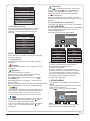
2. PICTURE MENU
The second item of the MENU is PICTURE MENU.
You can adjust picture effect here, such as
contrast, brightness, etc.
Press OK to move, press OK to adjust.
ATV Manual Tuning
_
Storage To 1
Picture Mode Standard
+
Color Temperature
Aspect Ratio
System BG
<
Current CH 1
PICTURE
Noise Reduction
Screen
>
Search
Fine-Tune
Frequency 255.25 MHz
Save
MENU
NOTE:
Press teletext red button to storage to channels
after manual tuning .
4). Program edit:
You can Delete ,Rename ,Move, Skip , FAV any
programs.
Delete
Press teletext red button , the program in cursor
will delete.
Rename:
Only can rename ATV programs .
Move the cursor to the program, press teletext
green button to rename the program.
Press
to choose the character. Press
to
move the cursor .
Press MENU button to exit edit , Press EXIT to
exit the menu.
Note: ATV programs name only can be 5 characters long,
DTV programs name can be 25 characters long.
Use the Arrow Buttons to select the channel you
wish to move. Then press the Yellow Button to
select Move function. Once active, enter the
number button and then press OK to confirm.
Press
to choose the program , press teletext
blue button to skip this program, The
will
show on the right side of the program .
Choose the skipped program, press blue button
again , you can cancel the skip ,The
will
disappear .
Picture Mode
Standard
Color Temperature
Contrast 82
Red 40
Brightness 50
Green 31
Color 50
Blue 50
Medium
Sharpness 50
Tint 50
MENU
MENU
NOTE:
1).There are four picture modes can be
selected standard,mild,user,Eco
(energy-saving mode).
2).Tint is available in NTSC system only.
3).There are four colors temperature modes
can be selected medium, warm, cool,user
4).Screen is available in PC mode only which,
can adjust Horizontal position, vertical
position, size and phase.
3.SOUND MENU
The third item of the MENU is the SOUND
MENU.
You can adjust the sound effect here such as
treble, bass, balance etc.
Press
to move, press OK to adjust.
Sound Mode Standard
<
SOUND
Balance
Auto Volume
Surround Sound
S/PDIF Mode
>
Note:
Auto volume: only available when the input
signal volume is too large or distortion.
P.16
4.TIME MENU
The forth item of the menu is the TIME MENU
You can adjust the clock, power on/off time,
sleep time etc Press
to move, press OK to
adjust.
<
Clock -- -- -Off Time
On Time
Sleep Timer
Auto Sleep
Time Zone
TIME
--
>
NOTE:
Restore factory default will clear all the programs
and password.
6.LOCK MENU
The sixth item of the menu is the LOCK MENU
You can lock system, set password, block program
and set parental guidance Once you set the lock
system on you can not search the channels or
change any programs.
NOTE:
Within 15 minutes there is no signal, the TV
will auto sleep , if Auto Sleep is set ON. The
clock time can get from the DTV system auto.
Lock System
Set Password
Block Program
<
Parental Guidance Off
LOCK
>
5.OPTION MENU
< OPTION
OSD Language English
Audio Languages English
Subtitle Languages English
Country UK
PVR File System
Restore Factory Default
Automatic power-down(4H)
Home/Shop Mode
DCR
>
Automatic Power-down
1.If after 4 hours from switch on and no changes
have been made to the TV, for example no channel
or volume changes,the TV will start the automatic
power down sequence.
And pop-up window will appear on screen.
XXX’s to automatic power-down
Please press any Key to Cancel
NOTE:
The default pass word is 0000, If you forget the
password, you can use the super password:9443.
Block program: Press
to choose the
program ,press teletext green button to block
the program. If you want unblock the program,
pls enter the main menu , input the password,
then press green button again.Parental
guidance: Press
to choose rating.
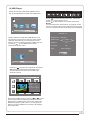
7.EPG Menu(Electronic Program
Guide).
The EPG menu is used to look at what is being
broadcasted on DTV or Radio channel in the day.
To access the EPG menu, press the EPG
botton,the following menu will be displayed:
PROGRAMME GUIDE
TIME
28 Apr 04:39
After 150 seconds the TV will automatically switch
to standby. To override the automatic shutdown
press any button on the remote control.
2. To cancel the automatic power-down
On the Option Menu select Automatic powerdown(4H)
Press OK. A pop-up message will appear
“Are you sure you want to enable automatic powerdown?”
Use the right arrow key to select NO
The TV screen returns to the Option Menu and the
Automatic
power-down(4H) option will display.
Automatic power-down(4H)
OFF
To return to auto shutdown after 4 hours repeat the
above except
use the left arrow key to select YES
In PVR File system menu you can set up USB
disk for PVR.
Select Disk
No Information
801 SZTVM02
No Information
802 SZTVM03
No Information
803 SZTVM04
No Information
804 Date
No Information
Record
INFO
Schedule
OK
Remind
INDEX
INFO
1.
Use
to choose the programs , Press
INFO key, you can display the highlight program's
information.
Schedule
2.
Press the teletext yellow key, It can list
all the reminder schedule, press
to choose
the list, press red key
DELETE to delete the
schedule list.
Schedule List
04:55 28th Apr
Delete
C:
Check PVR File System Start
USB Disk
Format
Time Shift Size
Speed
Free Record Limit 6 Hr.
P.17
800 SZTVM01
Time
Date
Programme Title
Channel Name
04 Operation
The fifth item of the MENU is the OPTION
MENU. You can adjust the Menu language,
Audio language,Subtitle language etc.
3.
Record
Press the red key ,It can set the program
to be recorded.
Remind
4.
Press the blue key to choose one program
and set up one reminder time, the TV screen will
skip to the choosed program in the reminder time
automatically.
_
OSD Language English
Audio Languages English
Subtitle Languages English
Country UK
PVR File System
Restore Factory Default
Automatic power-down(4H)
Home/Shop Mode
DCR
< OPTION
>
Reminder setting
802 SZTVM03
+
Select Disk
08 Minute
Start
USB Disk
Apr Month
Format
28 Date
Time Shift Size
Once Mode
OK
C:
Check PVR File System
05 Hour
Speed
BACK
Free Record Limit
6 Hr.
OK
8.PVR function
MENU
1.Prepare to record the program
PVR function only works in DTV.
From OPTION MENU enter into PVR File
System In “OPTION MENU”, please
choose “check PVR File System”. Click
“OK”, until “checking”change into
“Success”.
Note: please check the term “speed”. If it
is “HD support”, that means the speed of
USB device is available for time shift and
record. If not, please format the device, to
make sure the device available. The default
“Free Record Limit” is 6 hour, if the space
on the disk is big enough. If the space is not
big enough, the record time should be
shorter, depends on the room on the
device. During the “check PVR File
System” checking, please do not take any
The recordings must be done with the TV PVR
system. It can only be played in the same TV,
not in any other kind of device (computer,
DVD, etc.) which is not compatible with .
TS. file format.
Please note that in order to carry out any kind of
recording, the TV will require you to format the
connected USB device to store the recording.
WARNING. WHEN YOU FORMAT, THE
EXTERNAL USB DEVICE YOU WILL LOSE ALL
THE FILES AND INFORMATION YOU HAVE
STORAGE ON THE DEVICE.
The USB file system will limit the size of the
storage size.
File system: NTFS up to 2TB
FAT32 with up to 192GB
FAT16 with up to 2GB
From OPTION MENU enter into PVR File
System as below:
Select Disk:select which disc to save the
record file.
Select Disk
USB
0
Disk
C:
Check PVR File System: check if the PVR File
System set up in the USB device or not.
Format:
File System Size
PVR File System Type Hi Speed FS
PVR File System Size
All
SD 104 Mins
HD 29 Mins
MENU
File System Size
PVR File System Type
PVR File System Size
FAT32
All
SD 104 Mins
HD 29 Mins
OK
P.18
(Suggest to format the format the device by
“High Speed Fs...”, which can speed up
the record.)
Format disk
Format disk
2.Record the program
As playing the DTV source, choose the
channel and click “record”, the record
frame will pop up. Click “record” again,
the record frame will disappear and the
“REC” icon still on the left top. It will
disappear until you click “stop”.
Warning! All data will be lost.
3.Play the record
Exit
Format disk
Do not unplug USB device.
Formatting,please wait
below menu appear after Format finish:
Select Disk
C:
Check PVR File System
Checking
USB Disk
Pass
Format
Pass
Time Shift Size
All
Speed
Checking
Free Record Limit
6 Hr.
MENU
Select Disk
C:
Check PVR File System
SUCCESS
USB Disk
Pass
Format
Pass
Time Shift Size
Speed
All
HD support 2048 KB/s
Free Record Limit
6 Hr.
MENU
If you select the “Hi Speed FS ”format mode,
then you can change the time shift size:
Time Shift Size
Time Shift Disk Size
SB 14 Mins
HD 4 Mins
P.19
512 MB
The program recorded on the “USB”will be
saved in the folder “_MSTPVR” on the
device.
1.The USB storage size can be between
128MB and 500GB in size, but for practical
use 2GB to 500GB is recommended.
2. Video may become pixelated when Video
bit rate is too low. This can be caused by
connecting a USB extension cable instead
of plugging the USB directly into the TV
3. Not all USB devices are compatible.
Below is a list of recommended USB drives.
Models that are not listed may be
compatible, but it is not guaranteed to work.
The USB support list are the same as
Timeshift function,see the following pages
for details.
04 Operation
Start
9.Timeshift function
1.Prepare to record the program
This TV allows you to pause and record the
currently watched digital program to a USB
storage device, and to resume to the point
where it was paused.
NOTE:
Formatting a USB 2.0 storage device will
be needed. Save your original data
before formatting. All the data stored in
the USB device will be erased after
formatting.
USB Drive Storage Format
00:00:33/00:04:22
Play
FB
FF
Prev.
Next
Pause
Stop
NOTE:
Please do not unplug the USB storage
device when the Time Shift function is
activated.
Approximately 4GB of memory buffers
about offer 140 minutes.
Select to format the USB device and
allocate the amount of space for the Time
Shift function.
NOTE:
The format process will take at least 2
minutes. Please do not turn off the power
or remove the USB device during
formatting.
During formatting, a speed test will be
done on the USB device. If it fails, it
means the USB device may not support
the Time Shift function.
Record a paused DTV program to
USB storage device
1. While in the DTV input source, insert
USB storage device to the USB port on the
side of your TV.
2. Press PAUSE
to start Time Shift
function. The TV program paused. The Time
Shift OSD appears, and starts recording.
3. Press STOP
to stop Time Shift
function and stop recording program.
P.20
Time Shift limitations:
1. When the Time Shift feature is activated,
only the PLAY/PAUSE/STOP/FWD/REV/
VOL+/VOL-/MUTE keys and some basic
operation keys (ENTER/EXIT/navigation
keys) are available.
2. Video playback may not be smooth and
skip if USB recording speed does not meet
the minimum requirements .
3. Do Not remove USB disk or switch off the
power during Time Shift operations. It will
abort once the signal is lost.
4. Do Not remove the signal source during
Time Shift operations.
5. Do Not quickly and repeatedly change
operations between
PLAY/PAUSE/FWD/REV.
7. Not all USB devices are compatible, The
USB hard disk drive electricty should be
< 500MA.
Below is a list of recommended USB drvies.
Models that are not listed may be
compatible, but it is not guaranteed to work.
8. This feature is not available for all digital
TV,such as scrambled or audio only
channels.
P.21
04 Operation
6. Video may become pixelated when Video
bit rate is too low.
10.USB Player
Press source key, and selsct USB in soure
list, press OK button to enter the USB menu.
00:00:33/00:04:22
AB
Pause
FF
Prev.
Next
Stop
Repeat ALL
Set A
Press
to select the function icon, press OK
button to confirm the function.
Press
or EXIT button to exit the control bar.
NOTE:
You can adjust the audio track, or program in the
Info menu while Playing the video file.Choose the
Info icon and press OK can display the Info MENU.
USB 2.0
PHOTO
FB
MUSIC
MOVIE
TEXT
Sample1.ts
Please make sure that the USB device have
plugged in the slot.There are four type media
item can be selected, such as photo, music,
Movie, and text. Select the type media item by
pressing
, press OK button to enter
the disk selection menu.
Resolution: 720x576
AudioTrack:
1/2
Subtitle:
1/1
Program:
1/6
Size:
30574 KBytes
1/1
Close
Return
C
Press the
to select the right disk and press
OK to display media files and folder list or
choose Return to back to the media type
selection menu.
1/1
Resolution: 688x412
AudioTrack: 1/2
Subtitle:
1/1
Program:
1/5
Size: 511457 KBytes
Return
Movies
Sample1.ts
Sample1.ts
Sample2.ts
Sample3.ts
Sample4.ts
Select the media file by pressing
or
, then
the preview frame will pop up.Press the button
to play the media file in full screen.When the
media file (photo,music, Movie, or text type) is
playing, press the OK or Info button can display
the control bar.
P.22
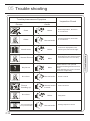
05 Trouble shooting
Trouble phenomenon Symptom
Inspection Check
Audio
Snow
Noise
antenna position, direction
or connection
Ghost
Normal audio
antenna position, direction
or connection
Interference
Noise
electronic equipment,car/
motorcycle,fluorescent light
Mute
Volume(check if mute is
activated or if the audio system
connections are not correct)
Normal Picture
No picture
Mute
No colour
Normal audio
Colour control
Picture
breaking up
Normal audio
or weak
retune channel
No colour
There is black bar
on top and bottom
P.23
Power cord is not inserted
Power switch is not opened
Contrast and brightness/volume
setup
Press standby key on the remote
control for inspecting
Noise
Normal audio
TVsystem
Change aspect to zoom
05 Trouble shooting
Picture
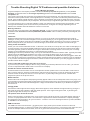
Trouble Shooting Digital TV Problems and possible Solutions.
Picture Breaks into Pixels
A typical example of a reception problem includes the break up of pictures (pixilation) or the picture
freezing, sometimes there are clicking or squeaking sounds or the sound drops out or there is NO
reception at all.
Your picture may break into pixels due to the digital video signal dropping. The signal dropping may occur
because of either problems with weak signals (see TV Aerials) or if you are connected by cable a weak cable
signal. If the problem is weak signals, use an amplifier to strengthen the signal. A cable technician can help
you install an inline amplifier or a pre-amplifier. This will boost your signal strength and fix the pixel problem.
If you are receiving your TV signal by satellite, check your dish has not moved following high winds, or that
the signal is blocked by trees. Trees can be a problem as the TV signal can change depending if a tree
between the satellite dish and satellite is in bare or in full leaf.
Missing channels
It may be that you find that there are channels missing, or you're receiving channels from the wrong region.
Sometimes the interactive services (red button) doesn't work. This is usually caused by weak signal, see
TV Aerials
TV Aerials
Digital terrestrial television (Freeview) comes to your TV via an aerial, The old aerial that was good for
analogue TV may not work well for digital so may need upgrading. If you are getting some but not all of the
digital channels on DTV (Freeview) for example you get BBC1, BBC2, Channel 4 ,but not ITV or Channel 5,
this is usually because your aerial is a narrow band type, and needs to be changed to a wide band type.
Faulty Leads and Cables
Check your TV. Are the leads at the back - to the mains, the aerial, the set-top box, the video or DVD player or
recorder properly connected? SCART leads are known to work loose over time and can result in both audio
and video (picture) problems. Either left or right or both audio is missing and the colours are poor or muddy
looking. Push the SCART plugs firmly in, this should fix the problem.
HDMI plugs need to be pushed in firmly; it's only the last millimetre that the contacts make. Typically the black
plastic part of the HDMI plug should be very close or touching the body of the TV or component.
When plugging in any HDMI cables you may experience problems if the HDMI cables are plugged in when the
TV or the other component is switched on. Always switch off both the TV and the component you are plugging
in. If you have checked the plugs and sockets, switch off the TV and whatever you have plugged in to the TV
and then switch them on again.
I have connected my PC to the TV. There is no sound.
If you connect your PC or Laptop to the TV using a VGA (15 pin Sub D) cable there is no audio, you need to
connect a separate audio cable to the TV from the PC or laptop.
Unnatural Colours and Flesh Tones
Unnatural flesh tones and other colours could present another problem even in a new HDTV. This is due to
the TV picture settings, which are optimized for a showroom environment. Fix this by changing the picture
mode to natural in the picture menu. For more precision, try manually setting the colour, contrast and
brightness options in the picture menu.
White Outlines
White outlines around objects and people generally appear either if the TV sharpness is set to very high, or if
your television set uses some edge-enhancement processing technology. Go to the picture menu and adjust
the sharpness till the white outline disappears. If edge-enhancement is enabled, try to disable it using the
service menu.
Choppy Video
At times the video might become choppy. When this happens, check whether the signal is strong enough. If
the signal is strong the problem is with the cable operator. If the signal strength is weak, try boosting the
signal strength with the help of an amplifier.
The picture does not fill the screen
When connecting PC's or laptops to the TV, the picture may not fill the screen. Check the display settings on
your PC or laptop (Windows > Start > Control Panel > Appearance and Personalization > Display settings)
and select the best resolution. On your TV select:- TV Menu > Picture > Settings and then try AUTO, ZOOM1
or ZOOM2 for the best display.
USB Connection
The USB connection will work with *.jpg (photo) and *.mp3 (music) files. Please note the TV does not
recognize Apple iPhone, or iPod's connected to the USB connector on the TV. The TV may play other files, but
due to the multiple different file formats, there is no guarantee that these other file formats will work.
P.24
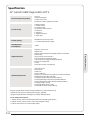
Specification
Television picture quality:
Full HD
Integrated digital.
Screen Size: 55"cm
Resolution 1920 x 1080 pixels 50Hz.
Connectivity:
2 HDMI sockets.
1 SCART socket.
PC input socket.
Component video socket.
Composite.
1 USB port.
1 Headphone port.
1 SPDIF port.
Sound quality:
NICAM stereo sound system.
2 x 3 watts RMS power output.
Standby Power
consumption
<0.5W
Digital features:
Digitally interactive.
Digital text.
Digital video broadcasting (DVB) subtitles available.
Auto setup.
Auto scan for new channels.
Now and next programme guide.
7 day electronic programme guide (EPG).
Top up TV compatible.
CI slot.
Audio description compatible.
Additional features:
UHF/VHF tuner.
Sleep timer.
Child lock.
Picture and text.
Remote control batteries required 2 x AAA (included).
VESA Mount Size 100 x 100 mm
Package Size (WxHxD): 616 x426 x135mm
Set Size (WxHxD) with Stand: 518 x363 x160mm
Set Size (WxHxD) without Stand: 518 x322 x50mm
Package weight : 4.5 kg
Set weight with stand: 3.3 kg
Set weight without stand: 2.85 kg
* The part specifications of this TV set provided here are for reference only.
Difierences may occur as product technology is updated.
Design and specifications are subject to change without notice.
Scart Output description :
1. When current source is ATV/AV/SCART, scart output signal is ATV.
2. When current source is DTV, scart output signal is DTV.
3. Other source have no scart output signal.
P.25
05 Trouble shooting
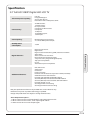
22" Full HD 1080P Digital LED LCD TV
Specification
Television picture quality:
Full HD
Integrated digital.
Screen Size: 60"cm
Resolution 1920 x 1080 pixels 50Hz.
Connectivity:
2 HDMI sockets.
1 SCART socket.
PC input socket.
Component video socket.
Composite.
1 USB port.
1 Headphone port.
1 SPDIF port.
Sound quality:
NICAM stereo sound system.
2 x 3 watts RMS power output.
Standby Power
consumption
<0.5W
Digital features:
Digitally interactive.
Digital text.
Digital video broadcasting (DVB) subtitles available.
Auto setup.
Auto scan for new channels.
Now and next programme guide.
7 day electronic programme guide (EPG).
Top up TV compatible.
CI slot.
Audio description compatible.
Additional features:
05 Trouble shooting
24" Full HD 1080P Digital LED LCD TV
UHF/VHF tuner.
Sleep timer.
Child lock.
Picture and text.
Remote control batteries required 2 x AAA (included).
VESA Mount Size 100 x 100 mm
Package Size (WxHxD): 650 x440 x135mm
Set Size (WxHxD) with Stand: 562 x388 x160mm
Set Size (WxHxD) without Stand: 562 x347 x50mm
Package weight : 5.1 kg
Set weight with stand: 3.9 kg
Set weight without stand: 3.45 kg
* The part specifications of this TV set provided here are for reference only.
Difierences may occur as product technology is updated.
Design and specifications are subject to change without notice.
Scart Output description :
1. When current source is ATV/AV/SCART, scart output signal is ATV.
2. When current source is DTV, scart output signal is DTV.
3. Other source have no scart output signal.
P.26
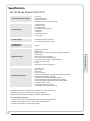
Specification
Television picture quality:
HD Ready
Integrated digital.
Screen Size: 66"cm
Resolution 1366 x 768 pixels 50Hz.
Connectivity:
2 HDMI sockets.
1 SCART socket.
PC input socket.
Component video socket.
Composite.
1 USB port.
1 Headphone port.
1 SPDIF port.
Sound quality:
NICAM stereo sound system.
2 x 3 watts RMS power output.
Standby Power
consumption
<0.5W
Digital features:
Digitally interactive.
Digital text.
Digital video broadcasting (DVB) subtitles available.
Auto setup.
Auto scan for new channels.
Now and next programme guide.
7 day electronic programme guide (EPG).
Top up TV compatible.
CI slot.
Audio description compatible.
Additional features:
UHF/VHF tuner.
Sleep timer.
Child lock.
Picture and text.
Remote control batteries required 2 x AAA (included).
VESA Mount Size 200 x 100 mm
Package Size (WxHxD): 720 x486 x135mm
Set Size (WxHxD) with Stand: 622 x422 x170mm
Set Size (WxHxD) without Stand: 622 x381 x50mm
Package weight : 6.7 kg
Set weight with stand: 4.8 kg
Set weight without stand: 4.15 kg
* The part specifications of this TV set provided here are for reference only.
Difierences may occur as product technology is updated.
Design and specifications are subject to change without notice.
Scart Output description :
1. When current source is ATV/AV/SCART, scart output signal is ATV.
2. When current source is DTV, scart output signal is DTV.
3. Other source have no scart output signal.
P.27
05 Trouble shooting
26" HD Ready Digital LED LCD TV