1
10.USB Player
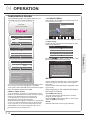
Press source key, and selsct USB in soure
list, press OK button to enter the USB menu.
00:00:33/00:04:22
AB
Pause
FF
Prev.
Next
Stop
Repeat ALL
Set A
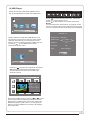
Press
to select the function icon, press OK
button to confirm the function.
Press
or EXIT button to exit the control bar.
NOTE:
You can adjust the audio track, or program in the
Info menu while Playing the video file.Choose the
Info icon and press OK can display the Info MENU.
USB 2.0
PHOTO
FB
MUSIC
MOVIE
TEXT
Sample1.ts
Please make sure that the USB device have
plugged in the slot.There are four type media
item can be selected, such as photo, music,
Movie, and text. Select the type media item by
pressing
, press OK button to enter
the disk selection menu.
Resolution: 720x576
AudioTrack:
1/2
Subtitle:
1/1
Program:
1/6
Size:
30574 KBytes
1/1
Close
Return
C
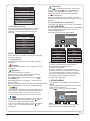
Press the
to select the right disk and press
OK to display media files and folder list or
choose Return to back to the media type
selection menu.
1/1
Resolution: 688x412
AudioTrack: 1/2
Subtitle:
1/1
Program:
1/5
Size: 511457 KBytes
Return
Movies
Sample1.ts
Sample1.ts
Sample2.ts
Sample3.ts
Sample4.ts
Select the media file by pressing
or
, then
the preview frame will pop up.Press the button
to play the media file in full screen.When the
media file (photo,music, Movie, or text type) is
playing, press the OK or Info button can display
the control bar.
P.22