1
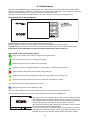
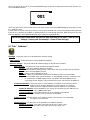
Touch any part of the screen or press the [ENTER/Display On] button to display the initial screen with the current stored DMX address:
Touch the green arrow at the bottom right corner of the screen or press the [ENTER/Display On] button to enter
the " Address" menu.
An item (such as a Tab, menu item, text box, icon) may be selected from a screen by simply touching the item
in the list or by pressing the [NEXT] or [PREV] buttons to scroll through list items. With each press, the next
item is highlighted. Press [ENTER/Display On] to select the highlighted item.
Before first fixture operation, set current date and time in the menu "Date &Time
Setings" (menu path: Personality--> Date &Time Setings).
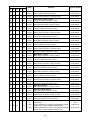
6.1 Tab " Address"
Settings - Select the menu to set desired fixture address setting.
DMX Address - Select the menu to set the DMX start address.
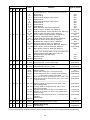
Ethernet Settings - The menu allows all needed settings for the Ethernet operation
Ethernet Mode - Use the menu to set the Ethernet operation mode:
Disable - The option disables Ethernet operation.
Artnet - Fixture receives Artnet protocol - every fixture has to be connected to the network.
gMAI - Fixture receives MANet protocol.
gMA2 - Fixture receives MANet2 protocol.
Art2DMX - Fixture receives Artnet protocol from the Ethernet input and sends DMX
data to its DMX output (fixture works as an "Artnet/DMX converter", next fixture can
be connected to its DMX output and you can build a standard DMX chain by
connecting another fixtures. Only one fixture has to be connected to the Ethernet.
IP Address/Net Mask - Select this menu to set IP address. IP address is the Internet protocol
address.The IP uniquely identifies any node (fixture) on a network.
There cannot be 2 fixtures with the same IP address on the network!
Default IP Address -Preset IP address, you can set up only first byte of IP address (2 or
10) e.g. 002.019.052.086.
Custom IP Address - The option enables to set up all bytes of IP address.
Net Mask - The option enables to set up all bytes of Net Mask.
. ArtNet Universe - Use this item to set a Universe (0-255). The Universe is a single DMX
512 frame of 512 channels.
MANet Settings - Use this menu to set parameters for MANet operation.
MANet I/II Universe - The value of this item can be set in range 1-256.
MANet Session ID - The value of this item can be set in range 1-32.
26