1
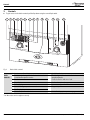
Controls
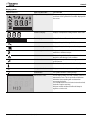
Display symbols
SCREEN DISPLAY
BRIEF DESCRIPTION
EXPLANATION
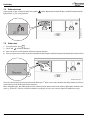
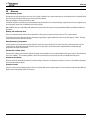
All possible screen symbols
This screen is displayed briefly during boiler start up
and shows all the symbols that could be displayed on
the screen.
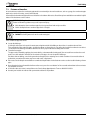
Numerical display
Displays a temperature setting or boiler status code.
Text display
Display PreHeat or Eco, or the Alert code
Hot water
Displays this symbol during a DHW demand.
Central Heating
Displays this symbol during central heating demand.
Service engineer mode
Displays during service when the boiler is set to
maximum or minimum output.
Alert
Displays along with the boiler status code and
diagnostic code during a fault condition.
Service mode
Displays when a qualified service engineer is in the
service menus.
Burner on
The boiler is in operation and the flame is alight.
Centigrade indication
Displays next to the temperature reading.
Confirmation
This symbol confirms a setting change.
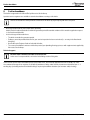
Maintenance codes
A code displayed with an H and a number relates to a
maintenance issue. This is not a boiler fault but an
indication that something will need attention
concerning the boiler.
The example shown is H13 Service interval reached,
the boiler requires servicing.
Call your installer or Worcester Bosch Group to
organise a service visit.
°C
°F
°C
°C
°F
H 13
Greenstar CDi Compact ErP - 6 720 813 277 (2014/09)
7