1
FREEVOLVE® LLC
Copyright 2008
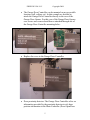
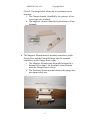
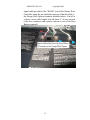
Here is the installed Garage Door Controller:
2. Testing the Garage Controller Installation
Power up the Garage Door Controller by connecting it to an active
housEvolve network. The yellow light next to the SYSTEM ports should be
ON, (indicating network power). The green light next to the SYSTEM ports
will blink about once a second. If the device is a stand-alone installation, use
the enclosed 15V DC adapter. Note that the SYSTEM lights will be off
because there is no network connection detected.
Manually close the Garage Door. The proximity sensor should engage and
the green light next to the SENSOR port should be ON. If the Sensor light is
not ON, check
that the Garage Door Controller is powered
that the Magnetic and Contact Elements of the proximity sensor
parallel and within 1.5in of each other
13