1
12. Double Quantity cookin
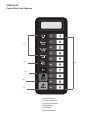
1) Through the use of the X2 pad, the user can easily set the time two of a particalar
food item.
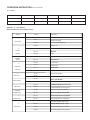
2) Under waiting state, press "X2" button and then press number buttons 0-9 in 5 seconds,
the oven will start cooking with the quantity preset cooking time.
3)) Press "X2", "doub" displays. When press number buttons, LED will display the quanti
preset time.
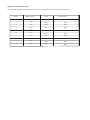
For example, number button "5" and its preset time is 1 minute. Then press "X2", then time
will change to 1:00*(1+0.8)=1:48
4)) When cooking program finish, the oven will enter End of Cook Cycle Mod
Note: This function cannot be used under memory mode.
13.. Stage Cooking Programm
This allows the user to cook food items at combination of various Power Levels.
1) Three stages can be set at most under cooking mode or memory mode.
Aftet setting the power and time for the first stage, press "
" to set the second stage.
And the same step to set the third stage.
2)) When setting the second or the th
third stage, press
3)) Press "
" button to start cookin
Example: To set three stages as memory mode. The first stageis PL7 and time is 1 minute
25 seconds. The second stage is PL5 and 5 minutes and 40 seconds. The steps are follow.
a..
aiting state, press "1" for 5 seconds, LED displays "ProG".
b.. Press number buttons "3" to save the program in "3
c.. Press "
","00:00"
d.. Press "1","2","5" to input the cooking time. "1:25" display
e. Press "
", "PL7" displays.
The first stage is finished.
f. Press "
", LED displa
g.. Press "5", "4","0" button, "5:40" display
h.. Press "
", "PL5" display
The second stage is finished.