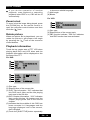
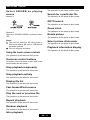
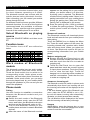
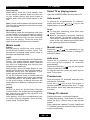
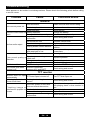
1
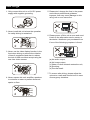
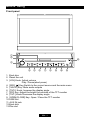
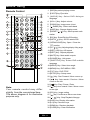
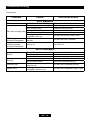
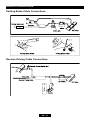
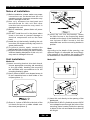
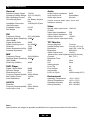
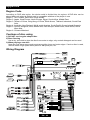
DVD/CD/VCD/MP3/WMA/SD/MMC/USB PLAYER BLUETOOTH/TV/GPS WITH FM/MW TUNER Operation Instructions aurora GX730E Legal Notice This guide is coyprighted © 2012 by iCar-Tech Inc. All rights reserved. Under copright laws, this guide may not be reproduced neither completely or in parts without written consent of iCar-Tech Inc. iCar-Tech, the iCar-Tech-Logo, Aurora and the Aurora-Logo are trademarks or registered trademarks of iCar-Tech Inc. All other trademarks contained herein are the property of their respective owners. Product features, specifications, sysrem requirements and availability are subject to change without notice. Ducomentation Feedback We are constantly working to improve our documentation. Should you have comments, corrections or suggestions about our Documentation, please send us an email to [email protected] Warnings 1. Only connect this unit to a 12V DC power supply with negative grounding. 5. Please don't change the fuse in the power cord without professional guidance, improper fuse may cause damage to this using unit or even cause fire. 1 2. Never install this unit where the operation for safety driving is restrained. 5 6. Please power off this unit at once and send it back to the after-sales service center or the dealer / distributor you purchased from if one of the following symptoms is found: 2 3. Never use the video display function in the front when driving to prevent the violation of laws & regulations and also to reduce the risk of traffic accident except using the rear view video camera. 3 4. Never expose this unit, amplifier, speakers to moisture or water to prevent electronic sparks or fires. 4 6 (a) No audio output; (b) No image output; (c) Water or other obstacle enters the unit; (d) Smoking; (e) Peculiar smell. 7. To ensure safe driving, please adjust the volume to a safe and comfort level in case of emergency situations. Precautions 1. Never disassemble or adjust the unit without any professional guide. For details, please consult any professional car shop / dealer for inquiry. 2. If the front panel or TFT monitor is squalid, please use a clean silicone cloth and neutral detergent to wipe off the spot. Using a rough cloth and non-neutral detergent such as alcohol for cleaning may result in scratching or decoloration to the applicant. 3. If any abnormal behavior of the unit is found, please refer to trouble shooting guide of this manual. If no relevant information is found,please press the [RESET] key on the front panel to resume factory default. 4. If you have parked the car in hot or cold weather for a long time, please wait until the temperature in the car becomes normal before operating the unit. 5. Using in-car heater in low temperature environment may result in beads coagulate inside the unit, DO NOT use the unit in this situation, eject the disc and wipe off the bead on the disc. If the unit still doesn't work after a few hours, please contact with after-sales service center. 6. No fierce impact to the LCD monitor when it is in open position for preventing the damage to any mechanisms inside. 7. To prevent the damage to the screen, avoid touching it with sharp objects. 8. The monitor employs auto motorizing mechanism, please don't push, pull, or swivel the monitor manually to prevent damage to the core mechanism. 9. To provide a clear demonstration and an alternative for easy understanding to the operation of this unit, graphic illustrations areused.However, these illustrations are some different from the actual images displayed on the screen. 10.During operating the unit, “ ” will display if the current operation is not available or illegal. 11.Operate the unit correctly according to this manual to prevent unnecessary problem. The guarantee won't be valid if the problem is caused by inappropriate operation. Declaration This product incorporates copyright protection technology that is protected by U.S patents and other intellectual property rights. Use of this copyright protection technology must be authorized by Macrovision, and is intended for home and other limited viewing uses only unless otherwise authorized by Macrovision. Reverse engineering or disassembly is prohibited. Contents Before using Front panel.............................................. 1 Remote Control....................................... 2 Basic operations Power on / off.......................................... 4 Mute........................................................ 4 Volume adjustment.................................. 4 Open SOURCE MENU........................... 4 Playing source selection......................... 4 Using the TFT Monitor............................ 4 Reset the unit.......................................... 4 RDS operations PTY function............................................ 5 Program Service (PS) ............................ 5 CT (Clock Time)...................................... 5 RT (Radio Text)....................................... 5 Radio mode Select radio as playing source................ 5 Select one radio band............................. 5 Auto tuning.............................................. 5 Manual tuning.......................................... 5 Auto save................................................ 5 Manual save............................................ 6 Preview scan . ........................................ 6 Recall the stored stations........................ 6 Local seeking.......................................... 6 Disc mode Insert a disc............................................. 6 Eject the disc........................................... 6 Touch screen controls............................. 6 Onscreen control buttons........................ 7 Suspend playback................................... 8 Stop playback ..................................... 8 Display file list......................................... 8 Fast playback.......................................... 8 Previous / next........................................ 8 Change folder.......................................... 8 Repeat playback..................................... 8 Repeat A-B.............................................. 8 Random playback................................... 8 Intro playback.......................................... 8 Direct search .......................................... 9 GOTO search.......................................... 9 MENU and TITLE.................................... 9 Select subtitle language.......................... 9 Select multi-angle views ........................ 9 Select audio channel . ............................ 9 PBC function .......................................... 9 Zoom in/out .......................................... 10 Rotate picture........................................ 10 Playback information............................. 10 SD/USB mode Select SD/USB as playing source..........11 Using the touch screen controls.............11 Onscreen control buttons.......................11 Stop playback temporarily......................11 Stop playback entirely............................11 Display file list........................................11 Fast forward/Fast reverse......................11 Play the next or previous file .................11 Repeat playback....................................11 Random playback..................................11 Intro playback.........................................11 Search for a particular file......................11 GOTO search.........................................11 Zoom in/out ...........................................11 Rotate picture.........................................11 Select picture slide mode ......................11 Playback information display..................11 Bluetooth mode......................................... 12 TV mode..................................................... 13 Other modes AUX....................................................... 14 Camera................................................. 14 Navigation............................................. 14 SWC...................................................... 14 Setup Setup procedures.................................. 15 General................................................. 15 Language.............................................. 15 Audio..................................................... 15 Bluetooth............................................... 15 Rating . ................................................. 16 Hardware............................................... 16 P.VOL.................................................... 16 TS CAL.................................................. 16 EQ............................................................... 17 Troubleshooting........................................ 18 Device connections Notes of connection ............................ 20 Control Cables...................................... 20 Parking Brake Cable Connections ...... 21 Reverse Driving Cable Connections..... 21 Installation and uninstall Notes of installation............................... 22 Unit Installation...................................... 22 Trim Ring installation............................. 23 Uninstall ............................................... 23 Specifications Appendix Region Code ........................................ 25 Cautions of disc using........................... 25 Wiring Diagram..................................... 25 Before using Front panel ཱ ཻ ི ཱི ུ ཱུ ྲྀ ཷ ླྀ ཹ ེ 1. Eject disc 2. Reset the unit 3. [VOL] Knob: Adjust volume Play / Pause(short press) 4. [SRC/ ] Key:Switch to the current source and the main menu 5. [ MUTE] Key: Mute audio outputs 6. [TILT+] Knob: Increase the display angle 7. [PIC] Key: Adjust the bright the contrast of the TFT monitor 8. [TILT-] Knob: Decrease the display angle 9. [OPEN/CLOSE] Key: Open / Close the TFT monitor 10.USB Slot 11. AUX IN jack 12.Eject disc 13.Disc slot EN - 1 Before using Remote Control 1. [SRC]Key:select playing source 2. [EJECT]Key: Eject disc 3. [AUDIO] Key: Select DVD dialogue language 4. [VOL+/-] Key: Adjust volume 5. [ZOOM] Key: Image zoom in/out 6. [ /BAND] Key: Select radio band 7. [WIDE] Key: Change display mode 8. [PRESET / ] Key: Select preset radio station 9. [EQ] Key: Enter/Exit the EQ setting 10.[GOTO/ ] Key: GOTO search/Call 11.[OPEN/CLOSE] Key: Open / Close the TFT monitor 12.[TILT / ] Key: Adjusting display tilting angle 13.[REPT A-B] Key: A-B repeat 14.[REPT] Key: Repeat playback 15.[MUTE] Key: Mute audio outputs 16.[POWER] Key: Unit power 17.[SUBTITLE] Key: Select DVD subtitle language 18.[ANGLE] Key: Select view angle 19.[MENU] Key: DVD MENU / PBC 20.[TILT ] Key: DVD TITLE 21.[SETUP] Key: Setup menu 22.[ ] Key: Fast Forward / Move cursor up 23.[ ] Key: Auto search / Previous / Move cursor to the left Note: Your remote control may differ slightly from the one pictured here. The above diagram is for illustrative purpose only. 24.[ ] Key: Play / Pause / Enter 25.[ ] Key:Auto search / Next / Move cursor to the right 26.[PIC] Key: Image setting 27.[ 28.[ / ] Key: Fast Reverse/ Move cursor down ] Key: Stop Playback/Hangup 29.[DISP] Key: Display information 30.[0~9] Key: Numeric keys 31.[RDM] Key: Random playback 32.[CLEAR] Key: Clear information EN - 2 Before using Notes of remote control using 1)Aim the remote control at the remote sensor on the unit. 2)Remove the battery from the remote control or insert a battery insulator if the battery has not been used for a month or longer. 3)DO NOT store the remote control under direct sunlight or in high temperature environment, or it may not function properly. 4) The battery can work for 6 months under normal condition. If the remote control can't work, please change the battery. 5)Use “button shaped” lithium battery “CR2025” (3V) only. 6)DO NOT recharge, disassemble, heat or expose the battery in fire. 7)Insert the battery in proper direction according to the (+) and (-) poles. 8)Store the battery in a place where children cannot reach to avoid the risk of accident. Uninstall Battery Slide out the battery compartment tray at the bottom on the back of the remote control. EN - 3 Install Battery Use button-shaped lithium battery “CR2025 (3V)” only. Insert the battery to the battery tray with proper direction according to the (+) and (-) poles. Basic operations Power on / off Using the TFT Monitor Press any key on the front panel or the [POWER] key on the remote control to turn on the power under standby mode. The unit goes back to the last status after power on. Press and hold the [SRC] key on the front panel or press the [POWER] key on the remote control to turn off the power under work mode. Open / Close monitor Press the [OPEN/CLOSE] key on the front panel or remote control topush the display panel out or in. Mute Press the [MUTE] key on the front panel or remote control to mute the volume from the unit. Notes: Doing the operation above again or adjusting volume will release muting. Mute icon winks on the TFT during muting. Volume adjustment Turn the volume knob on the front panel or press the [VOL] key on the remote control. The adjustable range of volume is 0 to 40. Open SOURCE MENU Press the [SRC] key on the front panel or remote control or touch the top left corner of the screen to open the SOURCE MENU. Do the above operation again to return to the original source. Playing source selection Open the SOURCE MENU, and then touch the source you desired or select one source by moving the cursor and then confirm. Notes: Playing source selection means selecting work mode, such as DVD mode, Radio mode, Camera mode, etc. When some devices are not ready, they cannot be selected. Display system time Press and hold the [DISP] key on the remote control to switch the display information between system time and playing source when the TFT monitor is closed. EN - 4 Change the monitor tilt angle Due to the inherent character of LCD, you will get different vision impressions when you watch it from different angles. The display angle of this unit can be changed; hence you can select the best angle where you can get the best vision impression. Press the [TILT] key on the display panel or the remote control to adjust the tilt angle one step at a time. Press and hold the [TILT] key on the display panel or the remote control to adjust the tilt angle continuously. Change aspect ratio Press the [WIDE] key on the display panel or remote control to adjust the aspect ratio. Image setting (1)Enter image setting mode Press the [PIC] key on the front panel. (2)Select one item to adjust Press the [ ]/[ ] keys on the remote control. (3)Adjust the value ]/[ ] keys on the remote Press the [ control. (4)Exit image setting mode To exit image setting mode, repeat the first step or stop operation for some seconds. Reset the unit If the unit can not work correctly, you should reset the unit by pressingthe [RESET] button on the front panel. RDS operations Radio mode PTY function Select radio as playing source PTY is the abbreviation for Program Type which is a code defining the type of program being broadcast (e.g. News or Rock). Six PTY options will display on the screen. To view more PTY options, touch the scroll bar and arrows on the screen. When one PTY option is touched (e.g. News), auto search for next available PTY by increasing tuning frequency until the PTY of the next station matches the current. If no matched PTY has been found, the unit will return to the original radio frequency. Open the SOURCE MENU and then touch RADIO. Program Service (PS) Used for receiver displays of an 8 character alpha numeric Program Service name which may use Upper or Lower case characters, e.g. {BBC_4_FM}, {Classic_}. Select one radio band Press the [BAND] key on the display panel or remote control or touch the [BAND] icon on the user interface to select one radio band among FM1, FM2, FM3, MW1 and MW2. Auto tuning Press the [ ] / [ ] key on the display ] panel or remote control or touch the [ ] icon on the user interface to seek a /[ higher / lower station. To stop searching, repeat the operation above or press other keys having radio functions. CT (Clock Time) Some stations broadcast the time and date within the encoded RDS signal. The clock time is automatically adjusted when 'CT' is set to 'On'. RT (Radio Text) When this function is activated, the unit will display short message data transmitted from the provider, such as station information, the name of the current broadcasting song and the artist name. Note: When a station is received, searching stops and the station is played. If the unit receives a stereo broadcasting, the indicator light of stereo ‘ST’ on the TFT or LCD display will be lighted. Manual tuning During manual tuning, the frequency will be changed in steps. Press the [ ]/[ ] key on remote control ] / [ ] icon on the user or touch the [ interface to tune in a higher / lower station. Touch the numeric keypad icon( ) and then touch the numeric buttons to input the radio station frequency numbers. Auto save Only stations with sufficient signal strength will be detected and stored in the memory. When the monitor is closed, press and hold the [AS] key on the display panel. When the monitor is opened, touch the [AS] icon on the user interface. To stop auto save, press other keys having radio functions. Notes: After auto save, the previous saved stations will be overwritten. The unit has 5 bands, such as FM1, FM2, FM3, MW1, MW2, and Each band can store 6 stations; hence the unit can store 30 stations in all. EN - 5 Radio mode Disc mode Manual save Insert a disc When one expected radio station has been detected…… (1)Press the [MEM] icon on the user interface and the preset menu will be opened. (2)Press one preset button among P1~P6. (3)If you want to abort, press the [Exit] button. Upon inserting a disc, the unit will switch to disc mode automatically. Preview scan Preview scan searching is such a process that the searching pauses when a station is received and then played for 5~10 seconds. After being played, the unit continues the process until the whole band is detected. When the monitor is closed, press the [AS] key on the display panel. When the monitor is opened, touch the [PS] icon on the user interface. To stop the process, press other keys having radio functions. Recall the stored stations Press one numeric key among 1 to 6 on the remote control or touch an onscreen station button to select the corresponding stored station. Local seeking Notes: Please confirm whether there is a disc in the unit before you insert another one. Some recorded discs, such as CD-R, CDRW, DVD-R, DVD+R, DVD-RW, DVD+RW cannot be played back because of different recording status. Otherwise, the discs without being closed could not be played back. About the cautions of disc using, please refer to the appendix. Eject the disc Press the [ ] key on the front panel or remote control to eject the disc. Touch screen controls The touch key areas for DVD playback are outlined below: A B When LOCAL seeking is on, only those radio stations with strong radio signal could be received. To open or close LOCAL function, press and hold the volume knob on the front panel. Notes: When the local radio station searching is on, the indicator light ‘LOC’ lights up; whereas the light goes off. The number of radio stations that can be received will decrease after the local seeking mode is on. EN - 6 C A - Return the last menu B - Display playback information C - Display onscreen control menu Disc mode Onscreen control buttons EN - 7 Disc mode Suspend playback Repeat playback ] key on the remote control or Press the [ open the onscreen control buttons menu and then touch the [ ] button. To resume normal play, repeat the above operation. Press the [RPT] key on the remote control repeatedly or open the onscreen control buttons menu and then touch the [ ] button repeatedly to alter repeat mode according to the following table. Disctype Stop playback DVD To stop playback, press the [■] key on the remote control or open the onscreen control buttons menu and then touch the[■] button. When the above operation is executed for the first time, the current playback is paused and the break point is memorized and the playback will resume when you start playback again or switch back from other playing sources. The current playback will cancel if the above operation is executed twice and the playback will start over when you start playback again. VCD(PBC off) Repeat single ė Repeat folder ėRepeat allėRepeat off MPEG Repeat single ė Repeat folder ėRepeat allėRepeat off Picture Repeat single ė Repeat folder ėRepeat allėRepeat off When a DVD, VCD or CD disc is played back, you can play back the contents between the time points from A to B repeatedly. Press the [RPT A-B] key on the remote control or open the onscreen control buttons menu and then touch the [RPT A-B] button to set the start point (A) of the repeated section. Do the above operation again to set the end point of the repeated section. The selected portion will repeat continuously. Do the above operation for the third time to cancel this function. Fast playback Press the [ ]/[ ] key on the remote control repeatedly or open the onscreen control buttons menu and then touch the ]/[ ] button repeatedly to change the [ rate of fast forward/fast reverse. Previous / next Press the [DIR+]/[DIR-] icon on the user interface (you should stop playback first if a video or picture file is played back) to change folder during the playback of one recorded disc containing more than one folder. Repeat single ė Repeat folder ėRepeat allėRepeat off MP3/WMA Repeat A-B To display the file list of one recorded disc, stop current playback. Change folder Repeat single ė Repeat all ėRepeat off CD Notes: When a VCD is played back, this function is prohibited if the PBC is on. Turning off the power or switching playing source to other modes and back will cancel this function. Display file list Press the [ ]/[ ] key on the display panel or remote control or open the onscreen control buttons menu and then touch the [ ]/[ ] button to play the next or previous file. Repeatmode Repeat chapter ė Repeat title ė Repeat off Random playback When this function is on, the contents in the disc will be played back randomly. Press the [RDM] key on the remote control repeatedly or open the onscreen control buttons menu and then touch the [ ] button repeatedly to alter random playback mode among ‘Random on’, ‘Random off’. Intro playback When this function is on, the unit will play back the first 10 seconds of each track of a VCD or CD disc. You can search the file you desired using this function. Press the [SCN] key on the remote control to activate this function. EN - 8 Disc mode Do the above operation again to cancel this function. Direct search When a DVD, VCD or CD disc is played back, you can search for a particular chapter / track by pressing the numeric keys of the remote control. For example, if you want to select the 15th track, you should press numerical key [1] and [5]. GOTO search (1)Enter GOTO search mode Press the [GOTO] key on the remote control to open search menu. For DVD, you can search according to title, chapter and time. For VCD, if PBC function is off, you can search according to time; if PBC function is on, you can search according to track, time and Disc time. For CD, you can search according to track. For MPEG files, you can search according to track and time. For record discs containing MP3 and/or JPG files, you can search according to track(file number). (2)Enter search information Select items by pressing the direction keys on the remote control and enter search information by pressing the numeric keys, such as title, chapter and time. (3)Confirm Press the [Enter] key on the remote control to confirm. (4)Exit GOTO search mode Repeat the above operation until the search menu disappeared or touch the [Exit] button on the menu. MENU and TITLE This function is only available for the DVD discs having “MENU / TITLE”. Press the [MENU] key on the remote control or open the onscreen control buttons menu and then touch the [MENU] button to open DVD MENU. You can select audio language, subtitle language and so on for playback. Press the [TITLE] key on the remote control EN - 9 or open the onscreen control buttons menu and then touch the [TITLE] button to open DVD TITLE. You can select a different title for playback. Select subtitle language Press the [SUBTITLE] key on the remote control repeatedly or open the onscreen control buttons menu and then touch the [SUBTITLE] button repeatedly to choose a subtitle language. Select multi-angle views Press the [ANGLE] key on the remote control repeatedly to choose a shooting angle during the playback of a DVD disc or video file containing multi-angle views. Select audio channel For DVD containing multi-language audio files, press the [AUDIO] key on the remote control repeatedly or open the onscreen control buttons menu and then touch the [AUDIO] button repeatedly to change dialogue language. For VCD and CD, press the [AUDIO] key on the remote control repeatedly or open the onscreen control buttons menu and then touch the [AUDIO] button repeatedly to alter audio channel modes among Left vocal, Right vocal, Mono left, Mono right, Stereo. Note: Left channel and right channel cannot work properly if the audio files are not recorded correctly. PBC function This function is available for the VCD discs with PBC function (Ver 2.0 or higher). Press the [MENU] key on the remote control to activate this function. Press again to cancel. Notes: When PBC is on, playback goes back to the track list and starts from the first track. When PBC is on, fast motion playback, slow motion playback or skip search is available but repeat playback and searching for a particular chapter or track is prohibited. Disc mode If you do the operation of random playback, scan playback or searching playback when PBC is on, PBC will be off automatically. Zoom in/out To zoom in/out the image being played, press the [ZOOM] key on the remote control or open the onscreen control buttons and then touch the [ + ] icon. Rotate picture When one picture file is played back, you can rotate the picture to get proper view angle by pressing the [ ] icon on the onscreen control buttons. to choose a subtitle language. (7)Multi angle. (8)Bitrate. For VCD (1)Disc type. (2)Elapsed time of the current track. (3)PBC function indicator. "PBC On" indicates that PBC function has been activated. Playback information Touch the top center area of TFT LCD when playing back DVD and VCD discs and the playback information will be displayed on the top area of the TFT. For DVD (1) Disc type. (2) Elapsed time of the current title. (3) DVD Title information. “5/8” indicates that this DVD has 8 titles and the title playing back now is the fifth title. (4)DVD Chapter information. “2/16” indicates that current title has 16 chapters and the chapter playing back now is the second chapter. (5)Indicates that the subtitle of this DVD has been recorded in 6 languages and the language displayed now is the second, that is English. (6)Touch the [SUB TITLE] button repeatedly EN - 10 SD/USB mode Select SD/USB as playing source The operation is the same as disc mode. Method 1: The operation is the same as disc mode. Search for a particular file GOTO search The operation is the same as disc mode. Zoom in/out Method 2: Open the 'SOURCE MENU' and then select 'SD'. Notes: The unit will switch to SD card mode or USB mode after a SD card or USB device has been inserted. The unit supports hot swap. The operation is the same as disc mode. Rotate picture The operation is the same as disc mode. Select picture slide mode The operation is the same as disc mode. Playback information display The operation is the same as disc mode. Using the touch screen controls The operation is the same as DVD mode. Onscreen control buttons Onscreen control buttons under USB mode are the same as disc mode. Stop playback temporarily The operation is the same as disc mode. Stop playback entirely The operation is the same as disc mode. Display file list The operation is the same as disc mode. Fast forward/Fast reverse The operation is the same as disc mode. Play the next or previous file The operation is the same as disc mode. Repeat playback The operation is the same as disc mode. Random playback The operation is the same as disc mode. Intro playback EN - 11 Bluetooth mode Bluetooth is a wireless transmission way for short distance operating at 2.4GHz. The bluetooth module can connect with the mobile phones having bluetooth function. After connecting, you can control your mobile phone through the unit. As different mobile phones provide different bluetooth functions, so not all of the functions undermentioned are available to different phones. Please read through the operation manual of the mobile phone in use at first. Select Bluetooth as playing source Open the SOURCE MENU and then touch BT. Function icons The function icons of BT are outlined as below. Wo r k m o d e s o f B l u e t o o t h module The bluetooth module has two work modes, which are phone mode and music mode. Touch the mode switch icon to switch to its corresponding mode. Under phone mode, hand-free, call and other phone functions are available. Under music mode, you can enjoy the music played back by your mobile phone through the speakers in your car and you can control the playback. Phone mode Pairing Use this function to establish a connection between the Bluetooth module and your mobile phone. Switch the work mode of the Bluetooth module to phone mode, open the SETUP menu and select the Bluetooth sub-menu and then set the 'Bluetooth' option to 'On'. Turn on the Bluetooth function of your mobile phone and start to search Bluetooth devices. After the name of the Bluetooth module appears on the pairing list on your mobile phone, you should select it. At this time, a pairing code is required. The Bluetooth module will exit pairing mode if there is no pairing instruction from your mobile phone during the pairing time (90s) and 'Phone Pairing Fail' is displayed on the screen. Enter the pairing code (1234 by default) to initiate the pairing process. The paired mobile phone name will display on the screen. Browse call numbers The Bluetooth module will download phone book and call records from your mobile phone after pairing. Touch the [MENU] icon to display the Menu list. There are some options on the menu list, including missed calls, received calls, dialed calls and phone book. When you press one of them, the Bluetooth module will get its corresponding information from your mobile phone. Make an outgoing call Browse through the Phone book or call records, touch the number you want to dial and then touch the dial icon to make an outgoing call. Touch the Dial Panel icon to open dial panel and then touch the numeric buttons to input phone numbers. Touch the [Clear] icon to clear the last digit. Touch the hangup icon to clear the entire numbers or end the conversation. Touch the Ans icon to make an outgoing call. Answer an incoming call The Bluetooth module will switch to phone mode automatically when there is an incoming call and the incoming call number will be displayed on the screen. If the 'Auto Answer' option of the 'Bluetooth' submenu under the SETUP MENU is set to 'On', the unit will answer incoming calls automatically, otherwise you should answer them manually. The call duration will be displayed on the screen after the incoming call has been put through. Hangup While talking, press the hangup key on your mobile phone or touch the hangup icon on the screen to end the conversation. EN - 12 Bluetooth mode TV mode Voice transfer While talking, touch the 'Voice transfer' icon on the screen to transfer audio from the unit to your mobile phone, and touch again to transfer audio from your mobile phone to the unit. Select TV as playing source Note: Some mobile phones will transfer audio from the unit to themselves once the incoming call is answered. Microphone mute While talking, press the microphone mute icon on the screen to mute the microphone built in the unit. Under this condition, the one talking over the telephone with you can not hear what you are saying. Touch the mute icon again to resume microphone functionality. Music mode Open the SOURCE MENU and then select TV. Auto search To search for a higher/lower TV channel, ]/[ ] key on the press and hold the [ display panel or remote control. Notes: To stop auto searching, press other keys having TV functions. When a TV channel is received, searching stops and the TV channel is played. If no TV channel is detected, the tuning channel stops at the very beginning channel when the searching process is finished. Pairing Before pairing, switch the work mode of the Bluetooth module to music mode. The procedures of pairing under music mode is the same as the phone mode. Manual search A2DP A2DP is short for Advanced Audio Distribution Profile. The mobile phones supporting this function can transmit stereo audio, whereas the ones not supporting this function can transmit mono audio only. After pairing, open the audio player of your mobile phone and set the transmit mode to Bluetooth. At this time, the speakers of your mobile phone will close automatically. To set the transmit mode of mobile phones to Bluetooth, please refer to the user manual or help document of the mobile phone in use or the audio player software because the audio players of different mobile phones vary greatly. Auto save AVRCP AVRCP is short for Audio/Video Remote Control Profile. The mobile phones supporting this function can control the playback of a Bluetooth audio player. After pairing, touch the corresponding icon to control current playback, such as Play, Pause, Stop, Previous, Next. Press the [ ]/[ ] key repeatedly on the display panel or remote control to change TV channel in steps. Search all TV channels in the whole range and storing the available TV channels automatically. ] key on the remote Press and hold the [ control to start auto save. To stop this process, press any other keys to save TV functions. Preview scan Scan the stored TV channels and play each channel for 5 seconds. Press the [ ] key on the front panel or remote control to start preview scan. To stop this process, press any other keys having TV functions. Change TV channel Play the previous / next stored channel. To play the previous / next stored TV channel, press the [Up] / [Down] key on the remote control. Play a particular channel To play a particular TV channel, press the numeric keys of remote control continuously. EN - 13 Other modes AUX SWC External peripheral devices with RCA audio and video outputs can be connected with the unit. To enter AUX IN mode, open the SOURCE MENU and then touch AUX IN. Press the [SETUP] key on the remote control or touch the setup icon [ ] on the user interface, and touch the desired function key of the list to the control button of the SWC. Camera This player is “camera ready”. Before accessing any camera features, you must purchase and install a rear video camera. Once the rear camera is connected and operating properly, the CAMERA source mode will become active. While the camera is not installed, the CAMERA option appears gray, indicating the function is not available. The playing source will change to 'CAMERA' mode automatically when you reverse your car. Navigation The suited navigation device can be connected to the unit. For more details, please refer to <Wiring Diagram >. To enter [NAVI ]mode: Method 1: Method 2: Restore the ‘SOURCE MENU' and then select 'NAVI’. By the setting, you can use the button of the steering wheel to control volume,select track etc. Setting below: To connect your steering wheel control device to the unit. Enter the setting menu. Touch the anyone key from“KEY 1" to "KEY 8",and the opposite function key turns bright. for example: Touch“KEY 1”function ; And long-touch the function key from the car,the screen display: " MUTE"/" VOL+"/" VOL-" /" SEEK DOWN" /"SEEK UP " /" SOURCE" /"BAND" /" NULL" Touch the anyone key that you want ,and the setting is success. Touch the nether left corner of the screen to exit, the setting of the other keys as the same as the above. Notes: For the operations under navigation mode, please refer to the user manual of the navigation device. Touch screen function is available under NAVI mode. EN - 14 Setup Setup procedures (1)Enter setup mode Press the [SETUP] key on the remote control or touch the setup icon [ ] on the user interface. The following menu appears after entering the setup mode. The GENERAL sub-menu is highlighted by default. (2) Select one sub-menu Press the direction keys on the remote control. (3) Select one item Press the [ ]/[ ] key on the remote control to select one item and then press the [ ] key to confirm. (4) Select one value Press the [ ]/[ ] key on the remote control to select one suitable value and then press the [ ] key to confirm. Note: All following settings can be done by touching the option directly. General ● Clock mode 12Hr: the clock displays in the type of 12 hours such as 11:18 AM. 24Hr: the clock displays in the type of 24 hours such as 20:18. ● Clock Adjust the clock displayed on the top right corner of the TFT screen. ● Tuner Region The unit provides several radio systems and you can select a correct radio system according to your country. ● Beep On: Background sound of key-press is on. Off: Background sound of key-press is off. Language ● Language Select one language of system menu display. ● Subtitle Select one subtitle language of DVD disc. Note: If the DVD disc does not contain the selected language, the subtitle will be displayed in default language. ● Audio Select one dialogue language of DVD disc. Note: If the DVD disc does not contain the selected language, the dialogues you listening to will be in default language. ● DVD menu Select one language of DVD MENU display. Note: If the DVD disc does not contain the selected language, the DVD MENU will be displayed in default language. Audio ● Loudness On: Loud mode is on. Off: Loud mode is off. ● Subwoofer On: Subwoofer mode is on. Off: Subwoofer mode is off. Bluetooth ● Bluetooth On: Turn on the power of the Bluetooth module. Off: Turn off the power of the Bluetooth module. ● Connect Auto: Bluetooth module connects with the bluetooth device automatically after disconnecting. Manual: Bluetooth module connects with the bluetooth device manually after disconnecting. ● Auto Answer Manual: Answer manually when one call is coming in. Auto: Answer automatically when one call is coming in. ● Pairing code You should enter the pairing code when the bluetooth module is pairing with another bluetooth device. The original paring code is 1234 and you can change the paring code when the bluetooth module is on. EN - 15 Setup Rating Some DVD discs have built-in parental lock which prevents children to watch some scenes as force or eroticism especially. ● Set Password The original password of the unit is null. You should set a new password ASAP. Method of changing password: (1)Open the parental lock Touch the 'Password' option directly to open the keypad, touch the numeric buttons to enter your old password (initial password for the first time) and then confirm by touching the [ENT] button. (2) Change the password Repeat the operation above to enter a 6-digit password (old or new) and then confirm. The new password becomes effective and the parental lock is closed. ● Parental Ctrl The unit has some watching level as followings: (1)Kid safe: A movie rating that is condign to children. (2)G: A movie rating that allows admission to persons of all ages. (3)P G : A m o v i e r a t i n g t h a t a l l o w s admission of persons of all ages but suggests parental guidance in the case of children. (4)P G-13: A movie rating that allows admission of persons of all ages but suggests parental guidance in the case of children under the age of 13. (5)PG-R: PG-related. (6)R: A movie rating that allows admission only to persons of a certain age,usually 17,unless accompanied by a parent or guardian. (7)N C - 1 7 : A m o v i e r a t i n g t h a t a l l o w s admission to no one under the age of 17. (8)Adult: A movie rating that is condign to the adult only. Procedures of changing the rating: (1)Open the parental lock According to the same method mentioned in the first step of changing password. (2)Change the rating Select an appropriate rating from the 'rating' list. (3)Close the parental lock Repeat the operation of the first step to enter a 6-digit password (old or new) and then confirm. The parental lock is closed. ● Load Factory To restore the default settings relating with DVD playback (e.g.: DVD Audio, DVD Subtitle), press the [RESET] option only. Hardware ● Camera In Normal: Actual scenes shot by the camera display on the TFT monitor while reverse driving (just like what you are looking). Mirror: The mirror images of actual scenes display on the TFT monitor while reverse driving (just like looking from the rearview mirror). ● TFT Auto Open Auto: The TFT panel automatically opens when the unit is turned on. Manual: When the ignition is turned off, the TFT panel remains open if it was opened previously. Off: The TFT panel opens only by pressing OPEN button when the unit is turned on. ● Video input NTSC: Set the color system of the TFT screen to NTSC. PAL: Set the color system of the TFT screen to PAL. AUTO: Set the color system of the TFT screen automatically by the unit according to the input video formats. ● Parking On: Image displays only after your car has been parked. Off: Image displays at all times. P.VOL P.VOL means Programmable Volume. You can balance the volume among different audio sources using this function. ● Source Select one playing source that you want to set relative volume. ● Level You can set relative volume level from 0 to 3. ● Led Standby You can set the light of power button on or off. TS CAL When the touch function is not sensitive or valid, you should calibrate the touch screen by this function. Calibrate the touch screen just following the screen introductions after entering the TS CAL mode. EN - 16 EQ EQ Audio control allows you to easily adjust the audio system to get the best possible sound effect. (1) Enter the EQ setup mode Press the [SEL] key on the remote control or touch the EQ icon in the user interface and the following interface will display on the screen. (2) Select EQ mode Touch the EQ selection bar repeatedly and the EQ mode will change. (3) Adjust EQ parameters To adjust EQ parameters, touch and drag the EQ parameters adjustment bar. (4)Adjust Front/Rear/Left/Right fader and balance You can adjust front/back/left/right balance of the speaker to get larruping listening effect according to the surroundings and your interest. To adjust Front/Rear/Left/Right fader and balance, touch and drag the small white point in the Fader/Balance adjustment area. Notes: The unit has provided some EQ modes: User, Rock, Hip Hop, Dance, Latin, Rave, Urban, Acoustic. Different EQ reflects in different Bass, Treble and Middle level. The parameters of the EQ modes has been preset and you can not change them besides ‘User’. The EQ mode will change to ‘User’ automatically when you adjust the value of BASS, TREB or MID under the modes besides ‘User’. The value of SUB is independent of EQ mode and can be adjusted solely. EN - 17 Troubleshooting What appears to be trouble is not always serious. Please check the following points before calling a service center. Problem Cause Corrective action General Unit fuse blown. Install new fuse with correct rating. Unit can not power on Car battery fuse blown. Illegal operation Remote control does not Battery depleted. work Battery installed incorrectly. Improper audio output connection. Volume set too low. Speakers damaged. No/low audio output Heavily biased volume balance. Install new fuse with correct rating. Reset the unit. Change the battery. Install the battery correctly. Check wiring and correct. Speaker wiring is in contact with metal part of car. Increase volume level. Replace speakers. Adjust the channel balance to center position. Insulate all speaker wiring connections. Piratic disc is in use. Use original disc. Speaker power rating does not Poor sound quality or Replace speakers. match unit. distortion Wrong connections. Check wiring and correct. Speaker is shorted. Check wiring and correct. Tel-Mute malfunction MUTE wire is grounded. Check the ‘MUTE’ wiring and correct. Unit resets itself when Incorrect connection Check wiring and correct. engine is off between ACC and BATT. TFT monitor Monitor does not open TFT Auto Open is turned off. automatically Warning information is Parking break wiring is not shown at all times correct. The color system of DVD disc does not match the monitor. Turn TFT Auto Open on. Check wiring and correct. Adjust the color system of the DVD disc playing back or the monitor in use. Use original disc. Replace cables. Flashing image or interference appears on Piratic disc is in use. screen Video cable damaged. Improper video signal Check wiring and correct. connections. EN - 18 Troubleshooting (Continued) Problem Cause Corrective action Disc playback Cannot insert disc A disc inside the unit already. Disc is warped or scratched. Disc is dirty or wet. Incompatible disc is used. Disc does not play back Disc is inserted upside down. Disc region code is not compatible with unit. PBC cannot be used PBC is not available on during VCD playback the disc. Repeat or search function is invalid PBC is on. during VCD playback Eject current disc and insert new one. Use disc in good condition. Clean disc with soft cloth. Use compatible disc. Insert disc with label side up. Use disc with proper region code. Use disc with PBC available. Turn PBC off. Error messages No disc Bad disc Unknown disc Region Error Disc is dirty. Disc is upside down. No disc inside. Disc is dirty. Disc is upside down. Disc format is not compatible with this unit. DVD region code is not compatible with this unit. EN - 19 Clean disc with soft cloth. Insert disc with label side up. Insert disc. Clean disc with soft cloth. Insert disc with label side up. Use disc with compatible format. Use disc with compatible region code. Device connections Notes of connection Control Cables ● This unit is designed to be used in a Auto Brightness Control vehicle with a 12-volt battery and negative To avoid the display being too bright at night grounding. Before installing this unit to a time, if the headlight cable is connected to recreational vehicle, a bus, or a truck, make ILLUMI, turning on the headlight will dim the sure the battery voltage is appropriate for backlight of the TFT LCD and vice versa. this unit to be used, otherwise, install a transformer by professional to convert the Telephone Mute output voltage to 12V. If the MUTE cable is connected to a car phone, other audio outputs mute when one ● To avoid short circuit in the electrical system, ensure that the negative battery call is received by the car phone. cable is disconnected before installation. ● To prevent short circuit in the wiring and Reverse Driving damaging to this unit, secure all wirings If a rear view camera is connected with the with cable clamp or adhesive tape. Route unit, the playing source switches to CAMERA the wirings in a secured, out of heating automatically when you start reverse driving. place without touching any moving parts As the reverse driving is done, the playing such as gear shift, handbrake, and seat source switches to the previous. rails to prevent the wiring insulation being melted / wore off. Parking Brake ● Never pass the yellow power cord through 1)If "PRK SW" cable is connected to hand the installation hole into the engine brake switch, video display on the TFT compartment and connect to the car monitor will be controlled by this function. battery. Otherwise, a high possibility of Parking cable function ceases when the serious short circuit to the electrical system playing source is CAMERA. may be occurred. 2)The monitor displays the blue screen with ● Replacing a new fuse with 10A rating when warning information to prevent the driver the old one is broken, using no fuse or fuse watching video contents during driving, but with improper rating may cause damage the passengers at the rear seat can watch to this unit or even fires. If a proper fuse is video contents normally. installed and electrical problems still occur, please contact with any professional car shops for inquiry. ● D O N O T c o n n e c t o t h e r e q u i p m e n t s with the car battery to avoid battery overheating. ● P l e a s e m a k e s u r e a l l t h e w i r i n g connections & the cables of the speakers are well-insulated. Otherwise, this unit may be damaged by short circuit. ● If there is no ACC available, Please connect ACC lead to the power supply with a switch. ● If an external power amplifier is connected, please don’t connect P.CONT lead to the power lead of the external power amplifier, otherwise, electric spark or other damage may be resulted. ● Never ground the speaker output to prevent the damage to the built-in power amplifier. ● The minimum rating of the speakers connected to this unit is 50W with 4 to 8Ω impedance. EN - 20 Device connections Parking Brake Cable Connections Reverse Driving Cable Connections EN - 21 Installation and uninstall Notes of installation (1)Before installation, please make sure proper connections are conducted and the unit operates normally. Improper connection may result in damage to the unit. (2)U s e o n l y a c c e s s o r i e s d e s i g n e d a n d manufactured for this unit and other unauthorized accessories may result in damage to the unit. (3)Before installation, please fasten all power cables. (4)DO NOT install the unit in the place where close to hot area to prevent damage to electrical components such as the laser head. (5)Install the unit horizontally. Installing the unit more than 30 degree vertically may result in worse performance. (6)To prevent electric spark, connect the positive pole first and then the negative pole. (7)DO NOT block the cooling fan exit to ensure sufficient heating dissipation of this unit, or it may result in damage to this unit. Unit Installation Method A (1)Insert mounting bracket into dash board, choose appropriate mounting tab according to the gap width, bending the mounting tab outwards with a screwdriver to fix the mounting bracket in place. (2)Use 2 pieces of M5×5 cone shaped screw to fix two assemble bars on both sides of the unit(see picture 1) (3)Screw in 1 piece of M5×24 to the hole of the unit back and put on a rubber sheath over the screw.(see picture 2) (4)Insert the unit into the bracket, fasten the M4×6 screw to the fireproofing board available at the back of the dashboard, and use 4 pieces of M2×2 screw to lock the assemble bars and the mounting bracket in position. Note: According to the depth of the opening, use different length of assemble bar accordingly. If the opening is too shallow, the monitor may be extended out 10mm from the dashboard. Method B (1)Insert this unit directly to the opening of the dashboard. (2)Place M4×3, M5×5 cylindrical screw or M5×5 cone shaped screw through the holes of the mounting frame located inside the opening to holes of the unit and fasten the screws to left & right. EN - 22 Installation and uninstall Trim Ring installation Attach the trim ring around the front panel with two indentions on one side facing upwards. Uninstall Disassemble trim ring (1)Push the trim ring upward and pull out the upper part. (2)Push the trim ring downward and pull out the lower part. Disassemble the unit (1)Unscrew the 4 pieces M2×2 screws. (2)Use a screwdriver to bend straight the bended mounting tab and tip out the unit from the mounting bracket. (3)Pull out the unit from the mounting bracket with both hands. EN - 23 Specifications General Reference Supply Voltage Operating Voltage Range Max Operating Current Grounding System Installation Dimension (WxHxD)output Installation Angle Net Weight Audio 12V DC 10.5~15.8V(DC) 15A Car Battery Negative Pole 178x50x(165+25)mm 0 ~30 2.3kg FM Frequency Range Residual Noise Sensitivity (S/N=30dB) Signal Noise Ratio Station Seeking Level Distortion Stereo Separation(1KHz) Antenna Impedance 87.5-108.0MHz 20dB V 55dB 20~30dB V 1.5 % 25dB 75 Ω MW Frequency Range 522-1620KHz Residual Noise Sensitivity 40dB V (S/N=20dB) Selectivity (±9KHz) 40dB DVD Player Signal / Noise Ratio Dynamic Range Distortion(line out) Frequency Response(±3dB) Max Output Power Load Impedance 90dB 90dB 0.1% 20Hz~20KHz 4×50W 4Ω AUX IN Distortion 0.5% Frequency Response(±3dB) 20Hz~20KHz Audio Input Level 0.4Vrms Audio Output Impedance 200Ω Audio Output Level 2Vrms(Max) Audio Input Level 0.4Vrms (Under normal audio input level and maximum volume) Video Normal Video Input Level 1.0±0.2V (CVBS) Video Input Impedance 75Ω Video Output Impedance 75Ω Video Output Level 1.0±0.2V (Under normal video input level) TFT Monitor Screen Diagonal 7 inches Usable Display Area 154.1(W) × 87.0 (H) Resolution 1440 (W) × 234 (H) Brightness 400cd/m2 Video Output Level 1.0±0.2V (Measure the center brightness after 30 minutes) Contrast 300( TYP. ) Response Time: Rise 12ms Fall 18ms Viewing Angle: From Top 40° From bottom 65° Horizontally ±65° 10000 hours(at 25°C) LCD Life Cycle Environment Operating Temperature Storing Temperature Operating Humidity Storing Humidity -10°C~+60°C -20°C~+70°C 45%~80%RH 30%~90%RH Note: Specifications are subject to possible modifciations for improvement without further notice. EN - 24 Appendix Region Code According to DVD sale region, the whole world is divided into six regions. A DVD disc can be played back only when its region code is compatible with that of the player in use. Region 1:USA, Canada, East Pacific Ocean Islands; Region 2:Japan, West Europe, North Europe, Egypt, South Africa, Middle East; Region 3:Taiwan of China, Hong Kong of China, South Korea, Thailand, Indonesia, South East Asia; Region 4: Australia, New Zealand, Mid & south America, South Pacific Ocean Islands/Oceania; Region 5:Russia, Mongolia, India, Middle Asia, East Europe, North Korea, North Africa, North West Asia; Region 6:Chinese Mainland. Cautions of disc using 1) DO NOT use irregular shaped disc 2) Disc Cleaning Use a dry, soft cloth to wipe the disc from center to edge, only neutral detergent can be used. 3) When playing a new disc New disc may have some rough spots around the inner and outer edges. If such a disc is used, remove these rough spots with a pencil or ball-point pen, etc. Wiring Diagram %/$&. (Optional) GPS BOX (Optional) TV BOX EN - 25 CLASS 1 LASER PRODUCT P.N.: 127075004350